developers
129 Topics
Static Tab and Chat Tab Order Is Not Persisting in Microsoft Teams
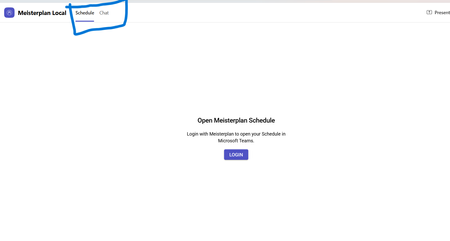
manifest file: "staticTabs": [ { "entityId": "schedule", "name": "Schedule", "contentUrl": "...", "websiteUrl": "...", "scopes": ["personal"] }, { "entityId": "conversations", "scopes": ["personal"] } ] the Schedule tab is intentionally place before conversations: it initially appears correctly, but after navigating away from the app and returning, Teams places Chat/Conversations before Shcedule. I'm using schema version 1.12. The tabs are configured in the specified order in the manifest file, and the expected tab order is displayed correctly when the app is initially opened. However, when I navigate to the Chat section, the tab order changes and does not persist as defined in the manifest file.80Views0likes0CommentsAzure HorizonDB: Enterprise-Ready Postgres, Engineered for the AI Era
Affan Dar, Vice President of Engineering, PostgreSQL at Microsoft Charles Feddersen, Partner Director of Program Management, PostgreSQL at Microsoft Today at Microsoft Build, we’re pleased to announce the public preview of Azure HorizonDB, a new enterprise-ready Postgres-compatible database service designed to meet the needs of modern AI applications, alongside a set of enhancements to our PostgreSQL tooling in Visual Studio Code to further streamline the developer experience. Postgres is rapidly solidifying its role as a foundational layer in modern data architectures, with accelerating adoption across industries. For developers, it has become the preferred platform for new application development, driven by its extensible architecture, mature extension ecosystem, and adherence to open standards and APIs. At the same time, enterprises are choosing Postgres to re-platform and modernize existing systems, taking advantage of its ability to support a broad range of operational workloads while enabling advanced capabilities such as vector-based data access all within a single, interoperable platform. A Postgres Platform Grounded in Security, Resilience, Scale, and Performance Azure HorizonDB is purpose-built to meet these demands, combining the flexibility developers expect from Postgres with the operational rigor enterprises require. It extends the core Postgres engine with cloud-native capabilities such as integrated identity, fine-grained network and security controls, and seamless lifecycle management, while preserving full compatibility with the open ecosystem of extensions and tools. At the same time, HorizonDB introduces advanced, natively integrated capabilities like vector data support and AI model management, enabling new classes of intelligent applications without sacrificing transactional integrity or developer productivity. These capabilities are backed by a platform designed for enterprise performance and scale. HorizonDB supports databases up to 128 TB, scales out with up to 15 read replicas for high-throughput workloads, and delivers sub-millisecond commit latency across availability zones for low-latency transactions and high availability. This combination is critical for modern applications that require consistent performance under load, including high-concurrency transactional systems, real-time AI-driven interactions, and globally distributed services. The result is a unified platform that scales from the first line of code to globally distributed, mission-critical systems. Enterprise adoption ultimately depends on trust in the platform itself. Azure HorizonDB delivers this with native integration into Microsoft Entra ID for centralized identity and access control, private endpoints for network isolation, and built-in encryption to protect data at rest and in transit. These capabilities are essential for meeting compliance requirements and enabling organizations to run mission-critical workloads with confidence, without added complexity. This foundation is critical for any application, but it becomes indispensable for AI, where secure access to data and controlled model interaction underpin every intelligent experience. Building on this, HorizonDB introduces a set of integrated AI capabilities designed to bring intelligence directly into the database. Run Fast, Memory-Efficient Vector Search with DiskANN HorizonDB brings high-performance vector search directly into Postgres through DiskANN with spherical quantization. This enables efficient, low-latency similarity search at scale while significantly reducing memory and storage overhead. Spherical quantization works by normalizing vectors and encoding them into compact representations that preserve angular distance, allowing the system to compare vectors efficiently with minimal loss in accuracy. The result is the ability to index and query large embedding datasets within the transactional engine itself, making vector search a first-class capability rather than an external dependency. "HorizonDB is compelling because it brings a PostgreSQL-compatible foundation, AI-native capabilities and enterprise-grade controls closer to the operational data layer." Jennings Balavari, Founder, Opsen AI Build Smarter Apps with Hybrid Search in Postgres HorizonDB supports hybrid search by combining vector similarity through pgvector with full-text search enabled via the pg_textsearch extension, allowing applications to match both semantic meaning and precise keyword relevance in a single query. This enables more accurate, context-aware results, such as blending intent-driven retrieval with exact term matching for search, recommendations, or RAG scenarios. By unifying these capabilities within Postgres, HorizonDB improves result quality while simplifying application design without the need for external search systems. Operationalize AI with Built-In AI Model Management Working with vectors requires models to generate, interpret, and evolve embeddings, making model lifecycle a core part of the application stack. HorizonDB introduces integrated AI model management to simplify how models are registered, versioned, and governed alongside data, including built-in support for generative GPT models and ranking models. For example, GPT models can be used to generate summaries, responses, or structured outputs directly from application data, while ranking models enable relevance scoring for search results or recommendations over vector results. By managing these models alongside the data they operate on, HorizonDB ensures consistency, traceability, and control, creating a unified environment where models and data evolve together. “As we build a multi-tenant, AI-driven commerce platform, HorizonDB has been particularly compelling in two areas: scale and how close AI capabilities are to the data itself. Running vector search, filtering, and model-driven workflows directly inside the database removes a lot of the complexity we’d normally manage across separate services." James Frawley, CIAO, ReFiBuy Bring AI into SQL with AI Functions With models managed in place, AI Functions provide a direct way to invoke them from within SQL and application logic. These functions are implemented through the azure_ai extension, which brings model invocation directly into the Postgres engine. This allows developers to embed inference into queries and transactions, eliminating the need for external orchestration. By bringing model execution closer to the data, AI Functions reduce latency, simplify application design, and make intelligent behavior a natural extension of existing Postgres workloads. "What stood out with HorizonDB is that it aligns closely with how we already think about the problem. Instead of stitching together multiple components, it brings transactional data, vector search, and AI capabilities into a single platform, which simplifies the architecture without forcing a complete rethink." Mohsin Shafqat, Director Software Engineering for Nasdaq Boardvantage®, Nasdaq Run Reliable, Event-Driven Workflows with AI Pipelines Finally, AI Pipelines operationalize these capabilities through reliable, event-driven workflows for model execution and data processing. Pipelines execute on data changes, enabling real-time asynchronous reactions without external orchestration and ensuring consistent, repeatable behavior as data evolves. Combined with model management and AI Functions, they turn embedded intelligence into something that can be run, scaled, and trusted in production, while inheriting the database’s high availability and failover characteristics for resilience. Pipelines can also be visualized and observed in real time through the Visual Studio Code extension for PostgreSQL, giving developers and operators immediate visibility into execution flow, state, and outcomes Modern Unified Experience for Data, AI, and Operations in VS Code As intelligence becomes a core part of the data platform, the developer and operator experience becomes equally critical. HorizonDB extends seamlessly into Visual Studio Code with enhanced PostgreSQL tooling that works across any Postgres deployment, not just HorizonDB. Features like AI-assisted query plans and integrated monitoring enable faster debugging and optimization, helping teams understand both database performance and AI-driven behaviors. At the same time, for Azure-based deployments, the experience is deeply integrated with platform capabilities, enabling management of networking configuration, server parameters, and server logs directly from the development environment, streamlining operations across application and infrastructure layers. Azure HorizonDB brings together enterprise-grade security, deep Postgres compatibility, and a modern AI-native data platform, all engineered for developers. It scales efficiently across workloads, from transactional systems to intelligent applications, while delivering a world-class, Azure-integrated experience in Visual Studio Code for both developers and operators. Ready to get started with Azure HorizonDB? Azure HorizonDB is now available in public preview in Australia East, Central US, Sweden Central, West US 2, and West US 3 regions. Additionally, East US, Canada Central, Indonesia Central, Italy North, Japan East, Korea Central, and Poland Central will be available in the coming weeks. You can get started today by creating a new HorizonDB instance using the Azure portal, API’s, or the Visual Studio Code extension for PostgreSQL to begin exploring these capabilities firsthand. To learn more, dive deeper into our documentation and sign-up today to try AI model management in a limited preview.GitHub Copilot Dev Days Online
After a series of in-person events, GitHub Copilot Dev Days is now going online, bringing developers from around the world together to explore modern AI-assisted software development in practice. Through live sessions focused on agentic development, modern workflows, and hands-on learning in VS Code, attendees will learn how to use GitHub Copilot beyond autocomplete and apply it across real development scenarios. Register for the session that fits your language and community GitHub Copilot Dev Days LATAM [Spanish] - May 26 A hands-on session for Spanish-speaking developers across Latin America focused on building modern applications with GitHub Copilot, TypeScript, React, and Tailwind. Attendees will explore agentic workflows, context engineering, and practical ways to use GitHub Copilot as an active development partner in VS Code. Date: May 26, 2026, 12 PM (Mexico City / CDMX) Register: GitHub Copilot Dev Days LATAM | Microsoft Reactor GitHub Copilot Dev Days Brazil [Portuguese] - May 25 This edition focuses on AI-assisted development with Python, FastAPI, and HTMX using GitHub Copilot throughout the development workflow. The session covers practical workflows for code generation, refactoring, debugging, and day-to-day development with GitHub Copilot in VS Code. Date: May 25, 2026, 7 PM (Brasilia Time) Register: GitHub Copilot Dev Days Brasil | Microsoft Reactor GitHub Copilot Dev Days 中文版 [Simplified Chinese] - May 26 This session explores how GitHub Copilot and GitHub Actions can work together to create intelligent and automated development workflows. Topics include ChatOps, automated summaries, syncing content into GitHub Issues, and agentic workflows designed to improve collaboration and engineering efficiency. Date: May 26, 2026, 7:30 PM (China Standard Time - CST) Register: GitHub Copilot Dev Days - 中文版 | Microsoft Reactor GitHub Copilot Dev Days [English] - May 27 An English-language workshop for developers who want to learn how to build modern applications with GitHub Copilot in VS Code. The session focuses on TypeScript, React, Tailwind, and Agent Mode workflows, showing how better context and prompting can improve AI-assisted development. Date: May 27, 2026, 9 AM (PST) Register: GitHub Copilot Dev Days | Microsoft Reactor All sessions are hosted through Microsoft Reactor. Check the registration pages for local times and additional event details.4.6KViews0likes0CommentsAnnouncing Azure HorizonDB
Affan Dar, Vice President of Engineering, PostgreSQL at Microsoft Charles Feddersen, Partner Director of Program Management, PostgreSQL at Microsoft Today at Microsoft Ignite, we’re excited to unveil the preview of Azure HorizonDB, a fully managed Postgres-compatible database service designed to meet the needs of modern enterprise workloads. The cloud native architecture of Azure HorizonDB delivers highly scalable shared storage, elastic scale-out compute, and a tiered cache optimized for running cloud applications of any scale. Postgres is transforming industries worldwide and is emerging as the foundation of modern data solutions across all sectors at an unprecedented pace. For developers, it is the database of choice for building new applications with its rich set of extensions, open-source API, and expansive ecosystems of tools and libraries. At the same time, but at the opposite end of the workload spectrum, enterprises around the world are also increasingly turning to Postgres to modernize their existing applications. Azure HorizonDB is designed to support applications across the entire workload spectrum from the first line of code in a new app to the migration of large-scale, mission-critical solutions. Developers benefit from the robust Postgres ecosystem and seamless integration with Azure’s advanced AI capabilities, while enterprises can gain a secure, highly available, and performant cloud database to host their business applications. Whether you’re building from scratch or transforming legacy infrastructure, Azure HorizonDB empowers you to innovate and scale with confidence, today and into the future. Azure HorizonDB introduces new levels of performance and scalability to PostgreSQL. The scale-out compute architecture supports up to 3,072 vCores across primary and replica nodes, and the auto-scaling shared storage supports up to 128TB databases while providing sub-millisecond multi-zone commit latencies. This storage innovation enables Azure HorizonDB to deliver up to 3x more throughput when compared with open-source Postgres for transactional workloads. Azure HorizonDB is enterprise ready on day one. With native support for Entra ID, Private Endpoints, and data encryption, it provides compliance and security for sensitive data stored in the cloud. All data is replicated across availability zones by default and maintenance operations are transparent with near-zero downtime. Backups are fully automated, and integration with Azure Defender for Cloud provides additional protection for highly sensitive data. All up, Azure HorizonDB offers enterprise-grade security, compliance, and reliability, making it ready for business use today. Since the launch of ChatGPT, there has been an explosion of new AI apps being built, and Postgres has become the database of choice due in large part to its vector index support. Azure HorizonDB extends the AI capabilities of Postgres further with two key features. We are introducing advanced filtering capabilities to the DiskANN vector index which enable query predicate pushdowns directly into the vector similarity search. This provides significant performance and scalability improvements over pgvector HNSW while maintaining accuracy and is ideal for similarity search over transactional data in Postgres. The second feature is built-in AI model management that seamlessly integrates generative, embedding, and reranking models from Microsoft Foundry for developers to use in the database with zero configuration. In addition to enhanced vector indexing and simplified model management to build powerful new AI apps, we’re also pleased to announce the general availability of Microsoft’s PostgreSQL Extension for VS Code that provides the tooling for Postgres developers to maximize their productivity. Using this extension, GitHub Copilot is context aware of the Postgres database which means less prompting and higher quality answers, and in the Ignite release, we’ve added live monitoring with one-click GitHub Copilot debugging where Agent mode can launch directly from the performance monitoring dashboard to diagnose Postgres performance issues and guide users to a fix. Alpha Life Sciences are an existing Azure customers “I’m truly excited about how Azure HorizonDB empowers our AI development. Its seamless support for Vector DB, RAG, and Agentic AI allows us to build intelligent features directly on a reliable Postgres foundation. With Azure HorizonDB, I can focus on advancing AI capabilities instead of managing infrastructure complexities. It’s a smart, forward-looking solution that perfectly aligns with how we design and deliver AI-powered applications.” Pengcheng Xu, CTO Alpha Life Sciences For enterprises that are modernizing their applications to Postgres in the cloud, the security and availability of Azure HorizonDB make it an ideal platform. However, these migrations are often complex and time consuming for large legacy codebase conversions. To simplify this and reduce the risk, we’re pleased to announce the preview of GitHub Copilot powered Oracle migration built into the PostgreSQL Extension for VS Code. Built into VS Code, teams of engineers can work with GitHub Copilot to automate the end-to-end conversion of complex database code using rich code editing, version control, text authoring, and deployment in an integrated development environment. Azure HorizonDB is the next generation of fully managed, cloud native PostgreSQL database service. Built on the latest Azure infrastructure with state-of-the-art cloud architecture, Azure HorizonDB is ready to for the most demanding application workloads. In addition to our portfolio of managed Postgres services in Azure, Microsoft is deeply invested into the open source Postgres project and is one of the top corporate upstream contributors and sponsors for the PostgreSQL project, with 19 Postgres project contributors employed by Microsoft. As a hyperscale Postgres vendor, it’s critical to actively participate in the open-source project. It enables us to better support our customers down to the metal in Azure, and to contribute our learnings from running Postgres at scale back to the community. We’re committed to continuing our investment to push the Postgres project forward, and the team is already active in making contributions to Postgres 19 to be released in 2026. Ready to explore Azure HorizonDB? Azure HorizonDB is initially available in Central US, West US3, UK South and Australia East regions. Customers are invited to apply for early preview access to Azure HorizonDB and get hands-on experience with this new service. Participation is limited, apply now at aka.ms/PreviewHorizonDBEdge AI for Beginners : Getting Started with Foundry Local
In Module 08 of the EdgeAI for Beginners course, Microsoft introduces Foundry Local a toolkit that helps you deploy and test Small Language Models (SLMs) completely offline. In this blog, I’ll share how I installed Foundry Local, ran the Phi-3.5-mini model on my windows laptop, and what I learned through the process. What Is Foundry Local? Foundry Local allows developers to run AI models locally on their own hardware. It supports text generation, summarization, and code completion — all without sending data to the cloud. Unlike cloud-based systems, everything happens on your computer, so your data never leaves your device. Prerequisites Before starting, make sure you have: Windows 10 or 11 Python 3.10 or newer Git Internet connection (for the first-time model download) Foundry Local installed Step 1 — Verify Installation After installing Foundry Local, open Command Prompt and type: foundry --version If you see a version number, Foundry Local is installed correctly. Step 2 — Start the Service Start the Foundry Local service using: foundry service start You should see a confirmation message that the service is running. Step 3 — List Available Models To view the models supported by your system, run: foundry model list You’ll get a list of locally available SLMs. Here’s what I saw on my machine: Note: Model availability depends on your device’s hardware. For most laptops, phi-3.5-mini works smoothly on CPU. Step 4 — Run the Phi-3.5 Model Now let’s start chatting with the model: foundry model run phi-3.5-mini-instruct-generic-cpu:1 Once it loads, you’ll enter an interactive chat mode. Try a simple prompt: Hello! What can you do? The model replies instantly — right from your laptop, no cloud needed. To exit, type: /exit How It Works Foundry Local loads the model weights from your device and performs inference locally.This means text generation happens using your CPU (or GPU, if available). The result: complete privacy, no internet dependency, and instant responses. Benefits for Students For students beginning their journey in AI, Foundry Local offers several key advantages: No need for high-end GPUs or expensive cloud subscriptions. Easy setup for experimenting with multiple models. Perfect for class assignments, AI workshops, and offline learning sessions. Promotes a deeper understanding of model behavior by allowing step-by-step local interaction. These factors make Foundry Local a practical choice for learning environments, especially in universities and research institutions where accessibility and affordability are important. Why Use Foundry Local Running models locally offers several practical benefits compared to using AI Foundry in the cloud. With Foundry Local, you do not need an internet connection, and all computations happen on your personal machine. This makes it faster for small models and more private since your data never leaves your device. In contrast, AI Foundry runs entirely on the cloud, requiring internet access and charging based on usage. For students and developers, Foundry Local is ideal for quick experiments, offline testing, and understanding how models behave in real-time. On the other hand, AI Foundry is better suited for large-scale or production-level scenarios where models need to be deployed at scale. In summary, Foundry Local provides a flexible and affordable environment for hands-on learning, especially when working with smaller models such as Phi-3, Qwen2.5, or TinyLlama. It allows you to experiment freely, learn efficiently, and better understand the fundamentals of Edge AI development. Optional: Restart Later Next time you open your laptop, you don’t have to reinstall anything. Just run these two commands again: foundry service start foundry model run phi-3.5-mini-instruct-generic-cpu:1 What I Learned Following the EdgeAI for Beginners Study Guide helped me understand: How edge AI applications work How small models like Phi 3.5 can run on a local machine How to test prompts and build chat apps with zero cloud usage Conclusion Running the Phi-3.5-mini model locally with Foundry Localgave me hands-on insight into edge AI. It’s an easy, private, and cost-free way to explore generative AI development. If you’re new to Edge AI, start with the EdgeAI for Beginners course and follow its Study Guide to get comfortable with local inference and small language models. Resources: EdgeAI for Beginners GitHub Repo Foundry Local Official Site Phi Model Link1.2KViews1like0CommentsModel Mondays S2E10: Automating Document Processing with AI
1. Weekly Highlights We kicked off with the top news and updates in the Azure AI ecosystem: Agent Factory Blog Series: A new 6-part blog series on designing reliable, agentic AI—exploring multi-step, collaborative agents that reflect, plan, and adapt using tool integrations and design patterns. Text PII Preview in Azure AI Language: Now redacts PII (like date of birth, license plates) in major European languages, with better accuracy for UK bank entities. Claude Opus 4.1 in Copilot Pro & Enterprise: Public preview brings smarter summaries, tool assistant thinking, and "Ask Mode" in VS Code.Now leverages stronger computer vision algorithms for table parsing—achieving 94-97% accuracy across Latin, Chinese, Japanese, and Korean—with sub-10ms latency. Mistral Document AI in Azure Foundry: Instantly turn PDFs, contracts, and scanned docs into structured JSON with tables, headings, and LaTeX support. Serverless, multilingual, secure, and perfect for regulated industries. 2. Spotlight On: Document Intelligence with Azure & Mistral This week’s spotlight was a hands-on exploration of document processing, featuring both Microsoft and Mistral AI experts. Why Document Processing? Unstructured data—receipts, forms, handwritten notes—are everywhere. Modern document AI can extract, structure, and even annotate this data, fueling everything from search to RAG pipelines. Azure Document Intelligence: State-of-the-art OCR and table extraction with super-high accuracy and speed. Handles multi-language, complex layouts, and returns structured outputs ready for programmatic use. Mistral Document AI: Transforms PDFs and scanned docs into JSON, retaining complex formatting, tables, images, and even LaTeX. Supports custom schema extraction, image/document annotations, and returns everything in one API call. Integrates seamlessly with Azure AI Foundry and developer workflows. Demo Highlights: Extracting Receipts: OCR accurately pulls out store, date, and transaction details from photos. Handwriting Recognition: Even historical documents (like Thomas Jefferson’s letters) are parsed with surprising accuracy. Tables & Structured Data: Financial statements and reports converted into structured markdown and JSON—ready for downstream apps. Advanced Annotations: Define your own schema (via JSON Schema or Pydantic), extract custom fields, classify images, summarize documents, and even translate summaries—all in a single call. 3. Customer Story: Oracle Health Oracle Health shared how agentic AI and fine-tuned models are revolutionizing clinical workflows: Problem: Clinicians spend hours on documentation, searching records, and manual data entry—reducing time for patient care. Solution: Oracle’s clinical AI agents automate chart reviews, data extraction, and even conversational Q&A—while keeping humans in the loop for safety. Technical Highlights: Multi-agent architecture understands provider specialty and context. Orchestrator model "routes" requests to the right agent or plugin, extracting needed arguments from context. Fine-tuning was key: For low latency, Oracle used lightweight models (like GPT-4 Mini) and fine-tuned on their data—achieving sub-800ms responses, with accuracy matching larger models. Fine-tuning also allowed for nuanced tool selection, argument extraction, and rule-based orchestration—better than prompt engineering alone. Used LoRA for efficient, targeted fine-tuning without erasing base model knowledge. Live Demo: Agent summarizes patient history, retrieves lab results, filters for abnormals, and answers follow-up questions—all conversationally. Fine-tuned orchestrator chooses the right tool and context for each doctor’s workflow. Result: 1-2 hours saved per day, more time for patients, and happier doctors! 4. Key Takeaways Here are the key learnings from this episode: Document AI is Production-Ready: Azure Document Intelligence and Mistral Document AI offer fast, accurate, and customizable document parsing for real enterprise needs. Schema-Driven Extraction & Annotation: Define your own schemas and extract exactly what you want—no more one-size-fits-all. Fine-Tuning Unlocks Performance: For low latency and high accuracy, fine-tuning lightweight models beats prompt engineering in complex, rule-based agent workflows. Agentic Workflows in Action: Multi-agent systems can automate complex tasks, route requests, and keep humans in control, especially in regulated domains like healthcare. Community & Support: Join the Discord and Forum to ask questions, share use cases, and connect with the team. Sharda's Tips: How I Wrote This Blog Writing this recap is all about sharing what I learned and making it practical for the community! I start by organizing the key highlights, then walk through customer stories and demos, using simple language and real-world examples. Copilot helps me structure and clarify my notes, especially when summarizing technical sections. Here’s the prompt I used for Copilot this week: "Generate a technical blog post for Model Mondays S2E10 based on the transcript and episode details. Focus on document processing with Azure AI and Mistral, include customer demos, and highlight practical workflows and fine-tuning. Make it clear and approachable for developers and students." Every episode inspires me to try these tools myself, and I hope this blog makes it easy for you to start, too. If you have questions or want to share your own experience, I’d love to hear from you! Coming Up Next Week Next week: Text & Speech AI Playgrounds! Learn how to build and test language and speech models, with live demos and expert guests. | Register For The Livestream – Aug 25, 2025 | Register For The AMA – Aug 29, 2025 | Ask Questions & View Recaps – Discussion Forum About Model Mondays Model Mondays is a weekly series to build your Azure AI IQ with: 5-Minute Highlights: News & updates on Mondays 15-Minute Spotlight: Deep dives into new features, models, and protocols 30-Minute AMA Fridays: Live Q&A with product teams and experts Get started: Register For Livestreams Watch Past Replays Register For AMA Recap Past AMAs Join The Community Don’t build alone! Join the Azure AI Developer Community for real-time chats, events, support, and more: Join the Discord Explore the Forum About Me I'm Sharda, a Gold Microsoft Learn Student Ambassador focused on cloud and AI. Find me on GitHub, Dev.to, Tech Community, and LinkedIn. In this blog series, I share takeaways from each week’s Model Mondays livestream.444Views0likes0CommentsModel Mondays S2E9: Models for AI Agents
1. Weekly Highlights This episode kicked off with the top news and updates in the Azure AI ecosystem: GPT-5 and GPT-OSS Models Now in Azure AI Foundry: Azure AI Foundry now supports OpenAI’s GPT-5 lineup (including GPT-5, GPT-5 Mini, and GPT-5 Nano) and the new open-weight GPT-OSS models (120B, 20B). These models offer powerful reasoning, real-time agent tasks, and ultra-low latency Q&A, all with massive context windows and flexible deployment via the Model Router. Flux 1 Context Pro & Flux 1.1 Pro from Black Forest Labs: These new vision models enable in-context image generation, editing, and style transfer, now available in the Image Playground in Azure AI Foundry. Browser Automation Tool (Preview): Agents can now perform real web tasks—search, navigation, form filling, and more—via natural language, accessible through API and SDK. GitHub Copilot Agent Mode + Playwright MCP Server: Debug UIs with AI: Copilot’s agent mode now pairs with Playwright MCP Server to analyze, identify, and fix UI bugs automatically. Discord Community: Join the conversation, share your feedback, and connect with the product team and other developers. 2. Spotlight On: Azure AI Agent Service & Agent Catalog This week’s spotlight was on building and orchestrating multi-agent workflows using the Azure AI Agent Service and the new Agent Catalog. What is the Azure AI Agent Service? A managed platform for building, deploying, and scaling agentic AI solutions. It supports modular, multi-agent workflows, secure authentication, and seamless integration with Azure Logic Apps, OpenAPI tools, and more. Agent Catalog: A collection of open-source, ready-to-use agent templates and workflow samples. These include orchestrator agents, connected agents, and specialized agents for tasks like customer support, research, and more. Demo Highlights: Connected Agents: Orchestrate workflows by delegating tasks to specialized sub-agents (e.g., mortgage application, market insights). Multi-Agent Workflows: Design complex, hierarchical agent graphs with triggers, events, and handoffs (e.g., customer support with escalation to human agents). Workflow Designer: Visualize and edit agent flows, transitions, and variables in a modular, no-code interface. Integration with Azure Logic Apps: Trigger workflows from 1400+ external services and apps. 3. Customer Story: Atomic Work Atomic Work showcased how agentic AI can revolutionize enterprise service management, making employees more productive and ops teams more efficient. Problem: Traditional IT service management is slow, manual, and frustrating for both employees and ops teams. Solution: Atomic Work’s “Atom” is a universal, multimodal agent that works across channels (Teams, browser, etc.), answers L1/L2 questions, automates requests, and proactively assists users. Technical Highlights: Multimodal & Cross-Channel: Atom can guide users through web interfaces, answer questions, and automate tasks without switching tools. Data Ingestion & Context: Regularly ingests up-to-date documentation and context, ensuring accurate, current answers. Security & Integration: Built on Azure for enterprise-grade security and seamless integration with existing systems. Demo: Resetting passwords, troubleshooting VPN, requesting GitHub repo access—all handled by Atom, with proactive suggestions and context-aware actions. Atom can even walk users through complex UI tasks (like generating GitHub tokens) by “seeing” the user’s screen and providing step-by-step guidance. 4. Key Takeaways Here are the key learnings from this episode: Agentic AI is Production-Ready: Azure AI Agent Service and the Agent Catalog make it easy to build, deploy, and scale multi-agent workflows for real-world business needs. Modular, No-Code Workflow Design: The workflow designer lets you visually create and edit agent graphs, triggers, and handoffs—no code required. Open-Source & Extensible: The Agent Catalog provides open-source templates and welcomes community contributions. Real-World Impact: Solutions like Atomic Work show how agentic AI can transform IT, HR, and customer support, making organizations more efficient and employees more empowered. Community & Support: Join the Discord and Forum to connect, ask questions, and share your own agentic AI projects. Sharda's Tips: How I Wrote This Blog Writing this blog is like sharing my own learning journey with friends. I start by thinking about why the topic matters and how it can help someone new to Azure or agentic AI. I use simple language, real examples from the episode, and organize my thoughts with GitHub Copilot to make sure I cover all the important points. Here’s the prompt I gave Copilot to help me draft this blog: Generate a technical blog post for Model Mondays S2E9 based on the transcript and episode details. Focus on Azure AI Agent Service, Agent Catalog, and real-world demos. Explain the concepts for students, add a section on practical applications, and share tips for writing technical blogs. Make it clear, engaging, and useful for developers and students. After watching the video, I felt inspired to try out these tools myself. The way the speakers explained and demonstrated everything made me believe that anyone can get started, no matter their background. My goal with this blog is to help you feel the same way—curious, confident, and ready to explore what AI and Azure can do for you. If you have questions or want to share your own experience, I’d love to hear from you. Coming Up Next Week Next week: Document Processing with AI! Join us as we explore how to automate document workflows using Azure AI Foundry, with live demos and expert guests. 1️⃣ | Register For The Livestream – Aug 18, 2025 2️⃣ | Register For The AMA – Aug 22, 2025 3️⃣ | Ask Questions & View Recaps – Discussion Forum About Model Mondays Model Mondays is a weekly series designed to help you build your Azure AI Foundry Model IQ with three elements: 5-Minute Highlights – Quick news and updates about Azure AI models and tools on Monday 15-Minute Spotlight – Deep dive into a key model, protocol, or feature on Monday 30-Minute AMA on Friday – Live Q&A with subject matter experts from Monday livestream Want to get started? Register For Livestreams – every Monday at 1:30pm ET Watch Past Replays to revisit other spotlight topics Register For AMA – to join the next AMA on the schedule Recap Past AMAs – check the AMA schedule for episode specific links Join The Community Great devs don't build alone! In a fast-paced developer ecosystem, there's no time to hunt for help. That's why we have the Azure AI Developer Community. Join us today and let's journey together! Join the Discord – for real-time chats, events & learning Explore the Forum – for AMA recaps, Q&A, and Discussion! About Me I'm Sharda, a Gold Microsoft Learn Student Ambassador interested in cloud and AI. Find me on GitHub, Dev.to, Tech Community, and LinkedIn. In this blog series, I summarize my takeaways from each week's Model Mondays livestream.465Views0likes0CommentsModel Mondays S2:E4 Understanding AI Developer Experiences with Leo Yao
This week in Model Mondays, we put the spotlight on the AI Toolkit for Visual Studio Code - and explore the tools and workflows that make building generative AI apps and agents easier for developers. Read on for my recap. This post was generated with AI help and human revision & review. To learn more about our motivation and workflows, please refer to this document in our website. About Model Mondays Model Mondays is a weekly series designed to help you grow your Azure AI Foundry Model IQ step by step. Each week includes: 5-Minute Highlights – Quick news and updates about Azure AI models and tools on Monday 15-Minute Spotlight – Deep dive into a key model, protocol, or feature on Monday 30-Minute AMA on Friday – Live Q&A with subject matter experts from the Monday livestream If you're looking to grow your skills with the latest in AI model development, this series is a great place to begin. Useful links: Register for upcoming livestreams Watch past episodes Join the AMA on AI Developer Experiences Visit the Model Mondays forum Spotlight On: AI Developer Experiences 1. What is this topic and why is it important? AI Developer Experiences focus on making the process of building, testing, and deploying AI models as efficient as possible. With the right tools—such as the AI Toolkit and Azure AI Foundry extensions for Visual Studio Code—developers can eliminate unnecessary friction and focus on innovation. This is essential for accelerating the real-world impact of generative AI. 2. What is one key takeaway from the episode? The integration of Azure AI Foundry with Visual Studio Code allows developers to manage models, run experiments, and deploy applications directly from their preferred development environment. This unified workflow enhances productivity and simplifies the AI development lifecycle. 3. How can I get started? Here are a few resources to explore: Install the AI Toolkit for VS Code Explore Azure AI Foundry Documentation Join the Microsoft Tech Community to follow and contribute to discussions 4. What’s New in Azure AI Foundry? Azure AI Foundry continues to evolve to meet developer needs with more power, flexibility, and productivity. Here are some of the latest updates highlighted in this week’s episode: AI Toolkit for Visual Studio Code Now with deeper integration, allowing developers to manage models, run experiments, and deploy applications directly within their editor—streamlining the entire workflow. Prompt Shields Enhanced security capabilities designed to protect generative AI applications from prompt injection and unsafe content, improving reliability in production environments. Model Router A new intelligent routing system that dynamically directs model requests to the most suitable model available—enhancing performance and efficiency at scale. Expanded Model Catalog The catalog now includes more open-source and proprietary models, featuring the latest from Hugging Face, OpenAI, and other leading providers. Improved Documentation and Sample Projects Newly added guides and ready-to-use examples to help developers get started faster, understand workflows, and build confidently. My A-Ha Moment Before watching this episode, setting up an AI development environment always felt like a challenge. There were so many moving parts—configurations, integrations, and dependencies—that it was hard to know where to begin. Seeing the AI Toolkit in action inside Visual Studio Code changed everything for me. It was a realization moment: “That’s it? I can explore models, test prompts, and deploy apps—without ever leaving my editor?” This episode made it clear that building with AI doesn’t have to be complex or intimidating. With the right tools, experimentation becomes faster and far more enjoyable. Now, I’m genuinely excited to build, test, and explore new generative AI solutions because the process finally feels accessible. Coming Up Next Week In the next episode, we’ll be exploring Fine-Tuning and Distillation with Dave Voutila. This session will focus on how to adapt Azure OpenAI models to your unique use cases and apply best practices for efficient knowledge transfer. Register here to reserve your spot and be part of the conversation. Join the Community Building in AI is better when we do it together. That’s why the Azure AI Developer Community exists—to support your journey and provide resources every step of the way. Join the Discord for real-time discussions, events, and peer learning Explore the Forum to catch up on AMAs, ask questions, and connect with other developers About Me I'm Sharda, a Gold Microsoft Learn Student Ambassador passionate about cloud technologies and artificial intelligence. I enjoy learning, building, and helping others grow in tech. Connect with me: LinkedIn GitHub Dev.to Microsoft Tech Community438Views0likes0CommentsModel Mondays S2:E2 - Understanding Model Context Protocol (MCP)
This week in Model Mondays, we focus on the Model Context Protocol (MCP) — and learn how to securely connect AI models to real-world tools and services using MCP, Azure AI Foundry, and industry-standard authorization. Read on for my recap About Model Mondays Model Mondays is a weekly series designed to help you build your Azure AI Foundry Model IQ step by step. Here’s how it works: 5-Minute Highlights – Quick news and updates about Azure AI models and tools on Monday 15-Minute Spotlight – Deep dive into a key model, protocol, or feature on Monday 30-Minute AMA on Friday – Live Q&A with subject matter experts from Monday livestream If you want to grow your skills with the latest in AI model development, Model Mondays is the place to start. Want to follow along? Register Here - to watch upcoming Mondel Monday livestreams Watch Playlists to replay past Model Monday episodes Register Here - to join the AMA on MCP on Friday Jun 27 Visit The Forum- to view Foundry Friday AMAs and recaps Spotlight On: Model Context Protocol (MCP) This week, the Model Monday’s spotlight was on the Model Context Protocol (MCP) with subject matter expert Den Delimarsky. Don't forget to check out the slides from the presentation, for resource links! In this blog post, I’ll talk about my five key takeaways from this episode: What Is MCP and Why Does It Matter? What Is MCP Authorization and Why Is It Important? How Can I Get Started with MCP? Spotlight: My Aha Moment Highlights: What’s New in Azure AI 1 . What Is MCP and Why is it Important? MCP is a protocol that standardizes how AI applications connect the underlying AI models to required knowledge sources (data) and interaction APIs (functions) for more effective task execution. Because these models are pre-trained, they lack access to real-time or proprietary data sources (for knowledge) and real-world environments (for interaction). MCP allows them to "discover and use" relevant knowledge and action tools to add relevant context to the model for task execution. Explore: The MCP Specification Learn: MCP For Beginners Want to learn more about MCP - check out the AI Engineer World Fair 2025 "MCP and Keynotes" track. It kicks off with a keynote from Asha Sharma that gives you a broader vision for Azure AI Foundry. Then look for the talk from Harald Kirschner on MCP and VS Code. 2. What Is MCP Authorization and Why Does It Matter? MCP (Model Context Protocol) authorization is a system that helps developers manage who can access their apps, especially when they are hosted in the cloud. The goal is to simplify the process of securing these apps by using common tools like OAuth and identity providers (such as Google or GitHub), so developers don't have to be security experts. Key Takeaways: The new MCP proposal uses familiar identity providers to simplify the authorization process. It allows developers to secure their apps without requiring deep knowledge of security. The update ensures better security controls and prepares the system for future authentication methods. Related Reading: Aaron Parecki, Let's Fix OAuth in MCP Den Delimarsky, Improving The MCP Authorization Spec - One RFC At A Time MCP Specification, Authorization protocol draft On Monday, Den joined us live to talk about the work he did for the authorization protocol. Watch the session now to get a sense for what the MCP Authorization protocol does, how it works, and why it matters. Have questions? Submit them to the forum or Join the Foundry Friday AMA on Jun 27 at 1:30pm ET. 3. How Can I Get Started? If you want to start working with MCP, here’s how to do it easily: Learn the Fundamentals: Explore MCP For Beginners Use an MCP Server: Explore VSCode Agent Mode support . Use MCP with AI Agents: Explore the Azure MCP Server 4. What’s New in Azure AI Foundry? Managed Compute for Cohere Models: Faster, secure AI deployments with low latency. Prompt Shields: New Azure security system to protect against prompt injection and unsafe content. OpenAI o3 Pro Model: A fast, low-cost model similar to GPT-4 Turbo. Codex Mini Model: A smaller, quicker model perfect for developer command-line tasks. MCP Security Upgrades: Now easier to secure AI apps using familiar OAuth identity providers. 5. My Aha Moment Before this session, I used to think that connecting apps to AI was complicated and risky. I believed developers had to build their own security systems from scratch, which sounded tough. But this week, I learned that MCP makes it simple. We can now use trusted logins like Google or GitHub and securely connect AI models to real-world apps without extra hassle. How I Learned This ? To be honest, I also used Copilot to help me understand and summarize this topic in simple words. I wanted to make sure I really understood it well enough to explain it to my friends and peers. I believe in learning with the tools we have, and AI is one of them. By using Copilot and combining it with what I learned from the Model Monday’s session, I was able to write this blog in a way that is easy to understand Takeaway for Beginners: It’s okay to use AI to learn what matters is that you grow, verify, and share the knowledge in your own way. Coming Up Next Week: Next week, we dive into SLMs & Reasoning (Phi-4) with Mojan Javaheripi, PhD, Senior Researcher at Microsoft Research. This session will explore how Small Language Models (SLMs) can perform advanced reasoning tasks, and what makes models like Phi-4 reasoning efficient, scalable, and useful in practical AI applications. Register Here! Join The Community Great devs don't build alone! In a fast-pased developer ecosystem, there's no time to hunt for help. That's why we have the Azure AI Developer Community. Join us today and let's journey together! Join the Discord - for real-time chats, events & learning Explore the Forum - for AMA recaps, Q&A, and help! About Me: I'm Sharda, a Gold Microsoft Learn Student Ambassador interested in cloud and AI. Find me on Github, Dev.to, Tech Community and Linkedin. In this blog series I have summarized my takeaways from this week's Model Mondays livestream.1.2KViews1like2CommentsParticipe da 2ª edição do GitHub Copilot Global Bootcamp
O GitHub Copilot Global Bootcamp começou em fevereiro como uma jornada totalmente virtual de aprendizado — e foi um sucesso. Mais de 60 mil desenvolvedores participaram da primeira edição, em vários idiomas e regiões. Agora, estamos empolgados em lançar a segunda edição — maior e melhor — com workshops virtuais e presenciais, organizados por comunidades de tecnologia ao redor do mundo. Essa nova edição chega logo após os anúncios do Microsoft Build 2025, onde as equipes do GitHub e do Visual Studio Code revelaram novidades empolgantes: A extensão GitHub Copilot Chat será open source, reforçando a transparência e a colaboração. A IA está sendo profundamente integrada ao Visual Studio Code, que agora está evoluindo para um editor de IA de código aberto. Novas APIs e ferramentas estão tornando mais fácil do que nunca construir com IA e LLMs. Este bootcamp é a sua oportunidade de explorar essas novas ferramentas, entender como usar o GitHub Copilot de forma eficaz e fazer parte da crescente conversa global sobre IA no desenvolvimento de software. 👩💻 Quem pode participar? Seja você um(a) desenvolvedor(a) iniciante, estudante ou profissional experiente em tecnologia, este bootcamp foi feito para você. Você aprenderá casos de uso práticos do GitHub Copilot e como aumentar sua produtividade usando IA — em um formato acessível e prático. Participe da edição virtual Não importa onde você esteja, é possível participar online e aprender com a gente: Português (Brasil – UTC -3) 24 de junho, 19h: Boas práticas para dominar o GitHub Copilot Chat 25 de junho, 19h: Integrações práticas com MCP Servers no VS Code e GitHub Copilot Aprenda na sua cidade! Estamos em parceria com comunidades locais de desenvolvedores para levar workshops presenciais a diversas cidades ao redor do mundo. Sessões presenciais confirmadas no Brasil: Data Cidade Inscrições 17 de Junho Brasília, Brasil Registre-se agora! 17 de Junho Pato de Minas, Brasil Registre-se agora! 21 de Junho Mogi das Cruzes, Brasil Registre-se agora! 26 de Junho Recife, Brasil Registre-se agora! 27 de Junho Rio de Janeiro, Brasil Registre-se agora! O Microsoft Applied Skills é um programa de credenciamento criado para validar sua capacidade de realizar tarefas técnicas específicas do mundo real. Diferente das certificações tradicionais que costumam abranger cargos amplos, o Applied Skills foca em habilidades práticas e cenários reais, diretamente aplicáveis a desafios de negócios. E a melhor parte? É totalmente gratuito! Você demonstra suas habilidades por meio de avaliações interativas, baseadas em tarefas, em um ambiente simulado — sem perguntas de múltipla escolha, apenas trabalho real. Uma das adições mais recentes é o Applied Skill do GitHub Copilot, que comprova sua habilidade de aproveitar a IA para aumentar a produtividade no desenvolvimento de software e melhorar a qualidade do código: Acelere o desenvolvimento de aplicativos usando o GitHub Copilot.5.2KViews2likes8Comments