developer
1397 Topics
Static Tab and Chat Tab Order Is Not Persisting in Microsoft Teams
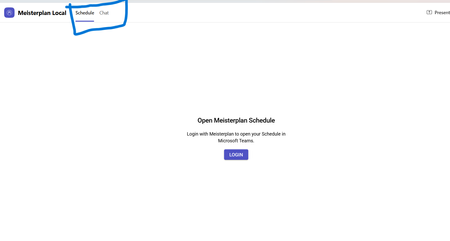
manifest file: "staticTabs": [ { "entityId": "schedule", "name": "Schedule", "contentUrl": "...", "websiteUrl": "...", "scopes": ["personal"] }, { "entityId": "conversations", "scopes": ["personal"] } ] the Schedule tab is intentionally place before conversations: it initially appears correctly, but after navigating away from the app and returning, Teams places Chat/Conversations before Shcedule. I'm using schema version 1.12. The tabs are configured in the specified order in the manifest file, and the expected tab order is displayed correctly when the app is initially opened. However, when I navigate to the Chat section, the tab order changes and does not persist as defined in the manifest file.115Views0likes0Comments
Setting app page is not getting localized in windows server OS 2025 with official language pack ISO
We created a VM on ESXi with Windows Server 2025 and installed the language packs offline using the official language pack ISO for Windows Server 2025. Most of the UI was localized successfully, but the Settings app was not localized. We tested this with the Japanese language pack and also tried installing it using both PowerShell and DISM. Is this a known issue? Has anyone else encountered the same behavior? If so, is there any known solution?140Views0likes0Comments
Teams iOS custom tab not appearing in Safari Web Inspector
Hi, I’m trying to debug an intermittent white screen in a custom Teams tab on iPhone, but I am unable to get "DevTools" to work as described here https://learn.microsoft.com/en-us/microsoftteams/platform/tabs/how-to/developer-tools My setup: Teams iOS 8.14.1 iOS 26.6.1 and iOS 27.0 Beta 6 macOS 26.6.2 Developer Preview enabled My user has been in Microsoft 365 Targeted Release for >24 hours Safari Web Inspector enabled on iPhone Safari pages on the same iPhone are inspectable from my Mac However, with the custom tab open in Teams, Safari → Develop → iPhone shows “No Inspectable Applications.” I’ve already signed out/in, force-quit Teams, cleared app data, re-enabled Developer Preview and tested on two different iPhones/Macs. Is Safari Web Inspector for Teams iOS tabs currently supported, and is there any additional setting required to make the Teams WebView inspectable?Solved353Views0likes2Comments
App Validation failing for no clear reason
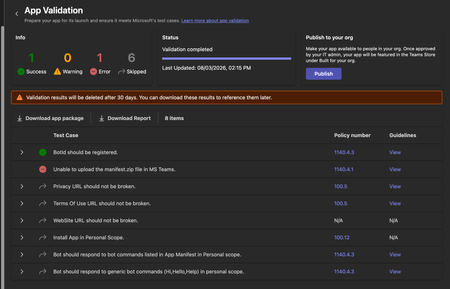
We're trying to get our (very simple) Teams App listed on the app store, but during the App Validation we keep getting the same error: "Unable to upload the manifest.zip file in MS Teams." as seen below: Downloading the report doesn't give any more information, it only lists the only successful validation step ("BotID should be registered") and the error doesn't appear there. I've validated the manifest.json file against the schema, tried reuploading the same manifest to a different org (creating a new app and bot) - validation fails there too. Does anyone have any pointers? Here is my (anonymized) manifest file: { "$schema": "https://developer.microsoft.com/en-us/json-schemas/teams/v1.19/MicrosoftTeams.schema.json", "manifestVersion": "1.19", "version": "1.1.1", "id": "[redacted]", "developer": { "name": "[redacted]", "websiteUrl": "https://www.[redacted].com", "privacyUrl": "[redacted]", "termsOfUseUrl": "[redacted]" }, "icons": { "color": "color.png", "outline": "outline.png" }, "name": { "short": "[redacted]", "full": "[redacted]" }, "description": { "short": "[redacted]", "full": "[redacted]" }, "accentColor": "#4A3AFF", "bots": [ { "botId": "[redacted]", "scopes": ["personal"], "supportsFiles": false, "isNotificationOnly": false, "commandLists": [ { "scopes": ["personal"], "commands": [ { "title": "help", "description": "Show what this bot does and how to connect your account" }, { "title": "connect", "description": "Get a fresh link to (re-)connect your account" } ] } ] } ], "staticTabs": [ { "entityId": "conversations", "scopes": ["personal"] }, { "entityId": "about", "scopes": ["personal"] } ], "permissions": ["identity", "messageTeamMembers"], "validDomains": ["app.[redacted].com", "auth.[redacted].com"] }372Views0likes2CommentsCS agent OK in M365 Copilot; Teams chat silent / no Studio session
We are troubleshooting a Copilot Studio agent that works correctly in Microsoft 365 Copilot and in the Copilot Studio test surface, but does not receive inbound activities from Microsoft Teams personal chat. Environment and evidence: - Agent: Copilot Studio agent (custom business assistant) - Copilot Studio agent ID: 88901b10-… (truncated) - Teams/Entra app ID: 7e4a53cc-… (truncated) - Manifest version: 1.0.8 - Channel configuration: Microsoft 365 Copilot + Microsoft Teams - Publish: Succeeded / Channel state: Synchronized - Agent Registry: Available - Authentication: Integrated / Tool credentials: Maker-provided - MCP/custom connector runtime: working (Studio tool test HTTP 200) - Microsoft 365 Copilot routing: working Failure specific to Teams: - Messages in Teams web and desktop appear delivered in the agent personal chat - Agent never replies - Studio monitor has M365 Copilot sessions, but no Teams session for those timestamps - Teams Admin Center Manage apps returns 0 results by name or exact app ID despite Agent Registry Available - Intentionally not republishing / reconnecting OAuth / rewiring connectors because M365 Copilot path proves the same agent+connection works Classification: FAIL — Teams inbound activity is not reaching the Copilot Studio agent. Questions focused on Teams delivery: 1. Why would Teams personal 1:1 messages never create a Studio conversation while M365 Copilot does? 2. Is a missing TAC Manage apps row expected under Unified App Management when Registry shows Available? 3. Known gaps: Agent Registry Available + channel Synchronized, but Teams client chat bound to a non-runtime endpoint? 4. Best diagnostic if Monitor shows 0 Teams sessions after a confirmed client send? Looking for production experience / documented workaround. Redacted evidence available; no tokens/secrets.406Views0likes2Comments
Migrating Teams Calling Bot (EchoBot) from VMSS to Windows Containers / ACI?
Hi everyone, I have built a Microsoft Teams Calling Bot using Application-Hosted Media based on the official C# EchoBot sample: https://github.com/microsoftgraph/microsoft-graph-comms-samples/tree/master/Samples/PublicSamples/EchoBot Currently, our signaling logic is fully serverless and runs efficiently on Azure Functions. However, the actual media processing (using the C# Calling SDK which relies on native Windows media binaries) is deployed on VMSS with Windows Server, just like the repository's default deployment guide suggests. Running these Windows VMs continuously is becoming extremely expensive, and we are looking for a cheaper, modern, or "on-demand" alternative to handle the media pipeline. Since raw audio processing strictly requires these native Windows-based Media binaries, I would like to ask the community: 1. Windows Containers (ACI / AKS): Has anyone successfully run this C# EchoBot/Media SDK inside Windows Containers (such as Azure Container Instances or AKS)? If so, how do you handle the public IP and port-binding requirements for the media sockets (since the platform needs direct public connectivity for UDP/TCP traffic)? 2. On-Demand Provisioning: Are there any known architectures or best practices for spinning up the media processor only when a call starts (e.g., triggering an ACI instance via the Azure Function signaling bot) and tearing it down afterwards to keep costs near zero when idle? 3. Alternative Approaches: If you have solved this high-infrastructure cost problem for a real-time raw audio bot in production, what architecture did you end up using? Any documentation, GitHub references, or architectural advice would be highly appreciated! Thanks!326Views0likes2CommentsRegarding Teams Meeting Media Transport Behavior in VDI Optimization Scenario
Hello Microsoft Teams Engineering Team, I am currently working on a Browser Content Redirection / media offload implementation for a VDI environment, where WebRTC media transport is handled through a local native component while the Teams application continues running inside the virtual desktop session. While testing, I observed that: 1:1 calls successfully receive audio and video media But in meetings auido / video RTP is never forwarded despite successful ICE, DTLS, and SRTP establishment DTLS ApplicationData traffic is present during meetings, suggesting DataChannel/SCTP activity Based on transport-level observations, it appears that Teams meetings may rely on SCTP/DataChannel communication for SFU video subscription management, while 1:1 calls do not require the same subscription flow. I wanted to ask whether: Teams meeting video forwarding depends on active bidirectional SCTP/DataChannel connectivity Meeting video subscriptions are expected to be coordinated over the WebRTC data channel/control plane Split ownership of media transport and control-plane transport could affect expected Teams meeting behavior in VDI optimization scenarios Thank you for your time and guidance. Best regards,Rajdev107Views0likes0Comments
Feature Request: Real-Time Multilingual Voice Translation in Microsoft Teams
Hello Microsoft Teams Community, I would like to suggest a feature for Microsoft Teams that could help multilingual users communicate more naturally during meetings. Feature Idea: Each participant can speak in their own native language, and Teams will automatically translate and play the speech audio in the listener’s selected language in real time. Example: Telugu speaker talks in Telugu Kannada user hears Kannada audio Hindi user hears Hindi audio English user hears English audio This would be more powerful than subtitles because users can continue conversations naturally in their mother tongue without needing to read captions constantly. Possible Technologies: Speech-to-Text AI Translation Text-to-Speech Real-Time Voice Streaming Benefits: Better communication in multilingual countries like India Improved accessibility Easier collaboration for global teams More inclusive meetings I believe this feature could significantly improve communication in international and regional meetings. Thank you.145Views0likes0Comments