developer
206 Topics
New Zoom Feature allways removes like it's never been
Hi everybody, Ever since the zoom feature was introduced, I’ve repeatedly encountered a phenomenon where the feature—despite having been present—suddenly disappears. There is no slider, no zoom option in the ribbon, and no corresponding database options. I am using Microsoft® Access® for Microsoft 365 MSO (Version 2609, Build 16.0.20430.20032, 64-bit) on the Monthly Enterprise Channel. Following an update to this version, the feature reappeared. I opened several databases, and the slider was visible—it worked without any major issues (even though I rarely use it), with no crashes or error messages. Then, upon opening another database, the slider and all other elements related to the zoom feature vanished. When I went back to the previous databases, the feature had disappeared there as well. Restarting the PC and performing a "Quick Repair" had no effect. I have observed the same behavior across the previous five versions; the feature keeps disappearing. It seems that a new "Click-to-Run" update might re-enable it (though I’m not entirely certain). Something—or someone (Microsoft ?)—is disabling it. Fortunately, I haven’t incorporated this new feature into any of my objects or VBA code yet; otherwise, the database would crash! Does anyone have any ideas? Thx 4 reading38Views0likes2Comments
MS Access ODBC driver doesn't support SQLPrimaryKeys function
I'm writing a python script using pyodbc to read an MS Access database. I was hoping to read the primary key of each table, but I'm getting the error IM001 "Driver does not support this function (0) (SQLPrimaryKeys)". Is there another way I can check the primary keys with python?26Views0likes0CommentsInconsistent behaviour of AccessRuntime and Access (Developer Version) - Office 365
I am using Access Version 2608 (Build 20326.20132) and I am having big problems because of a differnt behaviour of Runtime and Full (same version). When setting a short timer (for initialisation / 10ms) within the Form_Load event, the timer starts in the "Full-Version" of Access365 immediatly after finishing the Form_Load event (not further action in the other events). The Runtime-Versions don't accept the Timer-Value I set befor in the Form_Load event. Remark: With an old version (I don't know which one, because all customer PC were updated) it works perfekt, also with AccessRuntime. A very old customer installation (16.0.18827.20164) works perfekt. What can I do, because the application is broken down at many customer sites ... and I have to solve this problem very urgent.698Views0likes8Comments
Ribboncreator2021
RibbonCreator 2021 is one of the most popular tools for creating custom Microsoft Access ribbons without having to write all the Ribbon XML manually. It provides a WYSIWYG (What You See Is What You Get) editor that allows developers to create tabs, groups, buttons, menus, and icons visually, and then export the generated Ribbon XML directly into an Access database. Advantages of RibbonCreator 2021 Easy-to-use visual interface. Automatically generates Ribbon XML. Integrates VBA callbacks for Access applications. Supports custom images and built-in Office icons (idMso). Compatible with Microsoft Access 2021 and Microsoft 365. Alternative Solution Another excellent option is AccessUI Ribbon & Tree Builder, a free Access add-in that enables developers to build complex ribbons without XML knowledge. It also helps generate the required VBA callback procedures automatically. Recommendation For professional Microsoft Access development: RibbonCreator 2021 → Best for advanced customization and full control over the Ribbon interface. AccessUI Ribbon & Tree Builder → Best for rapid development and ease of use. If you are developing Access applications for end users and need a robust, mature solution, RibbonCreator 2021 is generally the better choice due to its comprehensive feature set and direct Access integration. https://ribboncreator2021.de/Solved424Views0likes2Comments
Access 2608 Build 20326: Line controls disappear in Print Preview
I believe there may be a regression in Microsoft Access Build 16.0.20326.20034 (64-bit) affecting Line controls in reports. I can reproduce the problem even with a completely new blank MDB database, so it does not appear to be related to an existing application. Steps to reproduce: 1.Start Microsoft Access 64-bit Build 16.0.20326.20034. 2.Create a new blank MDB database. 3.Create a new report in Design View. 4.Add a Line control to the Detail section. 5.Add a Rectangle control to the same section. 6.No VBA code or special event handling is required. 7.Select Microsoft Print to PDF as the printer. 8.Open Print Preview. Actual result: The Rectangle control is displayed correctly, but the Line control disappears in Print Preview. The problem is not specific to a particular printer. We have reproduced it with multiple printers. Expected result: Both the Line and Rectangle controls should appear in Print Preview and in the printed output. Workaround: Rolling Microsoft Access back to an earlier build immediately resolves the problem. The same MDB file and the same report then display and print the Line control correctly. We have also reproduced the issue with Build 16.0.20326.20044 (64-bit). Has anyone else been able to reproduce this with Version 2608 / Build 20326?2.4KViews3likes13Comments
Msgbox or Modal window Crash on PC Sleep
This has been an issue for a couple of years, but I haven't spent too much time trying to solve it because I thought it would eventually go away. It hasn't and it is becoming worse as I develop other parts of my application. Situation: When a msgbox (or modal window) is open and the PC sleeps, the application hangs upon PC awake. There's no way to get out it with ending the process. To replicate: Create and save blank database Create one module with a single public test function Enter msgbox "Hang Test", vbOkOnly Hit F5 to run the code. The message box pops up. Leave it. Put PC to sleep manually with windows | power | sleep Awaken PC, Access is now frozen. GPT provides a lot of explanations for this behavior, but it doesn't make sense and must be something that can be addressed. Windows 11, Version 2606 (Build 20131.20126 Click-to-Run)273Views0likes3Comments
Access VBA performance dramatically slowed since June Update
We are running an access based application with a large vba project. One customer with four different instances of this project experience extreme slow down in performance on all instances during the last week. We made no changes. The Microsoft Office Update was applied automatically. We believe the problem happened then. We have tried reverting to several different previous versions of Office but symptoms still remain.873Views0likes7Comments"File not found" error (Error 53) when opening Access database
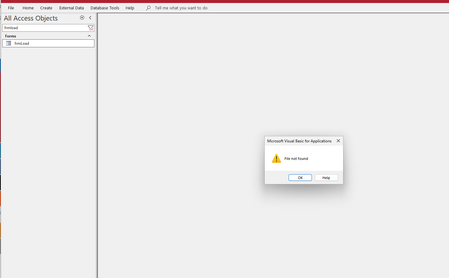
I'm getting a "File not found" (Error 53) error when trying to open an Access database (.accdb file). The error appears during the database startup process and points to a VBA subroutine declaration line: The error message mentions "The file was not found where specified" which suggests VBA is looking for a file during project compilation, but I can't identify what file it's looking for. Has anyone encountered this issue where the same Access file works with some SQL Server backends but fails to even open with others?403Views0likes2CommentsAccess Error on File Import through VBA
We are running a custom VBA routine in Microsoft Access that imports and parses text files into a database. Starting around September 9th, some machines began showing an error dialog during this process. The dialog mentions a failure in the VBA Regular Expression engine. The error does not occur consistently. On the same machine, the import may succeed several times and then fail (roughly 1 out of 4 attempts). The behavior appears to vary depending on the input file. The VBA code itself has been unchanged for years and continues to function correctly on older builds. We are wondering if this is related to a recent update in Access or the VBA runtime. Has anyone else encountered this behavior, and are there known workarounds or fixes? Going to leave version numbers out of this post because it keeps getting deleted and I'm not sure why. This is my 4th or 5th attempt to write this post and it keep getting auto-moderated.161Views0likes3Comments