developer
7961 Topics
Bot configuration config/fetch returns same channel ID when switching channels within same team
Summary When invoking a bot’s configuration flow (configuration.fetchTask) via an @mention-based settings entry point across different channels within the same Team, the request body consistently contains the same channelId, even after switching channels. https://learn.microsoft.com/en-us/microsoftteams/platform/bots/how-to/bot-configuration-experience?tabs=teams-bot-sdk1%2Cteams-bot-sdk2%2Cteams-bot-sdk3 This makes it impossible to reliably determine which channel initiated the configuration. Environment Microsoft Teams (desktop client) Bot installed at team scope Same Team, multiple channels Bot supports team scopes. Configuration enabled via manifest: "configuration": { "team": { "fetchTask": true } } Steps to Reproduce Install the bot into a Team with multiple channels Navigate to Channel A Invoke the bot configuration using an @Bot settings / configuration entry point Observe the incoming config/fetch request payload Note the channelId in the request body Switch to Channel B (same Team) Invoke the same configuration entry point again Observe the incoming config/fetch request payload Expected Behavior The config/fetch request body should include a channel identifier corresponding to the channel where the configuration was initiated, e.g.: channelData.channel.id or another channel-scoped identifier that uniquely identifies the initiating channel Actual Behavior The config/fetch request body always contains the same channel ID The channel ID does not change when switching channels The value appears to be: either the Team’s General channel or a cached / team-level channel context As a result, the bot cannot determine which channel the user intended to configure. Impact This behavior prevents implementing per-channel configuration using the bot configuration experience because: Configuration requests cannot be reliably scoped to the initiating channel All configuration actions appear to target the same channel Users configuring different channels in the same Team unintentionally overwrite the same settings Additional Notes This occurs within the same Team Reproduced consistently across multiple channels Observed even when the configuration is invoked after explicitly switching channels Behavior suggests the configuration context may be team-scoped rather than channel-scoped, but this is not clearly documented26Views0likes1CommentLeverage AI for faster, more productive coding with GitHub Copilot
GitHub Copilot serves as an invaluable learning tool for developers, especially those who are still learning a particular programming language or framework. By providing context-aware suggestions, it helps learners understand the syntax, structure, and logic behind different code snippets. While fundamental knowledge of programming concepts and syntax services should remain a prerequisite, a developer exploring a new framework would be able to describe the functionality they want to implement, and GitHub Copilot will generate code that demonstrates how to achieve it. This accelerates the learning process and empowers developers to gain proficiency in new technologies more efficiently.SharePoint Online Content Security Policy (CSP): Enforcement Dates and Guidance
Content Security Policy (CSP) is a critical browser security feature designed to protect web applications. SharePoint Online is rolling out CSP enforcement for all tenants starting March 1, 2026.2.3KViews0likes10CommentsPlease update Excel to handle more than 15 digit numbers!
I'm a professional database designer, and this limitation has caused me no end of headaches. The problem: numbers that are more than 15 digits long have all digits after the 15th converted into zeros. Microsoft provided workaround: format the the field as text. This workaround is only useful if you are doing data entry directly into an existing Excel spreadsheet that you are able to format the cells ahead of time. It's incredibly unhelpful when you are pushing and pulling data from different data sources. For example, if I need to push data out of a program like FileMaker to Excel, and the system I am pushing from has numeric fields (in particular ID fields), excel sees them as numbers and replaces the digits after the 15th. This jacks up formulas as well as any data synching possibilities. In situations like that, I end up having to export the data as .csv file, and then pull it in to an excel sheet and then do a bunch of conversion options on import (which does not always work, btw). But this is not a practical solution for every day users who are not tech savvy. I should be able to export the data directly to excel without the data being converted. This has been a big problem for every client I have that requires data being pushed to Excel. And this problem has existed for decades. Other spreadsheet programs (like google sheets) do not appear to have this issue. Can someone please explain why Excel continues to cling to this archaic standard? Are there any plans to update Excel to handle more than 15 digits? I know I am not the only one who has run into this problem. I've seen all kinds of posts about it. But trying to let Microsoft know how much of a problem this is has been a challenge. Their article on the subject had a link to give product feedback, and that link led me to this space. So here it is: product feedback for Excel. PLEASE FIX THIS! Thank you. Chris1.4KViews3likes8Comments
Name Manager using for create name which is contain atleast two name.
Hello. I creating somthing in excel with tables. These tables has thier own name, and can be dynamic or not. Any way. I using list in cell to select each data from a tables column. For that I created names with the content of a column. Unfortunatly i had to make a kind of name which is contain atleast 2 columns. These can grow dynamicly. So I think a plus helper tabel is not the right sollution for that. I think about 3 kind of solution. 1. =UNIQUE( VSTACK( INDEX(Tabla1[#Data];0;MATCH("Type_name";Tabla1[#Headers];0)); INDEX(Tabla2[#Data];0;MATCH("Column_name";Tabla2[#Headers];0)) ) output #name? 2. =UNIQUE(VSTACK(Lista_A; Lista_B)) lista_A as a name output #name? 3. created a helper table with the existing names. Created another name and use the table in it. output was the elements contained by the helper tabel, and the lista_A and lista_B tables each dedicated column. So How can i create list for a cell or cells from two column which are dynamicly growing, without a user needs to touch the core modell? Best Balázs16Views0likes0Comments
Set work location via API (Graph?)
Hey community! The new work hours and location feature is rolling out for Outlook and Teams: https://blog.admindroid.com/work-hours-and-location-in-outlook-for-efficient-collaboration/ Does anyone know who to read and write this information (especially the location) via API / Microsoft Graph? This is a nice feature and we would like to set this programmatically. Thank you very much! Best regards, Jens14KViews1like18CommentsSharePoint Online SP.FieldUserValue.get_email() always returns NULL.
Since last week, SP.FieldUserValue.get_email() has been returning null for all users in Person or Group fields. This occures when I use getItems method. For example: var listName = "MyList"; var context = SP.ClientContext.get_current(); var web = context.get_web(); var list = web.get_lists().getByTitle(listName); var query= new SP.CamlQuery(); var items = list.getItems(query); context.load(items); context.executeQueryAsync(()=>{ var enumerator = items.getEnumerator(); while (enumerator.moveNext()) { var item = enumerator.get_current(); var fldValues = item.get_fieldValues(); console.log(fldValues["Editor"].get_email()) } }); I haven’t been able to find any information about changes related to this behavior. We’ve been using the Email property of user fields for years without any issues, and it has always worked as expected. It's documented here: https://learn.microsoft.com/ru-ru/dotnet/api/microsoft.sharepoint.client.fielduservalue.email?view=sharepoint-csom Does anyone know what might have changed or why this has stopped working?186Views7likes0Comments
Task Module shows popup but Adaptive Card does not render using M365 Agent SDK (Python)
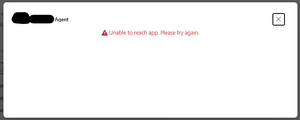
I am using the new M365 Agent SDK for Python to return a Task Module (task/fetch). The popup opens successfully when I click the button in Teams, but the Adaptive Card inside the Task Module does not render. Instead, Teams shows the generic error: “Unable to reach app. Please try again.” My invoke handler returns the following structure: adaptive_card = { "type": "AdaptiveCard", "$schema": "http://adaptivecards.io/schemas/adaptive-card.json", "version": "1.4", "body": [ {"type": "TextBlock", "text": "Sample task module card"}, {"type": "Input.Text", "id": "notes", "isMultiline": True} ], "actions": [ { "type": "Action.Submit", "title": "Submit", "data": {"action": "sample_task_submit"} } ] } task_response = { "task": { "type": "continue", "value": { "title": "Dialog", "width": "medium", "height": "medium", "card": { "contentType": "application/vnd.microsoft.card.adaptive", "content": adaptive_card } } } } return InvokeResponse(status=200, body=task_response) Key symptoms: Task module window opens (so invoke is successful) Adaptive card does not render Shows “Unable to reach app” inside popup No errors in server logs This happens only with Task Modules; normal message replies work fine Questions: Is the above Task Module response format correct for the new M365 Agent SDK for Python? Does the SDK require a different return type or content-type for invoke responses? Are Task Modules fully supported in the M365 Agent SDK preview? Is there an example of returning a Task Module using the Python SDK? Any clarification or working sample for Python would be very helpful. Screen shot -55Views0likes1CommentAdvanced Excel Formula discussion - Problem with dynamic range
Let's assume I want to rent a house. For each house, if the landlord has an agent, I'll contact the agent; If not, I contact the landlord directly. As below: Landlord Agent House Landlord James Mary W James Linda Michael X David Y Linda Z James Column F: =IFERROR(XLOOKUP(E2:E5,A:A,B:B,E2:E5),E2:E5) This is correct Column G: =XLOOKUP(E2:E5,A:A,B:B,E2:E5) #VALUE! for X-David Column H: =XLOOKUP(E2:E5,A:A,B:B,CHOOSECOLS(E2:E5,1)) Wrong value for X-David, because it returned the first value in range of XLOOKUP([if_not_found]) field My question is: the only difference between G and H is CHOOSECOLS(). If I put =CHOOSECOLS(E2:E5,1) or =E2:E5 in a separate cell, it gives me same result. However, in XLOOKUP, they are recognized differently. What is the logic behind this? Thank you for spending time on reading this.256Views0likes7Comments