developer
37 TopicsDeploying Moodle on Azure – things you should know
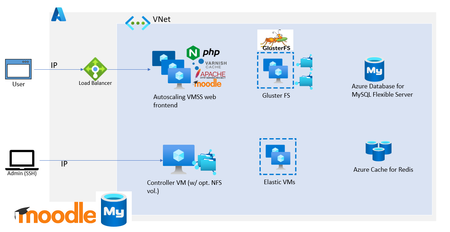
Moodle is one of the most popular open-source learning management platform empowering educators and researchers across the world to disseminate their work efficiently. It is also one of the most mature and robust OSS applications that the community has developed and improvised over the years. We have seen customers from small, medium, and large enterprises to schools, public sector, and government organizations deploying Moodle in Azure. In this blog post, I’ll share some best practices and tips for deploying Moodle on Azure based on our experiences working with several of our customers.69KViews14likes25CommentsHow to resolve DNS issues with Azure Database for MySQL
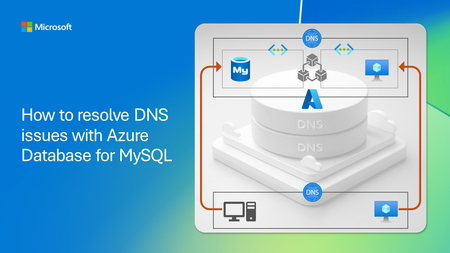
If you’re using Azure Database for MySQL and have encountered issues with name resolution or the Domain Name System (DNS) when attempting to connect to your server from different sources and networks, then this blog post is for you!7.8KViews7likes0CommentsBuilding a Restaurant Management System with Azure Database for MySQL
In this hands-on tutorial, we'll build a Restaurant Management System using Azure Database for MySQL. This project is perfect for beginners looking to understand cloud databases while creating something practical.1.5KViews5likes5Comments
Microsoft Azure innovation powers leading price-performance for MySQL database in the cloud
As part of our commitment to ensuring that Microsoft Azure is the best place to run MySQL workloads, Microsoft is excited to announce that Azure Database for MySQL - Flexible Server just achieved a new, faster performance benchmark.7.4KViews5likes0CommentsUnlocking AI-Driven Data Access: Azure Database for MySQL Support via the Azure MCP Server
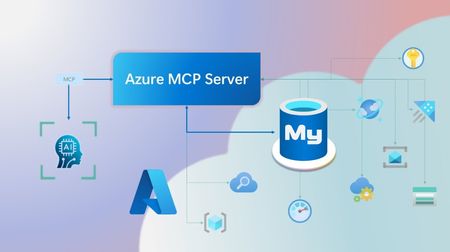
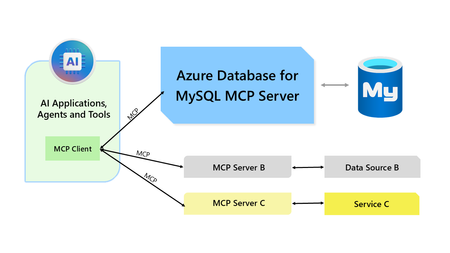
Step into a new era of data-driven intelligence with the fusion of Azure MCP Server and Azure Database for MySQL, where your MySQL data is no longer just stored, but instantly conversational, intelligent and action-ready. By harnessing the open-standard Model Context Protocol (MCP), your AI agents can now query, analyze and automate in natural language, accessing tables, surfacing insights and acting on your MySQL-driven business logic as easily as chatting with a colleague. It’s like giving your data a voice and your applications a brain, all within Azure’s trusted cloud platform. We are excited to announce that we have added support for Azure Database for MySQL in Azure MCP Server. The Azure MCP Server leverages the Model Context Protocol (MCP) to allow AI agents to seamlessly interact with various Azure services to perform context-aware operations such as querying databases and managing cloud resources. Building on this foundation, the Azure MCP Server now offers a set of tools that AI agents and apps can invoke to interact with Azure Database for MySQL - enabling them to list and query databases, retrieve schema details of tables, and access server configurations and parameters. These capabilities are delivered through the same standardized interface used for other Azure services, making it easier to the adopt the MCP standard for leveraging AI to work with your business data and operations across the Azure ecosystem. Before we delve into these new tools and explore how to get started with them, let’s take a moment to refresh our understanding of MCP and the Azure MCP Server - what they are, how they work, and why they matter. MCP architecture and key components The Model Context Protocol (MCP) is an emerging open protocol designed to integrate AI models with external data sources and services in a scalable, standardized, and secure manner. MCP dictates a client-server architecture with four key components: MCP Host, MCP Client, MCP Server and external data sources, services and APIs that provide the data context required to enhance AI models. To explain briefly, an MCP Host (AI apps and agents) includes an MCP client component that connects to one or more MCP Servers. These servers are lightweight programs that securely interface with external data sources, services and APIs and exposes them to MCP clients in the form of standardized capabilities called tools, resources and prompts. Learn more: MCP Documentation What is Azure MCP Server? Azure offers a multitude of cloud services that help developers build robust applications and AI solutions to address business needs. The Azure MCP Server aims to expose these powerful services for agentic usage, allowing AI systems to perform operations that are context-aware of your Azure resources and your business data within them, while ensuring adherence to the Model Context Protocol. It supports a wide range of Azure services and tools including Azure AI Search, Azure Cosmos DB, Azure Storage, Azure Monitor, Azure CLI and Developer CLI extensions. This means that you can empower AI agents, apps and tools to: Explore your Azure resources, such as listing and retrieving details on your Azure subscriptions, resource groups, services, databases, and tables. Search, query and analyze your data and logs. Execute CLI and Azure Developer CLI commands directly, and more! Learn more: Azure MCP Server GitHub Repository Introducing new Azure MCP Server tools to interact with Azure Database for MySQL The Azure MCP Server now includes the following tools that allow AI agents to interact with Azure Database for MySQL and your valuable business data residing in these servers, in accordance with the MCP standard: Tool Description Example Prompts azmcp_mysql_server_list List all MySQL servers in a subscription & resource group "List MySQL servers in resource group 'prod-rg'." "Show MySQL servers in region 'eastus'." azmcp_mysql_server_config_get Retrieve the configuration of a MySQL server "What is the backup retention period for server 'my-mysql-server'?" "Show storage allocation for server 'my-mysql-server'." azmcp_mysql_server_param_get Retrieve a specific parameter of a MySQL server "Is slow_query_log enabled on server my-mysql-server?" "Get innodb_buffer_pool_size for server my-mysql-server." azmcp_mysql_server_param_set Set a specific parameter of a MySQL server to a specific value "Set max_connections to 500 on server my-mysql-server." "Set wait_timeout to 300 on server my-mysql-server." azmcp_mysql_table_list List all tables in a MySQL database "List tables starting with 'tmp_' in database 'appdb'." "How many tables are in database 'analytics'?" azmcp_mysql_table_schema_get Get the schema of a specific table in a MySQL database "Show indexes for table 'transactions' in database 'billing'." "What is the primary key for table 'users' in database 'auth'?" azmcp_mysql_database_query Executes a SELECT query on a MySQL Database. The query must start with SELECT and cannot contain any destructive SQL operations for security reasons. “How many orders were placed in the last 30 days in the salesdb.orders table?” “Show the number of new users signed up in the last week in appdb.users grouped by day.” These interactions are secured using Microsoft Entra authentication, which enables seamless, identity-based access to Azure Database for MySQL - eliminating the need for password storage and enhancing overall security. How are these new tools in the Azure MCP Server different from the standalone MCP Server for Azure Database for MySQL? We have integrated the key capabilities of the Azure Database for MySQL MCP server into the Azure MCP Server, making it easier to connect your agentic apps not only to Azure Database for MySQL but also to other Azure services through one unified and secure interface! How to get started Installing and running the Azure MCP Server is quick and easy! Use GitHub Copilot in Visual Studio Code to gain meaningful insights from your business data in Azure Database for MySQL. Pre-requisites Install Visual Studio Code. Install GitHub Copilot and GitHub Copilot Chat extensions. An Azure Database for MySQL with Microsoft Entra authentication enabled. Ensure that the MCP Server is installed on a system with network connectivity and credentials to connect to Azure Database for MySQL. Installation and Testing Please use this guide for installation: Azure MCP Server Installation Guide Try the following prompts with your Azure Database for MySQL: Azure Database for MySQL tools for Azure MCP Server Try it out and share your feedback! Start using Azure MCP Server with the MySQL tools today and let our cloud services become your AI agent’s most powerful ally. We’re counting on your feedback - every comment, suggestion, or bug-report helps us build better tools together. Stay tuned: more features and capabilities are on the horizon! Feel free to comment below or write to us with your feedback and queries at AskAzureDBforMySQL@service.microsoft.com.466Views3likes0CommentsModel Context Protocol (MCP) Server for Azure Database for MySQL
We are excited to introduce a new MCP Server for integrating your AI models with data hosted in Azure Database for MySQL. By utilizing this server, you can effortlessly connect any AI application that supports MCP to your MySQL flexible server (using either MySQL password-based authentication or Microsoft Entra authentication methods), enabling you to provide your business data as meaningful context in a standardized and secure manner.2.8KViews3likes0CommentsPreventing and recovering from accidental deletion of an Azure Database for MySQL flexible server
Accidental deletion of critical Azure resources, such as Azure Database for MySQL flexible servers, can disrupt operations. To help avoid such accidental deletions, you can use a couple of options, including Azure Resource Locks and Azure Policy. This post explains how to implement these mechanisms, and how to revive a dropped MySQL flexible server by using the Azure CLI.1.4KViews3likes1CommentLeverage Flexible Server’s Business Critical service tier for mission critical applications
The Business Critical service tier is ideal for mission critical Tier 1 workloads such as ecommerce, financial, or internet-scale applications, that rely heavily on Azure Database for MySQL - Flexible Server to always be available, operational, and resilient to failure. Organizations with mission critical workloads that require low latency, high query per second (QPS), high concurrency, fast failover, and faster throughput should choose to run or build their applications using servers based on the Business Critical service tier.5.4KViews3likes0Comments
Azure AD Authentication for Azure Database for MySQL - Flexible Server now in General Availability!
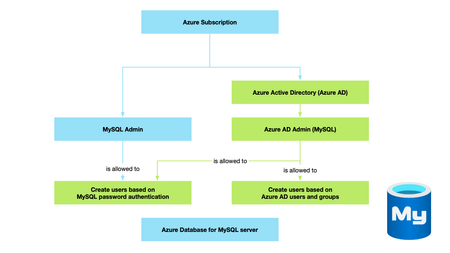
Microsoft Azure Active Directory (Azure AD) Authentication is now in General Availability! With this feature, customers can connect to Azure Database for MySQL - Flexible Server using identities that are defined in Azure AD!5.1KViews3likes0Comments