dev
79 Topics
WOA 29639.100 explorer.exe freeze when open some folders
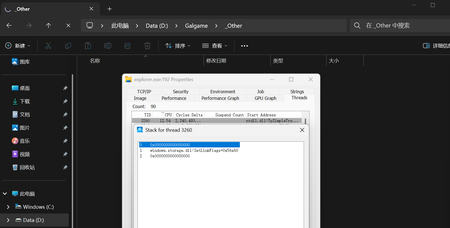
When attempting to open certain folders, File Explorer's CPU usage spikes rapidly, and some or all file items become invisible. Stack traces viewed via Process Monitor reveal that the activity consistently involves the `SetLinkFlags` function shown in the image. Third-party file management tools such as File and 7-Zip operate normally, and issues related to non-system Shell components have already been ruled out by ShellExView. 7zip can show all files normally.202Views0likes1Comment
New Outlook Unable to Close Since build 26220.8754 Update
Since build 26220.8754, I (and others) have been unable to close New Outlook using the X. I went into Windows Settings > Apps > Installed Apps > Outlook > click the 3 dots to the far right, select Advanced Options. Then select Reset. It worked for 1 time, but then the issue just showed right back up. I am not the only one with this issue, it has been reported here https://learn.microsoft.com/en-us/answers/questions/5933524/new-outlook-doesnt-close-with-x-any-longer?source=docs421Views1like4CommentsMicrosoft Print to PDF not working/missing.
The Microsoft Print to PDF was not working on my PC so I tried reenabling it via Windows Features in Optional Features and it won't turn back on. It gives error code: 0x800f0922. I also tried other various methods online and none work. All end with various error codes which all result in the service not working/turning on. I even filed feedback about 2 weeks ago with no response yet. I contacted support, where I was recommended to perform a repair via ISO but was then canceled by the agent as I am on an Insider build. I am on build 26300.8687. This is a summary of my diagnostic from Gemini which I had used to try to solve my issue. Here is a summary of the diagnostic, tracking every command I executed in PowerShell and the specific roadblocks the Windows subsystem threw back. The Add-Printer Layer attempted to use modern PowerShell commands to register the printer onto both the interactive prompt port and the standard local file port. Commands Ran: PowerShell Add-Printer -Name "Microsoft Print to PDF" -DriverName "Microsoft Print to PDF" -PortName "PORTPROMPT:" Add-Printer -Name "Microsoft Print to PDF" -DriverName "Microsoft Print to PDF" -PortName "FILE:" * **Errors Faced:** * `ObjectNotFound: (MSFT_Printer:ROOT/StandardCimv2/MSFT_Printer)` * `HRESULT 0x80070002,Add-Printer` --- ## 2. The Legacy PrintUI Layer To bypass the modern PowerShell cmdlet, I tried using the legacy Windows user interface print engine via standard command prompt syntax and escaped quotes. * **Commands Ran:** ```powershell cmd /c "rundll32 printui.dll,PrintUIEntry /if /b `"Microsoft Print to PDF`" /r `"PORTPROMPT:`" /m `"Microsoft Print to PDF`"" rundll32 printui.dll,PrintUIEntry /if /b "Microsoft Print to PDF" /f "C:\Windows\System32\spool\DRIVERS\x64\3\prnms009.inf" /r "PORTPROMPT:" /m "Microsoft Print to PDF" Errors Faced: A graphical dialog box error: Operation could not be completed (error 0x00000002). The system cannot find the file specified. The Deployment Script Layer (WMI/CScript) I tried deploying the printer using Windows’ built-in visual basic administrative scripts to side-step the user interface layer completely. Command Ran: PowerShell cscript $env:windir\System32\Printing_Admin_Scripts\en-US\prnmngr.vbs -a -p "Microsoft Print to PDF" -m "Microsoft Print to PDF" -r "PORTPROMPT:" * **Errors Faced:** * `Unable to add printer Microsoft Print to PDF Error 0x80041002 Not found` * `Operation PutInstance` * `Provider Win32 Provider` * `Description The system cannot find the file specified. Win32 error code 2` Ultimately, every single command failed with an identical variation of **"File Not Found" (Error 2 / 0x80070002 / 0x80041002)**.1.1KViews0likes4Comments
This pop-up in my settings: "You need to activate Windows before you can personalize your PC."
I am getting this pop-up in my settings: " You need to activate Windows before you can personalize your PC." Whenever I click on the Activate now button, it appears to be a troubleshooting feature.469Views1like1CommentFeature not available on Windows Dev build 29576.1000
I am currently on the Windows Dev version (build 29576.1000), and the feature is not available for me. I would like to ask whether this feature can be enabled on my device, or when it will become available for this build.” (Full Screen Experience)210Views0likes2Comments
Windows 11 build 26200.8116 broke system dll crtdll.dll
Latest Windows 11 25H2 release broke this system dll by replacing it with msvcrt40.dll which isn't anywhere like it, and it broke 32 bit programs that relied on that dll to run since it is missing symbols. I couldn't find an appropriate space to report this kind of issues, since this is not user error or a configuration problem, but a bug caused by a windows update that only has meaning for developers and users which use the very few apps remaining relying on this component. If there's a better way to report this issue, let me know, but I have no direct access to a Windows 11 device so i can't use the feedback hub application451Views1like5CommentsWindows 12 Is Not a Rumor. It’s Already in Your System
The new build 29558 reveals way more than most people think. If you know where to look, you’ll see that the next Windows release is already very close. Side‑by‑Side Winners now includes new versions of core system modules Startup‑task‑data is updated across all architectures Defender and Networking UI have new branding resource packages ShellCompatibility is already using version 12.\* GDI+ and the Search engine have new generations of libraries These are not “small tweaks”. This is the groundwork for a new shell and a new UI that is already physically present in the system — just not unlocked yet. Don’t follow YouTube “tech enthusiasts” — they spread rumors and don’t know how to look for real evidence inside the system. Windows is not analyzed through thumbnails, but through the registry, WinSxS and shell layers. 😎✌️ Winners sample: offlinefiles-ui is now running on version 29558.1000. This is one of many modules that indicate the presence of a new shell layer in the system.1.6KViews1like4Comments