dev
136 TopicsDev 155.0.4268.0 - HEVC cannot be played via hardware
Starting with Dev build 155.0.4268.0, HEVC content fails to playback throwing an error. This is attempting to use any hardware acceleration (NVIDIA, Intel, Qualcomm, etc). On the Stable channel, it still works as intended. I submitted feedback, but this is a rather impactful issue since a lot of websites use HEVC content.58Views0likes0Comments
WOA 29639.100 explorer.exe freeze when open some folders
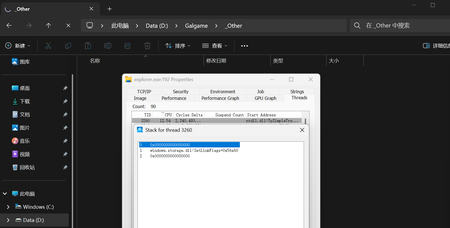
When attempting to open certain folders, File Explorer's CPU usage spikes rapidly, and some or all file items become invisible. Stack traces viewed via Process Monitor reveal that the activity consistently involves the `SetLinkFlags` function shown in the image. Third-party file management tools such as File and 7-Zip operate normally, and issues related to non-system Shell components have already been ruled out by ShellExView. 7zip can show all files normally.110Views0likes1Comment
New Outlook Unable to Close Since build 26220.8754 Update
Since build 26220.8754, I (and others) have been unable to close New Outlook using the X. I went into Windows Settings > Apps > Installed Apps > Outlook > click the 3 dots to the far right, select Advanced Options. Then select Reset. It worked for 1 time, but then the issue just showed right back up. I am not the only one with this issue, it has been reported here https://learn.microsoft.com/en-us/answers/questions/5933524/new-outlook-doesnt-close-with-x-any-longer?source=docs266Views1like4CommentsMicrosoft Print to PDF not working/missing.
The Microsoft Print to PDF was not working on my PC so I tried reenabling it via Windows Features in Optional Features and it won't turn back on. It gives error code: 0x800f0922. I also tried other various methods online and none work. All end with various error codes which all result in the service not working/turning on. I even filed feedback about 2 weeks ago with no response yet. I contacted support, where I was recommended to perform a repair via ISO but was then canceled by the agent as I am on an Insider build. I am on build 26300.8687. This is a summary of my diagnostic from Gemini which I had used to try to solve my issue. Here is a summary of the diagnostic, tracking every command I executed in PowerShell and the specific roadblocks the Windows subsystem threw back. The Add-Printer Layer attempted to use modern PowerShell commands to register the printer onto both the interactive prompt port and the standard local file port. Commands Ran: PowerShell Add-Printer -Name "Microsoft Print to PDF" -DriverName "Microsoft Print to PDF" -PortName "PORTPROMPT:" Add-Printer -Name "Microsoft Print to PDF" -DriverName "Microsoft Print to PDF" -PortName "FILE:" * **Errors Faced:** * `ObjectNotFound: (MSFT_Printer:ROOT/StandardCimv2/MSFT_Printer)` * `HRESULT 0x80070002,Add-Printer` --- ## 2. The Legacy PrintUI Layer To bypass the modern PowerShell cmdlet, I tried using the legacy Windows user interface print engine via standard command prompt syntax and escaped quotes. * **Commands Ran:** ```powershell cmd /c "rundll32 printui.dll,PrintUIEntry /if /b `"Microsoft Print to PDF`" /r `"PORTPROMPT:`" /m `"Microsoft Print to PDF`"" rundll32 printui.dll,PrintUIEntry /if /b "Microsoft Print to PDF" /f "C:\Windows\System32\spool\DRIVERS\x64\3\prnms009.inf" /r "PORTPROMPT:" /m "Microsoft Print to PDF" Errors Faced: A graphical dialog box error: Operation could not be completed (error 0x00000002). The system cannot find the file specified. The Deployment Script Layer (WMI/CScript) I tried deploying the printer using Windows’ built-in visual basic administrative scripts to side-step the user interface layer completely. Command Ran: PowerShell cscript $env:windir\System32\Printing_Admin_Scripts\en-US\prnmngr.vbs -a -p "Microsoft Print to PDF" -m "Microsoft Print to PDF" -r "PORTPROMPT:" * **Errors Faced:** * `Unable to add printer Microsoft Print to PDF Error 0x80041002 Not found` * `Operation PutInstance` * `Provider Win32 Provider` * `Description The system cannot find the file specified. Win32 error code 2` Ultimately, every single command failed with an identical variation of **"File Not Found" (Error 2 / 0x80070002 / 0x80041002)**.623Views0likes4CommentsEdge Dev on Windows - Tab sync not working
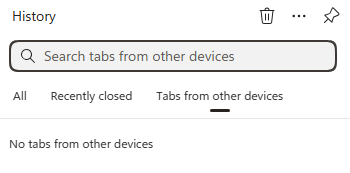
Just wondering if anyone else is seeing a bug where on Windows and Edge Dev (latest version), tab sync just says "No tabs from other devices". But if you go to Edge Stable, it does show open tabs. It also shows my recent tabs with Edge Dev on Android, so I know the sync is working, just the desktop client is not showing them. I've sent feedback for this issue but since sync is still working correctly, I am wondering if this is a UI bug.60Views0likes0Comments
This pop-up in my settings: "You need to activate Windows before you can personalize your PC."
I am getting this pop-up in my settings: " You need to activate Windows before you can personalize your PC." Whenever I click on the Activate now button, it appears to be a troubleshooting feature.390Views1like1CommentFeature not available on Windows Dev build 29576.1000
I am currently on the Windows Dev version (build 29576.1000), and the feature is not available for me. I would like to ask whether this feature can be enabled on my device, or when it will become available for this build.” (Full Screen Experience)114Views0likes2CommentsEdge Dev Version 149.0.3984.0 (Official build) dev (64-bit) Update
Got this update on Edge Dev today, immediately thereafter its locked up my pc after it applied and i went to open a new tab (had to ctrl+alt+del and end task it) its something specific here as edge stable and beta still work. unsure what's changed or if others have the same issue? diving into logs in just a sec...198Views0likes0Comments