deployment
15 Topics
Power Apps - development vs production
“It works fine in development.” Probably one of the most dangerous sentences in application development. 😄 I've seen Power Apps behave perfectly when we test with a small amount of data. Then the application goes to UAT or production and suddenly users start reporting: “It's taking too long to load.” “The gallery is empty.” “The search isn't returning everything.” “Why is this screen so slow?” Many times, the formula itself isn't the only issue. The data is. For example, an app might work perfectly with a few hundred SharePoint records. But as the list grows, the same approach can become a problem because of delegation and the amount of data being processed. That's why I've started asking these questions before finalizing an app: Is this query delegable? How much data will this list have after one year? Are we loading records into collections unnecessarily? Are we doing multiple LookUps inside a gallery? Can the filtering happen closer to the data source? Would Dataverse be a better option for this requirement? These questions don't always come up when we're building the first version of the application. But they become very important later. One thing I'm learning with Power Platform is that a solution that works today is not necessarily a solution that will scale tomorrow. Sometimes spending a little more time on the data and architecture in the beginning saves a lot of time later. Curious to know what others have experienced: What was the biggest Power Apps performance issue you faced after moving an application to production?153Views0likes0CommentsBest Practices for Hybrid Cloud Deployments with Microsoft 365 & Azure
Hi everyone, I’m Jaxon Varr 👋 I’ve been working with Microsoft 365 and Azure for a while now, and I’m looking to refine our hybrid cloud deployment strategy. Right now we’re integrating Azure AD with on-prem identity services and expanding into Azure Virtual Desktop. Does anyone have recommendations for best practices around security, identity sync, and performance optimization when connecting Microsoft 365 services with Azure? I’d love to hear real-world insights or helpful resources. Thanks in advance!384Views0likes0Comments
Network connectivity test TCP Connection results unreliable
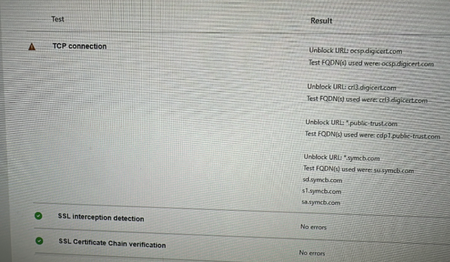
My team has spent the last 2 business days trying to get the https://connectivity.office.com/ TCP connection test to complete successfully to appease the Microsoft Unified Support Team. They don't want to take our MS Teams crash diags until they see SSL Interception Detection and TCP connection tests passing successfully. We can't get TCP connection tests to pass, we get one of the following: Success Attempt #1 Success, Attempt #2 Failure Any number of errors to unblock URLs such as (but not limited to) ocsp.digicert.com,ocspx.digicert.com,ocsp.omniroot.com,su.symcb.com,sr.symcb.com,sd.symcb.com,s1.symcb.com,sa.symcb.com We figured it was something with the corporate network but that's not the case. Last night we had about 50 employees try this test from their home (personal) computers that have no connection to our corporation. The TCP Connection test fails on home (consumer) PCs. What's the story with this TCP Connection check?1.4KViews2likes2Comments
Change UpdateChannel from Monthly Enterprise to Semi Annual Enterprise
I have some computers that are getting Monthly Enterprise updates pushed from the Microsoft 365 Apps admin center. I am trying to get these computers back to the Semi Annual Enterprise scheme, and have them downgraded to the latest release for that cadence (and to get their updates from normal source System Center). I can easily redeploy a previous version of O365 to the machines, but if i do that they jump back to wanting to upgrade to the latest Monthly Enterprise version pushed from the cloud as soon as they can. I guess this is related to the fact that the machines are associated with a servicing profile in the Microsoft 365 Apps admin center, but how do i unassociate the servicing profile for the Monthly Enterprise updates? Or what settings need to be in place, both on the client side and in the admin center? Any help is greatly appreciated924Views0likes0Comments
How to add file attachment button to my Teams bot?
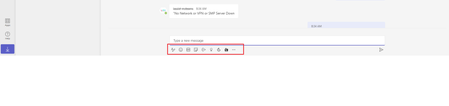
Dear community, Recently I created a new chatbot application using python and flask framework. It's working good and deployed in Teams as well. Then I planned add file attachment options but unfortunately I couldn't find attachment button in my Teams chatbot! For R&D purpose I tried below sample codes: https://github.com/microsoft/BotBuilder-Samples/tree/main/samples/python/15.handling-attachments https://github.com/microsoft/BotBuilder-Samples/tree/main/samples/python/56.teams-file-upload Can anyone guide how to add file attachment button in Teams chatbot app? Thank you.1.3KViews0likes0Comments
Word Add-In Deployment
Hi there, I am trying to deploy an add-in for some users for MS Word (right now we're just testing so it is limited just to a few people in our IT Dept.). We are trying to deploy the DocuSign add-in. I have done this through the Integrated Apps section of the O365 Admin Centre and applied it to a Security Group in our Active Directory. The issue we are facing is, when deploying the add-in it does not seem to want to automatically install on most of our users' MS Word applications (we did have 2 test users who said it was automatically installed). What we've had to do for the other test users is go to the "Get Add-ins" section of MS Word and click on "Admin Managed", then click on DocuSign to add it to the ribbon. Is there some setting somewhere that would have it automatically installed on our users' systems as opposed to having them add it manually? Thanks!1KViews0likes0Commentsmail from zimbra server during migration to office 365 is going to some office 365 users junk folder
my company has a project of migrating an organizations mail hosting from zimbra to office 365. we added and verified their domain to their office 365 tenant. we have ad connect syncing the ad users to office 365. we setup connectors to forward mail from office 365 users that have migrated to office 365 and users that have not been migrated are routed back to their onsite zimbra server using a group based routing connector. everything was working just fine until this week when customers of our client which btw who’s mail is also hosted by office 365 in their own tenant started having mail coming from the zimbra server users going directly to their junk folder. mail from zimbra is going out directly to their customers office 365 server. we have not even begun to move users off of their zimbra yet. inbound mail delivery is still being delivered to the zimbra server as well as outbound. the spf record are still set for their zimbra server and we have tried both with and without the spf include record for office 365 without resolution. this didnt begin immediately when we added the domain to their tenant, the messages going to junk folder of their customers office 365 mailboxes that is, which again didnt start until almost 2 weeks after the fact.4KViews0likes2Comments
SCCM + Office 365 + Several Configuration.XML file (EN/FR)
Hi everyone, I'm building a Sequence Task in SCCM where it's possible to choose the language ( usign HTA script). For each language, we install the appropiated LP for Windows & i wish to do the same for Office 365. In order to realise this, i've downloaded all the language ( 7 in total ) from a single configuration.xml - so my office source contains all LPs. After that i've created 7 different XML file ( one for each language ) & 7 SCCM programs to call them. Sadly when i want to used the command setup.exe /configure configuration-FR.xml (for example ) it doesn't seems to work w/ the office folder included all the language. It's only work if i only keep file necessary for FR LP only So do i have to maintain one Office source for each language ? (means 2.5Gig * 7) or is there some other approach to reduce this and keep only one source folder ? Please note we want to avoid an installation w/ all LP on every machine. Thx for your help. Bonjour à tous, Nous avons crée une séquence de tache embarquant 7 langues ( à choisir via un script HTA ). Pour chaque langue, nous n'installons que le language pack approprié pour Windows & je souhaiterais faire de même pour office 365. Nous avons donc mis les 7 langues dans un fichiers configuration.xml & avons téléchargé les sources qui sont dont dans le répertoire "office". Suite à cela nous avons créer 7 fichiers de configuration ( 1 par langue ) & 7 programs pour appeler ces fichiers. Malheureusement, en effectuant la commande setup.exe /configure configurationFR.xml ( par exemple ), cela ne fonctionne pas avec le répertoire source office qui comprends toutes les langues. Cela fonctionne uniquement lorsque les sources office comprennent uniquement le nécessaire pour le langage FR. Donc dois-je maintenir un répertoire source par langue (7*2.5gig ) ou y'a-t-il un moyen d'utiliser seulement un répertoire source ? Merci de noter qu'installer Office 365 avec les 7 langues est un point à écarter. Merci d'avance pour votre aide.1.1KViews0likes0Comments
Setting up remote web application without AD
I have bought a windows server 2019 and would like to give some users access to a accounting system, and only that application. We are talking of max 5 people, so I do not want to setup an AD for this matter. After installing the terminal server and its needs, I am able to let the users into the server and they can run the application. I am not able to setup a remote App without AD. Is there a way of doing that? I have tried running the mstsc command but then the application is not responding as it should... some buttons are missing...11KViews0likes1Comment