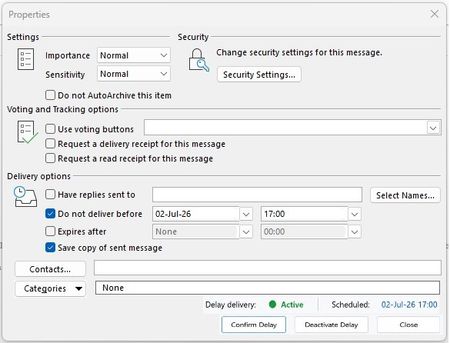
delivery
1 Topic
Suggestion to Improve Outlook Delay Delivery
Dear Microsoft Outlook Team, I have been using Outlook for a long time and I use the Delayed Delivery feature frequently. Honestly, I think it is one valuable features in Outlook, but it is also one of the features I trust the least. Many times I have wondered if my message was actually scheduled to be sent later or if it was sent immediately for some reason. I believe that this uncertainty could be reduced with a few small interface improvements, without changing the way Outlook works. My suggestion is to add: a Confirm Delay button after selecting a delivery date and time, a visible status such as Delay: Active/Not Active, so that the user immediately knows that delayed delivery has been successfully activated, a Scheduled: field that displays the exact delivery date and time, a Deactivate Delay button, which allows users to quickly disable delayed delivery, I have also created a test image example to better explain the idea and attached them to this message. As an Outlook user, I believe these small improvements would increase user confidence in the delayed delivery feature and help prevent accidental or premature delivery of emails. Thank you for taking the time to read my suggestion.Solved99Views0likes4Comments