defender
61 Topics
URL Detonation Reputation - How do you like it?
I personally have found this detection technology to be a huge pain in the buttocks. To me, this feature doesn't really look at specific threats or risks, it just says "You cannot do anything that involves this domain name". And with that analogy, "involves" translates to any of the following: Domain is in the subject or body One of the included recipient addresses to which the message is addressed uses the domain. One of the recipients who show in the body of the email due to it being a conversation/thread, uses that domain in their address. An attachment includes that domain within its text (PDF, Word, Excel, TXT, all personally observed by me). These things get blocked as "High confidence phish". To me, they are not that whatsoever, until the message itself is doing some of the "phish" verb. This feels like an overstep on the verdict and I'd prefer they come up with a new name for the detection type, as well as a new drop down box for us to choose between MoveToJunk or Quarantine. Most times I've observed this feature "saving" clients, it's a pain in the butt for the client. I will point out the one improvement I've seen since I started belly-aching over this - it is that Microsoft now puts the bad URL/domain from within the attachments, into the list of URLs in the email entity page within M365 Defender portal. So there is at least that there now, which adds the improvement of not having to go through MS Support to find out what is the supposed bad-rep URL. Would like to know if anyone else finds this feature as a pain for the most part, and hear any other suggestions, or just confirmations about my suggestion (new category of detection so we don't have to treat these things like (HC)phish).Solved51KViews2likes31Comments
Intune + Defender - Configure Quick and Full scan
Hello experts, I'm starting with Intune... been playing with it for few weeks already and want to start deploying some policies to my testing devices. These days, I'm struggling to find out how to properly configure Quick and Full scans via Intune. I've configured a policy in Intune->Endpoint Security->Antivirus as below: Disable Catchup Quick Scan - Enabled Scan Parameter - Full Scan Schedule Quick Scan Time - Configured (720) Schedule Scan Day - Thursday Schedule Scan Time - Configured (600) I want to: run Quick scan daily at 12 PM run Full scan on Thursdays at 10 AM run catchup scan for quick scans Is my configuration correct? As I do not see any status changes for Last Full / Last Quick scan in Defender ->Endpoint -when checking my testing devices. All other Status Types are green (Platform, Security Intelligence, Engine, Defender Antivirus Mode - Active) what am I missing here? been trying to do research online... but still not clear in this so hopefully I get some advise here 🙂 PS: M365 E3 + Security E5 addon is assigned to testing users32KViews1like12CommentsIntroducing Project Robin | New Feature
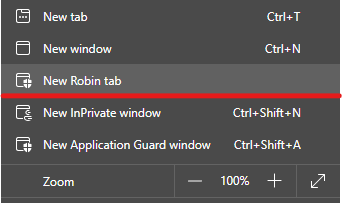
this one is a new flag you can enable: edge://flags/#edge-robin Microsoft Edge Version 91.0.852.0 (Official build) canary (64-bit) I think, Project Robin is a way to show Windows Defender Application Guard windows as tabs, next to other regular tabs. because right now, when you open a new WDAG window, it has its own protected window, backed up by Windows Defender engine. this Project Robin might be a way to bring the 2 environments together in the same window. so far the feature doesn't seem to be fully implemented yet. when I try it, it takes me to https://dev.browse.trafficmanager.net/?header=0&url=https%3A%2F%2Fwww.bing.com%2F&escape=newdomain&titlePrefix=0 and then nothing. it's exciting, waiting for future versions to see more changes.30KViews0likes4CommentsDefender Antivirus (AV) Passive Mode
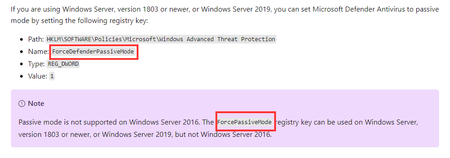
Hi, While researching how to set Defender AV to passive mode I stumbled upon two registry keys: ForceDefenderPassiveMode https://docs.microsoft.com/en-us/microsoft-365/security/defender-endpoint/microsoft-defender-antivirus-compatibility?view=o365-worldwide#microsoft-defender-antivirus-and-non-microsoft-antivirusantimalware-solutions https://docs.microsoft.com/en-us/microsoft-365/security/defender-endpoint/microsoft-defender-antivirus-on-windows-server?view=o365-worldwide#set-microsoft-defender-antivirus-to-passive-mode-using-a-registry-key ForcePassiveMode https://docs.microsoft.com/en-us/microsoft-365/security/defender-endpoint/switch-to-microsoft-defender-onboard?view=o365-worldwide#set-microsoft-defender-antivirus-on-windows-server-to-passive-mode-manually https://docs.microsoft.com/en-us/microsoft-365/security/defender-endpoint/switch-to-microsoft-defender-setup?view=o365-worldwide#set-microsoft-defender-antivirus-to-passive-mode-on-windows-server Does either of you know which one is the correct one? Thanks, AndreSolved26KViews2likes3CommentsSAP Applications and Microsoft Defender for Linux
The typical audience for this blog is SAP Basis administrators and consultants. Enterprise Security is a specialist role and the activities described in this blog should be planned in conjunction with the Security Administrators. The objective of this blog is to provide a basic understanding of MDE on Linux and how to operate, check and troubleshoot problems on SAP VMs running MDE. This blog is focusing on two subcomponents: Next-generation protection (AntiVirus) and Endpoint detection and response (EDR). Next-generation protection is an AntiVirus (AV) product similar to AV solutions for Windows environments. Endpoint detection and response (EDR) detects and can block suspicious activity and system calls.End of Windows 10 Support: What Defender Customers Need to Know
As of today, October 14, 2025, Microsoft is officially ending support for Windows 10. This means that Windows 10 devices will no longer receive security or feature updates, nor technical support from Microsoft. While these devices will continue to operate, the lack of regular security updates increases vulnerability to cyber threats, including malware and viruses. Applications running on Windows 10 may also lose support as the platform stops receiving updates. Will Defender continue to protect Windows 10 devices? Defender supports a range of legacy systems, including Windows 10. (See here for a full list of supported operating systems.) Microsoft Defender will continue to provide detection and protection capabilities to the extent possible on Windows 10 and other legacy systems. Keep in mind that security solutions on legacy systems are inherently less secure and may not be able to receive all new features, so please review the next section for important actions you can take. For Windows 10 customers without Defender, Microsoft will continue to provide security intelligence updates for the built-in Microsoft Defender Antivirus protection through October 2028. Of course, Defender Antivirus alone isn't a comprehensive risk mitigation posture without Microsoft Defender detection and response deployed across your digital estate. What should customers do to protect their Windows 10 devices? Upgrade to Windows 11: Moving to Windows 11 is strongly recommended for PCs eligible to upgrade. Windows 11 delivers the latest security features, improved performance, and ongoing support at no additional cost. This is the best way to ensure your endpoints remain protected and compliant. Devices running Windows 10 will be more vulnerable, even with ongoing security intelligence updates (SIUs). Extended security update (ESU) program: If upgrading isn’t immediately possible, Microsoft offers an ESU program for Windows 10. The ESU program provides critical and important security updates but does not include new Windows features or technical support. Enterprise customers can purchase ESU for up to three years or receive it at no additional cost with a Windows 365 subscription. Cloud and virtual environments: Windows 10 devices accessing Windows 11 Cloud PCs via Windows 365 or Virtual Machines are entitled to ESU at no extra cost, with automatic updates. Consumer customers have options to enroll for one year of ESU, including free enrollment methods in certain regions. For further guidance, check out the posts below or connect with your Microsoft account team. End of support for Windows 10, Windows 8.1, and Windows 7 | Microsoft Windows How to prepare for Windows 10 end of support by moving to Windows 11 today | Windows Experience Blog Extended Security Updates (ESU) program for Windows 10 | Microsoft Learn To learn more about Microsoft Security solutions, visit our website. Bookmark the Security blog to keep up with our expert coverage on security matters. Also, follow us on LinkedIn (Microsoft Security) and X (@MSFTSecurity) for the latest news and updates on cybersecurity.Exposure level clarification
Hi everybody, I having some machines in Defender ATP and wondering about the Exposure level. As explained in the info icon the exposure level is only about the security recommendations. Is there any deeper explanation how this number is generated? Because I see some low level recommendations but in some cases the level is medium - this does not make sense to me. Anyone having the same? Regards11KViews0likes1Comment