defender xdr
7 TopicsSplitting single-tenant Microsoft Defender XDR Sentinel logs in multiple company scenarios
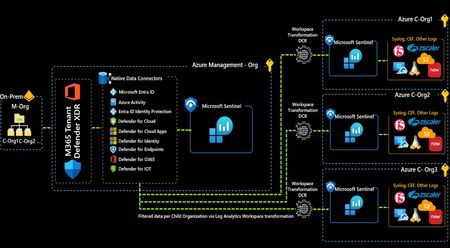
This article describes a simple, yet effective solution for the problem of segregating Microsoft Defender XDR and Entra ID Sentinel logs ingestion in a single-tenant with multiple companies scenario, leveraging Log Analytics workspace transformations and some simple KQL query statements.Best Practices for Investigating Phishing Incidents in Microsoft Defender for Office 365
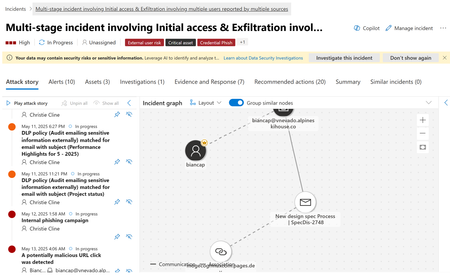
Discover best practices for investigating phishing incidents with Microsoft Defender for Office 365. Learn how to use the Incidents tab, analyze threats, and accelerate response with Security Copilot’s AI-powered guidance.
Microsoft 365 E7 & Agent365: From Where You Are to Enterprise AI at Scale
Introduction As organizations move beyond AI experimentation and begin operationalizing agent-based AI workloads, a new set of challenges is emerging governance, visibility, and control. Microsoft’s response to this shift is Microsoft 365 E7, introduced on May 1, 2026. It bundles: Microsoft 365 E5 Microsoft 365 Copilot Microsoft Entra Suite Microsoft Agent 365 This represents Microsoft’s strategic direction toward a human-led, agent-operated enterprise. However, a key pattern is emerging: Many organizations deploy Agent 365 and assume governance is complete. It isn’t. Understanding Agent 365: Control Plane, Not Control Source Agent 365 is not a standalone security solution, it is a control plane for AI agents. It provides: Agent registry and discovery Blueprint governance and lifecycle control Observability across agents Aggregation of signals from Entra, Defender and Purview Simple analogy Agent 365 is like a dashboard in a car It shows status It aggregates signals But it does not generate signals Without identity, data and threat signals → governance visibility is incomplete. The Key Gap: “Enabled” vs “Governed” Agent 365 can be enabled standalone but governance requires: Identity signals (Entra) Threat signals (Defender) Data risk signals (Purview) This gap between “enablement” and “full governance” is where most deployments fall short. Agent 365 Governance Maturity Heatmap The following heatmap summarizes how governance capabilities evolve as you layer the Microsoft stack: Capability Agent 365 on E3 + Defender Suite + Purview Suite + Entra Suite E7 (Full) Agent registry / inventory ✅ Full ✅ ✅ ✅ ✅ Shadow agent discovery ✅ Full ✅ ✅ ✅ ✅ Blueprint governance / kill-switch ✅ Full ✅ ✅ ✅ ✅ First-party agent observability ✅ Full ✅ ✅ ✅ ✅ Conditional Access for agents (P1) ✅ Already in BP/E3 ✅ ✅ ✅ ✅ ID Governance for agents (P1) ✅ Already in BP/E3 ✅ ✅ ✅ ✅ Risk-based CA / ID Protection (P2) ❌ ✅ ❌ ✅ ✅ MDA behavioral risk detection ❌ ✅ ❌ ❌ ✅ Risks column fully populated ⚠️ Entra only ⚠️ Entra + Defender ⚠️ Entra + Purview ⚠️ Entra + Network ✅ All signals Purview DLP for agent interactions ⚠️ Basic only ⚠️ Basic only ✅ Full ⚠️ Basic only ✅ Full DSPM for AI ❌ ❌ ✅ ❌ ✅ Shadow AI discovery (external tools) ❌ ❌ ❌ ✅ ✅ Security Copilot SCUs ❌ ❌ ❌ ❌ ✅ (via E5) 🔍 Interpretation of the Heatmap Key insight: Agent 365 on its own provides visibility and governance scaffolding, but true governance maturity emerges only when identity (Entra) threat (Defender), and data (Purview) signals are combined. Microsoft 365 E7 is the only SKU that delivers all signals, identity, security, compliance and AI governance in a single integrated model. What Works with Agent 365 Alone On Business Premium or E3 + Agent 365, you still get meaningful capabilities: Agent registry (full visibility) Shadow agent discovery Blueprint governance and kill-switch Entra Agent ID (identity registration) Conditional Access for agents (via Entra P1) ID Governance (via Entra P1) First-party agent observability This provides a strong governance foundation, especially for early-stage adoption. What’s Missing Without the Full Stack Without Defender, Purview, and Entra Suite key capabilities are limited: Risk-based Conditional Access (requires Entra P2) Behavioral threat detection (Defender) Data interaction governance (Purview DLP) AI data security posture (DSPM for AI) External shadow AI discovery (Entra Internet Access) Result: You can see agents exist but you cannot fully assess risk, behavior or data exposure. What changes across layers: Layer Added What Improves Defender Threat detection, behavioral risk Purview Data protection, AI data governance Entra Suite Network + identity-level AI control E7 Full integration across all layers Licensing Model: Clarifying Agent 365 Agent 365 licensing is simple but often misunderstood: Licensed per user (not per agent) Covers all agents owned or managed by that user Agents do not need individual licenses This eliminates agent sprawl licensing concerns and anchors governance to the user identity. Upgrade Math by Starting Point This is where architecture meets commercial reality. 📍 Business Premium Starting point: $22/user Step Add-on Total Step 1 Agent 365 ($15) $37 Step 2 Defender + Purview Combo ($15) $52 Step 3 Entra Suite ($12) $64 Step 4 Copilot + Intune Suite ~$95 👉 Full E7 Parity: ~$95/user 👉 E7: $99/user At this stage: Minimal price difference E7 adds Security Copilot + removes 300-user limit ✅ This is where consolidation becomes compelling. 📍 E3 Starting point: $39/user Component Cost E3 Base $39 Agent 365 $15 Defender Suite $12 Purview Suite $12 Entra Suite $12 Intune Suite $10 Copilot $30 Total $130/user 👉 E7: $99/user 💥 Delta: $31/user 💥 ~$74K/year extra for 200 users ✅Use Agent 365 for visibility if needed ✅Avoid building full add-on stack ✅Move to E5 or E7 early 📍 E5 Starting point: $60/user Remaining gaps: Copilot ($30) Entra Suite ($12) Agent 365 ($15) 👉 Total: $117/user 👉 E7: $99/user 💥 Savings: $18/user 💥 ~$108K/year for 500 users ✅ ~15% savings ✅ Simplified licensing ✅ This becomes a strong renewal conversation driver. Architectural Perspective AI governance requires layered architecture: Layer Function Agent 365 Control plane Entra Identity + access Defender Threat detection Purview Data protection Governance is not a feature, it is a system built on continuous signals across identity, security and data. How to Position This in Customer Conversations For Business Premium Start with Agent 365 Add Defender + Purview for maximum value For E3 Avoid incremental add-ons Move to E5/E7 For E5 Position E7 as cost optimization + simplification Final Thought Agent 365 is a foundational capability but it is not a complete solution. On its own, it gives you visibility and a governance layer. But enterprise AI governance is not just about seeing and managing agents it’s about understanding what they’re doing, what they’re accessing and whether they should be doing it at all. A simple way to think about it: Deploying Agent 365 alone is like setting up a badge system in your building you can track who is inside and control access. But without the broader security stack, you still can’t: Detect risky or unusual behavior Protect sensitive data from overexposure Enforce governance consistently across the environment Bottom Line Agent 365 provides the control plane Security and compliance services provide the signals Microsoft 365 E7 brings these together into a unified governance model The Strategic Shift Organizations are moving from: AI as tools → isolated productivity gains AI as systems → integrated workflows and automation AI as governed ecosystems → secure, compliant, and scalable operations Sustainable AI adoption is not defined by capability alone it is defined by how effectively that capability is governed at scale. E7 is not just a licensing evolution it represents a shift to an integrated AI operating model, where governance is embedded by design, not added as an afterthought.2.1KViews2likes1CommentMaking the Most of Attack Simulation Training: Dynamic Groups, Automation, and User Education
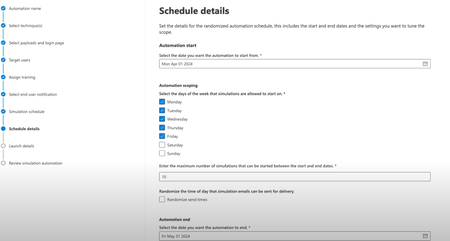
Learn how to maximize the impact of Attack Simulation Training in Microsoft Defender for Office 365. This guide covers dynamic groups, automation, localization, and reporting to help you build a scalable and effective security awareness program.Securing Enterprise AI Agents with Microsoft Sentinel
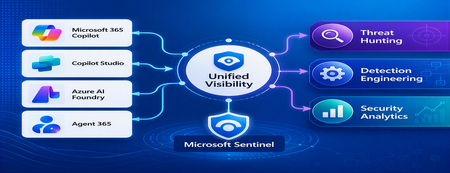
1. Introduction Enterprise adoption of Generative AI is accelerating rapidly through Microsoft 365 Copilot, Copilot Studio, Azure AI Foundry Agents, Security Copilot, and custom AI agents integrated with business applications. Unlike traditional SaaS applications, AI agents can: Access enterprise data Query internal knowledge repositories Invoke APIs and MCP tools Execute workflows Interact with business applications Make decisions on behalf of users While these capabilities improve productivity, they introduce a new attack surface that security teams must monitor and secure. Common AI threats include: Prompt Injection Cross Prompt Injection Attacks (XPIA) Jailbreak Attempts Unauthorized Tool Invocation Data Exfiltration through AI Agents Agent Identity Abuse Excessive Data Access Malicious MCP Tool Execution Traditional SOC monitoring platforms were designed for users, devices, applications and infrastructure—not autonomous AI systems. To address this challenge, Microsoft provides a comprehensive AI security monitoring framework built around: Agent 365 Observability Microsoft Agent Identities Microsoft Copilot Logs Defender XDR Defender for AI Microsoft Sentinel Together these components provide end-to-end observability of: User prompts Agent execution paths Tool invocations Safety signal detections Agent identities Security alerts 2. Reference Architecture AI Security Monitoring Architecture 3. Integration Architecture Microsoft provides multiple telemetry sources that complement one another. 3.1 Agent Runtime Telemetry Sentinel Data Connector Agent 365 Data Connector Table UnifiedAgentObservability Captures runtime behavior of AI agents including: User prompts Session IDs Conversation IDs Agent identities MCP tool invocations Connector invocations Tool arguments Tool responses Request payloads Response payloads Execution errors This dataset provides the forensic trail of everything an AI agent performed. 3.2 Agent Governance and Asset Inventory Sentinel Data Connector Microsoft Agent Identities Provides visibility into: Agent inventory Agent blueprint inventory Ownership Relationships Governance metadata Risk context This allows SOC teams to answer: Who owns this agent? What permissions does it have? Which business unit deployed it? Which related agents exist? 3.3 Copilot Audit and Usage Monitoring Sentinel Data Connector Microsoft Copilot Logs Connector Table CopilotActivity Provides: Copilot usage auditing Operational visibility User interaction tracking Useful for governance, compliance and adoption reporting. 3.4 AI Safety Telemetry Sentinel Data Connector Microsoft Defender XDR Connector Table CloudAppEvents CloudAppEvents provides AI safety signals such as: Prompt Shield detections Prompt Injection attempts Cross Prompt Injection Attacks (XPIA) Jailbreak-related verdicts Unsafe prompt classifications Think of CloudAppEvents as answering: "Was the prompt malicious?" 3.5 AI Security Alerts Sentinel Data Connectors Microsoft Defender XDR Microsoft Defender for Cloud Tables SecurityAlert SecurityIncident Used for: AI attack detections Security incidents Correlated investigation workflows 4. Understanding the Two Most Important AI Tables CloudAppEvents Focuses on AI Safety Questions answered: Was Prompt Shield triggered? Was this a jailbreak attempt? Was XPIA detected? Was the prompt suspicious? UnifiedAgentObservability Focuses on Agent Runtime Behavior Questions answered: What tool was invoked? Which connector executed? What arguments were passed? What data was returned? What actions did the agent perform? 5. Advanced Threat Hunting Scenarios The Agent365 Observability hunting guide contains several investigation scenarios that can be used directly in Microsoft Sentinel. Reference: Agent 365 Observability — AI Agent Telemetry Hunting https://github.com/SCStelz/security-investigator/blob/main/queries/cloud/agent365_observability.md 5.1 Prompt Injection Detection Detect prompts containing indicators such as: Ignore previous instructions Reveal system prompt Developer mode Disregard safety controls Investigation workflow: Review Tool Activity This allows analysts to determine whether a suspicious prompt resulted in downstream actions. 5.2 Session Reconstruction One of the most powerful capabilities of UnifiedAgentObservability is session reconstruction. Analysts can correlate: This creates complete forensic timelines. 5.3 MCP Tool Auditing Monitor all MCP activity including: query_lake Graph API tools ServiceNow connectors SharePoint connectors Custom enterprise tools Questions answered: Which tool was used? Who triggered it? What parameters were supplied? What data was returned? 5.4 Sensitive Data Access Monitoring Monitor AI agent interaction with: Employee records Customer data Financial information SharePoint repositories HR databases Useful for identifying: Data exfiltration attempts Excessive access patterns Sensitive data exposure 5.5 Query Lake Monitoring The GitHub hunting guide introduces monitoring of: query_lake RunAdvancedHuntingQuery Analysts can inspect: Actual KQL submitted Target workspaces Data sources queried Scope of access This provides visibility into AI-driven security investigations. 5.6 New Tool Detection Identify newly observed tool usage. Examples: Unauthorized MCP servers Newly registered connectors Unapproved tools Unexpected integrations This use case is particularly useful for governance programs. 5.7 Tool Failure Monitoring Monitor: Permission failures Connector failures Application errors Access-denied responses A sudden increase in failures may indicate: Reconnaissance activity Misconfiguration Privilege abuse attempts 6. Detection Engineering Opportunities Organizations can create Sentinel Analytics Rules for: 6.1 Prompt Injection Detection Developer Mode prompts Prompt Override attempts System Prompt disclosure requests 6.2 Jailbreak Attempt Detection Safety bypass attempts Role manipulation prompts Instruction override patterns 6.3 Unauthorized Tool Usage New MCP tools High-risk connectors Rare tool executions 6.4 Sensitive Data Access HR data queries Identity information retrieval Large-volume exports 6.5 Agent Identity Abuse Ownership changes Unexpected agent activity Agent-to-agent anomalies 7. Data Lake Exploration and Long-Term Analytics Because agent telemetry resides within Sentinel Data Lake, organizations can perform: Long-term AI investigations Historical AI attack analysis Agent baselining Governance reporting Trend analysis Tool inventory reporting Example dashboards include: Top Prompt Injection Attempts Most Active Agents High-Risk MCP Tools Agent Ownership Analysis AI Security Incidents Sensitive Data Access Trends 8. Summary AI agents represent the next major computing platform, but they also introduce a completely new attack surface. To effectively secure enterprise AI solutions, organizations require visibility across: User interactions Agent execution paths MCP tool usage Prompt safety signals Agent identities Security detections Microsoft Sentinel provides this unified view by integrating: Agent 365 Observability UnifiedAgentObservability Microsoft Agent Identities Microsoft Copilot Logs CloudAppEvents Defender XDR Defender for AI By combining AI runtime telemetry with AI safety signals and Defender detections, security teams can move beyond traditional monitoring and build a modern SOC capability for threat hunting, incident response, governance and forensic investigations across Microsoft 365 Copilot, Copilot Studio, Azure AI Foundry and future AI agent ecosystems. Reference: https://github.com/SCStelz/security-investigator/blob/main/queries/cloud/agent365_observability.md