database platform cse
59 TopicsData Archiving Strategies for SQL Server
As databases grow, keeping them performing well becomes increasingly more difficult. Often pruning data that is no longer required is a better strategy. This blog explores different techniques to remove or archive data at a high level. Some of the techniques depend on the version of SQL Server that you are running (box product, Azure SQL DB/HyperScale, or Azure SQL Managed Instance), but some techniques apply to all.
Automating the setup of Azure SQL Managed Instance Link
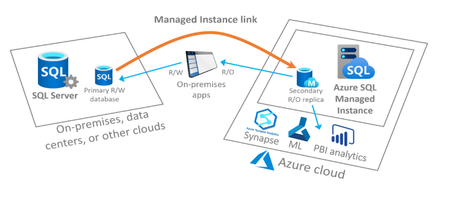
In this post we will be discussing how to automate the setup of the Managed Instance Link feature which enables near real-time data replication from SQL Server to Azure SQL Managed Instance. This feature is an extremely powerful migration tool for moving your databases from SQL Server running on-premises, in Azure VMs or on other cloud providers to Azure SQL Managed Instance and can also be used to provide a readable copy of your database(s) on Azure SQL Managed Instance for offloading specific real only workloads. The scripts we have created and referenced here in this post are a joint effort between the SQL CSE Engineering team and the Azure SQL Managed Instance team at Microsoft.Oracle to Azure SQL Post Migration Optimization: Handling Oracle Function-Based Indexes in Azure SQL
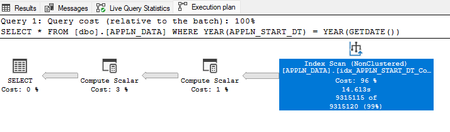
Why Post-Migration Optimization Matters For customers migrating from Oracle to Azure SQL Databases, understanding Azure SQL optimization techniques can make a significant difference in overall database performance. During the Application Stress Testing phase, it is essential to identify query patterns, evaluate index usage, and refine queries to prevent performance bottlenecks and ensure system efficiency. While Azure SQL databases Intelligent Query Processing (IQP) can significantly improve performance with minimal intervention, certain complex scenarios may still require manual query rewrites to achieve the desired level of performance. Leveraging SARGable Queries in SQL Server One such optimization technique involves ensuring that queries in SQL Server are SARGable (Search ARGument-able). SARGable queries enable the SQL Engine to efficiently leverage indexes, significantly reducing resource consumption and execution time. For instance, small adjustments such as replacing column transformations with range-based conditions, creating computed columns, and adding required indexes on computed columns can have a significant impact on query performance. Metric Non-SARGable Query SARGable Query Execution Plan Index Scan (usually less efficient) Index Seek (usually more efficient) IO Cost High (Reads Many Pages) Low (Reads Fewer Pages) CPU Time Higher (Function Evaluation for Rows) Lower (Direct Use of Index) Logical Reads High (entire index/table scanned) Low (only relevant index pages accessed) Handling Function-Based Indexes: Oracle vs SQL Server Oracle: In Oracle, function-based indexes allow indexing on the result of a function or expression. This enables efficient query execution when functions or expressions are used in WHERE or JOIN conditions. The TRUNC(APPLN_START_DT) function is precomputed and stored in the Index. Queries can get the value of the expression from the index instead of computing it. The following is an example of this in practice: -- Create a function-based index on the TRUNC(APPLN_START_DT) expression CREATE INDEX idx_appln_start_dt ON appln_data ( trunc(appln_start_dt) ); -- Filter rows where the year of APPLN_START_DT matches the current year. SELECT * FROM appln_data WHERE trunc(appln_start_dt, 'YYYY') = trunc(sysdate, 'YYYY'); SQL Server: SQL Server takes a slightly different approach to handling Indexes and Query Optimization, particularly when working with large datasets or tables containing millions of rows. The SQL optimizer excels when queries are SARGable (Search ARGument-able), meaning the predicates are written to allow direct index utilization without applying transformations to columns. Let’s analyze this with a simple and practical example to see how query design impacts performance, resource usage, and execution efficiency. Let's analyze two versions of a query on a table [APPLN_DATA] with 50 million rows to understand how query formulation impacts performance, resource utilization, and execution efficiency. Comparing SARGable and Non-SARGable Queries Non-SARGable Query: -- Filter rows where the year of APPLN_START_DT matches the current year. SELECT * FROM [dbo].[APPLN_DATA] WHERE YEAR(APPLN_START_DT) = YEAR(GETDATE()); Execution Plan: Index Scan. Logical Reads: 928,804 CPU Time: 7,562 ms Physical Reads: 2 Elapsed Time: 63,130 ms Execution Plan: Why It's Inefficient: The YEAR() function transforms the APPLN_START_DT column, which prevents the optimizer from performing an Index Seek and forces an Index Scan. The execution plan confirms this by showing an Index Scan, where SQL Server reads through all rows instead of directly seeking the relevant ones using the index. This behavior increases resource consumption, including logical reads, CPU usage, I/O costs, and overall query execution time. SARGable Query: SELECT * FROM [dbo].[APPLN_DATA] WHERE APPLN_START_DT >= CAST(YEAR(GETDATE()) AS CHAR(4)) + '-01-01' AND APPLN_START_DT < CAST(YEAR(GETDATE()) + 1 AS CHAR(4)) + '-01-01'; Execution Plan: Index Seek. Logical Reads: 173,041 CPU Time: 3,547 ms Elapsed Time: 52,092 ms Execution Plan: Why It's Better: The query uses range-based conditions (>= and <) directly on the APPLN_START_DT column without applying any functions. This makes the query SARGable, allowing SQL Server to efficiently perform an Index Seek, as shown in the execution plan. An Index Seek ensures that SQL Server retrieves only the relevant rows, significantly reducing logical reads, CPU usage, and overall query execution time. Understanding the Key Differences and Impact of SARGable and Non-SARGable Queries Aspect Non-SARGable SARGable Query Example WHERE YEAR(APPLN_START_DT) = YEAR(GETDATE()) WHERE APPLN_START_DT >= '2024-01-01' Index Usage Index Scan (Due to YEAR() function - inefficient) Index Seek (efficient) Logical Reads High (entire index/table scanned) Low (only relevant index pages accessed) CPU Time High Low Elapsed Time Longer Shorter Query Optimization Applies function on the column Uses range conditions without transformations Additional Optimization Techniques: A Computed column with an index was not used here because the query retrieves rows for an entire year, making range-based conditions more efficient. Computed indexes are more suitable for scenarios with specific transformations on smaller subsets of data, such as Calculations and Filtering for a particular month or day. In our example, we use SELECT * for simplicity, but in real-world workloads, queries typically retrieve specific columns based on application requirements. Selecting only the required columns reduces I/O and improves query performance. Additionally, Covering Indexes (indexes that include all queried columns) should be considered to eliminate Key Lookups, further enhancing performance for frequently accessed queries. If your table has billions of rows, even efficient Index Seeks may take considerable time. Filtered Indexes, Indexed Views and Partitioning the table based on a logical key (e.g., date ranges) can help improve query performance further. Key Takeaways for a successful Heterogenous Migration: Oracle's function-based indexes can be adapted in SQL Server using Range-based Conditions, Computed Columns with Indexes, Indexed Views, or Application-level Optimizations. Aim to write SARGable queries to leverage SQL Server's indexing capabilities effectively. Avoid using Functions in Query Predicates. Evaluate and consider the use of Indexed Views and Filtered Indexes. It is crucial to iteratively analyze and Update Index Statistics, Evaluate Index Access patterns, Review Histograms, monitor Query Plans and Fragmentation, Rebuilding Indexes during the App Stress Testing phase to achieve optimal performance. Collaborate with application developers to refactor query logic when needed. References: Intelligent query processing details - SQL Server | Microsoft Learn Create indexed views - SQL Server | Microsoft Learn Create filtered indexes - SQL Server | Microsoft Learn Migrating Oracle Databases to SQL Server (OracleToSQL) - SQL Server | Microsoft Learn Automatic tuning - SQL Server | Microsoft Learn Feedback and suggestions If you have feedback or suggestions for improving this data migration asset, please contact the Databases SQL Ninja Engineering Team (datasqlninja@microsoft.com). Thanks for your support! Note: For additional information about migrating various source databases to Azure, see the Azure Database Migration Guide.Azure SQL Managed Instance – Sync Agent Jobs and Logins in Failover Groups
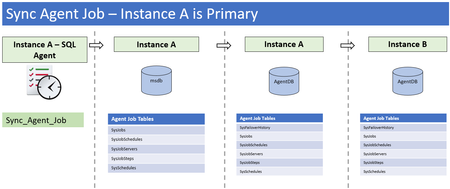
In an Azure SQL Managed Instance setup with Failover Group, the schema, data, and database-level users will always be synced between primary and secondary instances. As of October 2021, there is no sync mechanism for SQL Server Agent Jobs or Server Logins/Roles because the functionality of replicating system databases does not exist. This document provides guidance and scripts to implement a workaround solution to have the Agent Jobs and Server Logins/Roles synced between primary and secondary instances.Db2 to Azure SQL DB parallel data copy by generating ADF copy activities dynamically
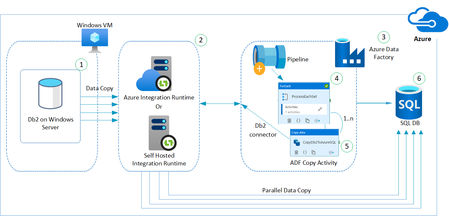
Want to utilize near to full network bandwidth / CPU resources on source and target to perform efficient data copy from Db2 to Azure SQL? Follow this tech article to know more about how ADF can be utilized for this purpose.Monitoring CDC using Extended Events in SQL Server 2022
What do the new SQL 2022 CDC extended events track? CDC jobs include: Capture Job - Captures changes into capture table. Clean-up Job - Removes older data from capture table. Each event will cover the different CDC job activities. repl_logscan_session reports on capture job progress. cdc_cleanup_job_status reports on Clean-up job progressDatabase Migration / Reverse Migration between Azure SQL (DB/MI) and SQL Server using SmartBulkCopy
The purpose of this blog post is to accelerate and automate database migrations between different SQL Server Source and Target pairs that are out of scope for our 1st Party migration tooling such as DMA/DMS. Many times there is a need to migrate back to on-premises from Azure SQL (for compliance or regulatory reasons) and this blog can cover the option of accomplishing this using SmartBulkCopy for data movement.