data retention
14 TopicsSentinel Foundry - MCP Server (Github Community Release)
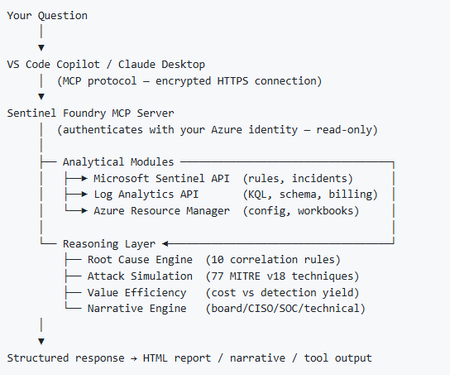
I’ve been cooking something that a lot of people in SOC have been struggling with — especially on the engineering side of Microsoft Sentinel. Thanks to the Microsoft Security team for shaping the capabilities of Sentinel even better with Sentinel Data Lake & Modern SecOps. Today’s the day I can finally share it. Note: This is not an official Microsoft product, but it is designed to make the Sentinel Build even better (complement) with much more intelligence. 🚀 Sentinel Foundry is now in public preview with 43 tools. (Sentinel Foundry - MCP Server) It’s an MCP server built to act like the brain of a strong Sentinel engineer — helping make building, improving, and operating Sentinel far more practical, faster, and honestly more enjoyable. For a lot of teams, the challenge is not understanding what Sentinel can do. The hard part is the engineering work around it: -> Deciding what data should actually be ingested -> Building a clean, scalable Sentinel foundation -> Writing useful detections instead of noisy ones -> Balancing security value with cost -> Turning ideas into deployable engineering outputs That is exactly why I built Sentinel Foundry to help communities grow stronger. It helps with the real engineering tasks behind Sentinel — from architecture thinking to detection design, deployment planning, ingestion strategy, automation ideas, and many of the workflows outlined in the GitHub project. How does it work? Here’s one of the flagship prompts I ran with it: “Give me a complete security posture report for our workspace. Score each pillar and tell me what to prioritise.” And within seconds, it produced a structured engineering blueprint that would normally take a lot longer to pull together manually. You can see the example prompts here in what it can do: https://github.com/prabhukiranveesam/Sentinel-Foundry#what-can-it-do I want building Sentinel to feel less like repetitive engineering overhead — and more like real security engineering that is fast, creative, and enjoyable. If you work with Sentinel as a SOC L2 analyst, engineer, detection engineer, consultant, or architect, I’d genuinely love for you to try it and tell me what you think. 🔗 Public Preview: https://github.com/prabhukiranveesam/Sentinel-Foundry This is just the start of an AI era — and I’m excited to keep shaping it with more powerful features over the coming days. This is very easy to set up and will be available to all of you at no cost during this month as part of the public preview, and your feedback is extremely valuable to shape this as a powerful solution.1.1KViews0likes2Comments
Reset Data Lake?
Hi, Is the only want to reset or change the Data Lake to contact Microsoft Support. We've a ticket open for a few days now. The Data Lake was setup as in a test subscription and we really need to delete it/reset it and start again under a proper production subscription. Thanls227Views0likes1Comment
Sentinel datalake: private link/private endpoint
Has anyone already configured Sentinel Datalake with a private link/private endpoint setup? I can't find any instructions for this specific case. Can I use the wizard in the Defender XDR portal, or does it require specific configuration steps? Or does it require configuring a private link/private endpoint setup on the Datalake component after activation via the wizard?329Views0likes2CommentsFetching alerts from Sentinel using logic apps
Hello everyone, I have a requirement to archive alerts from sentinel. To do that I need to do the following: Retrieve the alerts from Sentinel Send the data to an external file share As a solution, I decided to proceed with using logic apps where I will be running a script to automate this process. My questions are the following: -> Which API endpoints in sentinel are relevant to retrieve alerts or to run kql queries to get the needed data. -> I know that I will need some sort of permissions to interact with the API endpoint. What type of service account inside azure should I create and what permissions should I provision to it ? -> Is there any existing examples of logic apps interacting with ms sentinel ? That would be helpful for me as I am new to Azure. Any help is much appreciated !676Views1like4CommentsFinOps In Microsoft Sentinel
Microsoft Sentinel's security analytics and operations data is stored in an Azure Monitor Log Analytics workspace. Billing is based on the volume of data analyzed in Microsoft Sentinel and stored in the Log Analytics workspace. The cost of both is combined in a simplified pricing tier. Microsoft 365 data sources are always free to ingest for all Microsoft Sentinel users: Billable data sources: Although alerts are free, the raw logs for Microsoft Endpoint Defender, Defender for Cloud Apps, Microsoft Entra ID sign in and audit logs, and Azure Information Protection (AIP) data types are paid: Microsoft Sentinel data retention is free for the first 90 days. Enable Microsoft Sentinel on an Azure Monitor Log Analytics workspace and the first 10 GB/day is free for 31 days. The cost for both Log Analytics data ingestion and Microsoft Sentinel analysis charges up to the 10 GB/day limit are waived during the 31-day trial period. This free trial is subject to a 20 workspace limit per Azure tenant • By default, all tables in your workspace inherit the workspace's interactive retention setting and have no archive. • You can modify the retention and archive settings of individual tables Azure Monitor Logs retains data in two states: - Interactive retention: Lets you retain Analytics logs for interactive queries of up to 2 years. - Archive: Lets you keep older, less used data in your workspace at a reduced cost. • You can access data in the archived state by using search jobs, restore and keep data in archived state for up to 12 years • Its very important for cost management in MS Sentinel when you define short data retention period, but firstly go in Log Analytics WS | Workbooks | Workspace Usage in order to see tables size Use this workbook to analyze the the sizes of the different tables in your workspace: Where can save your money? Ingestion • Carefully plan what data is sent into your Microsoft sentinel workspace • Utilize filtering mechanisms to reduce ingestions to what the SOC needs • Set daily cap (good for PoC scenarios but not recommend for production) Retention • Send data to other storage platforms that have cheaper storage costs (Azure blob storage, Azure data explorer) Compute • Shutdown Azure machine learning compute during off hours, consider using reserved instances pricing • Set quotas on your subscription and workspaces • Use low-priority virtual machine (VM) Bandwidth • Sending data across Azure regions might incur into additional costs Ingestion planning • Analyze your data sources and decides what data is needed by your SOC for detection, investigations, hunting and enrichment. Take use-driven approach • Plan your workspace design • Existing workspaces might be ingesting data not needed by the SOC • Consider using separate workspace for Microsoft Sentinel • When possible enable Defender for Servers on the same workspace where you enable Microsoft Sentinel, you get 500 MB of free data ingestion per day • If you configure your Log Analytics agent to send data to two or more different Log Analytics workspaces (multi-homing), you'll get 500-MB free data ingestion for each workspace. Retention • Microsoft Sentinel retention is charged ($0.1/GB/month) and can become a big portion of the Microsoft Sentinel cost • 1.2 TB/day ingestion with 1-year retention (East US list prices) Ingestion: ~ $89К/month Retention: ~ $33К/month • If you require more than 90 days retention, determine if you need it for the whole workspace or just some tables • Consider using other storage platform for long storage retention (Azure blob storage, Azure data explorer) Long term retention options: • Azure blob storage • Cheaper than Microsoft sentinel retention • Difficult for query • Ideal for audit/compliance purposes Azure Data explorer Stores security logs in Azure Data Explorer on a long-term basis. Minimizes costs and provides easy access when you need to query the data and stores most of the data in the cold cache, minimizing the computing cost. Log Analytics doesn't currently support exporting custom log tables. In this scenario, you can use Azure Logic Apps to export data from Log Analytics workspaces. Because Azure Data Explorer provides long-term storage, you can reduce your Sentinel retention costs with this approach and ideal for forensic investigation and hunting on older data Can achieve up to 75% saving on retention costs Instead of using Azure Data Explorer for long-term storage of security logs, you can use Storage. This approach simplifies the architecture and can help control the cost. A disadvantage is the need to rehydrate the logs for security audits and interactive investigative queries. With Azure Data Explorer, you can move data from the cold partition to the hot partition by changing a policy. This functionality speeds up data exploration. Bandwidth Sending telemetry from one Azure region to another can incur in bandwidth costs this only affect Azure VMs that send telemetry across Azure regions data sources based on diagnostics settings are not affected not a big cost component compared to ingestion or retention Example: 1000 VMs, where each generates 1GB/day, sending data from US to EU: 1000 VMs * 1GB/day *30 days/month*$0.05/GB =$1.500/month Ingestion Cost Alert Playbook Managing cost for cloud services is an essential part of ensuring that you get maximum value for your investment in solutions running on this computing platform. Azure Sentinel is no different. To help you exercise greater control over your budget for Azure Sentinel this playbook will send you an alert should you exceed a budget that you define for your Azure Sentinel Workspace within a given time-frame With the ingestion cost alert playbook, you can set up an alert based on the budget defined in your Microsoft Sentinel workspace within a given timeframe. Ingestion Anomaly Alert Playbook This playbook sends you an alert should there be an ingestion spike into your workspace. The playbook uses the series_decompose_anomalies KQL function to determine anomalous ingestion The Workspace Usage Report workbook The Workspace Usage Report workbook provides your workspace's data consumption, cost, and usage statistics. The workbook gives the workspace's data ingestion status and amount of free and billable data. You can use the workbook logic to monitor data ingestion and costs, and to build custom views and rule-based alerts. This workbook also provides granular ingestion details. The workbook breaks down the data in your workspace by data table, and provides volumes per table and entry to help you better understand your ingestion patterns. Azure pricing model – based on volume of data ingested User Entity Behavior Analytics Approximately 10% of the cost of logs selected for UEBA Reduce To change your pricing tier commitment, select one of the other tiers on the pricing page, and then select Apply. You must have Contributor or Owner role in Microsoft Sentinel to change the pricing tier costs for Microsoft Sentinel Useful links: Tools that are related to FinOps on Azure Sentinel (Azure Pricing Calculator, Azure Cost Management, Azure Advisor, TCO Calculator, Azure Hybrid Benefit Savings Calculator) https://techcommunity.microsoft.com/t5/fasttrack-for-azure/the-azure-finops-guide/ba-p/3704132 Manage and monitoring Costs for Microsoft Sentinel https://learn.microsoft.com/en-us/azure/sentinel/billing-monitor-costs Reduce costs for Microsoft Sentinel https://learn.microsoft.com/en-us/azure/sentinel/billing-reduce-costs Ingestion Cost Spike Detection Playbook https://techcommunity.microsoft.com/t5/microsoft-sentinel-blog/ingestion-cost-spike-detection-playbook/ba-p/2591301 Ingestion Cost Alert Playbook https://techcommunity.microsoft.com/t5/microsoft-sentinel-blog/ingestion-cost-alert-playbook/ba-p/2006003 Introducing Microsoft Sentinel Optimization Workbook https://techcommunity.microsoft.com/t5/microsoft-sentinel-blog/introducing-microsoft-sentinel-optimization-workbook/ba-p/39014892.4KViews1like0CommentsEdit a single watchlist item
Hi, I have a watchlist, let's say it has 3000 watchlist items present. I want to modify the value of an entry - an IP address that is no longer required. Can I edit this programmatically? At present I manually have to scroll through each page of results with a CTRL+F to find on the page which is really lame. Surely there must be a better way?782Views0likes3CommentsLog Retention Configuration in Microsoft Sentinel for SAP Data Connector
Good day Everyone! I would like to ask if there is a specific setting that can be configured in the Microsoft Sentinel for SAP Data Connector to specify the log retention. When the Microsoft Sentinel for SAP Data Connector ingests logs from the SAP environment and sends them to the Log Analytics workspace, are local copies of the logs retained in the VM where the SAP Data Connector resides? If yes, can someone please share with us how to configure the log retention to avoid consuming all the disk space in the VM. Thank you in advance.672Views0likes0Comments
Error ussing the powershell script to configure Long term retention on Sentinel tables.
Hi everybody. I recently use the powershell Configure-Long-Term-Retention.ps1 that is provided by the community Sentinel Github and follow the steps to change the retention of my tables on Sentinel, but every time that I do that, get the same error: Update-TablesRetention {"error":{"code":"InvalidInput","message":"One or more validation errors occurred","target":"property","details":[{"code":"InvalidParameter","message":"Unexpected character encountered while parsing value: ,. Path 'properties.retentionInDays', line 3, position 25.","target":"properties.retentionInDays"}]}} Anyone knows why I got this error? I tried whit many tables, whit old and new Sentinel instances and got the same error. Thanks in advance guys.1.3KViews0likes2Comments
Sentinel Issues and out of service sometimes
Hello, Sometimes we have a problem with sentinel data retrieving, no statistic are shown in overview and the taps is just loading, for example logs, the pages are just loading, it's not internet issue, as we testing from different networks. For example yesterday, there are some analytics we are working in that for testing, the used KQL query of that rule is retrieving data in logs, but when apply it in analytic rule, there are no result, and it's delayed to up of 2h. Our LAW location is in West Europe Is it a global issue?Solved2.5KViews0likes1Comment