data retention
24 TopicsManage all your Microsoft Sentinel data in one place with Unified Data Management (Public Preview)
As security teams bring in more data from more sources and use it across SIEM and XDR workflows, decisions about connector health, ingestion volume, and cost optimization get harder. Today, we’re announcing the public preview of Unified Data Management for Microsoft Sentinel, available in the new Data & connectors experience in the Microsoft Defender portal, so you can monitor and manage your data from a single place. What Unified Data Management is and why it matters Unified Data Management brings connectors, tables, and ingestion health together. Instead of moving between separate pages, you can see your full data landscape, spot issues, and act on them from one view. It’s designed to help you quickly answer questions like: Which connectors are configured and which need attention? Which tables are receiving data? Are there ingestion spikes, drops, or stale data patterns? Which tables drive the most ingestion volume? What schema, transformations, and retention settings apply to a table? You’ll find it under Setup & configuration > Data & connectors, organized into three tabs: Overview, Connectors, and Tables. Overview: See health at a glance The Overview tab gives you a workspace-level snapshot of ingestion and health, so you can catch data issues before they impact analytics, detections, investigations, or reporting. It surfaces: Ingestion volume: Daily ingestion split by Analytics tier and Data Lake tier for your selected time range. Connectors that need attention: Connectors with credential errors, ingestion failures, or outages, including error type, failure count, and last successful ingestion. Table ingestion fluctuations: Tables with unexpected volume changes, grouped into spikes and drops. Data ingestion volume by table: Your top ingesting tables, ranked by daily volume. Ingestion latency by table: How long it takes for data to become available after it’s generated. Together, these insights help you troubleshoot connector failures, track down cost spikes, validate that new connectors are flowing, and catch unexpected changes in volume. Figure 1: The Overview tab shows daily ingestion volume by tier alongside data health insights, including connectors that need attention and tables with unexpected volume spikes or drops. Connectors: One inventory for unified and classic connectors The Connectors tab puts unified data connectors and Sentinel classic data connectors side by side, so it’s easier to see which data sources are onboarded and how they're connected. From here, you can: View onboarded connectors with their status, provider, content source, and available updates. Switch between unified connectors and Sentinel classic connectors. Search and filter connectors by provider, data type, and status. Open connector details to review configuration and health. Unified connectors reduce duplication by allowing supported data sources to connect once and feed data across Microsoft security products. Sentinel classic connectors continue to support the broad connector ecosystem, including connectors built with the Codeless Connector Framework (CCF). Figure 2: The Connectors tab brings unified and Sentinel classic connectors into a single inventory, with counts for onboarded and connected connectors, available updates, and filters for provider, data type, and status. Tables: Health, schema, transformations, and retention in one place The Tables tab brings Microsoft Sentinel and Microsoft Defender XDR tables together with their health signals, schema, transformations, and retention settings. Key insights now appear right in the grid, so you can compare tables side by side: last data received, average daily ingestion volume, estimated daily ingestion cost, volume anomaly, tier, and retention settings. This makes it easier to spot tables that have gone stale, are growing unexpectedly, or are driving a big share of your ingestion volume. Select any table to open the details panel, which organizes everything about that table into tabs: Details panel tab What it shows Overview Table type, tier, analytics retention, total retention, and other table metadata. Schema Column names, data types, and descriptions, with no KQL query required. Transformations Filter, Split, and Scope Tag transformation rules applied to the table. Retention Analytics retention and total retention settings. Figure 3: The Tables tab opens a details panel for any selected table. The Schema tab is especially useful when you need to understand incoming data, validate table fields, or create transformation logic without first writing schema-discovery queries. Built for everyday data operations in the Microsoft Defender portal Data management touches nearly every part of security operations, from detection and investigation to hunting, retention, and cost optimization. By bringing these tasks into the Microsoft Defender portal, Unified Data Management cuts down on context switching and makes it clearer how connectors, tables, health, transformations, and retention fit together. It’s one more step in Microsoft Sentinel’s investment in a unified security operations experience, where SIEM and XDR data can be managed and used together. Preview availability and prerequisites Unified Data Management is now available in public preview in commercial cloud environments. To experience it, you’ll need: Microsoft Sentinel onboarded to the Microsoft Defender portal. Unified role-based access control (URBAC) enabled in the Microsoft Defender portal. Data (manage) permission in the Data Operations permission group. Workspace permissions equivalent to Log Analytics Contributor, including permissions to write workspace and table settings. Get started Ready to try it? Open the Microsoft Defender portal and go to Setup & configuration > Data & connectors. From there: Start on the Overview tab to check ingestion volume and data health. Use the Connectors tab to view your unified and classic connectors. Explore the Tables tab to review table health, schema, transformations, and retention. For implementation and configuration guidance, see: Manage data in Microsoft Sentinel and Defender Configure data connectors Manage your existing tables and data Monitor the health of your Microsoft Sentinel data connectors Unified connectors overview Microsoft Sentinel data connectors More Microsoft Sentinel data integration news Public Preview: Nested API Support Comes to Microsoft Sentinel CCF Create a pull codeless connector for Microsoft Sentinel Logs Ingestion API in Azure Monitor405Views0likes0CommentsSentinel Foundry - MCP Server (Github Community Release)
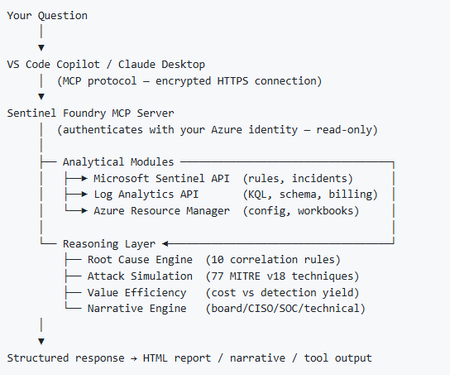
I’ve been cooking something that a lot of people in SOC have been struggling with — especially on the engineering side of Microsoft Sentinel. Thanks to the Microsoft Security team for shaping the capabilities of Sentinel even better with Sentinel Data Lake & Modern SecOps. Today’s the day I can finally share it. Note: This is not an official Microsoft product, but it is designed to make the Sentinel Build even better (complement) with much more intelligence. 🚀 Sentinel Foundry is now in public preview with 43 tools. (Sentinel Foundry - MCP Server) It’s an MCP server built to act like the brain of a strong Sentinel engineer — helping make building, improving, and operating Sentinel far more practical, faster, and honestly more enjoyable. For a lot of teams, the challenge is not understanding what Sentinel can do. The hard part is the engineering work around it: -> Deciding what data should actually be ingested -> Building a clean, scalable Sentinel foundation -> Writing useful detections instead of noisy ones -> Balancing security value with cost -> Turning ideas into deployable engineering outputs That is exactly why I built Sentinel Foundry to help communities grow stronger. It helps with the real engineering tasks behind Sentinel — from architecture thinking to detection design, deployment planning, ingestion strategy, automation ideas, and many of the workflows outlined in the GitHub project. How does it work? Here’s one of the flagship prompts I ran with it: “Give me a complete security posture report for our workspace. Score each pillar and tell me what to prioritise.” And within seconds, it produced a structured engineering blueprint that would normally take a lot longer to pull together manually. You can see the example prompts here in what it can do: https://github.com/prabhukiranveesam/Sentinel-Foundry#what-can-it-do I want building Sentinel to feel less like repetitive engineering overhead — and more like real security engineering that is fast, creative, and enjoyable. If you work with Sentinel as a SOC L2 analyst, engineer, detection engineer, consultant, or architect, I’d genuinely love for you to try it and tell me what you think. 🔗 Public Preview: https://github.com/prabhukiranveesam/Sentinel-Foundry This is just the start of an AI era — and I’m excited to keep shaping it with more powerful features over the coming days. This is very easy to set up and will be available to all of you at no cost during this month as part of the public preview, and your feedback is extremely valuable to shape this as a powerful solution.1.2KViews0likes2CommentsRun agentless SAP connector cost-efficiently
The SAP agentless connector uses SAP Integration Suite (Cloud Integration/CPI) to fetch SAP audit log data and forward it to Microsoft Sentinel. Because SAP CPI billing typically reflects message counts and data volume, you can tune the connector to control costs—while preserving reliability and timeliness. Cost reductions primarily come from sending fewer CPI messages by increasing the polling interval. The max-rows parameter is a stability safeguard that caps events per run to protect CPI resources; it is not a direct cost-optimization lever. After any change, monitor CPI execution time and resource usage. ☝️Note: It may not be feasible to increase the polling interval on busy systems processing large data volumes. Larger intervals lengthen CPI execution time and cause truncation when event spikes exceed max-rows. Cost optimization via longer intervals generally works best on lower-utilization environments (for example, dev and test) where event volume is modest and predictable. Tunable parameters Setting Default Purpose Cost impact Risk / trade-off Polling interval 1 minute How often the connector queries SAP and triggers a CPI message. Lower message count at longer intervals → potential cost reduction. Larger batches per run can extend CPI execution time; spikes may approach max-rows after which message processing for that interval is truncated. max-rows 150,000 Upper bound on events packaged per run to protect CPI stability. None (safeguard)—does not reduce message count on its own. If too low, frequent truncation; if too high, runs may near CPI resource limits. Adjust cautiously and observe. ☝️Note: When event volume within one interval exceeds max-rows, the batch is truncated by design. Remaining events are collected on subsequent runs. Find the latest documentation on available customizing parameters always on Microsoft Learn. Recommended approach Start with defaults. Use a 1-minute polling interval and max-rows = 150,000. Measure your baseline. Understand average and peak ingestion per minute (see KQL below). Optimize the polling interval first to reduce message count when costs are a concern. Treat max-rows as a guardrail. Change only if you consistently hit the cap; increase in small steps. Monitor after each change. Track CPI run duration, CPU/memory, retries/timeouts, and connector health in both SAP CPI and Sentinel. 💡Aim for the lowest interval that keeps CPI runs comfortably within execution-time and resource limits. Change one variable at a time and observe for at least a full business cycle. 🧐Consider the Azure Monitor Log Ingestion API limits to close the loop on your considerations. Analyze ingestion profile (KQL) ABAPAuditLog | where TimeGenerated >= ago(90d) | summarize IngestedEvents = count() by bin(UpdatedOn, 1m) | summarize MaxEvents = max(IngestedEvents), AverageEvents = toint(avg(IngestedEvents)), P95_EventsPerMin = percentile(IngestedEvents, 95) How to use these metrics? AverageEvents → indicates typical per-minute volume. P95_EventsPerMin → size for spikes: choose a polling interval such that P95 × interval (minutes) remains comfortably below max-rows. If MaxEvents × interval approaches max-rows, expect truncation and catch-up behavior—either shorten the interval or, if safe, modestly raise max-rows. Operational guidance ⚠️❗Large jumps (for example, moving from a 1-minute interval to 5 minutes and raising max-rows simultaneously) can cause CPI runs to exceed memory/time limits. Adjust gradually and validate under peak workloads (e.g., period close, audit windows). Document changes (interval, max-rows, timestamp, rationale). Alert on CPI anomalies (timeouts, retries, memory warnings). Re-evaluate regularly in higher-risk periods when SAP event volume increases. Balancing Audit Log Tuning and Compliance in SAP NetWeaver: Risks of Excluding Users and Message Classes When tuning SAP NetWeaver audit logging via transaction SM19 (older releases) or RSAU_CONFIG (newer releases), administrators can filter by user or message class to reduce log volume - such as excluding high-volume batch job users or specific event types - but these exclusions carry compliance risks: omitting audit for certain users or classes may undermine traceability, violate regulatory requirements, or mask unauthorized activities, especially if privileged or technical users are involved. Furthermore, threat hunting in Sentinel for SAP gets "crippled" due to missing insights. Best practice is to start with comprehensive logging, only apply exclusions after a documented risk assessment, and regularly review settings to ensure that all critical actions remain auditable and compliant with internal and external requirements. Cost-Efficient Long-Term Storage for Compliance Microsoft Sentinel Data Lake enables organizations to retain security logs - including SAP audit data - for up to 12 years at a fraction of traditional SIEM storage costs, supporting compliance with regulations such as NIS2, DORA and more. By decoupling storage from compute, Sentinel Data Lake allows massive volumes of security data to be stored cost-effectively in a unified, cloud-native platform, while maintaining full query and analytics capabilities for forensic investigations and regulatory reporting. This approach ensures that organizations can meet strict data retention and auditability requirements without compromising on cost or operational efficiency. Summary Use the polling interval to reduce message count (primary cost lever). Keep max-rows as a safety cap to protect CPI stability. Measure → adjust → monitor to achieve a stable, lower-cost configuration tailored to your SAP workload. Use built-in mirroring to the Sentinel Data Lake to store the SAP audit logs cost-efficient for years Next Steps Explore agentless SAP deployment config and parameter guide on Microsoft Learn Expand deployment to SAP Business Technology Platform Use the insightful blog series by AryaG for details on how to move to production with the built-in SAP content of agentless907Views0likes0Comments
Reset Data Lake?
Hi, Is the only want to reset or change the Data Lake to contact Microsoft Support. We've a ticket open for a few days now. The Data Lake was setup as in a test subscription and we really need to delete it/reset it and start again under a proper production subscription. Thanls251Views0likes1CommentMicrosoft Sentinel data lake FAQ
Microsoft Sentinel data lake (generally available) is a purpose‑built, cloud‑native security data lake. It centralizes all security data in an open format, serving as the foundation for agentic defense, enhanced security insights, and graph-based enrichment. It offers cost‑effective ingestion, long‑term retention, and advanced analytics. In this blog we offer answers to many of the questions we’ve heard from our customers and partners. General questions What is the Microsoft Sentinel data lake? Microsoft has expanded its industry-leading SIEM solution, Microsoft Sentinel, to include a unified, security data lake, designed to help optimize costs, simplify data management, and accelerate the adoption of AI in security operations. This modern data lake serves as the foundation for the Microsoft Sentinel platform. It has a cloud-native architecture and is purpose-built for security—bringing together all security data for greater visibility, deeper security analysis, contextual awareness and agentic defense. It provides affordable, long-term retention, allowing organizations to maintain robust security while effectively managing budgetary requirements. What are the benefits of Sentinel data lake? Microsoft Sentinel data lake is purpose built for security offering flexible analytics, cost management, and deeper security insights. Sentinel data lake: Centralizes security data delta parquet and open format for easy access. This unified data foundation accelerates threat detection, investigation, and response across hybrid and multi-cloud environments. Enables data federation by allowing customers to access data in external sources like Microsoft Fabric, ADLS and Databricks from the data lake. Federated data appears alongside native Sentinel data, enabling correlated hunting, investigation, and custom graph analysis across a broader digital estate. Offers a disaggregated storage and compute pricing model, allowing customers to store massive volumes of security data at a fraction of the cost compared to traditional SIEM solutions. Allows multiple analytics engines like Kusto, Spark, and ML to run on a single data copy, simplifying management, reducing costs, and supporting deeper security analysis. Integrates with GitHub Copilot and VS Code empowering SOC teams to automate enrichment, anomaly detection, and forensic analysis. Supports AI agents via the MCP server, allowing tools like GitHub Copilot to query and automate security tasks. The MCP Server layer brings intelligence to the data, offering Semantic Search, Query Tools, and Custom Analysis capabilities that make it easier to extract insights and automate workflows. Provides streamlined onboarding, intuitive table management, and scalable multi-tenant support, making it ideal for MSSPs and large enterprises. The Sentinel data lake is designed for security workloads, ensuring that processes from ingestion to analytics meet evolving cybersecurity requirements. Is Microsoft Sentinel SIEM going away? No. Microsoft is expanding Sentinel into an AI powered end-to-end security platform that includes SIEM and new platform capabilities - Security data lake, graph-powered analytics and MCP Server. SIEM remains a core component and will be actively developed and supported. Getting started What are the prerequisites for Sentinel data lake? To get started: Connect your Sentinel workspace to Microsoft Defender prior to onboarding to Sentinel data lake. Once in the Defender experience see data lake onboarding documentation for next steps. Note: Sentinel is moving to the Microsoft Defender portal and the Sentinel Azure portal will be retired by March 31, 2027. I am a Sentinel-only customer, and not a Defender customer. Can I use the Sentinel data lake? Yes. You must connect Sentinel to the Defender experience before onboarding to the Sentinel data lake. Microsoft Sentinel is generally available in the Microsoft Defender portal, with or without Microsoft Defender XDR or an E5 license. If you have created a log analytics workspace, enabled it for Sentinel and have the right Microsoft Entra roles (e.g. Global Administrator + Subscription Owner, Security Administrator + Sentinel Contributor), you can enable Sentinel in the Defender portal. For more details on how to connect Sentinel to Defender review these sources: Microsoft Sentinel in the Microsoft Defender portal In what regions is Sentinel data lake available? For supported regions see: Geographical availability and data residency in Microsoft Sentinel | Azure Docs. Is there an expected release date for Microsoft Sentinel data lake in GCC, GCC-H, and DoD? While the exact date is not yet finalized, we plan to expand Sentinel data lake to the US Government environments. . How will URBAC and Entra RBAC work together to manage the data lake given there is no centralized model? Entra RBAC will provide broad access to the data lake (URBAC maps the right permissions to specific Entra role holders: GA/SA/SO/GR/SR). URBAC will become a centralized pane for configuring non-global delegated access to the data lake. For today, you will use this for the “default data lake” workspace. In the future, this will be enabled for non-default Sentinel workspaces as well – meaning all workspaces in the data lake can be managed here for data lake RBAC requirements. Azure RBAC on the Log Analytics (LA) workspace in the data lake is respected through URBAC as well today. If you already hold a built-in role like log analytics reader, you will be able to run interactive queries over the tables in that workspace. Or, if you hold log analytics contributor, you can read and manage table data. For more details see: Roles and permissions in the Microsoft Sentinel platform | Microsoft Learn Data ingestion and storage How do I ingest data into the Sentinel data lake? To ingest data into the Sentinel data lake, you can use existing Sentinel data connectors or custom connectors to bring data from Microsoft and third-party sources. Data can be ingested into the analytics tier or the data lake tier. Data ingested into the analytics tier is automatically mirrored to the lake (at no additional cost). Alternatively, data that is not needed in the analytics tier can be ingested directly into the data lake. Data retention is configured directly in table management, for both analytics retention and data lake storage. Note: Certain tables do not support data lake-only ingestion via either API or data connector UI. See here for more information: Custom log tables. What is Microsoft’s guidance on when to use analytics tier vs. the data lake tier? Sentinel data lake offers flexible, built-in data tiering (analytics and data lake tiers) to effectively meet diverse business use cases and achieve cost optimization goals. Analytics tier: Is ideal for high-performance, real-time, end-to-end detections, enrichments, investigation and interactive dashboards. Typically, high-fidelity data from EDRs, email gateways, identity, SaaS and cloud logs, threat intelligence (TI) should be ingested into the analytics tier. Data in the analytics tier is best monitored proactively with scheduled alerts and scheduled analytics to enable security detections Data in this tier is retained at no cost for up to 90 days by default, extendable to 2 years. A copy of the data in this tier is automatically available in the data lake tier at no extra cost, ensuring a unified copy of security data for both tiers. Data lake tier: Is designed for cost-effective, long-term storage. High-volume logs like NetFlow logs, TLS/SSL certificate logs, firewall logs and proxy logs are best suited for data lake tier. Customers can use these logs for historical analysis, compliance and auditing, incident response (IR), forensics over historical data, build tenant baselines, TI matching and then promote resulting insights into the analytics tier. Customers can run full Kusto queries, Spark Notebooks and scheduled jobs over a single copy of their data in the data lake. Customers can also search, enrich and promote data from the data lake tier to the analytics tier for full analytics. For more details see documentation. What does it mean that a copy of all new analytics tier data will be available in the data lake? When Sentinel data lake is enabled, a copy of all new data ingested into the analytics tier is automatically duplicated into the data lake tier. This means customers don’t need to manually configure or manage this process, every new log or telemetry added to the analytics tier becomes instantly available in the data lake. This allows security teams to run advanced analytics, historical investigations, and machine learning models on a single, unified copy of data in the lake, while still using the analytics tier for real-time SOC workflows. It’s a seamless way to support both operational and long-term use cases—without duplicating effort or cost. What is the guidance for customers using data federation capability in Sentinel data lake? Starting April 1, 2026, federate data from Microsoft Fabric, ADLS, and Azure Databricks into Sentinel data lake. Use data federation when data is exploratory, infrequently accessed, or must remain at source due to governance, compliance, sovereignty, or contractual requirements. Ingest data directly into Sentinel to unlock full SIEM capabilities, always-on detections, advanced automation, and AI‑driven defense at scale. This approach lets security teams start where their data already lives — preserving governance, then progressively ingest data into Sentinel for full security value. Is there any cost for retention in the analytics tier? Analytics ingestion includes 90 days of interactive retention, at no additional cost. Simply set analytics retention to 90 days or less. Analytics retention beyond 90 days will incur a retention cost. Data can be retained longer within the data lake by using the “total retention” setting. This allows you to extend retention within the data lake for up to 12 years. While data is retained within the analytics tier, there is no charge for the mirrored data within the lake. Retaining data in the lake beyond the analytics retention period incurs additional storage costs. See documentation for more details: Manage data tiers and retention in Microsoft Sentinel | Microsoft Learn What is the guidance for Microsoft Sentinel Basic and Auxiliary Logs customers? If you previously enabled Basic or Auxiliary Logs plan in Sentinel: You can view Basic Logs in the Defender portal but manage it from the Log Analytics workspace. To manage it in the Defender portal, you must change the plan from Basic to Analytics. Once the table is transitioned to the analytics tier, if desired, it can then be transitioned to the data lake. Existing Auxiliary Log tables will be available in the data lake tier for use once the Sentinel data lake is enabled. Billing for these tables will automatically switch to the Sentinel data lake meters. Microsoft Sentinel customers are recommended to start planning their data management strategy with the data lake. While Basic and Auxiliary Logs are still available, they are not being enhanced further. Sentinel data lake offers more capabilities at a lower price point. Please plan on onboarding your security data to the Sentinel data lake. Azure Monitor customers can continue to use Basic and Auxiliary Logs for observability scenarios. What happens to customers that already have Archive logs enabled? If a customer has already configured tables for Archive retention, existing retention settings will not change and will be automatically inherited by the Sentinel data lake. All data, including existing data in archive retention will be billed using the data lake storage meter, benefiting from 6x data compression. However, the data itself will not move. Existing data in archive will continue to be accessible through Sentinel search and restore experiences: o Data will not be backfilled into the data lake. o Data will be billed using the data lake storage meter. New data ingested after enabling the data lake: o Will be automatically mirrored to the data lake and accessible through data lake explorer. o Data will be billed using the data lake storage meter. Example: If a customer has 12 months of total retention enabled on a table, 2 months after enabling ingestion into the Sentinel data lake, the customer will still have access to 10 months of archived data (through Sentinel search and restore experiences), but access to only 2 months of data in the data lake (since the data lake was enabled). Key considerations for customers that currently have Archive logs enabled: The existing archive will remain, with new data ingested into the data lake going forward; previously stored archive data will not be backfilled into the lake. Archive logs will continue to be accessible via the Search and Restore tab under Sentinel. If analytics and data lake mode are enabled on table, which is the default setting for analytics tables when Sentinel data lake is enabled, all new data will be ingested into the Sentinel data lake. There will only be one storage meter (which is data lake storage) going forward. Archive will continue to be accessible via Search and Restore. If Sentinel data lake-only mode is enabled on table, new data will be ingested only into the data lake; any data that’s not already in the Sentinel data lake won’t be migrated/backfilled. Only data that was previously ingested under the archive plan will be accessible via Search and Restore. What is the guidance for customers using Azure Data Explorer (ADX) alongside Microsoft Sentinel? Some customers might have set up ADX cluster for their DIY lake setup. Customers can choose to continue using that setup and gradually migrate to Sentinel data lake for new data that they want to manage. The lake explorer will support federation with ADX to enable the customers to migrate gradually and simplify their deployment. What happens to the Defender XDR data after enabling Sentinel data lake? By default, Defender XDR tables are available for querying in advanced hunting, with 30 days of analytics tier retention included with the XDR license. To retain data beyond this period, an explicit change to the retention setting is required, either by extending the analytics tier retention or the total retention period. You can extend the retention period of supported Defender XDR tables beyond 30 days and ingest the data into the analytics tier. For more information see Manage XDR data in Microsoft Sentinel. You can also ingest XDR data directly into the data lake tier. See here for more information. A list of XDR advanced hunting tables supported by Sentinel are documented here: Connect Microsoft Defender XDR data to Microsoft Sentinel | Microsoft Learn. KQL queries and jobs Is KQL and Notebook supported over the Sentinel data lake? Yes, via the data lake KQL query experience along with a fully managed Notebook experience which enables spark-based big data analytics over a single copy of all your security data. Customers can run queries across any time range of data in their Sentinel data lake. In the future, this will be extended to enable SQL query over lake as well. Note: Triggering a KQL job directly via an API or Logic App is not yet supported but is on the roadmap. Why are there two different places to run KQL queries in Sentinel experience? Advanced hunting queries both XDR and analytics tables, with compute cost included. Data lake explorer only queries data in the lake and incurs a separate compute cost. Consolidating advanced hunting and KQL explorer user interfaces is on the roadmap. This will provide security analysts a unified query experience across both analytics and data lake tiers. Where is the output from KQL jobs stored? KQL jobs are written into existing or new custom tables in the analytics tier. Is it possible to run KQL queries on multiple data lake tables? Yes, you can run KQL interactive queries and jobs using operators like join or union. Can KQL queries (either interactive or via KQL jobs) join data across multiple workspaces? Security teams can run multi-workspace KQL queries for broader threat correlation Pricing and billing How does a customer pay for Sentinel data lake? Billing is automatically enabled at the time of onboarding based on Azure Subscription and Resource Group selections. Customers are then charged based on the volume of data ingested, retained, and analyzed (e.g. KQL Queries and Jobs). See Sentinel pricing page for more details. 2. What are the pricing components for Sentinel data lake? Sentinel data lake offers a flexible pricing model designed to optimize security coverage and costs. At a high level, pricing is based on the volume of data ingested/processed, the volume of data retained, and the volume of data processed. For specific meter definitions, see documentation. 3. How does the business model for Sentinel SIEM change with the introduction of the data lake? There is no change to existing Sentinel analytics tier ingestion business model. Sentinel data lake has separate meters for ingestion, storage and analytics. 4. What happens to the existing Sentinel SIEM and related Azure Monitor billing meters when a customer onboards to Sentinel data lake? When a customer onboards to the Sentinel data lake, nothing changes with analytic ingestion or retention. Customers using data archive and Auxiliary Logs will automatically transition to the new data lake meters. How does data lake storage affect cost efficiency for high volume data retention? Sentinel data lake offers cost-effective, long-term storage with uniform data compression of 6:1 across all data sources, applicable only to data lake storage. Example: For 600GB of data stored, you are only billed for 100GB compressed data. This approach allows organizations to retain greater volumes of security data over extended periods cost-effectively, thereby reducing security risks without compromising their overall security posture. here How “Data Processing” billed? To support the ingestion and standardization of diverse data sources, the Data Processing feature applies a $0.10 per GB (US East) charge for all data ingested into the data lake. This feature enables a broad array of transformations like redaction, splitting, filtering and normalization. The data processing charge is applied per GB of uncompressed data Note: For regional pricing, please refer to the “Data processing” meter within the Microsoft Sentinel Pricing official documentation. Does “Data processing” meter apply to analytics tier data mirrored in the data lake? No. Data processing charge will not be applied to mirrored data. Data mirrored from the analytic tier is not subject to either data ingestion or processing charges. How is retention billed for tables that use data lake-only ingestion & retention? Sentinel data lake decouples ingestion, storage, and analytics meters. Customers have the flexibility to pay based on how data is retained and used. For tables that use data lake‑only ingestion, there is no included free retention—unlike the analytics tier, which includes 90 days of analytics retention. Retention charges begin immediately once data is stored in the data lake. Data lake storage billing is based on compressed data size rather than raw ingested volume, which significantly reduces storage costs and delivers lower overall retention spend for customers. Does data federation incur charges? Data federation does not generate any ingestion or storage fees in Sentinel data lake. Customers are billed only when they run analytics or queries on federated data, with charges based on Sentinel data lake compute and analytics meters. This means customers pay solely for actual data usage, not mere connectivity. How do I understand Sentinel data lake costs? Sentinel data lake costs driven by three primary factors: how much data is ingested, how long that data is retained, and how the data is used. Customers can flexibly choose to ingest data into the analytics tier or data lake tier, and these architectural choices directly impact cost. For example, data can be ingested into the analytics tier—where commitment tiers help optimize costs for high data volumes—or ingested data directly into the Sentinel data lake for lower‑cost ingestion, storage, and on‑demand analysis. Customers are encouraged to work with their Microsoft account team to obtain an accurate cost estimate tailored to their environment. See Sentinel pricing page to understand Sentinel pricing. How do I manage Sentinel data lake costs? Built-in cost management experiences help customers with cost predictability, billing transparency, and operational efficiency. Reports provide customers with insights into usage trends over time, enabling them to identify cost drivers and optimize data retention and processing strategies. Set usage-based alerts on specific meters to monitor and control costs. For example, receive alerts when query or notebook usage passes set limits, helping avoid unexpected expenses and manage budgets. See our Sentinel cost management documentation to learn more. If I’m an Auxiliary Logs customer, how will onboarding to the Sentinel data lake affect my billing? Once a workspace is onboarded to Sentinel data lake, all Auxiliary Logs meters will be replaced by new data lake meters. Do we charge for data lake ingestion and storage for graph experiences? Microsoft Sentinel graph-based experiences are included as part of the existing Defender and Purview licenses. However, Sentinel graph requires Sentinel data lake and specific data sources to build the underlying graph. Enabling these data sources will incur ingestion and data lake storage costs. Note: For Sentinel SIEM customers, most required data sources are free for analytics ingestion. Non-entitled sources such as Microsoft Entra ID logs will incur ingestion and data lake storage costs. How is Entra asset data and ARG data billed? Data lake ingestion charges of $0.05 per GB (US EAST) will apply to Entra asset data and ARG data. Note: This was previously not billed during public preview and is billed since data lake GA. To learn more, see: https://learn.microsoft.com/azure/sentinel/datalake/enable-data-connectors When a customer activates Sentinel data lake, what happens to tables with archive logs enabled? To simplify billing, once the data lake is enabled, all archive data will be billed using the data lake storage meter. This provides consistent long-term retention billing and includes automatic 6x data compression. For most customers, this change results in lower long‑term retention costs. However, customers who previously had discounted archive retention pricing will not automatically receive the same discounts on the new data lake storage meters. In these cases, customers should engage their Microsoft account team to review pricing implications before enabling the Sentinel data lake. Thank you Thank you to our customers and partners for your continued trust and collaboration. Your feedback drives our innovation, and we’re excited to keep evolving Microsoft Sentinel to meet your security needs. If you have any questions, please don’t hesitate to reach out—we’re here to support you every step of the way. Learn more: Get started with Sentinel data lake today: https://aka.ms/Get_started/Sentinel_datalake Microsoft Sentinel AI-ready platform: https://aka.ms/Microsoft_Sentinel Sentinel data lake videos: https://aka.ms/Sentineldatalake_videos Latest innovations and updates on Sentinel: https://aka.ms/msftsentinelblog Sentinel pricing page: https://aka.ms/MicrosoftSentinel_Pricing7.8KViews1like9CommentsExtending Sentinel Data Integration: Azure Blob Storage Support for CCF Connectors
As organizations scale their security operations, the ability to ingest, process, and analyze high volumes of data reliably becomes increasingly critical. Microsoft Sentinel continues to expand its ecosystem through the Codeless Connector Framework (CCF), enabling ISVs to build and deliver integrations with Sentinel faster while simplifying deployment for customers. Today, CCF extends even further with support for Azure Blob Storage, introducing a new pattern for how data can be delivered into Sentinel. Expanding Connector Patterns with Azure Blob Storage CCF has traditionally enabled connectors that integrate directly with partner APIs and data sources. With this latest enhancement, ISVs can now build connectors that read data from Azure Blob Storage—unlocking new flexibility in how security data is collected and delivered. In this model, an ISV writes data to an Azure Blob Storage account. The Sentinel connector then reads from that storage layer, using Azure-native components such as Event Grid and storage queues to process events and forward them through data collection rules (DCR) into Log Analytics workspace. This approach introduces a durable data layer between the data source and Sentinel, enabling more resilient and scalable ingestion scenarios. Why a durable data layer matters By leveraging Azure Blob Storage as part of the ingestion pipeline, CCF connectors gain important operational advantages. This architecture allows data to be buffered and processed asynchronously, helping manage fluctuations in data volume and ensuring consistent delivery. Key benefits include: Resilience: Buffers spikes and handles backpressure to maintain steady ingestion Improved Compatibility: Supports widely adopted Azure Blob-based log streaming, enabling seamless integration with partners that already use Azure for audit data delivery Data protection: Reduces risk of data loss during outages or throttling Scalability: Supports high-volume ingestion scenarios across tenants Flexibility: Enables architectures that can support multiple SIEMs or data consumers Together, these capabilities make CCF Azure Blob Storage based connectors a strong fit for partners managing large, variable, or distributed data pipelines. Partner adoption Early partners are already taking advantage of this capability to modernize their integrations and support evolving customer needs. Cloudflare Cloudflare integrates with Microsoft Sentinel using the Codeless Connector Framework (CCF) to bring Cloudflare log data into centralized security operations workflows. The connector ingests Cloudflare logs—delivered via Logpush to Azure Blob Storage—into Sentinel for analysis, enabling security teams to correlate web, network, and application activity with other security signals. By combining Cloudflare’s global threat visibility with Sentinel analytics and automation, this integration supports more effective threat detection, investigation, and incident response across Cloudflare‑protected environments. Netskope Web Transaction Events Netskope integrates with Microsoft Sentinel to provide detailed visibility into web and cloud activity across users, applications, and SaaS services. The connector ingests Netskope web transaction logs into Sentinel—leveraging Azure Blob Storage as a staging layer for log streaming and ingestion—to enable near real‑time analysis of user behavior, policy violations, and potential threats. By combining Netskope’s inline web inspection with Sentinel’s analytics and correlation capabilities, this integration helps security teams detect risky activity, investigate incidents, and strengthen monitoring across modern cloud environments. These integrations demonstrate how Azure Blob Storage support can simplify ingestion architectures while improving reliability and scalability for customers. Here is what our partners say about the functionality. Cloudflare: Netskope: Get started Developers can begin building CCF Azure Blob Storage -enabled connectors today using the guidance on Microsoft Learn. This documentation provides step-by-step instructions for configuring storage, processing events, and connecting data to Sentinel. In the unlikely event that you encounter any issues in building or updating your connector, App Assure is here to help. We are an engineering-backed team committed to supporting customers and software development companies throughout their journey with Sentinel to streamline integration and accelerate time to market. Reach out to us via our intake form for assistance.1.2KViews0likes0CommentsRSAC 2026: New Microsoft Sentinel Connectors Announcement
Microsoft Sentinel helps organizations detect, investigate, and respond to security threats across increasingly complex environments. With the rollout of the Microsoft Sentinel data lake in the fall, and the App Assure-backed Sentinel promise that supports it, customers now have access to long-term, cost-effective storage for security telemetry, creating a solid foundation for emerging Agentic AI experiences. Since our last announcement at Ignite 2025, the Microsoft Sentinel connector ecosystem has expanded rapidly, reflecting continued investment from software development partners building for our shared customers. These connectors bring diverse security signals together, enabling correlation at scale and delivering richer investigation context across the Sentinel platform. Below is a snapshot of Microsoft Sentinel connectors newly available or recently enhanced since our last announcement, highlighting the breadth of partner solutions contributing data into, and extending the value of, the Microsoft Sentinel ecosystem. New and notable integrations Acronis Cyber Protect Cloud Acronis Cyber Protect Cloud integrates with Microsoft Sentinel to bring data protection and security telemetry into a centralized SOC view. The connector streams alerts, events, and activity data - spanning backup, endpoint protection, and workload security - into Microsoft Sentinel for correlation with other signals. This integration helps security teams investigate ransomware and data-centric threats more effectively, leverage built-in hunting queries and detection rules, and improve visibility across managed environments without adding operational complexity. Anvilogic Anvilogic integrates with Microsoft Sentinel to help security teams operationalize detection engineering at scale. The connector streams Anvilogic alerts into Microsoft Sentinel, giving SOC analysts centralized visibility into high-fidelity detections and faster context for investigation and triage. By unifying detection workflows, reducing alert noise, and improving prioritization, this integration supports more efficient threat detection and response while helping teams extend coverage across evolving attack techniques. BigID BigID integrates with Microsoft Sentinel to extend data security posture management (DSPM) insights into security operations workflows. The solution brings visibility into sensitive, regulated, and critical data across cloud, SaaS, and on‑premises environments, helping security teams understand where high‑risk data resides and how it may be exposed. By incorporating data‑centric risk context into Sentinel, this integration supports more informed investigation and prioritization, enabling organizations to reduce data‑related risk and align security operations with data protection and compliance objectives. Commvault Cloud Commvault Cloud integrates with Microsoft Sentinel to bring data protection and cyber‑resilience telemetry into security operations workflows. The connector ingests security‑relevant signals from Commvault Cloud—such as backup anomalies, malware and ransomware indicators, and other threat‑related events—into Sentinel, enabling centralized detection, investigation, and automated response. By correlating backup intelligence with broader Sentinel telemetry, this integration helps security teams reduce blind spots, validate the scope of incidents, and improve coordination between security and recovery operations. CyberArk Audit CyberArk Audit integrates with Microsoft Sentinel to centralize visibility into privileged identity and access activity. By streaming detailed audit logs - covering system events, user actions, and administrative activity - into Microsoft Sentinel, security teams can correlate identity-driven risks with broader security telemetry. This integration supports faster investigations, improved monitoring of privileged access, and more effective incident response through automated workflows and enriched context for SOC analysts. Cyera Cyera integrates with Microsoft Sentinel to extend AI-native data security posture management into security operations. The connector brings Cyera’s data context and actionable intelligence across multi-cloud, on-premises, and SaaS environments into Microsoft Sentinel, helping teams understand where sensitive data resides and how it is accessed, exposed, and used. Built on Sentinel’s modern framework, the integration feeds context-rich data risk signals into the Sentinel data lake, enabling more informed threat hunting, automation, and decision-making around data, user, and AI-related risk. TacitRed CrowdStrike IOC Automation Data443 TacitRed CS IOC Automation integrates with Microsoft Sentinel to streamline the operationalization of compromised credential intelligence. The solution uses Sentinel playbooks to automatically push TacitRed indicators of compromise into CrowdStrike via Sentinel playbooks, helping security teams turn identity-based threat intelligence into action. By automating IOC handling and reducing manual effort, this integration supports faster response to credential exposure and strengthens protection against account-driven attacks across the environment. TacitRed SentinelOne IOC Automation Data443 TacitRed SentinelOne IOC Automation integrates with Microsoft Sentinel to help operationalize identity-focused threat intelligence at the endpoint layer. The solution uses Sentinel playbooks to automatically consume TacitRed indicators and push curated indicators into SentinelOne via Sentinel playbooks and API-based enforcement, enabling faster enforcement of high-risk IOCs without manual handling. By automating the flow of compromised credential intelligence from Sentinel into EDR, this integration supports quicker response to identity-driven attacks and improves coordination between threat intelligence and endpoint protection workflows. TacitRed Threat Intelligence Data443 TacitRed Threat Intelligence integrates with Microsoft Sentinel to provide enhanced visibility into identity-based risks, including compromised credentials and high-risk user exposure. The solution ingests curated TacitRed intelligence directly into Sentinel, enriching incidents with context that helps SOC teams identify credential-driven threats earlier in the attack lifecycle. With built-in analytics, workbooks, and hunting queries, this integration supports proactive identity threat detection, faster triage, and more informed response across the SOC. Cyren Threat Intelligence Cyren Threat Intelligence integrates with Microsoft Sentinel to enhance detection of network-based threats using curated IP reputation and malware URL intelligence. The connector ingests Cyren threat feeds into Sentinel using the Codeless Connector Framework (CCF), transforming raw indicators into actionable insights, dashboards, and enriched investigations. By adding context to suspicious traffic and phishing infrastructure, this integration helps SOC teams improve alert accuracy, accelerate triage, and make more confident response decisions across their environments. TacitRed Defender Threat Intelligence Data443 TacitRed Defender Threat Intelligence integrates with Microsoft Sentinel to surface early indicators of credential exposure and identity-driven risk. The solution automatically ingests compromised credential intelligence from TacitRed into Sentinel and can support synchronization of validated indicators with Microsoft Defender Threat Intelligence through Sentinel workflows, helping SOC teams detect account compromise before abuse occurs. By enriching Sentinel incidents with actionable identity context, this integration supports faster triage, proactive remediation, and stronger protection against credential-based attacks. Datawiza Access Proxy (DAP) Datawiza Access Proxy integrates with Microsoft Sentinel to provide centralized visibility into application access and authentication activity. By streaming access and MFA logs from Datawiza into Sentinel, security teams can correlate identity and session-level events with broader security telemetry. This integration supports detection of anomalous access patterns, faster investigation through session traceability, and more effective response using Sentinel automation, helping organizations strengthen Zero Trust controls and meet auditing and compliance requirements. Endace Endace integrates with Microsoft Sentinel to provide deep network visibility by providing always-on, packet-level evidence. The connector enables one-click pivoting from Sentinel alerts directly to recorded packet data captured by EndaceProbes. This helps SOC and NetOps teams reconstruct events and validate threats with confidence. By combining Sentinel’s AI-driven analytics with Endace’s always-on, full-packet capture across on-premises, hybrid, and cloud environments, this integration supports faster investigations, improved forensic accuracy, and more decisive incident response. Feedly Feedly integrates with Microsoft Sentinel to ingest curated threat intelligence directly into security operations workflows. The connector automatically imports Indicators of Compromise (IoCs) from Feedly Team Boards and folders into Sentinel, enriching detections and investigations with context from the original intelligence articles. By bringing analyst‑curated threat intelligence into Sentinel in a structured, automated way, this integration helps security teams stay current on emerging threats and reduce the manual effort required to operationalize external intelligence. Gigamon Gigamon integrates with Microsoft Sentinel through a new connector that provides access to Gigamon Application Metadata Intelligence (AMI), delivering high-fidelity network-derived telemetry with rich application metadata from inspected traffic directly into Sentinel. This added context helps security teams detect suspicious activity, encrypted threats, and lateral movement faster and with greater precision. By enriching analytics without requiring full packet ingestion, organizations can reduce noise, manage SIEM costs, and extend visibility across hybrid cloud infrastructure. Halcyon Halcyon integrates with Microsoft Sentinel to provide purpose-built ransomware detection and automated containment across the Microsoft security ecosystem. The connector surfaces Halcyon ransomware alerts directly within Sentinel, enabling SOC teams to correlate ransomware behavior with Microsoft Defender and broader Microsoft telemetry. By supporting Sentinel analytics and automation workflows, this integration helps organizations detect ransomware earlier, investigate faster using native Sentinel tools, and isolate affected endpoints to prevent lateral spread and reinfection. Illumio The Illumio platform identifies and contains threats across hybrid multi-cloud environments. By integrating AI-driven insights with Microsoft Sentinel and Microsoft Graph, Illumio Insights enables SOC analysts to visualize attack paths, prioritize high-risk activity, and investigate threats with greater precision. Illumio Segmentation secures critical assets, workloads, and devices and then publishes segmentation policy back into Microsoft Sentinel to ensure compliance monitoring. Joe Sandbox Joe Sandbox integrates with Microsoft Sentinel to enrich incidents with dynamic malware and URL analysis. The connector ingests Joe Sandbox threat intelligence and automatically detonates suspicious files and URLs associated with Sentinel incidents, returning behavioral and contextual analysis results directly into investigation workflows. By adding sandbox-driven insights to indicators, alerts, and incident comments, this integration helps SOC teams validate threats faster, reduce false positives, and improve response decisions using deeper visibility into malicious behavior. Keeper Security The Keeper Security integration with Microsoft Sentinel brings advanced password and secrets management telemetry into your SIEM environment. By streaming audit logs and privileged access events from Keeper into Sentinel, security teams gain centralized visibility into credential usage and potential misuse. The connector supports custom queries and automated playbooks, helping organizations accelerate investigations, enforce Zero Trust principles, and strengthen identity security across hybrid environments. Lookout Mobile Threat Defense (MTD) Lookout Mobile Threat Defense integrates with Microsoft Sentinel to extend SOC visibility to mobile endpoints across Android, iOS, and Chrome OS. The connector streams device, threat, and audit telemetry from Lookout into Sentinel, enabling security teams to correlate mobile risk signals such as phishing, malicious apps, and device compromise, with broader enterprise security data. By incorporating mobile threat intelligence into Sentinel analytics, dashboards, and alerts, this integration helps organizations detect mobile driven attacks earlier and strengthen protection for an increasingly mobile workforce. Miro Miro integrates with Microsoft Sentinel to provide centralized visibility into collaboration activity across Miro workspaces. The connector ingests organization-wide audit logs and content activity logs into Sentinel, enabling security teams to monitor authentication events, administrative actions, and content changes alongside other enterprise signals. By bringing Miro collaboration telemetry into Sentinel analytics and dashboards, this integration helps organizations detect suspicious access patterns, support compliance and eDiscovery needs, and maintain stronger oversight of collaborative environments without disrupting productivity. Obsidian Activity Threat The Obsidian Threat and Activity Feed for Microsoft Sentinel delivers deep visibility into SaaS and AI applications, helping security teams detect account compromise and insider threats. By streaming user behavior and configuration data into Sentinel, organizations can correlate application risks with enterprise telemetry for faster investigations. Prebuilt analytics and dashboards enable proactive monitoring, while automated playbooks simplify response workflows, strengthening security posture across critical cloud apps. OneTrust for Purview DSPM OneTrust integrates with Microsoft Sentinel to bring privacy, compliance, and data governance signals into security operations workflows. The connector enriches Sentinel with privacy relevant events and risk indicators from OneTrust, helping organizations detect sensitive data exposure, oversharing, and compliance risks across cloud and non-Microsoft data sources. By unifying privacy intelligence with Sentinel analytics and automation, this integration enables security and privacy teams to respond more quickly to data risk events and support responsible data use and AI-ready governance. Pathlock Pathlock integrates with Microsoft Sentinel to bring SAP-specific threat detection and response signals into centralized security operations. The connector forwards security-relevant SAP events into Sentinel, enabling SOC teams to correlate SAP activity with broader enterprise telemetry and investigate threats using familiar SIEM workflows. By enriching Sentinel with SAP security context and focused detection logic, this integration helps organizations improve visibility into SAP landscapes, reduce noise, and accelerate detection and response for risks affecting critical business systems. Quokka Q-scout Quokka Q-scout integrates with Microsoft Sentinel to centralize mobile application risk intelligence across Microsoft Intune-managed devices. The connector automatically ingests app inventories from Intune, analyzes them using Quokka’s mobile app vetting engines, and streams security, privacy, and compliance risk findings into Sentinel. By surfacing app-level risks through Sentinel analytics and alerts, this integration helps security teams identify malicious or high-risk mobile apps, prioritize remediation, and strengthen mobile security posture without deploying agents or disrupting users. Semperis Lightning Semperis Lightning integrates with Microsoft Sentinel to deliver deep visibility into identity‑centric risk across Active Directory and Microsoft Entra environments. The connector ingests identity security telemetry such as indicators of exposure, Tier 0 assets, and attack path insights into Sentinel, enabling security teams to correlate identity risks with broader security signals. By bringing rich identity context into Sentinel analytics, hunting, and investigations, this integration helps organizations detect, prioritize, and respond to identity‑driven attacks more effectively across hybrid identity infrastructures. Synqly Synqly integrates with Microsoft Sentinel to simplify and scale security integrations through a unified API approach. The connector enables organizations and security vendors to establish a bi‑directional connection with Sentinel without relying on brittle, point‑to‑point integrations. By abstracting common integration challenges such as authentication handling, retries, and schema changes, Synqly helps teams orchestrate security data flows into and out of Sentinel more reliably, supporting faster onboarding of new data sources and more maintainable integrations at scale. Versasec vSEC:CMS Versasec vSEC:CMS integrates with Microsoft Sentinel to provide centralized visibility into credential lifecycle and system health events. The connector securely streams vSEC:CMS and vSEC:CLOUD alerts and status data into Sentinel using the Codeless Connector Framework (CCF), transforming credential management activity into correlation-ready security signals. By bringing smart card, token, and passkey management telemetry into Sentinel, this integration helps security teams monitor authentication infrastructure health, investigate credential-related incidents, and unify identity security operations within their SIEM workflows. VirtualMetric DataStream VirtualMetric DataStream integrates with Microsoft Sentinel to optimize how security telemetry is collected, normalized, and routed across the Microsoft security ecosystem. Acting as a high-performance telemetry pipeline, DataStream intelligently filters and enriches logs, sending high-value security data to Sentinel while routing less-critical data to Sentinel data lake or Azure Blob Storage for cost-effective retention. By reducing noise upstream and standardizing logs to Sentinel ready schemas, this integration helps organizations control ingestion costs, improve detection quality, and streamline threat hunting and compliance workflows. VMRay VMRay integrates with Microsoft Sentinel to enrich SIEM and SOAR workflows with automated sandbox analysis and high-fidelity, behavior-based threat intelligence. The connector enables suspicious files and phishing URLs to be submitted directly from Sentinel to VMRay for dynamic analysis, while validated, high-confidence indicators of compromise (IOCs) are streamed back into Sentinel’s Threat Intelligence repository for correlation and detection. By adding detailed attack-chain visibility and enriched incident context, this integration helps SOC teams reduce investigation time, improve detection accuracy, and strengthen automated response workflows across Sentinel environments. XBOW XBOW integrates with Microsoft Sentinel to bring autonomous penetration testing insights directly into security operations workflows. The connector ingests automated penetration test findings from the XBOW platform into Sentinel, enabling security teams to analyze validated exploit activity alongside alerts, incidents, and other security telemetry. By correlating offensive testing results with Sentinel detections, this integration helps organizations identify monitoring gaps, validate detection coverage, and strengthen defensive controls using real‑world, continuously generated attack evidence. Zero Networks Segment Audit Zero Networks Segment integrates with Microsoft Sentinel to provide visibility into micro-segmentation and access-control activity across the network. The connector can collect audit logs or activities from Zero Networks Segment, enabling security teams to monitor policy changes, administrative actions, and access events related to MFA-based network segmentation. By bringing segmentation audit telemetry into Sentinel, this integration supports compliance monitoring, investigation of suspicious changes, and faster detection of attempts to bypass lateral-movement controls within enterprise environments. Zscaler Internet Access (ZIA) Zscaler Internet Access integrates with Microsoft Sentinel to centralize cloud security telemetry from web and firewall traffic. The connector enables ZIA logs to be ingested into Sentinel, allowing security teams to correlate Zscaler Internet Access signals with other enterprise data for improved threat detection, investigation, and response. By bringing ZIA web, firewall, and security events into Sentinel analytics and hunting workflows, this integration helps organizations gain broader visibility into internet-based threats and strengthen Zero Trust security operations. In addition to these solutions from our third-party partners, we are also excited to announce the following connector published by the Microsoft Sentinel team: GitHub Enterprise Audit Logs Microsoft’s Sentinel Promise For Customers Every connector in the Microsoft Sentinel ecosystem is built to work out of the box. In the unlikely event a customer encounters any issue with a connector, the App Assure team stands ready to assist. For Software Developers Software partners in need of assistance in creating or updating a Sentinel solution can also leverage Microsoft’s Sentinel Promise to support our shared customers. For developers seeking to build agentic experiences utilizing Sentinel data lake, we are excited to announce the launch of our Sentinel Advisory Service to guide developers across their Sentinel journey. Customers and developers alike can reach out to us via our intake form. Learn More Microsoft Sentinel data lake Microsoft Sentinel data lake: Unify signals, cut costs, and power agentic AI Introducing Microsoft Sentinel data lake What is Microsoft Sentinel data lake Unlocking Developer Innovation with Microsoft Sentinel data lake Microsoft Sentinel Codeless Connector Framework (CCF) Create a codeless connector for Microsoft Sentinel Public Preview Announcement: Microsoft Sentinel CCF Push What’s New in Microsoft Sentinel Monthly Blog Microsoft App Assure App Assure home page App Assure services App Assure blog App Assure Request Assistance Form App Assure Sentinel Advisory Services announcement App Assure’s promise: Migrate to Sentinel with confidence App Assure’s Sentinel promise now extends to Microsoft Sentinel data lake Ignite 2025 new Microsoft Sentinel connectors announcement Microsoft Security Microsoft’s Secure Future Initiative Microsoft Unified SecOps Editor's Note - April 7th, 2026: This blog was updated to include connector descriptions for BigID, Commvault, Semperis, and XBOW.2.4KViews0likes0Comments
Sentinel datalake: private link/private endpoint
Has anyone already configured Sentinel Datalake with a private link/private endpoint setup? I can't find any instructions for this specific case. Can I use the wizard in the Defender XDR portal, or does it require specific configuration steps? Or does it require configuring a private link/private endpoint setup on the Datalake component after activation via the wizard?360Views0likes2Comments
What’s New in Microsoft Sentinel: November 2025
Welcome to our new Microsoft Sentinel blog series! We’re excited to launch a new blog series focused on Microsoft Sentinel. From the latest product innovations and feature updates to industry recognition, success stories, and major events, you’ll find it all here. This first post kicks off the series by celebrating Microsoft’s recognition as a Leader in the 2025 Gartner Magic Quadrant for SIEM 1 . It also introduces the latest innovations designed to deliver measurable impact and empower defenders with adaptable, collaborative tools in an evolving threat landscape. Microsoft is recognized as a Leader in 2025 Gartner Magic Quadrant for Security Information and Event Management (SIEM) Microsoft Sentinel continues to drive security innovation—and the industry is taking notice. Microsoft was named a leader in the 2025 Gartner Magic Quadrant for Security Information and Event Management (SIEM) 1 , published on October 8, 2025. We believe this acknowledgment reinforces our commitment to helping organizations stay secure in a rapidly changing threat landscape. Read blog for more information. Take advantage of M365 E5 benefit and Microsoft Sentinel promotional pricing Microsoft 365 E5 benefit Customers with Microsoft 365 E5, A5, F5, or G5 licenses automatically receive up to 5 MB of free data ingestion per user per day, covering key security data sources like Azure AD sign-in logs and Microsoft Cloud App Security discovery logs—no enrollment required. Read more about M365 benefits for Microsoft Sentinel. New 50GB promotional pricing To make Microsoft Sentinel more accessible to small and mid-sized organizations, we introduced a new 50 GB commitment tier in public preview, with promotional pricing starting October 1, 2025, through March 31, 2026. Customers who choose the 50 GB commitment tier during this period will maintain their promotional rate until March 31, 2027. Available globally with regional variations in regional pricing it is accessible through EA, CSP, and Direct channels. For more information see Microsoft Sentinel pricing page. Partner Integrations: Strengthening TI collaboration and workflow automation Microsoft Sentinel continues to expand its ecosystem with powerful partner integrations that enhance security operations. With Cyware, customers can now share threat intelligence bi-directionally across trusted destinations, ISACs, and multi-tenant environments—enabling real-time intelligence exchange that strengthens defenses and accelerates coordinated response. Learn more about the Cyware integration. Learn more about the Cyware integration here. Meanwhile, BlinkOps integration combined with Sentinel’s SOAR capabilities empowers SOC teams to automate repetitive tasks, orchestrate complex playbooks, and streamline workflows end-to-end. This automation reduces operational overhead, cuts Mean Time to Respond (MTTR) and frees analysts for strategic threat hunting. Learn more about the BlinkOps integration. Learn more about the BlinkOps integration. Harnessing Microsoft Sentinel Innovations Security is being reengineered for the AI era, moving beyond static, rule-based controls and reactive post-breach response toward platform-led, machine-speed defense. To overcome fragmented tools, sprawling signals, and legacy architectures that cannot keep pace with modern attacks, Microsoft Sentinel has evolved into both a SIEM and a unified security platform for agentic defense. These updates introduce architectural enhancements and advanced capabilities that enable AI-driven security operations at scale, helping organizations detect, investigate, and respond with unprecedented speed and precision. Microsoft Sentinel graph – Public Preview Unified graph analytics for deeper context and threat reasoning. Microsoft Sentinel graph delivers an interactive, visual map of entity relationships, helping analysts uncover hidden attack paths, lateral movement, and root causes for pre- and post-breach investigations. Read tech community blog for more details. Microsoft Sentinel Model Context Protocol (MCP) server – Public Preview Context is key to effective security automation. Microsoft Sentinel MCP server introduces a standardized protocol for building context-aware solutions, enabling developers to create smarter integrations and workflows within Sentinel. This opens the door to richer automation scenarios and more adaptive security operations. Read tech community blog for more details. Enhanced UEBA with New Data Sources – Public Preview We are excited to announce support for six new sources in our user entity and behavior analytics algorithm, including AWS, GCP, Okta, and Azure. Now, customers can gain deeper, cross-platform visibility into anomalous behavior for earlier and more confident detection. Read our blog and check out our Ninja Training to learn more. Developer Solutions for Microsoft Sentinel platform – Public Preview Expanded APIs, solution templates, and integration capabilities empower developers to build and distribute custom workflows and apps via Microsoft Security Store. This unlocks faster innovation, streamlined operations, and new revenue opportunities, extending Sentinel beyond out-of-the-box functionality for greater agility and resilience. Read tech community blog for more details. Growing ecosystem of Microsoft Sentinel data connectors We are excited to announce the general availability of four new data connectors: AWS Server Access Logs, Google Kubernetes Engine, Palo Alto CSPM, and Palo Alto Cortex Xpanse. Visit find your Microsoft Sentinel data connector page for the list of data connectors currently supported. We are also inviting Private Previews for four additional connectors: AWS EKS, Qualys VM KB, Alibaba Cloud Network, and Holm Security towards our commitment to expand the breadth and depth to support new data sources. Our customer support team can help you sign up for previews. New agentless data connector for Microsoft Sentinel Solution for SAP applications We’re excited to announce the general availability of a new agentless connector for Microsoft Sentinel solution for SAP applications, designed to simplify integration and enhance security visibility. This connector enables seamless ingestion of SAP logs and telemetry directly into Microsoft Sentinel, helping SOC teams monitor critical business processes, detect anomalies, and respond to threats faster—all while reducing operational overhead. Events, Webinars and Training Stay connected with the latest security innovation and best practices. From global conferences to expert-led sessions, these events offer opportunities to learn, network, and explore how Microsoft is shaping AI-driven, end-to-end security for the modern enterprise. Microsoft Ignite 2025 Security takes center stage at Microsoft Ignite, with dedicated sessions and hands-on experiences for security professionals and leaders. Join us in San Francisco, November 17–21, 2025, or online, to explore our AI-first, end-to-end security platform designed to protect identities, devices, data, applications, clouds, infrastructure—and critically—AI systems and agents. Register today! Microsoft Security Webinars Stay ahead of emerging threats and best practices with expert-led webinars from the Microsoft Security Community. Discover upcoming sessions on Microsoft Sentinel SIEM & platform, Defender, Intune, and more. Sign up today and be part of the conversation that shapes security for everyone. Learn more about upcoming webinars. Onboard Microsoft Sentinel in Defender – Video Series Microsoft leads the industry in both SIEM and XDR, delivering a unified experience that brings these capabilities together seamlessly in the Microsoft Defender portal. This integration empowers security teams to correlate insights, streamline workflows, and strengthen defenses across the entire threat landscape. Ready to get started? Explore our video series to learn how to onboard your Microsoft Sentinel experience and unlock the full potential of integrated security. Watch Microsoft Sentinel is now in Defender video series. MDTI Convergence into Microsoft Sentinel & Defender XDR overview Discover how Microsoft Defender Threat Intelligence Premium is transforming cybersecurity by integrating into Defender XDR, Sentinel, and the Defender portal. Watch this session to learn about new features, expanded access to threat intelligence, and how these updates strengthen your security posture. Partner Sentinel Bootcamp Transform your security team from Sentinel beginners to advanced practitioners. This comprehensive 2-day bootcamp helps participants master architecture design, data ingestion strategies, multi-tenant management, and advanced analytics while learning to leverage Microsoft's AI-first security platform for real-world threat detection and response. Register here for the bootcamp. Looking to dive deeper into Microsoft Sentinel development? Check out the official https://aka.ms/AppAssure_SentinelDeveloper. It’s the central reference for developers and security teams who want to build custom integrations, automate workflows, and extend Sentinel’s capabilities. Bookmark this link as your starting point for hands-on guidance and tools. Stay Connected Check back each month for the latest innovations, updates, and events to ensure you’re getting the most out of Microsoft Sentinel. 1 Gartner® Magic Quadrant™ for Security Information and Event Management, Andrew Davies, Eric Ahlm, Angel Berrios, Darren Livingstone, 8 October 20253.7KViews2likes3CommentsComprehensive coverage and cost-savings with Microsoft Sentinel’s new data tier
Microsoft is excited to announce the public preview of a new data tier Auxiliary Logs and Summary Rules in Microsoft Sentinel to further increase security coverage for high-volume data at an affordable price.16KViews3likes2Comments