data protection
70 TopicsSecuring data and access in the era of AI with Microsoft Entra and Microsoft Purview
As organizations move from experimenting with AI to deploying it at scale, securing sensitive data, access, and AI usage has become mission critical. In this series, Microsoft experts will show how Microsoft Entra and Microsoft Purview help you: Protect sensitive data across networks, apps, and AI interactions Govern access for users, applications, and AI agents Reduce risk while enabling innovation at scale Whether you're shaping your security strategy or implementing controls, you’ll walk away with the guidance you need to secure data and access to AI as one unified strategy. Now on demand! Secure the age of AI: Redefining trust, data and access Data and identity controls for the browser and network Unlock AI agents without sacrificing security Not able to watch here due to organizational policies? Use a personal account or visit each session page for an option to view on LinkedIn.3.4KViews3likes0CommentsData and identity controls for the browser and network
Sensitive data doesn't stay still. It moves through browsers, SaaS apps, generative AI tools, and prompts; often beyond the visibility of traditional controls. In this session, see how Microsoft Entra and Purview bring real-time visibility and control to sensitive data in motion across the network. You’ll learn how integrated data security and secure access controls can help reduce leakage risk, support responsible AI adoption, and enable modern work without slowing the business down. How do I participate? Select Add to Calendar to save the date, then click the Attend button to save your spot, receive event reminders, and participate in the Q&A. Not able to attend live? This session will be recorded and available on demand shortly after airing. Don't see Attend or Add to Calendar? Sign in to the Tech Community to join the conversation. If you can't view the session due to your organizational policies, you can also tune in on LinkedIn. This session is part of Securing data and access in the era of AI with Microsoft Entra and Microsoft Purview. View the full agenda for more insights to help you move from experimenting with AI to deploying it at scale, securing sensitive data, access, and AI usage.1.3KViews0likes3CommentsAzure Database Security Newsletter - April 2026
Welcome to the quarterly edition of Azure Database Platform Security Newsletter. In this newsletter we highlight the importance of strong encryption for data security, and call out recent encryption, key management, and auditing enhancements designed to help you strengthen your security posture while simplifying operational management. Data is one of the most critical assets organizations manage, and protecting it is essential to maintaining trust, resilience, and long‑term success. As cyber threats continue to evolve and regulatory expectations increase, strong encryption has become a foundational requirement rather than an optional safeguard. Encryption protects sensitive data across its entire lifecycle. Data is encrypted at rest using Transparent Data Encryption (TDE) to protect stored information, in transit using Transport Layer Security (TLS) to secure data as it moves across your application and server, and in use through Always Encrypted to help ensure data remains protected even from high-privileged users. Together, these capabilities reduce risk and support compliance obligations. Feature highlights 💡 Customer-Managed Keys in Fabric SQL Database Customer-Managed Keys (CMK) are now generally available for Fabric SQL Database, allowing you to use Azure Key Vault keys to encrypt all workspace data, including all SQL Database data. This feature gives organizations greater control over key management and helps meet data governance and encryption requirements. More information on How to encrypt Fabric SQL Database with Customer Managed Keys (Video). Versionless keys for Transparent Data Encryption in Azure SQL Database Azure SQL Database now lets you use versionless key URIs for Transparent Data Encryption (TDE) with customer-managed keys, automatically applying the latest enabled key from Azure Key Vault or Managed HSM. This update simplifies encryption management. Auditing in Fabric SQL Database Auditing for Fabric SQL Database is now generally available. Organizations can track and log database activities, addressing questions about data access for compliance, threat detection, and forensic analysis. Audit logs are stored in One Lake, and access is controlled by Fabric workspace roles and SQL permissions. Best Practices Corner Retain all historical TDE keys and key versions Always keep all historical Transparent Data Encryption (TDE) keys and their versions. Databases and backups remain encrypted with the key version that was active at the time of encryption. Restoring an older database requires access to the exact key version used. Deleting older keys or versions can make database restore impossible and result in permanent data loss. See Everything you need to know about TDE key management for database restore. Apply the Principle of Least Privilege Always grant users, applications, and services the minimum level of access required to perform their database tasks. Avoid broad administrative or owner-level permissions unless absolutely necessary. Regularly review, restrict, and remove excessive or unused privileges to reduce the attack surface and limit the impact of compromised credentials or configuration errors. This control aligns with established security standards such as NIST SP 800‑53 (AC‑6: Least Privilege), CIS Critical Security Controls, ISO/IEC 27002, and OWASP database security guidance. Enable Auditing on Azure SQL and SQL Server Always enable auditing on Azure SQL to record database activities for security monitoring, compliance, and forensic investigation. Auditing provides visibility into database access and changes, helping detect unauthorized or suspicious behavior and supporting incident response and regulatory requirements. See Auditing - Azure SQL Database. Blogs and Video Spotlight 🅱️ In the last three months, we've published blog posts on major releases and features. These updates offer practical insights and highlight the latest in data security and database management. Why ledger verification is non-negotiable How to Enable Microsoft Entra ID for Azure Cosmos DB (NoSQL) Why Developers and DBAs love SQL’s Dynamic Data Masking (Series-Part 1) Announcing Preview of bulkadmin role support for SQL Server on Linux Zero Trust for data: Make Microsoft Entra authentication for SQL your policy baseline Community & Events 👥 The data platform security team will be on-site at several upcoming events. Come and say hi! Previous events SQL Konferenz FABCON 26 - Microsoft Fabric Community Conference - FABCON SQLCON - Microsoft SQL Community Conference - SQLCON Upcoming events SQLBits DataGrillen Call to action 📢 Take 15 minutes this week to validate your database encryption posture: confirm TDE is enabled, review your key management plan (including retaining historical key versions), and ensure TLS is enforced for all connections. If you are using Fabric SQL Database, consider enabling Customer-Managed Keys and turning on Auditing to strengthen governance and investigation readiness. Share this newsletter with your security and DBA partners and align on one concrete improvement you can complete.Using MCAS to block file upload to SharePoint Online based on (external) file property?
Hi, With MCAS (by file policy or by Conditional Access App Control), would it be possible to act on single file if specific file property matches search criteria? E.g. if any value in multivalued property "Tags" in Office file matches "testtag01" or if any value in multivalued property "Keywords" in PDF file matches "testtag01". I've tried with O365 DLP, but with traditional Office 365 DLP issue is that those properties are not indexed in SharePoint search index by default and therefore DLP wont detect those.
File Policy: Change stale externally shared files from modified to created with same parameters
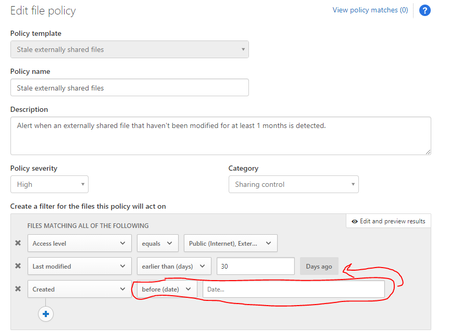
Hello, So I applied a file policy which works great with our organization which is the "Stale externally shared files". This File policy detects any files shared externally that have not been modified for X amount of days. My question is, can I change this modified parameter so that instead of modified, it's created? Here's a screenshot of what I mean. When I add the Created parameter, it only gives me data ranges instead of by days like in the last modified parameter. Is this a customized parameter that comes with the policy? Can I replicate it with Created? How can I make it so that it can detect any files that were created more than X days, to apply governance actions? Thank you!2.5KViews0likes1Comment
MCAS Regex Engine
Maybe you have a Quick answer. We are currently evaluating DLP Capabilities with MCAS. As we are now implementing Use Cases, we discovered that the Regex Engine from Microsoft is somewhat special. Me and my colleagues understand that this is a mass amount engine and therefore has its limitations regarding the Quantifiers. Now, the Docs are kind of clear but only very less. How does the Regex Engine actually works, what are the limitations? We can investigate every single regex match but how do we validate false positives for a amount of matches? (Probability Score or Reducing the max. Matches per day) Some example use cases from the customer: - Leveraging regex to look for http headers - Look for Cookies (e.g. Look for "Set-Cookie") - Regex hunting base64 encoded jwt id or access tokens or other custom tokens with various file types - pci data (can be covered by MCAS) - aws session token (SessionToken AND base64 encoded data in the vicinity) - MIP labeled documents ( can be covered by MCAS) Hope someone can helpMicrosoft Cloud App Security Session Policy For .PDF Viewing
Currently we have a session policy in Microsoft Cloud App Security that blocks all file downloads while using Outlook Web which still allows attachment viewing. This works great for all Office documents however .PDF attachments cannot be viewed because they perform a download when previewing them. The only workaround is allow .PDF attachment downloads only. Will there be any future enhancements in MCAS that will allow .PDF viewing while still blocking downloads? Previewing or printing PDF files may be blocked This is normal behavior when you have a policy configured to block downloads. Occasionally when previewing or printing PDF files, apps initiate a download of the file causing Cloud App Security to intervene to ensure the download is blocked and that data is not leaked from your environment. If you would like to allow PDF file downloads, you can exclude PDF files based on their file extension in the relevant session policy.
App Discovery - application criteria
Does anyone know if there is documented criteria that defines an application in the context of Cloud App Discovery - i.e. what criteria does the app have to meet to be defined as an app, that in turn means it shows up in the discovered apps list? An example of why I ask. I tested uploading data to Datto Workspace and within a few hours, Datto Workspace shows up as a new discovered app. I've then setup 'Synology Drive' on my NAS at home, which has a public DNS record, uses TLS and is arguably no different to Datto Workspace in the sense that I can logon and upload data. The difference is, this has not shown up as a discovered app in MCAS. MCAS has no record of the 6GB of test data that I uploaded to the NAS.. Keen for any thoughts/advice. Thanks Darren
How to restrict access to D365 Customer Insights to company network (IP range)
Hi, I'd like to ask if anyone here knows a way to restrict access to the Customer Insights app so that users can access this cloud app only if they are doing it from within our own network? We were able to set up an AAD Conditional Access policy to achieve this for other Dynamics 365 apps by restricting access for the Common Data Service. But I don't find an appropriate app to select for restriction of Customer Insights. Do we have to restrict something different to achieve this or do we have to use another feature or is it not possible to do what we want? Our data protection officer told us that we have to seal our D365 cloud apps off first before we may upload sensitive customer data to/through it. That way we can easily make sure (more or less) that users use controlled devices and controlled client apps and filtered LAN/VPN that prohibits them from accidentally or intentionally leaking sensitive data to other services etc. I appreciate every hint. Thanks in advance. Roberto