data protection
66 Topics
How to restrict access to D365 Customer Insights to company network (IP range)
Hi, I'd like to ask if anyone here knows a way to restrict access to the Customer Insights app so that users can access this cloud app only if they are doing it from within our own network? We were able to set up an AAD Conditional Access policy to achieve this for other Dynamics 365 apps by restricting access for the Common Data Service. But I don't find an appropriate app to select for restriction of Customer Insights. Do we have to restrict something different to achieve this or do we have to use another feature or is it not possible to do what we want? Our data protection officer told us that we have to seal our D365 cloud apps off first before we may upload sensitive customer data to/through it. That way we can easily make sure (more or less) that users use controlled devices and controlled client apps and filtered LAN/VPN that prohibits them from accidentally or intentionally leaking sensitive data to other services etc. I appreciate every hint. Thanks in advance. Roberto
EIN Regex for DLP
We are trying to create a new policy to detect Employer Identification Number (EIN). I'm very new to Regex so I need some help. We've tried the below regex and MCAS is showing me an error of: Capturing parenthesis not allowed in regular expression. Does anyone know how to convert the below regex to something without the capturing parentheses? Thanks! ([07][1-7]|1[0-6]|2[0-7]|[35][0-9]|[468][0-8]|9[0-589])-?\d{7}
App Discovery - application criteria
Does anyone know if there is documented criteria that defines an application in the context of Cloud App Discovery - i.e. what criteria does the app have to meet to be defined as an app, that in turn means it shows up in the discovered apps list? An example of why I ask. I tested uploading data to Datto Workspace and within a few hours, Datto Workspace shows up as a new discovered app. I've then setup 'Synology Drive' on my NAS at home, which has a public DNS record, uses TLS and is arguably no different to Datto Workspace in the sense that I can logon and upload data. The difference is, this has not shown up as a discovered app in MCAS. MCAS has no record of the 6GB of test data that I uploaded to the NAS.. Keen for any thoughts/advice. Thanks Darren
MCAS BIgID DLP integration
Hi Team, We are currently working on a project where our customer has BigID implemented for DLP and data classification. In MCAS, we can use built-in DLP or M365 Data classification services as part of session policy, file policy etc. Would like to know if MCAS can be integrated with BigID as an external DLP provider to perform the data classification during evaluation of session policy, file policy in MCAS? So far, we just found that BigID integrates with MIP through this link: https://bigid.com/blog/how-bigid-and-microsoft-information-protection-mip-work-together/ but need to understand whether we can leverage BigID in MCAS? regards, SubhajitDelayed MCAS Policy Scanning in Box
We have integrated Box and MCAS. We have noticed that MCAS policies are applied at different time intervals and not close to Near Real Time. Fastest policy alert is 5 hours and up to a few days. This policy is directed to be applied to one folder in Box. We tested this policy in SharePoint and it was successful in identifying and labeling the files within an hour. Does anyone know how the policies are applied from MCAS to Box? and if there is a setting that I need to turn on to speed up the file scan in Box.
Microsoft Cloud App Security Session Policy For .PDF Viewing
Currently we have a session policy in Microsoft Cloud App Security that blocks all file downloads while using Outlook Web which still allows attachment viewing. This works great for all Office documents however .PDF attachments cannot be viewed because they perform a download when previewing them. The only workaround is allow .PDF attachment downloads only. Will there be any future enhancements in MCAS that will allow .PDF viewing while still blocking downloads? Previewing or printing PDF files may be blocked This is normal behavior when you have a policy configured to block downloads. Occasionally when previewing or printing PDF files, apps initiate a download of the file causing Cloud App Security to intervene to ensure the download is blocked and that data is not leaked from your environment. If you would like to allow PDF file downloads, you can exclude PDF files based on their file extension in the relevant session policy.
New Blog Post | Microsoft Cloud App Security update: March 2021
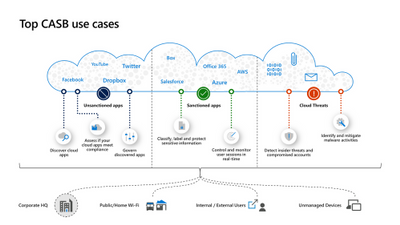
What’s new in Microsoft Cloud App Security @Spring Ignite 2021 Every organization needs to have visibility and control of their environment, including identifying and understanding usage of SaaS apps, and protecting against application threats. Microsoft Cloud App Security, our leading cloud access security broker (CASB), provides a comprehensive set of capabilities to help you manage and control the use of cloud apps across your org - including visibility into inappropriate cloud app usage, sophisticated threat protection, secure access to cloud apps, ability to protect sensitive data, and much more.New Blog Posts | Microsoft Cloud App Security
Successful Security Posture Management: control your SaaS apps via Microsoft Cloud App Security - Microsoft Tech Community A security posture management system should continuously report on and improve your organization’s security posture by focusing on disrupting any potential attackers from gaining a return on their investment. Specifically, security posture management in cloud applications should encompass two things-- cloud security posture management (CSPM) and SaaS security posture management (SSPM). Secure Access for applications with Microsoft Cloud App Security - Microsoft Tech Community Your cloud access security broker (CASB) should provide secure, easy and adaptive access to your organization’s apps depending on factors like location, device and user behavior. Adaptive access affirms the security measures your organization has put into place. This brief two-minute video demonstrates the flexibility of secure access in Microsoft Cloud App Security. Microsoft Information Protection and Microsoft Cloud App Security in 2021 Information protection is a key component of a CASB, and should deliver an integrated, nuanced understanding of your organization’s sensitive-labeled data as it's leveraged in your cloud environment. This brief two-minute video demonstrates the deep reach of information protection in Microsoft Cloud App Security. Cloud usage blind spots, how to uncover them and seamlessly control risks to your organization Rapid cloud adoption is a fact, and we believe any organization should adopt the cloud in a safe and monitored way to minimize risk of exposure. Shadow IT discovery should give immediate and clear feedback to your organization about which applications are being leveraged in your cloud environment. This brief two-minute video demonstrates the value of cloud shadow IT discovery in Microsoft Cloud App Security.