data map
8 Topics
Microsoft Purview Data Map Approach to scan
I plan to scan Purview data assets owner by owner rather than scanning entire databases in one go because this approach aligns with data governance and RBAC (Role-Based Access Control) principles. By segmenting scans by asset ownership, we ensure that only the designated data asset owners have the ability to edit or update metadata for their respective assets in Purview. This prevents broad, unrestricted access and maintains accountability, as each owner manages the metadata for the tables and datasets they are responsible for. Scanning everything at once would make it harder to enforce these permissions and could lead to unnecessary exposure of metadata management rights. This owner-based scanning strategy keeps governance tight, supports compliance, and ensures that metadata stewardship remains with the right people. This approach also aligns with Microsoft Purview best practices and the RBAC model: Microsoft recommends scoping scans to specific collections or assets rather than ingesting everything at once, allowing different teams or owners to manage their own domains securely and efficiently. Purview supports metadata curation via roles such as Data Owner and Data Curator, ensuring that only users assigned as owners; those with write or owner permissions on specific assets; can edit metadata like descriptions, contacts, or column details. The system adheres to the principle of least privilege, where users with Owner/Write permissions can manage metadata for their assets, while broader curation roles apply only where explicitly granted. Therefore, scanning owner by owner not only enforces governance boundaries but also ensures each data asset owner retains exclusive editing rights over their metadata; supporting accountability, security, and compliance. After scanning by ownership, we can aggregate those assets into a logical data product representing the full database without breaking governance boundaries. Is this considered best practice for managing metadata in Microsoft Purview, and does it confirm that my approach is correct?Solved366Views0likes2Comments
Cross-Tenant Purview Scan of Fabric Lakehouse fails to ingest Sub-items (Delta Tables)
Environment: Tenant 1 (Consumer): Azure Purview (Microsoft Purview Data Map). Tenant 2 (Provider): Microsoft Fabric (Capacity + Workspaces). Architecture: Purview in Tenant 1 is scanning Fabric in Tenant 2 via the "Fabric" Data Source using Azure Auto-Resolve Integration Runtime. The Issue: I can successfully scan and see Item-level metadata (e.g., Workspace Name, Lakehouse Name). However, I am getting Zero sub-item visibility. No Delta Tables, no Columns, and no sub-item lineage are being ingested into Purview. Configuration Verified: Service Principal (SPN): Created an App Registration in Tenant 2 (Fabric Tenant). Permissions: The SPN is a Member (and I tested Admin) of the target Fabric Workspace. Fabric Admin Settings (Tenant 2): Allow service principals to use read-only admin APIs: Enabled for the SPN's Security Group. Enhance admin APIs responses with detailed metadata: Enabled. Enhance admin APIs responses with DAX and mashup expressions: Enabled. My Specific Questions for the Product Team / MVPs/Members: Authentication Flow: For sub-item ingestion (Delta Tables) to work cross-tenant, is it sufficient for the SPN to be a standard App Registration in Tenant 2 (Provider), or does Fabric require the "Cross-Tenant Access" (Guest User) flow where a shadow SPN is created via the specific trusted external tenants configuration? API Limitation: Is the "Enhanced Metadata" API payload (metadata/subartifacts) restricted to Same-Tenant calls only during the current Preview? I suspect the API is returning a standard payload instead of the enhanced one due to the cross-tenant boundary. Workaround: Has anyone successfully forced ingestion of Delta Tables cross-tenant by using the Apache Atlas REST API to manually inject the schema entities, or is there a specific hidden toggle in the Fabric Admin Portal (perhaps specifically for "External Principals") that I am missing?310Views1like1Comment
MS Purview Data Map - Sensitivity Label - Atlas API
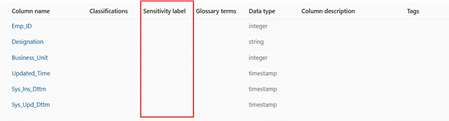
Hi Everyone, Can someone confirm if it’s possible to update the Sensitivity label column in the Microsoft Purview Unified Data Catalog using the Atlas API? Since Microsoft Fabric currently does not support the auto-labeling feature in the Data Map, can we apply sensitivity labels to Fabric assets in the catalog through the Atlas API? Regards, BanuMurali254Views0likes1CommentAuto classifcation policy - Sensitivity Lables - SIT - Fabric Delta Tables
Hi Everyone, Can you please anyone confirm, Can I apply sensitivity labels (Through Auto classification Policy) on Fabric Lakehouse delta tables using Purview Data Map. Its quite urgent, could you please confirm it. Regards, BanuMuraliSolved379Views0likes5CommentsData Quality/Data Profiling Scan issue in Purview
Hi Everyone, Hope you are doing great !! I tried to run Data Quality/Data profiling scan in Purview, Scan got failed with an error "DataQualityInternalError Internal service error occurred. Please retry or contact Microsoft support" Could you please help me how can I resolve it. Want to ensure did I have provided right access to Purview : Currently I am using Purview MSI as an authentication option to integrate (Fabric and Purview) and provided Purview MSI with "Contributor" role access to our required Fabric Workspace. Also I am having "Contributor" role access to the required Workspace. Kindly help me to understand: if we want to run data quality scan on Fabric Workspace, User (Myself) should assign with which level of access Member or Contributor in Fabric To run Data quality/Data profiling scan on Fabric Lakehouse delta tables in Purview , Which authentication should I have use (MSI or Service Principal) Could you please help me to resolve it, It will help us to do Data Quality and Profiling. Thanks in advance. Regards, Banumathi687Views0likes2CommentsAuto-label cannot scope to Synapse Analytics Database
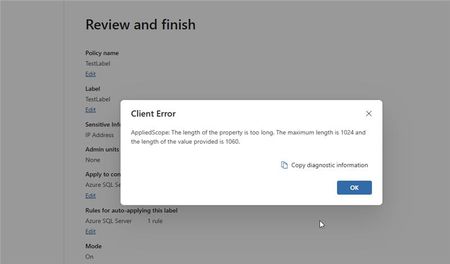
After testing some Purview functionality I have discovered that any Synapse Analytics Serverless SQL Database cannot be handled by Purview when scoped to the individual database. You get the following error: As the "AppliedScope" is just a tick box for the user, I am presuming there is a long FQDN in the Azure backend causing this error. The synapse workspace name and database name are not particularly long as well. We were testing this for a customer and know that their own Synapse workspace names and database names will be more characters than our test scenario. The scenario was an Auto-Label policy for a sensitivity label against a data source in data map. This data source was a single Synapse Workspace with a single serverless SQL database. All names for these were around 8-10 characters. Can anyone in the Purview team confirm if this is a known error at all and if there is a fix incoming anytime soon?294Views0likes1Comment
Purview Account
Just started using Purview and can see that data in my MS cloud has already been categorised and when I create new files they are categorised too. But I do not have a Purview Account - do I need one ? I do not see the Data Map menu despite reading articles about putting my account in various groups but now wandering if its because we do not have a Purview Account. If i created a new SIT I would have to go to each SharePoint site and have re-index it which I would prefer to have it done to all sites at once which I believe you can do in the Data Map which we cannot see.330Views0likes0Comments