data & storage
380 Topics
DevOps Wiki: How to enable download of attachment
Hello, I do have a git based wiki in ADO with the following structure: | ---- REAGME.md | ---- .attachments | ---- config.xml Within README.md I want to reference config.xml in a way that: 1. enforces the file to be downloaded and not opened 2. ensures a meaningful file name proposal for the download For "common" markdown this would be something like: ... [Config](./.attachments/config.xml?download=true&name=config.xml) ... unfortunately ADO performs some URL-encoding to this relative link and tries to find a file named: - ./attachments/config.xml%3Fdownload%3Dtrue%26name%3Dconfig.xml This file cannot be found (why should it, such a file does not exist) My questions are: 1. How to properly format the relative link in ADO markdown to make the attachment downloadable 2. How to properly format the relative link in ADO markdown to define the attachments name Exclusion: - The answer "Use an absolute link like https://..../" is not an option as no-one will ever be able to maintain this across multiple branches Thank you in advance 😉4.1KViews0likes7CommentsBuild richer applications with the new asynchronous Azure Storage SDK for Java
Cloud scale applications typically require high concurrency to achieve desired performance when accessing remote data. The new Storage Java SDK simplifies building such applications by offering asynchronous operations, eliminating the need to create and manage a large thread-pool. This new SDK uses the RxJava reactive programming model for asynchronous operations, also relying on Netty HTTP client for REST requests. Get started with the Azure Storage SDK for Java now. Azure Storage SDK v10 for Java adopts the next-generation Storage SDK design providing thread-safe types that were introduced earlier with the Storage Go SDK release. This new SDK is built to effectively move data without any buffering on the client, and provides interfaces close to the ones in the Storage REST APIs. Read about it in the Azure blog.942Views0likes0CommentsAccelerated and Flexible Restore Points with SQL Data Warehouse
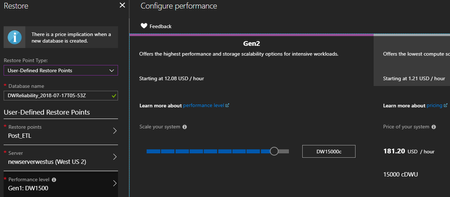
We are thrilled to announce that SQL Data Warehouse (SQL DW) has released accelerated and flexible restore points for fast data recovery. SQL DW is a fully managed and secure analytics platform for the enterprise, optimized for running complex queries fast across petabytes of data. The ability to quickly restore a data warehouse offers customers data protection from accidental corruption, deletion, and disaster recovery. We have seen scenarios where compliance requirements and having multiple test and development environments of a data warehouse enforce stricter capabilities in this area as well. To continue delivering first-class data protection and recovery, we have released the following critical improvements which are seamlessly integrated within the Azure Portal. Read about it in the Azure blog.895Views0likes0CommentsBuild secure Oozie workflows in Azure HDInsight with Enterprise Security Package
Customers love to use Hadoop and often rely on Oozie, a workflow and coordination scheduler for Hadoop to accelerate and ease their big data implementation. Oozie is integrated with the Hadoop stack, and it supports several types of Hadoop jobs. However, for users of Azure HDInsight with domain joined clusters, Oozie was not a supported option. To get around this limitation customers had to run Oozie on a regular cluster. This was costly with extra administrative overhead. Today we are happy to announce that customers can now use Oozie in domain-joined Hadoop clusters too. In domain-joined clusters, authentication happens through Kerberos and fine-grained authorization is through Ranger policies. Oozie supports impersonation of users and a basic authorization model for workflow jobs. Read more about it in the Azure blog.930Views0likes0CommentsScore one for the IT Pro: Azure File Sync is now generally available!
Azure File Sync replicates files from your on-premises Windows Server to an Azure file share. With Azure File Sync, you don’t have to choose between the benefits of cloud and the benefits of your on-premises file server - you can have both! Azure File Sync enables you to centralize your file services in Azure while maintaining local access to your data. Read more about it in the Azure blog.2.2KViews0likes2Comments
Gateway Timout on Azure Data Factory Copy Task
I'm trying to set up a copy job that connects to a text file in Data Lake Storage (v1) and copies the data to somewhere... I've set up the Active Directory application I've created a Data Factory (tried v1 and v2) I've created the copy task and connected to the Data Lake. I've successfully picked a file on the lake. The fie is a CSV file. On the file format settings screen I get a Gateway Timeout. Activity ID:2f860074-7a71-470d-87b9-b5523a13d8a6 when setting up the file. I've tried a simple file with 2 lines and 3 columns all the way to a zipped file with lots of columns I get a similar error on the v1 factory. Any ideas on what I've done wrong?946Views0likes0Comments
Upload large data to storage in different zones
Hi all, First of all please accept my apologise for my question. This is my first question in the tech form. I have a case where I need to upload large data to the cloud storage and I need a guide to solve this. So, we have a large single object with size around 800 GB, which I need upload this to the storage. My first question for the large single object like this, which storage (Blob or Data lake) you suggest? My second question is related also to this. I want to upload this file as multi part. Moreover, I need to use for this storages which are in the different zones (this is also project requirement) and measure the uploading time. I would like to know your suggestions for this purpose. Thank you for reading1.1KViews0likes1CommentLatest updates to Azure Database for MySQL
Earlier this year, in March, we announced the general availability (GA) of Azure Database for MySQL, offering the community version of MySQL together with built-in high availability, a 99.99 percent availability SLA, elastic scaling for performance, and industry leading security and compliance in Azure. Since GA, the team has been at work delivering a variety of new features and additional functionality to enhance and extend the value of this service. We are pleased to share with you some details about the new additions to this service based on customer feedback. Read about it in the Azure blog.738Views0likes0CommentsLatest updates to Azure Database for PostgreSQL
Earlier this year, in March, we announced the general availability (GA) of Azure Database for PostgreSQL, offering the community version of MySQL together with built-in high availability, a 99.99 percent availability SLA, elastic scaling for performance, and industry-leading security and compliance in Azure. Since GA, the team has been at work delivering a variety of new features and additional functionality to enhance and extend the value of this service. I am pleased to share with you some details new additions to this service based on customer feedback. Read about it in the Azure blog.788Views0likes0CommentsWelcome our newest family member - Data Box Disk
Last year at Ignite, we talked to you about the preview of Azure Data Box, a ruggedized, portable, and simple way to move large datasets into Azure. So far, the response has been phenomenal. Customers have used Data Box to move petabytes of data into Azure. While our customers and partners love Data Box, they told us that they also wanted a lower capacity, even easier-to-use option. They cited examples such as moving data from Remote/Office Branch Offices (ROBOs), which have smaller data sets and minimal on-site tech support. They said they needed an option for recurring, incremental transfers for ongoing backups and archives. And they said it needed to have the same traits as Data Box – namely fast, simple, and secure. So, we're here today with our partners at Inspire 2018 to announce a new addition to the Data Box family: Azure Data Box Disk. Read about it in the Azure blog.1.6KViews0likes0Comments