data & ai
159 TopicsAzure Availability Zone Mapping and VM Resilience Analysis Guidance using SRE.AZURE.COM Agent
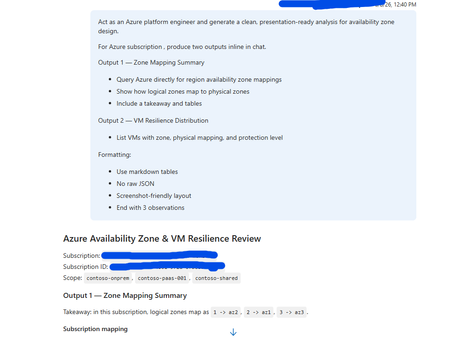
Overview This guidance, supported and tested using SRE.Azure.com, helps Azure platform engineers understand how Availability Zones are mapped within their subscription and how virtual machines (VMs) are distributed across those zones. SRE.Azure.com enables discovery and analysis of zone mappings, VM placement, and infrastructure resilience. Why This Matters Azure uses logical zones (1, 2, 3), but these map differently to physical datacenter zones (az1, az2, az3) in each subscription. This means workloads in the same logical zone across subscriptions may not be physically co-located. Understanding this is critical for high availability, disaster recovery, compliance, and resilience planning. Example sub-prod-eastus-01 -> Zone 1 → az3 sub-prod-eastus-01 -> Zone 2 → az1 sub-prod-eastus-01 -> Zone 3 → az2 sub-prod-weu-01 -> Zone 1 → az1 sub-prod-weu-01 -> Zone 2 → az2 sub-prod-weu-01 -> Zone 3 → az3 Key takeaway: Logical zone numbers do not guarantee physical separation across subscriptions. What SRE.Azure.com agent Enables - Discover logical-to-physical zone mappings - Analyze VM distribution across zones - Identify resilience gaps - Generate presentation-ready reports Suggested Prompt “Act as an Azure platform engineer and generate a clean, presentation-ready analysis for availability zone design. For Azure subscription <subscription-id>, produce two outputs inline in chat. Output 1 — Zone Mapping Summary - Query Azure directly for region availability zone mappings - Show how logical zones map to physical zones - Include a takeaway and tables Output 2 — VM Resilience Distribution - List VMs with zone, physical mapping, and protection level Formatting: - Use markdown tables - No raw JSON - Screenshot-friendly layout - End with 3 observations” Example output: And so on …… Next Steps: Get Started | Azure SRE Agent What is SRE Agent? | Azure SRE Agent494Views2likes0CommentsDeploying DNS Private Resolvers and Private DNS Zones for Azure AI Supported Services
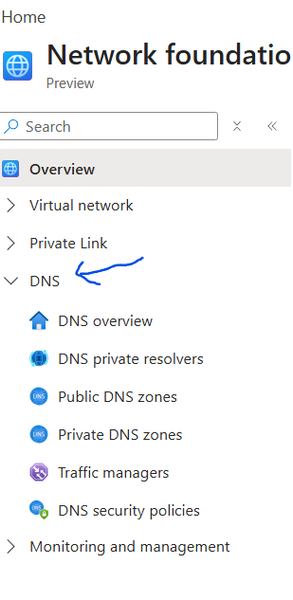
Private Networks: Private DNS Zones: Resolves domain names to private IPs within Azure virtual networks without exposing them to the internet. Private DNS Zones are global, you don’t need to create multiple same private DNS Zones, you can reuse the same zones as it’s global DNS Private Resolvers: Fully managed service that enables DNS resolution between Azure VNets and on-premises networks without custom DNS servers. DNS Private resolvers are regional, which means if you have Azure EAST US and WEST US 2 regions, you need to create DNS Private resolvers in both regions linked to Private DNS Zones, you can adopt centralized or distributed DNS Private resolvers, I will discuss both options later in this article Public Networks: <In this part – not focusing on Public Networks> Public DNS Zones: Resolves internet-facing domain names to publicly accessible IP addresses Traffic Managers: DNS-based traffic load balancer that routes client requests to the best available global endpoint DNS Security Policy: Controls and protects DNS resolution behavior (e.g., filtering, forwarding, and access rules) to secure name resolution and prevent misuse **Note: 1. Follow Prerequisites to deploy resources. 2. A common misconception is that VNet peering enables DNS resolution. In reality, private DNS zones are only accessible to VNets that are explicitly linked to them, peering provides connectivity, but not name resolution. In the following snapshot à Azure Portal à Network Foundations à DNS, lets explore individual DNS Services offered and later in this document, we will interconnect **Credits to Microsoft Azure Portal Design team for creating new grouped views – you can check out for more – like compute infrastructure, Hybrid, Backup Now, let’s delve into scenario 01: I have grabbed the following snapshot from Azure AI Landing Zones and removed non-network Azure resources to focus only on private Network components, **Credits to AI Landing Zone team for the diagram, Original Version: Inbound Zoom in view with End-to-End Flow Hop Summary 1 Client initiates request 2 DNS query sent to on-prem DNS 3 DNS query forwarded to Azure 4 Azure DNS Resolver processes query 5 Private DNS resolves to Private Endpoint IP 6 Traffic routed via VNet peering 7 Traffic hits Private Endpoint 8 Request served by Azure Files *Link Private DNS to DNS resolvers in other regions, Private DNS is GLOBAL and DNS Resolvers are regional Example Snapshot of entire flow: Nslookup from Client machine, Domain – DNS Conditional Forwarder configuration Note 1: Make sure you selected “All DNS Servers in this forest” for replication, otherwise users pointed to some other domain will be unable to resolve Verifying Connectivity with PsPing <credit to Sysinternals team PsPing > PsPing, a tool from Sysinternals, is highly effective for verifying network connectivity from on-premises environments to Azure resources on specific ports. This is particularly useful when you need to ensure connectivity to ports such as 445, 443, 1433, 1521, or any other port required by Azure services you intend to access from either on-premises locations or other cloud environments. By using PsPing, you can test and confirm that the necessary ports are open and accessible, which is crucial for troubleshooting connectivity issues and ensuring smooth communication between your on-premises infrastructure and Azure-hosted resources. Ensure your firewall is set to allow traffic DNS private resolvers – inbound configuration Private DNS Configuration Virtual Network links enable to your private dns Make sure you have peer between hub and spoke Private Endpoint configuration Storage Account configuration “Replace the file share with any supported Azure service that uses Private Endpoints, and follow the same guidance.” 2. Outbound <flow and resources colored with blue> part 2 upcoming soon966Views0likes0CommentsFastTrack for Azure (FTA) program retiring December 2024
ATTENTION: As of December 31st, 2024, the FastTrack for Azure (FTA) program will be retired. FTA will support any projects currently in motion to ensure successful completion by December 31st, 2024, but will no longer accept new nominations. For more information on available programs and resources, visit: Azure Migrate, Modernize, and Innovate | Microsoft Azure1.6KViews1like0CommentsConnecting to Azure SQL Database using SQLAlchemy and Microsoft Entra authentication
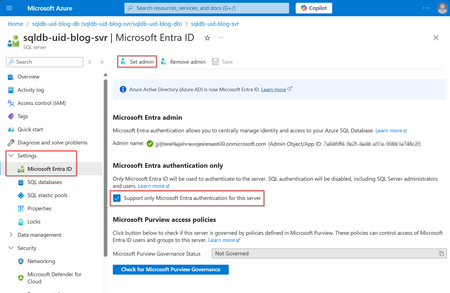
Unlock secure, password-free connections to Azure SQL Database using Microsoft Entra Authentication and SQLAlchemy with this in-depth guide. Learn to configure Microsoft Entra as your SQL Server user and connect seamlessly using Python’s SQLAlchemy library—all without hard-coded credentials. Discover why Microsoft Entra Managed Identity surpasses traditional SQL Authentication by enhancing security, simplifying access management, and centralizing identity controls. Perfect for developers looking to boost data protection and streamline authentication workflows in Azure, this step-by-step solution empowers you to safeguard your database while maximizing efficiency and ease of use, while bringing your solution closer to production readiness. Dive in to elevate your Azure SQL security and performance!11KViews2likes0CommentsSecuring Your Data Pipelines: Best Practices for Fabric Data Factory
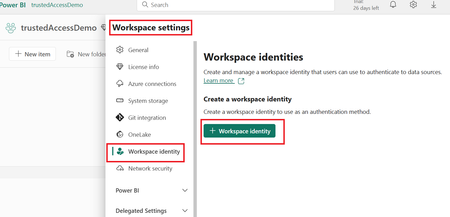
Introduction In today’s data-driven world, securing data pipelines is crucial to protect sensitive information and ensure compliance with regulatory requirements. Microsoft Fabric Data Factory experience (FDF) offers a robust set of security features to safeguard your data as it moves through various stages of your data workflows. In this post, we’ll explore key security features in FDF and demonstrate how to implement them with a practical example. Key Security Features in Fabric Data Factory Before diving into the implementation, let’s take a look at the primary security mechanisms that Fabric Data Factory provides: Authentication: Fabric data factory uses on Microsoft Entra ID to authenticate users (or service principals). When authenticated, users receive access tokens from Microsoft Entra ID. Fabric uses these tokens to perform operations in the context of the user. Authorization: All Fabric permissions are stored centrally by the metadata platform. Fabric services query the metadata platform on demand in order to retrieve authorization information and to authorize and validate user requests. Data Encryption: Data at rest: All Fabric data stores are encrypted at rest by using Microsoft-managed keys. Fabric data includes customer data as well as system data and metadata. Data at transit: Data in transit between Microsoft services is always encrypted with at least TLS 1.2. Fabric negotiates to TLS 1.3 whenever possible. Traffic between Microsoft services always routes over the Microsoft global network. Managed Identities: A Fabric workspace identity is an automatically managed service principal that can be associated with a Fabric workspace. Fabric workspaces with a workspace identity can securely read or write to firewall-enabled Azure Data Lake Storage Gen2 accounts through trusted workspace access for OneLake shortcuts. Fabric items can use the identity when connecting to resources that support Microsoft Entra authentication. Fabric uses workspace identities to obtain Microsoft Entra tokens without the customer having to manage any credentials. Key Vault Integration: unfortunately, as of today Key vault integration is not supported in Dataflow Gen 2 / data pipeline connections in Fabric. Network Security: When you connect to Pipeline via private link, you can use the data pipeline to load data from any data source with public endpoints into a private-link-enabled Microsoft Fabric Lakehouse. Customers can also author and operationalize data pipelines with activities, including Notebook and Dataflow activities, using the private link. However, copying data from and into a Data Warehouse isn't currently possible when Fabric's private link is enabled. Now, let’s walk through an example that demonstrates how to secure data pipeline in Fabric Data Factory (FDF). Example: Securing a Data Pipeline in Fabric Data Factory Scenario: You are setting up a data pipeline that moves sensitive data from ADLS gen 2 to Fabric warehouse. To ensure that this pipeline is secure, you will: Use a managed identity to authenticate Fabric data factory Configure trusted workspace access in ADLS Gen2 Copy data from ADLS to Fabric Lakehouse using secured pipeline Prerequisites: - Tools and Technologies Needed: Azure Data Lake Gen2 (ADLS) storage account. knowledge in Azure data factory. Fabric workspace. Steps: Step 1: Enable Managed Identity in Workspace level for Fabric Data Factory pipeline Workspace identity can be created and deleted by workspace admins. The workspace identity has the workspace contributor role on the workspace. Workspace identity is supported for authentication to target resources in connections. Only users with an admin, member, or contributor role in the workspace can configure the workspace identity for authentication in connections. Managed identities allow Fabric Data Factory to securely authenticate to other Azure services without hardcoding credentials. Navigate to the workspace and open the workspace settings. Select the Workspace identity tab. Select the + Workspace identity button. Once enabled, this identity can be used to access resources like Azure SQL Database securely. Step 2: Configure trusted workspace access in ADLS Gen2 Sign in to the Azure portal and go to Custom deployment. Choose Build your own template in the editor. For a sample ARM template that creates a resource instance rule, see ARM template sample. Create the resource instance rule in the editor. When done, choose Review + Create. On the Basics tab that appears, specify the required project and instance details. When done, choose Review + Create. On the Review + Create tab that appears, review the summary and then select Create. The rule will be submitted for deployment. When deployment is complete, you'll be able to go to the resource. Step 3: Create a pipeline to connect to ADLS gen2 and copy data to Fabric Lakehouse with this pipeline, we will connect directly to a firewall-enabled ADLS Gen2 account that has trusted workspace access enabled. Navigate to your workspace, click on new item Create new pipeline In your pipeline, add Copy activity to the canvas In Copy activity Source Tab : Choose ADLS Gen2 as data source and connect to it In Destination tab, Connect to the lakehouse and select table Step 4: Results After copy activity finish running, you can view the data in your Lakehouse Conclusion - Securing your data pipelines in Azure Data Factory is essential to maintaining the integrity, confidentiality, and availability of your data. By leveraging features such as managed identities you can build a robust security framework around your data flows. Do you have any other tips for securing Fabric Data Factory? Let me know in the comments! - Follow me on LinkedIn: Sally Dabbah | LinkedIn4.6KViews2likes0CommentsLeveraging dynamic few-shot prompt with Azure OpenAI
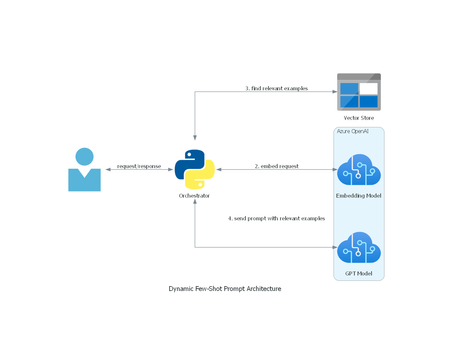
Discover the efficiency of dynamic few-shot prompts in natural language processing! By leveraging a vector store and OpenAI embeddings, this technique ensures only the most relevant examples are included, optimizing prompt size and relevance. This approach not only maintains the efficiency of few-shot learning but also enhances the model’s accuracy and contextual relevance. Dive into the future of NLP with dynamic few-shot prompts! 🚀7.7KViews1like0CommentsSecuring Microsoft Fabric: User Authentication & Authorization Guidelines
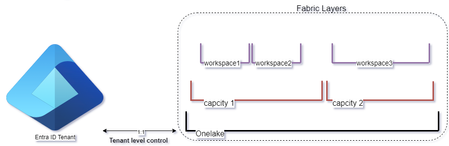
Did you wonder what are the options to define users and permissions to access and operate in Microsoft Fabric? Considering Conditional Access for Fabric users? Looking to understand the best practices to define user roles in workspace level? In this blog, we will talk about authentication and authorization options in Fabric including use case example.14KViews5likes1Comment