csv
15 Topics
Decimal separator after CSV import
Hi, I need some help, please. I'm trying to import a csv file. The problem is that numbers are written with comma decimal separator, but my PC is working with dots as decimal separator. In the previous Excel versions, there was the possibility to convert them during the import wizard. Unfortunately, I'm not able to find the same option in the new import wizard (Power Query). Thanks for all your answers Luca165KViews0likes9CommentsWhat's the difference between "CSV-File (.csv)" and "Microsoft Excel-CSV-File (.csv)"?
Hi, I have noticed that a .csv file opens differently on my two machines. On machine A) the opened file displays everything in separate columns: On machine B) the opened file displays everything in the same column: I can't figure out why that is. The Windows and Office versions on both machines are identical. Windows: 1709 (Build 16299.431) Office: 1802 (Build 9029.2253 CTR) I noticed that the file icon is different on both machines. Machine A): Machine B): Moreover, I file type (Dateityp) seems to be different (please don't mind the German): Machine A) says "CSV-Datei": Machine B) says "Microsoft Excel-CSV-Datei": Furthermore, I opened the file in Excel Online and it opens like on Machine B). One more thing I did is use PowerShell Get-Service | Export-Csv "C:\users\[xxx]". I would expect each property to show in it's own column. It does that on machine A) but not on B). I have attached the file for you to test it. Ideally I would like the file to opened on every machine as it does on A). Thanks in advance for your help.Solved18KViews0likes1Comment
Import a CSV File and Pivot tables
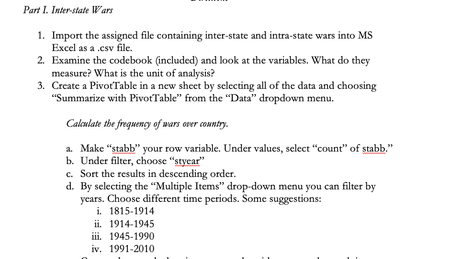
Hi, I have to do this assignment that is due October 25 at 12pm PST but I have been really struggling because I dont know how to import the file they gave me into a csv.file let alone create a pivot table or a "stab" someone please help me!!5.3KViews0likes3Comments
Excel Import 32 bit vs 64 bit
I currently use the 32 bit excel, which I believe only allows use of 2gb or ram. This is extremely frustrating when working in large spreadsheets. I've requested from my IT department an upgrade to 64 bit. Their response is that our accounting system does not support the 64 bit. My question is how would a separate system be effected by the use of 64 bit vs 32 bit? I understand an add-in needing a certain excel version but would exporting reports from our accounting system to csv. or xls. be effected by 32 vs 64 bit excel? Wouldn't I be able to export a report to csv. then open in excel no matter the version?3.9KViews0likes1CommentPowershell bulk creation - error with UserPrincipalName
Hi I use a simple script (and it works) to bulk create new users on my M365 tenant (cloud based only). When I set the UserPrincipalName to e.g. [jan . jensen @ DOMAIN . onmicrosoft . com] it works (disregard the spaces, if I didn't use spaces in the example, the email gets removed by the editor). When I set the UserPrincipalName to e.g. [mailto:Email address removeddk] it doesn't work. I'm missing something here, because, I assumed that the UserPrincipalName also could be the new email address. What do I need to in order to also create a valid email address as well? Below is the online script, and the CSV file it references. Import-Csv -Path "C:\Users\Jens Jakobsen\users.csv" | ForEach {New-MsolUser -DisplayName $_.DisplayName -FirstName $_.FirstName -LastName $_.LastName -UserPrincipalName $_.UserPrincipalName -UsageLocation $_.UsageLocation -LicenseAssignment $_.AccountSkuId} | Export-Csv -Path "C:\Users\Jens Jakobsen\Results.csv" Thanks.Solved3.7KViews0likes7Comments
Flow Exporting .CSV File from Azure Blob to SharePoint site (Power BI Data Export)
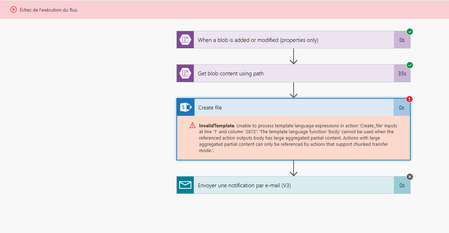
Hello, First of all sorry if this question was already asked. I was searching about this on Tech community and Google but nothing helped me. We worked on a simple Flow that export .CSV data File from Azure Blob to SharePoint site. With 3 of 4 exports it works just fine ! The last one is showing an error (screenshot below) We tried to remake it from scratch but nothing changed. Have you any idea on what the problem can be ? Thanks a lot in advance, Regards
Creating Private Channels from a CSV file
Hi all, I have existing teams that I'd like to create plus thirty private channels for. I have these private channel names in a CSV file with headers such as: cname ctype Group 001 Private I tried using this code: Import-csv -path "C:\xxxx" | foreach{New-TeamChannel -GroupId GROUPID -DisplayName $_.cname -MembershipType $_.ctype} However, the error that keeps being return is: New-TeamChannel : A parameter cannot be found that matches parameter name 'MembershipType'. At line:1 char:159 + ... -4f95-af21-868941f09af1 -DisplayName $_.cname -MembershipType $_.ctyp ... + ~~~~~~~~~~~~~~~ + CategoryInfo : InvalidArgument: (:) [New-TeamChannel], ParameterBindingException + FullyQualifiedErrorId : NamedParameterNotFound,Microsoft.TeamsCmdlets.PowerShell.Custom.NewTeamChannel Please can someone assist me here.Solved3.2KViews0likes3CommentsMassive load of documents into a library - PNP
Hello, I wonder if somebody has prepared a script for performing a massive load of documents into a library. I have the documents available in a windows folder. I have a csv with the file name and several mandatory properties for every file. I have to use PNP. Thanks!2.2KViews0likes7Comments