csv
15 Topics
Error when importing CSV file
Hi, I am new at MS SQL and have the community edition in my local machine. Trying to import a CSV file but getting the following error message: Total Defect Qty:=SUM([Defect Qty]) TITLE: Microsoft SQL Server Management Studio ------------------------------ Error inserting data into table. (Microsoft.SqlServer.Import.Wizard) ------------------------------ ADDITIONAL INFORMATION: Error inserting data into table. (Microsoft.SqlServer.Prose.Import) ------------------------------ The given value '[name of the column]' of type String from the data source cannot be converted to type nvarchar for Column 4 [Label]. (Microsoft.Data.SqlClient) ------------------------------ String or binary data would be truncated in table '[dbo].[name of the file]', column 'Label'. Truncated value: '[name of the column '. (Microsoft.Data.SqlClient) ------------------------------ BUTTONS: OK ------------------------------ Do you think you can help me please? Thanks, NaveenSolved794Views0likes5Comments
Decimal separator after CSV import
Hi, I need some help, please. I'm trying to import a csv file. The problem is that numbers are written with comma decimal separator, but my PC is working with dots as decimal separator. In the previous Excel versions, there was the possibility to convert them during the import wizard. Unfortunately, I'm not able to find the same option in the new import wizard (Power Query). Thanks for all your answers Luca167KViews0likes9CommentsPowershell bulk creation - error with UserPrincipalName
Hi I use a simple script (and it works) to bulk create new users on my M365 tenant (cloud based only). When I set the UserPrincipalName to e.g. [jan . jensen @ DOMAIN . onmicrosoft . com] it works (disregard the spaces, if I didn't use spaces in the example, the email gets removed by the editor). When I set the UserPrincipalName to e.g. [mailto:Email address removeddk] it doesn't work. I'm missing something here, because, I assumed that the UserPrincipalName also could be the new email address. What do I need to in order to also create a valid email address as well? Below is the online script, and the CSV file it references. Import-Csv -Path "C:\Users\Jens Jakobsen\users.csv" | ForEach {New-MsolUser -DisplayName $_.DisplayName -FirstName $_.FirstName -LastName $_.LastName -UserPrincipalName $_.UserPrincipalName -UsageLocation $_.UsageLocation -LicenseAssignment $_.AccountSkuId} | Export-Csv -Path "C:\Users\Jens Jakobsen\Results.csv" Thanks.Solved3.9KViews0likes7Comments
Excel Language Options
Hello everyone, Hopefully someone might have an answer for my situation. Any feedback or suggestions are welcome. I work as a designer for a company that produces document books within a variety of languages, including english, french, greek, Russian, Arabic and Hebrew. Currently, I use a variety of programs and files to create translation documents for each other the languages. What I am trying to do is create one Excel document with all of my languages and translations and export that as a CSV to import into Indesign with Data Merge. My current problem is that I can't seem to change between writing styles for different languages, such as from left-to-right typing to right-to-left typing. Any advice or potentially an easier way to do what I am trying to do is appreciated. Thank you.1.5KViews0likes2CommentsNew Password Import feature natively available on Edge Canary Version 90.0.817.0
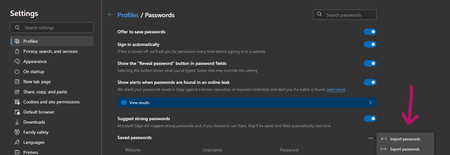
Microsoft Edge Version 90.0.817.0 (Official build) canary (64-bit) you need to enable this new flag first: edge://flags/#PasswordImport There is also another way to do this which was explained here Happy importing!1.9KViews2likes0Comments
Flow Exporting .CSV File from Azure Blob to SharePoint site (Power BI Data Export)
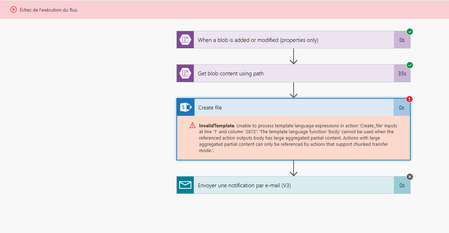
Hello, First of all sorry if this question was already asked. I was searching about this on Tech community and Google but nothing helped me. We worked on a simple Flow that export .CSV data File from Azure Blob to SharePoint site. With 3 of 4 exports it works just fine ! The last one is showing an error (screenshot below) We tried to remake it from scratch but nothing changed. Have you any idea on what the problem can be ? Thanks a lot in advance, Regards
Export Import CSV - help please :)
Hi Everyone I am currently creating a script that consists of a lot of small tasks, ending with the result being an Excel Report for the management team. But one part is giving me some trouble, so new i seek your help. I have a number of CSV filers with the following rows: "computer";"lastseen";"doccount" I am only interested in the "computer" row, which contains computer names on client machines. I need to end up with a CSV file with only that row + the column data. I have been trying to do the following: Get-content -Path Pathtosource\sourcefile.csv | Select-Object -Property computer | Export-Csv -path Pathtodestination\destinationfile.csv -NoTypeInformation To get it done in one command. But all i get is a CSV file with the text "computer" and nothing else. All the column data is missing. I have been trying this also: $ElasticBDContent = Get-content -Path PathtoSource\Sourcefile.csv $ElasticBDContent = $ElasticBDContent | Select-Object -Property computer $ElasticBDContent | Export-Csv -path PathtoDestination\Destinationfile.csv -NoTypeInformation Giving me the exact same result, a CSV file with the following content: "computer" This is the content i am looking for: "computer" "computer1" "computer2" "computer3" Can anyone give an example on how to achieve this? Any help is much appreciated. Thanks in advance.Solved1.6KViews0likes3CommentsCreating Private Channels from a CSV file
Hi all, I have existing teams that I'd like to create plus thirty private channels for. I have these private channel names in a CSV file with headers such as: cname ctype Group 001 Private I tried using this code: Import-csv -path "C:\xxxx" | foreach{New-TeamChannel -GroupId GROUPID -DisplayName $_.cname -MembershipType $_.ctype} However, the error that keeps being return is: New-TeamChannel : A parameter cannot be found that matches parameter name 'MembershipType'. At line:1 char:159 + ... -4f95-af21-868941f09af1 -DisplayName $_.cname -MembershipType $_.ctyp ... + ~~~~~~~~~~~~~~~ + CategoryInfo : InvalidArgument: (:) [New-TeamChannel], ParameterBindingException + FullyQualifiedErrorId : NamedParameterNotFound,Microsoft.TeamsCmdlets.PowerShell.Custom.NewTeamChannel Please can someone assist me here.Solved3.3KViews0likes3CommentsImport a CSV File and Pivot tables
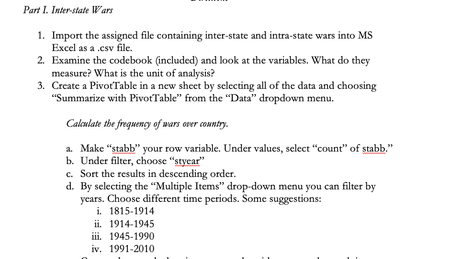
Hi, I have to do this assignment that is due October 25 at 12pm PST but I have been really struggling because I dont know how to import the file they gave me into a csv.file let alone create a pivot table or a "stab" someone please help me!!5.4KViews0likes3Comments