cost management
22 Topics
Sentinel Billable data
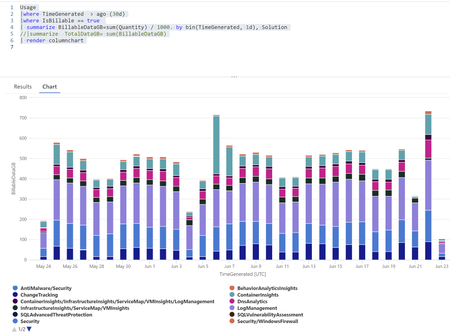
Hello can you please help me understand difference of two queries we received from vendor deployin sentinel. We have logic app running daily this query to see billable data (to monitor if we are reaching cap). Usage | where TimeGenerated > ago(1d) | where IsBillable == true | summarize BillableDataGB = sum(Quantity) / 1000. by bin(TimeGenerated, 31d), Solution | summarize TotalDataGB = sum(BillableDataGB) Also we got the visualisation in chart over mont Usage |where TimeGenerated > ago (30d) |where IsBillable == true | summarize BillableDataGB=sum(Quantity) / 1000. by bin(TimeGenerated, 1d), Solution | render columnchart However often there is big difference, while the first one reports over several days numbers 300-400, when i look at the data in second I see peaks to 700 GB. Example below. On 22June we see peak to 700GB, however the outcome of the first query was always 300-400 GB when reported 23.6. reported previous daily ingestion : 415.907715810097 GB. 22.6 reported previous daily ingestion : 367.10762928873 GB. Does not make sense to me have such big difference. ALSO WHAt Query for monnitoring and analyzing daily ingestion are you using please???7.6KViews0likes10Comments
Analytic rules, KQL queries and UEBA pricing
Hi, I am interested if there is any additional cost when talking about Log Analytics Workspace (without Sentinel) when it comes to running KQL queries? Are there any "data processing" costs that occur or is it free in that sense? On this link https://azure.microsoft.com/en-us/pricing/details/monitor/ I didn't see any mention of "data processing costs", Microsoft only mentions "Log data processing" feature name "Log data ingestion and transformation" but writing KQL queries is not data transformation in that sense -> https://learn.microsoft.com/en-us/azure/azure-monitor/essentials/data-collection-transformations When talking about Sentinel, should I expect larger bill if I enable 50-500 Analytic rules from Sentinel templates or content hub? Do these or custom analytic rules occur any additional "processing" costs? On this link https://azure.microsoft.com/en-us/pricing/details/microsoft-sentinel/ Microsoft only mentions "Search jobs". I assume Analytic rules and issuing KQL queries fall into category search jobs. What if someone is not using Sentinel but only Log Analytics Workspace and writing KQL queries? Since this (search jobs) is not mentioned on https://azure.microsoft.com/en-us/pricing/details/monitor/ is documentation just not up to date and this same search job price applies to KQL queries in Log Analytics deployments without Sentinel? Microsoft states UEBA doesn't cost any additional money. Is it truly no additional cost or some cost will occur since it processes data from Audit Logs, Azure Activity, Security Events and SignIn Logs tables, namely as described by "search jobs"?4.1KViews1like2CommentsLog analytics agent basic logs / analytics logs
Does this mean the log analytics agent will be able to send important logs directly to the LAW and mundane logs into basic logs? Or will you still need some proxy/log collector in between to distinguish all that for you? Example: I have an on-prem windows server. Will I be able to make a distinguishment with logon information and perhaps dns data ?3.6KViews0likes3Comments
Understand New Sentinel Pricing Model with Sentinel Data Lake Tier
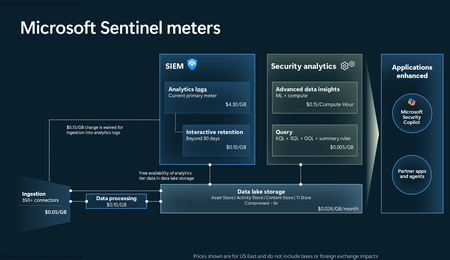
Introduction on Sentinel and its New Pricing Model Microsoft Sentinel is a cloud-native Security Information and Event Management (SIEM) and Security Orchestration, Automation, and Response (SOAR) platform that collects, analyzes, and correlates security data from across your environment to detect threats and automate response. Traditionally, Sentinel stored all ingested data in the Analytics tier (Log Analytics workspace), which is powerful but expensive for high-volume logs. To reduce cost and enable customers to retain all security data without compromise, Microsoft introduced a new dual-tier pricing model consisting of the Analytics tier and the Data Lake tier. The Analytics tier continues to support fast, real-time querying and analytics for core security scenarios, while the new Data Lake tier provides very low-cost storage for long-term retention and high-volume datasets. Customers can now choose where each data type lands—analytics for high-value detections and investigations, and data lake for large or archival types—allowing organizations to significantly lower cost while still retaining all their security data for analytics, compliance, and hunting. Please flow diagram depicts new sentinel pricing model: Now let's understand this new pricing model with below scenarios: Scenario 1A (PAY GO) Scenario 1B (Usage Commitment) Scenario 2 (Data Lake Tier Only) Scenario 1A (PAY GO) Requirement Suppose you need to ingest 10 GB of data per day, and you must retain that data for 2 years. However, you will only frequently use, query, and analyze the data for the first 6 months. Solution To optimize cost, you can ingest the data into the Analytics tier and retain it there for the first 6 months, where active querying and investigation happen. After that period, the remaining 18 months of retention can be shifted to the Data Lake tier, which provides low-cost storage for compliance and auditing needs. But you will be charged separately for data lake tier querying and analytics which depicted as Compute (D) in pricing flow diagram. Pricing Flow / Notes The first 10 GB/day ingested into the Analytics tier is free for 31 days under the Analytics logs plan. All data ingested into the Analytics tier is automatically mirrored to the Data Lake tier at no additional ingestion or retention cost. For the first 6 months, you pay only for Analytics tier ingestion and retention, excluding any free capacity. For the next 18 months, you pay only for Data Lake tier retention, which is significantly cheaper. Azure Pricing Calculator Equivalent Assuming no data is queried or analyzed during the 18-month Data Lake tier retention period: Although the Analytics tier retention is set to 6 months, the first 3 months of retention fall under the free retention limit, so retention charges apply only for the remaining 3 months of the analytics retention window. Azure pricing calculator will adjust accordingly. Scenario 1B (Usage Commitment) Now, suppose you are ingesting 100 GB per day. If you follow the same pay-as-you-go pricing model described above, your estimated cost would be approximately $15,204 per month. However, you can reduce this cost by choosing a Commitment Tier, where Analytics tier ingestion is billed at a discounted rate. Note that the discount applies only to Analytics tier ingestion—it does not apply to Analytics tier retention costs or to any Data Lake tier–related charges. Please refer to the pricing flow and the equivalent pricing calculator results shown below. Monthly cost savings: $15,204 – $11,184 = $4,020 per month Now the question is: What happens if your usage reaches 150 GB per day? Will the additional 50 GB be billed at the Pay-As-You-Go rate? No. The entire 150 GB/day will still be billed at the discounted rate associated with the 100 GB/day commitment tier bucket. Azure Pricing Calculator Equivalent (100 GB/ Day) Azure Pricing Calculator Equivalent (150 GB/ Day) Scenario 2 (Data Lake Tier Only) Requirement Suppose you need to store certain audit or compliance logs amounting to 10 GB per day. These logs are not used for querying, analytics, or investigations on a regular basis, but must be retained for 2 years as per your organization’s compliance or forensic policies. Solution Since these logs are not actively analyzed, you should avoid ingesting them into the Analytics tier, which is more expensive and optimized for active querying. Instead, send them directly to the Data Lake tier, where they can be retained cost-effectively for future audit, compliance, or forensic needs. Pricing Flow Because the data is ingested directly into the Data Lake tier, you pay both ingestion and retention costs there for the entire 2-year period. If, at any point in the future, you need to perform advanced analytics, querying, or search, you will incur additional compute charges, based on actual usage. Even with occasional compute charges, the cost remains significantly lower than storing the same data in the Analytics tier. Realized Savings Scenario Cost per Month Scenario 1: 10 GB/day in Analytics tier $1,520.40 Scenario 2: 10 GB/day directly into Data Lake tier $202.20 (without compute) $257.20 (with sample compute price) Savings with no compute activity: $1,520.40 – $202.20 = $1,318.20 per month Savings with some compute activity (sample value): $1,520.40 – $257.20 = $1,263.20 per month Azure calculator equivalent without compute Azure calculator equivalent with Sample Compute Conclusion The combination of the Analytics tier and the Data Lake tier in Microsoft Sentinel enables organizations to optimize cost based on how their security data is used. High-value logs that require frequent querying, real-time analytics, and investigation can be stored in the Analytics tier, which provides powerful search performance and built-in detection capabilities. At the same time, large-volume or infrequently accessed logs—such as audit, compliance, or long-term retention data—can be directed to the Data Lake tier, which offers dramatically lower storage and ingestion costs. Because all Analytics tier data is automatically mirrored to the Data Lake tier at no extra cost, customers can use the Analytics tier only for the period they actively query data, and rely on the Data Lake tier for the remaining retention. This tiered model allows different scenarios—active investigation, archival storage, compliance retention, or large-scale telemetry ingestion—to be handled at the most cost-effective layer, ultimately delivering substantial savings without sacrificing visibility, retention, or future analytical capabilities.Solved3KViews2likes6Comments
Sentinel Cost Optimization Series - Part 1 - Data prioritization
* There are graphs in this post, but I can't seem to upload/insert them; please visit the link in each part to see the picture. Problem statement Data prioritization is an issue that any SIEM or data gathering and analysis solution must consider. The log that we collect to SIEM is typically security-related and capable of directly creating alerts based on the event of that log, such as EDR alerts. However, not all logs are equally weighted. For example, the proxy log only contains the connections of internal users, which is very useful for investigation, but it does not directly create alerts and has a very high volume. To demonstrate this, we categorize the log into the primary log and secondary log based on its security value and volume. https://i.ibb.co/d4CzxCH/sentinel-cost-optimize-p1-1.png The metadata and context of what was discovered are frequently contained in the primary log sources used for detection. However, secondary log sources are sometimes required to present a complete picture of a security incident or breach. Unfortunately, many of these secondary log sources are high-volume verbose logs with little relevance for security detection. They aren’t useful unless a security issue or threat search requires them. On the current traditional on-premise solution, we will use SIEM alongside a data lake to store secondary logs for later use. https://i.ibb.co/kyc96Dx/sentinel-cost-optimize-p1-architect-onpremise.png Because we have complete control over everything, we can use any technology or solution, making it simple to set up (Eg. Qradar for SIEM and ELK for data lake). However, for cloud-naive SIEM, this becomes more difficult, particularly with https://azure.microsoft.com/en-gb/products/microsoft-sentinel/. Microsoft Sentinel is a cloud-native security information and event manager (SIEM) platform that includes artificial intelligence (AI) to help with data analysis across an enterprise. To store and analyze everything for Sentinel, we typically use Log Analytics with the Analytics Logs data plan. However, this is prohibitively expensive, costing between $2.00 and $2.50 per GB ingested per day depending on the Azure region used. Current Solution Storage Account (Blob Storage) To store these secondary data, the present approach uses https://docs.microsoft.com/en-us/azure/storage/blobs/storage-blobs-introduction. Blob storage is designed to hold large volumes of unstructured data, which implies it does not follow a certain data model or specification, such as text or binary data. This is a low-cost option for storing large amounts of data. The architecture for this solution is as follows: https://i.ibb.co/YhDJvJ8/sentinel-cost-optimize-p1-architect-blob.png However, Blob Storage has a limitation that is hard to ignore. The data in Blob Storage is not searchable. We can circumvent this by using as demonstrated in https://docs.microsoft.com/en-us/azure/search/search-blob-storage-integration, but this adds another layer of complexity and pricing that we would prefer to avoid. The alternative option is to use https://docs.microsoft.com/en-us/azure/data-explorer/kusto/query/externaldata-operator?pivots=azuredataexplorer, but this is designed to obtain small amounts of data (up to 100 MB) from an external storage device, not massive amounts of data. Our Solution High-Level Architecture Our solution used Basic Logs to tackle this problem. https://docs.microsoft.com/en-us/azure/azure-monitor/logs/log-analytics-workspace-overview#log-data-plans-preview is a less expensive option for importing large amounts of verbose log data into your Log Analytics workspace. The Basic log also supports a subset of KQL, making it searchable. To get the log into the Basic Log, We need to use a Custom table generated with the Data Collection Rule (DCR)-based logs ingestion API. The structure is as follows: https://i.ibb.co/2hZ6Gpx/sentinel-cost-optimize-p1-architect.png Our Experiment In our experiment, we use the following component for the architecture: Component Solution Description Source Data VMware Carbon Black EDR Carbon Black EDR is an endpoint activity data capture and retention solution that allows security professionals to chase attacks in real-time and observe the whole attack kill chain. This means that it captures not only data for alerting, but also data that is informative, such as binary or host information. Data Processor Cribl Stream Cribl helps process machine data in real-time - logs, instrumentation data, application data, metrics, and so on - and delivers it to a preferred analysis platform. It supports sending logs to Log Analytics, but only with the Analytics plan. To send the log to the Basic plan, we need to set up a data collection endpoint and rule, please see Logs ingestion API in https://learn.microsoft.com/en-us/azure/azure-monitor/logs/logs-ingestion-api-overview for additional information on how to set this up. And we also use a Logic App as a webhook to collect the log and send it to the Data collection endpoint. The environment we use for log generation is as follows: Number of hosts: 2 Operation System: Windows Server 2019 Number of days demo: 7 The number of logs we collected for our test environment are: Basic Log generated: 30.2 MB Alerts generated: 16.6 MB https://i.ibb.co/HYXyDYL/sentinel-cost-optimize-p1-2.png The cost is based on the East US region, the currency is the USD, and the Pay-As-You-Go Tier was used to determine the number saved using the generated data with 1000 hosts and 30 days retention period. The calculation using only Analytic Log Table Ingestion Volume (GB) Cost per GB (USD) Total cost per day (USD) Total cost per retention period (USD) Host number Retention (Days) Cb_logs_Raw_CL 2.16 2.3 4.96 148.84 1000 30 Cb_logs_alert_CL 1.19 2.3 2.73 81.81 1000 30 Total 7.69 230.66 If we use Analytic Log with Storage Account Table Ingestion Volume (GB) Cost per GB (USD) Total cost per day (USD) Total cost per retention period (USD) Host number Retention (Days) Cb_logs_Raw_CL 2.16 0.02 0.04 1.29 1000 30 Cb_logs_alert_CL 1.19 2.3 2.73 81.81 1000 30 Total 2.77 83.11 If we use Analytic Log with Basic Log Table Ingestion Volume (GB) Cost per GB (USD) Total cost per day (USD) Total cost per retention period (USD) Host number Retention (Days) Cb_logs_Raw_CL 2.16 0.5 1.08 32.36 1000 30 Cb_logs_alert_CL 1.19 2.3 2.73 81.81 1000 30 Total 3.81 114.17 Now let’s compare these 3 solutions together and get an overall look altogether. Only Analytic Log Analytic Log with Storage Account Analytic Log with Basic Log Cost calculated $230.66 $83.11 $114.17 Searchable Yes No Yes but cost $0.005 per GB Retention Up to 2,556 days (7 years) 146,000 days (400 years) Up to 2,556 days (7 years) Limitation Even though the Basic Log is an excellent choice for ingesting hot data, it does have some limitations that are difficult to overlook: The retention period is only 8 days, and this retention can’t be increased, after that, it will either be deleted or archived KQL language access is limited, for a list of what operators can be used, please see https://learn.microsoft.com/en-us/azure/azure-monitor/logs/basic-logs-query?tabs=portal-1#kql-language-limits There is a charge for interactive queries ($0.005/GB-scanned) This is the first post in this Sentinel Cost Optimization series. I hope this helps you have another choice to consider when setting up and sending your custom log to Sentinel.2.7KViews1like0Comments
Pricing for Security Events Ingestion
Hi All, Just wondering if someone can provide any idea how the logs from Security Center a billed? The connector is not enabled but we are seeing the Security Events schema being filled. Running a query against _IsBillable == True shows this data as billable. How does this data get billed? On the connector we see the informational notice: "Security Events tier configuration is shared with Azure Security Center and was already configured there for this workspace. Change the tier in Azure Security Center and it will apply for Azure Sentinel as well. Note that Security events will be collected once and used in both solutions." It says once and used for both - is it billed twice or just once? If it's billed once is billed against the Data Analytics pricing or the Sentinel pricing?2.2KViews0likes1CommentMicrosoft sentinel custom parsers
Dear All, There are charges as per the Microsoft website for creating custom coloumns during parsing. Please let me know the following:- What is the charge exactly? How much i will charge if i do parsing and create a single custom coloumns? What is i do the parsing and use the already existing coloumns for example "Account", is there any charges for it? Kindly share any supporting documents or links from Microsoft for support. Regards Sammy. https://techcommunity.microsoft.com/t5/microsoft-sentinel/latest-costing-billing-changes/m-p/36795681.9KViews0likes2Comments
RE: Commitment Tiers in Microsoft Sentinel
If you choose a commitment tier of 100 GB per day, are you charged the fixed rate per day OR the amount of GB I use per day, say 50GB? So, let's say I use, on average, 50GB for 30 days, and I am using the commitment tier mentioned... How are my estimated costs calculated?Solved1.9KViews0likes6CommentsIs there a minimum cost for Sentinel?
Hello, I'd like to use Sentinel in a SMB environment. We should process about 5-10 GB of data every month: using the pay-as-you-go tier, the cost should be very low, assuming a 5$ per GB. I was wondering if Sentinel has a minimum price to pay, when the logs volume is very low. Thanks in advance.1.3KViews0likes4CommentsAMA agent DCR log filtering
Hi, I have previously created KQL queries for ingestion time transformation and was filtering out certain event ids and few other logs (e.g. | where not(EventID == 4799 and CallerProcessName contains "C:\\Program Files\\Qualys\\QualysAgent\\QualysAgent.exe") ) . Now I have almost 80+ filtering KQL queries which I have applied on securityEvent table to filter out specific logs. I have shifted my servers from MMA agent to AMA agent and AMA agent has its down DCR and my existing ingestion time transformation won't work now. I need to create xpath queries in new DCR. Is there anyway I can convert all of the existing ingestion time transformation applied KQLs (example already mentioned above)? OR Do I need to create separate DCRs for AMA to filterout specific events which are 80+?1.3KViews0likes1Comment