copilot
20 TopicsMigrating to GPT-5.x Without Breaking GPT-4: A Practical, Backward-Compatible Playbook
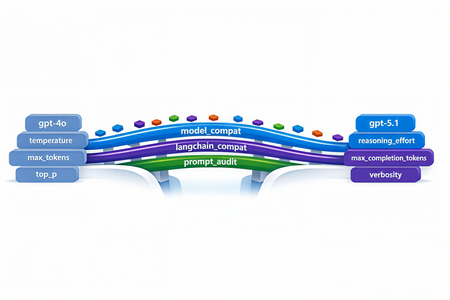
The first request your service sends after swapping gpt-4o for gpt-5.1 in production will return HTTP 400. Not in two weeks. On the first call. And the parameter the error points to isn't one you set anywhere in your code - it's bound onto the request by a LangChain helper you've used for two years. This post walks through every breaking change between the GPT-4 and GPT-5 families on Azure OpenAI in Microsoft Foundry, the integration cliffs nobody warns you about, and the small set of files you need so the same call sites work against both model families without branching. Who this is for: engineers maintaining an existing production codebase that calls Azure OpenAI / OpenAI - directly or through LangChain - and needs to onboard GPT-5.x while keeping the GPT-4 deployments alive during rollout. What you'll leave with: one copy-paste compatibility module, a tiny LangChain subclass, a prompt-audit harness, and a 10-step rollout checklist. 1. Why this migration is different Every previous Azure OpenAI bump - 3.5 → 4, 4 → 4o, 4o → 4o-mini - was additive. You changed engine="gpt-4o" and everything kept working. GPT-5.x is the first generation that is subtractive: parameters you used to send now return 400 Unsupported parameter. The wire protocol itself changed because GPT-5 is a reasoning model - it spends tokens thinking internally before it answers, so the parameters that controlled the old sampling pipeline (temperature, top_p, presence_penalty, frequency_penalty) no longer exist on the request schema. What this means for production code: A passing test suite against gpt-4o will fail on the first call against gpt-5.1 with HTTP 400. A passing test suite against gpt-5.1 will fail on every legacy gpt-4* deployment because the new reasoning controls (reasoning_effort, verbosity) are not recognised there. LangChain helpers that worked unmodified for two years (notably create_sql_query_chain) silently bind stop=[...] onto your LLM and trigger the same 400. Source-grep won't find the offending line because it lives inside the library. The good news: the divergence is mechanical. With one detection helper, one parameter-builder, and one tiny LangChain subclass you can run the same code against both families. 2. The breaking-changes matrix Concern GPT-4 / GPT-4o (legacy) GPT-5.x / o1 / o3 (reasoning) Output budget max_tokens max_completion_tokens (rejects max_tokens) temperature 0.0–1.0 Only the default (1) is accepted - omit it top_p Supported Rejected presence_penalty, frequency_penalty Supported Rejected logprobs, logit_bias Supported Rejected stop sequences Supported Rejected on most reasoning deployments reasoning_effort Rejected New: minimal | low | medium | high verbosity Rejected New: low | medium | high (sometimes via extra_body) System instruction role system developer recommended; system still works as alias Output token cost Output tokens only Output + reasoning tokens count against your cap Recommended API version 2024-12-01-preview or earlier 2025-03-01-preview or later Two consequences are easy to miss: max_completion_tokens is a shared budget. GPT-5.1 can burn 2–4× more tokens internally before emitting the first response token. A cap of 4096 that comfortably held a SQL query on GPT-4o now silently truncates the answer mid-token on GPT-5.1. Multiply your legacy budgets by ~2.5× and add a floor (e.g. 4096) before sending. The stop parameter is the silent killer. Any helper that calls llm.bind(stop=[...]) - and there are several in langchain - will turn a working code path into a 400 the moment you swap deployments. 3. Compatibility strategy: detect, don't fork The temptation is to fork: one branch for GPT-4, one for GPT-5. Don't. The right unit of abstraction is one function that classifies the deployment into a family, and one function that builds a kwargs dict the SDK will accept for that family. Every call site - SDK, LangChain, raw HTTP - drains into the same kwargs builder. When you eventually retire GPT-4 you delete the legacy branch in one file, not in fifty. 4. The industry-agnostic compatibility module Drop the following file into your project. It has no Azure / OpenAI / LangChain imports at module load time, so the same file works from a web service, a serverless function, a notebook, or a CLI tool. 4.1 model_compat.py """ Model compatibility helper for GPT-5.x with GPT-4 backward compatibility. This module centralises the parameter translation needed to talk to the "reasoning" generation of OpenAI / Azure OpenAI models (GPT-5, GPT-5.1, o1, o3, o4) while keeping older deployments (gpt-4, gpt-4o, gpt-4-32k, gpt-3.5-turbo, etc.) working unchanged. """ from __future__ import annotations import logging import os import re from typing import Any, Dict, Iterable, Mapping, Optional # --------------------------------------------------------------------------- # Family detection # --------------------------------------------------------------------------- _REASONING_PATTERNS = ( # gpt-5, gpt5, gpt-5.1, gpt_5, GPT 5, gpt5mini-prod-eu, ... re.compile(r"(?i)(^|[^a-z0-9])gpt[-_ ]?5(\.\d+)?([^0-9]|$)"), # o1, o3, o4, o1-mini, o3-preview ... re.compile(r"(?i)(^|[^a-z0-9])o[134](-mini|-preview)?([^a-z0-9]|$)"), ) _LEGACY_PATTERNS = ( re.compile(r"(?i)gpt[-_ ]?4o"), re.compile(r"(?i)gpt[-_ ]?4(?!\d)"), re.compile(r"(?i)gpt[-_ ]?4[-_ ]?32k"), re.compile(r"(?i)gpt[-_ ]?3\.?5"), re.compile(r"(?i)gpt[-_ ]?35"), ) def get_model_family(model_or_deployment: Optional[str]) -> str: """Return ``"reasoning"`` for GPT-5.x / o-series, ``"legacy"`` otherwise. Honours an ``OPENAI_MODEL_FAMILY`` env-var override for deployments whose user-defined name does not embed the model family (e.g. ``prod-default``). """ override = (os.getenv("OPENAI_MODEL_FAMILY") or "").strip().lower() if override in {"reasoning", "gpt-5", "gpt5", "gpt-5.1", "o-series", "o1", "o3"}: return "reasoning" if override in {"legacy", "gpt-4", "gpt4", "gpt-3.5", "gpt35", "chat"}: return "legacy" name = (model_or_deployment or "").strip() if not name: # Fail closed: when we don't know, assume legacy so old code keeps # working. Misclassifying a reasoning deployment as legacy fails fast # with a clear "Unsupported parameter" 400; the reverse silently # drops parameters the caller expected. return "legacy" for pat in _REASONING_PATTERNS: if pat.search(name): return "reasoning" for pat in _LEGACY_PATTERNS: if pat.search(name): return "legacy" return "legacy" def is_reasoning_model(model_or_deployment: Optional[str]) -> bool: return get_model_family(model_or_deployment) == "reasoning" # --------------------------------------------------------------------------- # Reasoning controls # --------------------------------------------------------------------------- _VALID_REASONING_EFFORT = {"minimal", "low", "medium", "high"} _VALID_VERBOSITY = {"low", "medium", "high"} def _coerce_choice(raw: Optional[str], valid: Iterable[str]) -> Optional[str]: if raw is None: return None value = str(raw).strip().lower() if not value: return None if value not in set(valid): logging.warning( "Ignoring unsupported value '%s'; expected one of %s", raw, sorted(valid), ) return None return value def get_reasoning_effort(override: Optional[str] = None) -> Optional[str]: return _coerce_choice( override if override is not None else os.getenv("OPENAI_REASONING_EFFORT"), _VALID_REASONING_EFFORT, ) def get_verbosity(override: Optional[str] = None) -> Optional[str]: return _coerce_choice( override if override is not None else os.getenv("OPENAI_VERBOSITY"), _VALID_VERBOSITY, ) # --------------------------------------------------------------------------- # max_completion_tokens scaling # --------------------------------------------------------------------------- def _reasoning_token_scale() -> float: """Multiplier applied to legacy ``max_tokens`` when targeting a reasoning model.""" try: scale = float(os.getenv("OPENAI_REASONING_TOKEN_SCALE", "2.5")) except (TypeError, ValueError): scale = 2.5 return scale if scale > 0 else 1.0 def _reasoning_token_floor() -> int: try: floor = int(os.getenv("OPENAI_REASONING_TOKEN_FLOOR", "4096")) except (TypeError, ValueError): floor = 4096 return floor if floor > 0 else 4096 def scale_max_tokens_for_reasoning(max_tokens: Optional[int]) -> Optional[int]: """Scale a legacy ``max_tokens`` budget up for reasoning models. ``None`` and ``-1`` ("no explicit cap") are passed through. """ if max_tokens is None: return None if max_tokens == -1: return -1 return max(int(round(max_tokens * _reasoning_token_scale())), _reasoning_token_floor()) # --------------------------------------------------------------------------- # Kwargs builders # --------------------------------------------------------------------------- _SAMPLING_KEYS = ("temperature", "top_p", "presence_penalty", "frequency_penalty") def _drop_none(mapping: Mapping[str, Any]) -> Dict[str, Any]: return {k: v for k, v in mapping.items() if v is not None} def build_openai_chat_kwargs( model: str, *, max_tokens: Optional[int] = None, temperature: Optional[float] = None, top_p: Optional[float] = None, presence_penalty: Optional[float] = None, frequency_penalty: Optional[float] = None, reasoning_effort: Optional[str] = None, verbosity: Optional[str] = None, extra: Optional[Mapping[str, Any]] = None, ) -> Dict[str, Any]: """Build kwargs for ``openai.OpenAI / AzureOpenAI .chat.completions.create``. Splat the result directly: ``client.chat.completions.create(**kwargs)``. Unsupported parameters are silently omitted for reasoning models; legacy deployments retain the historical behaviour. """ family = get_model_family(model) kwargs: Dict[str, Any] = {"model": model} # ---- output budget ---- if max_tokens is not None and max_tokens != -1: if family == "reasoning": kwargs["max_completion_tokens"] = scale_max_tokens_for_reasoning(int(max_tokens)) else: kwargs["max_tokens"] = int(max_tokens) # ---- sampling ---- if family == "legacy": kwargs.update(_drop_none({ "temperature": temperature, "top_p": top_p, "presence_penalty": presence_penalty, "frequency_penalty": frequency_penalty, })) else: for key, value in ( ("temperature", temperature), ("top_p", top_p), ("presence_penalty", presence_penalty), ("frequency_penalty", frequency_penalty), ): if value is not None: logging.debug( "Dropping unsupported parameter '%s' for reasoning model '%s'", key, model, ) # ---- reasoning controls ---- if family == "reasoning": effort = get_reasoning_effort(reasoning_effort) if effort is not None: kwargs["reasoning_effort"] = effort verb = get_verbosity(verbosity) if verb is not None: # ``verbosity`` is not a top-level kwarg in openai-python <= 1.65.x; # route it via ``extra_body`` so it lands in the JSON without a # TypeError from the SDK. kwargs.setdefault("extra_body", {})["verbosity"] = verb # ---- caller-supplied extras (already filtered) ---- if extra: for key, value in extra.items(): if value is None: continue if family == "reasoning" and key in _SAMPLING_KEYS: continue kwargs[key] = value return kwargs def build_langchain_chat_kwargs( deployment_name: str, *, max_tokens: Optional[int] = None, temperature: Optional[float] = None, top_p: Optional[float] = None, reasoning_effort: Optional[str] = None, verbosity: Optional[str] = None, ) -> Dict[str, Any]: """Build kwargs for ``langchain_openai.AzureChatOpenAI`` / ``ChatOpenAI``. Older ``langchain-openai`` releases don't expose ``max_completion_tokens`` as a top-level kwarg, so we forward it through ``model_kwargs`` (which langchain passes straight to the SDK). """ family = get_model_family(deployment_name) kwargs: Dict[str, Any] = {} model_kwargs: Dict[str, Any] = {} if max_tokens is not None and max_tokens != -1: if family == "reasoning": model_kwargs["max_completion_tokens"] = scale_max_tokens_for_reasoning(int(max_tokens)) else: kwargs["max_tokens"] = int(max_tokens) if family == "reasoning": effort = get_reasoning_effort(reasoning_effort) if effort is not None: model_kwargs["reasoning_effort"] = effort verb = get_verbosity(verbosity) if verb is not None: model_kwargs.setdefault("extra_body", {})["verbosity"] = verb else: if temperature is not None: kwargs["temperature"] = temperature if top_p is not None: kwargs["top_p"] = top_p if model_kwargs: kwargs["model_kwargs"] = model_kwargs return kwargs def get_system_role(model_or_deployment: Optional[str] = None) -> str: """Return ``"developer"`` for reasoning models when opted in, ``"system"`` otherwise. Defaulting to ``"system"`` preserves compatibility with LangChain prompt templates and SDK helpers that don't yet recognise the new role. Opt in with ``OPENAI_USE_DEVELOPER_ROLE=1`` once your stack supports it. """ if not is_reasoning_model(model_or_deployment): return "system" raw = os.getenv("OPENAI_USE_DEVELOPER_ROLE", "") return "developer" if raw.strip().lower() in {"1", "true", "yes", "on"} else "system" 4.2 What this buys you Every direct-SDK call collapses to two lines: from openai import AzureOpenAI from model_compat import build_openai_chat_kwargs client = AzureOpenAI( azure_endpoint=os.environ["AZURE_OPENAI_ENDPOINT"], api_version=os.environ["OPENAI_API_VERSION"], api_key=os.environ["AZURE_OPENAI_API_KEY"], ) kwargs = build_openai_chat_kwargs( model=os.environ["OPENAI_ENGINE"], max_tokens=4096, # automatically becomes max_completion_tokens for GPT-5 temperature=0.2, # automatically dropped for GPT-5 reasoning_effort="low", # automatically dropped for GPT-4 ) response = client.chat.completions.create( messages=[ {"role": "system", "content": "You are a helpful assistant."}, {"role": "user", "content": user_input}, ], **kwargs, ) The same call site now correctly targets gpt-5.1, gpt-4o, gpt-4-32k, o3-mini, or any future deployment whose name embeds the family - and you can override with the OPENAI_MODEL_FAMILY env var when the deployment alias is opaque. 4.3 Raw HTTP call sites Some legacy code paths bypass the SDK and POST JSON directly. The same builder works there: import json import requests from model_compat import build_openai_chat_kwargs, get_system_role deployment = os.environ["OPENAI_ENGINE"] api_version = os.environ["OPENAI_API_VERSION"] endpoint = ( f"{os.environ['AZURE_OPENAI_ENDPOINT']}/openai/deployments/{deployment}" f"/chat/completions?api-version={api_version}" ) payload = { "messages": [ {"role": get_system_role(deployment), "content": system_prompt}, {"role": "user", "content": user_prompt}, ], } # Splat the kwargs into the payload, then strip the SDK-only ``model`` key. payload.update(build_openai_chat_kwargs( model=deployment, max_tokens=800, temperature=0.7, top_p=0.95, reasoning_effort="low", )) payload.pop("model", None) # ``model`` is encoded in the URL for Azure payload.pop("extra_body", None) # already on the payload root resp = requests.post( endpoint, headers={"Content-Type": "application/json", "api-key": api_key}, data=json.dumps(payload), timeout=60, ) resp.raise_for_status() 5. LangChain: the hidden stop parameter langchain.chains.sql_database.query.create_sql_query_chain calls llm.bind(stop=["\nSQLResult:"]) internally to terminate the model's output before the example block in its prompt. That stop value is forwarded to the SDK on every invocation. GPT-5.1 rejects it: openai.BadRequestError: Error code: 400 - {'error': { 'message': "Unsupported parameter: 'stop' is not supported with this model.", 'type': 'invalid_request_error', 'param': 'stop', }} You can't reach into the chain to disable it. The clean fix is a thin AzureChatOpenAI subclass that drops stop for reasoning models only: 5.1 langchain_compat.py """LangChain-side compatibility shim for reasoning-class deployments.""" from __future__ import annotations from typing import Any, List, Optional from langchain_core.callbacks.manager import ( AsyncCallbackManagerForLLMRun, CallbackManagerForLLMRun, ) from langchain_core.messages import BaseMessage from langchain_core.outputs import ChatResult from langchain_openai import AzureChatOpenAI # use ChatOpenAI for non-Azure from model_compat import is_reasoning_model class ReasoningSafeAzureChatOpenAI(AzureChatOpenAI): """``AzureChatOpenAI`` variant that hides parameters reasoning models reject. Reasoning models (GPT-5.x, o1/o3/o4) return HTTP 400 when a request payload carries ``stop``. LangChain's SQL helpers unconditionally bind it, so the unsupported parameter reaches the SDK regardless of how the caller configured the LLM. This subclass strips ``stop`` for reasoning deployments while forwarding it unchanged for legacy GPT-4 / GPT-3.5 deployments - the behaviour is byte-identical to upstream LangChain for those models. """ def _deployment_id(self) -> str: # ``langchain-openai`` >= 0.2 exposes ``azure_deployment``; older # releases use ``deployment_name``. Either may be set by the caller. return ( getattr(self, "azure_deployment", None) or getattr(self, "deployment_name", None) or "" ) def _generate( self, messages: List[BaseMessage], stop: Optional[List[str]] = None, run_manager: Optional[CallbackManagerForLLMRun] = None, **kwargs: Any, ) -> ChatResult: if is_reasoning_model(self._deployment_id()): stop = None return super()._generate(messages, stop=stop, run_manager=run_manager, **kwargs) async def _agenerate( self, messages: List[BaseMessage], stop: Optional[List[str]] = None, run_manager: Optional[AsyncCallbackManagerForLLMRun] = None, **kwargs: Any, ) -> ChatResult: if is_reasoning_model(self._deployment_id()): stop = None return await super()._agenerate(messages, stop=stop, run_manager=run_manager, **kwargs) Use it as a drop-in replacement: from langchain_compat import ReasoningSafeAzureChatOpenAI from model_compat import build_langchain_chat_kwargs llm_kwargs = build_langchain_chat_kwargs( deployment_name=os.environ["OPENAI_ENGINE"], max_tokens=6000, temperature=0, reasoning_effort="low", ) llm = ReasoningSafeAzureChatOpenAI( azure_endpoint=os.environ["AZURE_OPENAI_ENDPOINT"], azure_deployment=os.environ["OPENAI_ENGINE"], openai_api_version=os.environ["OPENAI_API_VERSION"], api_key=os.environ["AZURE_OPENAI_API_KEY"], **llm_kwargs, ) That single substitution makes create_sql_query_chain, SQLDatabaseChain, and the ChatOpenAI-based RAG helpers all work against GPT-5.1 without any other changes. 6. The second LangChain gotcha: prose where SQL should be create_sql_query_chain is documented to return the literal string "I don't know" (or a similar fallback) when the LLM cannot form a query. The default code path takes the chain output and runs it against the database: sql = chain.invoke({...}) # -> "I don't know" result = db.run(sql) # -> sends "I don't know" to pyodbc The database faithfully returns: [42000] Unclosed quotation mark after the character string 't know'. (105) Which surfaces to the end user as a misleading "SQL syntax error". The mitigation is a one-line guard that validates the chain output looks like SQL before execution: import re _SQL_START_RE = re.compile( r"^\s*(?:WITH|SELECT|INSERT|UPDATE|DELETE|CREATE|DROP|ALTER|MERGE|EXEC|EXECUTE|TRUNCATE)\b", re.IGNORECASE, ) def looks_like_sql(text: str) -> bool: """True only if ``text`` starts with a recognised SQL DML/DDL keyword.""" if not text or not text.strip(): return False return bool(_SQL_START_RE.match(text)) sql = extract_sql_query(chain.invoke({...})) if not looks_like_sql(sql): logging.warning("SQL chain returned a non-SQL response: %r", sql[:200]) return ( "I couldn't form a SQL query for that question. " "Please rephrase or add more context." ) result = db.run(sql) This isn't specific to GPT-5.1 - it's good hygiene for any LLM that backs a SQL agent - but the failure mode becomes much more frequent on reasoning models because they're better at refusing. 7. Cleaning Markdown out of create_sql_query_chain output Reasoning models like to wrap their answer in a markdown fence and append a "Note:" or "Explanation:" paragraph. None of that survives db.run(). A defensive extract_sql_query handles all the variants: import re def extract_sql_query(text: str) -> str: """Strip markdown fences, leading prose, and trailing explanations.""" # 1) Prefer SQL inside a markdown code fence. m = re.search(r"```(?:sql|SQL|Sql)?\s*\n(.*?)\n```", text, re.DOTALL) if m: text = m.group(1) text = text.strip() # 2) Drop any prose *before* the SQL by jumping to the first SQL keyword. m = re.search( r"(?im)^\s*(WITH|SELECT|INSERT|UPDATE|DELETE|CREATE|DROP|ALTER|MERGE|EXEC|EXECUTE|TRUNCATE)\b", text, ) if m: text = text[m.start(1):] # 3) Cut at the first "Explanation:" / "Note:" / "This query..." marker. m = re.compile( r"(?im)^\s*(?:Explanation|Note|Notes|Here(?:'|\u2019)?s|" r"This\s+(?:query|SQL|statement|returns|counts|selects|will|gets|finds)|" r"The\s+(?:query|SQL|above|result|statement)|" r"Result|Results|Description|Output|Answer)\b[^\n]*" ).search(text) if m: text = text[: m.start()].rstrip() # 4) Drop any trailing fence that survived step 1. if text.endswith("```"): text = text[:-3].rstrip() return text.strip() 8. Package versioning The bare minimum your requirements.txt / environment.yml needs: Package Last GPT-4-only version First GPT-5.x-safe version Notes openai 1.55.x 1.65.x (recommend 1.65.4+) Earlier versions reject max_completion_tokens and reasoning_effort as unknown kwargs langchain-openai 0.2.14 0.3.7+ 0.3.x line exposes azure_deployment and forwards model_kwargs correctly to the new SDK langchain 0.3.14 0.3.21+ Pin together with langchain-openai and langchain-core langchain-core 0.3.29 0.3.49+ Update in lockstep with the others langchain-community 0.3.14 0.3.20+ Mostly transitive; needed for SQLDatabase helpers tiktoken 0.7.x 0.8.0+ Encodings for GPT-5.1 ship in 0.8.0; older versions fall back to cl100k_base for unknown models tokencost (optional) 0.1.16 0.1.20+ Update for GPT-5.x price tables Azure OpenAI API version 2024-12-01-preview 2025-03-01-preview First version that ships reasoning_effort and the GPT-5.x routing Pin exact versions after testing - LangChain has a habit of moving public re-exports between minor releases. requirements.txt snippet: openai==1.65.4 langchain==0.3.21 langchain-core==0.3.49 langchain-openai==0.3.7 langchain-community==0.3.20 tiktoken==0.8.0 9. New GPT-5.x knobs worth using Once you're on a reasoning deployment, two new parameters become available. Both are optional, both default to a sensible value, and both are stripped by the kwargs builder above when the target is a legacy model. reasoning_effort minimal - one-shot lookups, classification. low - deterministic structured output (SQL, JSON-schema extraction, rule-based rewrites). Lowest cost overhead. medium (default) - RAG, summarisation, normal Q&A. high - multi-step analytical reasoning, complex code synthesis. A useful pattern is to choose the level by task profile rather than at the call site: TASK_EFFORT = { "sql": "low", "structured_extract": "low", "kg_cleaning": "low", "rag_qa": "medium", "vision": "medium", "analytical": "high", } verbosity low | medium | high. Controls the length of the response, not its substance. Useful for grounding chat UIs where you want crisp answers - set low for /answer endpoints and high for "explain like a senior engineer" panels. Note: in openai-python <= 1.65.x, verbosity is not yet a top-level keyword argument; pass it through extra_body (the builder above already does this). developer role GPT-5.x prefers {"role": "developer", "content": "..."} for instructions that previously used system. The change is non-breaking on the Azure side - system is still accepted as an alias - but some downstream LangChain prompt templates predate the role and will reject it on construction. Treat developer as opt-in (OPENAI_USE_DEVELOPER_ROLE=1) for now; flip the default after your prompt-template version is known good. 10. Auditing your existing prompts When the wire-level migration is done your service will talk to GPT-5.x - but that doesn't mean it says the right thing. Reasoning models read prompts differently in ways that won't show up as 400s: They take instructions more literally. A prompt that worked when GPT-4o rounded the corners may surface every edge case verbatim. They refuse more often. "I don't know" / "I cannot help with that" are more frequent because reasoning models are less willing to confabulate. They ignore "be concise" / "be terse". Use the new verbosity knob. Step-by-step / chain-of-thought instructions become redundant. The model already reasons internally; extra "think before you answer" prose competes with its own chain of thought and often hurts output quality. Negative-only instructions can backfire. "Never output X" prompts occasionally cause refusals where you'd rather have a workaround. 10.1 Build a prompt regression harness Capture every system+user prompt your service emits in a CSV, then replay each one against both deployments and diff the output. The diff is the single most useful artefact you can produce before the cutover: # prompt_audit.py - minimal differential tester import csv from openai import AzureOpenAI from model_compat import build_openai_chat_kwargs LEGACY = "gpt-4o" REASONING = "gpt-5.1" client = AzureOpenAI( azure_endpoint=os.environ["AZURE_OPENAI_ENDPOINT"], api_version=os.environ["OPENAI_API_VERSION"], api_key=os.environ["AZURE_OPENAI_API_KEY"], ) def run(model: str, system: str, user: str) -> str: kw = build_openai_chat_kwargs( model=model, max_tokens=4096, temperature=0.2, # auto-dropped for reasoning reasoning_effort="medium", # auto-dropped for legacy ) resp = client.chat.completions.create( messages=[ {"role": "system", "content": system}, {"role": "user", "content": user}, ], **kw, ) return resp.choices[0].message.content or "" with open("prompts.csv") as f_in, open("diff.tsv", "w", newline="") as f_out: writer = csv.writer(f_out, delimiter="\t") writer.writerow(["id", "legacy_first80", "reasoning_first80", "len_legacy", "len_new", "identical"]) for row in csv.DictReader(f_in): legacy = run(LEGACY, row["system"], row["user"]) new = run(REASONING, row["system"], row["user"]) writer.writerow([ row["id"], legacy[:80].replace("\n", " "), new[:80].replace("\n", " "), len(legacy), len(new), legacy.strip() == new.strip(), ]) Capture three signals per prompt - they're enough to triage 95% of drift: Format compliance. Did the output still parse as the expected JSON / YAML / Markdown / SQL? Run your existing downstream parser on both columns. Token cost delta. Reasoning models tend to be more verbose by default. Anything beyond +20% is a candidate for the verbosity="low" knob. Semantic drift. Spot-check 5–10% of rows by hand. You're looking for changes in intent, not changes in wording. 10.2 Common rewrites to make prompts model-agnostic The goal isn't to write two prompts. It's to write one prompt that produces correct output on both families by moving constraints out of the natural-language body and into the request shape. 10.2a. Format constraints belong in response_format, not the prose Don't: Output ONLY a JSON object with keys `name` and `score`. Do not include any explanation. Do not wrap in markdown. Do not say anything else. Do: resp = client.chat.completions.create( messages=[...], response_format={ "type": "json_schema", "json_schema": { "name": "scored_entity", "schema": { "type": "object", "properties": { "name": {"type": "string"}, "score": {"type": "number"}, }, "required": ["name", "score"], "additionalProperties": False, }, "strict": True, }, }, **kw, ) response_format is honoured by both gpt-4o (>= 2024-08-06) and the entire GPT-5.x line. The prompt loses three lines of brittle natural-language constraints and you get schema-validated output for free. 10.2b. Replace "think step by step" with reasoning_effort Don't: Let's think step by step. First identify the entity. Then find the category. Then compute the score. Then format the answer. Do: delete the prose and pass reasoning_effort="medium" (or "high") for reasoning deployments. The kwargs builder drops the parameter automatically for GPT-4 models, so the same prompt now produces: step-by-step reasoning internally on GPT-5.x (lower output token cost), the same final answer on GPT-4o that the verbose prompt used to elicit. 10.2c. Replace temperature-based variety with n sampling If your code relied on temperature=0.9 to get diverse completions, GPT-5.x will return roughly the same answer every time. Generate variety the explicit way: resp = client.chat.completions.create(messages=[...], n=5, **kw) candidates = [c.message.content for c in resp.choices] Or call the model N times with slightly different framings. Both patterns work against either family with no further code changes. 10.2d. Move procedural instructions to the developer role For multi-step workflows, the new developer role gives clearer separation between what the system enforces and what the user is asking: messages = [ {"role": get_system_role(deployment), "content": role_card_for_assistant}, {"role": "developer", "content": procedural_instructions}, {"role": "user", "content": user_question}, ] get_system_role returns "system" for legacy models and "developer" for reasoning models opted in via OPENAI_USE_DEVELOPER_ROLE=1. Once your LangChain templates support the new role you can flip the default. 10.2e. Add a literal-execution header for strict formats For prompts where the exact output shape matters (table generation, SQL with a fixed column order, structured incident reports), prepend an explicit literal-execution header so reasoning models don't drift into "helpful improvements": LITERAL_EXECUTION_HEADER = ( "Execution mode: follow the instructions below literally and in order. " "Do not infer intent, skip, reorder, merge, or add steps. Honour the " "exact formatting, tone, and verbosity specified. If a step is " "ambiguous, respond with the literal interpretation and flag the " "ambiguity instead of guessing." ) def apply_literal_execution(prompt: str) -> str: if LITERAL_EXECUTION_HEADER in prompt: return prompt return f"{LITERAL_EXECUTION_HEADER}\n\n{prompt}" It's a no-op on GPT-4o (the older models already follow instructions literally enough) and a meaningful guard rail on GPT-5.1. Wire it behind an OPENAI_LITERAL_EXECUTION flag so you can disable it without redeploying. 10.3 A prompt-shaped checklist Run every prompt your service emits past these questions: Question Action Does it specify output format in prose? Move to response_format (10.2a) Does it include "think step by step"? Remove; set reasoning_effort (10.2b) Does it set tone constraints ("be concise")? Use verbosity Does it use negative-only instructions ("never X")? Add positive alternative ("do Y instead") Does it embed example outputs with values that would change? Replace concrete values with placeholder tokens (<VALUE>) Does it rely on temperature > 0 for variety? Use n=K sampling (10.2c) Is the system prompt > 2k tokens? Split into role-card (system) + procedure (developer) Does output ordering matter? Add the literal-execution header (10.2e) 10.4 Score before you ship Don't approve a rewritten prompt by eyeballing one example. Score it: Format compliance rate. Percentage of N=50 outputs that pass your existing downstream parser / JSON schema validation. Token cost delta. Cap regression at +20% versus the legacy baseline. Beyond that, dial verbosity="low" or tighten the prompt. Latency p50 / p95 delta. Reasoning models add tail latency. If your SLA is tight, set reasoning_effort="low" for the path or move it to a background queue. A prompt that regresses on any of those by more than your tolerance window ships behind a feature flag with rollback wired in. 11. Testing strategy Two test layers catch >90% of regressions: Family-classification tests import pytest from model_compat import get_model_family, build_openai_chat_kwargs @pytest.mark.parametrize("name,expected", [ ("gpt-5.1", "reasoning"), ("gpt5", "reasoning"), ("gpt-5-prod-eu", "reasoning"), ("o3-mini", "reasoning"), ("o1", "reasoning"), ("gpt-4o", "legacy"), ("gpt-4", "legacy"), ("gpt-4-32k", "legacy"), ("gpt-35-turbo", "legacy"), ("", "legacy"), # unknown -> fail closed to legacy (None, "legacy"), ]) def test_family(name, expected): assert get_model_family(name) == expected def test_kwargs_for_reasoning_drops_temperature(): kw = build_openai_chat_kwargs( model="gpt-5.1", max_tokens=1000, temperature=0.2, top_p=0.9, reasoning_effort="low", ) assert "temperature" not in kw assert "top_p" not in kw assert kw["max_completion_tokens"] >= 4096 # floor applied assert kw["reasoning_effort"] == "low" def test_kwargs_for_legacy_keeps_temperature(): kw = build_openai_chat_kwargs( model="gpt-4o", max_tokens=1000, temperature=0.2, top_p=0.9, ) assert kw["max_tokens"] == 1000 assert kw["temperature"] == 0.2 assert kw["top_p"] == 0.9 assert "reasoning_effort" not in kw Wire-level smoke tests For each LLM call site you maintain, write a single integration test that exercises the chain against a real (or mocked) endpoint and asserts: HTTP 200, non-empty content, finish_reason != "length" (so you catch silent truncation), (optional) classifier-style assertions against a golden output. Run those tests once against the legacy deployment and once against the new one - same test code, two OPENAI_ENGINE values. 12. Things that don't change It's easy to over-correct. Several pieces of plumbing keep working without modification: Authentication. AAD token providers, managed identity, and API keys are unchanged. Embeddings. text-embedding-3-small, text-embedding-3-large, and text-embedding-ada-002 are not part of the reasoning generation; the embeddings call shape is identical. Function calling / tool use. Same JSON schema, same response shape. Streaming. SSE format is unchanged. Token counters. tiktoken still works, but bump to 0.8.0+ so the new model name resolves to the right encoding instead of silently falling back to cl100k_base. 13. Next steps If you only do four things from this post, do these - in order: Deploy a GPT-5.1 model side-by-side with your current GPT-4 deployment in Microsoft Foundry. Keep the GPT-4 deployment live; you'll need both for the parallel-run period. Drop model_compat.py and langchain_compat.py into your project (Sections 4 and 5). Replace every AzureChatOpenAI(...) construction with ReasoningSafeAzureChatOpenAI and route every kwargs literal through the builders. Run the prompt-audit harness (Section 10.1) against your top 50 most frequently invoked prompts. Triage the diff with the checklist in 10.3. Roll out behind a percentage-based flag. Start at 5% of traffic for 24 hours, compare quality and cost telemetry against the GPT-4o baseline, then ramp. Reference material Azure OpenAI in Microsoft Foundry - model overview Azure OpenAI model retirements and deprecations Reasoning models in Azure OpenAI Structured Outputs in Azure OpenAI openai-python SDK changelog langchain-openai release notes Talk to us Open an issue on the Microsoft Foundry GitHub samples repository if you hit a gap this post didn't cover. Share your migration story or numbers in the comments below - field data is the fastest way to make this guide better for the next team. If you operate a regulated workload (finance, health, public sector) and need help sequencing the rollout with your model retirement deadlines, reach out to your Microsoft account team or a Microsoft Foundry partner. GPT-5.x is the first major model bump in two years that requires code changes - but the changes collapse into one small compatibility module and a one-line LangChain subclass. With those in place your code is forwards-compatible (works on reasoning models today) and backwards- compatible (still works on every GPT-4 deployment you haven't migrated yet). The investment pays a recurring dividend: when the next reasoning bump ships, the only file that needs updating is model_compat.py. Appendix A - Minimal .env template # Endpoint and auth (unchanged between families) AZURE_OPENAI_ENDPOINT=https://<resource>.openai.azure.com AZURE_OPENAI_API_KEY=<key> # The deployment name decides the family. The classifier reads it. OPENAI_ENGINE=gpt-5.1 OPENAI_API_VERSION=2025-03-01-preview # Optional override for opaque deployment names # OPENAI_MODEL_FAMILY=reasoning # or "legacy" # Optional reasoning controls (ignored for legacy deployments) OPENAI_REASONING_EFFORT=medium OPENAI_VERBOSITY=medium OPENAI_REASONING_TOKEN_SCALE=2.5 OPENAI_REASONING_TOKEN_FLOOR=4096 # Flip when your LangChain templates support it # OPENAI_USE_DEVELOPER_ROLE=1 Appendix B - One-liner sanity checks # Does a deployment name classify correctly? python -c "from model_compat import get_model_family; print(get_model_family('gpt-5.1'))" # -> reasoning # Does the LangChain LLM strip ``stop`` when the deployment is GPT-5.1? python -c " from langchain_compat import ReasoningSafeAzureChatOpenAI import inspect; print(inspect.getsource(ReasoningSafeAzureChatOpenAI._generate)) " Companion repository: drop model_compat.py and langchain_compat.py next to each other in your utils/ package. They are zero-dependency on import, so you can vendor them into any service - web, function, batch job - without dragging Azure SDK or LangChain into module-load.1.3KViews2likes1Comment
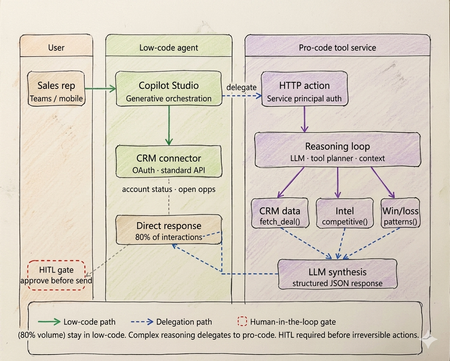
Three tiers of Agentic AI - and when to use none of them
Every enterprise has an AI agent. Almost none of them work in production. Walk into any enterprise technology review right now and you will find the same thing. Pilots running. Demos recorded. Steering committees impressed. And somewhere in the background, a quiet acknowledgment that the thing does not actually work at scale yet. OutSystems surveyed nearly 1,900 global IT leaders and found that 96% of organizations are already running AI agents in some capacity. Yet only one in nine has those agents operating in production at scale. The experiments are everywhere. The production systems are not. That gap is not a capability problem. The infrastructure has matured. Tool calling is standard across all major models. Frameworks like LangGraph, CrewAI, and Microsoft Agent Framework abstract orchestration logic. Model Context Protocol standardizes how agents access external tools and data sources. Google's Agent-to-Agent protocol now under Linux Foundation governance with over 50 enterprise technology partners including Salesforce, SAP, ServiceNow, and Workday standardizes how agents coordinate with each other. The protocols are in place. The frameworks are production ready. The gap is a selection and governance problem. Teams are building agents on problems that do not need them. Choosing the wrong tier for the ones that do. And treating governance as a compliance checkbox to add after launch, rather than an architectural input to design in from the start. The same OutSystems research found that 94% of organizations are concerned that AI sprawl is increasing complexity, technical debt, and security risk and only 12% have a centralized approach to managing it. Teams are deploying agents the way shadow IT spread through enterprises a decade ago: fast, fragmented, and without a shared definition of what production-ready actually means. I've built agentic systems across enterprise clients in logistics, retail, and B2B services. The failures I keep seeing are not technology failures. They are architecture and judgment failures problems that existed before the first line of code was written, in the conversation where nobody asked the prior question. This article is the framework I use before any platform conversation starts. What has genuinely shifted in the agentic landscape Three changes are shaping how enterprise agent architecture should be designed today and they are not incremental improvements on what existed before. The first is the move from single agents to multi-agent systems. Databricks' State of AI Agents report drawing on data from over 20,000 organizations, including more than 60% of the Fortune 500 found that multi-agent workflows on their platform grew 327% in just four months. This is not experimentation. It is production architecture shifting. A single agent handling everything routing, retrieval, reasoning, execution is being replaced by specialized agents coordinating through defined interfaces. A financial organization, for example, might run separate agents for intent classification, document retrieval, and compliance checking each narrow in scope, each connected to the next through a standardized protocol rather than tightly coupled code. The second is protocol standardization. MCP handles vertical connectivity how agents access tools, data sources, and APIs through a typed manifest and standardized invocation pattern. A2A handles horizontal connectivity how agents discover peer agents, delegate subtasks, and coordinate workflows. Production systems today use both. The practical consequence is that multi-agent architectures can be composed and governed as a platform rather than managed as a collection of one-off integrations. The third is governance as the differentiating factor between teams that ship and teams that stall. Databricks found that companies using AI governance tools get over 12 times more AI projects into production compared to those without. The teams running production agents are not running more sophisticated models. They built evaluation pipelines, audit trails, and human oversight gates before scaling not after the first incident. Tier 1 - Low-code agents: fast delivery with a defined ceiling The low-code tier is more capable than it was eighteen months ago. Copilot Studio, Salesforce Agentforce, and equivalent platforms now support richer connector libraries, better generative orchestration, and more flexible topic models. The ceiling is higher than it was. It is still a ceiling. The core pattern remains: a visual topic model drives a platform-managed LLM that classifies intent and routes to named execution branches. Connectors abstract credential management and API surface. A business team — analyst, citizen developer, IT operations — can build, deploy, and iterate without engineering involvement on every change. For bounded conversational problems, this is the fastest path from requirement to production. The production reality is documented clearly. Gartner data found that only 5% of Copilot Studio pilots moved to larger-scale deployment. A European telecom with dedicated IT resources and a full Microsoft enterprise agreement spent six months and did not deliver a single production agent. The visual builder works. The path from prototype to production, production-grade integrations, error handling, compliance logging, exception routing is where most enterprises get stuck, because it requires Power Platform expertise that most business teams do not have. The platform ceiling shows up predictably at four points. Async processing anything beyond a synchronous connector call, including approval chains, document pipelines, or batch operations cannot be handled natively. Full payload audit logs platform logs give conversation transcripts and connector summaries, not structured records of every API call and its parameters. Production volume concurrency limits and message throughput budgets bind faster than planning assumptions suggest. Root cause analysis in production you cannot inspect the LLM's confidence score or the alternatives it considered, which makes diagnosing misbehavior significantly harder than it should be. The correct diagnostic: can this use case be owned end-to-end by a business team, covered by standard connectors, with no latency SLA below three seconds and no payload-level compliance requirement? Yes, low code is the correct tier. Not a compromise. If no on any point, continue. If low-code is the right call for your use case: Copilot Studio quickstart Tier 2 - Pro-code agents: the architecture the current landscape demands The defining pattern in production pro-code architecture today is multi-agent. Specialized agents per domain, coordinating through MCP for tool access and A2A for peer-to-peer delegation, with a governance layer spanning the entire system. What this looks like in practice: a financial organization handling incoming compliance queries runs separate agents for intent classification, document retrieval, and the compliance check itself. None of these agents tries to do all three jobs. Each has a narrow responsibility, a defined input/output contract typed against a JSON Schema, and a clear handoff boundary. The 327% growth in multi-agent workflows reflects production teams discovering that the failure modes of monolithic agents topic collision, context overflow, degraded classification as scope expands are solved by specialization, not by making a single agent more capable. The discipline that makes multi-agent systems reliable is identical to what makes single-agent systems reliable, just enforced across more boundaries: the LLM layer reasons and coordinates; deterministic tool functions enforce. In a compliance pipeline, no LLM decides whether a document satisfies a regulatory requirement. That evaluation runs in a deterministic tool with a versioned rule set, testable outputs, and an immutable audit log. The LLM orchestrates the sequence. The tool produces the compliance record. Mixing these letting an LLM evaluate whether a rule pass collapses the audit trail and introduces probabilistic outputs on questions that have regulatory answers. MCP is the tool interface standard today. An MCP server exposes a typed manifest any compliant agent runtime can discover at startup. Tools are versioned, independently deployable, and reusable across agents without bespoke integration code. A2A extends this horizontally: agents advertise capability cards, discover peers, and delegate subtasks through a standardised protocol. The practical consequence is that multi-agent systems built on both protocols can be composed and governed as a platform rather than managed as a collection of one-off integrations. Observability is the architectural element that separates teams shipping production agents from teams perpetually in pilot. Build evaluation pipelines, distributed traces across all agent boundaries, and human review gates before scaling. The teams that add these after the first production incident spend months retrofitting what should have been designed in. If pro-code is the right call for your use case: Foundry Agent Service The hybrid pattern: still where production deployments land The shift to multi-agent architecture does not change the hybrid pattern it deepens it. Low-code at the conversational surface, pro-code multi-agent systems behind it, with a governance layer spanning both. On a logistics client engagement, the brief was a sales assistant for account managers shipment status, account health, and competitive context inside Teams. The business team wanted everything in Copilot Studio. Engineering wanted a custom agent runtime. Both were wrong. What we built: Copilot Studio handled all high-frequency, low-complexity queries shipment tracking, account status, open cases through Power Platform connectors. Zero custom code. That covered roughly 78% of actual interaction volume. Requests requiring multi-source reasoning competitive positioning on a specific lane, churn risk across an account portfolio, contract renewal analysis delegated via authenticated HTTP action to a pro-code multi-agent service on Azure. A retrieval agent pulled deal history and market intelligence through MCP-exposed tools. A synthesis agent composed the recommendation with confidence scoring. Structured JSON back to the low-code layer, rendered as an adaptive card in Teams. The HITL gate was non-negotiable and designed before deployment, not added after the first incident. No output reached a customer without a manager approval step. The agent drafts. A human sends. This boundary low-code for conversational volume, pro-code for reasoning depth maps directly to what the research shows separates teams that ship from teams that stall. The organizations running agents in production drew the line correctly between what the platform can own and what engineering needs to own. Then they built governance into both sides before scaling. The four gates - the prior question that still gets skipped Run every candidate use case through these four checks before the platform conversation begins. None of the recent infrastructure improvements change what they are checking, because none of them change the fundamental cost structure of agentic reasoning. Gate 1 - is the logic fully deterministic? If every valid output for every valid input can be enumerated in unit tests, the problem does not need an LLM. A rules engine executes in microseconds at zero inference cost and cannot produce a plausible-but-wrong answer. NeuBird AI's production ops agents which have resolved over a million alerts and saved enterprises over $2 million in engineering hours work because alert triage logic that can be expressed as rules runs in deterministic code, and the LLM only handles cases where pattern-matching is insufficient. That boundary is not incidental to the system's reliability. It is the reason for it. Gate 2 - is zero hallucination tolerance required? With over 80% of databases now being built by AI agents per Databricks' State of AI Agents report the surface area for hallucination-induced data errors has grown significantly. In domains where a wrong answer is a compliance event financial calculation, medical logic, regulatory determinations irreducible LLM output uncertainty is disqualifying regardless of model version or prompt engineering effort. Exit to deterministic code or classical ML with bounded output spaces. Gate 3 - is a sub-100ms latency SLA required? LLM inference is faster than it was eighteen months ago. It is not fast enough for payment transaction processing, real-time fraud scoring, or live inventory management. A three-agent system with MCP tool calls has a P50 latency measured in seconds. These problems need purpose-built transactional architecture. Gate 4 - is regulatory explainability required? A2A enables complex agent coordination and delegation. It does not make LLM reasoning reproducible in a regulatory sense. Temperature above zero means the same input produces different outputs across invocations. Regulators in financial services, healthcare, and consumer credit require deterministic, auditable decision rationale. Exit to deterministic workflow with structured audit logging at every Five production failure modes - one of them new The four original anti-patterns are still showing up in production. A fifth has been added by scale. Routing data retrieval through a reasoning loop. A direct API call returns account status in under 10ms. Routing the same request through an LLM reasoning step adds hundreds of milliseconds, consumes tokens on every call, and introduces output parsing on data that is already structured. The agent calls a structured tool. The tool calls the API. The agent never acts as the integration layer. Encoding business rules in prompts. Rules expressed in prompt text drift as models update. They produce probabilistic output across invocations and fail in ways that are difficult to reproduce and diagnose. A rule that must evaluate correctly every time belongs in a deterministic tool function unit-tested, version-controlled, independently deployable via MCP. No approval gate on CRUD operations. CRUD operations without a human approval step will eventually misfire on the input that testing did not cover. The gate needs to be designed before deployment, not added after the first incident involving a financial posting, a customer-facing communication, or a data deletion. Monolithic agent for all domains. A single agent accumulating every domain leads predictably to topic collision, context overflow, and maintenance that becomes impossible as scope expands. Specialized agents per domain, coordinating through A2A, is the architecture that scales. Ungoverned agent sprawl. This is the new one and currently the most prevalent. OutSystems found 94% of organizations concerned about it, with only 12% having a centralized response. Teams building agents independently across fragmented stacks, without shared governance, evaluation standards, or audit infrastructure, produce exactly the same organizational debt that shadow IT created but with higher stakes, because these systems make autonomous decisions rather than just storing and retrieving data. The fix is treating governance as an architectural input before deployment, not a compliance requirement after something breaks. The infrastructure is ready. The judgment is not. The tier decision sequence has not changed. Does the problem need natural language understanding or dynamic generation? No — deterministic system, stop. Can a business team own it through standard connectors with no sub-3-second latency SLA and no payload-level compliance requirement? Yes — low-code. Does it need custom orchestration, multi-agent coordination, or audit-grade observability? Yes — pro-code with MCP and A2A. Does it need both a conversational surface and deep backend reasoning? Hybrid, with a governance layer spanning both. What has changed is that governance is no longer optional infrastructure to add when you have time. The data is unambiguous. Companies with governance tools get over 12 times more AI projects into production than those without. Evaluation pipelines, distributed tracing across agent boundaries, human oversight gates, and centralised agent lifecycle management are not overhead. They are what converts experiments into production systems. The teams still stuck in pilot are not stuck because the technology failed them. They are stuck because they skipped this layer. The protocols are standardised. The frameworks are mature. The infrastructure exists. None of that is what is holding most enterprise agent programmes back. What is holding them back is a selection problem disguised as a technology problem — teams building agents before asking whether agents are warranted, choosing platforms before running the four gates, and treating governance as a checkpoint rather than an architectural input. I have built agents that should have been workflow engines. Not because the technology was wrong, but because nobody stopped early enough to ask whether it was necessary. The four gates in this article exist because I learned those lessons at clients' expense, not mine. The most useful thing I can offer any team starting an agentic AI project is not a framework selection guide. It is permission to say no — and a clear basis for saying it. Take the four gates framework to your next architecture review. If you have already shipped agents to production, I would like to hear what worked and what did not - comment below What to do next Three concrete steps depending on where you are right now. If you have pilots that have not reached production: Run them through the four gates in this article before the next sprint. Gate 1 alone will eliminate a meaningful percentage of them. The ones that survive all four are your real candidates for production investment. Download the attached file for gated checklist and take it into your next architecture review. If you are starting a new agent project: Do not open a platform before you have answered the gate questions. Once you have confirmed an agent is warranted and identified the tier, start here: Copilot Studio guided setup for low-code scenarios, or Foundry Agent Service for pro-code patterns with MCP and multi-agent coordination built in. Build governance infrastructure - evaluation pipeline, distributed tracing, HITL gates - before you scale, not after. If you have already shipped agents to production: Share what worked and what did not in the Azure AI Tech Community — tag posts with #AgentArchitecture. The most useful signal for teams still in pilot is hearing from practitioners who have been through production, not vendors describing what production should look like. References OutSystems — State of AI Development Report - https://www.outsystems.com/1/state-ai-development-report Databricks — State of AI Agents Report - https://www.databricks.com/resources/ebook/state-of-ai-agents Gartner — 2025 Microsoft 365 and Copilot Survey - https://www.gartner.com/en/documents/6548002 (Paywalled primary source — publicly reported via techpartner.news: https://www.techpartner.news/news/gartner-microsoft-copilot-hype-offset-by-roi-and-readiness-realities-618118) Anthropic — Model Context Protocol (MCP) - https://modelcontextprotocol.io Google Cloud — Agent-to-Agent Protocol (A2A) . https://developers.googleblog.com/en/a2a-a-new-era-of-agent-interoperability NeuBird AI — Production Operations Deployment Announcement NeuBird AI Closes $19.3M Funding Round to Scale Agentic AI Across Enterprise Production Operations ReAct: Synergizing Reasoning and Acting in Language Models — Yao et al. https://arxiv.org/abs/2210.03629 Enterprise Integration Patterns — Gregor Hohpe & Bobby Woolf, Addison-Wesley https://www.enterpriseintegrationpatterns.com5.4KViews4likes1CommentTurn Enterprise Knowledge into Answers with Copilot Studio and Azure AI Search
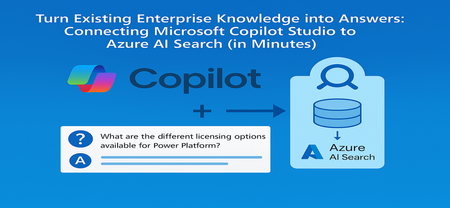
From the Field: Why This Integration Works As an experienced AI Cloud Solution Architect working in Greater China Region (GCR), I’ve seen one emerging pattern that delivers quick wins for some of my customers: combining Microsoft Copilot Studio with an existing Azure AI Search index. Teams choose this approach because it delivers two outcomes immediately: business users get grounded, reliable answers, and enterprises avoid re-building pipelines or re-platforming knowledge stores. This guide shows exactly how to connect Copilot Studio to an Azure AI Search index that is already live, so your copilot can answer confidently using your enterprise documents. What We Assume Is Already Ready To stay focused on the integration step, we assume: You have an Azure AI Search service deployed You have an index containing vectorized content (manuals, PDFs, policies, FAQs) Your platform/data team already handled ingestion, embeddings, and indexing In short, your Azure AI Search endpoint and admin key are ready, and the index already contains chunked content with embeddings. Step 1 - Collect Your Azure AI Search Connection Details From the Azure AI Search resource: Endpoint URL Azure AI Search → Overview → Url: https://<your-search-service>.search.windows.net Admin Key Azure AI Search → Keys Use either the primary or secondary key. Governance tip: For production, rotate keys regularly and use managed identities when possible. Step 2 - Add Azure AI Search as Knowledge Inside Copilot Studio Open your Copilot Studio agent Go to the Knowledge tab Select Add knowledge, choose Azure AI Search Provide: Endpoint URL Admin key Create or select the connection Choose your existing index from the dropdown Select Add to agent Step 3 - Test a Grounded Response Open the Test copilot pane and ask a question your indexed content can answer, such as: “What are the different licensing options available for Power Platform?” Verify that: The Activity Map shows Azure AI Search being invoked The answer reflects the correct document in your index Citations or references appear where applicable Conclusion Business value: You can activate grounded, explainable answers in Copilot Studio immediately by reusing your existing Azure AI Search index - no re-platforming, no new pipelines. Team model: Data/Platform teams own ingestion, enrichment, and vectorization. Business teams build and refine the copilot experience in Copilot Studio. Scale and governance: All components stay inside Azure, with enterprise-grade security, RBAC, and operational monitoring, while enabling low‑code agility for makers. For the full end-to-end lab (storage setup, embeddings, index creation), see: 🔗 https://github.com/Azure/Copilot-Studio-and-Azure (Lab 1.4). Acknowledgements This tutorial builds on foundational work by my EMEA colleague Pablo Carceller, whose GitHub repo on Copilot Studio and Azure has helped teams worldwide accelerate real customer implementations. 👉 GitHub - Copilot Studio and Azure: https://github.com/Azure/Copilot-Studio-and-Azure I would also like to thank the broader Cloud Accelerate Factory GCR team for their contributions, insights, and active collaboration in validating this pattern across customer engagements. Special appreciation to our AI Architects Dr. Longyu Qi, Jian (Jason) Shao, Lei (Leo) Ma, and Ethan Tseng, as well as our PM partners Yunxi (Rayne) Jin and Emma Wang, whose feedback and field experiences helped shape and refine this guide. Image credits: demo visuals adapted from materials by Pablo Carceller (GitHub Lab 1.4).645Views1like0CommentsHow Do We Know AI Isn’t Lying? The Art of Evaluating LLMs in RAG Systems
🔍 1. Why Evaluating LLM Responses is Hard In classical programming, correctness is binary. Input Expected Result 2 + 2 4 ✔ Correct 2 + 2 5 ✘ Wrong Software is deterministic — same input → same output. LLMs are probabilistic. They generate one of many valid word combinations, like forming sentences from multiple possible synonyms and sentence structures. Example: Prompt: "Explain gravity like I'm 10" Possible responses: Response A Response B Gravity is a force that pulls everything to Earth. Gravity bends space-time causing objects to attract. Both are correct. Which is better? Depends on audience. So evaluation needs to look beyond text similarity. We must check: ✔ Is the answer meaningful? ✔ Is it correct? ✔ Is it easy to understand? ✔ Does it follow prompt intent? Testing LLMs is like grading essays — not checking numeric outputs. 🧠 2. Why RAG Evaluation is Even Harder RAG introduces an additional layer — retrieval. The model no longer answers from memory; it must first read context, then summarise it. Evaluation now has multi-dimensions: Evaluation Layer What we must verify Retrieval Did we fetch the right documents? Understanding Did the model interpret context correctly? Grounding Is the answer based on retrieved data? Generation Quality Is final response complete & clear? A simple story makes this intuitive: Teacher asks student to explain Photosynthesis. Student goes to library → selects a book → reads → writes explanation. We must evaluate: Did they pick the right book? → Retrieval Did they understand the topic? → Reasoning Did they copy facts correctly without inventing? → Faithfulness Is written explanation clear enough for another child to learn from? → Answer Quality One failure → total failure. 🧩 3. Two Types of Evaluation 🔹 Intrinsic Evaluation — Quality of the Response Itself Here we judge the answer, ignoring real-world impact. We check: ✔ Grammar & coherence ✔ Completeness of explanation ✔ No hallucination ✔ Logic flow & clarity ✔ Semantic correctness This is similar to checking how well the essay is written. Even if the result did not solve the real problem, the answer could still look good — that’s why intrinsic alone is not enough. 🔹 Extrinsic Evaluation — Did It Achieve the Goal? This measures task success. If a customer support bot writes a beautifully worded paragraph, but the user still doesn’t get their refund — it failed extrinsically. Examples: System Type Extrinsic Goal Banking RAG Bot Did user get correct KYC procedure? Medical RAG Was advice safe & factual? Legal search assistant Did it return the right section of the law? Technical summariser Did summary capture key meaning? Intrinsic = writing quality. Extrinsic = impact quality. A production-grade RAG system must satisfy both. 📏 4. Core RAG Evaluation Metrics (Explained with Very Simple Analogies) Metric Meaning Analogy Relevance Does answer match question? Ask who invented C++? → model talks about Java ❌ Faithfulness No invented facts Book says started 2004, response says 1990 ❌ Groundedness Answer traceable to sources Claims facts that don’t exist in context ❌ Completeness Covers all parts of question User asks Windows vs Linux → only explains Windows Context Recall / Precision Correct docs retrieved & used Student opens wrong chapter Hallucination Rate Degree of made-up info “Taj Mahal is in London” 😱 Semantic Similarity Meaning-level match “Engine died” = “Car stopped running” 💡 Good evaluation doesn’t check exact wording. It checks meaning + truth + usefulness. 🛠 5. Tools for RAG Evaluation 🔹 1. RAGAS — Foundation for RAG Scoring RAGAS evaluates responses based on: ✔ Faithfulness ✔ Relevance ✔ Context recall ✔ Answer similarity Think of RAGAS as a teacher grading with a rubric. It reads both answer + source documents, then scores based on truthfulness & alignment. 🔹 2. LangChain Evaluators LangChain offers multiple evaluation types: Type What it checks String or regex Basic keyword presence Embedding based Meaning similarity, not text match LLM-as-a-Judge AI evaluates AI (deep reasoning) LangChain = testing toolbox RAGAS = grading framework Together they form a complete QA ecosystem. 🔹 3. PyTest + CI for Automated LLM Testing Instead of manually validating outputs, we automate: Feed preset questions to RAG Capture answers Run RAGAS/LangChain scoring Fail test if hallucination > threshold This brings AI closer to software-engineering discipline. RAG systems stop being experiments — they become testable, trackable, production-grade products. 🚀 6. The Future: LLM-as-a-Judge The future of evaluation is simple: LLMs will evaluate other LLMs. One model writes an answer. Another model checks: ✔ Was it truthful? ✔ Was it relevant? ✔ Did it follow context? This enables: Benefit Why it matters Scalable evaluation No humans needed for every query Continuous improvement Model learns from mistakes Real-time scoring Detect errors before user sees them This is like autopilot for AI systems — not only navigating, but self-correcting mid-flight. And that is where enterprise AI is headed. 🎯 Final Summary Evaluating LLM responses is not checking if strings match. It is checking if the machine: ✔ Understood the question ✔ Retrieved relevant knowledge ✔ Avoided hallucination ✔ Provided complete, meaningful reasoning ✔ Grounded answer in real source text RAG evaluation demands multi-layer validation — retrieval, reasoning, grounding, semantics, safety. Frameworks like RAGAS + LangChain evaluators + PyTest pipelines are shaping the discipline of measurable, reliable AI — pushing LLM-powered RAG from cool demo → trustworthy enterprise intelligence. Useful Resources What is Retrieval-Augmented Generation (RAG) : https://azure.microsoft.com/en-in/resources/cloud-computing-dictionary/what-is-retrieval-augmented-generation-rag/ Retrieval-Augmented Generation concepts (Azure AI) : https://learn.microsoft.com/en-us/azure/ai-services/content-understanding/concepts/retrieval-augmented-generation RAG with Azure AI Search – Overview : https://learn.microsoft.com/en-us/azure/search/retrieval-augmented-generation-overview Evaluate Generative AI Applications (Microsoft Learn – Learning Path) : https://learn.microsoft.com/en-us/training/paths/evaluate-generative-ai-apps/ Evaluate Generative AI Models in Microsoft Foundry Portal : https://learn.microsoft.com/en-us/training/modules/evaluate-models-azure-ai-studio/ RAG Evaluation Metrics (Relevance, Groundedness, Faithfulness) : https://learn.microsoft.com/en-us/azure/ai-foundry/concepts/evaluation-evaluators/rag-evaluators RAGAS – Evaluation Framework for RAG Systems : https://docs.ragas.io/775Views0likes0CommentsIntegrate Custom Azure AI Agents with Copilot Studio and M365 Copilot
Integrating Custom Agents with Copilot Studio and M365 Copilot In today's fast-paced digital world, integrating custom agents with Copilot Studio and M365 Copilot can significantly enhance your company's digital presence and extend your CoPilot platform to your enterprise applications and data. This blog will guide you through the integration steps of bringing your custom Azure AI Agent Service within an Azure Function App, into a Copilot Studio solution and publishing it to M365 and Teams Applications. When Might This Be Necessary: Integrating custom agents with Copilot Studio and M365 Copilot is necessary when you want to extend customization to automate tasks, streamline processes, and provide better user experience for your end-users. This integration is particularly useful for organizations looking to streamline their AI Platform, extend out-of-the-box functionality, and leverage existing enterprise data and applications to optimize their operations. Custom agents built on Azure allow you to achieve greater customization and flexibility than using Copilot Studio agents alone. What You Will Need: To get started, you will need the following: Azure AI Foundry Azure OpenAI Service Copilot Studio Developer License Microsoft Teams Enterprise License M365 Copilot License Steps to Integrate Custom Agents: Create a Project in Azure AI Foundry: Navigate to Azure AI Foundry and create a project. Select 'Agents' from the 'Build and Customize' menu pane on the left side of the screen and click the blue button to create a new agent. Customize Your Agent: Your agent will automatically be assigned an Agent ID. Give your agent a name and assign the model your agent will use. Customize your agent with instructions: Add your knowledge source: You can connect to Azure AI Search, load files directly to your agent, link to Microsoft Fabric, or connect to third-party sources like Tripadvisor. In our example, we are only testing the CoPilot integration steps of the AI Agent, so we did not build out additional options of providing grounding knowledge or function calling here. Test Your Agent: Once you have created your agent, test it in the playground. If you are happy with it, you are ready to call the agent in an Azure Function. Create and Publish an Azure Function: Use the sample function code from the GitHub repository to call the Azure AI Project and Agent. Publish your Azure Function to make it available for integration. azure-ai-foundry-agent/function_app.py at main · azure-data-ai-hub/azure-ai-foundry-agent Connect your AI Agent to your Function: update the "AIProjectConnString" value to include your Project connection string from the project overview page of in the AI Foundry. Role Based Access Controls: We have to add a role for the function app on OpenAI service. Role-based access control for Azure OpenAI - Azure AI services | Microsoft Learn Enable Managed Identity on the Function App Grant "Cognitive Services OpenAI Contributor" role to the System-assigned managed identity to the Function App in the Azure OpenAI resource Grant "Azure AI Developer" role to the System-assigned managed identity for your Function App in the Azure AI Project resource from the AI Foundry Build a Flow in Power Platform: Before you begin, make sure you are working in the same environment you will use to create your Copilot Studio agent. To get started, navigate to the Power Platform (https://make.powerapps.com) to build out a flow that connects your Copilot Studio solution to your Azure Function App. When creating a new flow, select 'Build an instant cloud flow' and trigger the flow using 'Run a flow from Copilot'. Add an HTTP action to call the Function using the URL and pass the message prompt from the end user with your URL. The output of your function is plain text, so you can pass the response from your Azure AI Agent directly to your Copilot Studio solution. Create Your Copilot Studio Agent: Navigate to Microsoft Copilot Studio and select 'Agents', then 'New Agent'. Make sure you are in the same environment you used to create your cloud flow. Now select ‘Create’ button at the top of the screen From the top menu, navigate to ‘Topics’ and ‘System’. We will open up the ‘Conversation boosting’ topic. When you first open the Conversation boosting topic, you will see a template of connected nodes. Delete all but the initial ‘Trigger’ node. Now we will rebuild the conversation boosting agent to call the Flow you built in the previous step. Select 'Add an Action' and then select the option for existing Power Automate flow. Pass the response from your Custom Agent to the end user and end the current topic. My existing Cloud Flow: Add action to connect to existing Cloud Flow: When this menu pops up, you should see the option to Run the flow you created. Here, mine does not have a very unique name, but you see my flow 'Run a flow from Copilot' as a Basic action menu item. If you do not see your cloud flow here add the flow to the default solution in the environment. Go to Solutions > select the All pill > Default Solution > then add the Cloud Flow you created to the solution. Then go back to Copilot Studio, refresh and the flow will be listed there. Now complete building out the conversation boosting topic: Make Agent Available in M365 Copilot: Navigate to the 'Channels' menu and select 'Teams + Microsoft 365'. Be sure to select the box to 'Make agent available in M365 Copilot'. Save and re-publish your Copilot Agent. It may take up to 24 hours for the Copilot Agent to appear in M365 Teams agents list. Once it has loaded, select the 'Get Agents' option from the side menu of Copilot and pin your Copilot Studio Agent to your featured agent list Now, you can chat with your custom Azure AI Agent, directly from M365 Copilot! Conclusion: By following these steps, you can successfully integrate custom Azure AI Agents with Copilot Studio and M365 Copilot, enhancing you’re the utility of your existing platform and improving operational efficiency. This integration allows you to automate tasks, streamline processes, and provide better user experience for your end-users. Give it a try! Curious of how to bring custom models from your AI Foundry to your Copilot Studio solutions? Check out this blog23KViews3likes11CommentsIntroducing Microsoft Agent Factory
Microsoft Agent Factory is a new program designed for organizations that want to move from experimentation to execution faster. With a single plan, organizations can build agents with Work IQ, Fabric IQ, and Foundry IQ using Microsoft Foundry and Copilot Studio. They can also deploy their agents anywhere, including Microsoft 365 Copilot, with no upfront licensing and provisioning required. Eligible organizations can also tap into hands-on engagement from top AI Forward Deployed Engineers (FDEs) and access tailored role-based training to boost AI fluency across teams.35KViews13likes0CommentsThe Future of AI: The Model is Key, but the App is the Doorway
This post explores the real-world impact of GPT-5 beyond benchmark scores, focusing on how application design shapes user experience. It highlights early developer feedback, common integration challenges, and practical strategies for adapting apps to leverage the advanced capabilities of GPT-5 in Foundry Models. From prompt refinement to fine-tuning to new API controls, learn how to make the most of this powerful model.860Views4likes0CommentsDeployment Guide-Copilot Studio agent with MCP Server exposed by API Management using OAuth 2.0
Introduction In today’s enterprise landscape, enabling AI agents to interact with backend systems securely and at scale is critical. By exposing MCP servers through Azure API Management (APIM), organizations can provide controlled access to these services. When combined with OAuth 2.0 authorization code flow, this setup ensures robust, enterprise-grade security for AI agents built in Copilot Studio—empowering intelligent automation while maintaining strict access governance. Disclaimer & Caveats This article explores how to configure a MCP tool—exposed as a MCP server via APIM—for secure consumption by AI agents built in Copilot Studio. Leveraging the OAuth 2.0 Authorization Code Flow, this setup ensures enterprise-grade security by enabling delegated access without exposing user credentials. With Azure API Management now supporting MCP server capabilities in public preview, developers can expose REST APIs as MCP tools using a standardized JSON-RPC interface. This allows AI agents to invoke backend services securely and scalable, without the need to rebuild existing APIs. Copilot Studio, also in preview for MCP integration, empowers organizations to orchestrate intelligent agents that interact with these tools in real time. While this guide provides a foundational approach, every environment is unique. You can enhance security further by implementing app roles, conditional access policies, and extending your integration logic with custom Python code for advanced scenarios. ⚠️ Note: Both MCP server support in APIM and MCP tool integration in Copilot Studio are currently in public preview. As these platforms evolve rapidly, expect changes and improvements over time. Always refer to the https://learn.microsoft.com/en-us/azure/api-management/export-rest-mcp-server for the latest updates. This article is about consuming remote MCP servers. In Azure, managed identity can also be leveraged for APIM integration. What is Authorization Code Flow? The Authorization Code Flow is designed for applications that can securely store a client secret (like server-side apps). It allows the app to obtain an access token on behalf of the user without exposing their credentials. This flow uses an intermediate authorization code to exchange for tokens, adding an extra layer of security. Steps in the Flow User Authentication The user is redirected to the Authorization Server (In this case: Azure AD) to log in and grant consent. Authorization Code Issued After successful login, the Authorization Server sends an authorization code to the app via the redirect URI. Token Exchange The app sends the authorization code (plus client credentials) to the Token Endpoint to get: Access Token (for API calls) and Refresh Token (to renew access without user interaction) API Access The app uses the Access Token to call protected resources. Below diagram shows the Authorization code flow in detail. Press enter or click to view image in full size Microsoft identity platform and OAuth 2.0 authorization code flow — Microsoft identity platform | Microsoft Learn High Level Architecture Press enter or click to view image in full size This architecture can also be implemented with APIM backend app registration only. However, stay cautious in configuring redirect URIs appropriately. Remote MCP Servers using APIM Architecture APIM exposing Remote MCP servers, enabling AI agents—such as those built in Copilot Studio—to securely access backend services using standardized JSON-RPC interfaces. This integration offers a robust, scalable, and secure way to connect AI tools with enterprise APIs. Key Capabilities: Secure Gateway: APIM acts as an intelligent gateway, handling OAuth 2.0 Authorization Code Flow, authentication, and request routing. Monitoring & Observability: Integration with Azure Log Analytics and Application Insights enables deep visibility into API usage, performance, and errors. Policy Enforcement: APIM’s policy engine allows for custom rules, including token validation, header manipulation, and response transformation. Rate Limiting & Throttling: Built-in support for rate limits, quotas, and IP filtering helps protect backend services from abuse and ensures fair usage. Managed Identity & Entra ID: Secure service-to-service communication is enabled via system-assigned and user-assigned managed identities, with Entra ID handling identity and access management. Flexible Deployment: MCP servers can be hosted in Azure Functions, App Services, or Container Apps, and exposed via APIM with minimal changes to existing APIs. To learn more, visit https://learn.microsoft.com/en-us/samples/azure-samples/remote-mcp-apim-functions-python/remote-mcp-apim-functions-python/ Develop MCP server in VS Code This deployment guide provides sample MCP code written in python for ease of use. It is available on the following GitHub repo. However, you can also use your own MCP server. Clone the following repository and open in VS Code. git clone https://github.com/mafzal786/mcp-server.git Run the following to execute it locally. cd mcp-server uv venv uv sync uv run mcpserver.py Deploy MCP Server as Azure Container App In this deployment guide, MCP server is deployed in Azure Container App. It can also be deployed as Azure App service. Deploy the MCP server in Azure container App by running the following command. It can be deployed by many other various ways such as via VS Code or CI/CD pipeline. AZ Cli is used for simplicity. az containerapp up \ --resource-group <RESOURCE_GROUP_NAME> \ --name streamable-mcp-server2 \ --environment mcp \ --location <REGION> \ --source . Configure Authentication for Azure Container App 1. Sign in Azure portal. Visit the container App in Azure and Click “Authentication” as shown below. Press enter or click to view image in full size For more details, visit the following link: Enable authentication and authorization in Azure Container Apps with Microsoft Entra ID | Microsoft Learn Click Add Identity Provider as shown. 2. Select Microsoft from the drop down and leave everything as is as shown below. 3. This will create a new app registration for the container App. After it is all setup, it will look like as below. As soon as authentication is configured. it will make container app inaccessible except for OAuth. Note: If you have app registration for Azure Container App already configured, use that by selecting "pick an existing app registration in this directory" option. Review App Registration of Container App — Backend Visit App registration and click streamable-mcp-server2 as in this case. Click on Authentication tab. Verify the Redirect URIs. you should see a redirect URL for container app. URI will end with /.auth/login/aad/callback as shown in the green box in the below screenshot. Now click on “Expose an API”. Confirm Application ID URI is configured with scope as shown below. its format is api://<client id> Scope "user_impersonation" is created. Verify API Permission. Make sure you Grant admin consent for your tenant as shown below. More scope can be created depending on the requirement of data access. Note: Make sure to "Grant admin consent" before proceeding to next step. Create App registration for representing APIM API Lauch Azure Portal. Visit App registration. Click New registration. Create a new App registration as shown below. For example, "apim-mcp-backend-api" in this case. Click "Expose an API", configure Application ID URI, and add a scope as shown in the below diagram such as user_impersonation. Click "App roles" and create the following role as shown below. More roles can be created depending on the requirements and case by case basis. Here app roles are created to get the concept around it and how it will be used in APIM inbound policies in the coming sections. Create App Registration for Client App — Copilot Studio In these steps, we will be configuring app registration for the client app, such as copilot studio in this case acting as a client app. This is also mentioned in the “high level architecture” diagram in the earlier section of this article. Lauch Azure Portal. Visit App registration. Click New registration. Create a new App registration. leave the Redirect URL as of now, we will configure it later as it is provided by copilot studio when configuring custom MCP connector. 3. Click on API permission and click “Add a permission”. Click Microsoft Graph and then click “Delegated permissions”. Select email, openid, profile as shown below. 4. Make sure to Grant admin consent and it should look like as below. 5. Create a secret. click “Certificates & secrets”. Create a new client secret by clicking “New client secret”. store the value as it will be masked after some time. if that happens, you can always delete and re-create a new secret. 6. Capture the following as you would need it in configuring MCP tool in Copilot Studio. Client ID from the Overview Tab of app registration. Client secret from “Certificates & secrets” tab. 7. Configure API permissions for APIM API i.e. "apim-mcp-backend-api" in this case. Click “API permissions” tab. Click “Add a permission”. Click on “My APIs” tab as shown below and select "apim-mcp-backend-api". Note: If you don't see the app registration in "My APIs". Go to App registration. Click "Owners". Add your AD account as Owners. 8. Select "Delegated permissions". Then select the permission as shown below. 9. Select the Application permission. Select the App roles created in the apim-mcp-backend-api registration. Such as mcp.read in this case. You MUST “Grant admin consent” as final step. It is very important!!! I can’t emphasize more on that. without it, nothing will work!!! 10. End result of this client app registration should look like as mentioned in the below figure. Configure permissions for Container App registration Lauch Azure Portal. Visit app registration. Select app registration of Azure container app such as streamable-mcp-server2 in this case. Select API permissions. Add the following delegated and application permissions as shown in the below diagram. Note: Don't forget to Grant admin consent. Configure allowed token audience for Container App It defines which audience values (aud claim) in a token are considered valid for your app. When a client app requests an access token from Microsoft Entra ID (Azure AD), the token includes an aud claim that identifies the intended recipient. Your container app will only accept tokens where the aud claim matches one of the values in the Allowed Token Audiences list. This is important as it ensures that only tokens issued for your API or app are accepted and prevents misuse of tokens intended for other resources. This adds extra layer of security. In the Azure Portal, visit Azure Container App. i.e. streamable-mcp-server2. Click on "Authentication" Click "Edit" under identity provider Under "Allowed token audiences", add the application ID URI of "apim-mcp-backend-api". As this will be included as an audience in the access token. Best Practices Only include trusted client app IDs. Avoid using overly broad values like “allow all” (not recommended). Validate tokens using Microsoft libraries (MSAL) or built-in auth features. Configure MCP server in API Management Note: Provisioning an API Management resource is outside the scope of this document. If you do not already have an API Management instance, follow this QuickStart: https://learn.microsoft.com/en-us/azure/api-management/get-started-create-service-instance The following service tiers are available for preview: Classic Basic, Standard, Premium, and Basic v2, Standard v2, Premium v2. For the Classic Basic, Standard, or Premium tiers, you must join the AI Gateway Early Update group to enable MCP server features. Please allow up to 2 hours for the update to take effect. Expose an existing MCP server Follow these steps to expose an existing MCP server is API Management: In the Azure portal, navigate to your API Management instance. In the left-hand menu, under APIs, select MCP servers > + Create MCP server. Select Expose an existing MCP server. In Backend MCP server: Enter the existing MCP server base URL. Example: https://streamable-mcp-serverv2.kdhg489457dslkjgn,.eastus2.azurecontainerapps.io/mcpfor the Microsoft Azure Container App hosting MCP server. In Transport type, Streamable HTTP is selected by default. In New MCP server: Enter a Name the MCP server in API Management. In Base path, enter a route prefix for tools. Example: mcptools Optionally, enter a Description for the MCP server. Select Create. Below diagram shows the MCP servers configured in APIM for reference. Configure policies for MCP server Configure one or more API Management policies to help manage the MCP server. The policies are applied to all API operations exposed as tools in the MCP server and can be used to control access, authentication, and other aspects of the tools. To configure policies for the MCP server: In the Azure portal, navigate to your API Management instance. In the left-hand menu, under APIs, select MCP Servers. Select an MCP server from the list. In the left menu, under MCP, select Policies. In the policy editor, add or edit the policies you want to apply to the MCP server's tools. The policies are defined in XML format. <!-- - Policies are applied in the order they appear. - Position <base/> inside a section to inherit policies from the outer scope. - Comments within policies are not preserved. --> <!-- Add policies as children to the <inbound>, <outbound>, <backend>, and <on-error> elements --> <policies> <!-- Throttle, authorize, validate, cache, or transform the requests --> <inbound> <base /> <set-variable name="accessToken" value="@(context.Request.Headers.GetValueOrDefault("Authorization", "").Replace("Bearer ", ""))" /> <!-- Log the captured access token to the trace logs --> <trace source="Access Token Debug" severity="information"> <message>@("Access Token: " + (string)context.Variables["accessToken"])</message> </trace> <set-variable name="userId" value="@(context.Request.Headers.GetValueOrDefault("Authorization", "Bearer ").Split(' ')[1].AsJwt().Claims["oid"].FirstOrDefault())" /> <set-variable name="userName" value="@(context.Request.Headers.GetValueOrDefault("Authorization", "Bearer ").Split(' ')[1].AsJwt().Claims["name"].FirstOrDefault())" /> <trace source="User Name Debug" severity="information"> <message>@("username: " + (string)context.Variables["userName"])</message> </trace> <set-variable name="scp" value="@(context.Request.Headers.GetValueOrDefault("Authorization", "Bearer ").Split(' ')[1].AsJwt().Claims["scp"].FirstOrDefault())" /> <trace source="Scope Debug" severity="information"> <message>@("scope: " + (string)context.Variables["scp"])</message> </trace> <set-variable name="roles" value="@(context.Request.Headers.GetValueOrDefault("Authorization", "Bearer ").Split(' ')[1].AsJwt().Claims["roles"].FirstOrDefault())" /> <trace source="Role Debug" severity="information"> <message>@("Roles: " + (string)context.Variables["roles"])</message> </trace> <!-- <set-variable name="requestBody" value="@{ return context.Request.Body.As<string>(preserveContent:true); }" /> <trace source="Request Body information" severity="information"> <message>@("Request body: " + (string)context.Variables["requestBody"])</message> </trace> --> <validate-azure-ad-token tenant-id="{{tenant-id}}" header-name="Authorization" failed-validation-httpcode="401" failed-validation-error-message="Unauthorized. Access token is missing or invalid."> <client-application-ids> <application-id>{{client-application-id}}</application-id> </client-application-ids> <audiences> <audience>{{audience}}</audience> </audiences> <required-claims> <claim name="roles" match="any"> <value>mcp.read</value> </claim> </required-claims> </validate-azure-ad-token> </inbound> <!-- Control if and how the requests are forwarded to services --> <backend> <base /> </backend> <!-- Customize the responses --> <outbound> <base /> </outbound> <!-- Handle exceptions and customize error responses --> <on-error> <base /> <trace source="Role Debug" severity="error"> <message>@("username: " + (string)context.Variables["userName"] + " has error in accessing the MCP server, could be auth or role related...")</message> </trace> <return-response> <set-status code="403" reason="Forbidden" /> <set-body> {"error":"Missing required scope or role"} </set-body> </return-response> </on-error> </policies> Note: Update the above inbound policy with the tenant Id, client application id, and audience as per your environment. It is recommended to use APIM "Named values" instead of hard coding inside the policy. To learn more, visit Use named values in Azure API Management policies Configure Diagnostics for APIM In this solution, APIM diagnostics are configured to forward log data to Log Analytics. Testing and validation will be carried out using insights from Log Analytics. Note: Setting up diagnostics is outside the scope of this article. However, you can visit the following link for more information. https://learn.microsoft.com/en-us/azure/api-management/api-management-howto-use-azure-monitor Below diagram shows what Logs are being sent to Log Analytics workspace. MCP Tool configuration in Copilot Studio Lauch copilot studio at https://copilotstudio.microsoft.com/. Configuration of environment and agent is beyond the scope of this article. It is assumed, you already have environment setup and agent has been created. Following link will help you, how to create an agent in copilot studio. Quickstart: Create and deploy an agent — Microsoft Copilot Studio | Microsoft Learn Inside agent configuration, click "Add tool". 3. Click on New tool. 4. Select Model Context Protocol. 5. Provide all relevant information for MCP server. Make sure your server URL ends with your mcp setup. In this case, it is APIM MCP server URL, with base path configured in APIM in the end. Provide server name and server description. Select OAuth 2.0 radio button. 6. Provide the following in the OAuth 2.0 section Client ID of client app registration. In this case, copilot-studio-client as configured earlier. Client secret of copilot-studio-client app registration. Authorization URL: https://login.microsoftonline.com/common/oauth2/v2.0/authorize Token URL template & Refresh URL: https://login.microsoftonline.com/oauth2/v2.0/token Scopes: openid, profile, email — which we selected earlier for Microsoft Azure Graph permissions. Click “Create”. This will provide you Redirect URL. you need to configure the redirect URL in client app registration. In this case, it is copilot-agent-client. Configure Redirect URI in Client App Registration Visit client app registration. i.e. copilot-studio-client. Click Authentication Tab and provide the Web Redirect URIs as shown below. Note: Configure Redirect URIs MUST be configured in app registration. Otherwise, authorization will not complete and sign on will fail. Configure redirect URI in APIM API app registration Also configure apim-mcp-backend-api app registration with the same redirect URI as shown below. Modify MCP connector in PowerApps Now visit the https://make.powerapps.com and open the newly created connector as shown below. Select the security tab and modify the Resource URL with application ID URI of apim-mcp-backend-api configured earlier in app registration for expose an API. Add .default in the scope. Provide the secret of client app registration as it will not let you update the connector. This is extra security measure for updating the connector in Powerapps. Click Update connector. CORS Configuration CORS configuration is a MUST!!! Since our Azure Container App is a remote MCP server with totally different domain or origin. Power Apps and CORS for External Domains — Brief Overview When embedding or integrating Power Apps with external web applications or APIs, Cross-Origin Resource Sharing (CORS) becomes a critical consideration. CORS is a browser security feature that restricts web pages from making requests to a different domain than the one that served the page, unless explicitly allowed. Key Points: Power Apps hosted on *.powerapps.com or within Microsoft 365 domains will block calls to external APIs unless those APIs include the proper CORS headers. The external API must return: Access-Control-Allow-Origin: https://apps.powerapps.com (or * for all origins, though not recommended for production) Access-Control-Allow-Methods: GET, POST, OPTIONS (or as needed) Access-Control-Allow-Headers: Content-Type, Authorization (and any custom headers) If the API requires authentication (e.g., OAuth 2.0), ensure preflight OPTIONS requests are handled correctly. For scenarios where you cannot modify the external API, consider using: Power Automate flows as a proxy Azure API Management or Azure Functions to inject CORS headers Always validate security implications before enabling wide-open CORS. If the CORS are not setup. You will encounter following error in copilot studio after pressing F12 (Browser Developer) CORS policy — blocking the container app Azure container app provides very efficient way of configuring CORS in the Azure portal. Lauch Azure Portal. Visit Azure container app i.e. streamable-mcp-server2 in this case. Click on CORS under Networking section. Configure the following in Allowed Origin Section as shown below. localhost is added to make it work from local laptop, although it is not required for Copilot Studio. 4. Click on “Allowed Method” tab and provide the following. 5. Provide wild card “*” in “Allowed Headers”tab. Although, it is not recommended for production system. it is done for the sake for simplicity. Configure that for added security 6. Click “Apply”. This will configure CORS for remote application. Test the MCP custom connector We are in the final stages of configuring the connector. It is time to test it, if everything is configured correctly and works. Launch the http://make.powerapps.com and click on “Custom connectors”, select your configured connector and click “5. Test” tab as shown below. You will see Selected Connection as blank if you are running it first time. Click “+ New connection” 2. New connection will launch the Authorization flow and browser dialog will pop up for making a request for authorization code. 3. Click “Create”. 4. Complete the login process. This will create a successful connection. 5. Click “Test operation”. If the response is 406 means everything is configured correctly as shown below. Solution validation Add user in Enterprise Application for App roles Roles have been defined under the required claims in the APIM inbound policy and also configured in the apim-mcp-backend-api app registration. As a result, any request from Copilot Studio will be denied if this role is not properly assigned. This role is included in the JWT access token, which we will validate in the following sections. To assign role, perform the following steps. Visit Azure Portal. Visit Enterprise Application. Select APIM backend app registration. In this case for example, apim-mcp-backend-api Click "Users and groups" Select "Add user/group" 5. Select User or Group who should have access to the role. 6. Click "Assign". It will look like as below. Note: Role assignment for users or groups is an important step. If it is not configured, MCP server tests will fail in Copilot studio. Test MCP server in Copilot Studio Lauch copilot studio and click on the Agent you created in earlier steps and click on “Tools tab”. Select your MCP tool as shown the following figure. Make sure it is “Enabled” if you have other tools attached to the same agent, disable them for now for testing. Make sure you have connection available which we created during the testing of custom connector in earlier step. You can also initiate a fresh connection by clicking on the drop down under “Connection” as shown below. Refreshing the tools will show all the tools available in this MCP server. Provide the sample prompt such as “Give me the stock price of tesla”. This will trigger the MCP server and call the respective method to bring the stock price of Tesla. Now try a weather-related question to see more. Now invoking weather forecast tool in the MCP server. APIM Monitoring with Log Analytics We previously configured APIM diagnostic settings to forward log data to Log Analytics. In this section, we’ll review that data, as the inbound policy in APIM sends valuable information to Log Analytics. Run the Kusto query to retrieve data from the last 30 minutes. As shown, the logs capture the APIM API endpoint URL and the backend URL, which corresponds to the Azure Container App endpoint. Scrolling further, we find the TraceRecords section. This contains the information captured by APIM inbound policies and sent to Log Analytics. The figure below illustrates the TraceRecords data. In the inbound policy, we configured it to extract details from the access token—such as the token itself, username, scope, and roles—and forward them to Log Analytics. Now let's capture the access token in the clip board, launch the http://jwt.io which is JSON Web Token (JWT) debugger, and paste the access token in the ENCODED VALUE box as show below. Note the following information. aud: This shows the Application URI ID of apim-mcp-backend-api. which shows access token is requested for that audience. appid: This shows the client Id for copilot-studio-client app registration. You can also see roles and scope. These roles are specified in APIM inbound policy. Note: As you can see, roles are included in access token and if it is not assigned in the enterprise application for "apim-mcp-backend-api", all requests will be denied by APIM inbound policy configured earlier. Perform a test using another Azure AD account that does not have the app role assigned Now, let's try the copilot studio agent by logging in with another account which is not assigned for the "mcp.read" role. Let's, review the below diagram. Logged in as demo and tried to access the MCP tool in copilot studio agent. Request failed with the error "Missing required scope or roles". If you look at it, this is coming from the APIM policy configured earlier in <on-error> Let's review log analytics. As you can see request failed due to inbound APIM policy with 403 error and there is no backend URL. Error is also reported under TraceRecords as we configured it in APIM policy. Now copy the Access token from log analytics and paste it into jwt.io. You can notice in the below diagram, there is no "roles" in the access token, resulting access denied from APIM inbound policy definition to the APIM backend i.e. azure container app. Assign the app role to the demo account Let's assign the "mcp.read" role to the demo account and test if it accesses the tool. Visit Azure Portal, Lauch Enterprise application, and select "apim-mcp-backend-api" as in this example. Click "Users and groups" Click "+ Add user/group" Select demo Click "Select" Click "Assign" End result would look like as shown below. Now, login again as demo. Make sure a new access token is generated. Access token refresh happens after one hours. As you can see in the image below, this time the request is successful after assigning the "mcp.read" app roles. Now let's review the log analytics entries. Let's review the access token in JWT.io. As you can see, roles are included in the access token. Conclusion Exposing the MCP server through Azure API Management (APIM) and integrating it with Copilot Studio agents provides a secure and scalable way to extend enterprise capabilities. By implementing OAuth 2.0, you ensure robust authentication and authorization, protecting sensitive data and maintaining compliance with industry standards. Beyond security, APIM adds significant operational value. With APIM policies, you can monitor traffic, enforce rate limits, and apply fine-grained controls to manage access and performance effectively. This combination of security and governance empowers organizations to innovate confidently while maintaining control and visibility over API usage. In today’s enterprise landscape, leveraging APIM with OAuth 2.0 for MCP integration is not just best practice—it’s a strategic move toward building resilient, secure, and well-governed solutions.6.9KViews3likes2CommentsThe Future of AI: From Noise to Insight - An AI Agent for Customer Feedback
This post explores how Microsoft’s AI Futures team built a multi-agent system to transform scattered customer feedback into actionable insights. The solution aggregates feedback from multiple channels, uses advanced language models to cluster themes, summarize content, and identify sentiment, and delivers prioritized insights directly in Microsoft Teams. With human-in-the-loop safeguards, the system accelerates triage, prioritization, and follow-ups while maintaining compliance and traceability. Future enhancements include richer automation, trend visualization, and expanded feedback sources.671Views0likes0CommentsImplementing MCP Remote Servers with Azure Function App and GitHub Copilot Integration
Introduction In the evolving landscape of AI-driven applications, the ability to seamlessly connect large language models (LLMs) with external tools and data sources is becoming a cornerstone of intelligent system design. Model Context Protocol (MCP) — a specification that enables AI agents to discover and invoke tools dynamically, based on context. While MCP is powerful, implementing it from scratch can be daunting !!! That’s where Azure Functions comes in handy. With its event-driven, serverless architecture, Azure Functions now supports a preview extension for MCP, allowing developers to build remote MCP servers that are scalable, secure, and cloud-native. Further, In VS Code, GitHub Copilot Chat in Agent Mode can connect to your deployed Azure Function App acting as an MCP server. This connection allows Copilot to leverage the tools and services exposed by your function app. Why Use Azure Functions for MCP? Serverless Simplicity: Deploy MCP endpoints without managing infrastructure. Secure by Design: Leverage HTTPS, system keys, and OAuth via EasyAuth or API Management. Language Flexibility: Build in .NET, Python, or Node.js using QuickStart templates. AI Integration: Enable GitHub Copilot, VS Code, or other AI agents to invoke your tools via SSE endpoints. Prerequisites Python version 3.11 or higher Azure Functions Core Tools >= 4.0.7030 Azure Developer CLI To use Visual Studio Code to run and debug locally: Visual Studio Code Azure Functions extension An storage emulator is needed when developing azure function app in VScode. you can deploy Azurite extension in VScode to meet this requirement. Press enter or click to view image in full size You can run the Azurite in VS Code as shown below. C:\Program Files\Microsoft Visual Studio\2022\Enterprise\Common7\IDE\Extensions\Microsoft\Azure Storage Emulator> .\azurite.exe Press enter or click to view image in full size alternatively, you can also run Azurite in docker container as shown below. docker run -p 10000:10000 -p 10001:10001 -p 10002:10002 \ mcr.microsoft.com/azure-storage/azurite For more information about setting up Azurite, visit Use Azurite emulator for local Azure Storage development | Microsoft Learn Github Repositories Following Github repos are needed to setup this PoC. Repository for MCP server using Azure Function App https://github.com/mafzal786/mcp-azure-functions-python.git Repository for AI Foundry agent as MCP Client https://github.com/mafzal786/ai-foundry-agent-with-remote-mcp-using-azure-functionapp.git Clone the repository Run the following command to clone the repository to start building your MCP server using Azure function app. git clone https://github.com/mafzal786/mcp-azure-functions-python.git Run the MCP server in VS Code Once cloned. Open the folder in VS Code. Create a virtual environment in VS Code. Change directory to “src” in a new terminal window, install the python dependencies and start the function host locally as shown below. cd src pip install -r requirements.txt func start Note: by default this will use the webhooks route: /runtime/webhooks/mcp/sse. Later we will use this in Azure to set the key on client/host calls: /runtime/webhooks/mcp/sse?code=<system_key> Press enter or click to view image in full size MCP Inspector In a new terminal window, install and run MCP Inspector. npx @modelcontextprotocol/inspector Click to load the MCP inspector. Also provide the generated proxy session token. http://127.0.0.1:6274/#resources In the URL type and click “Connect”: http://localhost:7071/runtime/webhooks/mcp/sse Once connected, click List Tools under Tools and select “hello_mcp” tool and click “Run Tool” for testing as shown below. Press enter or click to view image in full size Select another tool such as get_stockprice and run it as shown below. Press enter or click to view image in full size Deploy Function App to Azure from VS Code For deploying function app to azure from vs code, make sure you have Azure Tools extension enabled in VS Code. To learn more about Azure Tools extension, visit the following Azure Extensions if your VS code environment is not setup for Azure development, follow Configure Visual Studio Code for Azure development with .NET — .NET | Microsoft Learn Once Azure Tools are setup, sign in to Azure account with Azure Tools Press enter or click to view image in full size Once Sign-in is completed, you should be able to see all of your existing resources in the Resources view. These resources can be managed directly in VS Code. Look for Function App in Resource, right click and click “Deploy to Function App”. Press enter or click to view image in full size If you already have it deployed, you will get the following pop-up. Click “Deploy” Press enter or click to view image in full size This will start deploying your function app to Azure. In VS Code, Azure tab will display the following. Press enter or click to view image in full size Once the deployment is completed, you can view the function app and all the tools in Azure portal under function app as shown below. Press enter or click to view image in full size Get the mcp_extension key from Functions → App Keys in Function App. Press enter or click to view image in full size This mcp_extension key would be needed in mcp.json file in VS code, if you would like to test the MCP server using Github Copilot in VS Code. Your entries in mcp.json file will look like as below for example. { "inputs": [ { "type": "promptString", "id": "functions-mcp-extension-system-key", "description": "Azure Functions MCP Extension System Key", "password": true }, { "type": "promptString", "id": "functionapp-name", "description": "Azure Functions App Name" } ], "servers": { "remote-mcp-function": { "type": "sse", "url": "https://${input:functionapp-name}.azurewebsites.net/runtime/webhooks/mcp/sse", "headers": { "x-functions-key": "${input:functions-mcp-extension-system-key}" } }, "local-mcp-function": { "type": "sse", "url": "http://0.0.0.0:7071/runtime/webhooks/mcp/sse" } } } Test Azure Function MCP Server in MCP Inspector Launch MCP Inspector and provide the Azure Function in MCP inspector URL. Provide authentication as shown below. Bearer token is mcp_extension key. Testing an MCP server with GitHub Copilot Testing an MCP server with GitHub Copilot involves configuring and utilizing the server within your development environment to provide enhanced context and capabilities to Copilot Chat. Steps to Test an MCP Server with GitHub Copilot: Ensure Agent Mode is Enabled: Open Copilot Chat in Visual Studio Code and select “Agent” mode. This mode allows Copilot to interact with external tools and services, including MCP servers. Add the MCP Server: Open the Command Palette (Ctrl+Shift+P or Cmd+Shift+P) and run the command MCP: Add Server. Press enter or click to view image in full size Follow the prompts to configure the server. You can choose to add it to your workspace settings (creating a .vscode/mcp.json file) . Select HTTP or Server-Sent events Press enter or click to view image in full size Specify the URL and click Enter Press enter or click to view image in full size Provide a name of your choice Press enter or click to view image in full size Select scope as Global or workspace. I selected Workspace Press enter or click to view image in full size This will generate mcp.json file in .vscode or create a new entry if mcp.json already exists as shown below. Click Start to “start” the server. Also make sure your Azure function app is locally running with func start command. Press enter or click to view image in full size Now Type the prompt as shown below. Press enter or click to view image in full size Try another tool as below. Press enter or click to view image in full size VS code terminal output for reference. Press enter or click to view image in full size Testing an MCP server with Claude Desktop Claude Desktop is a standalone AI application that allows users to interact with Claude AI models directly from their desktop, providing a seamless and efficient experience. you can download Claude desktop at Download Claude In this article, I have added another tool to utilize to test your MCP server running in Azure Function app. Modify claude_desktop_config.json with the following. you can find this file in window environment at C:\Users\<username>\AppData\Roaming\Claude { "mcpServers": { "my mcp": { "command": "npx", "args": [ "mcp-remote", "http://localhost:7071/runtime/webhooks/mcp/sse" ] } } } Note: If claude_desktop_config.json does not exists, click on setting in Claude desktop under user and visit developer tab. You will see you MCP server in Claude Desktop as shown below. Press enter or click to view image in full size Type the prompt such as “What is the stock price of Tesla” . After submitting, you will notice that it is invoking the tool “get_stockprice” from the MCP server running locally and configured in the .json earlier. Click Allow once or Allow always as shown below. Following output will be displayed. Press enter or click to view image in full size Now lets try weather related prompt. As you can see, it has invoked “get_weatheralerts” tool from MCP server. Press enter or click to view image in full size Azure AI Foundry agent as MCP Client Use the following Github repo to set up Azure AI Foundry agent as MCP client. git clone https://github.com/mafzal786/ai-foundry-agent-with-remote-mcp-using-azure-functionapp.git Open the code in VS code and follow the instructions mentioned in README.md file at Github repo. Once you execute the code, following output will show up in VS code. Press enter or click to view image in full size In this code, message is hard coded. Change the content to “what is weather advisory for Florida” and rerun the program. It will call get_weatheralerts tool and output will look like as below. Press enter or click to view image in full size Conclusion The integration of Model Context Protocol (MCP) with Azure Functions marks a pivotal step in democratizing AI agent development. By leveraging Azure’s serverless architecture, developers can now build remote MCP servers that scale automatically, integrate seamlessly with other Azure services, and expose modular tools to intelligent agents like GitHub Copilot. This setup not only simplifies the deployment and management of MCP servers but also enhances the developer experience — allowing tools to be invoked contextually by AI agents in environments like VS Code, GitHub Codespaces, or Copilot Studio[2]. Whether you’re building a tool to query logs, calculate metrics, or manage data, Azure Functions provides the flexibility, security, and scalability needed to bring your AI-powered workflows to life. As the MCP spec continues to evolve, and GitHub Copilot expands its agentic capabilities, this architecture positions you to stay ahead — offering a robust foundation for cloud-native AI tooling that’s both powerful and future-proof.2.2KViews1like1Comment