copilot
1213 TopicsCopilot, Microsoft 365 & Power Platform Community call
💡 Copilot, Microsoft 365 & Power Platform weekly community call focuses on different use cases and features within the Copilot, Microsoft 365 and Power Platform - across Microsoft 365 Copilot, Copilot Studio, SharePoint, Power Apps and more. 👏 Looking to catch up on the latest news and updates, including cool community demos, this call is for you! 📅 On 2nd of July we'll have following agenda: Copilot prompt of the week CommunityDays.org update Microsoft 365 Maturity model Latest on PnP Framework and Core SDK extension Latest on PnP PowerShell Latest on script samples Latest Copilot pro dev samples Latest on Power Platform samples Picture time with the Together Mode! Shahab Matapour (Systra Canada) – How to build an offline SharePoint Form Customizer Sudipta Kumar Basu (Capgemini) AI-Driven Underwriting Hub (SharePoint AI with Outlook Add‑In) Chris Kent (Takeda) – List Formatting Tips & Tricks 📅 Download recurrent invite from https://aka.ms/community/m365-powerplat-dev-call-invite 📞 & 📺 Join the Microsoft Teams meeting live at https://aka.ms/community/m365-powerplat-dev-call-join 👋 See you in the call! 💡 Building something cool for Microsoft 365 or Power Platform (Copilot, SharePoint, Power Apps, etc)? We are always looking for presenters - Volunteer for a community call demo at https://aka.ms/community/request/demo 📖 Resources: Previous community call recordings and demos from the Microsoft Community Learning YouTube channel at https://aka.ms/community/youtube Microsoft 365 & Power Platform samples from Microsoft and community - https://aka.ms/community/samples Microsoft 365 & Power Platform community details - https://aka.ms/community/home 🧡 Sharing is caring!9Views0likes0CommentsCopilot, Microsoft 365 & Power Platform Community call
💡Copilot, Microsoft 365 & Power Platform product updates call concentrates on the different use cases and features within the Microsoft 365 and in Power Platform. Call includes topics like Microsoft 365 Copilot, Copilot Studio, Microsoft Teams, Power Platform, Microsoft Graph, Microsoft Viva, Microsoft Search, Microsoft Lists, SharePoint, Power Automate, Power Apps and more. 👏 Weekly Tuesday call is for all community members to see Microsoft PMs, engineering and Cloud Advocates showcasing the art of possible with Microsoft 365 and Power Platform. 📅 On the 30th of June we'll have following agenda: News and updates from Microsoft Together mode group photo Joe Komban – How to improve your SharePoint Skills using out of the box skills Paolo Pialorsi - Work IQ: Leveraging A2A for context-aware agents interaction Bert Jansen & Vesa Juvonen – Considerations for SPFx Copilot Apps - SPFx Copilot Apps 3/3 📞 & 📺 Join the Microsoft Teams meeting live at https://aka.ms/community/ms-speakers-call-join 🗓️ Download recurrent invite for this weekly call from https://aka.ms/community/ms-speakers-call-invite 👋 See you in the call! 💡 Building something cool for Microsoft 365 or Power Platform (Copilot, SharePoint, Power Apps, etc)? We are always looking for presenters - Volunteer for a community call demo at https://aka.ms/community/request/demo 📖 Resources: Previous community call recordings and demos from the Microsoft Community Learning YouTube channel at https://aka.ms/community/youtube Microsoft 365 & Power Platform samples from Microsoft and community - https://aka.ms/community/samples Microsoft 365 & Power Platform community details - https://aka.ms/community/home 🧡 Sharing is caring!9Views0likes0Comments
Mind the Specs: Grading formal specifications and KPIs as artefacts for LLM-driven code generation
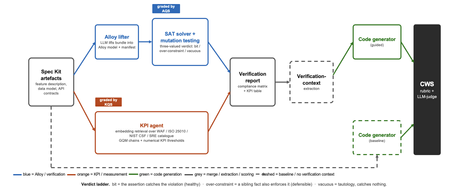
Large language models now write code straight from a prompt, but the specification in between is never checked, and a model asked to judge its own work brings the same blind spots to the review. We built a pipeline that lifts a plain-language requirements bundle into two graded specifications (a formal Alloy model and a set of numerical KPI targets), scores both before a single line of code is written, and hands the graded result to the code generator. It starts from GitHub Spec Kit and the Azure Well-Architected Framework. Here is what we built, and what we learned from running it at scale. The problem Writing software used to be four separate activities: gathering requirements, writing a specification, verifying it, and implementing it. A language model collapses all four into a single step. Two of those activities used to give us a quality signal before any code existed: a formal specification you could inspect, and measurable targets an implementation had to hit. The prompt-to-code loop inherits neither. There is no externally observable signal, before a line of code is written, that the requirements a model received are even well-formed enough to drive a correct implementation. You might think the model could just check its own work. It cannot do so reliably. Ask a language model to check the logic it just wrote: not only will it bring the same blind spot to the review, but its stochastic nature will make it produce different answers on each run. A SAT solver does not behave this way. Its verdict is deterministic: the same specification produces the same verdict every time. The thing that historically kept formal specification out of everyday development was never its rigour, it was the cost of writing the specification by hand. And that is exactly the step a language model can now do. What we built We built an agentic pipeline that sits between the requirements and the generated code. In plain terms it takes the requirements once, turns them into two things that can be checked by a machine: a precise description of rules that the system must obey, and a set of measurable targets that the system must hit. These artefacts are both graded, and are handed to the code generator. We split the work in two and gave each half to the tool that is good at it. The language model does the creative part, turning messy prose into formal structure. Deterministic checks, not the model's own opinion, grade what it produces. From a single Spec Kit artefacts bundle the pipeline builds two graded specifications before any code exists, and then carries both into code generation. Since these grades are computed deterministically rather than just generated, you can actually trust them. The input is a GitHub Spec Kit bundle. Spec Kit is an open-source, specification-first toolkit: instead of prompting for code directly, you describe what you want to build, and it produces a set of structured artefacts, a feature specification, a data model, and a set of API contracts. Our pipeline reads that bundle and turns it into the two graded specifications in parallel. overview. Spec Kit artefacts on the left. The Alloy lifter (with SAT solver and the attack step) and the KPI agent run in parallel. Their graded outputs are merged into a verification report that feeds the guided code generator. A dashed baseline path feeds the goal alone to the generator for comparison. Lift the requirements into a formal model The first half is structural. An Alloy lifter translates the requirements into a formal model written in Alloy, a specification language whose rules a SAT solver can check exhaustively, and whose verdict is deterministic, so the grade never depends on asking an LLM what it thinks. A banking requirement like "zero balance discrepancies" becomes a precise, checkable rule: the money leaving one account and the money arriving in another must always add up to the balances you started with, so a transfer can never quietly create or destroy money. The solver searches for any scenario that would break the rule. We modified Spec Kit's templates to force the model to output functional requirements and their corresponding Alloy code blocks in a structured format. Against the stock templates, that change alone nearly doubled the Alloy code compilation rate, jumping from 40 to 74 percent. A machine-written specification cannot be trusted, though, so the lifter does more than write it: it attacks it. Each load-bearing rule is deliberately broken by clearing its body and injecting a clause that forces a violation and the solver is re-run on the broken model. If the solver fails after this mutation, the original rule genuinely caught the violation it was meant to catch. If it still passes, the rule never really constrained anything on its own. Mutation testing usually grades a test suite against a specification that is assumed correct; here the roles are reversed, and the specification itself is on trial. Turn the requirements into measurable targets The second half is measurable. A KPI agent takes the same Spec Kit bundle, retrieves the most relevant principles from the Azure Well-Architected Framework, and derives numerical targets in the Goal-Question-Metric style. Each target carries an explicit threshold, a direction, and a measurement method, the kind of target a monitoring tool could actually track. Where earlier automated approaches stopped at describing quality in words, this half emits the actual numbers an implementation has to satisfy. And the knowledge base is a setting, not a fixture: swapping the Well-Architected Framework for ISO 25010, the NIST Cybersecurity Framework, or Google's SRE workbook requires zero changes to the underlying code. Review the report before any code Both graded halves merge into one human-readable verification report: the patterns the model applied, which rules passed, the counterexamples the solver found, the attack results, and the KPI threshold table. A developer reads it first and can see exactly where the specification is weak: a rule that passed for the wrong reason, or a requirement that nothing covers. After revising the specification, they re-run the lifting phase. Because the process is cached, re-runs are cheap, allowing the developer to loop until the report looks perfect, all before any code exists. The work shifts from reviewing generated code after the fact to curating a specification and reading a report before anything is built. Carry the graded context into code generation Only then does the report do its real job. In the guided pipeline, the merged report becomes the context handed to a code generator, which is asked to implement each rule, requirement, and KPI threshold and to leave markers tracing the code back to them. A baseline generator gets only the plain-language goal. Same generator, same settings; the only difference is whether it can see the graded specification. Feeding graded artefacts, rather than raw prose, into code generation is the piece that ties the whole pipeline together. So three choices separate this from simply asking a model for a spec: the specification is attacked rather than trusted, the targets are numbers rather than prose, and what reaches the code generator is graded evidence rather than raw text. How we tested it We ran the pipeline at scale: 270 Alloy lifts and 1,930 KPI records, across three application domains chosen to differ sharply (banking, software-as-a-service, and healthcare), three levels of requirement detail, four knowledge bases, and three model tiers, with ten runs of each combination so a real effect could be told apart from noise. For the code-generation half, we generated two codes for each case, once with the graded report as context and once from the plain-language goal alone, and compared the two. What we found First, the foundation: the specifications proved gradeable. The rubric cleanly separated sound specifications from degenerate ones. Because it returned the same verdict run after run, the grades are reliable enough to act on. The three key observations are as follows: The model matters more than the prompt Of the two knobs a practitioner controls, the model you choose and the amount of detail you write, the model dominated by roughly nine to one. A weak model could not be rescued by richer requirements. But you do not need the most expensive one: a mid-tier model delivered about 98 percent of the best model's quality at under a third of the cost and about half the time. The cheapest tier was a false economy, producing a model the analyser could even load only 23 percent of the time. More detail can backfire More requirements are not always better. Sparse and standard requirements scored the same, but over-specified requirements collapsed: KPI quality fell from about 0.89 to about 0.73, and the effect held across all four knowledge bases. Pile in too much numerical detail and the pipeline starts echoing the numbers it was handed instead of deriving sound ones, which is the opposite of what more detail is supposed to buy. Graded context produces far better code This is the payoff, and it is the point of the whole pipeline. Across all nine combinations of domain and detail, code generated with the graded verification context scored about 8 out of 10, against about 1 out of 10 for the same generator given only the plain-language goal. The guided code carried the traceability back to each requirement, the named rules, and the structural patterns that a bare prompt gives us no way to know about. This part of the study is a single run per combination, so we report the size and the consistency of the gap rather than a precise average, but the gap was large and it held in every case. What this means for you Four things to take from our study into your own work: Write requirements at a standard, middle level of detail. Not sparse, and not exhaustively numerical. The middle is the sweet spot on both halves of the specification. Reach for a capable mid-tier model before you invest in heavy prompt engineering. Model choice moves quality more than requirement detail does, and the mid tier is the value leader. Give the code generator externally graded context instead of letting it specify for itself. That is where most of the quality gain came from. Treat the knowledge base as a setting worth tuning, not a fixed ingredient. Each is a recommendation that data supports under the conditions we tested, not a universal law. The limit Every grade measures structure, not meaning. A high score says the specification is well-formed, discriminating, and stable. It does not say whether the invariants are the right ones, or the thresholds are the right ones for your deployment. A specification can be perfectly well-formed and still describe the wrong system. That judgement stays with a human, which is where we think it belongs. The pipeline is built to make that judgement efficient by moving it earlier, to curating the specification and reading the report, rather than to remove it. Generated code should not be shipped end to end without human validation. Try it The full pipeline, every input, and the artefacts behind every figure are in the project repository. If you want the Microsoft tools it builds on, start here: Project repository: https://github.com/RadaanMadhan/Specification-Led-Development GitHub Spec Kit: https://github.com/github/spec-kit Azure Well-Architected Framework: https://learn.microsoft.com/en-us/azure/well-architected/ If you'd like to explore the work in more detail, we've included the full technical report in the project repository, covering the related work, methodology, pipeline design, experimental setup, and extended results. About the team This project was carried out by six students at Imperial College London: Leon Hausmann, Charlotte Maxwell, Radaan Madhan, Keshav Das, Anson Huang, and Ander Cobo, in collaboration with Microsoft and supervised by Lee Stott (Microsoft) and Max Cattafi (Imperial College London)93Views1like0Comments
Are Microsoft partners using the Business Process Catalog? Looking for real-world adoption insights
Hi community, I'm curious to hear from Microsoft partners about your experience with the Business Process Catalog (BPC)- Microsoft's structured library of end-to-end business processes for D365 implementations. Specifically, I'd love to understand: Are you actively using the BPC in your D365 engagements? If yes, how and where does it fit into your delivery methodology? If not, what's holding adoption back — awareness, tooling, client readiness, or something else? We're seeing increasing attention on BPC as a foundation for structured implementation approaches, and I'm interested in how partners are (or aren't) integrating it into their practice. Would love to hear honest takes from the field. -Ellie9Views0likes0CommentsScale Microsoft 365 Copilot for SMBs with targeted sales and technical skilling
Build the skills to land, deploy, and scale Microsoft 365 Copilot solutions for small and medium-sized businesses (SMBs) with the Microsoft 365 Copilot SMB Learning Journeys. Now available on the Microsoft Partner Skilling Hub, the Microsoft 365 Copilot SMB Learning Journeys are designed for both sales and technical roles. These structured paths offer on-demand skilling to guide teams from foundational knowledge to real-world execution. Built so your teams can land deals and deploy, configure, and scale Copilot solutions with confidence, there are two paths available: Sales + Tech Deal Ready: Empower your sales teams to show SMBs the immense benefits of deploying Copilot, resulting in new deals, upsell, and cross-sell. Project Ready: Tech teams can build the skills to deploy, configure, and scale the solutions that will set SMBs up for success. Encourage your teams to sign up today to take their Copilot knowledge to the next level.39Views0likes0Comments
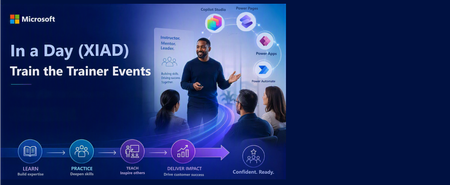
In a Day (XIAD) Partner Events Program - Train the Trainer Events (AgIAD, AIAD, AuIAD, PPIAD)
We invite you to attend an upcoming Train the Trainer session for Microsoft Partners to learn more about the In a Day (XIAD) Partner Events Program and how to lead workshops that empower customers to use and adopt Microsoft products. Our Train the Trainer events are designed to provide you with the knowledge and tools necessary to deliver successful Microsoft In a Day (XIAD) sessions. *Please note, participation is restricted to individuals representing a Microsoft Partner organization. You must register using your corporate email address that is associated with your Partner ID. Personal emails will not be approved. ✨ Why Attend? Expert Guidance: Learn from experienced trainers and get your questions answered. Comprehensive Resources: Access all the content and support you need to succeed. 📅 Upcoming Events: Agent in a Day Discover the basics of building agents with Microsoft Copilot Studio, including generative AI orchestration and integrating external data sources. Full day session (8 hours): Thursday, June 25 | 09:00–17:00 GMT+2 (Central European Summer Time) Trainer ready session (1.5 hours): Tuesday, June 30 | 09:00–10:30 GMT-5 (Central Daylight Time) Recordings available on-demand. Inquire at xiadevents@microsoft.com App in a Day Explore the fundamentals of building apps with Microsoft Power Apps, including creating custom business applications without writing code. Full day session (8 hours): Tuesday, June 23 | 09:00–17:00 GMT+2 (Central European Summer Time) Trainer ready session (1.5 hours): Tuesday, June 30 | 11:00–12:30 GMT-5 (Central Daylight Time) Recordings available on-demand. Inquire at xiadevents@microsoft.com Automation in a Day Explore automation solutions with Power Automate, including creating workflows and automating business processes. Trainer ready session (1.5 hours): Tuesday, June 30 | 14:00–15:30 GMT-5 (Central Daylight Time) Recordings available on-demand. Inquire at xiadevents@microsoft.com Power Pages in a Day Get hands-on building simple, secure business websites with Microsoft Power Pages. More sessions coming soon! Recordings available on-demand. Inquire at xiadevents@microsoft.com 👉 Register for all upcoming sessions at https://aka.ms/xiadTTT/pp Partner with us! Are you a Microsoft Partner interested in the opportunity to join the program and deliver In a Day (XIAD) events? 🔍 Learn more about the program and review partner eligibility criteria: https://aka.ms/xiadpartneropportunity. 📧 Contact the XIAD Program team: xiadevents@microsoft.com 🚀 Get started today: https://aka.ms/XIADGetStarted 📤 Submit requests to deliver events: https://aka.ms/xIAD/PartnerEvents408Views2likes2CommentsCopilot, Microsoft 365 & Power Platform product updates call
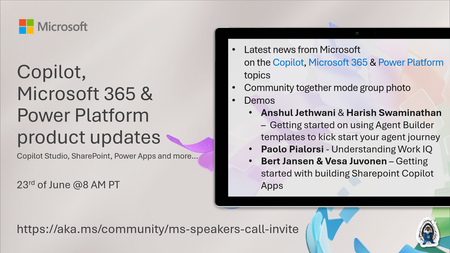
💡Copilot, Microsoft 365 & Power Platform product updates call concentrates on the different use cases and features within the Microsoft 365 and in Power Platform. Call includes topics like Microsoft 365 Copilot, Copilot Studio, Microsoft Teams, Power Platform, Microsoft Graph, Microsoft Viva, Microsoft Search, Microsoft Lists, SharePoint, Power Automate, Power Apps and more. 👏 Weekly Tuesday call is for all community members to see Microsoft PMs, engineering and Cloud Advocates showcasing the art of possible with Microsoft 365 and Power Platform. 📅 On the 23rd of June we'll have following agenda: News and updates from Microsoft Together mode group photo Anshul Jethwani & Harish Swaminathan – Getting started on using Agent Builder templates to kick start your agent journey Paolo Pialorsi - Understanding Work IQ Bert Jansen & Vesa Juvonen – Getting started with building Sharepoint Copilot Apps 📞 & 📺 Join the Microsoft Teams meeting live at https://aka.ms/community/ms-speakers-call-join 🗓️ Download recurrent invite for this weekly call from https://aka.ms/community/ms-speakers-call-invite 👋 See you in the call! 💡 Building something cool for Microsoft 365 or Power Platform (Copilot, SharePoint, Power Apps, etc)? We are always looking for presenters - Volunteer for a community call demo at https://aka.ms/community/request/demo 📖 Resources: Previous community call recordings and demos from the Microsoft Community Learning YouTube channel at https://aka.ms/community/youtube Microsoft 365 & Power Platform samples from Microsoft and community - https://aka.ms/community/samples Microsoft 365 & Power Platform community details - https://aka.ms/community/home 🧡 Sharing is caring!71Views0likes0Comments