copilot
3 Topics
GitHub Copilot and SSMA: Strap a GenAI conversion booster to your Oracle to SQL Migrations
In this blog, we’ll explore how GitHub Copilot and SQL Server Migration Assistant (SSMA) for Oracle can supercharge your code conversion journey from PL/SQL to T-SQL. Learn how both these tools bring comprehensive conversion rule set and Generative AI capabilities together to simplify and expedite your migration journey from Oracle to Azure SQL.5KViews6likes0CommentsLeveraging GitHub Copilot for T-SQL Code Conversion: A Deep Dive into Code Explainability
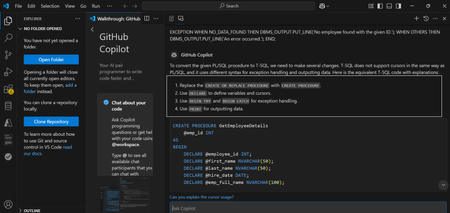
Converting database code between different relational database management systems (RDBMS) is an essential part of database migration , especially when moving from Oracle’s PL/SQL to SQL Server’s T-SQL. Both Oracle and SQL Server have unique syntax, functions, and programming conventions that require significant adjustments when converting complex SQL queries, stored procedures, or functions. While manual conversion can be a painstaking process, GitHub Copilot, an AI-powered code assistant, can ease this burden by offering real-time suggestions and automating many aspects of the conversion. In the first part of this two-part blog, we explore how GitHub Copilot can be a powerful tool for code conversion, helping developers quickly adapt code from one language or framework to another. By providing context-aware suggestions and completions, Copilot simplifies the process of rewriting and refactoring code. In the second part, we dive deeper into Copilot’s explainability feature, showcasing how it enhances the code conversion process from Oracle to Azure SQL. Code explainability in GitHub Copilot refers to the tool’s ability to offer suggestions and comments that help developers understand what a given piece of code is doing. When dealing with database migrations, such as converting Oracle SQL code to Azure SQL (SQL Server), GitHub Copilot’s ability to explain, suggest, and refactor code can ease the transition. It can assist in making the conversion process smoother, more efficient, and less error-prone by explaining the logic behind Oracle-specific queries and suggesting corresponding changes in Azure SQL’s syntax We'll go through multiple examples, analyze the differences between the two languages, and show how GitHub Copilot handles these challenges. Understanding the Key Differences: PL/SQL vs T-SQL Before jumping into examples, it's important to understand few of the fundamental differences between PL/SQL (Oracle) and T-SQL (SQL Server): Syntax: While both are procedural SQL dialects, there are key differences in the way they handle variables, control structures, and flow control. Functions: Each platform has its own set of built-in functions (e.g., string manipulation, date handling, etc.), and these need to be mapped correctly during conversion. Error Handling: Error handling and exception management differ between the two, with PL/SQL using EXCEPTION blocks and T-SQL using TRY...CATCH. Cursor Handling: While both support cursors for iterating through results, their syntax differs. Leveraging GitHub Copilot for Oracle PL/SQL to SQL Server T-SQL Code Conversion: A Deep Dive into Complex Examples with Explainability Converting database code between different relational database management systems (RDBMS) is an essential part of database migration , especially when moving from Oracle’s PL/SQL to SQL Server’s T-SQL. Both Oracle and SQL Server have unique syntax, functions, and programming conventions that require significant adjustments when converting complex SQL queries, stored procedures, or functions. While manual conversion can be a painstaking process, GitHub Copilot, an AI-powered code assistant, can ease this burden by offering real-time suggestions and automating many aspects of the conversion. In the first part of this two-part blog, we explore how GitHub Copilot can be a powerful tool for code conversion, helping developers quickly adapt code from one language or framework to another. By providing context-aware suggestions and completions, Copilot simplifies the process of rewriting and refactoring code. In the second part, we dive deeper into Copilot’s explainability feature, showcasing how it enhances the code conversion process from Oracle to Azure SQL. Code explainability in GitHub Copilot refers to the tool’s ability to offer suggestions and comments that help developers understand what a given piece of code is doing. When dealing with database migrations, such as converting Oracle SQL code to Azure SQL (SQL Server), GitHub Copilot’s ability to explain, suggest, and refactor code can ease the transition. It can assist in making the conversion process smoother, more efficient, and less error-prone by explaining the logic behind Oracle-specific queries and suggesting corresponding changes in Azure SQL’s syntax We'll go through multiple examples, analyse the differences between the two languages, and show how GitHub Copilot handles these challenges. Understanding the Key Differences: PL/SQL vs T-SQL Before jumping into examples, it's important to understand few of the fundamental differences between PL/SQL (Oracle) and T-SQL (SQL Server): Syntax: While both are procedural SQL dialects, there are key differences in the way they handle variables, control structures, and flow control. Functions: Each platform has its own set of built-in functions (e.g., string manipulation, date handling, etc.), and these need to be mapped correctly during conversion. Error Handling: Error handling and exception management differ between the two, with PL/SQL using EXCEPTION blocks and T-SQL using TRY...CATCH. Cursor Handling: While both support cursors for iterating through results, their syntax differs. Example 1: Complex Stored Procedure Conversion Let’s start with a complex example that involves handling parameters, cursors, and error handling. We'll look at a PL/SQL stored procedure in Oracle that processes employee records and outputs their details. CREATE OR REPLACE PROCEDURE GetEmployeeDetails (emp_id IN NUMBER) IS CURSOR emp_cursor IS SELECT employee_id, first_name, last_name, hire_date FROM employees WHERE employee_id = emp_id; emp_record emp_cursor%ROWTYPE; emp_full_name VARCHAR2(100); BEGIN OPEN emp_cursor; LOOP FETCH emp_cursor INTO emp_record; EXIT WHEN emp_cursor%NOTFOUND; -- Concatenate first and last name emp_full_name := emp_record.first_name || ' ' || emp_record.last_name; -- Output employee details DBMS_OUTPUT.PUT_LINE('Employee ID: ' || emp_record.employee_id); DBMS_OUTPUT.PUT_LINE('Full Name: ' || emp_full_name); DBMS_OUTPUT.PUT_LINE('Hire Date: ' || TO_CHAR(emp_record.hire_date, 'YYYY-MM-DD')); END LOOP; CLOSE emp_cursor; EXCEPTION WHEN NO_DATA_FOUND THEN DBMS_OUTPUT.PUT_LINE('No employee found with the given ID.'); WHEN OTHERS THEN DBMS_OUTPUT.PUT_LINE('An error occurred.'); END; Oracle PL/SQL Example In Oracle, we might have a procedure that uses a cursor to fetch employee records and print them. The procedure also includes error handling for potential issues during execution. Key Points in Oracle PL/SQL: Cursor: PL/SQL uses CURSOR for iterating through rows. Concatenation: Oracle uses || for string concatenation. Error Handling: PL/SQL uses EXCEPTION blocks for handling errors such as NO_DATA_FOUND. Converting to SQL Server T-SQL with GitHub Copilot When you type the PL/SQL code into an IDE with GitHub Copilot enabled (e.g., Visual Studio Code), Copilot will start suggesting the equivalent SQL Server T-SQL code. Here’s how Copilot converts the procedure. Copilot’s Suggested SQL Server T-SQL Code CREATE PROCEDURE GetEmployeeDetails (@emp_id INT) AS BEGIN DECLARE @emp_id INT, @first_name NVARCHAR(50), @last_name NVARCHAR(50); DECLARE @emp_full_name NVARCHAR(100); DECLARE emp_cursor CURSOR FOR SELECT employee_id, first_name, last_name, hire_date FROM employees WHERE employee_id = @emp_id; OPEN emp_cursor; FETCH NEXT FROM emp_cursor INTO @emp_id, @first_name, @last_name, @hire_date; WHILE @@FETCH_STATUS = 0 BEGIN -- Concatenate first and last name SET @emp_full_name = @first_name + ' ' + @last_name; -- Output employee details PRINT 'Employee ID: ' + CAST(@emp_id AS NVARCHAR); PRINT 'Full Name: ' + @emp_full_name; PRINT 'Hire Date: ' + CONVERT(NVARCHAR, @hire_date, 23); FETCH NEXT FROM emp_cursor INTO @emp_id, @first_name, @last_name, @hire_date; END CLOSE emp_cursor; DEALLOCATE emp_cursor; BEGIN TRY -- Error handling code (example) END TRY BEGIN CATCH PRINT 'An error occurred.'; END CATCH END; Key Points in T-SQL: Cursor: SQL Server uses DECLARE CURSOR to declare a cursor, similar to PL/SQL but with different syntax for opening and fetching. Concatenation: SQL Server uses + for string concatenation. Error Handling: SQL Server uses TRY...CATCH for error handling, unlike PL/SQL’s EXCEPTION block. GitHub Copilot provides a T-SQL equivalent for an Oracle PL/SQL stored procedure. Explanation of the Conversion Process Cursor Declaration and Fetching: PL/SQL uses CURSOR with OPEN, FETCH, and CLOSE to process rows. T-SQL uses DECLARE CURSOR to define the cursor and fetches rows with FETCH NEXT. Both approaches are similar, but T-SQL requires explicit DEALLOCATE to release the cursor. Error Handling: PL/SQL uses EXCEPTION blocks to handle errors like NO_DATA_FOUND. T-SQL uses TRY...CATCH blocks to capture and handle errors, a major difference in error handling between the two systems. String Concatenation: PL/SQL uses || for concatenating strings, while T-SQL uses +. This is a simple yet crucial change when converting between the two dialects. Example 2: Complex Query with Date Handling Let’s now look at a query that involves date handling and conditional logic. These are often tricky when converting between PL/SQL and T-SQL due to differences in how each platform handles dates. Oracle PL/SQL Query Example SELECT employee_id, first_name, hire_date, CASE WHEN hire_date < TO_DATE('2000-01-01', 'YYYY-MM-DD') THEN 'Veteran' ELSE 'New Hire' END AS employee_status FROM employees WHERE hire_date BETWEEN TO_DATE('1990-01-01', 'YYYY-MM-DD') AND SYSDATE; Key Points in PL/SQL: TO_DATE: Used to convert strings into dates. SYSDATE: Returns the current system date. CASE: Used for conditional logic to categorize employees as either "Veteran" or "New Hire". Copilot’s Suggested SQL Server T-SQL Code SELECT employee_id, first_name, hire_date, CASE WHEN hire_date < CONVERT(DATE, '2000-01-01', 23) THEN 'Veteran' ELSE 'New Hire' END AS employee_status FROM employees WHERE hire_date BETWEEN CONVERT(DATE, '1990-01-01', 23) AND GETDATE(); Key Points in T-SQL: CONVERT: SQL Server uses CONVERT for date formatting, similar to Oracle’s TO_DATE, but with different syntax and style codes. GETDATE(): Equivalent to Oracle’s TO_DATE In conclusion, GitHub Copilot streamlines code conversion by offering both quick suggestions and detailed explanations. The first part highlighted its ability to assist with code transitions, while the second part focused on how its explainability feature enhances the Oracle to Azure SQL migration, providing guided, efficient, and error-free conversion. This combination accelerates development and reduces potential issues during migration.2KViews2likes0CommentsDeep dive into the SSMA Code Conversion Copilot Architecture
The Problem We Set Out to Solve Migrating from Oracle PL/SQL to SQL Server T‑SQL is notoriously complex. While SSMA’s rule engine covers hundreds of conversion rules, edge cases, custom logic, and nuanced syntax but it often slips through. Developers end up spending hours manually fixing scripts, validating correctness, and worrying about regressions. The Copilot was built to tackle this pain point: augment SSMA’s rule engine with large language models (LLMs) that can reason about tricky conversions, explain their logic, and accelerate the migration process. But building trust in AI‑generated code meant we had to design an architecture that was controllable, reliable, and secure. SSMA Code Conversion Copilot was released back in the month of May and some of the use cases are elaborated here. This blog talks about the inner working of Copilot. ⚙️ Semantic Kernel for Skill / Plugin Management At the heart of SSMA Copilot lies Semantic Kernel, Microsoft’s open‑source framework for integrating LLMs. It offers two big capabilities: Prompt management — defining prompts as reusable “skills” with parameters like model, temperature, and token count. Agentic orchestration — automating workflows by chaining tools and prompts together. For Copilot, we deliberately chose only prompt management at this point. We have also added native skills such as checking the correctness of syntax and semantics but have not used agentic orchestration for the current implementation. ❌ Why Not Agentic Features? Agentic orchestration can be powerful, but in practice it wasn’t reliable enough for production migrations. Tool selection logic sometimes failed, leading to incorrect validations or spurious edits. Moreover, we saw an issue with latency. Instead, we implemented a deterministic workflow that gave us full control. ✅ Manual Orchestration Workflow Our workflow looks like this (please refer to the diagram): Partial Migration: SSMA generates a baseline conversion. Copilot Authentication: The Copilot is authenticated using the inputs provided by the user. This is where the model is also decided. Alternately, the user can use the managed endpoint that is controlled by Microsoft. LLM Completion: Copilot fills in gaps. Moreover, it explains the solution, points out the error that it is trying to resolve in simple language. Parsing & Compilation: A target‑dialect parser checks syntax. This catches unsupported constructs or binding issues far more reliably than prompt tuning. Spurious Edit Detection: LLMs are instructed to only enhance flagged portions of code. Any edits to “correct” blocks incur penalties, with a strict threshold of zero spurious edits allowed. Query Execution & Data Generation: Where possible, we generate minimal synthetic data (two rows per table) to validate equivalence between source and target queries. Semantic Equivalence Checks: For cases where execution isn’t feasible, we use LLM‑based scoring to judge logical fidelity. This loop repeats until syntactic and semantic correctness is achieved. By using this workflow, we avoided regression spirals and ensured predictable outcomes across dialects. This workflow was tested using our built-in evaluation framework which has leveraged the rich test cases of SSMA. 🔑 Feature Comparison Managed Endpoint Authentication was released with SSMA 10.4 in November 2025. Managed Endpoint BYOK Provisioning OpenAI Endpoint No Yes LLM Model Selection Automatic Manual Authentication Mandatory Entra ID OpenAI Endpoint and Key Private Endpoint Support No Yes Cross Tenant Dependency* Yes No Pricing Free Consumption in actuals *Cross Tenant Dependency: The endpoint is hosted in Microsoft tenant while the authentication happens in the user tenant. 🔒 Privacy and Data Handling A critical point: we don’t store your data. The scripts you provide are used only for generating the migration output. Once the process completes, the data is flushed. No proprietary code or schema information is retained. This design ensures: Security: We run OpenAI in Microsoft tenant following all security protocols. Trust: Copilot is a tool, not a repository. Compliance: Aligns with enterprise privacy expectations. 🌟 Why This Matters By combining Semantic Kernel framework, SSMA Copilot delivers reliable migrations without sacrificing flexibility. And with the managed endpoint, it’s now easier and safer than ever to adopt — no keys, no storage, no friction. This isn’t just about faster migrations. It’s about building trust in AI‑assisted workflows, ensuring correctness, and giving enterprises confidence that their data is secure. Get started with your Copilot based migration journey using SSMA for Oracle