copilot
1275 Topics
Tuesday Prompt Day 🚀 | 6W + E Practical Experiment #2
In our previous practical experiment, we took a simple Copilot request and transformed it using the Six W + E framework. Today, let's focus on the part that can make the biggest difference: E = EVALUATE A common assumption is: Prompt → Copilot → Answer But in real-world enterprise work, I believe the process should be: Prompt → Output → Evaluate → Refine → Better Output Let's continue with the same scenario. 🔹 BASIC PROMPT "Create a summary of our cloud migration project." The response may be reasonable. But before accepting it, let's evaluate it. 🔹 EVALUATE Ask yourself: Did Copilot understand the intended audience? Did it focus on the business objective? Did it distinguish facts from assumptions? Did it surface the risks that actually matter? Can the intended audience act on the result? Suppose the answer is: "Mostly good, but the risks are too generic and the executive summary contains too much technical detail." That feedback is valuable. We now know what needs to change. 🔹 REFINE Instead of starting over, we refine the instruction: "Refine the previous response for senior business and IT leadership. Reduce technical implementation details. Prioritize the most significant business risks. For each risk, provide: Risk • Business impact • Current mitigation • Decision or action required Keep the executive summary concise. Do not introduce information that is not supported by the source material. Clearly identify any information that is unavailable." Now the interaction has changed. We are no longer simply asking Copilot for an answer. We are using the first answer to improve the next instruction. 🔹 IMPROVED OUTPUT The objective is not necessarily to make the prompt longer. The objective is to make the next interaction more precise. That distinction matters. A good prompt can produce a useful first response. But a good evaluation process helps us systematically improve the result. This is why I see EVALUATE as an important part of Six W + E. It creates a feedback loop: Think → Prompt → Output → Evaluate → Refine And this raises an interesting question for enterprise AI adoption: Should we teach people only how to write better prompts? Or should we teach them how to evaluate AI output and refine their interaction with AI? I believe the second capability is just as important. 💡 YOUR TURN Take one prompt you use with Copilot. Run it once. Then evaluate the response before rewriting the prompt. Share: What you originally asked What was missing or incorrect in the response What you changed in your prompt Whether the second result was actually better Please avoid sharing confidential or sensitive information. I'm particularly interested in examples where the first Copilot response looked correct but wasn't actually useful for the business problem. Those are often the most interesting examples. 🔗 This discussion continues our Six W + E journey. Start with the original framework discussion and then explore the practical experiment series from there. I'll use the strongest examples from this series to explore how Six W + E can evolve from a prompting framework into a practical method for working with AI.9Views0likes0CommentsSharePoint Showcase: 10 Custom AI Skills Every SharePoint Site Owner Should Build
In this edition of SharePoint Showcase, we explore how skills work, how to create or install them, and ten practical examples to help SharePoint site owners get started. These examples are not an exhaustive list, but a curated starting point for identifying everyday processes that can become reusable, team-ready skills.7.5KViews4likes1CommentTurn conversations into code with GitHub Copilot in Microsoft Teams
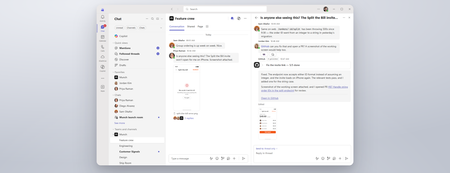
Coding where context lives and collaboration happens The best prompt may be the conversation your team has already had or is currently having. Until now, using a coding agent often meant paying context and coordination taxes. Developers had to leave the discussion, open another tool, and reconstruct the problem in a lengthy prompt: what happened, what the team decided, which constraints matter, and what needs to be built. With GitHub Copilot in Teams, teams can move directly from conversation to action. @mention GitHub Copilot when the team is ready to act, and it can use the conversation alongside repository context to understand the request, implement the change, and create a pull request for review. This makes working with a coding agent more collaborative and visible. Instead of one developer privately reconstructing the request, teammates can contribute context, correct assumptions, refine the approach in real time, and review the resulting work together. Let’s explore the new GitHub Copilot in Teams experience to see how it can streamline development tasks: If the player doesn’t load, open the video in a new window: Open video GitHub Copilot in Teams is available in Teams channels, group chats, meeting chats, and 1:1 chats. Once the GitHub app is installed and added to the conversation, @-mention GitHub Copilot to bring it into the discussion and start a task. During public preview, users can complete the following scenarios with GitHub Copilot in Teams: Build a feature based on requirements discussed in Teams Implement a fix for a bug Expand test coverage or improve documentation Create and update a pull request No copying the discussion into a CLI. No rewriting it in a desktop app. No asking one developer to translate a team decision into the perfect prompt. GitHub Copilot works where the context already lives, and because that context is shared, working with GitHub Copilot becomes a team activity. Built around the controls teams already use GitHub Copilot in Teams works within existing GitHub permissions and repository policies. Branch protections and required reviews continue to apply, and people remain responsible for deciding what gets merged, ensuring that humans stay in the loop at every step. Availability GitHub Copilot in Teams is now available in Public Preview. To try it, install the GitHub app for Microsoft Teams and check out our documentation to get started! Less context reconstruction. More progress from the conversations already happening.2KViews0likes1CommentCopilot, Microsoft 365 & Power Platform Community call
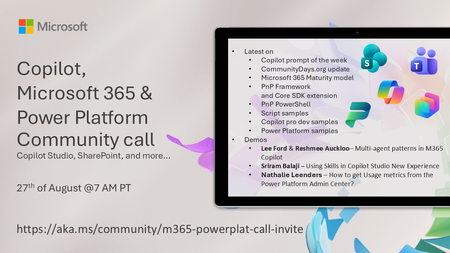
💡 Copilot, Microsoft 365 & Power Platform weekly community call focuses on different use cases and features within the Microsoft 365 and Power Platform - across Microsoft 365 Copilot, Copilot Studio, SharePoint, Power Apps and more. Demos in this call are presented by the community members 🙏 👏 Looking to catch up on the latest news and updates, including cool community demos, this call is for you! 📅 On 27th of August we'll have following agenda: Copilot prompt of the week CommunityDays.org update Microsoft 365 Maturity model PnP Framework and Core SDK extension PnP PowerShell Script samples Copilot pro dev samples Power Platform samples Lee Ford & Reshmee Auckloo– Multi-agent patterns in M365 Copilot Sriram Balaji – Using Skills in Copilot Studio New Experience Nathalie Leenders – How to get Usage metrics from the Power Platform Admin Center? 📅 Download recurrent invite from https://aka.ms/community/m365-powerplat-dev-call-invite 📞 & 📺 Join the Microsoft Teams meeting live at https://aka.ms/community/m365-powerplat-dev-call-join 💡 Building something cool for Copilot, Microsoft 365 or Power Platform (Copilot Studio, SharePoint, Power Apps, etc)? We are always looking for presenters - Volunteer for a community call demo at https://aka.ms/community/request/demo 👋 See you in the call! 📖 Resources: Previous community call recordings and demos from the Microsoft Community Learning YouTube channel at https://aka.ms/community/youtube Microsoft 365 & Power Platform samples from Microsoft and community - https://aka.ms/community/samples Microsoft 365 & Power Platform community details - https://aka.ms/community/home 🧡 Sharing is caring!58Views0likes0CommentsCopilot, Microsoft 365 & Power Platform product updates call
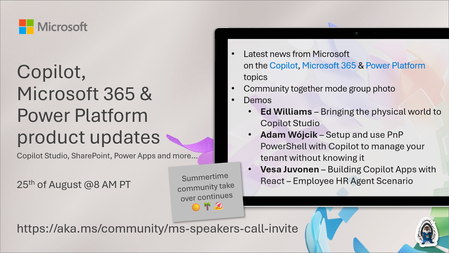
💡Copilot, Microsoft 365 & Power Platform product updates call concentrates on the different use cases and features within the Microsoft 365 and in Power Platform. Call includes topics like Microsoft 365 Copilot, Copilot Studio, Microsoft Teams, Power Platform, Microsoft Graph, Microsoft Viva, Microsoft Search, Microsoft Lists, SharePoint, Power Automate, Power Apps and more. 👏 Weekly Tuesday call is for all community members to see Microsoft PMs, engineering and Cloud Advocates showcasing the art of possible with Microsoft 365 and Power Platform. 📅 On the 18th of August we'll have following agenda: News and updates from Microsoft Together mode group photo Ed Williams – Bringing the physical world to Copilot Studio Adam Wójcik – Setup and use PnP PowerShell with Copilot to manage your tenant without knowing it Vesa Juvonen – Building Copilot Apps with React – Employee HR Agent Scenario 📞 & 📺 Join the Microsoft Teams meeting live at https://aka.ms/community/ms-speakers-call-join 🗓️ Download recurrent invite for this weekly call from https://aka.ms/community/ms-speakers-call-invite 👋 See you in the call! 💡 Building something cool for Microsoft 365 or Power Platform (Copilot, SharePoint, Power Apps, etc)? We are always looking for presenters - Volunteer for a community call demo at https://aka.ms/community/request/demo 📖 Resources: Previous community call recordings and demos from the Microsoft Community Learning YouTube channel at https://aka.ms/community/youtube Microsoft 365 & Power Platform samples from Microsoft and community - https://aka.ms/community/samples Microsoft 365 & Power Platform community details - https://aka.ms/community/home 🧡 Sharing is caring!141Views0likes0Comments
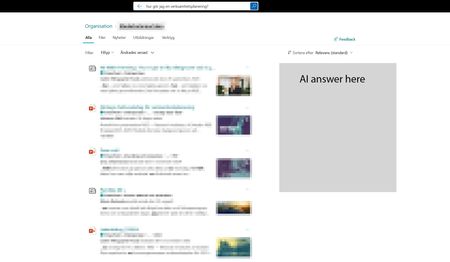
Copilot answers in Sharepoint search results?
I would really like to add a copilot AI answer in the Sharepoint search result page, mainly for the intranet hub, to help our users better find answers across the intranet and also make the search bar a more complete search experience. Something we could toggle on and maybe we could point out a specific agent we've created for the intranet. I feel people are quickly starting to expect to have an AI summary in their search. Would also make sense when so many use the search bar i Sharepoint to incorporate it there, instead of having to go to a different place to use Copilot. It would make search easier.129Views0likes1CommentWhat's New in Microsoft EDU - Back to School 2026 webinar
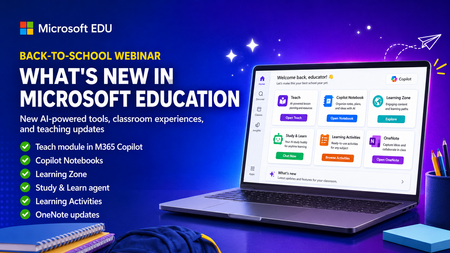
Get ready for back to school (Northern Hemisphere) with the latest product updates from Microsoft Education. In this webinar, we’ll showcase new AI-powered tools, teaching resources, and product updates designed to help educators save time, personalize learning, and support every student. You’ll see what’s new across Microsoft 365 Copilot, Teams for Education, OneNote, and more, including: ✅ Teach module in Microsoft 365 Copilot ✅ Copilot Notebooks ✅ Study and Learn agent ✅ Learning Zone ✅ Teams for EDU updates ✅ The latest OneNote EDU updates And more! Join us for practical demonstrations, helpful tips, and new ideas you can put to work as you prepare for a successful school year. And don't worry if you can't make it live, we will be recorded and posting this on the Microsoft Education YouTube channel afterwards. 📅 When: Wednesday, August 26th @ 8am Pacific Time 🔗 Register here: https://df.events.teams.microsoft.com/event/df.8c4f06fc-399f-4603-8023-f5fd92601bd1@72f988bf-86f1-41af-91ab-2d7cd011db47?source=copyLinkOneEventsShareDialog Mike Tholfsen Group Product Manager Microsoft Education306Views1like1Comment
Word Copilot attachments fail with NoTokenObtained
Word Copilot cannot read local or cloud attachments with my Microsoft account. Cloud file attachment opens OneDrive Picker but fails with NoTokenObtained, timeout, or “Sorry, something went wrong.” Local files are accepted but reported as empty/corrupted. The same files work correctly in Microsoft 365 Copilot Chat with the same account. The issue reproduces on different computers, different networks, new Edge profile, new Windows user, and Word for the web without Office desktop installed. Word Copilot can read the active document, so only the attachment pipeline appears broken. Correlation IDs: 49a92ea2-7068-2001-bf16-3cf7d0c388fd and b39b30a2-b012-f000-cf51-72bd844c5dea. Please escalate to Word Copilot / OneDrive File Picker / Microsoft 365 Copilot engineering.128Views0likes1CommentAGENTIC RAG
Agentic RAG for the Enterprise: Building Intelligent AI Agents with Microsoft Foundry Enterprise AI is moving beyond simple chatbots and classic RAG patterns. In this session, we will explore how Agentic RAG can help organizations build smarter, more autonomous AI solutions using Microsoft Foundry. We will cover how Agentic RAG combines retrieval, reasoning, tools, orchestration, grounding, and guardrails to solve real enterprise use cases. The session will also share practical architecture patterns, implementation tips, common pitfalls, security considerations, performance tuning techniques, and lessons learned from real-world Microsoft AI projects. By the end of the session, attendees will understand when to use classic RAG versus Agentic RAG, how to design enterprise-ready AI agents, and what best practices to follow when building solutions with Microsoft Foundry. Event Host Girish Uppal | Nehal Shah32Views0likes0Comments