copilot studio
72 TopicsThe Employee Self-Service agent - how to find it
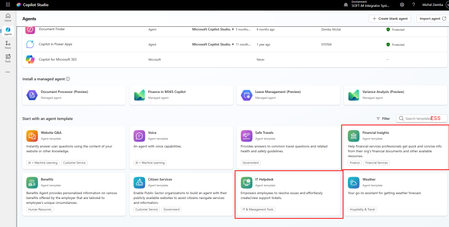
I see that Microsoft has put a lot of efforts to marketing the Copilot Employee Self-Service Agent but it seems it is not available for every tenant. I have already checked on several small and mid ones (5-2k users) and cannot find it in templates. As I understand from what I already red and saw, this is a template that should be available to you when you start building agents. Unfortunately when I enter Copilot Studio and enter in the search ESS (abbreviation from Employee Self-Service) I got only those two agents marked red filtered (see screenshot below). When I installed IT Helpdesk agent, I do not see topics related to HRSD in ServiceNow which I need. I found the Employee-Self-Service-Agent-Developer-Kit that contains same examples of the ServiceNow HRSD topics, but when I copy the YAML code of those topics to my agent I got some references to topics that I do not exists in my agents. Anyone has struggled with the same? Or maybe you have access to the Employee Self-Service agent and can share the basic solution/topics with me? Michal37Views0likes1Comment
Copilot studio Agents published on Sharepoint
Hi everyone, I'm hoping someone can confirm or correct my understanding of a limitation we're experiencing. We have a Copilot Studio agent published to a SharePoint site. When users interact with the agent, they are unable to see their previous chat history — unlike the built-in SharePoint AI agents (e.g. SharePoint Agents / Copilot for SharePoint), which do appear to retain and display conversation history. Is it correct that Copilot Studio agents published to SharePoint do NOT support persistent chat history visible to the end user, while native/built-in SharePoint AI agents do support this out of the box?26Views0likes1CommentNew Microsoft Applied Skill Alert – Create Agents in Microsoft Copilot Studio (APL-7008)
Hi Friends👋 If you’ve been demoing Copilot Studio in your classes, here’s a quick way to validate and showcase those agent-building skills—without sitting a full certification exam. Why grab this micro-credential? Hands-on, half-day lab — prove you can build, publish & govern generative-AI agents end-to-end. Instant résumé boost — digital badge drops into Credly the moment you pass. Perfect add-on to PL-300/PL-400/PL-700 prep or any Power Platform course you teach. Lab tasks you’ll master Design the agent persona & generative AI instructions Build topics, variables & rich dialogues (Adaptive Cards included!) Call Dataverse data with Power Automate flows Publish to Microsoft Teams & the web, then secure with content moderation Prep in three steps Run the free learning path: Create agents in Microsoft Copilot Studio (9 bite-size modules). Skim the official study guide checklist (APL-7008). Spin up a trial tenant for learners and let them practice before the live lab. Ready? 👉 Copilot Studio Applied Skill Let’s keep empowering our students (and ourselves) to build the next generation of AI agents inside Microsoft 365. If you earn the badge, drop it below—would love to celebrate your win! 🏆 #CopilotStudio #AppliedSkills #PowerPlatform #GenerativeAI4.7KViews3likes2Comments
New Agent experience - how to add Fabric data agent
When using the new (Agent) experience in Copilot studio how can you add Fabric Data agent as connected agent ? There does not seem to be an option. Also should adding it as an MCP server be supported (under Tools) ? https://learn.microsoft.com/en-us/fabric/data-science/data-agent-mcp-server says the following: Currently, you can use the Fabric data agent MCP server only in VS Code. If you're using your own MCP client, it can also work, as long as you set up authentication Has anyone tried this? If yes, by using with authentication? OAuth2? Thanks70Views1like2CommentsMicrosoft Power Platform community call - June 2026
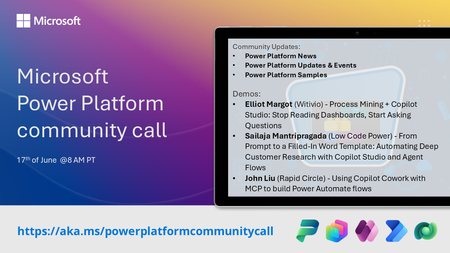
💡 Power Platform monthly community call focuses on different extensibility options for builders, makers and developers within the Power Platform. Typically demos are from our awesome community members who showcase the art of possible within the Power Platform capabilities. 👏 Looking to catch up on the latest news and updates, including cool community demos, this call is for you! 📅 On 17th of June we'll have following agenda: Power Platform Updates & Events Latest on Power Platform samples Elliot Margot (Witivio) - Process Mining + Copilot Studio: Stop Reading Dashboards, Start Asking Questions Sailaja Mantripragada (Low Code Power) - From Prompt to a Filled-In Word Template: Automating Deep Customer Research with Copilot Studio and Agent Flows John Liu (Rapid Circle) - Using Copilot Cowork with MCP to build Power Automate flows 📅 Download recurrent invite from https://aka.ms/powerplatformcommunitycall 📞 & 📺 Join the Microsoft Teams meeting live at https://aka.ms/PowerPlatformMonthlyCall 💡 Building something cool for Microsoft 365 or Power Platform (Copilot, SharePoint, Power Apps, etc)? We are always looking for presenters - Volunteer for a community call demo at https://aka.ms/community/request/demo 👋 See you in the call! 📖 Resources: Previous community call recordings and demos from the Microsoft 365 & Power Platform community YouTube channel at https://aka.ms/community/videos Microsoft 365 & Power Platform samples from Microsoft and community - https://aka.ms/community/samples Microsoft 365 & Power Platform community details - https://aka.ms/community/home109Views0likes1Comment
Why Your Copilot Studio Agent Fails in Production (And How to Fix It)
Most Copilot Studio tutorials show you how to build a chatbot. This post is about something harder: building agents that actually work in production. I architect enterprise agents at a hospitality company — handling customer email triage, HR workflows, helpdesk automation, and reporting pipelines across multiple systems. One of those agents reduced human handling time per customer email from ~12 minutes to under 2 minutes (88% reduction) by orchestrating sentiment analysis, CRM lookups, SOP research via child agents, and response drafting — all before a human agent ever opens the email. Here is what I've learned building at that scale. The Four Layers Every Enterprise Agent Needs Most teams design only the top layer and treat everything else as "we'll figure it out later." By the time the other layers become urgent — usually after an incident — they're too expensive to retrofit. Layer Component Conversation Topics · Entities · Adaptive Cards · NLU Orchestration Agent routing · Context passing · State Integration Connectors · Power Automate · Azure Functions Governance DLP · Auth · ALM · Monitoring · Logging Build the governance layer first. Design the conversation layer last. The demo will be slightly less impressive. The production deployment will be significantly more stable. The Three Mistakes I See Most Often 1. Slot-filling designed for the happy path The default Copilot Studio pattern collects parameters one by one. It breaks the moment your flow has conditional branches — which every real enterprise workflow does. Use intent-first routing instead: identify what the user wants before collecting any parameters, then branch to a sub-flow that collects only what that variant needs. 2. Multi-agent context that gets dropped When you delegate from a router agent to a capability agent, the receiving agent needs to know who the user is and what conversation state to preserve. Native session variables don't cross agent boundaries. Build an explicit context envelope — a JSON object passed at delegation time — that carries user identity, security scope, origin topic, and return context. Your agents become stateless with respect to each other. Context travels with the conversation. 3. No async pattern for slow integrations A synchronous request that works for a REST API returning in 200ms will silently fail for a legacy system query that takes 45 seconds. Design async from day one: submit to an Azure Service Bus queue, return a correlation ID, acknowledge the user, and use proactive messaging to deliver the result when it's ready. This is the single biggest gap between demos and production deployments. A Note on Authentication — Chatbots vs. Autonomous Agents This is a distinction most articles get wrong, so it's worth being explicit. Chatbots have a human on the other end of the conversation. Authentication options here include Entra ID SSO (works in Teams and SharePoint channels where the user's identity is delegated to the agent) or client ID + secret (validates against AD but without user delegation — the agent authenticates as itself, not as the user). Autonomous agents are different in a fundamental way: there is no human in the authentication loop. The agent authenticates using the identity of the account that owns and runs it. There is no SSO because there is no interactive user session. This distinction matters because the security model shifts entirely — you are no longer protecting a user session, you are protecting a service identity. This gets more interesting when your autonomous agent connects to non-Microsoft systems. There is no universal pattern here — it depends entirely on what the external system supports: - API Key / Secret — the most common pattern for SaaS integrations. The external system issues a scoped key specifically for this integration. Store it in Azure Key Vault or encrypted Power Platform environment variables, never hardcoded in a flow. The scoping question is critical: is this a full-admin key or a least-privilege key issued only for what this agent needs? - OAuth 2.0 Client Credentials (machine-to-machine) — the agent authenticates as itself using client ID + secret against the external system's auth server and receives a bearer token. No user involved, fully automated. - Basic Auth on legacy systems — still common in enterprise environments. Credentials must live in Key Vault, not in flow variables or connector configuration in plain text. - Custom connector with encrypted connection — Power Platform manages the auth at the connector level; credentials are stored encrypted and scoped to the environment. The governing principle across all of these: the identity the agent uses to call an external system should be issued specifically for that integration, scoped to only the permissions that agent needs, stored securely (Key Vault or encrypted environment variables), and auditable — meaning the external system's logs show the agent's calls as a distinct identity, not a shared admin account that 12 other things also use. Before You Go to Production — Quick Checklist [ ] Autonomous agent's owning account/service principal is scoped to least-privilege — access only to systems the agent needs, nothing broader [ ] Non-Microsoft system credentials stored in Azure Key Vault or encrypted environment variables — never hardcoded in flows [ ] Each external system integration uses a dedicated, scoped credential — not a shared admin account [ ] External system audit logs show the agent as a distinct, identifiable caller [ ] DLP policies configured per environment — production is strict, dev is permissive [ ] Dataverse schema finalized before topic design begins [ ] Error handling designed for every integration point with user-readable failure messages [ ] Async pattern in place for any integration that may take > 10 seconds [ ] ALM pipeline configured: Dev → Test → UAT → Prod with automated solution checker [ ] Application Insights connected with custom events for key agent actions [ ] Escalation rate baseline established with alert threshold configured The One Question to Ask Before Building Anything "What does success look like in six months, and what data does the agent need access to in order to achieve it?" That answer determines your Dataverse schema, your integration architecture, your authentication model, and your DLP policy — before a single topic is created. Agents designed from that question forward are maintainable and trusted by the business. Agents designed from the conversation layer down spend their first year in retrofitting mode. Happy to go deeper on any of these layers in the comments — particularly multi-agent context passing and the async pattern, which I find generate the most questions in enterprise deployments.
Copilot Studio + SharePoint: Markdown (.md) Files in Doc Libraries Supported as Knowledge Sources?
Hi all, We’ve been doing some deeper testing with Copilot Studio agents grounded in SharePoint knowledge sources, and I’m hoping to clarify whether what we’re seeing is a known limitation or an undocumented gap. Scenario A Copilot Studio agent uses SharePoint document libraries as a knowledge source The library contains Markdown (.md) files that are intentionally used as canonical design references The same .md files: ✅ Work well when uploaded directly to the agent ❌ Are not retrievable or citable when stored in a SharePoint library and added as a SharePoint knowledge source To help with grounding, we created modern SharePoint index pages that: Explain what the markdown collections are (Patterns, ADRs, Guardrails) Link directly to the canonical folders and files Explicitly state that the .md files are the source of truth The agent can: Discover and summarize the index pages correctly Understand that .md artifacts exist and where they live But it cannot: Read the content of the individual .md files Apply a specific pattern or ADR from those files in a design conversation Cite them as sources, even when permissions and search indexing are confirmed What We’ve Checked Permissions (agent user has access) Folder depth (kept shallow) Search results (markdown files appear in SharePoint search) SharePoint indexing status Work IQ enabled Same content works when attached directly to the agent This behavior also seems consistent with what others have reported here: Markdown works when uploaded directly Markdown retrieval degrades when hosted in SharePoint libraries Questions for the Product Team / Community Are Markdown (.md) files in SharePoint document libraries officially supported as Copilot Studio knowledge sources today? If yes, are there specific constraints (file size, rendering, parsing, indexing) that differ from Word/PDF? If no (or “not yet”), is this a known limitation on the roadmap? Is the recommended pattern to: Convert important markdown files into .aspx pages, or Use thin “index / summary” pages and keep markdown canonical until retrieval improves? We’re happy to adapt our information architecture — just trying to align with the intended platform direction rather than work against it. Thanks in advance for any guidance or clarification. This capability is extremely powerful, and clearer expectations here would help a lot of teams make the right design tradeoffs.884Views7likes3CommentsCopilot, Microsoft 365 & Power Platform Community call
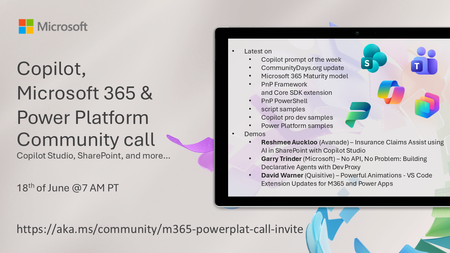
💡 Copilot, Microsoft 365 & Power Platform weekly community call focuses on different use cases and features within the Copilot, Microsoft 365 and Power Platform - across Microsoft 365 Copilot, Copilot Studio, SharePoint, Power Apps and more. 👏 Looking to catch up on the latest news and updates, including cool community demos, this call is for you! 📅 On 18th of June we'll have following agenda: Copilot prompt of the week CommunityDays.org update Microsoft 365 Maturity model Latest on PnP Framework and Core SDK extension Latest on PnP PowerShell Latest on script samples Latest Copilot pro dev samples Latest on Power Platform samples Picture time with the Together Mode! Reshmee Auckloo (Avanade) – Insurance Claims Assist using AI in SharePoint with Copilot Studio Garry Trinder (Microsoft) – No API, No Problem: Building Declarative Agents with Dev Proxy David Warner (Quisitive) – Powerful Animations - VS Code Extension Updates for M365 and Power Apps 📅 Download recurrent invite from https://aka.ms/community/m365-powerplat-dev-call-invite 📞 & 📺 Join the Microsoft Teams meeting live at https://aka.ms/community/m365-powerplat-dev-call-join 👋 See you in the call! 💡 Building something cool for Microsoft 365 or Power Platform (Copilot, SharePoint, Power Apps, etc)? We are always looking for presenters - Volunteer for a community call demo at https://aka.ms/community/request/demo 📖 Resources: Previous community call recordings and demos from the Microsoft Community Learning YouTube channel at https://aka.ms/community/youtube Microsoft 365 & Power Platform samples from Microsoft and community - https://aka.ms/community/samples Microsoft 365 & Power Platform community details - https://aka.ms/community/home 🧡 Sharing is caring!106Views1like0CommentsThe AI job boom continues: Build the skills that move business forward
Discover new AI powered business Certifications to validate the skills that matter most. Gretchen LaBelle: Copilot + Agents Learning Portfolio Manager, Global Skilling Tarek Saleh Eldin: Content Publishing Manager, Global Skilling In Part 1 of this series, The AI job boom is here. Are you ready to showcase your skills?, we explored how Microsoft Certifications across AI, cloud, and security are evolving to keep pace with a rapidly changing job market. AI is no longer a niche capability. It’s becoming foundational across roles, reshaping how work gets done, and redefining how professionals create impact. This post picks up that thread. As organizations move from experimenting with AI to operationalizing it at scale, big changes are happening in business solutions roles. These shifts demand the ability to apply AI in real business contexts, redesign processes, build intelligent apps and agents, and lead transformation responsibly across the organization. Earlier this year, Microsoft introduced four new AI business solutions Certifications: Microsoft Certified: Agentic AI Business Solutions Architect (Exam AB‑100) Microsoft 365 Certified: Copilot and Agent Administration Fundamentals (Exam AB‑900) Microsoft Certified: AI Business Professional (Exam AB‑730) Microsoft Certified: AI Transformation Leader (Exam AB‑731) Together, these Certifications map to the critical roles in an AI‑driven workplace, from business practitioners and IT administrators to solution architects and transformation leaders. Building on that foundation, we’re launching new Certifications to help amplify human skills for AI-powered roles in the business landscape. New AI business solutions credentials: April 2026 and beyond Additional new Certification exams begin rolling out in beta starting in April 2026, with more releases over the following months, and going live later this year. The Microsoft Certified: AI Agent Builder Associate Certification is designed for tech pros, including developers, AI engineers, and architects, who are pushing AI agents beyond out‑of‑the‑box scenarios to implement production‑ready Microsoft Copilot Studio agents and multi‑agent solutions capable of sophisticated processes, workflow automation, and enterprise integration. Exam AB-620 beta and training available in April 2026; exam expected to go live in June 2026. The Microsoft Certified: Dynamics 365 Contact Center AI Engineer Associate Certification is designed for contact center engineers and solutions pros who design and run modern contact center as a service (CCaaS) solutions with Dynamics 365 Contact Center and service‑oriented autonomous agents. This Certification goes beyond routing and channels, focusing on how AI, Microsoft Copilot, and agents deliver scalable, always‑on service across voice and digital channels. Exam AB-250 beta and training available in June 2026; exam expected to go live in August 2026. The Microsoft Certified: Dynamics 365 Sales AI Consultant Associate Certification is for modern sellers who design and operationalize AI‑powered sales solutions across the lead‑to‑cash lifecycle, emphasizing Copilot-driven productivity and insights, AI-powered opportunity research and qualification, agent configuration and lifecycle management, and secure, scalable automation aligned with governance and responsible AI. Exam AB‑210 beta and training available in May 2026; exam expected to go live in June 2026. The Microsoft Certified: Intelligent Applications Builder Associate Certification equips Microsoft Power Platform pros to build for an AI-first world, where apps, agents, automation, and models work as one. It validates the skills to use Copilot and natural language to design intelligent solutions, embed agents across experiences, and ship responsibly with strong governance and application lifecycle management. Exam AB-410 beta and training available in April 2026; exam expected to go live in June 2026. The Microsoft Applied Skills: Build an agent-first app credential validates learners’ ability to build an app that surfaces a Copilot Studio agent and to craft prompts that make the agent genuinely effective, not just functional. This credential is part of the broader Microsoft Certified: Intelligent Applications Builder Associate (Exam AB-410) Certification journey, serving as a fast, accessible entry point for those looking to get started with agent-first development before pursuing the full Certification. Credential and training expected to go live in June 2026. Refresh: The Microsoft Certified: Power Platform Fundamentals Certification (Exam PL-900) is being updated with a streamlined, one-day instructor-led course and a new training program. These improvements are designed to align with the AI-powered Microsoft Power Platform and to make it easier than ever for learners to start building confidently. Training and courseware updates are scheduled for June 2026, with minor exam changes planned at the same time to reflect these enhancements. Retiring Certifications: What you need to know We’re committed to keeping our Certifications portfolio aligned with latest technology. As we launch new Certifications, we also retire some older credentials to keep the portfolio mapped to evolving roles. The following table itemizes what’s changing and provides key dates for Certification and training retirements in 2026. If your Certification is eligible for renewal, please renew it before the retirement date. Retiring Microsoft Credential Credential and exam retirement date Planned training retirement date Related new Credential Microsoft Certified: Dynamics 365 Customer Experience Analyst Associate (Exam MB-280) July 31, 2026 July 31, 2026 Microsoft Certified: Dynamics 365 Sales AI Consultant Associate (Exam AB-210) Microsoft Certified: Power Platform Functional Consultant Associate (Exam PL-200) August 31, 2026 August 31, 2026 Microsoft Certified: Intelligent Applications Builder Associate (Exam AB-410) Microsoft Certified: Dynamics 365: Finance and Operations Apps Solution Architect Expert (Exam MB-700) June 30, 2026 June 30, 2026 No new Certification is planned. To stay up to date with these technologies please refer to the Microsoft technical documentation. Microsoft Certified: Power Platform Solution Architect Expert (Exam PL-600) June 30, 2026 June 30, 2026 Microsoft Certified: Dynamics 365 Supply Chain Management Functional Consultant Expert (Exam MB-335) June 30, 2026 June 30, 2026 Microsoft Certified: Dynamics 365 Field Service Functional Consultant Associate (Exam MB-240) June 30, 2026 June 30, 2026 Microsoft Certified: Power Automate RPA Developer Associate (Exam PL-500) June 30, 2026 June 30, 2026 Microsoft Applied Skills: Create and manage model-driven apps with Power Apps and Dataverse June 30, 2026 June 30, 2026 Microsoft Applied Skills: Build an agent-first app Note: The recently released Microsoft Certified: Agentic AI Business Solutions Architect Certification (Exam AB‑100), although not a direct replacement for the retiring Certifications listed here, is the flagship expert‑level Certification, spanning a significantly broader scope and covering agentic architectures, AI‑driven solution design, and end‑to‑end business impact. If you currently hold one of the retiring expert-level Certifications (associated with Exam MB‑700, Exam PL‑600, Exam MB-335, Exam MB-240, or Exam PL-500), consider pursuing the Microsoft Certified: Agentic AI Business Solutions Architect Certification (Exam AB‑100) as your next step. Navigating the transition: FAQs The following questions and answers can help you determine how these retirements and expanded portfolio could impact your learning journey: Q. Why is Microsoft implementing these updates? A. Microsoft Credentials are valuable, as is the time you spend earning them. With the ongoing evolutions in technology, it’s essential that we keep the credentials up to date so we can help you stay aligned with latest skills and trends. We’re implementing these updates to provide a valuable path forward to keep up with the latest skills. Q. I’ve already earned one of the retiring Certifications. What happens now? A. If you’ve already earned any of the retiring Certifications, your credential remains valid until it expires. Retirement does not revoke or invalidate Certifications that were earned while the exam was active. They show your continued dedication to staying up to date and learning new skills in this ever-changing technical landscape. Q. What if a Certification that’s retiring is part of the prerequisites for an expert-level Certification? A. If a retiring Certification is required for an expert-level Certification, the requirements for that expert-level Certification will be updated as needed. The retiring Certification will be removed from the requirements and replaced (as appropriate) with a new associate-level Certification. If you’ve earned an expert-level Certification by earning an associate-level Certification that’s now retiring, you’ll continue to hold the expert-level Certification as long as you renew the expert-level Certification when it’s eligible. After you’ve earned a Certification, and if you renew it when it’s eligible, you hold it until it expires. If you’ve earned an associate-level Certification that’s a requirement for an expert-level Certification and that associate-level Certification hasn't expired, it can still satisfy the expert-level requirement. Be sure to meet all the requirements for the expert-level Certification before the associate-level Certification expires. Expired Certifications cannot be used to meet the requirements for an expert-level Certification. Q. Can I renew a soon-to-retire Certification? A. Yes, as long as it’s eligible for renewal and you renew it before the Certification officially retires, you can renew a soon-to-retire Certification. Please note that Fundamentals Certifications don’t expire. Q. Is there a direct transition path from a retiring Certification that I’ve already earned to the related new Certification, or do I need to pass the new exam? A. To earn the new Certification, you need to pass the new exam, since the new exam and the old one don’t measure the same skill sets. Q. I’m preparing for an exam that’s retiring. What should I do? A. The time you spend preparing for an exam and earning a Certification never goes to waste. If you’re actively preparing for an exam that’s retiring and a replacement exam has been announced: If you’ve already registered for the exam, you can continue preparing for it and take it while it’s still available. Keep in mind that after the exam retires, you won’t be able to retake it if you don’t pass, and you won’t be able to renew it. Exam registration ends on the same day that the exam retires. If you haven’t registered for the exam and there’s a related new exam, we strongly recommend that you prepare for and take the new exam instead, as noted in the following table. If you’re not close to testing for this exam Prepare for and take this exam instead Learning path and instructor-led training expected to be available in Exam MB-280 Exam AB-210 April 2026 Exam PL-200 Exam AB-410 April 2026 If you’re preparing for Exam PL-900 to earn the Microsoft Certified: Power Platform Fundamentals Certification, the new Course PL-900 will be available at the end of June 2026. If you’re preparing for Exam MB-335 to earn the Microsoft Certified: Dynamics 365 Supply Chain Management Functional Consultant Associate Certification, Exam MB-700 to earn the Microsoft Certified: Dynamics 365: Finance and Operations Apps Solution Architect Expert Certification, or Exam PL-600 to earn the Microsoft Certified: Power Platform Solution Architect Expert Certification, consider preparing for and taking Exam AB-100 to earn the Microsoft Certified: Agentic AI Business Solutions Architect Certification, the new flagship expert‑level Certification for solutions architects, available now. Note that to earn the Certification, you must pass Exam AB-100 and you must also have a current associate-level Certification. Q. How might these updates impact partner competency requirements? A. To track whether and how these updates might impact partner competency requirements, go to Solutions Partner for Business Applications in the Partner Center. The bigger picture AI is transforming not only what technology can do but also who does the work and how. Whether you’re building agents, designing intelligent apps, transforming sales, or leading enterprise AI strategy, there’s now a Certification that reflects the real skills your role demands. These Certifications can help ensure that you’re not only ready for AI-driven work but you’re also leading it. We’ll share updates for the new AI business solutions Certifications, including beta exams and go-live dates, on The Skills Hub Blog. Stay tuned! Explore more Microsoft Credentials on AI Skills Navigator.80KViews13likes65Comments