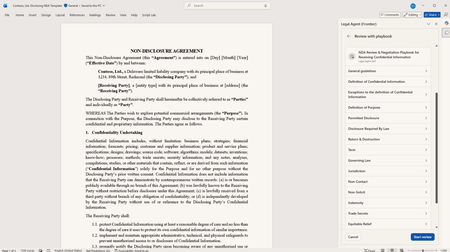
copilot in word
17 TopicsWhat’s New in Microsoft 365 Copilot | May 2026
Welcome to the May 2026 edition of What's New in Microsoft 365 Copilot! Every month, we highlight new features and enhancements to keep Microsoft 365 admins up to date with Copilot features that help your users be more productive and efficient in the apps they use every day.30KViews11likes5CommentsIn Case You Missed It: Frontier Transformation and Wave 3 of Microsoft 365 Copilot Announcements
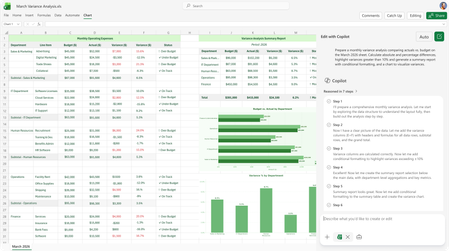
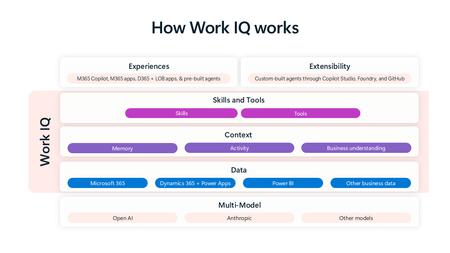
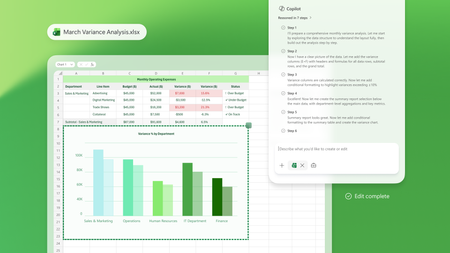
March brought a major set of Frontier Transformation and wave 3 of Microsoft 365 Copilot announcements across Microsoft 365 Copilot, Copilot Chat, and agents—all focused on helping people move faster from intent to action and helping organizations scale AI responsibly. If you missed any of the updates, here’s a quick recap of what’s new and why it matters. Copilot Transforms Knowledge Work These updates deepen how Copilot shows up inside the flow of work—grounded in your content, context, and tools. Word, Excel, and PowerPoint Agents From Copilot Chat, users can ask Word, Excel, or PowerPoint agents to create content, take next steps, or execute tasks, helping them move from intent to action without copying and pasting or switching contexts. 👉 Learn more Edit with Copilot in Word, Excel, and PowerPoint Copilot now creates, edits, and refines content directly inside Word, Excel, and PowerPoint, grounded in the context of a user’s work through Work IQ, so people can iterate and improve content without leaving the app they’re working in. 👉 Learn more Sequences shortened for demonstration purposes. Copilot Chat in Outlook Copilot Chat in Outlook enables users to draft and refine emails, manage calendars and RSVPs, and use the Outlook email widget to take action directly from chat, streamlining everyday communication and scheduling tasks. 👉 Learn more Outlook customer calendar instructions & proactive RSVPs Copilot finds available meeting times, sends invites, and keeps calendars up to date based on custom instructions, notifying users of changes directly in chat to reduce manual coordination. 👉 Learn more Copilot Cowork Built with Anthropic, Copilot Cowork brings a multimodel approach to Microsoft 365 Copilot—so your work isn’t tied to a single model. Cowork moves Copilot beyond prompts into long‑running, multi‑step work. With full awareness of your work context through Work IQ, it lets you delegate meaningful work and stay informed as it progresses. 👉 Learn more Claude Sonnet available in Copilot Chat Users can select Claude models directly in Copilot Chat, alongside next‑generation OpenAI models, bringing leading models from multiple providers into a single Copilot experience. 👉 Learn more Dataverse in Work IQ Work IQ connects signals from Microsoft 365—including documents, meetings, email, and chat—and will soon access operational data in Dataverse through Copilot in Dynamics 365 and Power Apps, bringing work context and business data closer together. 👉 Learn more Work IQ Memory (Chat History) Work IQ Memory enables more relevant, personalized Copilot responses shaped by a user’s work and Copilot chat history over time. 👉 Learn more Extensibility: Work IQ API / MCP Work IQ APIs provide access to production‑ready AI capabilities that work directly with enterprise work context, enabling extensibility through APIs and MCP. 👉 Learn more Launch Demo Copilot in Dynamics 365 & Power Apps Microsoft 365 Copilot is accessible directly within Dynamics 365 Sales, Customer Service, and Power Apps, extending Copilot experiences into business applications where operational work happens. 👉 Learn more Agents That Help Run the Business These announcements focus on building, deploying, and scaling agents across the enterprise. Apps SDK The Apps SDK provides tools to build ChatGPT apps based on the MCP Apps standard, with additional ChatGPT functionality to support agent and Copilot experiences. 👉 Learn more Model Context Protocol (MCP) Apps MCP Apps turn Copilot from a text interface into a governed, interactive execution layer by surfacing interactive app experiences directly in Copilot Chat. 👉 Learn more Apps in Agents: Outlook, Dynamics 365, and Power Apps Agents can bring Outlook, Dynamics 365, and Power Apps directly into chat, allowing users to review information and take action without leaving the conversation. 👉 Learn more Agent Recommendations in Microsoft 365 Copilot When users prompt Microsoft 365 Copilot, the system analyzes intent and recommends an installed, IT‑approved agent directly in the flow of work, making agents easier to discover and use at scale. 👉 Learn more Evaluate agents in Copilot Studio Copilot Studio provides structured, repeatable testing to help catch issues early, reduce the risk of bad answers, and maintain agent quality as agents evolve. 👉 Learn more Visibility, Governance, and Control at Scale As agent usage grows, these updates help organizations move from experimentation to enterprise readiness. Agent 365 Agent 365 serves as the control plane for agents, helping organizations move from experimentation to enterprise‑scale operations by enabling them to observe, govern, and secure agents. 👉 Learn more Microsoft 365 E7: The Frontier Suite Microsoft 365 E7 unifies Microsoft 365 E5, Microsoft 365 Copilot and Agent 365 into a single solution powered by Work IQ and integrated with the productivity apps and security stack customers already rely on. It includes Microsoft Entra Suite and advanced Defender, Intune and Purview security capabilities, delivering comprehensive protection across agents and employees. 👉 Learn more To explore what’s available now—and what’s coming next—visit the Microsoft 365 roadmap and related announcement blogs. 👉 Explore the roadmap8.4KViews3likes1Comment