copilot in viva
20 Topics
Please Remove Daily Cap Usage for Free Copilot Text Chat
Dear Microsoft Copilot Team, I am writing to express my disappointment with the new daily usage caps on Microsoft Copilot, particularly for ordinary text-based conversations. In the past, I could use Copilot freely for everyday questions, learning, research, brainstorming, and general conversations without constantly worrying about reaching a daily limit. The newer restrictions have made the experience significantly more frustrating and less useful. I understand that running AI services requires computing resources and that Microsoft must manage operating costs. However, I believe ordinary text chat should remain uncapped, especially when it was previously possible to use Copilot much more freely. Text conversations are a fundamental part of the service, and users should not have to stop in the middle of a useful discussion because they have exhausted a daily allowance. The move toward a unified Copilot experience should make the product simpler, more consistent, and more useful—not make existing users feel that they have lost access to a service they have come to rely on. I am therefore asking Microsoft to: Remove daily usage caps entirely for ordinary text-based Copilot conversations, including for free users. Keep basic text chat freely accessible without arbitrary daily cutoffs or lengthy waiting periods. If stricter limits are necessary for resource-intensive features such as image generation or advanced research, apply those limits separately rather than restricting ordinary text conversations. Clearly communicate any usage policies and reconsider changes that negatively affect the experience of long-time users. Unlimited text chat would help preserve user trust, encourage continued engagement, and distinguish Copilot as an accessible AI assistant for everyone. Restricting basic conversations risks pushing loyal users toward competing services that offer a more suitable experience. I hope Microsoft will take this feedback seriously and reconsider the current daily cap policy. Please restore uncapped text chat so users can rely on Copilot whenever they need assistance, without worrying about running out of messages. People on Reddit and online have been criticizing these changes ever since Copilot was unified under one product between enterprise and personal, If you guys dont do anything now it might reduce user trust and might be bad business decisions so please fix Copilot Thank you for your time and consideration. I look forward to seeing Microsoft make Copilot more accessible and user-friendly again.206Views3likes2CommentsFix all annoying Copilot bugs
I’m experiencing an issue with Microsoft Edge on Android. Starting today (September 22, 2026), whenever I try to visit copilot.microsoft.com, Edge automatically redirects me to the Google Play Store to install the Copilot app. I prefer using Copilot in the browser and do not want to install the app. And even when i try to install the copilot app it does not let me do anything and thinks I need a license or subscription to access it like copilot is litterly supposed to be free and also even when i try to get rid of the app redirection it for some dumb reason it redirects me to from copilot.microsoft.com to copilot.com and they put in restrictions like after a lot of chats you must wait for a specific time period and a couple months ago you guys removed the ability to use copilot without registration like come on that is so dumb I want Microsoft Copilot to be fixed revert how copilot was before how is this consumer friendly284Views1like2Comments
Questions about the Facilitator and Copilot dashboards
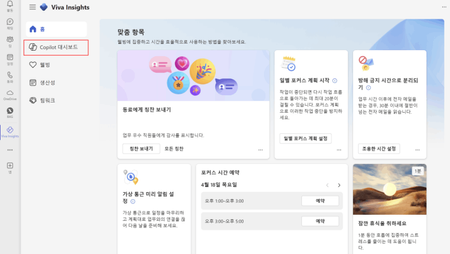
We currently have 24 people using MS Copilot in our company. 1. Do we need to have more than 25 people using copilot to create a column on the left bar of viva insight called 'Copilot Dashboard' as shown below? 2. Is the facilitator in TEAMS currently not available outside of the US? I tried as shown in the link below, but facilitator was not activated in TEAMS. https://learn.microsoft.com/en-us/microsoftteams/facilitator-teams232Views0likes1Comment
Introducing Copilot Analytics to measure AI impact on your business
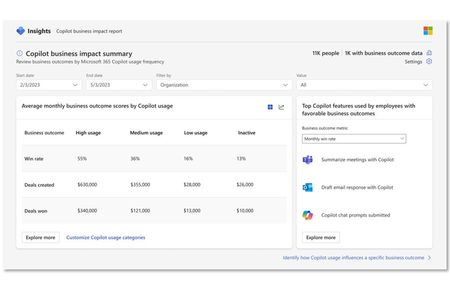
AI is revolutionizing work today, enhancing productivity and business processes to deliver new value. As AI continues to evolve, measuring usage, adoption trends and impact of AI-powered assistants like Copilot and agents is crucial for achieving business transformation. While measuring minutes and hours saved has been fundamental to the journey, what you really need is data-driven insights to truly see and measure the impact Copilot has on your bottom line. Today we’re announcing Viva Insights will be included in Microsoft 365 Copilot at no additional charge as part of the new Copilot Analytics. Copilot Analytics is designed to empower every IT and business leader to measure adoption and business impact of Copilot and agents — with out-of-the-box experiences (Copilot Dashboard & Microsoft admin center) and customizable reporting for deeper analysis against your KPIs. With Viva Insights included, IT admins and analysts can now tailor advanced prebuilt Copilot reports with their business data or create custom reports with organizational attributes, longer usage data sets, and more granular controls. Copilot Analytics is a component of the new Copilot Control System, designed for IT to confidently adopt and accelerate the business value of Copilot and agents. Copilot Analytics can be accessed via Microsoft 365 admin center, the Copilot Dashboard and Viva Insights and will be generally available in early 2025. Measure business value with the new Copilot Business Impact Report To make it easy for customers to measure the ROI of Copilot, we’re introducing the new Business Impact Report now available in public preview. The report is designed to help organizations understand how Microsoft 365 Copilot usage relates to KPIs. By leveraging this report, organizations can gain valuable insights into how Copilot provides business value across key areas like Sales, Service, Finance, Marketing and more. One of the key benefits of this new report is the ability to customize your analysis for your teams, metrics and data sources. IT admins and analysts can use the report to understand how different levels of Copilot usage relate to key business outcomes, see which Copilot features employees use to achieve their business goals and identify how usage differs across groups to improve adoption and value. Copilot business impact at Microsoft The sales organization at Microsoft recently turned to the business impact report to better understand how usage of Microsoft 365 Copilot was impacting business outcomes – drilling down on seller productivity KPIs like revenue per seller, pipeline creation and close rates. With this analysis they were able to see a 9.4% increase in revenue per seller and a 20% increase in close rates among high users of Copilot. AI not only is changing the way we work to transform areas like Sales – but it’s also impacting employee engagement outcomes. By comparing metrics acquired through Microsoft Viva Glint surveys with Copilot usage, the HR team has found that employees who use Copilot at least once every week are more likely to say they’re thriving[1] and take the initiative to be productive. Employees report 20-30% higher sentiment related to learning ways to apply AI to work, thriving and productivity when Copilot usage is six months, compared to three months. How the Copilot Business Impact Report works There are three main steps to getting your report up and running. Identify the business metrics to track Upload business metrics and run report View results Step 1. Identify business metrics The most important step to measuring Copilot business impact is to define the functional business area, outcome metrics and data sources for your report. It’s critical to get executive support at this stage to help guide the program’s overall goals, adoption strategy and to secure the right resources to gather the data you’ll need for the report. Use the Copilot scenario library to get inspired about different ways to use Copilot across your functions. The library contains useful guides, templates and related metrics to focus your Copilot efforts. For best results, use individual-level metrics vs broader group or company-level metrics. Below are some recommended individual-level metrics that are common across many organizations. Step 2. Upload your business impact data and run report Analysts can upload their business metrics into Viva Insights using a .csv file or a recurring upload via Azure Blob. A CSV template is available to structure your data and has guidelines to cleanly map your data for reporting. For more details on uploading your data please refer to our Learn articles. After uploading data, analysts run the query and define the thresholds of favorable business outcomes and Copilot usage in a guided setup process in Viva Insights. Step 3. View business impact results You’re now ready to view the results. Let’s look at how this report works using a fictional sales team as an example. The report can be customized by date range, organizational filters and value. In this example, we can see that high Copilot usage positively relates to metrics like win rate, deals created, and deals won. We also get a view into the top Copilot features that employees use in relation to business outcomes. In one glance, this report gives leaders and analysts a powerful view into the impact of Copilot on business outcomes and the key features employees use to achieve their results. Digging deeper, leaders and analysts can see what Copilot usage behaviors increase the likelihood of achieving a favorable business outcome. This provides a “what-if” view into the impact that Copilot can have on your business outcomes to help you focus your adoption programs on the most impactful behaviors. Business leaders and analysts can also see how Copilot usage compares within your team to find more areas of opportunity. But how are sellers using Copilot to achieve their results? This view provides a deeper look at the top Copilot features used to support a favorable business outcome, for example monthly win rate — and empowers sales leaders to tailor AI training and Copilot-led workflows that move the needle. Next steps and resources With Copilot Analytics and the Business Impact Report, organizations have a powerful toolset to measure the business value of Microsoft 365 Copilot and create custom reports through Viva Insights. Copilot Analytics will be generally available to all Microsoft 365 customers in early 2025. To take advantage of these advanced reporting capabilities today, customers with a minimum of 50 Microsoft 365 Copilot licenses can access the Viva Insights promotional offer. Please contact your Microsoft sales representative with questions or a detailed demonstration. We have a host of resources to get you started on your AI measurement journey. Ignite on demand session: Measure AI adoption and value Learn articles: Copilot Business Impact Report Learn articles: Viva Insights Copilot scenario library [1] Internal Microsoft data, comparison of HR employees who use Copilot at least once per week with those who use Copilot less often or not at all. 140,000 respondents. April 2-19, 2024. Thriving is based on the average of responses related to being energized by work, doing work that is meaningful, and being empowered to do my best work.57KViews6likes6Comments
Cost for family on copilot
Feedback on Microsoft Copilot Pricing Dear Microsoft Team, I hope this message finds you well. I am writing to share feedback regarding the pricing of Microsoft Copilot. As a Microsoft 365 Family subscriber (99€/year), I find the additional cost of Copilot—ranging from 22€ to 30€ per user per month—challenging to justify. For a family of four, this adds up to a substantial annual cost of 1,056€, which feels disproportionate compared to the base subscription price. I appreciate the value that Copilot brings, but I believe a more accessible pricing model, especially for families or multiple users, would make the service much more appealing. A bundled or tiered pricing approach could encourage broader adoption and enhance the overall value perception of Microsoft 365. Thank you for considering my feedback. I look forward to seeing how Microsoft evolves its offerings to meet the needs of its loyal customers. Best regards, Maikel630Views0likes1Comment
CoPilot for M365 only available as a yearly?
How does a company as successful and forward thinking as Microsoft consistently get it wrong. The uptake of CoPilot among our customer base of 100 clients can be counted on half a hand. We have a customer that would like to trial 5 x users but there is no trial available and the only option is to subscribe to a twelve month commitment for each user. Every other M365 product we use has a monthly option. Why would you do that?1.1KViews0likes1CommentQuestions about the Facilitator and Co-Pilot dashboards
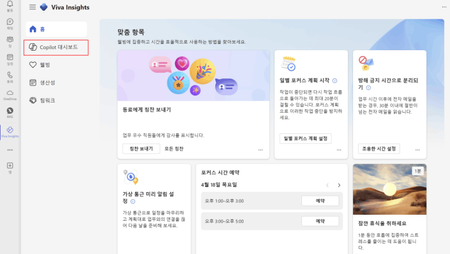
We currently have 24 people using MS Copilot in our company. 1. do we need to have more than 25 people using copilot to create a column on the left bar of viva insight called 'Copilot Dashboard' as shown below? 2. is the facilitator in TEAMS currently not available outside of the US? I tried as shown in the link below, but facilitator was not activated in TEAMS. https://learn.microsoft.com/en-us/microsoftteams/facilitator-teams317Views0likes3CommentsMicrosoft Copilot Academy now available to all Microsoft 365 Copilot users
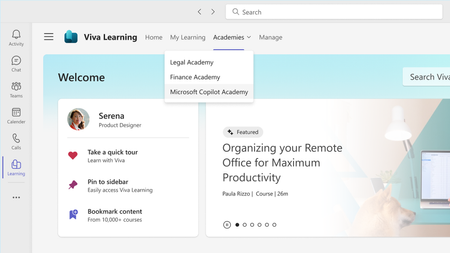
Microsoft Copilot Academy is now available to everyone with a Microsoft 365 Copilot license. Copilot Academy is a structured learning experience crafted by Microsoft experts, enabling users to learn about, discover, and use Copilot effectively.53KViews5likes4Comments