copilot in teams
144 TopicsCopilot Chat vsus. Microsoft 365 Copilot What's the difference?
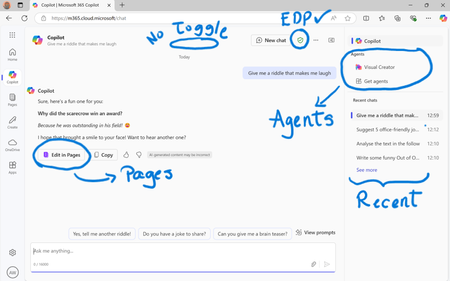
While their names sound similar at first glance - Microsoft 365 Copilot and Microsoft 365 Copilot Chat - they differ in several aspects. And more importantly, one can't be without another. What is Microsoft 365 Copilot Chat? First since first. Microsoft 365 Copilot Chat is also called Copilot Chat. Copilot Chat generates answers based on web content, while Microsoft 365 Copilot is also grounded on users' data, like emails, meetings, files, and more. Since January 15, Microsoft 365 Copilot Chat is available for everyone. Everyone in organizations. Also customers with a Microsoft 365 Business Basic subscriptions can enjoy using Copilot Chat securily. The screenshot below shows how Copilot Chat looks like and highlights its main capabilities. Note that EDP - Enterprise Data Protection is available. What is Microsoft 365 Copilot? Microsoft 365 Copilot is an add-on available for specific Microsoft 365 Subscriptions: Microsoft 365 E3, E5, A3, A5, and Business Standard & Premium. It includes Copilot Chat in addition to other Copilot features: Microsoft 365 Copilot also includes a chat grounded on users' meetings, emails, chats, and documents. It integrates into Microsoft 365 apps, like Outlook, Teams, Word, Excel, and more. It brings the capability to create agents and additional Copilot management features such as SharePoint Advanced Management and Copilot Dashboard. The screenshot below shows how the Copilot chat experience for those users who got the Microsoft 365 Copilot license. Note that EDP - Enterprise Data Protection is available here too. Copilot Chat can be pinned in MS Teams and MS Outlook as App. How can I access Microsoft 365 Copilot Chat? Copilot Chat is nowadays accessible via m365copilot.com using your Entra account. In contrast to Microsoft 365 Copilot licensed users, Microsoft 365 Copilot Chat users cannot see, by default, Copilot Chat pinned on the Microsoft 365 homepage. Microsoft 365 Copilot Administrators will have to pin the chat in the admin center so it is easy for Copilot Chat users to access it. What's the difference? There are some aspects, such as licensing requirements, subscription fees, data sources, or access to organization content, that determine the differences between Copilot Chat and Microsoft 365 Copilot. I have listed it in the screenshot below. 👇 Image showing a 3-column table: Aspect, Microsoft 365 Copilot Chat, and Microsoft 365 Copilot.Solved56KViews39likes43CommentsWhat’s New in Microsoft 365 Copilot | May 2026
Welcome to the May 2026 edition of What's New in Microsoft 365 Copilot! Every month, we highlight new features and enhancements to keep Microsoft 365 admins up to date with Copilot features that help your users be more productive and efficient in the apps they use every day.30KViews11likes5CommentsCopilot Chat vsus. Microsoft 365 Copilot. What's the difference?
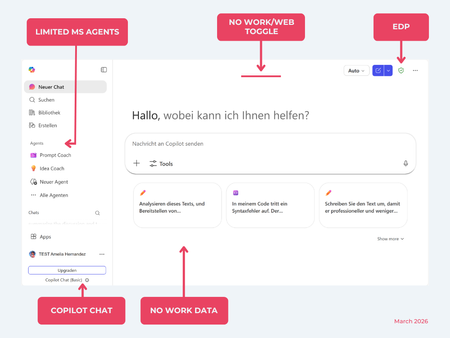
While their names sound similar at first glance, Microsoft 365 Copilot and Microsoft 365 Copilot Chat, they differ in several aspects. And more importantly: one is built on top of the other. What is Copilot Chat (Basic)? First things first. Microsoft 365 Copilot Chat is often simply called Copilot Chat. Copilot Chat (Basic) generates answers based on web content, while Microsoft 365 Copilot (Premium) is also grounded on users' data, like emails, meetings, files, and more. Since early 2025, Microsoft 365 Copilot Chat has been available to all users in organizations, becoming the entry point to AI assistance for many organizations. Copilot Chat (Basic) is the foundational Copilot experience available at no extra cost for everyone with an eligible Microsoft 365 plan, including: Microsoft 365 E3 / E5 Microsoft 365 A3 / A5 Microsoft 365 Business Standard & Business Premium Copilot Chat (Basic) is secured, compliant, and it does not required the full Copilot add-on license. Copilot Chat (Basic) is able to ground responses on: Public web content. Content explicitly shared or work data manually uploaded to the chat by the user. On-screen content or content displayed on-screen in apps like Outlook, Word, Excel, PowerPoint, and OneNote. When it comes to agents, Copilot Chat (Basic) offers these features: You can create your own declarative agents grounded on public web content with Agent Builder. You can use agents built by your org grounded on organizational data with the pay-as-you-go method. There are Microsoft prebuilt agents available like Prompt Coach, however Microsoft premium prebuilt agents like Researcher or Analyst are not included. The screenshot below shows how Copilot Chat looks and highlights its main capabilities. Note the Upgrade button, meaning this is not Microsoft 365 Copilot, but the Copilot Chat (Basic) experience. Note that EDP (Enterprise Data Protection) is available in Copilot Chat (Basic). What is Microsoft 365 Copilot (Premium)? Microsoft 365 Copilot (Premium) is a paid add-on license that builds on top of Copilot Chat and unlocks Copilot's full power. It is available for selected Microsoft 365 plans, including: Microsoft 365 E3 / E5 Microsoft 365 A3 / A5 Microsoft 365 Business Standard & Business Premium With a Microsoft 365 Copilot license, users get everything Copilot Chat (Basic) offers, plus much more: Data grounding: Microsoft 365 Copilot (Premium) includes Copilot Chat grounded on web and/or on user's Microsoft 365 data like emails, meetings, chats, and documents. Office apps: It integrates deeply into Microsoft 365 apps like Outlook, Teams, Word, Excel, and more. The integration includes features like Edit with Copilot allowing Copilot to adjust live your documents or email based on your prompts. Custom agents: It brings the capability to create your own declarative agents grounded in organizational data and/or web data. You can create agent either using Agent Builder or Copilot Studio. MS prebuilt agents: Premium prebuilt agents like Researcher and Analyst are included in Microsoft 365 Copilot (Premium). The screenshot below shows the Copilot chat experience for users who have a Microsoft 365 Copilot license. Note that EDP or Enterprise Data Protection also applies here How can I access Microsoft 365 Copilot Chat? Today, Copilot Chat is accessible via https://m365.cloud.microsoft or https://copilot.cloud.microsoft using your Entra ID (work or school account). One important difference in day-to-day experience: Users with a Microsoft 365 Copilot license typically see Copilot prominently surfaced across Microsoft 365 apps. Users with Copilot Chat only may not see it pinned by default on the Microsoft 365 home page. To improve discoverability, Microsoft 365 Copilot administrators can pin Copilot Chat via the Microsoft 365 admin center, ensuring that users can easily access it without friction. Especially convenient is that if you use the M365 Copilot Chat app on Windows, you can open Copilot using the keyboard shortcut Ctrl + C. What’s the difference? The differences between Copilot Chat and Microsoft 365 Copilot mainly come down to: Licensing Data grounding (web-only vs. personal work data) Integration depth within Microsoft 365 apps I’ve listed the key differences in the comparison below. 👇Solved8.1KViews8likes21Comments