copilot in powerpoint
53 Topics
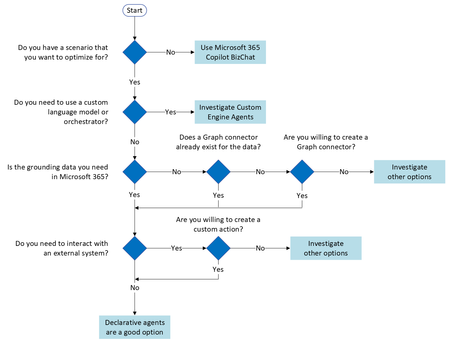
What the hack is a "Microsoft 365 Copilot Bizchat"?
I am taking a training course on learn.microsoft and this word "Microsoft 365 Copilot Bizchat" just came out of nowhere... I went few slides/pages of the training course and even googled it but there is no definition or clarification of it either sigh... What is that3.6KViews2likes4CommentsCopilot missing in Word, Excel and PowerPoint desktop apps of some users
Hi Everyone, At my company we're setting up copilot. After allowing access through the Admin Centers we've encountered various oddities. Some users can use the sharepoint/onedrive search functionality. But most can't. Some users have the Copilot button in some of their apps. There is no consistency in which app they get it. Some have it in word, others in excel, some in multiple, some in none. A handful of users have Copilot in all apps. Things like transcribe work fine everywhere. We switched intune to push Office apps with Current Channel instead of Semi-Annual, to no avail. We use M365 Business premium with the Teams phone standard addon.3.3KViews0likes1Comment
The types of files that can be created in Copilot Chat, Copilot in Word, and PowerPoint.
I would like to know the file types that Copilot can create in each app. The results of my test are as follows. Is this correct? Especially, I wonder whether the differences between Copilot Chat Web and Work are accurate. Additionally, can Copilot create any new file types? App / Type of files Word PowerPoint Excel Text file Copilot Chat (Web) Available Available Available Available Copilot Chat (Work) Unavailable Unavailable Unavailable Unavailable Word - Unavailable Unavailable Unavailable PowerPoint Unavailable - *When requesting a translation, a new PowerPoint file will be created Unavailable UnavailableSolved2.1KViews1like9Comments
Update licence seems to not activate Copilot.. gettign redirected to FAQ url
Good day I have updated the licence on my Copilot 365 several times to make sure i restarted the apps and even the machine... I can see Semi-Annual Enterprise Channel and the Copilot icon. But still everytime i click the copilot365 icon from within a 365 app I get redirected to when clicking copilot within an office ai always get redirected to https://go.microsoft.com/fwlink/?linkid=2242508 . i am not a admin on my machine so i suspect it might be it? ThanksSolved1.7KViews0likes7CommentsHow to use the Copilot Wave 2 in PowerPoint
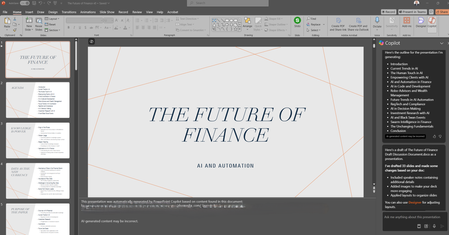
The release of the second wave of Copilot also enriches Microsoft PowerPoint, bringing the so-called Narrative Builder. The user starting from a description and existing files can easily create a presentation. In addition, Copilot is able to apply the same template used to be aligned with the corporate brand. #MicrosoftCopilot #Copilot #AI #Microsoft365 #MPVbuzz #PowerPoint1.7KViews2likes0Comments
Powerpoint Copilot generates unrelated and nonsensical slides
I have been using Copilot for Office in a case that seemed perfect, namely generating slides in PowerPoint from a Word document. I got quite strange results, i.e., the first version of the slides is good, if I then ask for a modification such as reducing the number of slides (which Copilot in the chat seems to have understood correctly), the result was repeatedly the same, i.e., it proposes me nonsensical slides about... the history of Istanbul (!?!). I don't have any material on Istanbul nor have I ever researched it, so I think (I hope) that it is some kind of Easter Egg popping up when Copilot doesn't understand the command, otherwise it would be a really serious problem. In the screenshots you can see that Copilot interpreted the command correctly, but the result is completely wrong. I repeated the same sequence several times, starting from scratch, and the result was always the same, i.e., slides about Istanbul. What's happening here?1.4KViews1like5CommentsTop NEW Copilot Features in PowerPoint You Need to Try
Creating presentations just got A LOT easier. Microsoft Copilot in PowerPoint is evolving fast, and in my latest video I walk through the newest features that can dramatically improve the way you build and design slides. From AI‑powered slide generation to smarter design guidance, these updates can save you time, boost creativity, and help you deliver presentations that stand out. 🎥 Check out the full video here: 👉 https://youtu.be/WnNF9Eao5XM In the video, I cover: ✨ The latest Copilot capabilities you can start using today ⚡ How to generate complete presentations from a simple prompt 🎨 Tools that enhance visual design and storytelling 💡 Tips to get the most out of Copilot in your workflow If you're using PowerPoint regularly—or want to boost your productivity with AI—this one’s for you. Let me know what feature you find the most helpful! 👇 #Microsoft365 #Copilot #PowerPoint #AI #Productivity #MicrosoftCopilot #PresentationDesign #GiulianoDeLuca1KViews0likes0Comments
Limitations of Microsoft 365 Copilot for Excel workflows?
I've been exploring Microsoft 365 Copilot for Excel workflows recently. It works well for simple queries, but I still find it limited when dealing with: - messy data cleaning - converting images/PDFs into structured tables - more complex data transformations Curious how others are using Copilot for these scenarios? Are you relying purely on Copilot, or combining it with other tools/workflows?999Views2likes4Comments