copilot for microsoft 365
27 Topics
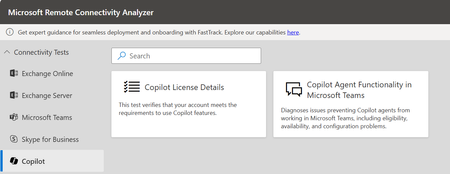
New Diagnostic: Copilot Agent Functionality in Microsoft Teams.
As Microsoft Copilot for Microsoft 365 continues to evolve, ensuring reliable agent performance within Microsoft Teams is critical to delivering a seamless user experience. To support this, we’re introducing the Copilot Agent Functionality Diagnostic—a powerful tool designed to identify and resolve issues that may prevent Copilot agents from operating in Teams. This includes validating eligibility, confirming service availability, and checking for configuration compliance. With this test, organizations can quickly verify that their environment is optimized for Copilot agents, helping users fully leverage the capabilities of Copilot within Teams. Why This Matters For Copilot agents to function seamlessly in Microsoft Teams, several dependencies must be in place—including user authentication, valid license assignment, tenant app settings, and the ability to run required custom apps in preview. If any of these prerequisites are misconfigured, users may face errors, limited functionality, or even lose access to Copilot features altogether. That’s where our Diagnostics comes in -The Copilot Agent Functionality Test helps eliminate these risks by proactively checking authentication, confirming license validity, validating Teams app configurations, and identifying settings that could block Copilot agents. By addressing these issues early, organizations can ensure users experience the full value of Copilot in Teams without disruption. What the Diagnostic Does The Copilot Agent Functionality Diagnostic is designed to help both customers and support engineers validate the critical requirements that enable Copilot agents to work seamlessly in Microsoft Teams. It performs a series of checks to confirm: Successful retrieval of Teams user authentication information Verification that users hold a valid Microsoft 365 Copilot license for Teams Confirmation that custom apps in preview are enabled to support Copilot agents Validation of Teams tenant app settings for proper permissions and availability Identification of configuration gaps that may block agent functionality By running these validations, the diagnostic ensures that the Teams environment is properly configured, reducing the likelihood of errors and empowering organizations to deliver a consistent Copilot experience in Microsoft Teams. Who Should Use It? Note: A Global Administrator account is required to run this diagnostic. IT Admins validating Teams settings, app configurations, and license prerequisites to ensure Copilot agents function correctly. Support Engineers troubleshooting Copilot agent issues related to authentication, configuration, or feature availability. Adoption & Change Management Leads confirming the Teams environment is properly prepared for users to engage with Copilot agents during rollout. Get Started To run the diagnostic, you’ll need a Global Administrator account. To access the new customer facing diagnostic, navigate to Microsoft Remote Connectivity Analyzer, select COPILOT, then click on the “Copilot Agent Functionality in Microsoft Teams”. A Big Thank you to Rui Andre Tabares.1.1KViews1like0CommentsNew Diagnostic: Copilot License Details check
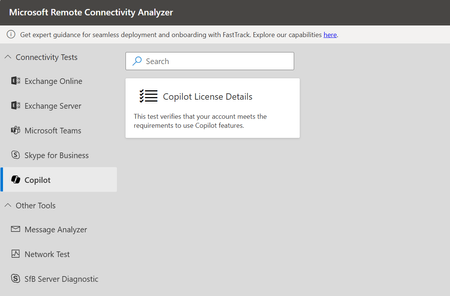
As Microsoft Copilot for Microsoft 365 continues to expand its capabilities, so must the tools that ensure a seamless user experience. One of the most important steps in enabling Copilot features is validating license assignments. To support this, we’re excited to introduce the Copilot License Check Diagnostic—a powerful tool designed to streamline and validate your license readiness by confirming whether Copilot for Microsoft 365 licenses are properly assigned to users, ensuring that features dependent on Copilot function as expected. Diagnostics makes it easy to validate license assignments, ensuring users are set to unlock the full power of Copilot. Why This Matters The ability to leverage Copilot for Microsoft 365 is directly tied to proper license assignment—a critical step in unlocking AI-powered productivity. Without the right license, users may be unable to access key Copilot features, leading to confusion or reduced value from your Microsoft 365 investment. That’s where our Diagnostics comes in—helping you quickly validate license readiness, ensure feature availability, and streamline the path to a seamless Copilot experience. What the Diagnostic Does The Copilot License Check Diagnostic is built to empower both customers and support engineers. It validates whether users are properly licensed to access Copilot for Microsoft 365 by checking: Assignment and validity of Copilot for Microsoft 365 licenses User eligibility across Microsoft 365 services that integrate with Copilot Dependency on prerequisite licenses (e.g., Microsoft 365 E3/E5, Office apps) Checks all the service plans enabled within Copilot license. Potential gaps that could block access to Copilot-powered capabilities This diagnostic ensures that license readiness is confirmed in advance, reducing the risk of feature unavailability and helping organizations maximize the value of Copilot. Who Should Use It? Note: We can run the diagnostic either with Global admin or normal account. IT Admins validating that users have the correct Copilot for Microsoft 365 licenses assigned Support Engineers troubleshooting Copilot feature availability issues Adoption & Change Management Leads ensuring users are ready to access Copilot as part of rollout plans Get Started We can run the diagnostic either with Global admin or normal account. To access the new customer facing diagnostic, navigate to Microsoft Remote Connectivity Analyzer, select COPILOT, then click on the “Copilot License Details”. A Big Thank you to Rui Andre Tabares.14KViews0likes0CommentsSupercharge Your Business. Getting Small Businesses Ready for 2025 with Microsoft 365
How Microsoft 365 is Empowering Small Businesses In the ever-changing world of productivity and collaboration tools, Microsoft 365 continues to shine as a vital tool for small businesses. With a treasure trove of applications designed to boost efficiency, security, and innovation, Microsoft 365 rolled out some game-changing features in 2024, earning high praise from industry experts. Last year was a rollercoaster for business owners and their customers. They faced rising inflation, tighter budgets, and the AI revolution. Through it all, Microsoft 365 was the trusty partner that helped businesses run smoothly and operate productively. The suite introduced exciting new features, integrated smart AI capabilities, and laid out a promising roadmap to tackle current trends and challenges. Recapping An Exciting 2024 Here are some notable new features we released in Microsoft 365 -- starting with Teams and Teams Phone: We introduced the Queues App in the fall, a Teams-native solution designed to empower organizations to manage Teams Phone engagements directly from within Teams. With it, they can manage call queues, auto attendants, get real-time metrics, and see reporting – to ensure they’re conducting customer engagement efficiently. We introduced Shared Calling, which makes a single phone number and calling plan sharable by a group, so teams can better manage calls in coordination. We enhanced survivable calling with the Survivable Branch Appliance (SBA), a backup solution designed to keep your phone services running smoothly, even during network outages. It now supports call transfer, forwarding, and incoming calls during network outages. In Microsoft Excel, we added some powerful updates: The ability to automatically sync data from Forms to Excel for the web. In real-time, responses can be synced between the two apps, ensuring data is always up-to-date. There’s seamless integration so if you go to an active Form and the Responses page, you can click “Open results in Excel” to create an Excel worksheet in OneDrive to do deeper manipulation of your data. The addition of checkboxes that can drive and be driven by existing Excel functions. With Interactive Checkboxes, they automatically check or uncheck based on the value of another cell. And finally, we integrated Python into Excel for users to have the ability to manipulate data in the familiar Excel environment but now with access to powerful Python's libraries and plots to make even deeper analysis possible. We made generally available a brand new Outlook: It has an exciting, newly redesigned interface, new productivity features, and integration with Copilot. Small and medium-sized businesses currently on Microsoft 365 are already moving to it but the choice to keep using classic Outlook will still be available. To help small businesses conserve their marketing budget, we introduced Microsoft Clipchamp in the fall of 2023 and Microsoft Designer in the summer of 2024. Clipchamp is a user-friendly video editor for creating professional-quality videos without needing technical skills. In Clipchamp, we rolled out over 100 pre-built templates, transitions, noise-suppression, background removal, auto-compose, and text-to-speech – saving users tons of time in making videos that may have taken many hours to do before. Designer is a powerful, AI image-generating and graphic design tool that can help any small business create professional-quality visuals with ease – without needing technical skills. Key updates were: We integrated Designer into Word and PowerPoint so users can generate images and use those images within these apps. In addition, Designer will suggest design templates for your slides. A Microsoft 365 Copilot subscription is needed and unlocks the use of Copilot in Microsoft 365 apps. And lastly, in 2024, we empowered SMBs to see how AI could make them more productive by expanding Microsoft Copilot into our popular apps like Outlook, Word, Excel, and Teams. Users can now summarize emails, generate insights in Word and Excel, and unlock powerful meeting insights in Teams. Among many new AI-powered features, we introduced Intelligent Call Recap in Teams which serves up AI-powered insights and recaps for your VoIP and PSTN calls in Teams, helping you stay on top of important details. Microsoft’s Continued Recognitions With Analysts and Customers As a testament to our excellence, Microsoft was once again crowned a Leader in the 2024 Gartner Magic Quadrant for Unified Communications for the sixth year in a row! Here’s what Gartner called out: Microsoft Teams is the top pick for businesses, especially when using it for internal collaboration. With a super reliable 99.999% uptime, it has solid telephony services to keep you connected. Teams is perfect for global cloud telephony, offering flexible PSTN options. Plus, Gartner called out our Operator Connect feature, which allows businesses to connect their existing telephony services directly to Teams, is now available in over 96 countries, including India. Copilot in Teams and Teams Premium brings cutting-edge AI features to meetings, chats, and calls. Gartner said that for those seeking the latest in AI, Microsoft is rapidly innovating. Teams now has over 350 million monthly active users. This growth highlights the platform’s continued popularity and widespread adoption among businesses worldwide. If you haven’t tried running your meetings on Teams, there’s no better time to. And over on G2 Reviews, Microsoft 365 currently has 4.6 out of 5 stars. Users like its ease of use, seamless integrations, and the extensive suite of tools it offers. Small businesses have praised the platform’s ability to streamline workflows and supercharge productivity. TechRadar also recognized Microsoft 365 as “the original and best office productivity suite” in December 2024, giving it 4.5 out of 5 stars. We’re thrilled that they said: “What ensured that MS Office became a market leader is the comprehensive way data can be covered by different applications and moved between them, making working more efficient and hassle-free.” Transforming Operations: How ICG Build Scaled with Microsoft 365 ICG, a startup construction firm, has successfully leveraged Microsoft 365 to establish and streamline its entire operations from day one. By utilizing Excel for budgeting, Word and PowerPoint for creating branded templates, Outlook for managing emails, Power BI for data visualization, and Teams for communication and collaboration, ICG has been able to scale its business efficiently. Here are some insights from their experience: Nick Masci, Principal & Co-Founder at ICG, shares: “Having everything in Microsoft 365 makes finding information fast and easy. Microsoft 365 has been instrumental in setting up our entire operations, from budgeting in Excel to managing emails in Outlook.” Melissa McEwen, Principal & Co-founder at ICG, adds, “Using Microsoft 365, we’ve been able to create branded templates in Word and PowerPoint, which has streamlined our client presentations and enhanced our professional image.” These testimonials highlight the transformative impact of Microsoft 365 on ICG’s operational efficiency and client engagement. Navigating 2025 Together Small businesses are in for another exciting ride in 2025 as they face trends like the continued integration of AI into our lives, a shift to returning to the office, and the continued need to be as efficient as possible. Microsoft 365 is here to support you with tools that boost productivity like Copilot; Teams and Teams Phone to support all work models, and powerful features that come included in our core apps like Design Ideas in PowerPoint that gives you multiple layout and design options to help you get your new slide started. Curious to learn more? You can read more about how to choose the right plan here. Are you a small or medium business owner/decision maker currently using Microsoft 365? We'd like to hear from you! We invite you to apply to join the Microsoft 365 SMB Customer Advisory Board. Applications accepted until February 28th, 2025. See aka.ms/SMBCAB for more details.1.2KViews2likes0CommentsSign Up Now! Empowering HLS Business Leaders with Copilot for M365
You're invited to Microsoft’s Chicago Office or Virtually Join us in person or virtually with experts from Microsoft and Accenture for an immersive and interactive session to show how Copilot for Microsoft 365 will empower an entirely new way of working. Discover how this cutting-edge AI technology is bringing the power of next-generation AI to work and transforming the way how your organization does business. Hear from industry experts including Dr. Tej Shah, Managing Director at Accenture, and many other healthcare technology thought leaders as they share best practices and innovation case studies they are seeing across the globe Attendance in person is limited to 25 people only. Reserve your seat today and enjoy complimentary lunch and exclusive swag! Sessions include: Executive Opening The Future of Healthcare Introducing Copilot for M365 Copilot Overview Voice of our customers Empowering HLS Business Leaders with Copilot for M365 October 3rd | 9:30 AM – 2:00 PM CST Microsoft Chicago Office 200 East Randolph Drive, Suite 200, Chicago, IL 60601 View map > REGISTER TODAY! Schedule 9:30 am - 10:00 am Registration, Check-in, and Continental Breakfast 10:00 am - 10:15 am Executive Keynote Introduction by Jesse Washington 10:15 am - 11:00 am The Future of Healthcare & Q&A by Dr. Tej Shah 11:00 am - 11:30 pm Introducing Copilot for Microsoft 365 11:30 pm - 12:00 pm Lunch & Networking 12:00 pm - 12:30 pm Copilot for M365 Overview - Why Copilot 12:30 pm – 1:00 pm See Copilot for Microsoft 365 in Action with HLS-Specific Use Cases 1:00 pm – 1:30 pm Voice of the customer – Panel Discussion 1:30 pm – 1:45 pm Closing & Thank You1.3KViews2likes0CommentsNOW ON DEMAND | Two Copilot and M365 for SMB Community offerings (Webinar and AMA)
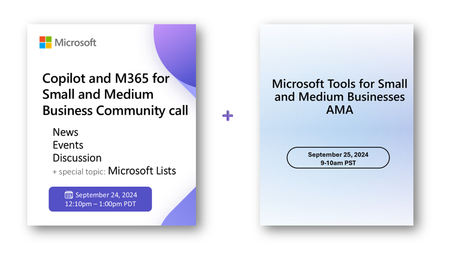
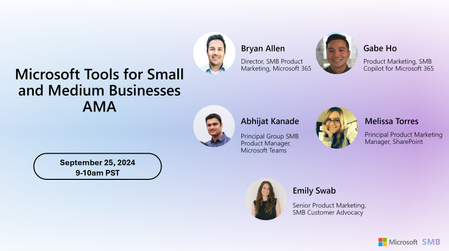
We’ve got two upcoming public events for you. We’re ready to share, show, and engage! We got news, announcements, insights into using Microsoft Lists, and set to answer a lot of questions across Copilot, Teams, SharePoint, and more.2.5KViews2likes0CommentsCopilot for Word
Hi There, I've been playing around with Copilot for Microsoft 365 for quite sometime and I just have a quick question in regards to Copilot for Microsoft 365. Lets say I'm using Copilot for word and I ask Copilot to create a document for me and I review it and I click on regenerate because I'm not happy about the result that it created. So, my question is how many times can I ask Copilot to create new document for me? Is there a limit for that? For instance, I can click on it for 5 times and it will give me a different content everytime and beyond that it will return back to content which it created for me the first time. So, please let me know the limit here.857Views1like2Comments