containers
213 TopicsMajor Updates to VS Code Docker: Introducing Container Tools
The first, most obvious thing is the introduction of the Container Tools extension to broaden our focus and open new extensibility opportunities. The existing extension code (and MIT license) will be migrated to the Container Tools extension, and the Docker extension will become an extension pack that includes the Docker DX and Container Tools extensions. For you, this means the ability to customize the tooling to meet your needs - choose your preferred container runtime and only the functionality that you need in the extension settings. This major update marks a significant step forward in enhancing the development experience when working with containers. Please comment here with any questions or feedback and stay tuned to experiment with the new features! tl;dr The Docker extension is becoming the Container Tools extension Still free and open source Podman support is coming No action is required26KViews9likes0CommentsReference Architecture for a High Scale Moodle Environment on Azure
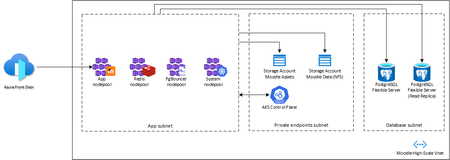
Introduction Moodle is an open-source learning platform that was developed in 1999 by Martin Dougiamas, a computer scientist and educator from Australia. Moodle stands for Modular Object-Oriented Dynamic Learning Environment, and it is written in PHP, a popular web programming language. Moodle aims to provide educators and learners with a flexible and customizable online environment for teaching and learning, where they can create and access courses, activities, resources, and assessments. Moodle also supports collaboration, communication, and feedback among users, as well as various plugins and integrations with other systems and tools. Moodle is widely used around the world by schools, universities, businesses, and other organizations, with over 100 million registered users and 250,000 registered sites as of 2020. Moodle is also supported by a large and active community of developers, educators, and users, who contribute to its development, documentation, translation, and support. [URL] is the official website of the Moodle project, where anyone can download the software, join the forums, access the documentation, participate in events, and find out more about Moodle. Goal The goal for this architecture is to have a Moodle environment that can handle 400k concurrent users and scale in and out its application resources according to usage. Using Azure managed services to minimize operational burden was a design premise because standard Moodle reference architectures are based on Virtual Machines that comes with a heavy operational cost. Challenges Being a monolith application, scaling Moodle in a modern cloud native environment is challenging. We choose to use Kubernetes as its computing provider due to the fact that it allow us to build a Moodle artifact in an immutable way that allows it to scale out and in when needed in a fast and automatic way and also recover from potential failures by simply recreating its Deployments without the need to maintain Virtual Machine resources, introducing the concept of pets vs cattle[1] to a scenario that at first glance wouldn't be feasible. Since Moodle is written in PHP it has no concept of database polling, creating a scenario where its underlying database is heavily impacted by new client requests, making it necessary to use an external database pooling solution that had to be custom tailored in order to handle the amount of connections for a heavy-traffic setup like this instead of using Azure Database for PostgreSQL's built-in pgbouncer. The same effect is also observed in its Redis implementation, where a custom Redis cluster had to be created, whereas using Azure Cache for Redis would incur prohibitive costs due to the way it is set up for a more general usage. 1 - https://learn.microsoft.com/en-us/dotnet/architecture/cloud-native/definition#the-cloud Architecture This architecture uses Azure managed (PaaS) components to minimize operational burden by using Azure Kubernetes Service to run Moodle, Azure Storage Account to host course content, Azure Database for PostgreSQL Flexible Server as its database and Azure Front Door to expose the application to the public as well as caching commonly used assets. The solution also leverages Azure Availability Zones to distribute its component across different zones in the region to optimize its availability. Provisioning the solution The provisioning has two parts: setting up the infrastructure and the application. The first part uses Terraform to deploy easily. The second part involves creating Moodle's database and configuring the application for optimal performance based on the templates, number of users, etc. and installing templates, courses, plugins etc. The following steps walk you through all tasks needed to have this job done. Clone the repository $ git clone https://github.com/Azure-Samples/moodle-high-scale Provision the infrastructure $ cd infra/ $ az login $ az group create --name moodle-high-scale --location <region> $ terraform init $ terraform plan -var moodle-environment=production $ terraform apply -var moodle-environment=production $ az aks get-credentials --name moodle-high-scale --resource-group moodle-high-scale Provision the Redis Cluster $ cd ../manifests/redis-cluster $ kubectl apply -f redis-configmap.yaml $ kubectl apply -f redis-cluster.yaml $ kubectl apply -f redis-service.yaml Wait for all the replicas to be running $ ./init.sh Type 'yes' when prompted. Deploy Moodle and its services Change image in moodle-service.yaml and also adjust the moodle data storage account name in the nfs-pv.yaml (see commented lines in the files) $ cd ../../images/moodle $ az acr build --registry moodlehighscale<suffix> -t moodle:v0.1 --file Dockerfile . $ cd ../../manifests $ kubectl apply -f pgbouncer-deployment.yaml $ kubectl apply -f nfs-pv.yaml $ kubectl apply -f nfs-pvc.yaml $ kubectl apply -f moodle-service.yaml $ kubectl -n moodle get svc –watch Provision the frontend configuration that will be used to expose Moodle and its assets publicly $ cd ../frontend $ terraform init $ terraform plan $ terraform apply Approve the private endpoint connection request from Frontdoor in moodle-svc-pls resource. Private Link Services > moodle-svc-pls > Private Endpoint Connections > Select the request from Front Door and click on Approve. Install database $ kubectl -n moodle exec -it deployment/moodle-deployment -- /bin/bash $ php /var/www/html/admin/cli/install_database.php --adminuser=admin_user --adminpass=admin_pass --agree-license Deploy Moodle Cron Change image in moodle-cron.yaml $ cd ../manifests $ kubectl apply -f moodle-cron.yaml Your Moodle installation is now ready to use! Conclusion You can create a Moodle environment that is scalable and reliable in minutes with a very simple approach, without having to deal with the hassle of operating its parts that normally comes with standard Moodle installations.2.1KViews8likes1CommentAzure Kubernetes Service Baseline - The Hard Way
Are you ready to tackle Kubernetes on Azure like a pro? Embark on the “AKS Baseline - The Hard Way” and prepare for a journey that’s likely to be a mix of command line, detective work and revelations. This is a serious endeavour that will equip you with deep insights and substantial knowledge. As you navigate through the intricacies of Azure, you’ll not only face challenges but also accumulate a wealth of learning that will sharpen your skills and broaden your understanding of cloud infrastructure. Get set for an enriching experience that’s all about mastering the ins and outs of Azure Kubernetes Service!44KViews8likes6CommentsCloud Rendering Adobe After Effects Video with Windows Docker Container
Since I run Newbie Homemade Mashup Lab, I always have video render needs for After Effects. When there are many videos, my personal computer will spend a lot of time rendering them. During this time, I cannot do anything else. So, I came up with the idea of Cloud Rendering. This article will guide you to build your own After Effects Docker image and ultimately try rendering on Azure App Service.6.4KViews8likes0CommentsExtend the capabilities of your AKS deployments with Kubernetes Apps on Azure Marketplace
We’re excited to announce that Kubernetes Apps in the Azure Marketplace is now Generally Available. Azure Kubernetes Service (AKS) provides a robust and scalable managed Kubernetes platform for organizations running their most mission-critical applications on Azure. With Kubernetes Apps, teams can further extend the capabilities of their AKS deployments with a vibrant ecosystem of tested and transactable third-party solutions from industry-leading partners and popular open-source offerings.12KViews7likes0Comments
The Swarm Diaries: What Happens When You Let AI Agents Loose on a Codebase
The Idea Single-agent coding assistants are impressive, but they have a fundamental bottleneck: they think serially. Ask one to build a full CLI app with a database layer, a command parser, pretty output, and tests, and it’ll grind through each piece one by one. Industry benchmarks bear this out: AIMultiple’s 2026 agentic coding benchmark measured Claude Code CLI completing full-stack tasks in ~12 minutes on average, with other CLI agents ranging from 3 to 14 minutes depending on the tool. A three-week real-world test by Render.com found single-agent coding workflows taking 10–30 minutes for multi-file feature work. But these subtasks don’t depend on each other. A storage agent doesn’t need to wait for the CLI agent. A test writer doesn’t need to watch the renderer work. What if they all ran at the same time? The hypothesis was straightforward: a swarm of specialized agents should beat a single generalist on at least two of three pillars — speed, quality, or cost. The architecture looked clean on a whiteboard: The reality was messier. But first, let me explain the machinery that makes this possible. How It’s Wired: Brains and Hands The system runs on a brains-and-hands split. The brain is an Azure Durable Task Scheduler (DTS) orchestration — a deterministic workflow that decomposes the goal into a task DAG, fans agents out in parallel, merges their branches, and runs quality gates. If the worker crashes mid-run, DTS replays from the last checkpoint. No work lost. Simple LLM calls — the planner that decomposes the goal, the judge that scores the output — run as lightweight DTS activities. One call, no tools, cheap. The hands are Microsoft Agent Framework (MAF) agents, each running in its own Docker container. One sandbox per agent, each with its own git clone, filesystem, and toolset. When an agent’s LLM decides to edit a file or run a build, the call routes through middleware to that agent’s isolated container. No two agents ever touch the same workspace. These complex agents — coders, researchers, the integrator — run as DTS durable entities with full agentic loops and turn-level checkpointing. The split matters because LLM reasoning and code execution have completely different reliability profiles. The brain checkpoints and replays deterministically. The hands are ephemeral — if a container dies, spin up a new one and replay the agent’s last turn. This separation is what lets you run five agents in parallel without them stepping on each other’s git branches, build artifacts, or file handles. It’s also what made every bug I was about to encounter debuggable. When something broke, I always knew which side broke — the orchestration logic, or the agent behavior. That distinction saved me more hours than any other design decision. The First Run Produced Nothing After hours of vibe-coding the foundation — Pydantic models, skill prompts, a prompt builder, a context store, sixteen architectural decisions documented in ADRs — I wired up the seven-phase orchestration and hit go. All five agents returned empty responses. Every single one. The logs showed agents “running” but producing zero output. I stared at the code for an embarrassingly long time before I found it. The planner returned task IDs as integers — 1, 2, 3 . The sandbox provisioner stored them as string keys — "1", "2", "3" . When the orchestrator did sandbox_map.get(1) , it got None . No sandbox meant no middleware. The agents were literally talking to thin air — making LLM calls with no tools attached, like a carpenter showing up to a job site with no hammer. The fix was one line. The lesson was bigger: LLMs don’t respect type contracts. They’ll return an integer when you expect a string, a list when you expect a dict, and a confident hallucination when they have nothing to say. Every boundary between AI-generated data and deterministic systems needs defensive normalization. This would not be the last time I learned that lesson. The Seven-Minute Merge Once agents actually ran and produced code, a new problem emerged. I watched the logs on a run that took twenty-one minutes total. Four agents finished their work in about twelve minutes. The remaining seven minutes were the LLM integrator merging four branches — eight to thirty tool calls per merge, using the premium model, to do what git merge --no-edit does in five seconds. I was paying for a premium LLM to run git diff , read both sides of every file, and write a merged version. For branches that merged cleanly. With zero conflicts. The fix was obvious in retrospect: try git merge first. If it succeeds — great, five seconds, done. Only call the LLM integrator when there are actual conflicts to resolve. Merge time dropped from seven minutes to under thirty seconds. I felt a little silly for not doing this from the start. When Agents Build Different Apps The merge speedup felt like a win until I looked at what was actually being merged. The storage agent had built a JSON-file backend. The CLI agent had written its commands against SQLite. Both modules were well-written. They compiled individually. Together, nothing worked — the CLI tried to import a Storage class that didn’t exist in the JSON backend. This was the moment I realized the agents weren’t really a team. They were strangers who happened to be assigned to the same project, each interpreting the goal in their own way. The fix was the single most impactful change in the entire project: contract-first planning. Instead of just decomposing the goal into tasks, the planner now generates API contracts — function signatures, class shapes, data model definitions — and injects them into every agent’s prompt. “Here’s what the Storage class looks like. Here’s what Task looks like. Build against these interfaces.” Before contracts, three of six branches conflicted and the quality score was 28. After contracts, zero of four branches conflicted and the score hit 68. It turns out the plan isn’t just a plan. In a multi-agent system, the plan is the product. A brilliant plan with mediocre agents produces working code. A vague plan with brilliant agents produces beautiful components that don’t fit together. The Agent Who Lied PR #4 came back with what looked like a solid result. The test writer reported three test files with detailed coverage summaries. The JSON output was meticulous — file names, function names, which modules each test covered. Then I checked tool_call_count: 0 . The test writer hadn’t written a single file. It hadn’t even opened a file. It received zero tools — because the skill loader normalized test_writer to underscores while the tool registry used test-writer with hyphens. The lookup failed silently. The agent got no tools, couldn’t do any work, and did what LLMs do when they can’t fulfill a request but feel pressure to answer: it made something up. Confidently. This happened in three of our first four evaluation runs. I called them “phantom agents” — they showed up to work, clocked in, filed a report, and went home without lifting a finger. The fix had two parts. First, obviously, fix the hyphen/underscore normalization. Second, and more importantly: add a zero-tool-call guard. If an agent that should be writing files reports success with zero tool calls, don’t believe it. Nudge it and retry. The deeper lesson stuck with me: agents will never tell you they failed. They’ll report success with elaborate detail. You have to verify what they actually did, not what they said they did. The Integrator Who Took Shortcuts Even with contracts preventing mismatched architectures, merge conflicts still happened when multiple agents touched the same files. The LLM integrator’s job was to resolve these conflicts intelligently, preserving logic from both sides. Instead, facing a gnarly conflict in models.py , it ran: git restore --source=HEAD -- models.py One command. Silently destroyed one agent’s entire implementation — the Task class, the constants, the schema version — gone. The integrator committed the lobotomized file and reported “merge resolved successfully.” The downstream damage was immediate. storage.py imported symbols that no longer existed. The judge scored 43 out of 100. The fixer agent had to spend five minutes reconstructing the data model from scratch. But that wasn’t even the worst shortcut. On other runs, the integrator replaced conflicting code with: def add_task(desc, priority=0): pass # TODO: implement storage layer When an LLM is asked to resolve a hard conflict, it’ll sometimes pick the easiest valid output — delete everything and write a placeholder. Technically valid Python. Functionally a disaster. Fixing this required explicit prompt guardrails: Never run git restore --source=HEAD Never replace implementations with pass # TODO placeholders When two implementations conflict, keep the more complete one After resolving each file, read it back and verify the expected symbols still exist The lesson: LLMs optimize for the path of least resistance. Under pressure, “valid” and “useful” diverge sharply. Demolishing the House for a Leaky Faucet When the judge scored a run below 70, the original retry strategy was: start over. Re-plan. Re-provision five sandboxes. Re-run all agents. Re-merge. Re-judge. Seven minutes and a non-trivial cloud bill, all because one agent missed an import statement. This was absurd. Most failures weren’t catastrophic — they were close. A missing model field. A broken import. An unhandled error case. The code was 90% right. Starting from scratch was like tearing down a house because the bathroom faucet leaks. So I built the fixer agent: a premium-tier model that receives the judge’s specific complaints and makes surgical edits directly on the integrator’s branch. No new sandboxes, no new branches, no merge step. The first time it ran, the score jumped from 43 to 89.5. Three minutes instead of seven. And it solved the problem that actually existed, rather than hoping a second roll of the dice would land better. Of course, the fixer’s first implementation had its own bug — it ran in a new sandbox, created a new branch, and occasionally conflicted with the code it was trying to fix. The fix to the fixer: just edit in place on the integrator’s existing sandbox. No branch, no merge, no drama. How Others Parallelize (and Why We Went Distributed) Most multi-agent coding frameworks today parallelize by spawning agents as local processes on a single developer machine. Depending on the framework, there’s typically a lead agent or orchestrator that breaks the task down into subtasks, spins up new agents to handle each piece, and combines their work when they finish — often through parallel TMux sessions or subprocess pools sharing a local filesystem. It’s simple, it’s fast to set up, and for many tasks it works. But local parallelization hits a ceiling. All agents share one machine’s CPU, memory, and disk I/O. Five agents each running npm install or cargo build compete for the same 32 GB of RAM. There’s no true filesystem isolation — two agents can clobber the same file if the orchestrator doesn’t carefully sequence writes. Recovery from a crash means restarting the entire local process tree. And scaling from 3 agents to 10 means buying a bigger machine. Our swarm takes a different approach: fully distributed execution. Each agent runs in its own Docker container with its own filesystem, git clone, and compute allocation — provisioned on AKS, ACA, or any container host. Four agents get four independent resource pools. If one container dies, DTS replays that agent from its last checkpoint in a fresh container without affecting the others. Git branch-per-agent isolation means zero filesystem conflicts by design. The trade-off is overhead: container provisioning, network latency, and the merge step add wall-clock time that a local TMux setup avoids. On a small two-agent task, local parallelization on a fast laptop probably wins. But for tasks with 4+ agents doing real work — cloning repos, installing dependencies, running builds and tests — independent resource pools and crash isolation matter. Our benchmarks on a 4-agent helpdesk system showed the swarm completing in ~8 minutes with zero resource contention, producing 1,029 lines across 14 files with 4 clean branch merges. The Scorecard After all of this, did the swarm actually beat a single agent? I ran head-to-head benchmarks: same prompt, same model (GPT-5-nano), solo agent vs. swarm, scored by a Sonnet 4.6 judge on a four-criterion rubric. Two tasks — a simple URL shortener (Render.com’s benchmark prompt) and a complex helpdesk ticket system. All runs are public — you can review every line of generated code: Task Solo Agent PR Swarm PR URL Shortener PR #1 PR #2 Helpdesk System PR #3 PR #4 URL Shortener (Simple) Helpdesk System (Complex) Quality (rubric, /5) Solo 1.9 → Swarm 2.5 (+32%) Solo 2.3 → Swarm 2.95 (+28%) Speed Solo 2.5 min → Swarm 5.5 min (2.2×) Solo 1.75 min → Swarm ~8 min (~4.5×) Tokens 7.7K → 30K (3.9×) 11K → 39K (3.4×) The pattern held across both tasks: +28–32% quality improvement, at the cost of 2–4× more time and ~3.5× more tokens. On the complex task, the quality gains broadened — the swarm produced better code organization (3/5 vs 2/5), actually wrote tests (code:test ratio 0 → 0.15), and generated 5× more files with cleaner decomposition. On the simple task, the gap came entirely from security practices: environment variables, parameterized queries, and proper .gitignore rules that the solo agent skipped entirely. Industry benchmarks from AIMultiple and Render.com show single CLI agents averaging 10–15 minutes on comparable full-stack tasks. Our swarm runs in 5–12 minutes depending on parallelizability — but the real win is quality, not speed. Specialized agents with a narrow, well-defined scope tend to be more thorough: the solo agent skipped tests and security practices entirely, while the swarm's dedicated agents actually addressed them. Two out of three pillars — with a caveat the size of your task. On small, tightly-coupled problems, just use one good agent. On larger, parallelizable work with three or more independent modules? The swarm earns its keep. What I Actually Learned The Rules That Stuck Contract-first planning. Define interfaces before writing implementations. The plan isn’t just a guide — it’s the product. Deterministic before LLM. Try git merge before calling the LLM integrator. Run ruff check before asking an agent to debug. Use code when you can; use AI when you must. Validate actions, not claims. An agent that reports “merge resolved successfully” may have deleted everything. Check tool call counts. Read the actual diff. Trust nothing. Cheap recovery over expensive retries. A fixer agent that patches one file beats re-running five agents from scratch. The cost of failure should be proportional to the failure. Not every problem needs a swarm. If the task fits in one agent’s context window, adding four more just adds overhead. The sweet spot is 3+ genuinely independent modules. The Bigger Picture The biggest surprise? Building a multi-agent AI system is more about software engineering than AI engineering. The hard problems weren’t prompt design or model selection — they were contracts between components, isolation of concerns, idempotent operations, observability, and recovery strategies. Principles that have been around since the 1970s. The agents themselves are almost interchangeable. Swap GPT for Claude, change the temperature, fine-tune the system prompt — it barely matters if your orchestration is broken. What matters is how you decompose work, how you share context, how you merge results, and how you recover from failure. Get the engineering right, and the AI just works. Get it wrong, and no model on earth will save you. By the Numbers The codebase is ~7,400 lines of Python across 230 tests and 141 commits. Over 10+ evaluation runs, the swarm processed a combined ~200K+ tokens, merged 20+ branches, and resolved conflicts ranging from trivial (package.json version bumps) to gnarly (overlapping data models). It’s built on Azure Durable Task Scheduler, Microsoft Agent Framework, and containerized sandboxes that run anywhere Docker does — AKS, ACA, or a plain docker run on your laptop. And somewhere in those 141 commits is a one-line fix for an integer-vs-string bug that took me an embarrassingly long time to find. References Azure Durable Task Scheduler — Deterministic workflow orchestration with replay, checkpointing, and fan-out/fan-in patterns. Microsoft Agent Framework (MAF) — Python agent framework for tool-calling, middleware, and structured output. Azure Kubernetes Service (AKS) — Managed Kubernetes for running containerized agent workloads at scale. Azure Container Apps (ACA) — Serverless container platform for simpler deployments. Azure OpenAI Service — Hosts the GPT models used by planner, coder, and judge agents. Built with Azure DTS, Microsoft Agent Framework, and containerized sandboxes (Docker, AKS, ACA — your choice). And a lot of grep through log files.2.2KViews6likes0Comments