configuration
2334 Topics
GSOD and Chrome left open issue after updating to Insider Preview build 29661.1000
This issue is caused by the AMD Radeon(TM) Graphics driver (version 31.0.21925.1001), which triggers a GSOD (Green Screen of Death) with the error code `SYSTEM_THREAD_EXCEPTION_NOT_HANDLED` (0x7E)—indicating a failure of the dxgmms2.sys file—while Chrome browser windows, websites, or applications are left open. The incidents occurred twice on September 11, 2026, between 11:33 AM and 12:02 PM, and the issue remains unresolved. System Specifications: CPU: Ryzen 5 5500GT Mainboard: Gigabyte A520M K V2 RAM: 16GB102Views0likes2CommentsStuck in BIOS on my Windows 11 portable console – touchscreen only
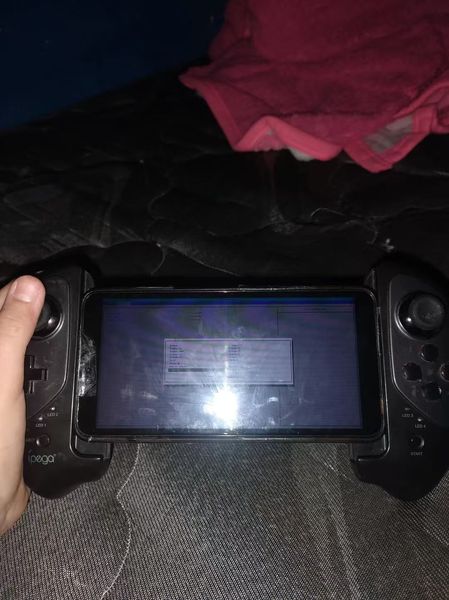
So I was messing around with my Windows 11 handheld console and somehow ended up in the BIOS. Now I can't get out. The only input that works is the touchscreen, and none of the usual exit options seem to do anything. I've tried tapping around, looking for a save and exit or discard changes option, but it's not responding the way I'd expect. Not sure if I accidentally changed something or if it's just being stubborn. Anyone know how to exit BIOS when you're stuck with only touchscreen controls? Really don't want to force shutdown if I don't have to.53Views0likes1Comment
Widgets panel takes forever to load and sometimes won't open at all
The Widgets panel has been super slow lately. It sometimes takes 20–30 seconds to load, and occasionally it just won't open no matter how many times I click the icon. I've already restarted the Widgets process, cleared its cache, and checked for updates. Nothing helped. It's a clean install with no third-party tweaks. Anyone run into this or know what's causing it?74Views0likes2Comments
There is a problem with File History; a protest is lodged.
Your Microsoft technical team has repeatedly corrupted file history. Since the July 28th/August 13th updates KB5101684/KB5120249, my file history has reappeared. Backups to the D drive are successful, but the backup times cannot be synchronized. Newly created or saved Word documents, images, videos, etc., still show "No previous version available" in "Properties → Previous Versions". The folder is not being corrected; its date is automatically changed. Until Wednesday's updates KB5124008, KB5126052, KB5126146, KB5122878, and KB890830, the file history was corrupted and disabled, resulting in an "InconsistentState" entry in C:\Users\User\AppData\Local\Microsoft\Windows\FileHistory\Configuration. Why did Microsoft disable it? Everyone is using it, and I'm extremely angry. Many users have reported encountering this issue on various forums. Microsoft, stop deceiving us! I demand that Microsoft review this matter immediately and release an emergency update as soon as possible to restore the file history to its original state. The five updates installed are:KB5122878,KB5126146,KB5124008,KB5126052,KB890830 Anyone else experiencing the same issue as me can report it to the media and have Microsoft confirm the error. Furthermore, "File History" itself is not listed in Microsoft's "Deprecated Features List." While other backup features suggest that Microsoft has no plans to discontinue it. Microsoft is going to pretend it doesn't exist.89Views2likes1Comment
File History has stopped functioning
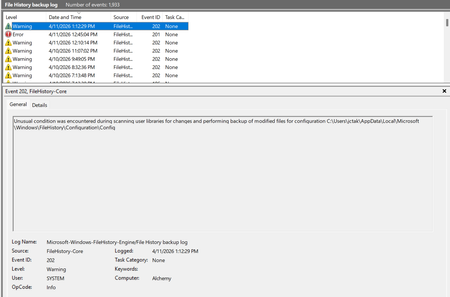
My file history program has stopped functioning. I tried searching the internet for some of these error messages and I have not found anything that has a solution that works. I tried deleting the backup on my backup drive, and also deleting the file history data/configuration folders so it would "start fresh" and I still keep getting errors. Here are some of the errors: Also have gotten a bunch of different errors for "reparse points". This is one example. I tried to exclude some of these folders from the backup but it didn't seem to help. But how do I find and eliminate a "reparse point" so it doesn't cause the file history to fail? And why doesn't file history just ignore those folders and go on and back up everything else?3.5KViews5likes36CommentsWindows 11 keeps resetting my audio output device back to default
Every time I restart my PC, Windows 11 resets my audio output back to the default speakers instead of my USB headset. I've set it manually in Settings and in the Sound Control Panel, but after a reboot it's back to the wrong device. I've already disabled audio enhancements, updated my audio drivers, and turned off "Allow applications to take exclusive control." Still happens. Anyone else dealing with this or know how to make it stick?64Views0likes1Comment
White Icons on Windows 11 – IconCache.db Rebuild Did Not Help
Hello everyone, I would need your help regarding an icon display issue on Windows 11. For the past few months, most of the icons on our Windows 11 devices have been appearing as white/blank icons. The issue is also present on the server. For example, the icons for File Explorer and Command Prompt (CMD) are also affected. I have already tried rebuilding the IconCache.db file, but unfortunately, this did not resolve the issue. Does anyone have any idea what could be causing this problem or any solution I could try? Thank you in advance for your help.86Views0likes3CommentsWindows 11 home internet not working after update
I just updated with my windows 11 home with the latest patches today. After restart, my internet is not working anymore. I have tried restarting few times, restarting the router, flushing dns, Ip release, IP renew etc. Nothing worked. Did a full network reset. That failed too. As a last resort as suggested by Google AI, I manually set my DNS to a fixed IP, then only it worked. So after updating my Win 11 today, my automatic dhcp totatlly stopped working. Has this happened to anyone else ? Any guess why this would have happened and how I can get my automatic DNS back to working state ? WIFI is working on every other device conntected like phone, TV, Alexa...etc. Thanks.97Views0likes2Comments
Windows 11 Insider Preview Feature Update (26220.9343) endet mit Fehlercode 0x800b0109
Windows 11 Insider Preview Feature Update (26220.9343) endet mit Fehlercode 0x800b0109 Windows 11 Home 25H2 Build 26220.7872 ge_release Windows Feature Experience Pack 1000.26100.333.0 BETA-channel As I want to install Windows 11 Insider Preview Feature Update (26220.9343) on the above mentioned computer I like to know how to avoid the error 0x800b0109. Can anyone help???103Views0likes2CommentsWindows 11 keeps changing my default browser back to Edge after every update
Every time Windows 11 installs an update, it resets my default browser back to Edge. I've set Chrome as default more times than I can count, but the next patch comes through and it's back to Edge again. I even tried removing Edge once, but Windows just reinstalled it during the next update. I've gone through Settings and set Chrome as default for every file type I could find. Still happens. Not comfortable messing with the registry unless I know exactly what I'm doing. Anyone else dealing with this on Windows 11? Found a way to make it stick?79Views0likes2Comments