configuration profiles
7 Topics
OneDrive for macOS documentation issue. DefaultFolder plist example is missing array wrapper
Hi everyone, The Microsoft Learn documentation for configuring the OneDrive sync app on macOS currently contains an incorrect plist example for the DefaultFolderLocation setting. Documentation page: https://learn.microsoft.com/en-us/sharepoint/deploy-and-configure-on-macos#defaultfolderlocation In the “DefaultFolderLocation” section, the current plist example shows the DefaultFolder key as a dictionary: <key>DefaultFolder</key> <dict> <key>Path</key> <string>(DefaultFolderPath)</string> <key>TenantId</key> <string>(TenantID)</string> </dict> This format does not work correctly when deployed as a managed preference/configuration profile. The setting starts working when the DefaultFolder dictionary is wrapped in an array, like this: <key>DefaultFolder</key> <array> <dict> <key>Path</key> <string>(DefaultFolderPath)</string> <key>TenantId</key> <string>(TenantID)</string> </dict> </array> Please update the Microsoft Learn documentation to include the array wrapper in the DefaultFolder plist example. The current Microsoft Learn example is confusing because administrators may deploy the documented plist exactly as shown, but the setting does not appear to work correctly until the array wrapper is added.471Views0likes2Comments
Configuration profile status not updating when profile removed
I have created a configuration profile which sets 3 user settings. This was deployed to a group of users. I can see the settings were applied successfully when I look at the profile Assignment Status in the Overview pane of the profile. I want to remove the settings now and apply them to a different group of users (a subset of the original group). If I remove the original group from the deployment I can see on some machines that the settings have been removed (by physically connecting to the machines and viewing that the settings have gone from the registry) however the status page is still showing as successful. Should this change, and if not, how can I work out if the settings have actually been removed from the devices ? ThanksSolved3.8KViews0likes2Commentsconfig profiles "fragmentation"? yay or nay?
Hello all, We have two different device groups to which we want to deploy slightly different configuration profiles in endpoint. These configuration profiles are mostly about the device restrictions - password module. Basically, the password requirements are the same, but for practical reasons we need to implement different screen lock times for the two groups. Logically, it would make sense to create a profile with the common settings and deploy it to both groups, and then two additional profiles where the only setting is the different screen lock inactivity periods. This way any change made on the password requirement should affect both groups at the same time. I'm not sure anyway if this is considered best practice, or if it'd be better to store two complete password restrictions profiles for both groups. As it is right now (with the common settings in one profile and the two screen lock times in different additional profiles) I'm not experiencing any conflict, so it seems the rules are correctly deployed, but I'm not so sure if this is the way Endpoint would handle this scenario in the best way possible. Any suggestion?Solved2KViews0likes4Comments
How to get rid of RestrictedGroups/ConfigureGroupMembership settings?
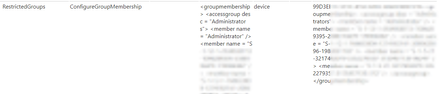
Colleagues had created a configuration profile with a RestrictedGroups/ConfigureGroupMembership policy to overwrite the local Administrators group on workstations. We have removed the policy assignment weeks ago, but on some devices it is still applying: We have some exception devices where we want to have the Administrators group managed locally, but on every Intune policy sync the group gets overwritten, and any changes done locally or by GPO are reverted. On an affected computer, I can see the old policy in WMI class MDM_Policy_Result01_RestrictedGroups02, but I cannot delete it from there. I do not see the old policy in WMI class MDM_Policy_Config01_RestrictedGroups02. How can I get rid of this policy?464Views0likes0Comments
Turn off Suggest names while completing TO, CC and BCC fields in outlook through Intune
Hi, I have recently received a request to turn off this particular option from Outlook. As we do not have any on-prem AD, the way to manage all applications is via Intune. I have researched and found the settings under Configuration profiles-> Settings Catalog Outlook Options > Preferences > E-mail Options > Advanced E-mail Options The option works fine when applied and pushed initially, but once the device is rebooted/ outlook is restarted the options revert back to default. The same case happens when i try to edit the registry manually using powershell. HKEY_CURRENT_USER\SOFTWARE\Microsoft\Office\16.0\Outlook\Preferences - D-Word "ShowAutoSug" = 0 HKEY_CURRENT_USER\SOFTWARE\Policies\Microsoft\office\16.0\outlook\preferences - D-Word "ShowAutoSug" = 0 Does anyone know the reson behind this?1.7KViews0likes1Commentconfiguration profiles
I created a new profile (edition upgrade and mode switch) hoping to be able to switch MAK keys. Long story, but we are moving away from KMS because users are at home. the wrong MAK key was pushed out via a script converted to a EXE (deployed via an "APP" in intune) . I was hoping to use a configuration policy to change the MAK key. But it only seems to check if the edition is correct (which its already enterprise) and not updated the MAK key. Any recommendations on how to switch a MAK key via intune, users are not local admins.982Views0likes0Comments