conditional access
724 Topics
'Microsoft App Access Panel' and Conditional Access with SSPR combined registration bug
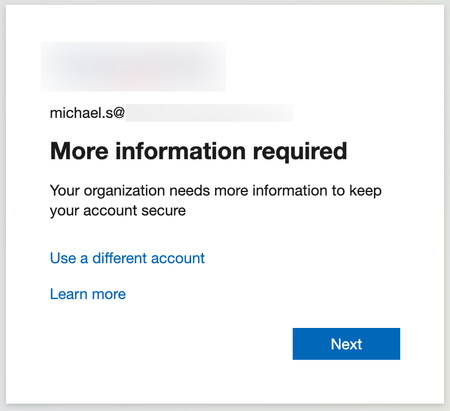
Currently, enabling self-service password reset (SSPR) registration enforcement causes the app 'Microsoft App Access Panel' to be added to the login flow of users who have SSPR enabled. This app is not able to be excluded from Conditional Access (CA) polices and is caught by 'All cloud apps', which breaks secure zero-trust scenarios and CA policy configurations. Best way to demonstrate this is through examples... ----Example 1---- Environment: CA Policy 1 - 'All cloud apps' requiring hybrid/compliant device, but excluding [App] (for all non-guest accounts) CA Policy 2 - [App] requiring MFA only (for contractor accounts, etc) CA Policy 3 - [App] requiring hybrid/compliant device (for internal accounts, etc) SSPR registration enforcement (Password reset > Registration) - set to 'Yes' MFA registration enforcement (Security > Authentication Methods > Registration campaign) - set to 'Enabled' Scenario: A new user requires access to web [App] on an unenrolled device and is assigned an account that falls under CA Policy 1 and 2, however [App] is excluded from 1 and shouldn't apply to this login. When accessing [App] for the first time, users must register SSPR/MFA. They see the below message, click 'Next' and are directed to https://accounts.activedirectory.windowsazure.com/passwordreset/register.aspx: Then they see this screen, which will block the login and try to get the user to download the Company Portal app: While behind the scenes, the login to [App] is being blocked by 'Microsoft App Access Panel' because it is seemingly added to the login flow and caught in CA Policy 1 in Req 2/3: CA Policy 1 shows as not applied on Req 1, CA Policy 2 shows as successful for Req 1/2/3 and CA Policy 3 shows as not applied for Req 1/2/3. Creating a CA policy for the 'Register security information' user action has no effect on this scenario and also shows as not applied on all the related sign-in logs. ----Example 2---- Environment: Same as above, but SSPR registration enforcement - set to 'No' Scenario: Same as above, but when accessing the [App] for the first time, they see the below message instead, click 'Next' and are directed to https://accounts.activedirectory.windowsazure.com/proofup.aspx: Then they are directed to the combined SSPR/MFA registration experience successfully: The 'Microsoft App Access Panel' doesn't show in the sign-in logs and the sign-in is successful after registration. From the two examples, it seems to be a bug with the SSPR registration enforcement and the combined registration experience. ----Workarounds---- 1 - Prevent using 'All cloud apps' with device based CA policies (difficult, requires redesigning/thinking/testing policies, could introduce new gaps, etc) 2 - Turn off SSPR registration enforcement and turn on MFA registration enforcement like in example 2 (easy, but only enforces MS MFA App registration, doesn't seem to re-trigger registration if the MS MFA App is removed, no other methods are supported for registration, and doesn't remind users to update) 3 - Disable SSPR entirely for affected users (medium depending on available security groups, and doesn't allow for affected users to use SSPR) ----Related links---- https://feedback.azure.com/d365community/idea/d5253b08-d076-ed11-a81b-000d3adb7ffd https://feedback.azure.com/d365community/idea/1365df89-c625-ec11-b6e6-000d3a4f0789 Conditional Access Policies, Guest Access and the "Microsoft Invitation Acceptance Portal" - Microsoft Community Hub MS, please either: 1 - Allow 'Microsoft App Access Panel' to be added to CA policies so it can be excluded 2 - Prevent 'Microsoft App Access Panel' from showing up in the CA login flow when SSPR registration enforcement is enabled20KViews2likes15Comments
Authentication Context (Entra ID) Use case
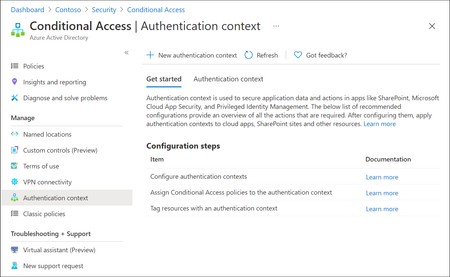
Microsoft Entra ID has evolved rapidly over the last few years, with Microsoft continuously introducing new identity, access, and security capabilities as part of the broader Zero Trust strategy. While many organizations hold the necessary Entra ID and Microsoft 365 licenses (often through E3 or E5 bundles), a number of these advanced features remain under‑utilised or entirely unused. This is frequently due to limited awareness, overlapping capabilities or uncertainty about where and how these features provide real architectural value. One such capability which is not frequently used is Authentication Context. Although this feature is available for quite some time, it is often misunderstood or overlooked because it does not behave like traditional Conditional Access controls. Consider Authentication Context as a mobile “assurance tag” that connects a resource (or a particular access route to that resource) to one or several Conditional Access (CA) policies, allowing security measures to be enforced with resource-specific accuracy instead of broad, application-wide controls. Put simply, it permits step-up authentication only when users access sensitive information or perform critical actions, while maintaining a smooth experience for the “regular path.” When used intentionally, it enables resource‑level and scenario‑driven access control, allowing organizations to apply stronger authentication only where it is actually needed without increasing friction across the entire user experience. Not expensive Most importantly to use Authentication Context the minimum licensing requirement is Microsoft Entra ID Premium P1 which most customers already have this license. so you not need to convenience for higher license to utilize this feature. But do note Entra Premium 2 is needed if your Conditional Access policy uses advanced signals, such as: User or sign‑in risk (Identity Protection) Privileged Identity Management (PIM) protected roles Risk‑based Conditional Access policies The Workflow Architecturally, Authentication Context works when a claims request is made as part of token issuance commonly expressed via the acrs claim. When the request includes a specific context (for example c1), Entra evaluates CA policies that target that context and forces the required controls (MFA, device compliance, trusted location, etc.). The important constraint: the context must be requested/triggered by a supported workload (e.g., SharePoint) or by an application designed to request the claim; it is not an automatic “detect any action inside any app” feature. Lets look at few high level architecture reference 1. Define “assurance tiers” as contexts Create a small set of contexts (e.g., c1: Confidential Access, c2: Privileged Operations) and publish them for use by supported apps/services. 2. Bind contexts to resources Assign the context to the resource boundary you want to protect—most commonly SharePoint sites (directly or via sensitivity labels), so only those sites trigger the context. (e.g - Specific SharePoint sites like financials, agreements etc ) 3. Attach Conditional Access policies to the context Create CA policies that target the context and define enforcement requirements (Additional MFA strength, mandating device compliance, or location constraint through named locations etc.). The context is the “switch” that activates those policies at the right moment. 4. Validate runtime behavior and app compatibility Because authentication context can impact some client apps and flows, validate supported clients and known limitations (especially for SharePoint/OneDrive/Teams integrations). Some Practical Business Scenarios Scenario A — Confidential SharePoint Sites (M&A / Legal / HR) Problem: You want stronger controls for a subset of SharePoint sites without forcing those controls for all SharePoint access. Architect pattern: Tag the confidential site(s) with Authentication Context and apply a CA policy requiring stronger auth (e.g., compliant device + MFA) for that context. Pre-reqs: SharePoint Online support for authentication context; appropriate licensing and admin permissions; CA policies targeted to the context Scenario B — “Step-up” Inside a Custom Line-of-Business App Problem: Users can access the app normally, but certain operations (approval, export, privileged view) need elevated assurance. Architect pattern: Build the app on OpenID Connect/OAuth2 and explicitly request the authentication context (via acrs) when the user reaches the sensitive path; CA then enforces step-up. Pre-reqs: App integrated with Microsoft identity platform using OIDC/OAuth2; the app can trigger claims requests/handle claim challenges where applicable; CA policies defined for the context Scenario C — Granular “Resource-based” Zero Trust Without Blanket MFA Problem: Security wants strong controls on crown jewels, but business wants minimal prompts for routine work. Architect pattern: Use authentication context to enforce higher assurance only for protected resources (e.g., sensitive SharePoint sites). This provides least privilege at the resource boundary while reducing global friction. Pre-reqs: Clearly defined resource classification; authentication context configured and published; CA policies and monitoring. In a nutshell, Authentication Context allows organizations to move beyond broad, one‑size‑fits‑all Conditional Access policies and adopt a more precise, resource‑driven security model. By using it to link sensitive resources or protected access paths to stronger authentication requirements, organizations can improve security outcomes while minimizing unnecessary user friction. When applied deliberately and aligned to business‑critical assets, Authentication Context helps close the gap between licensing capability and real‑world value—turning underused Entra ID features into practical, scalable Zero Trust controls. If you find this useful, please do not forget to like and add your thoughts 🙂42Views1like0CommentsHow to exclude specific machines from Intune compliance policy?
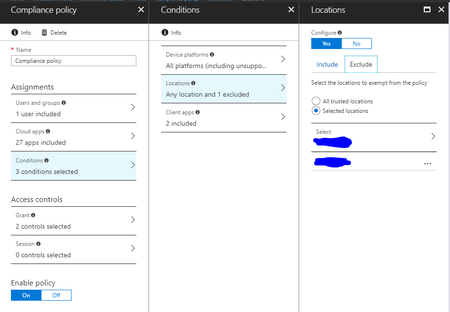
Hi, I need a few virtual machines to be excluded from the Intune compliance policy, I thought that the following setup would be sufficient to accomplish this and be able to access corporate data without the need to make these virtual machines compliant (they all have fixed IPs): Unfortunately this isn't working and I'm wondering how could I exclude this machines from enrolment. Thank you, IonSolved40KViews0likes11CommentsIntune does not sync Owner/Compliant state to Entra (iOS)
Dear All, We have the following problem in our environment. Initial situation Company Owned iOS Devices are joined / autoenrollt with Apple Business Manager into our Intune MDM and are fully managed. The devices have all configuration and compliance policies applied. The devices have an primary user and are compliant. During the enrollment the Entra device has been successful created. Problem The Entra device has no owner, no compliant state, no "MDM" value. Thereforce our conditional access policies which refer to the "Compliant"-state are not applied. Analysis Created a Microsoft case. We checked several things: - Intune seems correct configured - Compliance Policies are applied in Intune (as mentioned above) - irrelevant, when device has been enrolled or what models they are Microsoft support confirmed that they received similar feedbacks from other customers. It is indicated as "known issue" Workaround We found out, that when an end user opens the "Company Portal" app on the device and syncs, all Entra device attributes are updated. Then the owner, compliance state, MDM state, etc. is updated and now valid. But this seems to be not the correct behaviour. As far as I understood the Microsoft documentation, it should not require this step (Intune should sync the status to Entra in the backgroud, from service to service) Our objective should be, that it is not necessary to start Company portal. All entra devices should always have the current values from Intune synced. Thanks for your help, Chris137Views0likes1Comment
MFA catch-22 during onboarding due to registration policy
Hi, We are experiencing a catch-22 scenario during user onboarding related to MFA. New users are required to install the Microsoft Authenticator app via our Company Portal. However, they are prompted to complete MFA registration before they can access or download anything from the Company Portal. Since they do not yet have the Authenticator app installed, they are effectively blocked from completing the MFA setup. From our investigation, it appears that the Multi-Factor Authentication registration policy is enforcing MFA registration for new users. In our scenario, this creates a circular dependency. We have attempted to exclude our office network from MFA using Conditional Access, but this does not resolve the issue because the MFA registration policy is triggered before Conditional Access policies are evaluated. Our questions: Is there a recommended way to handle MFA onboarding in this type of scenario? Can Conditional Access policies be used instead of the MFA registration policy for initial MFA enrollment?293Views0likes4CommentsIntune MAM BYOD: Remove Account message for iOS devices
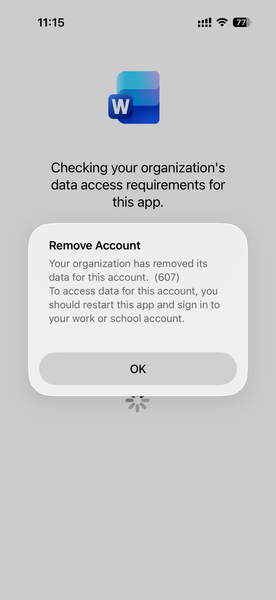
Hello, I am seeing an issue for Intune MAM BYOD(iOS) users. After a user account password reset, it causes Intune to remove the account configured from mobile applications like MS Outlook, Work, OneDrive, etc. Current Intune Configuration: Done - App Protection Policy Done - Conditional access policy --> Grant --> Requires app protection policy (checked) Users had to re-enrol to access his/her data. Here is the screenshot, Thank you,147Views0likes1CommentFree Webinar: Microsoft Entra ID Break-Glass Accounts Done Right (Live Demo + Q&A)
Hi everyone, I’m hosting a free community webinar focused on one of the most common (and painful) Entra ID issues: tenant lockouts caused by break-glass account misconfiguration. This session is practical and demo-driven, and I’ll cover real-world scenarios I’ve seen involving Conditional Access and emergency access design. What we’ll cover Why every tenant should have at least two break-glass accounts Common misconfigurations that lead to lockouts Conditional Access exclusions: what works and what fails Recommended hardening approach (without blocking emergency access) Monitoring + alerting best practices Live demo + Q&A Who it’s for Microsoft 365 admins Entra ID / Conditional Access admins Security engineers MSP engineers The recording will be shared with registrants after the session. Registration link: https://teams.microsoft.com/l/meetup-join/19%3ameeting_MjkwYzExNzItMzY4OC00NThmLTg2ZDYtM2ExMTRiNWYwMGZl%40thread.v2/0?context=%7b%22Tid%22%3a%224bb6dd74-2dd1-459b-b867-f51781e1e7ed%22%2c%22Oid%22%3a%2251c6a848-6393-44f9-bac5-21855d5c7c3d%22%7d Thanks! Jaspreet Singh62Views0likes0Comments
Orphaned TPM-bound Entra Workplace Join device — no tenant access, backend deletion required
I have a personal Windows device that remains stuck in a TPM-protected Workplace Join to a former Microsoft Entra ID tenant. I no longer have tenant access and am not an admin. Local remediation completed: - dsregcmd /leave executed as SYSTEM - All MS-Organization / AAD certificates removed - Device still reports WorkplaceJoined : YES Azure Support ticket creation fails with: AADSTS160021 – interaction_required Application requested a user session which does not exist. Tenant inaccessible / user not present in tenant. This is an orphaned Entra ID device object. Requesting guidance or escalation for backend deletion. Tenant ID: 99f9b903-8447-4711-a2df-c5bd1ad1adf7 Device ID: f47987f4-a20b-4c34-a5f7-40ab0f593c6c58Views0likes0Comments
Entra Enterprise apps and App registrations - Global Secure Access - Conditional Access Block
I am working on a rollout for Global Secure Access and ran into an issue with Entra Enterprise apps setup in the tenant. With Global Secure Access I have a Conditional Access Policy set to Block access to All Resources excluding some resources like Intune and Defender tap required for mobile setup. When I added an administrator account which had done some Enterprise application setup and authorization for various third-party applications, those third-party applications stopped working with failed logins indicating token access issues. Upon review I found the majority of applications to be using client secret authentication with this administrator account as the authorizer. My limited knowledge of Enterprise apps leads me to believe this client secret is an application password that the third-party uses to keep generating tokens based on the authorizing account. My questions surrounding this setup and further understanding are mainly in relation to how Enterprise apps and app registrations authenticate, as well as user authentication directly. 1. How does the token authorization work? Does the application just use the client secret to authenticate as the user who authorized it to generate an access token? Why does MFA requirements and changing passwords not affect this but specific Block policy does? 2. What are best practices in relation to authorizing third-party applications? My thoughts are a dedicated account to authorize applications when needed. 3. How will this work with applications regular users use? Say a user has a digital notebook that syncs with their OneNote or a calendar app that syncs calendars between Outlook and their website. Do these applications also use client secrets with the user's token and will break when added to the GSA setup I have? Is the only way around this to authorize with an admin account for token issuance? Thank you for your time reading this and any insight you may have for any of the questions or ideas mentioned.133Views0likes1Comment
What is the prerequisite for Migrating AirWatch to Intune
Hi Team, Could you please provide your suggestion and help with the prerequisite for migrating AirWatch to MS Intune? Note - Current environment is Airwatch and the client requirement migrating to MS Intune. Thanks, Anand Rathod1.5KViews0likes2Comments