compliance manager
55 TopicsRegistration Open: Community-Led Purview Lightning Talks
Get ready for an electrifying event! The Microsoft Security Community proudly presents Purview Lightning Talks; an action-packed series featuring your fellow Microsoft users, partners and passionate Microsoft Security community members of all sorts. Each 3-12 minute talk cuts straight to the chase, delivering expert insights, real-world use cases, and even a few game-changing tips and tricks. Don’t miss this opportunity to learn, connect, and be inspired! Secure your spot now for the big day: April 30th at 8am Redmond Time. See agenda details below and follow this blog post (sign in and click the "follow" heart in the upper right) to receive notifications. ❗UPDATE❗This event is expected to last around 2 hours and 15 minutes, due to the incredible number of community sessions that were submitted! 💖 Please see the timing table below broken out into sections of four talks each, and plan to arrive 10 minutes before the section that interests you, OR stay for the whole time! Speakers will be available in the chat to answer your questions; please ask your questions during their session. Spillover Q&A forum links will also be shared. The full session recording will be indexed and posted to Microsoft Security Community YouTube within 24 hours after the event. Bookmark this page or follow this blog post for updates! Agenda Legend ↩️ Data Lifecycle Management 🔐 Information Protection 🚫 Data Loss Prevention (DLP) 🦾 Data Security Posture Management (DSPM) for AI 🤖 Purview for AI 👁️ Insider Risk Management (IRM) 🔍 eDiscovery 📊 Governance 🗒️ Compliance Manager 🛡️ Data Security All times are listed in US Pacific/Redmond Time. Session lengths are rounded to the nearest minute. AGENDA Section 1 - approximately 8:00 am - 8:43 am ↩️ The Day Offboarding Exposed Infinite Retention — Nikki Chapple Length: 10 minutes | Topic: Data Lifecycle Management A routine Purview request led to an unexpected discovery: more than 9,000 orphaned OneDrives and thousands of inactive mailboxes still storing content long after employees had left. This talk explains how a retain-only policy created hidden retention debt and how Adaptive Scopes can help organisations separate active users from leavers to avoid similar pitfalls. 🔐 The Purview Label Engine: Automated Classification, Translation, and co-Documentation for Enterprise Tenants — Michael Kirst-Neshva Length: 12 minutes | Topic: Information Protection Global enterprises face the challenge of implementing uniform data protection standards across borders and languages. In this talk, I’ll present a framework that makes Microsoft Purview labels truly scalable. Discover how to roll out parent and child label logics automatically, manage priorities with a single click, and generate instant compliance documentation for every business unit. 🗒️ What's In My Compliance Manager Toolbox: A Cloud Security Architect's Perspective — Jerrad Dahlager Length: 8 minutes | Topic: Compliance Manager A practical walkthrough of how I use Compliance Manager across real client engagements to map controls, track improvement actions, and simplify multi-framework compliance. No theory, just what works in the field. 🛡️ Stop, Think, Protect: Data Security in Real Life with Purview — Oliver Sahlmann Length: 8 minutes | Topic: Data Security With simple labels and matching DLP policies, Purview offers a practical and accessible way to approach data security. This lightning talk uses a real-life traffic light concept to show how a low barrier to adoption can still drive meaningful protection and awareness. Section 2 - approximately 8:44 am - 9:15 am 🔐 Using Purview to prevent oversharing with AI services — Viktor Hedberg Length: 10 minutes | Topic: Information Protection In this day and age, AI is the big thing. However, Copilot has access to everything you can access, including potentially sensitive data. In this session we will look at how to prevent Copilot to access highly sensitive data, using Information Protection. 🦾 How I Helped My Customers Understand their AI Usage (and protect their sensitive data) — Bram de Jager Length: 5 minutes | Topic: Data Security Posture Management (DSPM) for AI As AI tools explode across the web, many organizations still have no idea what’s actually happening in the browser—where employees type prompts, paste sensitive data, or visit public AI sites outside corporate governance. In this lightning talk, I’ll share how I helped customers shine a light on this issue. We’ll explore how Purview Data Security Posture Management (DSPM) can reveal which AI tools employees use, what types of data they input, and where sensitive information may leak through prompts. I’ll walk through real customer scenario where we detected risky AI usage patterns—such as employees pasting confidential documents into public chatbots. 🔐 Four Labels Max for Daily Use: Which Ones & Why? — Romain Dalle Length: 8 minutes | Topic: Information Protection Sensitivity labels are one of the most critical parts of a Purview Risk and compliance deployment, if not the most critical, because it directly impacts how end-users and business units should allow or restrict themselves to share their business data, internally and externally, on a daily basis. Labels have not other options than being precise, meaningful, and balanced in terms of embedded data security. Setting the right taxonomy is core to success, and is everything but a one-time project. 🚫 Data-driven Endpoint DLP Solution with Advanced Hunting — Tatu Seppälä Length: 8 minutes | Topic: Data Loss Prevention (DLP) This lightning talk shows you how to use KQL queries in advanced hunting to easily build initial sensitive service domain groups for authorized and unauthorized domains based on your organization's usage patterns. The same approach can be used for numerous other similar solution refinement and design purposes. Section 3 - approximately 9:16 am - 9:46 am 🔐 The Purview Hack No One Talks About: Container Sensitivity Labels That Fix Oversharing Fast — Nikki Chapple Length: 10 minutes | Topic: Information Protection Most organizations tackle oversharing with manual fixes, but the fastest solution is often overlooked. In this lightning talk, I show how container sensitivity labels automatically apply the right sharing and collaboration controls, ensuring every new Group, Team or SharePoint site starts secure by default. 🔍 Does M365 Support eDiscovery? — Julian Kusenberg Length: 11 minutes | Topic: eDiscovery A myth-busting session that separates perception from reality when it comes to Microsoft 365 eDiscovery capabilities. 📊 Improving Discovery, Trust, and Reuse of Analytics with Purview Data Products — Craig Wyndowe Length: 5 minutes | Topic: Governance This talk shows how bringing Power BI and Fabric assets into Microsoft Purview Governance Domains and Data Products creates a single, trusted view of enterprise analytics. By connecting reports, semantic models, and underlying data with shared metadata, ownership, and business context, organizations can make existing assets easy to discover and safe to reuse. 🔐 Why You Should Create Your Own Sensitive Information Types (SITs) — Niels Jakobsen Length: 5 minutes | Topic: Information Protection An in depth analysis of why Microsoft SITs are not one-size-fits-all, and how to create your own using what Microsoft has already built for you. Section 4 - approximately 9:47 am-10:30 am 👁️ From Zero to First Signal: Insider Risk Management Prerequisites That Actually Matter — Sathish Veerapandian Length: 8 minutes | Topic: Insider Risk Management (IRM) A focused live demo showing the real world prerequisites required for Microsoft Purview Insider Risk Management to work effectively. This session highlights the critical Entra ID, Intune, Microsoft Defender for Endpoint, and Purview DLP configurations that must be in place before creating IRM policies. 🤖 Securing data in the age of AI — Júlio César Gonçalves Vasconcelos Length: 11 minutes | Topic: Purview for AI AI will transform business as we know it; but without proper governance, it can introduce serious risks. We’ll show you how Microsoft Purview enables organizations to accelerate AI adoption while maintaining security, compliance, and transparency. 🔍 Beyond eDiscovery - Purview DSI for Security Investigation — Susantha Silva Length: 11 minutes | Topic: eDiscovery Most people hear “Microsoft Purview” and immediately think compliance, eDiscovery, or legal holds. But this session highlights Data Security Investigations, showing how DSI lets you take a DLP alert or insider risk signal and turn it into a structured investigation. 🚫 Elevating Purview DLP with a real world use case — Victor Wingsing Length: 14 minutes | Topic: Data Loss Prevention (DLP) Learn how I hardened Microsoft Purview DLP beyond out of the box defaults—closing real world data loss gaps, tuning policies to actual user behavior, and turning noisy alerts into protection that really blocks exfiltration. - Quick Closing/ Resource Sharing2.6KViews7likes2CommentsAuthorization and Governance for AI Agents: Runtime Authorization Beyond Identity at Scale
Designing Authorization‑Aware AI Agents at Scale Enforcing Runtime RBAC + ABAC with Approval Injection (JIT) Microsoft Entra Agent Identity enables organizations to govern and manage AI agent identities in Copilot Studio, improving visibility and identity-level control. However, as enterprises deploy multiple autonomous AI agents, identity and OAuth permissions alone cannot answer a more critical question: “Should this action be executed now, by this agent, for this user, under the current business and regulatory context?” This post introduces a reusable Authorization Fabric—combining a Policy Enforcement Point (PEP) and Policy Decision Point (PDP)—implemented as a Microsoft Entra‑protected endpoint using Azure Functions/App Service authentication. Every AI agent (Copilot Studio or AI Foundry/Semantic Kernel) calls this fabric before tool execution, receiving a deterministic runtime decision: ALLOW / DENY / REQUIRE_APPROVAL / MASK Who this is for Anyone building AI agents (Copilot Studio, AI Foundry/Semantic Kernel) that call tools, workflows, or APIs Organizations scaling to multiple agents and needing consistent runtime controls Teams operating in regulated or security‑sensitive environments, where decisions must be deterministic and auditable Why a V2? Identity is necessary—runtime authorization is missing Entra Agent Identity (preview) integrates Copilot Studio agents with Microsoft Entra so that newly created agents automatically get an Entra agent identity, manageable in the Entra admin center, and identity activity is logged in Entra. That solves who the agent is and improves identity governance visibility. But multi-agent deployments introduce a new risk class: Autonomous execution sprawl — many agents, operating with delegated privileges, invoking the same backends independently. OAuth and API permissions answer “can the agent call this API?” They do not answer “should the agent execute this action under business policy, compliance constraints, data boundaries, and approval thresholds?” This is where a runtime authorization decision plane becomes essential. The pattern: Microsoft Entra‑Protected Authorization Fabric (PEP + PDP) Instead of embedding RBAC logic independently inside every agent, use a shared fabric: PEP (Policy Enforcement Point): Gatekeeper invoked before any tool/action PDP (Policy Decision Point): Evaluates RBAC + ABAC + approval policies Decision output: ALLOW / DENY / REQUIRE_APPROVAL / MASK This Authorization Fabric functions as a shared enterprise control plane, decoupling authorization logic from individual agents and enforcing policies consistently across all autonomous execution paths. Architecture (POC reference architecture) Use a single runtime decision plane that sits between agents and tools. What’s important here Every agent (Copilot Studio or AI Foundry/SK) calls the Authorization Fabric API first The fabric is a protected endpoint (Microsoft Entra‑protected endpoint required) Tools (Graph/ERP/CRM/custom APIs) are invoked only after an ALLOW decision (or approval) Trust boundaries enforced by this architecture Agents never call business tools directly without a prior authorization decision The Authorization Fabric validates caller identity via Microsoft Entra Authorization decisions are centralized, consistent, and auditable Approval workflows act as a runtime “break-glass” control for high-impact actions This ensures identity, intent, and execution are independently enforced, rather than implicitly trusted. Runtime flow (Decision → Approval → Execution) Here is the runtime sequence as a simple flow (you can keep your Mermaid diagram too). ```mermaid flowchart TD START(["START"]) --> S1["[1] User Request"] S1 --> S2["[2] Agent Extracts Intent\n(action, resource, attributes)"] S2 --> S3["[3] Call /authorize\n(Entra protected)"] S3 --> S4 subgraph S4["[4] PDP Evaluation"] ABAC["ABAC: Tenant · Region · Data Sensitivity"] RBAC["RBAC: Entitlement Check"] Threshold["Approval Threshold"] ABAC --> RBAC --> Threshold end S4 --> Decision{"[5] Decision?"} Decision -->|"ALLOW"| Exec["Execute Tool / API"] Decision -->|"MASK"| Masked["Execute with Masked Data"] Decision -->|"DENY"| Block["Block Request"] Decision -->|"REQUIRE_APPROVAL"| Approve{"[6] Approval Flow"} Approve -->|"Approved"| Exec Approve -->|"Rejected"| Block Exec --> Audit["[7] Audit & Telemetry"] Masked --> Audit Block --> Audit Audit --> ENDNODE(["END"]) style START fill:#4A90D9,stroke:#333,color:#fff style ENDNODE fill:#4A90D9,stroke:#333,color:#fff style S1 fill:#5B5FC7,stroke:#333,color:#fff style S2 fill:#5B5FC7,stroke:#333,color:#fff style S3 fill:#E8A838,stroke:#333,color:#fff style S4 fill:#FFF3E0,stroke:#E8A838,stroke-width:2px style ABAC fill:#FCE4B2,stroke:#999 style RBAC fill:#FCE4B2,stroke:#999 style Threshold fill:#FCE4B2,stroke:#999 style Decision fill:#fff,stroke:#333 style Exec fill:#2ECC71,stroke:#333,color:#fff style Masked fill:#27AE60,stroke:#333,color:#fff style Block fill:#C0392B,stroke:#333,color:#fff style Approve fill:#F39C12,stroke:#333,color:#fff style Audit fill:#3498DB,stroke:#333,color:#fff ``` Design principle: No tool execution occurs until the Authorization Fabric returns ALLOW or REQUIRE_APPROVAL is satisfied via an approval workflow. Where Power Automate fits (important for readers) In most Copilot Studio implementations, Agents calls Power Automate (agent flows), is the practical integration layer that calls enterprise services and APIs. Copilot Studio supports “agent flows” as a way to extend agent capabilities with low-code workflows. For this pattern, Power Automate typically: acquires/uses the right identity context for the call (depending on your tenant setup), and calls the /authorize endpoint of the Authorization Fabric, returns the decision payload to the agent for branching. Copilot Studio also supports calling REST endpoints directly using the HTTP Request node, including passing headers such as Authorization: Bearer <token>. Protected endpoint only: Securing the Authorization Fabric with Microsoft Entra For this V2 pattern, the Authorization Fabric must be protected using Microsoft Entra‑protected endpoint on Azure Functions/App Service (built‑in auth). Microsoft Learn provides the configuration guidance for enabling Microsoft Entra as the authentication provider for Azure App Service / Azure Functions. Step 1 — Create the Authorization Fabric API (Azure Function) Expose an authorization endpoint: HTTP Step 2 — Enable Microsoft Entra‑protected endpoint on the Function App In Azure Portal: Function App → Authentication Add identity provider → Microsoft Choose Workforce configuration (enterprise tenant) Set Require authentication for all requests This ensures the Authorization Fabric is not callable without a valid Entra token. Step 3 — Optional hardening (recommended) Depending on enterprise posture, layer: IP restrictions / Private endpoints APIM in front of the Function for rate limiting, request normalization, centralized logging (For a POC, keep it minimal—add hardening incrementally.) Externalizing policy (so governance scales) To make this pattern reusable across multiple agents, policies should not be hardcoded inside each agent. Instead, store policy definitions in a central policy store such as Cosmos DB (or equivalent configuration store), and have the PDP load/evaluate policies at runtime. Why this matters: Policy changes apply across all agents instantly (no agent republish) Central governance + versioning + rollback becomes possible Audit and reporting become consistent across environments (For the POC, a single JSON document per policy pack in Cosmos DB is sufficient. For production, add versioning and staged rollout.) Store one PolicyPack JSON document per environment (dev/test/prod). Include version, effectiveFrom, priority for safe rollout/rollback. Minimal decision contract (standard request / response) To keep the fabric reusable across agents, standardize the request payload. Request payload (example) Decision response (deterministic) Example scenario (1 minute to understand) Scenario: A user asks a Finance agent to create a Purchase Order for 70,000. Even if the user has API permission and the agent can technically call the ERP API, runtime policy should return: REQUIRE_APPROVAL (threshold exceeded) trigger an approval workflow execute only after approval is granted This is the difference between API access and authorized business execution. Sample Policy Model (RBAC + ABAC + Approval) This POC policy model intentionally stays simple while demonstrating both coarse and fine-grained governance. 1) Coarse‑grained RBAC (roles → actions) FinanceAnalyst CreatePO up to 50,000 ViewVendor FinanceManager CreatePO up to 100,000 and/or approve higher spend 2) Fine‑grained ABAC (conditions at runtime) ABAC evaluates context such as region, classification, tenant boundary, and risk: 3) Approval injection (Agent‑level JIT execution) For higher-risk/high-impact actions, the fabric returns REQUIRE_APPROVAL rather than hard deny (when appropriate): How policies should be evaluated (deterministic order) To ensure predictable and auditable behavior, evaluate in a deterministic order: Tenant isolation & residency (ABAC hard deny first) Classification rules (deny or mask) RBAC entitlement validation Threshold/risk evaluation Approval injection (JIT step-up) This prevents approval workflows from bypassing foundational security boundaries such as tenant isolation or data sovereignty. Copilot Studio integration (enforcing runtime authorization) Copilot Studio can call external REST APIs using the HTTP Request node, including passing headers such as Authorization: Bearer <token> and binding response schema for branching logic. Copilot Studio also supports using flows with agents (“agent flows”) to extend capabilities and orchestrate actions. Option A (Recommended): Copilot Studio → Agent Flow (Power Automate) → Authorization Fabric Why: Flows are a practical place to handle token acquisition patterns, approval orchestration, and standardized logging. Topic flow: Extract user intent + parameters Call an agent flow that: calls /authorize returns decision payload Branch in the topic: If ALLOW → proceed to tool call If REQUIRE_APPROVAL → trigger approval flow; proceed only if approved If DENY → stop and explain policy reason Important: Tool execution must never be reachable through an alternate topic path that bypasses the authorization check. Option B: Direct HTTP Request node to Authorization Fabric Use the Send HTTP request node to call the authorization endpoint and branch using the response schema. This approach is clean, but token acquisition and secure secretless authentication are often simpler when handled via a managed integration layer (flow + connector). AI Foundry / Semantic Kernel integration (tool invocation gate) For Foundry/SK agents, the integration point is before tool execution. Semantic Kernel supports Azure AI agent patterns and tool integration, making it a natural place to enforce a pre-tool authorization check. Pseudo-pattern: Agent extracts intent + context Calls Authorization Fabric Enforces decision Executes tool only when allowed (or after approval) Telemetry & audit (what Security Architects will ask for) Even the best policy engine is incomplete without audit trails. At minimum, log: agentId, userUPN, action, resource decision + reason + policyIds approval outcome (if any) correlationId for downstream tool execution Why it matters: you now have a defensible answer to: “Why did an autonomous agent execute this action?” Security signal bonus: Denials, unusual approval rates, and repeated policy mismatches can also indicate prompt injection attempts, mis-scoped agents, or governance drift. What this enables (and why it scales) With a shared Authorization Fabric: Avoid duplicating authorization logic across agents Standardize decisions across Copilot Studio + Foundry agents Update governance once (policy change) and apply everywhere Make autonomy safer without blocking productivity Closing: Identity gets you who. Runtime authorization gets you whether/when/how. Copilot Studio can automatically create Entra agent identities (preview), improving identity governance and visibility for agents. But safe autonomy requires a runtime decision plane. Securing that plane as an Entra-protected endpoint is foundational for enterprise deployments. In enterprise environments, autonomous execution without runtime authorization is equivalent to privileged access without PIM—powerful, fast, and operationally risky.Microsoft Purview Data Quality Thresholds: More Control, More Trust
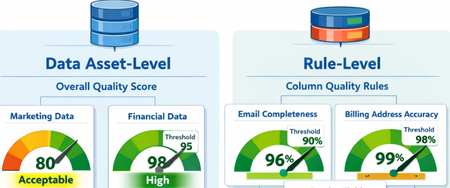
What Are Data Quality Thresholds? A data quality threshold defines the minimum acceptable score for a rule to pass. Instead of applying a single fixed standard across all data, organizations can now set expectations that align with business context and criticality. For example: An email column may require 99% completeness A product description column may only require 85% completeness Financial or regulatory data may require 100% accuracy With customizable thresholds, quality expectations become more meaningful and business-aligned. Why Does This Matter? Previously, using a single hardcoded threshold could lead to misleading quality scores. Critical data might appear “healthy” even when it didn’t meet business standards. With Data Quality Thresholds, you can: Define rule-level expectations Align quality scores with business risk Increase trust in DQ reporting Improve governance decision-making Data Asset-Level Quality Threshold Users can define data quality thresholds at the data asset level to measure how suitable a dataset is for specific business use cases. This allows organizations to quantify the overall health and fitness of a data asset before it is used in analytics, reporting, or data products. If the measured data quality score falls below the predefined threshold, the system can trigger notifications to the data asset owner or steward, prompting them to take corrective actions. It is important to note that not all data assets are equally critical. Therefore, thresholds should be context-driven and use-case specific. Example Scenario A marketing dataset used for campaign analysis may tolerate a lower quality threshold (e.g., 80%), since minor inconsistencies may not significantly impact insights. However, a financial reporting dataset used for regulatory filings may require a very high threshold (e.g., 98–100%), as even small errors can lead to compliance risks. Data Quality Rule-Level Threshold Thresholds can also be defined at the individual rule level, particularly for rules applied to specific columns. This provides more granular control and ensures that critical data elements are held to higher standards. Not all attributes have the same importance, so thresholds should reflect business criticality. Example Scenarios Email vs. Gender (Customer Contact Data) A completeness rule for a customer’s email address should have a higher threshold (e.g., 95–100%), since missing or invalid email addresses directly impact communication and engagement. In contrast, a gender attribute may have a lower threshold (e.g., 70–80%), as it is often less critical for most use cases. Billing Address vs. CRM Address A billing address is highly critical because it directly impacts: Invoice generation Tax calculations Timely delivery of invoices Therefore, the threshold for billing address quality should be very high (e.g., 98–100%). On the other hand, a CRM address used for general customer profiling may have a lower threshold, as occasional inaccuracies may not significantly affect business operations. The Impact By enabling flexible, context-aware scoring, Data Quality Thresholds help organizations move beyond generic quality checks and toward business-driven data quality management. Summary Data Quality Thresholds define the minimum acceptable score for data quality rules, allowing organizations to move beyond a one-size-fits-all approach and align quality expectations with business context and criticality. Instead of using fixed thresholds, organizations can set custom thresholds based on how important the data is. For example, financial data may require near-perfect accuracy, while less critical fields can tolerate lower thresholds. Thresholds can be applied at two levels: Data Asset Level: Measures the overall fitness of a dataset for a specific use case. Critical datasets (e.g., financial reporting) require higher thresholds than less critical ones (e.g., marketing analytics). Rule Level: Applies to individual columns or rules, ensuring that critical attributes (e.g., email, billing address) have stricter quality requirements than less important ones. This approach improves: Alignment with business risk and priorities Trust in data quality reporting Governance decision-making Focus on high-impact data issues Overall, data quality thresholds enable more meaningful, context-aware, and business-driven data quality management, helping organizations prioritize what matters most and build confidence in their data.Security Dashboard for AI - Now Generally Available
AI proliferation in the enterprise, combined with the emergence of AI governance committees and evolving AI regulations, leaves CISOs and AI risk leaders needing a clear view of their AI risks, such as data leaks, model vulnerabilities, misconfigurations, and unethical agent actions across their entire AI estate, spanning AI platforms, apps, and agents. 53% of security professionals say their current AI risk management needs improvement, presenting an opportunity to better identify, assess and manage risk effectively. 1 At the same time, 86% of leaders prefer integrated platforms over fragmented tools, citing better visibility, fewer alerts and improved efficiency. 2 To address these needs, we are excited to announce the Security Dashboard for AI, previously announced at Microsoft Ignite, is now generally available. This unified dashboard aggregates posture and real-time risk signals from Microsoft Defender, Microsoft Entra, and Microsoft Purview - enabling users to see left-to-right across purpose-built security tools from within a single pane of glass. The dashboard equips CISOs and AI risk leaders with a governance tool to discover agents and AI apps, track AI posture and drift, and correlate risk signals to investigate and act across their entire AI ecosystem. Security teams can continue using the tools they trust while empowering security leaders to govern and collaborate effectively. Gain Unified AI Risk Visibility Consolidating risk signals from across purpose-built tools can simplify AI asset visibility and oversight, increase security teams’ efficiency, and reduce the opportunity for human error. The Security Dashboard for AI provides leaders with unified AI risk visibility by aggregating security, identity, and data risk across Defender, Entra, Purview into a single interactive dashboard experience. The Overview tab of the dashboard provides users with an AI risk scorecard, providing immediate visibility to where there may be risks for security teams to address. It also assesses an organization's implementation of Microsoft security for AI capabilities and provides recommendations for improving AI security posture. The dashboard also features an AI inventory with comprehensive views to support AI assets discovery, risk assessments, and remediation actions for broad coverage of AI agents, models, MCP servers, and applications. The dashboard provides coverage for all Microsoft AI solutions supported by Entra, Defender and Purview—including Microsoft 365 Copilot, Microsoft Copilot Studio agents, and Microsoft Foundry applications and agents—as well as third-party AI models, applications, and agents, such as Google Gemini, OpenAI ChatGPT, and MCP servers. This supports comprehensive visibility and control, regardless of where applications and agents are built. Prioritize Critical Risk with Security Copilots AI-Powered Insights Risk leaders must do more than just recognize existing risks—they also need to determine which ones pose the greatest threat to their business. The dashboard provides a consolidated view of AI-related security risks and leverages Security Copilot’s AI-powered insights to help find the most critical risks within an environment. For example, Security Copilot natural language interaction improves agent discovery and categorization, helping leaders identify unmanaged and shadow AI agents to enhance security posture. Furthermore, Security Copilot allows leaders to investigate AI risks and agent activities through prompt-based exploration, putting them in the driver’s seat for additional risk investigation. Drive Risk Mitigation By streamlining risk mitigation recommendations and automated task delegation, organizations can significantly improve the efficiency of their AI risk management processes. This approach can reduce the potential hidden AI risk and accelerate compliance efforts, helping to ensure that risk mitigation is timely and accurate. To address this, the Security Dashboard for AI evaluates how organizations put Microsoft’s AI security features into practice and offers tailored suggestions to strengthen AI security posture. It leverages Microsoft’s productivity tools for immediate action within the practitioner portal, making it easy for administrators to delegate recommendation tasks to designated users. With the Security Dashboard for AI, CISOs and risk leaders gain a clear, consolidated view of AI risks across agents, apps, and platforms—eliminating fragmented visibility, disconnected posture insights, and governance gaps as AI adoption scales. Best of all, the Security Dashboard for AI is included with eligible Microsoft security products customers already use. If an organization is already using Microsoft security products to secure AI, they are already a Security Dashboard for AI customer. Getting Started Existing Microsoft Security customers can start using Security Dashboard for AI today. It is included when a customer has the Microsoft Security products—Defender, Entra and Purview—with no additional licensing required. To begin using the Security Dashboard for AI, visit http://ai.security.microsoft.com or access the dashboard from the Defender, Entra or Purview portals. Learn more about the Security Dashboard for AI at Microsoft Security MS Learn. 1AuditBoard & Ascend2 Research. The Connected Risk Report: Uniting Teams and Insights to Drive Organizational Resilience. AuditBoard, October 2024. 2Microsoft. 2026 Data Security Index: Unifying Data Protection and AI Innovation. Microsoft Security, 2026
Building Secure, Enterprise Ready AI Agents with Purview SDK and Agent Framework
At Microsoft Ignite, we announced the public preview of Purview integration with the Agent Framework SDK—making it easier to build AI agents that are secure, compliant, and enterprise‑ready from day one. AI agents are quickly moving from demos to production. They reason over enterprise data, collaborate with other agents, and take real actions. As that happens, one thing becomes non‑negotiable: Governance has to be built in. That’s where Purview SDK comes in. Agentic AI Changes the Security Model Traditional apps expose risks at the UI or API layer. AI agents are different. Agents can: Process sensitive enterprise data in prompts and responses Collaborate with other agents across workflows Act autonomously on behalf of users Without built‑in controls, even a well‑designed agent can create compliance gaps. Purview SDK brings Microsoft’s enterprise data security and compliance directly into the agent runtime, so governance travels with the agent—not after it. What You Get with Purview SDK + Agent Framework This integration delivers a few key things developers and enterprises care about most: Inline Data Protection Evaluate prompts and responses against Data Loss Prevention (DLP) policies in real time. Content can be allowed or blocked automatically. Built‑In Governance Send AI interactions to Purview for audit, eDiscovery, communication compliance, and lifecycle management—without custom plumbing. Enterprise‑Ready by Design Ship agents that meet enterprise security expectations from the start, not as a follow‑up project. All of this is done natively through Agent Framework middleware, so governance feels like part of the platform—not an add‑on. How Enforcement Works (Quickly) When an agent runs: Prompts and responses flow through the Agent Framework pipeline Purview SDK evaluates content against configured policies A decision is returned: allow, redact, or block Governance signals are logged for audit and compliance This same model works for: User‑to‑agent interactions Agent‑to‑agent communication Multi‑agent workflows Try It: Add Purview SDK in Minutes Here’s a minimal Python example using Agent Framework: That’s it! From that point on: Prompts and responses are evaluated against Purview policies setup within the enterprise tenant Sensitive data can be automatically blocked Interactions are logged for governance and audit Designed for Real Agent Systems Most production AI apps aren’t single‑agent systems. Purview SDK supports: Agent‑level enforcement for fine‑grained control Workflow‑level enforcement across orchestration steps Agent‑to‑agent governance to protect data as agents collaborate This makes it a natural fit for enterprise‑scale, multi‑agent architectures. Get Started Today You can start experimenting right away: Try the Purview SDK with Agent Framework Follow the Microsoft Learn docs to configure Purview SDK with Agent Framework. Explore the GitHub samples See examples of policy‑enforced agents in Python and .NET. Secure AI, Without Slowing It Down AI agents are quickly becoming production systems—not experiments. By integrating Purview SDK directly into the Agent Framework, Microsoft is making governance a default capability, not a deployment blocker. Build intelligent agents. Protect sensitive data. Scale with confidence.Security as the core primitive - Securing AI agents and apps
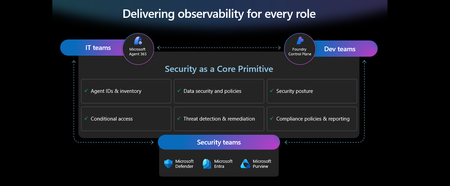
This week at Microsoft Ignite, we shared our vision for Microsoft security -- In the agentic era, security must be ambient and autonomous, like the AI it protects. It must be woven into and around everything we build—from silicon to OS, to agents, apps, data, platforms, and clouds—and throughout everything we do. In this blog, we are going to dive deeper into many of the new innovations we are introducing this week to secure AI agents and apps. As I spend time with our customers and partners, there are four consistent themes that have emerged as core security challenges to secure AI workloads. These are: preventing agent sprawl and access to resources, protecting against data oversharing and data leaks, defending against new AI threats and vulnerabilities, and adhering to evolving regulations. Addressing these challenges holistically requires a coordinated effort across IT, developers, and security leaders, not just within security teams and to enable this, we are introducing several new innovations: Microsoft Agent 365 for IT, Foundry Control Plane in Microsoft Foundry for developers, and the Security Dashboard for AI for security leaders. In addition, we are releasing several new purpose-built capabilities to protect and govern AI apps and agents across Microsoft Defender, Microsoft Entra, and Microsoft Purview. Observability at every layer of the stack To facilitate the organization-wide effort that it takes to secure and govern AI agents and apps – IT, developers, and security leaders need observability (security, management, and monitoring) at every level. IT teams need to enable the development and deployment of any agent in their environment. To ensure the responsible and secure deployment of agents into an organization, IT needs a unified agent registry, the ability to assign an identity to every agent, manage the agent’s access to data and resources, and manage the agent’s entire lifecycle. In addition, IT needs to be able to assign access to common productivity and collaboration tools, such as email and file storage, and be able to observe their entire agent estate for risks such as over-permissioned agents. Development teams need to build and test agents, apply security and compliance controls by default, and ensure AI models are evaluated for safety guardrails and security vulnerabilities. Post deployment, development teams must observe agents to ensure they are staying on task, accessing applications and data sources appropriately, and operating within their cost and performance expectations. Security & compliance teams must ensure overall security of their AI estate, including their AI infrastructure, platforms, data, apps, and agents. They need comprehensive visibility into all their security risks- including agent sprawl and resource access, data oversharing and leaks, AI threats and vulnerabilities, and complying with global regulations. They want to address these risks by extending their existing security investments that they are already invested in and familiar with, rather than using siloed or bolt-on tools. These teams can be most effective in delivering trustworthy AI to their organizations if security is natively integrated into the tools and platforms that they use every day, and if those tools and platforms share consistent security primitives such as agent identities from Entra; data security and compliance controls from Purview; and security posture, detections, and protections from Defender. With the new capabilities being released today, we are delivering observability at every layer of the AI stack, meeting IT, developers, and security teams where they are in the tools they already use to innovate with confidence. For IT Teams - Introducing Microsoft Agent 365, the control plane for agents, now in preview The best infrastructure for managing your agents is the one you already use to manage your users. With Agent 365, organizations can extend familiar tools and policies to confidently deploy and secure agents, without reinventing the wheel. By using the same trusted Microsoft 365 infrastructure, productivity apps, and protections, organizations can now apply consistent and familiar governance and security controls that are purpose-built to protect against agent-specific threats and risks. gement and governance of agents across organizations Microsoft Agent 365 delivers a unified agent Registry, Access Control, Visualization, Interoperability, and Security capabilities for your organization. These capabilities work together to help organizations manage agents and drive business value. The Registry powered by the Entra provides a complete and unified inventory of all the agents deployed and used in your organization including both Microsoft and third-party agents. Access Control allows you to limit the access privileges of your agents to only the resources that they need and protect their access to resources in real time. Visualization gives organizations the ability to see what matters most and gain insights through a unified dashboard, advanced analytics, and role-based reporting. Interop allows agents to access organizational data through Work IQ for added context, and to integrate with Microsoft 365 apps such as Outlook, Word, and Excel so they can create and collaborate alongside users. Security enables the proactive detection of vulnerabilities and misconfigurations, protects against common attacks such as prompt injections, prevents agents from processing or leaking sensitive data, and gives organizations the ability to audit agent interactions, assess compliance readiness and policy violations, and recommend controls for evolving regulatory requirements. Microsoft Agent 365 also includes the Agent 365 SDK, part of Microsoft Agent Framework, which empowers developers and ISVs to build agents on their own AI stack. The SDK enables agents to automatically inherit Microsoft's security and governance protections, such as identity controls, data security policies, and compliance capabilities, without the need for custom integration. For more details on Agent 365, read the blog here. For Developers - Introducing Microsoft Foundry Control Plane to observe, secure and manage agents, now in preview Developers are moving fast to bring agents into production, but operating them at scale introduces new challenges and responsibilities. Agents can access tools, take actions, and make decisions in real time, which means development teams must ensure that every agent behaves safely, securely, and consistently. Today, developers need to work across multiple disparate tools to get a holistic picture of the cybersecurity and safety risks that their agents may have. Once they understand the risk, they then need a unified and simplified way to monitor and manage their entire agent fleet and apply controls and guardrails as needed. Microsoft Foundry provides a unified platform for developers to build, evaluate and deploy AI apps and agents in a responsible way. Today we are excited to announce that Foundry Control Plane is available in preview. This enables developers to observe, secure, and manage their agent fleets with built-in security, and centralized governance controls. With this unified approach, developers can now identify risks and correlate disparate signals across their models, agents, and tools; enforce consistent policies and quality gates; and continuously monitor task adherence and runtime risks. Foundry Control Plane is deeply integrated with Microsoft’s security portfolio to provide a ‘secure by design’ foundation for developers. With Microsoft Entra, developers can ensure an agent identity (Agent ID) and access controls are built into every agent, mitigating the risk of unmanaged agents and over permissioned resources. With Microsoft Defender built in, developers gain contextualized alerts and posture recommendations for agents directly within the Foundry Control Plane. This integration proactively prevents configuration and access risks, while also defending agents from runtime threats in real time. Microsoft Purview’s native integration into Foundry Control Plane makes it easy to enable data security and compliance for every Foundry-built application or agent. This allows Purview to discover data security and compliance risks and apply policies to prevent user prompts and AI responses from safety and policy violations. In addition, agent interactions can be logged and searched for compliance and legal audits. This integration of the shared security capabilities, including identity and access, data security and compliance, and threat protection and posture ensures that security is not an afterthought; it’s embedded at every stage of the agent lifecycle, enabling you to start secure and stay secure. For more details, read the blog. For Security Teams - Introducing Security Dashboard for AI - unified risk visibility for CISOs and AI risk leaders, coming soon AI proliferation in the enterprise, combined with the emergence of AI governance committees and evolving AI regulations, leaves CISOs and AI risk leaders needing a clear view of their AI risks, such as data leaks, model vulnerabilities, misconfigurations, and unethical agent actions across their entire AI estate, spanning AI platforms, apps, and agents. 90% of security professionals, including CISOs, report that their responsibilities have expanded to include data governance and AI oversight within the past year. 1 At the same time, 86% of risk managers say disconnected data and systems lead to duplicated efforts and gaps in risk coverage. 2 To address these needs, we are excited to introduce the Security Dashboard for AI. This serves as a unified dashboard that aggregates posture and real-time risk signals from Microsoft Defender, Microsoft Entra, and Microsoft Purview. This unified dashboard allows CISOs and AI risk leaders to discover agents and AI apps, track AI posture and drift, and correlate risk signals to investigate and act across their entire AI ecosystem. For example, you can see your full AI inventory and get visibility into a quarantined agent, flagged for high data risk due to oversharing sensitive information in Purview. The dashboard then correlates that signal with identity insights from Entra and threat protection alerts from Defender to provide a complete picture of exposure. From there, you can delegate tasks to the appropriate teams to enforce policies and remediate issues quickly. With the Security Dashboard for AI, CISOs and risk leaders gain a clear, consolidated view of AI risks across agents, apps, and platforms—eliminating fragmented visibility, disconnected posture insights, and governance gaps as AI adoption scales. Best of all, there’s nothing new to buy. If you’re already using Microsoft security products to secure AI, you’re already a Security Dashboard for AI customer. Figure 5: Security Dashboard for AI provides CISOs and AI risk leaders with a unified view of their AI risk by bringing together their AI inventory, AI risk, and security recommendations to strengthen overall posture Together, these innovations deliver observability and security across IT, development, and security teams, powered by Microsoft’s shared security capabilities. With Microsoft Agent 365, IT teams can manage and secure agents alongside users. Foundry Control Plane gives developers unified governance and lifecycle controls for agent fleets. Security Dashboard for AI provides CISOs and AI risk leaders with a consolidated view of AI risks across platforms, apps, and agents. Added innovation to secure and govern your AI workloads In addition to the IT, developer, and security leader-focused innovations outlined above, we continue to accelerate our pace of innovation in Microsoft Entra, Microsoft Purview, and Microsoft Defender to address the most pressing needs for securing and governing your AI workloads. These needs are: Manage agent sprawl and resource access e.g. managing agent identity, access to resources, and permissions lifecycle at scale Prevent data oversharing and leaks e.g. protecting sensitive information shared in prompts, responses, and agent interactions Defend against shadow AI, new threats, and vulnerabilities e.g. managing unsanctioned applications, preventing prompt injection attacks, and detecting AI supply chain vulnerabilities Enable AI governance for regulatory compliance e.g. ensuring AI development, operations, and usage comply with evolving global regulations and frameworks Manage agent sprawl and resource access 76% of business leaders expect employees to manage agents within the next 2–3 years. 3 Widespread adoption of agents is driving the need for visibility and control, which includes the need for a unified registry, agent identities, lifecycle governance, and secure access to resources. Today, Microsoft Entra provides robust identity protection and secure access for applications and users. However, organizations lack a unified way to manage, govern, and protect agents in the same way they manage their users. Organizations need a purpose-built identity and access framework for agents. Introducing Microsoft Entra Agent ID, now in preview Microsoft Entra Agent ID offers enterprise-grade capabilities that enable organizations to prevent agent sprawl and protect agent identities and their access to resources. These new purpose-built capabilities enable organizations to: Register and manage agents: Get a complete inventory of the agent fleet and ensure all new agents are created with an identity built-in and are automatically protected by organization policies to accelerate adoption. Govern agent identities and lifecycle: Keep the agent fleet under control with lifecycle management and IT-defined guardrails for both agents and people who create and manage them. Protect agent access to resources: Reduce risk of breaches, block risky agents, and prevent agent access to malicious resources with conditional access and traffic inspection. Agents built in Microsoft Copilot Studio, Microsoft Foundry, and Security Copilot get an Entra Agent ID built-in at creation. Developers can also adopt Entra Agent ID for agents they build through Microsoft Agent Framework, Microsoft Agent 365 SDK, or Microsoft Entra Agent ID SDK. Read the Microsoft Entra blog to learn more. Prevent data oversharing and leaks Data security is more complex than ever. Information Security Media Group (ISMG) reports that 80% of leaders cite leakage of sensitive data as their top concern. 4 In addition to data security and compliance risks of generative AI (GenAI) apps, agents introduces new data risks such as unsupervised data access, highlighting the need to protect all types of corporate data, whether it is accessed by employees or agents. To mitigate these risks, we are introducing new Microsoft Purview data security and compliance capabilities for Microsoft 365 Copilot and for agents and AI apps built with Copilot Studio and Microsoft Foundry, providing unified protection, visibility, and control for users, AI Apps, and Agents. New Microsoft Purview controls safeguard Microsoft 365 Copilot with real-time protection and bulk remediation of oversharing risks Microsoft Purview and Microsoft 365 Copilot deliver a fully integrated solution for protecting sensitive data in AI workflows. Based on ongoing customer feedback, we’re introducing new capabilities to deliver real-time protection for sensitive data in M365 Copilot and accelerated remediation of oversharing risks: Data risk assessments: Previously, admins could monitor oversharing risks such as SharePoint sites with unprotected sensitive data. Now, they can perform item-level investigations and bulk remediation for overshared files in SharePoint and OneDrive to quickly reduce oversharing exposure. Data Loss Prevention (DLP) for M365 Copilot: DLP previously excluded files with sensitivity labels from Copilot processing. Now in preview, DLP also prevents prompts that include sensitive data from being processed in M365 Copilot, Copilot Chat, and Copilot agents, and prevents Copilot from using sensitive data in prompts for web grounding. Priority cleanup for M365 Copilot assets: Many organizations have org-wide policies to retain or delete data. Priority cleanup, now generally available, lets admins delete assets that are frequently processed by Copilot, such as meeting transcripts and recordings, on an independent schedule from the org-wide policies while maintaining regulatory compliance. On-demand classification for meeting transcripts: Purview can now detect sensitive information in meeting transcripts on-demand. This enables data security admins to apply DLP policies and enforce Priority cleanup based on the sensitive information detected. & bulk remediation Read the full Data Security blog to learn more. Introducing new Microsoft Purview data security capabilities for agents and apps built with Copilot Studio and Microsoft Foundry, now in preview Microsoft Purview now extends the same data security and compliance for users and Copilots to agents and apps. These new capabilities are: Enhanced Data Security Posture Management: A centralized DSPM dashboard that provides observability, risk assessment, and guided remediation across users, AI apps, and agents. Insider Risk Management (IRM) for Agents: Uniquely designed for agents, using dedicated behavioral analytics, Purview dynamically assigns risk levels to agents based on their risky handing of sensitive data and enables admins to apply conditional policies based on that risk level. Sensitive data protection with Azure AI Search: Azure AI Search enables fast, AI-driven retrieval across large document collections, essential for building AI Apps. When apps or agents use Azure AI Search to index or retrieve data, Purview sensitivity labels are preserved in the search index, ensuring that any sensitive information remains protected under the organization’s data security & compliance policies. For more information on preventing data oversharing and data leaks - Learn how Purview protects and governs agents in the Data Security and Compliance for Agents blog. Defend against shadow AI, new threats, and vulnerabilities AI workloads are subject to new AI-specific threats like prompt injections attacks, model poisoning, and data exfiltration of AI generated content. Although security admins and SOC analysts have similar tasks when securing agents, the attack methods and surfaces differ significantly. To help customers defend against these novel attacks, we are introducing new capabilities in Microsoft Defender that deliver end-to-end protection, from security posture management to runtime defense. Introducing Security Posture Management for agents, now in preview As organizations adopt AI agents to automate critical workflows, they become high-value targets and potential points of compromise, creating a critical need to ensure agents are hardened, compliant, and resilient by preventing misconfigurations and safeguarding against adversarial manipulation. Security Posture Management for agents in Microsoft Defender now provides an agent inventory for security teams across Microsoft Foundry and Copilot Studio agents. Here, analysts can assess the overall security posture of an agent, easily implement security recommendations, and identify vulnerabilities such as misconfigurations and excessive permissions, all aligned to the MITRE ATT&CK framework. Additionally, the new agent attack path analysis visualizes how an agent’s weak security posture can create broader organizational risk, so you can quickly limit exposure and prevent lateral movement. Introducing Threat Protection for agents, now in preview Attack techniques and attack surfaces for agents are fundamentally different from other assets in your environment. That’s why Defender is delivering purpose-built protections and detections to help defend against them. Defender is introducing runtime protection for Copilot Studio agents that automatically block prompt injection attacks in real time. In addition, we are announcing agent-specific threat detections for Copilot Studio and Microsoft Foundry agents coming soon. Defender automatically correlates these alerts with Microsoft’s industry-leading threat intelligence and cross-domain security signals to deliver richer, contextualized alerts and security incident views for the SOC analyst. Defender’s risk and threat signals are natively integrated into the new Microsoft Foundry Control Plane, giving development teams full observability and the ability to act directly from within their familiar environment. Finally, security analysts will be able to hunt across all agent telemetry in the Advanced Hunting experience in Defender, and the new Agent 365 SDK extends Defender’s visibility and hunting capabilities to third-party agents, starting with Genspark and Kasisto, giving security teams even more coverage across their AI landscape. To learn more about how you can harden the security posture of your agents and defend against threats, read the Microsoft Defender blog. Enable AI governance for regulatory compliance Global AI regulations like the EU AI Act and NIST AI RMF are evolving rapidly; yet, according to ISMG, 55% of leaders report lacking clarity on current and future AI regulatory requirements. 5 As enterprises adopt AI, they must ensure that their AI innovation aligns with global regulations and standards to avoid costly compliance gaps. Introducing new Microsoft Purview Compliance Manager capabilities to stay ahead of evolving AI regulations, now in preview Today, Purview Compliance Manager provides over 300 pre-built assessments for common industry, regional, and global standards and regulations. However, the pace of change for new AI regulations requires controls to be continuously re-evaluated and updated so that organizations can adapt to ongoing changes in regulations and stay compliant. To address this need, Compliance Manager now includes AI-powered regulatory templates. AI-powered regulatory templates enable real-time ingestion and analysis of global regulatory documents, allowing compliance teams to quickly adapt to changes as they happen. As regulations evolve, the updated regulatory documents can be uploaded to Compliance Manager, and the new requirements are automatically mapped to applicable recommended actions to implement controls across Microsoft Defender, Microsoft Entra, Microsoft Purview, Microsoft 365, and Microsoft Foundry. Automated actions by Compliance Manager further streamline governance, reduce manual workload, and strengthen regulatory accountability. Introducing expanded Microsoft Purview compliance capabilities for agents and AI apps now in preview Microsoft Purview now extends its compliance capabilities across agent-generated interactions, ensuring responsible use and regulatory alignment as AI becomes deeply embedded across business processes. New capabilities include expanded coverage for: Audit: Surface agent interactions, lifecycle events, and data usage with Purview Audit. Unified audit logs across user and agent activities, paired with traceability for every agent using an Entra Agent ID, support investigation, anomaly detection, and regulatory reporting. Communication Compliance: Detect prompts sent to agents and agent-generated responses containing inappropriate, unethical, or risky language, including attempts to manipulate agents into bypassing policies, generating risky content, or producing noncompliant outputs. When issues arise, data security admins get full context, including the prompt, the agent’s output, and relevant metadata, so they can investigate and take corrective action Data Lifecycle Management: Apply retention and deletion policies to agent-generated content and communication flows to automate lifecycle controls and reduce regulatory risk. Read about Microsoft Purview data security for agents to learn more. Finally, we are extending our data security, threat protection, and identity access capabilities to third-party apps and agents via the network. Advancing Microsoft Entra Internet Access Secure Web + AI Gateway - extend runtime protections to the network, now in preview Microsoft Entra Internet Access, part of the Microsoft Entra Suite, has new capabilities to secure access to and usage of GenAI at the network level, marking a transition from Secure Web Gateway to Secure Web and AI Gateway. Enterprises can accelerate GenAI adoption while maintaining compliance and reducing risk, empowering employees to experiment with new AI tools safely. The new capabilities include: Prompt injection protection which blocks malicious prompts in real time by extending Azure AI Prompt Shields to the network layer. Network file filtering which extends Microsoft Purview to inspect files in transit and prevents regulated or confidential data from being uploaded to unsanctioned AI services. Shadow AI Detection that provides visibility into unsanctioned AI applications through Cloud Application Analytics and Defender for Cloud Apps risk scoring, empowering security teams to monitor usage trends, apply Conditional Access, or block high-risk apps instantly. Unsanctioned MCP server blocking prevents access to MCP servers from unauthorized agents. With these controls, you can accelerate GenAI adoption while maintaining compliance and reducing risk, so employees can experiment with new AI tools safely. Read the Microsoft Entra blog to learn more. As AI transforms the enterprise, security must evolve to meet new challenges—spanning agent sprawl, data protection, emerging threats, and regulatory compliance. Our approach is to empower IT, developers, and security leaders with purpose-built innovations like Agent 365, Foundry Control Plane, and the Security Dashboard for AI. These solutions bring observability, governance, and protection to every layer of the AI stack, leveraging familiar tools and integrated controls across Microsoft Defender, Microsoft Entra, and Microsoft Purview. The future of security is ambient, autonomous, and deeply woven into the fabric of how we build, deploy, and govern AI systems. Explore additional resources Learn more about Security for AI solutions on our webpage Learn more about Microsoft Agent 365 Learn more about Microsoft Entra Agent ID Get started with Microsoft 365 Copilot Get started with Microsoft Copilot Studio Get started with Microsoft Foundry Get started with Microsoft Defender for Cloud Get started with Microsoft Entra Get started with Microsoft Purview Get started with Microsoft Purview Compliance Manager Sign up for a free Microsoft 365 E5 Security Trial and Microsoft Purview Trial 1 Bedrock Security, 2025 Data Security Confidence Index, published Mar 17, 2025. 2 AuditBoard & Ascend2, Connected Risk Report 2024; as cited by MIT Sloan Management Review, Spring 2025. 3 KPMG AI Quarterly Pulse Survey | Q3 2025. September 2025. n= 130 U.S.-based C-suite and business leaders representing organizations with annual revenue of $1 billion or more 4 First Annual Generative AI study: Business Rewards vs. Security Risks, , Q3 2023, ISMG, N=400 5 First Annual Generative AI study: Business Rewards vs. Security Risks, Q3 2023, ISMG, N=400Cybersecurity: What Every Business Leader Needs to Know Now
As a Senior Cybersecurity Solution Architect, I’ve had the privilege of supporting organisations across the United Kingdom, Europe, and the United States—spanning sectors from finance to healthcare—in strengthening their security posture. One thing has become abundantly clear: cybersecurity is no longer the sole domain of IT departments. It is a strategic imperative that demands attention at board-level. This guide distils five key lessons drawn from real-world engagements to help executive leaders navigate today’s evolving threat landscape. These insights are not merely technical—they are cultural, operational, and strategic. If you’re a C-level executive, this article is a call to action: reassess how your organisation approaches cybersecurity before the next breach forces the conversation. In this article, I share five lessons (and quotes) from the field that help demystify how to enhance an organisation’s security posture. 1. Shift the Mindset “This has always been our approach, and we’ve never experienced a breach—so why should we change it?” A significant barrier to effective cybersecurity lies not in the sophistication of attackers, but in the predictability of human behaviour. If you’ve never experienced a breach, it’s tempting to maintain the status quo. However, as threats evolve, so too must your defences. Many cyber threats exploit well-known vulnerabilities that remain unpatched or rely on individuals performing routine tasks in familiar ways. Human nature tends to favour comfort and habit—traits that adversaries are adept at exploiting. Unlike many organisations, attackers readily adopt new technologies to advance their objectives, including AI-powered ransomware to execute increasingly sophisticated attacks. It is therefore imperative to recognise—without delay—that the advent of AI has dramatically reduced both the effort and time required to compromise systems. As the UK’s National Cyber Security Centre (NCSC) has stated: “AI lowers the barrier for novice cyber criminals, hackers-for-hire and hacktivists to carry out effective access and information gathering operations. This enhanced access will likely contribute to the global ransomware threat over the next two years.” Similarly, McKinsey & Company observed: “As AI quickly advances cyber threats, organisations seem to be taking a more cautious approach, balancing the benefits and risks of the new technology while trying to keep pace with attackers’ increasing sophistication.” To counter this evolving threat landscape, organisations must proactively leverage AI in their cyber defence strategies. Examples include: Identity and Access Management (IAM): AI enhances IAM by analysing real-time signals across systems to detect risky sign-ins and enforce adaptive access controls. Example: Microsoft Entra Agents for Conditional Access use AI to automate policy recommendations, streamlining access decisions with minimal manual input. Figure 1: Microsoft Entra Agents Threat Detection: AI accelerates detection, response, and recovery, helping organisations stay ahead of sophisticated threats. Example: Microsoft Defender for Cloud’s AI threat protection identifies prompt injection, data poisoning, and wallet attacks in real time. Incident Response: AI facilitates real-time decision-making, removing emotional bias and accelerating containment and recovery during security incidents. Example: Automatic Attack Disruption in Defender XDR, which can automatically contain a breach in progress. AI Security Posture Management AI workloads require continuous discovery, classification, and protection across multi-cloud environments. Example: Microsoft Defender for Cloud’s AI Security Posture Management secures custom AI apps across Azure, AWS, and GCP by detecting misconfigurations, vulnerabilities, and compliance gaps. Data Security Posture Management (DSPM) for AI AI interactions must be governed to ensure privacy, compliance, and insider risk mitigation. Example: Microsoft Purview DSPM for AI enables prompt auditing, applies Data Loss Prevention (DLP) policies to third-party AI apps like ChatGPT, and supports eDiscovery and lifecycle management. AI Threat Protection Organisations must address emerging AI threat vectors, including prompt injection, data leakage, and model exploitation. Example: Defender for AI (private preview) provides model-level security, including governance, anomaly detection, and lifecycle protection. Embracing innovation, automation, and intelligent defence is the secret sauce for cyber resilience in 2026. 2. Avoid One-Off Purchases – Invest with a Strategy “One MDE and one Sentinel to go, please.” Organisations often approach me intending to purchase a specific cybersecurity product—such as Microsoft Defender for Endpoint (MDE)—without a clearly articulated strategic rationale. My immediate question is: what is the broader objective behind this purchase? Is it driven by perceived value or popularity, or does it form part of a well-considered strategy to enhance endpoint security? Cybersecurity investments should be guided by a long-term, holistic strategy that spans multiple years and is periodically reassessed to reflect evolving threats. Strengthening endpoint protection must be integrated into a wider effort to improve the organisation’s overall security posture. This includes ensuring seamless integration between security solutions and avoiding operational silos. For example, deploying robust endpoint protection is of limited value if identities are not safeguarded with multi-factor authentication (MFA), or if storage accounts remain publicly accessible. A cohesive and forward-looking approach ensures that all components of the security architecture work in concert to mitigate risk effectively. Security Adoption Journey (Based on Zero Trust Framework) Assess – Evaluate the threat landscape, attack surface, vulnerabilities, compliance obligations, and critical assets. Align – Link security objectives to broader business goals to ensure strategic coherence. Architect – Design integrated and scalable security solutions, addressing gaps and eliminating operational silos. Activate – Implement tools with robust governance and automation to ensure consistent policy enforcement. Advance – Continuously monitor, test, and refine the security posture to stay ahead of evolving threats. Security tools are not fast food—they work best as part of a long-term plan, not a one-off order. This piecemeal approach runs counter to the modern Zero Trust security model, which assumes no single tool will prevent every breach and instead implements layered defences and integration. 3. Legacy Systems Are Holding You Back “Unfortunately, we are unable to implement phishing-resistant MFA, as our legacy app does not support integration with the required protocols.” A common challenge faced by many organisations I have worked with is the constraint on innovation within their cybersecurity architecture, primarily due to continued reliance on legacy applications—often driven by budgetary or operational necessity. These outdated systems frequently lack compatibility with modern security technologies and may introduce significant vulnerabilities. A notable example is the deployment of phishing-resistant multi-factor authentication (MFA)—such as FIDO2 security keys or certificate-based authentication—which requires advanced identity protocols and conditional access policies. These capabilities are available exclusively through Microsoft Entra ID. To address this issue effectively, it is essential to design security frameworks based on the organisation’s future aspirations rather than its current limitations. By adopting a forward-thinking approach, organisations can remain receptive to emerging technologies that align with their strategic cybersecurity objectives. Moreover, this perspective encourages investment in acquiring the necessary talent, thereby reducing reliance on extensive change management and staff retraining. I advise designing for where you want to be in the next 1–3 years—ideally cloud-first and identity-driven—essentially adopting a Zero Trust architecture, rather than being constrained by the limitations of legacy systems. 4. Collaboration Is a Security Imperative “This item will need to be added to the dev team's backlog. Given their current workload, they will do their best to implement GitHub Security in Q3, subject to capacity.” Cybersecurity threats may originate from various parts of an organisation, and one of the principal challenges many face is the fragmented nature of their defence strategies. To effectively mitigate such risks, cybersecurity must be embedded across all departments and functions, rather than being confined to a single team or role. In many organisations, the Chief Information Security Officer (CISO) operates in isolation from other C-level executives, which can limit their influence and complicate the implementation of security measures across the enterprise. Furthermore, some teams may lack the requisite expertise to execute essential security practices. For instance, an R&D lead responsible for managing developers may not possess the necessary skills in DevSecOps. To address these challenges, it is vital to ensure that the CISO is empowered to act without political or organisational barriers and is supported in implementing security measures across all business units. When the CISO has backing from the COO and HR, initiatives such as MFA rollout happen faster and more thoroughly. Cross-Functional Security Responsibilities Role Security Responsibilities R&D - Adopt DevSecOps practices - Identify vulnerabilities early - Manage code dependencies - Detect exposed secrets - Embed security in CI/CD pipelines CIO - Ensure visibility over organizational data - Implement Data Loss Prevention (DLP) - Safeguard sensitive data lifecycle - Ensure regulatory compliance CTO - Secure cloud environments (CSPM) - Manage SaaS security posture (SSPM) - Ensure hardware and endpoint protection COO - Protect digital assets - Secure domain management - Mitigate impersonation threats - Safeguard digital marketing channels and customer PII Support & Vendors - Deliver targeted training - Prevent social engineering attacks - Improve awareness of threat vectors HR - Train employees on AI-related threats - Manage insider risks - Secure employee data - Oversee cybersecurity across the employee lifecycle Empowering the CISO to act across departments helps organisations shift towards a security-first culture—embedding cybersecurity into every function, not just IT. 5. Compliance Is Not Security “We’re compliant, so we must be secure.” Many organisations mistakenly equate passing audits—such as ISO 27001 or SOC 2—with being secure. While compliance frameworks help establish a baseline for security, they are not a guarantee of protection. Determined attackers are not deterred by audit checklists; they exploit gaps, misconfigurations, and human error regardless of whether an organisation is certified. Moreover, due to the rapidly evolving nature of the cyber threat landscape, compliance frameworks often struggle to keep pace. By the time a standard is updated, attackers may already be exploiting new techniques that fall outside its scope. This lag creates a false sense of security for organisations that rely solely on regulatory checkboxes. Security is a continuous risk management process—not a one-time certification. It must be embedded into every layer of the enterprise and treated with the same urgency as other core business priorities. Compliance may be the starting line, not the finish line. Effective security goes beyond meeting regulatory requirements—it demands ongoing vigilance, adaptability, and a proactive mindset. Conclusion: Cybersecurity Is a Continuous Discipline Cybersecurity is not a destination—it is a continuous journey. By embracing strategic thinking, cross-functional collaboration, and emerging technologies, organisations can build resilience against today’s threats and tomorrow’s unknowns. The lessons shared throughout this article are not merely technical—they are cultural, operational, and strategic. If there is one key takeaway, it is this: avoid piecemeal fixes and instead adopt an integrated, future-ready security strategy. Due to the rapidly evolving nature of the cyber threat landscape, compliance frameworks alone cannot keep pace. Security must be treated as a dynamic, ongoing process—one that is embedded into every layer of the enterprise and reviewed regularly. Organisations should conduct periodic security posture reviews, leveraging tools such as Microsoft Secure Score or monthly risk reports, and stay informed about emerging threats through threat intelligence feeds and resources like the Microsoft Digital Defence Report, CISA (Cybersecurity and Infrastructure Security Agency), NCSC (UK National Cyber Security Centre), and other open-source intelligence platforms. As Ann Johnson aptly stated in her blog: “The most prepared organisations are those that keep asking the right questions and refining their approach together.” Cyber resilience demands ongoing investment—in people (through training and simulation drills), in processes (via playbooks and frameworks), and in technology (through updates and adoption of AI-driven defences). To reduce cybersecurity risk over time, resilient organisations must continually refine their approach and treat cybersecurity as an ongoing discipline. The time to act is now. Resources: https://www.ncsc.gov.uk/report/impact-of-ai-on-cyber-threat Defend against cyber threats with AI solutions from Microsoft - Microsoft Industry Blogs Generative AI Cybersecurity Solutions | Microsoft Security Require phishing-resistant multifactor authentication for Microsoft Entra administrator roles - Microsoft Entra ID | Microsoft Learn AI is the greatest threat—and defense—in cybersecurity today. Here’s why. Microsoft Entra Agents - Microsoft Entra | Microsoft Learn Smarter identity security starts with AI https://www.microsoft.com/en-us/security/blog/2025/06/12/cyber-resilience-begins-before-the-crisis/ https://www.microsoft.com/en-us/security/security-insider/threat-landscape/microsoft-digital-defense-report-2023-critical-cybersecurity-challenges https://www.microsoft.com/en-us/security/blog/2025/06/12/cyber-resilience-begins-before-the-crisis/2.2KViews2likes0CommentsSecure and govern AI apps and agents with Microsoft Purview
The Microsoft Purview family is here to help you secure and govern data across third party IaaS and Saas, multi-platform data environment, while helping you meet compliance requirements you may be subject to. Purview brings simplicity with a comprehensive set of solutions built on a platform of shared capabilities, that helps keep your most important asset, data, safe. With the introduction of AI technology, Purview also expanded its data coverage to include discovering, protecting, and governing the interactions of AI apps and agents, such as Microsoft Copilots like Microsoft 365 Copilot and Security Copilot, Enterprise built AI apps like Chat GPT enterprise, and other consumer AI apps like DeepSeek, accessed through the browser. To help you view, investigate interactions with all those AI apps, and to create and manage policies to secure and govern them in one centralized place, we have launched Purview Data Security Posture Management (DSPM) for AI. You can learn more about DSPM for AI here with short video walkthroughs: Learn how Microsoft Purview Data Security Posture Management (DSPM) for AI provides data security and compliance protections for Copilots and other generative AI apps | Microsoft Learn Purview capabilities for AI apps and agents To understand our current set of capabilities within Purview to discover, protect, and govern various AI apps and agents, please refer to our Learn doc here: Microsoft Purview data security and compliance protections for Microsoft 365 Copilot and other generative AI apps | Microsoft Learn Here is a quick reference guide for the capabilities available today: Note that currently, DLP for Copilot and adhering to sensitivity label are currently designed to protect content in Microsoft 365. Thus, Security Copilot and Copilot in Fabric, along with Copilot studio custom agents that do not use Microsoft 365 as a content source, do not have these features available. Please see list of AI sites supported by Microsoft Purview DSPM for AI here Conclusion Microsoft Purview can help you discover, protect, and govern the prompts and responses from AI applications in Microsoft Copilot experiences, Enterprise AI apps, and other AI apps through its data security and data compliance solutions, while allowing you to view, investigate, and manage interactions in one centralized place in DSPM for AI. Follow up reading Check out the deployment guides for DSPM for AI How to deploy DSPM for AI - https://aka.ms/DSPMforAI/deploy How to use DSPM for AI data risk assessment to address oversharing - https://aka.ms/dspmforai/oversharing Address oversharing concerns with Microsoft 365 blueprint - aka.ms/Copilot/Oversharing Explore the Purview SDK Microsoft Purview SDK Public Preview | Microsoft Community Hub (blog) Microsoft Purview documentation - purview-sdk | Microsoft Learn Build secure and compliant AI applications with Microsoft Purview (video) References for DSPM for AI Microsoft Purview data security and compliance protections for Microsoft 365 Copilot and other generative AI apps | Microsoft Learn Considerations for deploying Microsoft Purview AI Hub and data security and compliance protections for Microsoft 365 Copilot and Microsoft Copilot | Microsoft Learn Block Users From Sharing Sensitive Information to Unmanaged AI Apps Via Edge on Managed Devices (preview) | Microsoft Learn as part of Scenario 7 of Create and deploy a data loss prevention policy | Microsoft Learn Commonly used properties in Copilot audit logs - Audit logs for Copilot and AI activities | Microsoft Learn Supported AI sites by Microsoft Purview for data security and compliance protections | Microsoft Learn Where Copilot usage data is stored and how you can audit it - Microsoft 365 Copilot data protection and auditing architecture | Microsoft Learn Downloadable whitepaper: Data Security for AI Adoption | Microsoft Explore the roadmap for DSPM for AI Public roadmap for DSPM for AI - Microsoft 365 Roadmap | Microsoft 365PMPurRethinking Data Security and Governance in the Era of AI
The era of AI is reshaping industries, enabling unprecedented innovations, and presenting new opportunities for organizations worldwide. But as organizations accelerate AI adoption, many are focused on a growing concern: their current data security and governance practices are not effectively built for the fast-paced AI innovation and ever-evolving regulatory landscape. At Microsoft, we recognize the critical need for an integrated approach to address these risks. In our latest findings, Top 3 Challenges in Securing and Governing Data for the Era of AI, we uncovered critical gaps in how organizations manage data risk. The findings exemplify the current challenges: 91% of leaders are not prepared to manage risks posed by AI 1 and 85% feel unprepared to comply with AI regulations 2 . These gaps not only increase non-compliance but also put innovation at risk. Microsoft Purview has the tools to tackle these challenges head on, helping organizations move to an approach that protects data, meets compliance regulations, and enables trusted AI transformation. We invite you to take this opportunity to evaluate your current practices, platforms, and responsibilities, and to understand how to best secure and govern your organization for growing data risks in the era of AI. Platform fragmentation continues to weaken security outcomes Organizations often rely on fragmented tools across security, compliance, and data teams, leading to a lack of unified visibility and insufficient data hygiene. Our findings reveal the effects of fragmented platforms, leading to duplicated data, inconsistent classification, redundant alerts, and siloed investigations, which ultimately is causing data exposure incidents related to AI to be on the rise 3 . Microsoft Purview offers centralized visibility across your organization’s data estate. This allows teams to break down silos, streamline workflows, and mitigate data leakage and oversharing. With Microsoft Purview, capabilities like data health management and data security posture management are designed to enhance collaboration and deliver enriched insights across your organization to help further protect your data and mitigate risks faster. Microsoft Purview offers the following: Unified insights across your data estate, breaking down silos between security, compliance, and data teams. Microsoft Purview Data Security Posture Management (DSPM) for AI helps organizations gain unified visibility into GenAI usage across users, data, and apps to address the heightened risk of sensitive data exposure from AI. Built-in capabilities like classification, labeling, data loss prevention, and insider risk insights in one platform. In addition, newly launched solutions like Microsoft Purview Data Security Investigations accelerate investigations with AI-powered deep content analysis, which helps data security teams quickly identify and mitigate sensitive data and security risks within impacted data. Organizations like Kern County historically relied on many fragmented systems but adopted Microsoft Purview to unify their organization’s approach to data protection in preparation for increasing risks associated with deploying GenAI. “We have reduced risk exposure, [Microsoft] Purview helped us go from reaction to readiness. We are catching issues proactively instead of retroactively scrambling to contain them.” – Aaron Nance, Deputy Chief Information Security Officer, Kern County Evolving regulations require continuous compliance AI-driven innovation is creating a surge in regulations, resulting in over 200 daily updates across more than 900 regulatory agencies 4 , as highlighted in our research. Compliance has become increasingly difficult, with organizations struggling to avoid fines and comply with varying requirements across regions. To navigate these challenges effectively, security leaders’ responsibilities are expanding to include oversight across governance and compliance, including oversight of traditional data catalog and governance solutions led by the central data office. Leaders also cite the need for regulation and audit readiness. Microsoft Purview enables compliance and governance by: Streamlining compliance with Microsoft Purview Compliance Manager templates, step-by-step guidance, and insights for region and industry-specific regulations, including GDPR, HIPAA, and AI-specific regulation like the EU AI Act. Supporting legal matters such as forensic and internal investigations with audit trail records in Microsoft Purview eDiscovery and Audit. Activating and governing data for trustworthy analytics and AI with Microsoft Purview Unified Catalog, which enables visibility across your data estate and data confidence via data quality, data lineage, and curation capabilities for federated governance. Microsoft Purview’s suite of capabilities provides visibility and accountability, enabling security leaders to meet stringent compliance demands while advancing AI initiatives with confidence. Organizations need a unified approach to secure and govern data Organizations are calling for an integrated platform to address data security, governance, and compliance collectively. Our research shows that 95% of leaders agree that unifying teams and tools is a top priority 5 and 90% plan to adopt a unified solution to mitigate data related risks and maximize impact 6 . Integration isn't just about convenience, it’s about enabling innovation with trusted data protection. Microsoft Purview enables a shared responsibility model, allowing individual business units to own their data while giving central teams oversight and policy control. As organizations adopt a unified platform approach, our findings reveal the upside potential not only being reduced risk but also cost savings. With AI-powered copilots such as Security Copilot in Microsoft Purview, data protection tasks are simplified with natural-language guidance, especially for under resourced teams. Accelerating AI transformation with Microsoft Purview Microsoft Purview helps security, compliance, and governance teams navigate the complexities of AI innovation while implementing effective data protection and governance strategies. Microsoft partner EY highlights the results they are seeing: “We are seeing 25%–30% time savings when we build secure features using [Microsoft] Purview SDK. What was once fragmented is now centralized. With [Microsoft] Purview, everything comes together on one platform, giving a unified foundation to innovate and move forward with confidence.” – Prashant Garg, Partner of Data and AI, EY We invite you to explore how you can propel your organization toward a more secure future by reading the full research paper at https://aka.ms/SecureAndGovernPaper. Visit our website to learn more about Microsoft Purview. 1 Forbes, Only 9% Of Surveyed Companies Are Ready To Manage Risks Posed By AI, 2023 2 SAP LeanIX, AI Survey Results, 2024 3 Microsoft, Data Security Index Report, 2024 4 Forbes, Cost of Compliance, Thomson Reuters, 2021 5 Microsoft, Audience Research, 2024 6 Microsoft, Customer Requirements Research, 20248.1KViews3likes0CommentsEnterprise-grade controls for AI apps and agents built with Azure AI Foundry and Copilot Studio
AI innovation is moving faster than ever, and more AI projects are moving beyond experimentation into deployment, to drive tangible business impact. As organizations accelerate innovation with custom AI applications and agents, new risks emerge across the software development lifecycle and AI stack related to data oversharing and leaks, new vulnerabilities and threats, and non-compliance with stringent regulatory requirements Through 2025, poisoning of software supply chains and infrastructure technology stacks will constitute more than 70% of malicious attacks against AI used in the enterprise 1 , highlighting potential threats that originate early in development. Today, the average cost of a data breach is $4.88 million, but when security issues are caught early in the development process, that number drops dramatically to just $80 per incident 2 . The message is very clear; security can’t be an afterthought anymore. It must be a team sport across the organization, embedded from the start and throughout the development lifecycle. That's why developers and security teams should align on processes and tools that bring security into every stage of the AI development lifecycle and give security practitioners visibility into and the ability to mitigate risks. To address these growing challenges and help customers secure and govern their AI workloads across development and security teams, we are: Enabling Azure AI Foundry and Microsoft Copilot Studio to provide best-in-class foundational capabilities to secure and govern AI workloads Deeply integrating and embedding industry-leading capabilities from Microsoft Purview, Microsoft Defender, and Microsoft Entra into Azure AI Foundry and Microsoft Copilot Studio This week, 3,000 developers are gathering in Seattle for the annual Microsoft Build conference, with many more tuning in online, to learn practical skills for accelerating their AI apps and agents' innovation. To support their AI innovation journey, today we are excited to announce several new capabilities to help developers and organizations secure and govern AI apps and agents. New Azure AI Foundry foundational capabilities to secure and govern AI workloads Azure AI Foundry enhancements for AI security and safety With 70,000 customers, 100 trillion tokens processed this quarter, and 2 billion enterprise search queries each day, Azure AI Foundry has grown beyond just an application layer—it's now a comprehensive platform for building agents that can plan, take action, and continuously learn to drive real business outcomes. To help organizations build and deploy AI with confidence, we’re introducing new security and safety capabilities and insights for developers in Azure AI Foundry Introducing Spotlighting to detect and block prompt injection attacks in real time As AI systems increasingly rely on external data sources, a new class of threats has emerged. Indirect prompt injection attacks embed hidden instructions in documents, emails, and web content, tricking models into taking unauthorized actions without any direct user input. These attacks are difficult to detect and hard to prevent using traditional filters alone. To address this, Azure AI Content Safety is introducing Spotlighting, now available in preview. Spotlighting strengthens the Prompt Shields guardrail by improving its ability to detect and handle potential indirect prompt injections, where hidden adversarial instructions are embedded in external content. This new capability helps prevent the model from inadvertently acting on malicious prompts that are not directly visible to the user. Enable Spotlighting in Azure AI Content Safety to detect potential indirect prompt injection attacks New capabilities for task adherence evaluation and task adherence mitigation to ensure agents remain within scope As developers build more capable agents, organizations face growing pressure to help confirm those agents act within defined instructions and policy boundaries. Even small deviations can lead to tool misuse, broken workflows, or risks like unintended exposure of sensitive data. To solve this, Azure AI Foundry now includes task adherence for agents, now in preview and powered by two components: a real-time evaluation and a new control within Azure AI Content Safety. At the core is a real-time task adherence evaluation API, part of Azure AI Content Safety. This API assesses whether an agent’s behavior is aligned with its assigned task by analyzing the user’s query, system instructions, planned tool calls, and the agent’s response. The evaluation framework is built on Microsoft’s Agent Evaluators, which measure intent resolution, tool selection accuracy, completeness of response, and overall alignment to the original request. Developers can run this scoring logic locally using the Task Adherence Evaluator in the Azure AI Evaluation SDK, with a five-point scale that ranges from fully nonadherent to fully adherent. This gives teams a flexible and transparent way to inspect task-level behavior before it causes downstream issues. Task adherence is enforced through a new control in Azure AI Content Safety. If an agent goes off-task, the control can block tool use, pause execution, or trigger human review. In Azure AI Agent Service, it is available as an opt-in feature and runs automatically. Combined with real-time evaluation, this control helps to ensure that agents stay on task, follow instructions, and operate according to enterprise policies. Learn more about Prompt Shields in Azure AI Content Safety. Azure AI Foundry continuous evaluation and monitoring of agentic systems Maintaining high performance and compliance for AI agents after deployment is a growing challenge. Without ongoing oversight, issues like performance degradation, safety risks, or unintentional misuse of resources can slip through unnoticed. To address this, Azure AI Foundry introduces continuous evaluation and monitoring of agentic systems, now in preview, provides a single pane of glass dashboard to track key metrics such as performance, quality, safety, and resource usage in real time. Continuous evaluation runs quality and safety evaluations at a sampled rate of production usage with results made available in the Azure AI Foundry Monitoring dashboard and published to Application Insights. Developers can set alerts to detect drift or regressions and use Azure Monitor to gain full-stack visibility into their AI systems. For example, an organization using an AI agent to assist with customer-facing tasks can monitor groundedness and detect a decline in quality when the agent begins referencing irrelevant information, helping teams to act before it potentially negatively affects trust of users. Azure AI Foundry evaluation integrations with Microsoft Purview Compliance Manager, Credo AI, and Saidot for streamlined compliance AI regulations and standards introduce new requirements for transparency, documentation, and risk management for high-risk AI systems. As developers build AI applications and agents, they may need guidance and tools to help them evaluate risks based on these requirements and seamlessly share control and evaluation insights with compliance and risk teams. Today, we are announcing previews for Azure AI Foundry evaluation tool’s integration with a compliance management solution, Microsoft Purview Compliance Manager, and AI governance solutions, Credo AI and Saidot. These integrations help define risk parameters, run suggested compliance evaluations, and collect evidence for control testing and auditing. For example, for a developer who’s building an AI agent in Europe may be required by their compliance team to complete a Data Protection Impact Assets (DPIA) and Algorithmic Impact Assessment (AIA) to meet internal risk management and technical documentation requirements aligned with emerging AI governance standards and best practices. Based on Purview Compliance Manager’s step-by-step guidance on controls implementation and testing, the compliance teams can evaluate risks such as potential bias, cybersecurity vulnerabilities, or lack of transparency in model behavior. Once the evaluation is conducted in Azure AI Foundry, the developer can obtain a report with documented risk, mitigation, and residual risk for compliance teams to upload to Compliance Manager to support audits and provide evidence to regulators or external stakeholders. Assess controls for Azure AI Foundry against emerging AI governance standards Learn more about Purview Compliance Manager. Learn more about the integration with Credo AI and Saidot in this blogpost. Leading Microsoft Entra, Defender and Purview value extended to Azure AI Foundry and Microsoft Copilot Studio Introducing Microsoft Entra Agent ID to help address agent sprawl and manage agent identity Organizations are rapidly building their own AI agents, leading to agent sprawl and a lack of centralized visibility and management. Security teams often struggle to keep up, unable to see which agents exist and whether they introduce security or compliance risks. Without proper oversight, agent sprawl increases the attack surface and makes it harder to manage these non-human identities. To address this challenge, we’re announcing the public preview of Microsoft Entra Agent ID, a new capability in the Microsoft Entra admin center that gives security admins visibility and control over AI agents built with Copilot Studio and Azure AI Foundry. With Microsoft Entra Agent ID, an agent created through Copilot Studio or Azure AI Foundry is automatically assigned an identity with no additional work required from the developers building them. This is the first step in a broader initiative to manage and protect non-human identities as organizations continue to build AI agents. : Security and identity admins can gain visibility into AI agents built in Copilot Studio and Azure AI Foundry in the Microsoft Entra Admin Center This new capability lays the foundation for more advanced capabilities coming soon to Microsoft Entra. We also know that no one can do it alone. Security has always been a team sport, and that’s especially true as we enter this new era of protecting AI agents and their identities. We’re energized by the momentum across the industry; two weeks ago, we announced support for the Agent-to-Agent (A2A) protocol and began collaborating with partners to shape the future of AI identity workflows. Today, we’re also excited to announce new partnerships with ServiceNow and Workday. As part of this, we’ll integrate Microsoft Entra Agent ID with the ServiceNow AI Platform and the Workday Agent System of Record. This will allow for automated provisioning of identities for future digital employees. Learn more about Microsoft Entra Agent ID. Microsoft Defender security alerts and recommendations now available in Azure AI Foundry As more AI applications are deployed to production, organizations need to predict and prevent potential AI threats with natively integrated security controls backed by industry-leading Gen AI and threat intelligence for AI deployments. Developers need critical signals from security teams to effectively mitigate security risks related to their AI deployments. When these critical signals live in separate systems outside the developer experience, this can create delays in mitigation, leaving opportunities for AI apps and agents to become liabilities and exposing organizations to various threats and compliance violations. Now in preview, Microsoft Defender for Cloud integrates AI security posture management recommendations and runtime threat protection alerts directly into the Azure AI Foundry portal. These capabilities, previously announced as part of the broader Microsoft Defender for Cloud solution, are extended natively into Azure AI Foundry enabling developers to access alerts and recommendations without leaving their workflows. This provides real-time visibility into security risks, misconfigurations, and active threats targeting their AI applications on specific Azure AI projects, without needing to switch tools or wait on security teams to provide details. Security insights from Microsoft Defender for Cloud help developers identify and respond to threats like jailbreak attacks, sensitive data leakage, and misuse of system resources. These insights include: AI security posture recommendations that identify misconfigurations and vulnerabilities in AI services and provide best practices to reduce risk Threat protection alerts for AI services that notify developers of active threats and provide guidance for mitigation, across more than 15 detection types For example, a developer building an AI-powered agent can receive security recommendations suggesting the use of Azure Private Link for Azure AI Services resources. This reduces the risk of data leakage by handling the connectivity between consumers and services over the Azure backbone network. Each recommendation includes actionable remediation steps, helping teams identify and mitigate risks in both pre- and post-deployment phases. This helps to reduce risks without slowing down innovation. : Developers can view security alerts on the Risks + alerts page in Azure AI Foundry : Developers can view recommendations on the Guardrails + controls page in Azure AI Foundry This integration is currently in preview and will be generally available in June 2025 in Azure AI Foundry. Learn more about protecting AI services with Microsoft Defender for Cloud. Microsoft Purview capabilities extended to secure and govern data in custom-built AI apps and agents Data oversharing and leakage are among the top concerns for AI adoption, and central to many regulatory requirements. For organizations to confidently deploy AI applications and agents, both low code and pro code developers need a seamless way to embed security and compliance controls into their AI creations. Without simple, developer-friendly solutions, security gaps can quickly become blockers, delaying deployment and increasing risks as applications move from development to production. Today, Purview is extending its enterprise-grade data security and compliance capabilities, making it easier for both low code and pro code developers to integrate data security and compliance into their AI applications and agents, regardless of which tools or platforms they use. For example, with this update, Microsoft Purview DSPM for AI becomes the one place data security teams can see all the data risk insights across Microsoft Copilots, agents built in Agent Builder and Copilot Studio, and custom AI apps and agents built in Azure AI Foundry and other platforms. Admins can easily drill into security and compliance insights for specific AI apps or agents, making it easier to investigate and take action on potential risks. : Data security admins can now find data security and compliance insights across Microsoft Copilots, agents built with Agent Builder and Copilot Studio, and custom AI apps and agents in Microsoft Purview DSPM for AI In the following sections, we will provide more details about the updates to Purview capabilities in various AI workloads. 1. Microsoft Purview data security and compliance controls can be extended to any custom-built AI application and agent via the new Purview SDK or the native Purview integration with Azure AI Foundry. The new capabilities make it easy and effortless for security teams to bring the same enterprise-grade data security compliance controls available today for Microsoft 365 Copilot to custom AI applications and agents, so organizations can: Discover data security risks, such as sensitive data in user prompts, and data compliance risks, such as harmful content, and get recommended actions to mitigate risks proactively in Microsoft Purview Data Security Posture Management (DSPM) for AI. Protect sensitive data against data leakage and insider risks with Microsoft Purview data security policies. Govern AI interactions with Audit, Data Lifecycle Management, eDiscovery, and Communication Compliance. Microsoft Purview SDK Microsoft Purview now offers Purview SDK, a set of REST APIs, documentation, and code samples, currently in preview, enabling developers to integrate Purview's data security and compliance capabilities into AI applications or agents within any integrated development environment (IDE). : By embedding Purview APIs into the IDE, developers help enable their AI apps to be secured and governed at runtime For example, a developer building an AI agent using an AWS model can use the Purview SDK to enable their AI app to automatically identify and block sensitive data entered by users before it’s exposed to the model, while also providing security teams with valuable signals that support compliance. With Purview SDK, startups, ISVs, and partners can now embed Purview industry-leading capabilities directly into their AI software solutions, making these solutions Purview aware and easier for their customers to secure and govern data in their AI solutions. For example, Infosys Vice President and Delivery Head of Cyber Security Practice, Ashish Adhvaryu indicates, “Infosys Cyber Next platform integrates Microsoft Purview to provide enhanced AI security capabilities. Our solution, the Cyber Next AI assistant (Cyber Advisor) for the SOC analyst, leverages Purview SDK to drive proactive threat mitigation with real-time monitoring and auditing capabilities. This integration provides holistic AI-assisted protection, enhancing cybersecurity posture." Microsoft partner EY (previously known as Ernst and Young) has also leveraged the new Purview SDK to embed Purview value into their GenAI initiatives. “We’re not just building AI tools, we are creating Agentic solutions where trust, security, and transparency are present from the start, supported by the policy controls provided through the Purview SDK. We’re seeing 25 to 30 percent time savings when we build secure features using the Purview SDK,” noted Sumanta Kar, Partner, Innovation and Emerging Tech at EY. Learn more about the Purview SDK. Microsoft Purview integrates natively with Azure AI Foundry Organizations are developing an average of 14 custom AI applications. The rapid pace of AI innovation may leave security teams unaware of potential data security and compliance risks within their environments. With the update announced today, Azure AI Foundry signals are now directly integrated with Purview Data Security Posture Management for AI, Insider Risk Management, and data compliance controls, minimizing the need for additional development work. For example, for AI applications and agents built with Azure AI Foundry models, data security teams can gain visibility into AI usage and data risks in Purview DSPM for AI, with no additional work from developers. Data security teams can also detect, investigate, and respond to both malicious and inadvertent user activities, such as a departing employee leveraging an AI agent to retrieve an anomalous amount of sensitive data, with Microsoft Purview Insider Risk Management (IRM) policies. Lastly, user prompts and AI responses in Azure AI apps and agents can now be ingested into Purview compliance tools as mentioned above. Learn more about Microsoft Purview for Azure AI Foundry. 2. Purview data protections extended to Copilot Studio agents grounded in Microsoft Dataverse data Coming to preview in June, Purview Information Protection extends auto-labeling and label inheritance coverage to Dataverse to help prevent oversharing and data leaks. Information Protection makes it easier for organizations to automatically classify and protect sensitive data at scale. A common challenge is that sensitive data often lands in Dataverse from various sources without consistent labeling or protection. The rapid adoption of agents built using Copilot Studio and grounding data from Dataverse increases the risk of data oversharing and leakage if data is not properly protected. With auto-labeling, data stored in Dataverse tables can be automatically labeled based on policies set in Microsoft Purview, regardless of its source. This reduces the need for manual labeling effort and protects sensitive information from the moment it enters Dataverse. With label inheritance, AI agent responses grounded in Dataverse data will automatically carry and honor the source data’s sensitivity label. If a response pulls from multiple tables with different labels, the most restrictive label is applied to ensure consistent protection. For example, a financial advisor building an agent in Copilot Studio might connect multiple Dataverse tables, some labeled as “General” and others as “Highly Confidential.” If a response pulls from both, it will inherit the most restrictive label, in this case, "Highly Confidential,” to prevent unauthorized access and ensure appropriate protections are applied across both maker and users of the agent. Together, auto-labeling and label inheritance in Dataverse support a more secure, automated foundation for AI. : Sensitivity labels will be automatically applied to data in Dataverse : AI-generated responses will inherit and honor the source data’s sensitivity labels Learn more about protecting Dataverse data with Microsoft Purview. 3. Purview DSPM for AI can now provide visibility into unauthenticated interactions with Copilot Studio agents As organizations increasingly use Microsoft Copilot Studio to deploy AI agents for frontline customer interactions, gaining visibility into unauthenticated user interactions and proactively mitigating risks becomes increasingly critical. Building on existing Purview and Copilot Studio integrations, we’ve extended DSPM for AI and Audit in Copilot Studio to provide visibility into unauthenticated interactions, now in preview. This gives organizations a more comprehensive view of AI-related data security risks across authenticated and unauthenticated users. For example, a healthcare provider hosting an external, customer-facing agent assistant must be able to detect and respond to attempts by unauthenticated users to access sensitive patient data. With these new capabilities in DSPM for AI, data security teams can now identify these interactions, assess potential exposure of sensitive data, and act accordingly. Additionally, integration with Purview Audit provides teams with seamless access to information needed for audit requirements. : Gain visibility into all AI interactions, including those from unauthenticated users Learn more about Purview for Copilot Studio. 4. Purview Data Loss Prevention extended to more Microsoft 365 agent scenarios To help organizations prevent data oversharing through AI, at Ignite 2024, we announced that data security admins could prevent Microsoft 365 Copilot from using certain labeled documents as grounding data to generate summaries or responses. Now in preview, this control also extends to agents published in Microsoft 365 Copilot that are grounded by Microsoft 365 data, including pre-built Microsoft 365 agents, agents built with the Agent Builder, and agents built with Copilot Studio. This helps ensure that files containing sensitive content are used appropriately by AI agents. For example, confidential legal documents with highly specific language that could lead to improper guidance if summarized by an AI agent, or "Internal only” documents that shouldn’t be used to generate content that can be shared outside of the organization. : Extend data loss prevention (DLP) policies to Microsoft 365 Copilot agents to protect sensitive data Learn more about Data Loss Prevention for Microsoft 365 Copilot and agents. The data protection capabilities we are extending to agents in Agent Builder and Copilot Studio demonstrate our continued investment in strengthening the Security and Governance pillar of the Copilot Control System (CSS). CCS provides integrated controls to help IT and security teams secure, manage, and monitor Copilot and agents across Microsoft 365, spanning governance, management, and reporting. Learn more here. Explore additional resources As developers and security teams continue to secure AI throughout its lifecycle, it’s important to stay ahead of emerging risks and ensure protection. Microsoft Security provides a range of tools and resources to help you proactively secure AI models, apps, and agents from code to runtime. Explore the following resources to deepen your understanding and strengthen your approach to AI security: Learn more about Security for AI solutions on our webpage Learn more about Microsoft Purview SDK Get started with Azure AI Foundry Get started with Microsoft Entra Get started with Microsoft Purview Get started with Microsoft Defender for Cloud Get started with Microsoft 365 Copilot Get started with Copilot Studio Sign up for a free Microsoft 365 E5 Security Trial and Microsoft Purview Trial 1 Predicts 2025: Navigating Imminent AI Turbulence for Cybersecurity, Jeremy D'Hoinne, Akif Khan, Manuel Acosta, Avivah Litan, Deepak Seth, Bart Willemsen, 10 February 2025 2 IBM. "Cost of a Data Breach 2024: Financial Industry." IBM Think, 13 Aug. 2024, https://www.ibm.com/think/insights/cost-of-a-data-breach-2024-financial-industry; Cser, Tamas. "The Cost of Finding Bugs Later in the SDLC." Functionize, 5 Jan. 2023, https://www.functionize.com/blog/the-cost-of-finding-bugs-later-in-the-sdlc