community
742 Topics
Can't remove external presenter in Microsoft Teams Webinar
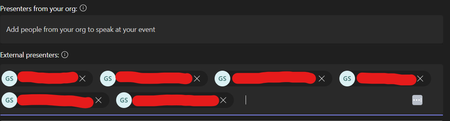
Hello, I am trying to remove some external presenters from my Microsoft Teams webinar, but clicking the 'X' button - which normally works - is not removing them. It is likely worth noting that these external presenters who can't be removed are in fact, for some reason, duplicates. In other words, there are three real presenters here but they are each entered twice. There were two other external presenters that I was able to remove, and they did not have duplicate entries. I'm not sure if this has something to do with it. I have tried this on both the desktop client and the web app. Please let me know how this can be solved. Many thanks,122Views0likes1Comment
How to revoke permissions from Teams Bot app
I want to revoke a user's permissions and logout user from my Teams bot application. Initially, the user granted consent through the bot when it was added to a team. Now, I need to: Remove all previously granted permissions. Log the user out from the bot. Prompt the user for a fresh login and obtain consent for the required permissions again. How can I achieve this?169Views0likes0Comments
Chatbot Chat History Issue When Integrated with Microsoft Teams
Hello Community, I have developed a chatbot application where I manage chat history using session-based storage. The chatbot works seamlessly on the web application, maintaining session-specific chat histories accurately. This functionality relies on properly handling cookies to preserve session IDs across user interactions. However, when I integrated this web application into Microsoft Teams as a custom app, I noticed a significant issue. Microsoft Teams does not seem to handle the session in the same way as a browser does. For every new input/query, Teams generates a new session, which results in the chatbot losing the chat history and treating each input as an independent session. This behavior is unexpected since the web app works flawlessly in maintaining session-based chat histories when accessed directly via a browser. Here are some additional details: The application is built using Flask, with sessions stored on the filesystem . Cookies are being used to maintain session IDs on the web application, and these are functioning as expected when tested locally or in a browser environment. Teams integration is done by embedding the app’s URL into the Teams app configuration. Query: Does Microsoft Teams handle cookies or session management differently compared to standard web browsers? If yes, what is the best way to maintain consistent session management and chat history when the app is running within Microsoft Teams? Are there any Teams-specific settings or APIs that need to be configured to support persistent session handling for embedded web apps? I would appreciate any insights or guidance on resolving this issue to ensure that the chatbot retains its session-based chat history within Microsoft Teams. Thank you in advance for your help! Best regards,121Views0likes0Comments
Multiple versions of teams
Hi everyone, hope you're doing well, actually in my job, we want update/delete the old versions of Microsoft Teams, we reviewed on a MDE Software inventory and we had a multiple versions, for example: The regkey of the latest version is located on: HKEY_USERS\localuser\SOFTWARE\Microsoft\Windows\CurrentVersion\Uninstall\Teams The regkey of the older version is located on: HKEY_USERS\Administrator\SOFTWARE\Microsoft\Windows\CurrentVersion\Uninstall\Teams So, has anyone been able to solve this issue?606Views0likes1Comment
Teams desktop client is no longer rendering Adaptive Card colors for table elements
Hello, Since the recent Teams update around October 20th, the Adaptive Card colors in my webhook-triggered Power Automate flows have stopped rendering correctly. The colors display as expected on iOS and in the Adaptive Card Designer, but not on the desktop or web versions of Teams. Please look at the example below. Thank you Following is the JSON I am using: { "type":"message", "attachments":[ { "contentType":"application/vnd.microsoft.card.adaptive", "contentUrl":None, "content":{ "$schema":"http://adaptivecards.io/schemas/adaptive-card.json", "type":"AdaptiveCard", "version":"1.4", "msteams": { "width": "Full" }, "body": [ { "type": "Table", "gridStyle": "default", "firstRowAsHeaders": True, "showGridLines": "true", "columns": [ { "width": 50 }, { "width": 25 }, { "width": 25 }, { "width": 25 }, { "width": 60 } ], "rows": [ { "type": "TableRow", "style": "accent", "cells": [ { "type": "TableCell", "style": "good", "items": [ { "type": "TextBlock", "text": "GREEN", "wrap": True, "weight": "Bolder" } ] }, { "type": "TableCell", "style": "warning", "items": [ { "type": "TextBlock", "text": "AMBER", "wrap": True, "weight": "Bolder" } ] }, { "type": "TableCell", "style": "attention", "items": [ { "type": "TextBlock", "text": "RED", "wrap": True, "weight": "Bolder" } ] }, { "type": "TableCell", "style": "accent", "items": [ { "type": "TextBlock", "text": "ACCENT", "wrap": True, "weight": "Bolder" } ] }, { "type": "TableCell", "style": "default", "items": [ { "type": "TextBlock", "text": "DEFAULT", "wrap": True, "weight": "Bolder" } ] } ] } ] } ] } } ] }444Views0likes1CommentShare App Content To Stage
Hi, I am using the Teams SDK to share my content to the stage and have set the shareOptions to ScreenShare, intending for only the Presenter to interact with it. However, despite this configuration, participants are still able to interact with the content. Can you help me resolve this issue?microsoftTeams.meeting.shareAppContentToStage((err, result) => { }, appContentUrl, { sharingProtocol: microsoftTeams.meeting.SharingProtocol.ScreenShare } );583Views0likes1Comment
Getting US User Phone number through Teams from Canada without having a US address
As a Canada-based organization, we aim to purchase approximately 20 US user phone numbers through Teams from Canada, without possessing a US address. We have already configured MS Teams phones successfully for our Canadian users. However, when attempting to procure US user numbers, we encounter a requirement for a US address or US emergency address, which we currently lack. Kindly advise on the appropriate steps to proceed in this situation. Thank you for your assistance!660Views0likes2Comments
New Teams App
I don't know where to start! I have been at this for two days now. I had support from Microsoft for two hours, but this did not solve my issue. When I switch my IMac to the new TEAMS app, participants can't hear me, but I can hear them. When on the same app in my browser, there is no issue at all, and there is no issue on my other Mac. One thing I have noticed is that when I go to devices in settings (on this PC or Mac), it is not allowing me to customise the setup. I am the admin, so I don't think its a permissions issue. I have also been in the terminal, trying to follow the advice given in another post.926Views0likes3Comments
Cannot delete an organisation in Teams
Hello there I am unable to delete an Organisation in teams, the only think left to cancel are the subscriptions and that is as far as i can get, some posts have pointed me to the Mircrosoft Admin Center but i am denied access with my normal hotmail email address which is all i have. please help regards/James2.3KViews0likes6Comments