community
3597 Topics
Looking for Guidance: Improving Playwright MCP Runbook Replay Reliability
Hi everyone, We are building an AI-powered browser automation agent using Playwright MCP, and we have implemented a runbook/replay mechanism to reduce repeated reasoning and improve navigation performance. Current Architecture Our setup currently looks like this: AI Agent (Client) – Hosted on Azure Container Apps Playwright MCP Server – Hosted on Azure Container Apps Chrome Extension – Running in the user's browser The Chrome Extension maintains a webhook connection with the Playwright MCP relay/server. The MCP server generates Chrome DevTools Protocol (CDP) commands, which are executed by the Chrome Extension in the user's browser. Runbook Functionality When the agent needs to navigate to a particular page, it normally performs multiple browser actions such as: browser_navigate browser_snapshot browser_click browser_type Other Playwright MCP tools During the first successful execution, we record the tool calls and their parameters used by the agent to reach the desired page. We store these actions as a runbook. For subsequent requests requiring navigation to the same destination, instead of asking the AI agent to reason through the navigation steps again, we directly replay the stored runbook. First execution User Request ↓ Agent Reasoning ↓ MCP Tools ↓ Browser ↓ Desired Page Example recorded sequence: browser_navigate → browser_snapshot → browser_click → browser_snapshot → browser_type ... Subsequent execution User Request ↓ Runbook Replay ↓ MCP Tools ↓ Browser ↓ Desired Page This significantly reduces latency, token usage, and unnecessary LLM reasoning. Example Runbook Step { "tool": "browser_click", "args": { "target": "e140", "element": "Earn credentials link" }, "a11y": { "role": "link", "name": "Earn credentials", "index": 0, "text": "Earn credentials", "textIndex": 0, "path": "generic/list/listitem/article/generic/generic", "url": "https://learn.microsoft.com/en-us/" }, "pageUrl": "https://learn.microsoft.com/en-us/", "timestamp": "2026-07-30T10:24:04.374Z" } For each recorded action, we persist information such as: MCP tool name Tool parameters Snapshot reference Accessibility role Accessibility name Element text Element index Text index Accessibility-tree path Page URL Other relevant metadata The Problem The main challenge is runbook replay reliability. A runbook contains references obtained from a previous browser_snapshot. During replay, the page may have: Slightly different DOM structure Timing differences Dynamic content Accessibility-tree changes As a result, a previously recorded snapshot reference may no longer match the current page. For example, a recorded action may effectively be: browser_click(ref="some_snapshot_ref") During replay, that reference may no longer exist or may resolve to a different element because the current snapshot has changed. This causes intermittent failures in operations such as: browser_click browser_type Other element interactions Current Status We have improved the replay mechanism and currently achieve approximately 90% replay success. The remaining ~10% failures are difficult because they are often nondeterministic. The same runbook can succeed or fail depending on the current browser or page state. Questions We would appreciate advice from anyone with experience using Playwright MCP or building production browser automation systems. What is the recommended way to make Playwright MCP tool calls more resilient to changes in snapshot or accessibility-tree references? Is relying on snapshot ref values fundamentally unreliable for replay? Should we instead store a different representation of the target element? If so, what additional information would you recommend storing for each interaction? What is the best strategy for re-resolving an element when the original snapshot reference is no longer valid instead of failing the entire runbook? Are there Playwright MCP capabilities or recommended patterns that specifically address dynamic pages and changing accessibility trees? For a production-grade browser automation agent, what architecture or strategy would you recommend to achieve >99% replay reliability? Our goal is not to eliminate dynamic behavior from websites, but to make the runbook intelligent enough to recover when previously recorded element references become invalid. Any architectural recommendations, implementation patterns, or examples from production systems would be greatly appreciated. Thank you!
How (if possible) do I remove thi
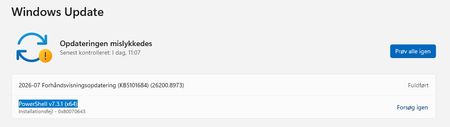
Hi. Windows Update wants to install PowerShell v7.3.1 (x64) on my desktop computer, even though I already have newer version, PowerShell 7.6.3.0-x64, installed! I have tried a lot of those 'tips' found with a Google search, but 10+ restarts later, I still have the view seen on WU.jpg! Is there any way I can remove that annoying message? Have a nice day :-) WU.jpg WU2.jpg6Views0likes0CommentsPlaywright MCP browser context is lost after 8-12 minutes of idle time.
Hi Everyone, I'm building an AI agent that uses Playwright MCP to control a browser, and I'm running into an issue where the browser context is lost after the agent remains idle for a while. Architecture My current setup looks like this: AI Agent (Client) hosted on Azure Container Apps Playwright MCP Server hosted on Azure Container Apps Chrome Extension running in the user's browser The extension maintains a webhook connection to the Playwright MCP relay/server. The MCP server generates Chrome DevTools Protocol (CDP) commands, which are executed by the Chrome Extension in the user's browser. This allows the browser to continue running on the user's machine while the agent and MCP server are hosted remotely. Issue Everything works as expected while the agent is actively interacting with the browser. However, if the agent stays idle for around 8–12 minutes, the next request fails with an agent response that the browser context is lost (or the context/browser is no longer available). If I ask the agent to retry, it invokes the browser_close tool and creates a new browser session. While this allows execution to continue, it completely loses the previous browser state, including: Current page Navigation history Login/session state tied to that browser context Any work already completed in the existing session Ideally, I want the existing browser session and context to remain usable even after periods of inactivity. Questions Is there any idle timeout in Playwright MCP or its browser context management that could explain this behavior? Could this be related to the CDP connection between the Chrome Extension and the MCP server being dropped after inactivity? Are there recommended keep-alive or heartbeat mechanisms for long-lived browser sessions? Has anyone successfully maintained browser contexts for extended idle periods (30+ minutes or longer)? Is there a recommended pattern for reconnecting to an existing browser context instead of creating a new one when the connection is interrupted? Environment Playwright MCP Server hosted on Azure Container Apps AI Agent hosted on Azure Container Apps Chrome Extension executing CDP commands in the user's local Chrome browser Communication between the agent, MCP server, and extension over the network I'd appreciate any guidance on where to investigate this issue or best practices for maintaining persistent browser contexts in this kind of architecture. If anyone has encountered a similar problem, I'd be interested in hearing how you resolved it. Thanks in advance!
Saving Downloads folder to OneDrive
Is it possible to save a Downloads folder to OneDrive? I have two computers. One is old and contains most of my important files. My new computer (Lenovo Yoga 2-in-1)has had ongoing issues. I haven't been able to use it much. However, it contains some important information in the Downloads folder. The new computer has to be sent away to resolve the problems. Is it possible to transfer this Downloads folder to OneDrive?2Views0likes0Comments
When I open Task View, the virtual desktop thumbnails appear blank.
After pressing Win + Tab to open Task View, the virtual desktop thumbnail area appears blank or black, and real-time content previews for each virtual desktop do not display. The thumbnails also fail to display properly after creating a new virtual desktop. Restarting File Explorer temporarily resolves the issue, but it recurs.16Views0likes2Comments
Windows 11-Enterprise to fix the bugs for slowness
I am experiencing slowness while switching from one application to another and opening application also taking time, The overall system performance is not as expected, especially when working on SAP applications or microsoft outlook with multiple session open, on a daily basis, at least once laptop to be restarted to close all background running application to continue wi th our daily tasks. This is the recurring issue and needs a permanent fix.3Views0likes0Commentswindows 11 audio stutter noise and screen stutter at the same time
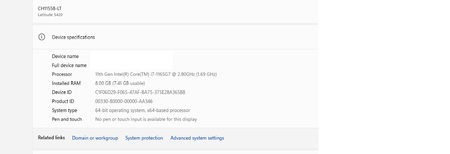
everytime i try to record this shi it just never appears, so i will try to explain the situation here. so when i start playing some music or anything and start browsing tru the ui or doing anything i get some stutter in my system with an electric noise, it happens for like a few micro secs. it happens randomly and i've noticed it gets worse when doing some work like switching bookmark bars in chrome, switching tabs, opening download pop ui, or like switching folders in file explorer (like switching between downloads, docs, pics, etc all the pinned folders) these are just some of the examples. it gets severe when i open my eq app peace ui, just navigating tru the basic ui (just hovering over the ui elements) or turning off/on the eq toggle it gets so annoying, and it's not like it happens every single time, no, i get it sometimes. it sounds like "zee" but electric. screen and mouse just lags and stutters for a micro second and gets normal. it also gets severe when am downloading something and browsing on the go. btw it doesnt happen when playing games, games run fine. it's happening since like few months back, my pc is like 2.5 years old and i never had anything like this until the windows crap update news were all over the web. i remember i used to get this same problem but it was with the scrolling before, whenever i try to scroll tru web pages or spotify, the same thing happened but idk the scroll thing got fixed automatically and now this new problem came up. few things i tried to fix it but didn't work (claude told me): removing usb devices from my motherboard (mouse, keyboard, speakers, gaming controller dongle) removing ep apo app because the stutter was getting worse everytime i open it clean installing gpu drivers removing realtek drivers clean installing windows (allthough i didnt face any stutter lags when i was on the older version of windows before updating, but i didn't test it for long and updated my system so idk) turning off audio enhancements my specs Processor 12th Gen Intel(R) Core(TM) i3-12100F (3.30 GHz) Installed RAM 16.0 GB (15.9 GB usable) Graphics card AMD Radeon RX 6650 XT (8 GB) Storage 79 GB of 1.36 TB used System type 64-bit operating system, x64-based processor Edition Windows 11 Pro Version 25H2 OS build 26200.8973 Experience Windows Feature Experience Pack 1000.26100.344.0 maybe my motherboard is getting weak here? idk should i update the bios? i never did bios update before. anyone having the same issue?17Views0likes2Comments
Let’s Make Microsoft Great Again
To the Microsoft Team, I write these words not as a demand, nor as a threat, but as a sincere reflection from someone who has admired your work for years. My voice is only one among millions, but it carries the weight of genuine passion for technology and for the vision that Microsoft once represented. I believe in the harmony between hardware and software, in respecting standards like JEDEC, and in building systems that feel like a perfect orchestra — CPU, GPU, RAM, and Kernel working together as one. That is the dream I hold, and the reason I continue to invest my time, energy, and money into your ecosystem. This is not about chasing “tops” or “flops.” It is about personal choice, about the trust that users place in Microsoft to deliver technology that respects individuality and empowers creativity. I do not ask for immediate answers. I only ask that these words be read, considered, and carried forward. Because deep down, I want to see Microsoft rise higher than ever before. Respectfully, [A concerned and passionate user]9Views0likes0Comments
Is it possible to do this?
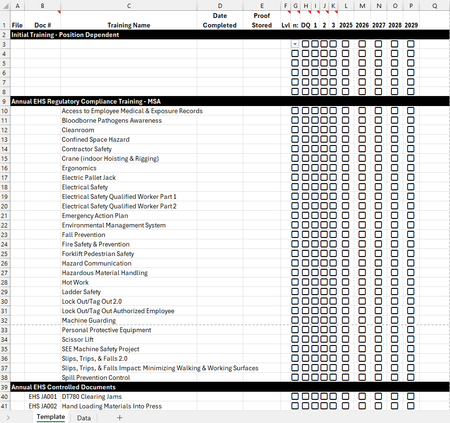
Hey all! I currently use Smartsheet to track my trainees' progress and I love the way I can use Conditional Formatting in that program. Unfortunately, my company is going away from using Smartsheet, so I need to move all the information I have to an Excel document. I'm struggling with getting the Conditional Formatting to work the same way I have it in Smartsheet and I'm curious if it's even possible. Here is an image of the Template I will be using for each employee. My plan is to have a tab for each employee, just duplicating the template and renaming it to their name and adding their information. Here are the two things I'm struggling with getting set-up with Conditional Formatting: 1. In the Lvl column, I have a drop down that is linked to the Data tab where the icons on the left are images. I want to be able to select the "Assigned" option and have the A icon show up (this is currently set up) and then have the fill of the box turn to red. I'm struggling to get that to work properly. Currently, when I select the "Assigned" option in the drop-down menu, it just shows the "A" icon. 2. I also want to be able to have the "Date Completed" column change to a specific color if one of the checkbox columns (G, H, I, J, K) are checked (i.e. if G is checked, it turns a light brown, if H is checked, it's gray, if I is checked, then it's red, etc.). This is what it looks like in Smartsheet and how I'm hoping to get it to look in Excel: Thank you!9Views0likes0CommentsUnable to follow the Viva Glint Blog
This post was originally submitted as a question in MS Learn on July 2 and I was advised to move it to the tech community. Hi MS team, I continue to click "Follow" on the Viva Glint blog to ensure I receive release updates but then get automatically set to not follow. https://techcommunity.microsoft.com/category/Viva-Glint For the second time, I am being automatically set to not follow. I checked with my admin team (there are 4 of us) and this is not an individual/isolated incident. They are also being automatically set to unfollow the Viva Glint blog. Please see screenshots attached from myself and my manager. We should be seeing the button as "Unfollow" indicating that we are following, instead it is showing "Follow" indicating that we are not following. I have opened an MS ticket about this already and was directed to contact the Microsoft Tech Community platform team. I followed the Glint blog back on 4/9/2026 and then was set to unfollow. I followed again at the beginning of June (maybe on 6/4/2026) and I was set to unfollow again. I did receive one "Microsoft Community Hub Weekly Digest" email on 6/7/2026 so I must have still been following then but I have not received any communications before or after. Can you please provide an explanation and a solution? We need to receive email notifications about updates and releases. Following the blog should be a reliable process. As of today, 7/28/2026, I am still following the Glint blog which is great but how do I know I won't be automatically set to "unfollow" a third time?19Views0likes1Comment