community
265 TopicsAfter seven years of being helped and even offering some help to others ...
... I think AI has effectively put this site out of business. So although I'll check in a few more times over the next month or so, and will definitely miss the virtual friends (real people) I've met, with whom I've exchanged messages...but other than that, it's a sad farewell. Thanks for the memories.314Views5likes6Comments
Add-in not working in EXCEL 2024 HOME SUBSCRIPTION.
I have office home 2024 subscription. Recently, when I try to add an add-in from the add-in tab in excel it shows error. It was working fine. I had python and some other add-ins through the add-in menu. Can somebody help? I have tried all methods suggested by AI tools.80Views0likes0Comments
VBE The XLSM file can't save macros
Two computers: On my personal computer, the VBE module shows 'no open projects,' most of the buttons are greyed out, and if I try to click any non-greyed button, it gives an 'error in loading DLL.' On my work computer, the issue is: after creating a new XLSX document and saving it as an XLSM file, it opens fine; however, once I insert a Macro, it shows that the file is corrupted, and repairing it deletes my macro. I’ve tried reinstalling, adding trusted folders, modifying the registry, and rolling back to version 2607, but nothing worked. The personal computer is set to the US region and I downloaded the English version of 365, while the work computer is set to CN and I downloaded the Simplified Chinese version of 365. Also, the USER folder on my personal computer was moved to the D drive. I contacted Microsoft support, and the staff suggested I post in this community .170Views0likes0Comments
I'm looking for a practical way to calculate Pakistan salary income tax in Excel.
The goal would be to enter a monthly salary and have the spreadsheet estimate the applicable tax and resulting take-home amount. Ideally, the calculation should be easy to update when the applicable tax slabs or salary-related rules change. For someone building this in Excel, would you recommend keeping the tax slabs in a separate lookup table and using formulas against that table, rather than hard-coding the rates into one large formula? I'm particularly interested in approaches that make the spreadsheet easier to maintain when tax rules change.274Views0likes1CommentWhat's the simplest way to make a genuinely random name selection system using Microsoft tools?
For example, suppose I have a list of participants in Excel and want to randomly select one winner without manually choosing from the list. Would you use RAND/RANDBETWEEN in Excel, Power Automate, or another Microsoft 365 approach? I'm also interested in preventing the same person from being selected twice when several winners are needed. I'd appreciate an approach that's easy for someone without much Excel or Power Automate experience to understand.260Views0likes5CommentsReferenced cells do not identify themselves with color
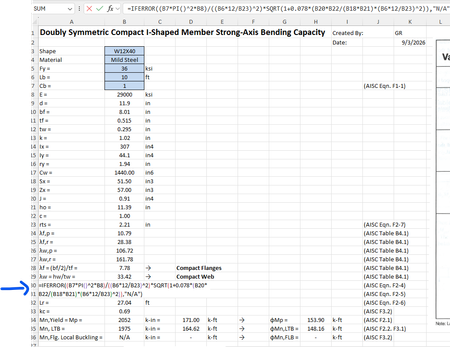
For some reason when I create a formula that references other cells, I cannot get those cells to "identify" themselves with a specific color. For example, in the image below the formula references cells B7, B8, B6, etc but they are just black text and don't show up in color per standard excel documents. Usually they "glow" with a specific color so you can find them easily in big spreadsheets. How do I get the colors back?Solved400Views0likes2Comments
Infinite Sign-In Redirect Loop on Power BI
Hi Community, I am stuck in an infinite sign-in redirect loop while trying to log into Power BI (app.powerbi.com). It repeatedly redirects between the login page and authentication screen without loading the dashboard. Steps I have tried so far: Cleared browser cache and cookies. Tried accessing via Incognito / Private mode. Checked third-party cookie settings. Could you please guide on how to resolve this authentication redirect issue or if there is any tenant-level setting blocking access? Thanks!299Views0likes2Comments
Excel Desktop Filter Checkboxes Not Visible – Windows 11 / Office Home & Student 2021
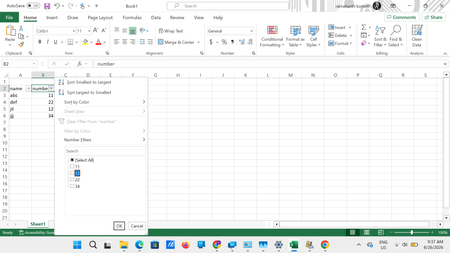
Excel Desktop Filter Checkboxes Not Visible – Windows 11 / Office Home & Student 2021 I am facing a persistent display/rendering issue in the Excel desktop application when using filters. When I apply a filter to a column, the filter dropdown opens correctly and the values are displayed. The filter functionality itself also works. However, the checkboxes beside the individual values are not visible properly. As shown in the attached screenshot, the values such as 11, 12, 22, and 34 are displayed in the filter list, but the checkbox controls beside them are either missing/not rendered correctly. Interestingly, the Select All checkbox area also appears abnormal. System details Operating System: Windows 11 Microsoft Office: Home & Student 2021 Application: Microsoft Excel Desktop Office is fully updated with the latest available updates. The same Excel file works correctly in Excel for the Web, where all filter checkboxes are displayed normally. Troubleshooting already performed by Microsoft Support Microsoft Support has already remotely checked the system and tried several troubleshooting steps, including: Reinstalling Microsoft Office Creating/modifying relevant Windows Registry entries Creating system restore/checkpoints during troubleshooting Creating and testing with a new Windows user profile Checking and installing all available Office updates Unfortunately, the issue still persists. Since the problem does not occur in Excel for the Web, it appears to be specific to the Excel desktop application's UI/rendering on my Windows 11 system. Has anyone experienced a similar issue with filter dropdown checkboxes not rendering or appearing invisible in Excel Desktop? Could this be related to: Excel hardware graphics acceleration/rendering Windows display scaling or DPI settings GPU/display drivers Office 2021 UI rendering Windows 11 accessibility/display settings A known Excel Desktop bug Any suggestions, known fixes, or confirmation of a similar issue would be appreciated. Screenshot attached for reference.384Views0likes2Comments
GLSU Excel add-in fails to load after Office update from Version 2607 to 2608
Our Excel add-in, Process Runner GLSU , fails to load after Microsoft Office updates from Version 2607 to Version 2608. This started August 17, 2026 and is actively growing in scope. Error messages: Excel: Cannot run the macro 'onLoad' VBA: System Error &H80004005 (-2147467259). Unspecified error VBA: Compile error in hidden module: ThisWorkbook Has anyone encountered similar issue with their own custom add-on. If yes, any pointers to fix it. We are seeking help on priority. Thanks, Vrushali Pawale, Sr. Manager, Insightsoftware.867Views0likes1Comment