community
18 TopicsBulk Update Tags in SharePoint Picture Library
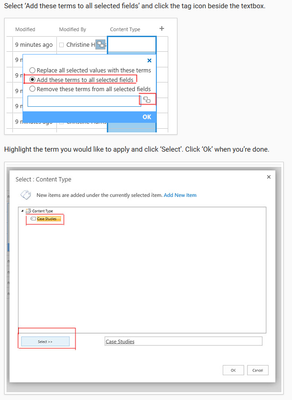
Hi all, Our Marketing department would like a way to tag and search (perhaps a couple thousand) images. IT is moving everyone away from file shares, and we have a bunch of free space in SharePoint; so that is looking like a good option, but I am running into some problems. I have created a Picture Library and uploaded some pictures to test with. I've added a Managed Metadata column for the tags. The issue is that Marketing would like to be able to bulk tag photos with existing tags, and to have those tags added rather than overwriting the existing tags. I have been following https://www.konverge.com/blog/adding-metadata-multiple-documents-sharepoint/, which seems like it would get me exactly what I need, but I am not able to select a range of records to tag, and I am not getting the "Add these terms to all selected fields" option. Instead of "Quick Edit" I only have "Edit in grid view". Otherwise, the screenshots in the tutorial make it look like I'm on the same version of SharePoint. I'm using SharePoint Online. The screenshot below is from the tutorial. I do not get the options in the first image, but I get the very same screen as in the second image. Any advice on how to select and tag multiple images without overwriting existing tags would be greatly appreciated. Thanks!6.8KViews0likes2Comments
HTML publishing on SharePoint (Web Part Page)
Hi, I have a training material as a single index.html file and couple of folders with relevant media. My intention is to publish this training on a SharePoint site to be accessible for other employees. I have created web part page and added a link to txt file with html code copied from index.html file. Both media folders I have uploaded to Site assets . When trying to access .aspx page created as a web part page I see the loading icon (see screenshot) and nothing happens. Could you please advise on what was done wrong. Thank you in advance!2KViews0likes2Comments
SharePoint Creating Files Randomly
Hi there, I have an interesting issue that is popping up and I'm not quiet sure how to tackle this. At the business I am with we use SharePoint a lot. There's a process that we use of dropping invoices needing Purchase Order fixes. There is a folder that this is done in and in that folder there has been a bulk of files created by a user that is not at his station. When they are being created the modified dates are not current but in the past. We have had this process for 2 years now and this just started happening. Was hoping there was a way to stop this from happening. Any suggestions would be great, thank you!2KViews0likes1CommentPower Automate - Pull MS Planner data to SQL Database
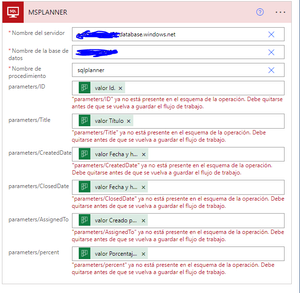
Hello There is a template available in Power AUtomate to pull data from MS Planner into a SQL Database. When I am at the Execute SP task, I enter Azure SQL Server, enter Azure SQL Database, then write a desired SP name as it looks in the Image. The parameters automatically appear with their proper "value"...But then when trying to SAVE it, I got the following error: Translation: "parameter is not longer available in the operation schema. It must be removed before saving...." Any thoughts? regards
delete configured team site libraries to sync automatically
I have a GPO to automatically sync libraries to file explorer. Is can delete the library folder by pausing onedrive. I don't get why the library doesn't delete if a user is removed from the GPO. Is there another way to delete the library?1.6KViews0likes1Comment
who to contact about the sharepoint spaces
the SharePoint spaces have become very messy with no clear distinction between "sharepoint" and "sharepoint developer" no separation between SPO and on-prem sharepoint posts no distinction of Microsoft announcements and general community problem posting no way to flag "How To" answers as distinct to the many many "I have a problem" posts Labels are very unstructured and not much use for SPFx community No clear connection to PnP video casts so that feedback on these can be channelled. How can regular users suggest changes and inspire some improvement?1.3KViews0likes2CommentsMondays at Microsoft | Episode 24 (LIVE from Orlando, FL #M365Con)
We're broadcasting live in Orlando, FL from the Microsoft 365 Community Conference! Join at 8am PDT on Monday, April 29th, 2024! Show notes: (more details coming soon) Dark Mode for Viva Connections on desktop Full M365Con event guide. Looking forward to a packed agenda.1.2KViews0likes1CommentLooking for Ideas to build framework around Clinical Process for Nursing Digital Application
Microsoft Community Members: I have a use case where I am trying to build some framework around a clinical workflow. Wasn't sure if anyone had any recommendations on what Tools to use to build something digital that is currently in paper form. The digital solution is a step by step application process where our Nurses will be required to fill out something similar to an application. It will require uploading documents and submitting information. I'm thinking the database should include a SharePoint list to collect all the data and files along with some automation. Some of the requirements are they want a way to share the data out to the manager so they can make changes but keep it private and not available to entire organization Our nurses use shared clinical workstations that do not have O365 licenses so whatever tools I decide to use has to be easily accessed through web only and have the functionality for them to submit data and files simply and efficiently. Would need to build this from an already existing SharePoint site that is public to all nurses. Would it be best to create multiple forms for each step or create one big form with all of these sections for the nurses to fill out? Wasn't sure if anyone had built a digital tool similar to this that you would be willing to share? The tools I am thinking about using to build my framework are SharePoint, Forms, Power Automate. If anyone has any ideas or use cases to share it would be greatly appreciated.1.2KViews0likes2Comments
Planner Power Automate with MS List
Hi Community , I am trying to power automate my Planner with MS List , means new task in list automatically comes under Planner bucket . I am having hard time doing this can you please guide me ?I am new to Power Automate . Can anyone just guide me steps to follow ? Thanks and warm regardsin O365 Sharepoint, do I have to re-create Sharepoint Library templates periodically?
If a Sharepoint Library Template remains valid for all the Library settings I need, do I have to re-create that Template periodically in order that any Libraries created from it remain up-to-date and valid? I can understand re-creating a Template when the Library parameters have changed, but in this circumstance the Library Template has remained constant for months. Am I right in thinking that, even if the Template is 'old' any subsequent Library created from it will be 'updated' automatically by O365?1.2KViews0likes2Comments