community
742 Topics
MS TEAMS ON MOBILE BROWSER
Hi, So I want to be able to access MS Teams meetings on the mobile browser itself, i.e on the mobile web app. I don't want our customers to be asked to download the MS Teams mobile app. They should be able to join meetings directly from the browser itself. What should I do? Thanks, RichaSolved254KViews0likes35Comments
Planner for Private Channels
Hello all, Does anyone have any information on when Private Channels will get Planners? Teams is a collaborative tool, but you can't assign tasks to people in private channels due to the lack of planners. Any info would be greatly appreciated. Thanks!Solved418KViews29likes52Comments
Default audio devices in teams
Hi All, I use a Lenovo X1 carbon 6th Generation laptop along with a Thunderbolt Docking station. (Windows 10 operating system) I use a usb headset for teams/ meetings and calls. When I unplug my headset, Teams defaults to my docking station. When I plug it back in, my docking station remains as default without automatically placing my headset back as default. (My headset is defaulted for all sound devices) My headset will appear in device options in Teams and I have to re-select it there in order to use it in -teams again. I've found that even after unplugging my docking station and only having my PC speakers and internal microphone as options, Teams will not automatically default back to my headset. It will remain defaulted to my PC speakers and internal microphone. Teams only defaults back if every other sound option is disabled from the sound control panel. However, other meeting software like Zoom and Cisco Webex automatically default to my headset (or whatever new sound device is plugged in) each time without me having to disable other sound devices or re-select it from the Zoom/Webex devices menu. I and many other users at my company have noticed this behavior. Does anyone have any hints or clues to help us out? Any help will be greatly appreciated. Thank you!71KViews15likes19Comments
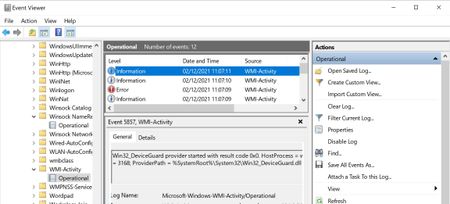
Win32_DeviceGuard and Win32_TpmProvider triggering errors and network spikes since 20H2!
Hello, since upgrading to Windows 10 Pro 20H2 from 1903. The following start up after 5 minutes. These are... Win32_TpmProvider provider started with result code 0x0. HostProcess = wmiprvse.exe; ProcessID = 3188; ProviderPath = C:\Windows\System32\wbem\Win32_TPM.dll And Win32_DeviceGuard provider started with result code 0x0. HostProcess = wmiprvse.exe; ProcessID = 3188; ProviderPath = %SystemRoot%\System32\Win32_DeviceGuard.dll Unfortunately they are triggering massive network activity even if it is for a few seconds.. This is triggering this error Id 5858 = {00000000-0000-0000-0000-000000000000}; ClientMachine = DESKTOP-XXXXX; User = NT AUTHORITY\SYSTEM; ClientProcessId = 4912; Component = Unknown; Operation = Start IWbemServices::ExecQuery - ROOT\CIMV2 : SELECT ID FROM Win32_ServerFeature; ResultCode = 0x80041010; PossibleCause = Unknown After restarting computer, no more errors and this doesn't occur again until the next day, back to square one again. But this is just like UPFC.exe. I think this is some sort of telemetry that Microsoft implemented every day to happen once at least.6.8KViews1like6Comments
Can't remove external presenter in Microsoft Teams Webinar
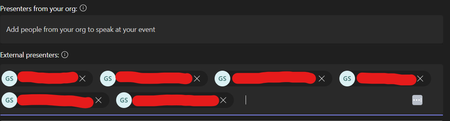
Hello, I am trying to remove some external presenters from my Microsoft Teams webinar, but clicking the 'X' button - which normally works - is not removing them. It is likely worth noting that these external presenters who can't be removed are in fact, for some reason, duplicates. In other words, there are three real presenters here but they are each entered twice. There were two other external presenters that I was able to remove, and they did not have duplicate entries. I'm not sure if this has something to do with it. I have tried this on both the desktop client and the web app. Please let me know how this can be solved. Many thanks,122Views0likes1Comment
Music Status change based on Spotify/YouTube Music etc.
Is there anything about changing Microsoft Teams' status to "Listening to X" based on what we are currently listening to on Spotify or YouTube Music etc ? Or is there any development about this currently? It would be cool like back in old MSN days 😄37KViews3likes7Comments