community
3589 TopicsFrom Visibility to Impact: Building Your Personal Brand with Smart, Cost-Effective Tools
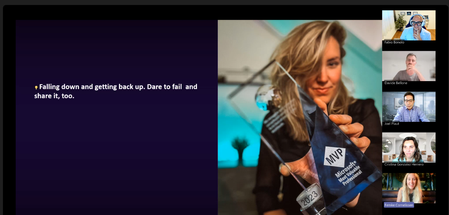
Beyond mastering technology, MVPs are passionate about helping others grow, supporting both technical and soft-skills development, and creating opportunities for learning and collaboration. They actively share their discoveries, experiences, and lessons learned while engaging in valuable exchanges with fellow community leaders and influencers. In this spirit of continuous learning and knowledge sharing, building a personal brand becomes a powerful way to amplify your voice, expand your reach, and increase the impact you can have on the communities you serve. Recently, the global MVP community came together for a discussion on creating a personal brand, best practices, tips and effective tools that can be leveraged to raise your social media reach. The session titled “From Visibility to Impact: Building Your Personal Brand with Smart, Cost-Effective Tools,” featured insights from Femke Cornelissen, Microsoft 365 and Copilot MVP from the Netherlands, and Fabio Bonolo, Microsoft 365 Copilot MVP from Switzerland. Together, they explored one of the most valuable skills for today's community leaders and technology advocates: building a personal brand that creates meaningful impact while staying authentic and accessible. Through personal experiences, practical examples, and demonstrations of cost-effective tools, they showed MVPs how visibility can become a catalyst for community growth, professional opportunities, and wider knowledge sharing. Personal Branding Starts with Authenticity Opening the session, Femke Cornelissen shared her personal journey to becoming an MVP and the lessons learned along the way. One of her strongest messages was clear: authenticity matters more than following a formula. Rather than trying to replicate someone else's success, Femke encouraged attendees to identify their own passions and areas of expertise. Whether sharing insights on Microsoft technologies, community initiatives, innovation, or personal experiences, the most effective personal brands are built around genuine interests and perspectives. She highlighted how consistent visibility on platforms such as LinkedIn can create unexpected opportunities—from speaking engagements and community leadership roles to customer conversations and valuable professional connections. Yet success does not happen overnight. Building recognition requires showing up consistently, sharing valuable insights, and developing trust over time. LinkedIn as a Community Platform While many professionals still view LinkedIn primarily as a digital résumé, Femke explained how the platform has evolved into a powerful space for thought leadership, networking, and community engagement. She encouraged MVPs to think beyond job titles and focus on creating content that demonstrates their expertise and unique perspective. Personal stories, lessons learned, event experiences, and practical guidance often resonate more strongly than purely promotional content. According to Femke, people connect with people—not corporate messaging. Several practical recommendations emerged from her presentation: Develop a consistent presence rather than posting sporadically. Share insights in your own voice. Engage actively with other community members through comments and conversations. Support and elevate the work of others. Focus on meaningful engagement rather than follower counts. She also emphasized the importance of balancing personal, community, and professional content to maintain authenticity while still supporting employers, projects, and initiatives that align with personal goals. AI as a Productivity Multiplier The session also explored how AI can help content creators work more efficiently without losing their human voice. Femke demonstrated how she uses AI-powered workflows to monitor industry trends, draft content ideas, analyse performance per post, and manage large volumes of community interactions. Rather than replacing authentic communication, she views AI as a tool that enables her to spend more time building relationships and less time managing repetitive tasks. One particularly important takeaway was her approach to maintaining authenticity. While AI helps create first drafts and analyse data, final content should always reflect an individual's own perspective, experiences, and tone of voice. Community members follow people for their unique insights, not automatically generated content. Designing a Recognisable Personal Brand Building on Femke's focus on authenticity, Fabio Bonolo explored the visual and strategic side of personal branding. His presentation introduced a structured framework built around four key pillars: Identity, Content, Reach and Consistency. Fabio explained how visual identity contributes to recognition and memorability. Colours, logos, typography, imagery, and design choices all communicate aspects of a person's personality and expertise. By maintaining consistent visual elements across websites, presentations, blogs, videos, and social media channels, community leaders can create a stronger and more recognisable presence. He demonstrated how even simple visual standards can make content instantly recognisable while reinforcing credibility and professionalism. Powerful Tools Without Enterprise Budgets One of the most popular parts of the session was Fabio's walkthrough of affordable tools that MVPs can use to professionalise their online presence. Among the tools showcased were MojoMox for logo creation, colour palettes, and brand design systems, PowerPoint as a surprisingly powerful design tool for creating thumbnails, graphics, and consistent visual assets, AuthoredUp for enhancing LinkedIn content creation and analytics, Wix for website management, blogging, and email marketing, Clipchamp for video creation and editing as well as Riverside and StreamYard for podcasting, live streaming, and content recording. A recurring theme throughout Fabio's presentation was that impactful personal branding does not require expensive software or large marketing budgets. By combining a clear strategy with carefully selected tools, MVPs can create professional-quality content for a relatively small investment. Community Remains the Force Multiplier Despite the extensive discussion about tools, automation, AI, and branding strategies, both presenters arrived at the same conclusion: community is the most important element. Femke described personal branding, AI, and community as three interconnected forces that create impact when combined effectively. Visibility alone is not the goal; meaningful relationships, knowledge sharing, and helping others succeed are what ultimately build a lasting reputation. Fabio reinforced this message by encouraging attendees to stay true to their identity, create content that delivers value, and remain consistent across the channels where they engage their audiences. Key Takeaways for MVPs The session concluded with several practical lessons for anyone looking to expand their impact: Be authentic and share your unique perspective. Focus on helping others rather than chasing metrics. Develop a consistent personal brand across your channels. Use AI to enhance productivity, not replace authenticity. Invest in relationships and community engagement. Start with simple, affordable tools and scale over time. Stay consistent, visibility is built through sustained effort. As the MVP community continues to grow and evolve, sessions like this demonstrate that the most powerful brands are not built through marketing alone—they are built through expertise, generosity, authenticity, and community. Thank you to Femke Cornelissen and Fabio Bonolo for sharing their experiences and practical guidance, and to all MVPs who participated in the discussion and contributed their own insights throughout the session. Want to Learn More About the MVP Program? To find an MVP and learn more about the MVP Program visit the MVP Communities website and follow our updates on LinkedIn or #mvpbuzz. Join us for a future live session through the Microsoft Reactor where we walk through what the MVP program is about, what we look for, and how nominations work. These sessions are designed to help you connect the dots between the work you’re already doing and the impact the MVP Program recognizes - with time for questions, examples, and real conversations.
When I open Task View, the virtual desktop thumbnails appear blank.
After pressing Win + Tab to open Task View, the virtual desktop thumbnail area appears blank or black, and real-time content previews for each virtual desktop do not display. The thumbnails also fail to display properly after creating a new virtual desktop. Restarting File Explorer temporarily resolves the issue, but it recurs.13Views0likes1CommentUnable to follow the Viva Glint Blog
This post was originally submitted as a question in MS Learn on July 2 and I was advised to move it to the tech community. Hi MS team, I continue to click "Follow" on the Viva Glint blog to ensure I receive release updates but then get automatically set to not follow. https://techcommunity.microsoft.com/category/Viva-Glint For the second time, I am being automatically set to not follow. I checked with my admin team (there are 4 of us) and this is not an individual/isolated incident. They are also being automatically set to unfollow the Viva Glint blog. Please see screenshots attached from myself and my manager. We should be seeing the button as "Unfollow" indicating that we are following, instead it is showing "Follow" indicating that we are not following. I have opened an MS ticket about this already and was directed to contact the Microsoft Tech Community platform team. I followed the Glint blog back on 4/9/2026 and then was set to unfollow. I followed again at the beginning of June (maybe on 6/4/2026) and I was set to unfollow again. I did receive one "Microsoft Community Hub Weekly Digest" email on 6/7/2026 so I must have still been following then but I have not received any communications before or after. Can you please provide an explanation and a solution? We need to receive email notifications about updates and releases. Following the blog should be a reliable process. As of today, 7/28/2026, I am still following the Glint blog which is great but how do I know I won't be automatically set to "unfollow" a third time?18Views0likes1Comment"In Review" means what? Can't message Allen"
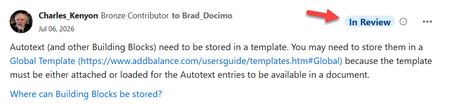
I am a VM in Q&A (Office) and have been a participant here in the Word Community for some time. Recently I've notice the tag "In Review" on my posts. Here is an example: https://techcommunity.microsoft.com/discussions/word/dynamic-pages-in-mail-merge/4531584/ What does this mean? Am I doing something wrong? I tried to send a message to Allen but do not believe it went through. When I click on "Send Message" it seems to be processing and then "Send Message" comes back active. When I checked in my profile under sent messages, nothing shows up for this. Thanks in advance. Charles KenyonSolved214Views3likes22CommentsAfter opening Xbox Game Bar, the performance monitoring panel does not display any data
After pressing Win + G to open the Xbox Game Bar, the performance monitoring widget shows that it cannot retrieve performance data. I tried restarting the Game Bar, updating my graphics card drivers, and turning the background recording feature off and on again, but none of these solutions worked.28Views0likes2Comments
RDP client shows black screen when SR-IOV GPU adapter is enabled on Windows 10 VM
Hi, I'm running a Windows 10 virtual machine as an RDP server. The VM is assigned a SR-IOV virtual function (VF) of the host's Intel UHD Graphics. When I enable the Group Policy setting "Use hardware graphics adapters for all Remote Desktop Services sessions", the RDP client connects but only displays a black screen. If I disable this Group Policy setting, the RDP session works normally, but without GPU acceleration. Environment: Host OS: linux Guest OS: Windows 10 GPU: Intel UHD Graphics (SR-IOV VF) RDP client: Windows built-in mstsc.exe Steps to reproduce: 1.Assign an SR-IOV VF of Intel UHD Graphics to the Windows 10 VM 2.Enable the Group Policy: Computer Configuration → Administrative Templates → Windows Components → Remote Desktop Services → Remote Desktop Session Host → Remote Session Environment → Use hardware graphics adapters for all Remote Desktop Services sessions 3.Connect to the VM via RDP 4.Result: black screen Is this a known limitation? Is there any workaround to use SR-IOV GPU with RDP desktop display? Thanks.26Views0likes1Comment
Fix for CapabilityAccessManager.db-wal Growing Huge in Windows 11
I had a problem where this file kept growing extremely fast and reached around 80 GB: C:\ProgramData\Microsoft\Windows\CapabilityAccessManager\CapabilityAccessManager.db-wal At first, stopping the Capability Access Manager Service would stop the file from growing, but it also caused Wi-Fi/network problems, so that was not the right fix. We used Microsoft Process Monitor and confirmed the file was being written by: svchost.exe → camsvc camsvc is the Capability Access Manager Service, which handles Windows app permissions like location, camera, microphone, screen capture, etc. The real trigger was not the service itself. Something was repeatedly requesting Location access, which caused camsvc to keep writing to the database WAL file. What fixed it Go to: Settings → Privacy & security → Location Turn off: Location services Also turn off: Let desktop apps access your location After doing that, the CapabilityAccessManager.db-wal file stopped growing rapidly. Small changes still happen when doing things like taking screenshots because Windows logs screen-capture permission activity. That appears normal. The problem was the runaway growth. What not to do Do not permanently disable: Capability Access Manager Service / camsvc Disabling that service can cause other Windows permission and network-related issues. Other note I also left Dell SmartByte services disabled, but the final fix was turning off Windows Location services.6.2KViews0likes5CommentsPlease remove Community Share Buttons at the left
Some time ago, Community Share Buttons started to appear on the left on the Tech Community Discussion Hubs. With normal zoom (100%), they overlap the text and are very annoying. Please get rid of these or give instructions on how to remove them. I found this article from 2018: Community Share Buttons | Microsoft Community Hub But I did not notice these buttons before, or they were not annoying. It seems they were meant to be on the right side, not the left side.431Views2likes9Comments
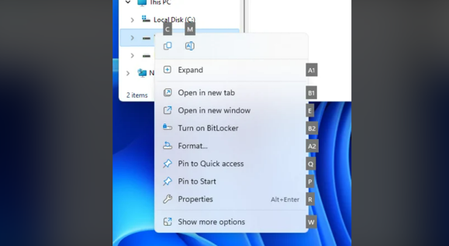
It is recommended that the Send To option be included by default in the right-click menu.
Currently, the default right-click menu in Windows 11 does not include a Send to option. To find this option, you need to hold down the Shift key and right-click, or select Show more options. We recommend adding this feature directly to the right-click menu for files and folders so you can access it quickly and easily.38Views0likes3Comments
Root DFS and ntlm hardening
Hi all Recently we have tried to harden our NTLM. After applying some settings the access to the root of our domain has become intermittent \\domain.co.uk but all the namespaces as well as symbol etc I der the root are working fine and can be navigated to without an issue. DCs have now been applied the same settings which are send LM and ntlm and use V2 if negotiated. The issue is intermitted as it it will work on a DC and then stop and then work again. Similar is on the end user devices. We have on prem DCs and all devices are in tuned and entra joined. We are hybrid but we do not sync or write the devices to ad. Replication and DFS itself are healthy. Issue are some users who have AFS paths already mapped to their devices it fails to connect to them sometimes. But new mapping works. Any ideas or assistance will be appreciated.35Views0likes2Comments