comments
5 Topics
How do I get balloon commenting on the right side of the page?
I'm using Word 2024 because I don't want AI in my interface. Now commenting all appears in the tab side bar. I can click on the "Comment" pulldown in the ribbon to show comments properly, but I can't write in them. This is aggressively hostile to people with vision difficulties. Even with my glasses, that's much smaller than I'm comfortable with. How can I get the comments that were so good and useful back? If not, how can I change the type size in the sidebar so I can read and write comments? Microsoft, please, don't ruin your products because you want to make us use AI for things that it's not helpful for. I don't use Word for anything I want AI in and deal with documents I cannot legally allow to be exposed to unverified servers like AI chatbots.Solved181Views0likes1Comment
notes attached to cells not visible, broken since last excel update (Office 365 on Mac)
I've got many notes (the yellow non-threaded formerly called comments) in my excel sheets. Since the latest software update I can not display/view my notes anymore. The cells containing note still show the red triangle-mark, but the note does not show up when I mouse over. By clicking "show all notes" in the ribbon menu, it will just only show the connection lines between cell and invisible note rectangle. But I can not access view or even edit the notes. Also right click on the cell -> edit note does not show anything. is there a fix or at least a workaround existing? regards dewege macos: high sierra, excel (office 365) version 16.21.1 (190123)99KViews3likes24Comments
Adding pictures to Notes on Excel Office 365 on Mac.
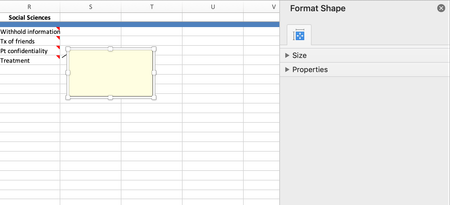
Hi there, is there a way to add pictures to Notes in Excel Office 365 on Mac? I was able to do it on previous versions of excel, when Notes was previously just termed Comments by using: 1.Edit comment 2.Format comment 3.Color fill in etc... However, the only formatting I am able to do is only format the shape. Any help would be appreciated!6.9KViews1like6Comments
Rechercher et sélectionner - Commentaire
Bonjour Sur Excel (Office 365 Proplus), la fonctionne de recherche et sélection - Commentaire ne fonctionne pas chez moi (aucun résultat trouvé alors qu'il y a des commentaires) Cf video attachée. De même avec les macros VBA cela ne fonctionne pas (Worksheet -> Comments ne renvoie rien). Avez-vous une solution ?1.5KViews0likes3CommentsAdding Comments on a Protected Worksheet
I am creating a form for someone where there are tabs for each employee, and am going to lock the cells that they don't need to add data. However when I protect the file I am not able to add a comment to specific cells. Which category do I need to check so someone can add a comment?1.2KViews0likes0Comments