cloud security
1456 Topics
Strengthening Confidential VM Migrations with Large OS Disk Encryption
Today, we are excited to announce the General Availability of Large OS Disk Encryption (LOSDE) for Azure Confidential VM migration scenarios. This capability removes a key adoption barrier for customers migrating sensitive workloads to Azure Confidential Virtual Machines by enabling confidential encryption for operating system disks larger than 127 GB. With LOSDE, organizations can securely migrate larger, more complex workloads to Azure while maintaining the confidentiality protections provided by Azure Confidential Computing. Why this matters For many enterprises, migrating existing workloads to the cloud is not simply a matter of redeployment. Business-critical applications often rely on large operating system disks and established operational configurations that must be preserved during migration. Until now, customers migrating workloads with operating system disks larger than 127 GB faced limitations when attempting to bring those workloads into Azure Confidential VMs while preserving confidential computing guarantees. This created an adoption challenge for organizations operating highly regulated or security-sensitive environments. Large OS Disk Encryption addresses this gap by extending confidential encryption support to larger operating system disks during migration workflows. With LOSDE, customers can: Enable upgrading virtual machines to Azure Confidential VMs through the migration process. Migrate workloads with OS disks larger than 127 GB to Azure Confidential VMs. Continue to use customer-managed keys (CMKs) aligned with their security and compliance requirements. Support migration scenarios for Windows, Ubuntu, Red Hat Enterprise Linux, and Rocky Linux. Check the Azure Migrate documentation for the support list. Accelerate adoption of Azure Confidential Computing for existing enterprise environments. Delivering security without compromising migration flexibility and helping customers accelerate confidential computing adoption The Large OS Disk Encryption feature integrates seamlessly into Azure migration workflows, enabling customers to move existing workloads into Azure Confidential VMs while continuing to benefit from hardware-backed protections and the trusted execution environment capabilities of Azure Confidential Computing. LOSDE helps close that gap by enabling customers to bring existing workloads into Azure Confidential Computing environments while preserving the confidentiality guarantees required for regulated, critical, and sensitive applications. The solution offers automation with Azure Migrate , enabling Windows, Ubuntu, RHEL, and Rocky Linux workloads to be encrypted before data leaves the customer boundary while preserving the confidentiality guarantees of Azure Confidential Computing and supporting customer-managed keys (CMKs). The result is a simpler path to cloud modernization, stronger protection for data in use, and expanded adoption opportunities for Azure Confidential Virtual Machines . This work reflects Microsoft's ongoing commitment to making advanced security capabilities easier to adopt without increasing operational complexity.Strengthening Semiconductor Supply Chain Trust with Microsoft’s Artifact Signing and Transparency
As enterprises expand their use of Confidential Computing in the cloud and in AI infrastructure, the security of the underlying hardware is more critical than ever. Organizations and their customers need confidence not only in the software they deploy, but also in the silicon and firmware executing their most sensitive workloads. AMD and Microsoft are collaborating to demonstrate how signing and transparency can strengthen trust in the semiconductor supply chain. By combining AMD Device Provenance with Microsoft’s Artifact Signing and Signing Transparency, we are exploring how device provenance, signing, and transparency could work together to support independently verifiable hardware evidence. Why Hardware Provenance Needs Transparency Provenance evidence is most useful when it can be independently verified and evaluated alongside related supply chain evidence. Semiconductor manufacturers generate evidence across selected manufacturing and lifecycle stages, which may describe relevant device attributes, manufacturing events, and validation activities. A digitally signed record establishes who issued information and its integrity. Individual signatures alone do not provide a durable and independently verifiable record of the order in which they were issued, whether they were recorded consistently, or whether unexpected activity occurred in the interval. Transparency addresses this gap. Microsoft's Signing Transparency leverages confidential computing to create a verified, tamper-evident record of signing events, allowing customers and auditors to confirm that evidence was recorded and has not been silently changed or been removed. It applies the Zero Trust principle of “trust but Verify” by giving relying parties cryptographic proof they can evaluate directly. Extending Transparency from Software to Silicon Microsoft's Signing Transparency was designed to address software supply chain threats that traditional code signing alone cannot fully prevent. The same principles can be applied to firmware, hardware provenance, and other evidence generated across the physical supply chain. AMD Device Provenance is designed to provide visibility into the manufacturing and lifecycle of data center components. Through our collaboration, AMD and Microsoft are demonstrating how this evidence can be signed, made transparent, and independently validated. This approach provides several important benefits: Transparent provenance: Changes to signed hardware evidence can be detected rather than silently accepted. Independent validation: Customers can independently validate the integrity, signing history, and transparency records associated with provenance evidence while still applying their own trust requirements to the evidence issuer. Stronger accountability: Transparency creates a durable record of signing events, providing evidence that can help identify unexpected patterns or unauthorized signatures. Audit and compliance evidence: Verifiable records may help inform supplier assessments, regulatory inquiries, and internal due diligence. Standards-based portability: Evidence can be validated across organizational boundaries using interoperable IETF specifications, including RFC 9943, An Architecture for Trustworthy and Transparent Digital Supply Chains, RFC 9942, CBOR Object Signing and Encryption Receipts, and RFC 9995, CBOR Object Signing and Encryption Hash Envelope, rather than proprietary trust mechanisms. Together, these capabilities allow relying parties to verify the origin, integrity, registration, and device binding of manufacturer-issued provenance evidence. Learn More at OCP Global Summit At OCP Global Summit 2026, AMD and Microsoft will present a proof-of-concept demonstration that prototypes how these components could operate together. Visit the AMD (#C61) booth to see the demonstration and learn how AMD and Microsoft are advancing semiconductor supply chain security. To dive deeper into the demo details read AMD’s blog Advancing Semiconductor Supply Chain Assurance. Organizations interested in applying Artifact Signing and Signing Transparency to software, firmware, or hardware can also join the Artifact Signing with Signing Transparency preview community to learn more and help shape the future of the service.MCP safety & evaluation with the Agent 365 CLI & Agent Governance Toolkit
Co Author: JiteshThakur AI agents are useful because they can act. They call tools, query databases, send messages, and hand work to other agents. That same freedom creates a problem: access control can tell you which service an agent may reach, but it does not always tell you whether a particular action is sensible, safe, or permitted. MCP is how most agents now act. Two Control Points: This post examines two control points that address different parts of the MCP lifecycle. Agent 365 CLI evaluates the MCP server before an agent uses it. Agent Governance Toolkit (AGT) governs sensitive tool calls while the agent runs. One improves what the agent sees. The other governs what the agent does. The Agent 365 CLI is a cross-platform command-line tool for Agent 365 applications on Azure. Its evaluation command examines MCP tool definitions and scores their quality. AGT evaluates actions against policy and records each decision. Together, these tools support a practical model: evaluate the server first, then provide proper scaffolding for the developer to test this in a dry run. Agent 365 CLI: Score an MCP server from the command line: The Agent 365 CLI can evaluate an MCP server against research-based practices for production readiness. The result is more useful than a simple pass or fail. The evaluation gives you: A score for each tool name, description, and parameter schema; A prioritized list of improvements; An overall maturity score for the server; and Local output that you can use early in development. This report turns a vague question, "Is this MCP server ready?", into a concrete list of work. The evaluate command a365 develop-mcp evaluate --server-url <server-url> [--auth-token <auth-token>] [options] The command reads the tool schemas from the server. It then produces guidance for names, descriptions, parameters, and schema structure. A local coding-agent CLI scores the semantic checks. You can use GitHub Copilot CLI or Claude Code under your account and AI subscription. The command does not send tool-schema data to Microsoft. Prerequisites: Install the following software: Agent 365 CLI; Node.js 18 or later for GitHub Copilot CLI; and A supported coding-agent CLI for semantic scoring. For example, install GitHub Copilot CLI with this command: powershell npm install -g @github/copilot This bring-your-own-LLM model keeps the scoring step in your local development environment. It is useful when model calls must remain inside an approved deployment. How the evaluation works The command runs a five-step pipeline and logs progress as it goes. Fig 1: MCP Evaluation using Agent 365 Cli Connect to the MCP server and collect its tool schemas. Generate an evaluation checklist in the output directory. Score the semantic checks with the selected coding agent. Calculate the maturity level and action priorities. Write the JSON and HTML reports. The evaluation contains two types of checks: Deterministic checks use exact rules in the CLI. For example, a tool name cannot be empty. Semantic checks use a coding agent to score clarity and meaning. Each result includes a reason for the score. Examples Set the authentication token in an environment variable. Then evaluate an authenticated server and write the artifacts to a subfolder. powershell $env:A365_MCP_AUTH_TOKEN = "<bearer-token>" a365 develop-mcp evaluate --server-url "https://my-mcp-server.contoso.com/mcp" --output-dir "./eval" Use a specific scoring engine with the `--eval-engine` option: powershell a365 develop-mcp evaluate --server-url "http://localhost:5000/mcp" --eval-engine claude-code Scenario: Evaluate a malicious MCP server For this demonstration, we hosted a deliberately malicious MCP server at `http://127.0.0.1:8124/`. It exposes tools that demonstrate tool poisoning, credential leakage, prompt injection, schema mismatch, sandbox escape, and other attacks. The server is intentionally unsafe and is for demonstration only. Fig 2: Setting up a test MCP server for evaluation We ran the evaluation in two steps. First, we generated the checklist without automatic semantic scoring: a365 develop-mcp evaluate --server-url "http://127.0.0.1:8124/" --eval-engine none Fig 3: Agent365CLI MCP Evaluation The command wrote the checklist and a semantic-evaluation prompt to the output directory. It also displayed the next steps. Second, we gave the prompt and checklist to a coding agent. The agent completed each unscored semantic check with a Boolean score and a short reason. After we saved the completed checklist, we ran the command again to generate the report: a365 develop-mcp evaluate --server-url "http://127.0.0.1:8124/" --output-dir "C:\temp\MaliciousMCP" Fig 4: Creating the report with Agent365 CLI MCP Evaluate command Understanding the evaluation report Open `<server-name>_eval_report.html` from the output directory. The report contains: The overall score from 0 to 100; The maturity level from 0 to 4; Scores for each tool and quality category; and A prioritized action list for the next maturity level. Fig 5: MCP Evaluation Report In our demonstration, the server scored 86.0 and reached Level 3: Optimized for AI. That strong overall score did not mean that every tool was safe or clear. The report found 58 action items, including one critical item and 33 high-priority items. That contrast matters. A server can have valid schemas and consistent names while still exposing misleading or dangerous tools. Fig 6: MCP Evaluation Report - Tool-By-Tool Detail What to look for Read the per-tool results before the overall score. A single weak tool can create more risk than the server average suggests. Focus on these report sections: Tool names: Can an agent select the correct tool from its name? Tool descriptions: Does each description explain the purpose and correct use? Parameter names: Do the names identify the data that the tool requires? Parameter descriptions: Do they explain the format, type, and constraints? Schema structure: Are the schemas valid and processable? Action items: Which changes have the highest effect on tool selection and use? The command processes static tool schemas from `tools/list`. It does not process runtime payloads, end-user data, or personal data. The command keeps the `--auth-token` value in memory. It sends the value only in the HTTP `Authorization` header. It does not write the token to disk or give it to the coding agent. AGT: Put governance in the execution path: Microsoft's open-source Agent Governance Toolkit (AGT) evaluates an action before execution. It adds identity and policy context, records the decision, and can send risky work for approval. This can be used by developers during the build time for dynamic evaluation of the MCP server. AGT lets developers put part of that intent into the execution path. Remote tools still need secure implementations, sandboxes need hard boundaries, and audit records need appropriate storage and access controls. You do not need to replace your agent framework to use it. What sits in the decision path? AGT wraps the tools that an agent already uses. You can start to govern a tool with two lines of Python: python from agentmesh.governance import govern safe_tool = govern(my_tool, policy="policy.yaml") On each call, `safe_tool` evaluates the configured policy. An allowed action reaches the original tool. A denied action raises `GovernanceDenied` and creates a decision record. This wrapper model reduces the cost of adoption. Teams can add governance to an existing agent stack without rebuilding it. AGT supports Python, TypeScript, .NET, Rust, and Go. Its documented integrations include popular agent frameworks, MCP, and A2A. Teams can also adopt AGT in stages. A team can begin with policy checks and audit records. It can add identity, approvals, sandboxing, and operational controls as risk increases. Each control answers a different question: Policy: Is this action allowed? Identity and trust: Which agent made the request? Runtime controls: What limits apply to execution? Audit evidence: Why did AGT allow or deny the action? A low-risk assistant can need only a deny rule and basic logging. An agent that moves money or changes production systems needs stronger controls. Fig 7: AGT Architecture Scenario: Govern the same malicious MCP server For this scenario demonstration, we used AGT Python packages as an MCP gateway. The gateway sat between an agent and the same malicious server from the earlier evaluation. This setup let us examine both control points against one target. The Agent 365 CLI examined the server's static tool definitions. The AGT gateway examined real requests and responses for the developer during its testing. Fig 8: AGT findings at runtime In the policy interface, a developer can edit runtime limits and detection rules. The developer can also validate the policy against sample tool metadata, save a revision, and activate it with a recorded reason. Fig 9: AGT control coverage The control-coverage view shows which AGT capabilities are active in the gateway. It also links each capability to package checks and end-to-end evidence. In our demonstration, we included the following controls: Tool metadata poisoning detection; Tool change and rug-pull detection; Dangerous argument blocking; Tool-response content scanning; Per-client tool-call budgets; and A redacted decision audit trail. You can build your detection & input security by reading more about it here. The gateway detected malicious content. For one blocked `tools/list` request, it recorded the findings. The important result was not only that AGT blocked the request. It also preserved the matched evidence, affected tool locations, policy modes, and request context. Fig 10: Example detection via AGT The dashboard then summarized block-mode findings, leading risk drivers, and tools that required review. This evidence can help a team prioritize policy changes and investigate repeated attacks. Fig 11: Sample AGT metrics AGT does not require this UI, gateway, or architecture. Its structured decisions can feed an admin console, SIEM, incident workflow, or approval queue. AGT also includes an Agent Compliance package with mappings for OWASP and other controls. These mappings give developers and governance teams a common record of applied controls. Teams do not need to reconstruct the agent's behavior after an incident. Check Compliance - Agent Governance Toolkit for more information. Conclusion: MCP safety needs controls before and during execution. The Agent 365 CLI improves the MCP interface before deployment. It exposes unclear tool definitions, scores server maturity, and turns quality gaps into prioritized work. While AGT is implemented at the build phase, it provides developers the ability to test policy, identity, execution context & preserve evidence for allowed or denied decisions. Neither tool replaces secure server code, strong sandbox boundaries, or protected audit storage. Instead, they make those controls easier to evaluate and explain. Start with one MCP server and one consequential tool call. Evaluate the server with the Agent 365 CLI. Then put an AGT policy around the action that carries the most risk. While these controls help secure the build phase of an agent, once agents move into production, runtime controls become essential. Agent365 provides those controls at runtime. With thanks to Ashik Kuppil for his inputs and collaboration on this post.Microsoft Defender for Cloud Customer Newsletter
*This will be the last monthly MDC newsletter. To keep up with the latest, please visit: What's new in MDC What's new in Defender for Cloud? Multiple container security features are now Generally Available: Container-level misconfiguration recommendations for Kubernetes, Upgrade AKS version recommendations, VA for runtime-discovered container images on EKS and GKE, Kubernetes notes VA for EKS and GKE, scanning support for Docker hardened container images. For more information, see this page here. Database-level recommendations for SQL VA now GA The SQL vulnerability assessment recommendations created as part of the transition from grouped to individual recommendations are now generally available. Each SQL vulnerability assessment rule is surfaced as its own recommendation, reported directly on the affected SQL database resource. For more details, please refer to this documentation . Blogs of the month In July, our team published the following blog posts we would like to share: 1. Built to Protect: The Architecture Behind Codename MDASH Customer journey Discover how other organizations successfully use Microsoft Defender for Cloud to protect their cloud workloads. This month we are featuring NTT Data. NTT Data, a top global IT services provider, leverages Azure, OpenAI and Microsoft Defender to launch their AI agents, adopting secure by design principles, to help enhance, competitiveness organization change and data usage. Defender for AI, and Defender CSPM, as part of the Defender family, address the emerging risks and threats like prompt injection and data poisoning that come with generative AI. Join our community! We offer several customer connection programs within our private communities. By signing up, you can help us shape our products through activities such as reviewing product roadmaps, participating in co-design, previewing features, and staying up-to-date with announcements. Sign up at aka.ms/JoinCCP. We greatly value your input on the types of content that enhance your understanding of our security products. Your insights are crucial in guiding the development of our future public content. We aim to deliver material that not only educates but also resonates with your daily security challenges. Whether it’s through in-depth live webinars, real-world case studies, comprehensive best practice guides through blogs, or the latest product updates, we want to ensure our content meets your needs. Please submit your feedback on which of these formats do you find most beneficial and are there any specific topics you’re interested in https://aka.ms/PublicContentFeedback. Note: If you want to stay current with Defender for Cloud and receive updates in your inbox, please consider subscribing to our monthly newsletter: https://aka.ms/MDCNewsSubscribeSecuring AI Agents at Runtime: Real-Time Protection and Threat Detection for Microsoft Agent 365
Organizations are rapidly adopting AI agents to automate workflows, access enterprise data, invoke tools, and take actions on behalf of users. This autonomy creates a fundamentally new security challenge. Unlike traditional AI applications, agents operate across dynamic execution flows, interacting with external content, calling tools, and accessing sensitive resources. These interactions create new attack paths that traditional security controls were not designed to address. Today, we're announcing two major milestones for Security for AI in Microsoft Defender for Microsoft Agent 365: Threat detection for Microsoft Agent 365 agents — now in public preview. Real-time protection for Microsoft Agent 365 tooling servers — now generally available. Together, these capabilities help security teams detect, investigate, and block attacks targeting AI agents, extending Microsoft Defender's threat protection capabilities into the agent runtime. Threat detection for Microsoft Agent 365 Agents (Public Preview) Threat detection provides SOC teams with detailed visibility into attacks and suspicious activity targeting AI agents. By analyzing runtime signals across agent interactions, tool usage, and execution patterns, Microsoft Defender identifies suspicious and malicious behavior throughout the agent execution lifecycle and surfaces actionable security alerts for SOC teams. Threat detection supports cloud agent types that emit observability logs to Microsoft Agent 365, including: Microsoft Copilot Studio Microsoft Foundry Microsoft 365 Copilot Agent Builder Agents integrated through the Microsoft Agent 365 SDK This provides consistent threat visibility across supported Microsoft Agent 365 agent experiences, regardless of how the agent was built. Fig. 1. Microsoft Security for AI alerts in Microsoft Defender XDR (Preview) Microsoft Defender identifies a broad range of AI-specific threats, including: Indirect prompt injection (XPIA) — malicious instructions embedded in external content designed to manipulate agent behavior. Evasion techniques — attempts to bypass agent instructions or security controls. Malicious content propagation — attempts to use agents to generate or distribute malicious content. Secret leakage — exposure of credentials, API keys, or other sensitive information through agent interactions. LLM reconnaissance — attempts to probe agent capabilities, instructions, or security boundaries. Suspicious IP access — agent access originating from anonymized or suspicious IP addresses. Alerts are surfaced directly in Microsoft Defender, enabling SOC analysts to investigate and respond using familiar workflows, Advanced Hunting queries, and the Defender XDR investigation experience. Real-time protection for WorkIQ and Custom MCP servers (General Availability) Real-time protection moves beyond detection by blocking threats inline when AI agents interact with WorkIQ and custom MCP servers (see Microsoft Agent 365 tooling servers). When an agent invokes a registered tool or receives a tool response, Defender evaluates the interaction against configured security policies and determines whether to allow or block it directly within the agent's execution flow. This helps prevent malicious actions and data leakage in real time, without requiring agent developers to implement custom security logic. Fig. 2. Microsoft Security for AI Real-Time Protection policy in Defender Real-time protection currently guards against high-impact threats, including: Evasion techniques — attempts to bypass agent guardrails or security controls. Malicious content propagation — preventing agents from spreading malicious content through tool actions. Secret leakage — blocking agents from inadvertently exposing credentials or sensitive data through tool calls. Communication with untrusted domains — preventing agents from sending email or data to high-risk or untrusted email domains. Better Together: Detection and Protection Threat detection and real-time protection address complementary parts of the agent security lifecycle. Real-time protection provides inline enforcement to block malicious interactions during execution, while threat detection gives SOC teams the visibility and investigation context needed to identify attack patterns, assess impact, and respond to suspicious activity. Together, they provide a defense-in-depth approach that combines runtime enforcement with SOC-driven detection and investigation, purpose-built for AI agents. Getting Started Both capabilities are available through Microsoft Defender, using a dedicated Security for AI workload experience that brings together AI threat detections, investigations, and runtime protection policies. To learn more: Enable security for AI agents using Microsoft Defender Detect and investigate threats to AI agents using Microsoft Defender (Preview) Protect AI agents in real time using Microsoft Defender As AI agents become more autonomous and gain access to enterprise data and tools, securing their runtime behavior becomes critical. With Threat Detection and Real-Time Protection, Microsoft Defender helps organizations adopt AI agents with security controls designed for how agents actually operate—detecting attacks, enabling SOC investigation, and blocking malicious interactions at runtime.1.7KViews1like0CommentsMicrosoft Defender for Cloud Customer Newsletter
What's new in Defender for Cloud? Microsoft Defender for Open-Source Relational Databases is now generally available for Amazon Web Services Relational Database Service (AWS RDS) instances. Receive database threat protection and sensitive data discovery insights for supported open-source relational databases, including Aurora PostgreSQL, Aurora MySQL, PostgreSQL, MySQL, and MariaDB on AWS RDS. For more information, see our public documentation. Expanded multicloud security coverage now GA Microsoft Defender for Cloud's expanded multicloud security coverage is now generally available. This release significantly broadens posture assessment for AWS and GCP environments, adding support for about 90 new resource types and over 200 new security recommendations across data, identity and access, networking, compute, and container categories. For more details, please refer to this documentation. Check out other updates from last month here! Check out monthly news for the rest of the MTP suite here! Blogs of the month In June, our team published the following blog posts we would like to share: Now Generally Available: Microsoft Defender for open source relational databases on AWS RDS Start Secure, Stay Secure: How Microsoft is Closing the Gap from Code to Runtime The end of patching era for containers: Microsoft Defender for Cloud expands hardened image support Closing the loop on container security: From code to runtime in the AI era Microsoft Defender for Cloud expands multicloud coverage across AWS and Google Cloud Defender for Cloud in the field Watch the latest Defender for Cloud in the Field YouTube episode here: Stay Secure: AI-powered Faster fixes Visit our YouTube page GitHub Community Check out Defender for Cloud GitHub lab module 25. It walks through the integration between Defender for Cloud and XDR to provide a comprehensive CDR solution. Module 25 - MDC and Defender portal integration Visit our GitHub page Customer journey Discover how other organizations successfully use Microsoft Defender for Cloud to protect their cloud workloads. This month we are featuring Hassan Allam Holding. Hassan Allam Holding is an Egyptian private-sector company with operations spanning engineering, construction, and infrastructure investment and was facing operational complexity. To overcome, they leveraged an end-to-end Microsoft Security ecosystem with Defender XDR, which integrates with Defender for Cloud and other products to centralize detection and signals across endpoint, identity, email and cloud workloads. As a result, alert noise reduce by up to 90%, and Hassan Allam Holding is able to respond faster with far less complexity. Join our community! We offer several customer connection programs within our private communities. By signing up, you can help us shape our products through activities such as reviewing product roadmaps, participating in co-design, previewing features, and staying up-to-date with announcements. Sign up at aka.ms/JoinCCP. We greatly value your input on the types of content that enhance your understanding of our security products. Your insights are crucial in guiding the development of our future public content. We aim to deliver material that not only educates but also resonates with your daily security challenges. Whether it’s through in-depth live webinars, real-world case studies, comprehensive best practice guides through blogs, or the latest product updates, we want to ensure our content meets your needs. Please submit your feedback on which of these formats do you find most beneficial and are there any specific topics you’re interested in https://aka.ms/PublicContentFeedback. Note: If you want to stay current with Defender for Cloud and receive updates in your inbox, please consider subscribing to our monthly newsletter: https://aka.ms/MDCNewsSubscribe494Views2likes0Comments
Now generally available: Serverless posture coverage in Microsoft Defender CSPM
Serverless workloads are a foundation of modern application development, powering everything from low-code and no-code solutions to AI applications and agentic workflows. Development teams use functions, app services, containers, APIs, and event-driven infrastructure to move quickly, scale on demand, and reduce operational overhead. As AI applications and autonomous workflows increasingly rely on distributed services, background tasks, retrieval pipelines, and event-driven components, serverless architectures have become a natural fit. At the same time, they introduce new visibility and posture management challenges. While cloud providers manage the underlying infrastructure, organizations remain responsible for securing their applications, including code, container images, dependencies, configurations, identities, permissions, and access paths. Today, we're announcing the general availability of Serverless Container posture in Microsoft Defender Cloud Security Posture Management (Defender CSPM). Building on the recent general availability of Serverless Compute posture in Defender CSPM, these capabilities extend agentless posture coverage across supported serverless containers, applications, and functions in Azure and AWS. With this expanded serverless posture coverage, security teams can: Discover serverless workloads as first-class assets in a unified cloud inventory Assess workload-specific vulnerabilities, insecure dependencies, and risky configurations Surface exposure, identity, permission, and configuration context that helps prioritize contextual attack paths to broader applications Prioritize risk using security graph context and attack path analysis Act on severity-ranked recommendations in Defender for Cloud Serverless posture coverage across containers, apps, and functions Defender CSPM extends posture management across supported serverless workloads in Azure and AWS. Category Covered workloads Serverless applications and functions Azure Functions, Azure Web Apps, AWS Lambda Serverless containers Azure Container Apps, Azure Container Instances, AWS ECS on Fargate These resources are automatically discovered and surfaced in Defender cloud inventory, helping security teams maintain visibility across dynamic, event-driven application environments. Across supported serverless workloads, multiple layers of posture assessment are provided: Inventory: Serverless compute and container workloads are automatically discovered and mapped with key properties, helping teams understand what is running across their environment. Misconfiguration assessment: identify risky settings such as internet exposure, missing HTTPS, and other configuration issues that can increase exposure. Vulnerability management: Vulnerabilities are detected across supported serverless workloads and tracked over time, helping teams understand where exposed workloads may also contain known CVEs. Attack path analysis: Serverless resources are connected into the Security Graph, so teams can understand how a compromised function or container could reach sensitive assets. Actionable recommendations: Findings are surfaced as resource-level recommendations, making it easier to assign ownership, remediate, and track progress. Secure Score impact: Serverless findings contribute to the broader Secure Score, so risk reduction is reflected in the organization’s overall posture. These findings are incorporated into Security Graph and attack path analysis, helping security teams understand risk in context and prioritize remediation based on how serverless workloads connect to other resources across the cloud environment. In practice Exposed function with access to sensitive data: A serverless function may look like a simple HTTP endpoint, but if it is internet-facing, running with broad identity permissions, and connected to sensitive storage, it can become part of a real attack path. Defender CSPM helps connect these signals across exposure, vulnerabilities, identity, and data access so teams can prioritize the workload based on actual risk, not just isolated findings. Serverless container running a vulnerable image: A serverless container running on Azure Container Apps, Azure Container Instances, or Amazon ECS on AWS Fargate may be fully managed at the infrastructure layer, but the customer still owns the image, application code, identity, configuration, and exposure. If that workload is internet-facing, built from an image with a critical CVE, and connected to Key Vault, storage, or other sensitive services, Defender CSPM helps teams discover it, assess the risk, and prioritize remediation in context. One consistent Defender experience Defender CSPM now natively includes serverless posture coverage. Discovered functions, web apps, and serverless containers appear in the unified cloud inventory, are evaluated through security recommendations, integrate into attack path analysis, and are queryable through Cloud Security Explorer. This consistency matters because serverless workloads rarely operate in isolation. A function might call an API, read from a queue, authenticate with a managed identity, and write to storage. A serverless container might expose an endpoint, pull an image from a registry, process events, and connect to secrets or databases. Defender CSPM helps security teams evaluate these workloads with surrounding context, including exposure, vulnerabilities, identity permissions, configuration risk, and relationships to other resources. That context helps teams move from isolated findings to prioritized remediation. Built for modern and AI-ready applications As organizations build AI-powered applications, agentic workflows, and distributed cloud services, serverless infrastructure continues to play a growing role in delivering scalability and operational efficiency. Defender CSPM helps security teams gain visibility into supported serverless containers, applications, and functions, assess vulnerabilities and misconfigurations, and prioritize remediation using Security Graph context and attack path analysis. By bringing serverless workloads into inventory, recommendations, Cloud Security Explorer, and attack path analysis experiences, Defender CSPM helps organizations better understand and reduce risk across their cloud environments. Explore the documentation for serverless protection and posture for serverless container workloads, and discover the latest innovations in Microsoft Defender for Cloud in the release notes.597Views0likes0CommentsMicrosoft Defender for Cloud expands multicloud coverage across AWS and Google Cloud
Organizations are building and running applications across multiple cloud platforms and hybrid environments to move faster, improve resilience, and choose the services that best fit each workload. But that flexibility also changes how teams need to manage exposure. A risk may start with an internet-facing resource, an over-permissive identity, a misconfigured managed service, a vulnerable container image, or a serverless workload with access to sensitive data. When those signals are spread across multiple cloud providers and tools, it becomes harder to understand how exposure is created and which actions will reduce risk fastest. Today, Microsoft is expanding multicloud coverage in Microsoft Defender for Cloud with general availability of approximately 90 new AWS and Google Cloud resource types and more than 200 recommendations. Building on recent enhancements in CIEM, identity security, containers, and serverless workloads, this expansion helps customers evaluate more of their cloud estate through a unified security experience. With broader coverage across cloud-native applications, data platforms, identity services, networking components, and managed services, security teams can move beyond isolated findings and gain more context across resources, configurations, identities, exposure signals, and prioritization. What’s new: broader AWS and Google Cloud coverage Security teams cannot reduce exposure they cannot see. The expanded coverage brings more AWS and Google Cloud resources into the Defender for Cloud experience, helping customers assess a wider set of modern cloud services through a unified security lens, reducing blind spots where teams increasingly build and operate: serverless applications, containers and build systems, identity and entitlement controls, data and analytics services, AI and ML, networking, messaging, storage, and other managed cloud services. App, platform, and serverless services, including Cloud Run and EventBridge, to help teams identify exposure in cloud-native applications and event-driven workloads. Containers, registries, and build systems, including Artifact Registry and CodePipeline, to connect software supply chain posture with workload risk. Identity, data, and managed services, including Cognito and BigQuery, to help teams understand how access, data, and platform configurations can increase exposure. Multicloud compliance and data protection controls, improving visibility into encryption, logging, backup, auditability, and resilience scenarios. This broader view helps customers understand their real exposure surface and act on recommendations tied to the scenarios that matter most. Find the full list of recommendations here. See exposure in context Exposure is rarely created by a single finding. Consider a security team managing applications across AWS and Google Cloud. A publicly accessible BigQuery dataset, a cloud-native application running in Cloud Run, and an over-permissioned identity may each generate separate findings. Viewed independently, these issues can appear as routine posture alerts; together, they reveal a higher-risk exposure scenario that could lead to unauthorized access to sensitive data. More AWS and Google Cloud resources can now be assessed in the same security experience, helping teams move beyond isolated findings and toward a clearer understanding of potential exposure and remediation priority. Why this matters For most security teams, the bigger challenge isn't generating more findings, it's prioritizing the ones that matter most. By bringing more AWS and Google Cloud resources into inventory, evaluating them with recommendations, and correlating them with identity context, exposure signals, regulatory compliance results, Secure Score insights, and business criticality, Defender for Cloud helps teams focus on the exposures most likely to impact their organization, without adding another fragmented tool to the stack. As coverage expands, teams can answer practical questions across a broader part of their environment: Which AWS and Google Cloud services are now visible in my cloud inventory? Which newly evaluated resources have recommendations that should be reviewed? Which findings are tied to exposed, high-value, or security-sensitive resources? Where should my team prioritize remediation based on exposure, not just finding volume? Building on recent multicloud investments This release builds on a series of multicloud investments in Defender for Cloud over the past several months that bring deeper, more consistent protection across multicloud environments. CIEM and identity: Identity is one of the most common entry points for cloud exposure. Defender for Cloud evaluates overprovisioned identities, risky permissions, weak authentication, and privilege-escalation paths. Modernized CIEM logic now assesses identity risk based on actual entitlement usage rather than sign-in activity, using a 90-day lookback. Customers benefit from improved accuracy using log ingestion from AWS CloudTrail and Google Cloud Logging, and drive actionable recommendations. Learn more about permissions management. Containers and serverless: In containers and serverless, Microsoft expanded multicloud posture coverage across serverless compute, serverless containers, and modern Kubernetes environments. This expansion brings more cloud-native workloads into a unified code-to-runtime security model with vulnerability assessment, misconfiguration analysis, container-level recommendations, and a richer exposure context. Last month we introduced general availability of serverless compute posture coverage for AWS Lambda, Azure Functions, and Azure Web Apps, and the public preview of serverless container posture coverage for Azure Container Apps, Azure Container Instances, and Amazon ECS on AWS Fargate. Learn more about the latest in container security, and find documentation about serverless protection and serverless containers posture protection. Together, these investments give security teams a more complete view of exposure across Azure, AWS, and Google Cloud. Built into the Microsoft Security experience The expanded AWS and Google Cloud coverage strengthens the foundation for multicloud exposure management in Defender for Cloud. Customers can use the same experience they already rely on to understand inventory, posture, serverless and container risk, CIEM and identity context, compliance, Secure Score, and risk prioritization across more of their cloud estate. Because exposure is shaped by relationships across resources, identities, entitlements, workloads, configurations, controls, and reachable services, a more complete multicloud view helps security teams understand risk and act with greater confidence. For customers standardizing on Microsoft Security, this means broader multicloud exposure management in one place – without adding another fragmented tool to the stack. Get started Customers can begin reviewing the expanded coverage by exploring Cloud Inventory, filtering by cloud provider and resource category, reviewing newly introduced recommendations, and monitoring Secure Score changes as broader assessment becomes available. We recommend that security teams: Use Cloud Inventory to understand which additional AWS and Google Cloud resource types are now represented in Defender for Cloud. Review new recommendations across key workload, identity, compliance, data protection, and networking. Reassess top exposure scenarios across clouds, including serverless, containers, identity, data, and managed services. Prioritize remediation based on exposure, criticality, and business context, not only recommendation volume. Learn more With expanded AWS and Google Cloud coverage, Microsoft Defender for Cloud helps security teams improve multicloud visibility, assess more resources, and prioritize exposure across their cloud estate. To learn more, visit the Microsoft Defender for Cloud documentation, review the latest release notes, and follow the Microsoft Defender for Cloud Tech Community blog for updates on cloud security and posture management.Authenticating AWS Workloads to Azure Functions using Workload Identity Federation
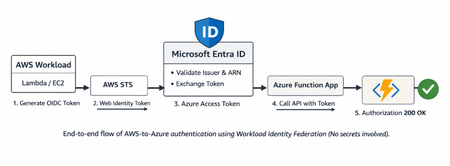
Step-by-step guide to configuring Workload Identity Federation between AWS and Azure, enabling service-to-service authentication where AWS workloads can securely call Azure Functions using token-based access instead of stored credentials.