cloud migration
4 Topics
What is the best way to handle networking during a long-running cloud migration?
Hi everyone, I'd like to get some opinions from people who have worked on large-scale cloud migrations. Consider a migration where workloads are gradually moved from AWS to Azure over several weeks or months rather than being migrated in a single cutover. During the migration period, both environments need to remain operational. A simplified architecture could look like: AWS workloads | | Existing connectivity | AWS Network | | Inter-cloud connectivity | Azure Network | | Azure workloads The challenge is that applications may temporarily become distributed across both clouds. For example: • Application servers may still be running in AWS. • New application components may already be deployed in Azure. • Databases or shared services may remain in AWS temporarily. • DNS and routing may need to support both environments. • Migration tools may require connectivity to source and target environments. • Some workloads may be migrated much earlier than their dependent services. For a long-running migration like this, what architecture would you recommend? Some options I have been considering are: 1. Site-to-site VPN between AWS and Azure 2. Dedicated connectivity such as AWS Direct Connect + Azure ExpressRoute 3. A combination of dedicated connectivity and VPN for backup 4. A hub-and-spoke architecture in Azure with controlled connectivity back to AWS 5. Application-level connectivity rather than relying heavily on network-level connectivity Another question is how you would handle routing. Would you prefer to: • Keep AWS and Azure routing domains mostly independent? • Use a centralized hub for cross-cloud traffic? • Advertise routes dynamically using BGP? • Restrict cross-cloud communication to only the application dependencies that require it? For a migration lasting several months, what approach have you found to be the most reliable and easiest to operate? I'm particularly interested in lessons learned around: • Routing • DNS • Security • Latency • Failover • Monitoring • Avoiding unexpected cross-cloud traffic costs Would appreciate experiences from anyone who has handled a production AWS-to-Azure or Azure-to-AWS migration.
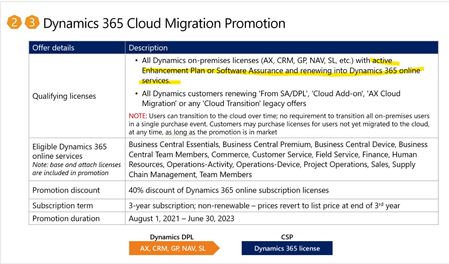
Cloud Migration Promotion offer
Hi I have a possible new customer, that my want to use the Cloud Migration Promotion. I know the promotion is expiring June 29th, so its a bit last minute but my questions are: - Is there a limit to the amount of users that can be added to the subscription? (If they have 50 on premise users, can they max have 50 cloud migration promotion users?) - The customer can create a cloud migration promotion subscription and add 1 user license today and add 200 users at a later date? - User licenses can only be added is the customer has an active enhancement plan? Thanks.4.5KViews0likes9Comments