chatgpt
42 TopicsSet Up Plaud Note Pro with Microsoft Foundry
Prerequisites Riffado, up and running: follow the setup guide in the official Riffado repository to get it going with Docker Compose. A Microsoft Foundry (formerly Azure AI Foundry) resource, with the models you want deployed; in my case, whisper for transcription and o3-mini for summaries. A Plaud device, or any audio recordings you can import into Riffado. Once Riffado is up, head to the Settings page > Providers > Add Provider, and select Custom. This is where the Azure details will go. Why "OpenAI-compatible" isn’t one thing on Microsoft Foundry Azure AI Foundry exposes two different API surfaces on the same resource, and which one serves your model depends on the model: Surface Path shape Serves OpenAI-compatible? v1 route /openai/v1/… gpt-4o-transcribe, gpt-4o-mini-transcribe, chat models, embeddings Yes: Bearer auth, model in the body, no api-version needed Classic route /openai/deployments/{name}/… Whisper (and other legacy audio) No: deployment name lives in the URL, and ?api-version= is mandatory A generic OpenAI client (Riffado's included) can only speak the first dialect. It has nowhere to put a deployment name in the path and no way to append a query parameter. That single fact drives everything below. Part 1 - Transcription Whisper and the DeploymentNotFound mystery Symptom My very first transcription attempt in Riffado failed with 404 Resource not found. Off to a flying start. Configured provider: base URL https://<resource>.services.ai.azure.com, model whisper. Dead end #1: the missing path The first bug was mine: the base URL had no path. Riffado's OpenAI client appends /audio/transcriptions to whatever you give it, so requests were hitting https://<resource>…/audio/transcriptions, a path that doesn't exist on the resource at all. Fixing the base URL to end in /openai/v1 got us to a more interesting error: POST /openai/v1/audio/transcriptions · model=whisper {"error":{"code":"DeploymentNotFound","message":"The API deployment for this resource does not exist. If you created the deployment within the last 5 minutes, please wait a moment and try again."}} Dead end #2: catalog ≠ deployment Worth checking before anything else: selecting a model in the Foundry catalog is not deploying it. GET /openai/v1/models lists everything you could deploy; only Deployments → Deploy model creates an endpoint that answers. If you get DeploymentNotFound, first confirm a deployment actually exists (the listing below requires only the API key): enumerate real deployments (classic control-plane, key auth) curl -s -H "api-key: $KEY" \ "https://<resource>.openai.azure.com/openai/deployments?api-version=2023-03-15-preview" # → {"data":[{"id":"whisper","model":"whisper","status":"succeeded",…}]} The actual cause Here is the part that nearly drove me mad: the deployment existed and was succeeded, yet the v1 route still said DeploymentNotFound. Because Whisper deployments are not served on the v1 route at all. They only answer on the classic path. Verified side by side with the same tiny WAV file: Request Result POST /openai/v1/audio/transcriptions · model=whisper · Bearer 404 DeploymentNotFound POST /openai/deployments/whisper/audio/transcriptions?api-version=2024-06-01 · Bearer 200 {"text":"you"} Same classic path, without ?api-version= 404 Resource not found Three constraints, then: Whisper needs the classic path; the classic path needs api-version; Riffado can send neither. One piece of good news hiding in the table: the classic route accepts Authorization: Bearer, not just Azure's api-key header, so the shim doesn't have to touch auth at all. The fix: a Caddy shim Drop a stock caddy:2-alpine container into the Compose network. Riffado points at it as if it were OpenAI; the shim rewrites the path, injects api-version, and proxies to Azure. The Bearer header passes through untouched. azure-shim.Caddyfile { admin off auto_https off } :80 { @transcribe path /v1/audio/transcriptions /audio/transcriptions handle @transcribe { rewrite * /openai/deployments/whisper/audio/transcriptions?api-version=2024-06-01 reverse_proxy https://<resource>.services.ai.azure.com { header_up Host <resource>.services.ai.azure.com } } handle { respond "azure-shim ok" 200 } } docker-compose.yml (added service) azure-shim: image: caddy:2-alpine restart: unless-stopped volumes: - ./azure-shim.Caddyfile:/etc/caddy/Caddyfile:ro Riffado's provider settings become: Field Value Base URL http://azure-shim/v1 Model whisper (must equal the deployment name) API key the Azure resource key (forwarded as Bearer) Verified From inside the Riffado container: POST http://azure-shim/v1/audio/transcriptions → 200 {"text":"…"}. Transcription works end-to-end in the UI. Part 2 · Summaries & titles o3-mini and the empty answer Symptom The summary button showed "An unexpected error occurred." The container logs were more honest: riffado-app logs Error generating title: TypeError: undefined is not an object (evaluating 'C.choices[0]') Riffado calls chat/completions and reads choices[0] without checking whether the response was an error. So anything the API refuses becomes "an unexpected error." What was it refusing? Cause 1: reasoning models reject the classic knobs o3-mini belongs to Azure/OpenAI's o-series reasoning models, which hard-reject parameters every classic chat client sends. Riffado sends temperature: 0.7 and max_tokens: 50 for titles (0.5 / 2000 for summaries), and o3-mini answers: POST /openai/v1/chat/completions · model=o3-mini HTTP 400 {"error":{"message":"Unsupported parameter: 'max_tokens' is not supported with this model. Use 'max_completion_tokens' instead.", …}} # and with max_tokens fixed: HTTP 400 {"error":{"message":"Unsupported parameter: 'temperature' is not supported with this model.", …}} Cause 2: reasoning tokens starve the output Stripping the bad params gets you to 200, and then comes a subtler failure, my personal favourite of this whole saga. Reasoning models spend completion tokens on internal "thinking" before emitting a single visible character. Riffado's 50-token title budget is consumed entirely by reasoning, and the reply comes back syntactically valid and empty: max_completion_tokens reasoning_effort finish_reason content 50 not set length "" (all 50 spent reasoning) 2000 not set stop "Q3 Budget Planning Strategy Meeting" 2000 low stop same, less reasoning overhead The fix: a Node shim that rewrites the request body Caddy can rewrite paths but not JSON bodies, so this shim is ~60 lines of dependency-free Node on node:20-alpine. Per request it: converts max_tokens → max_completion_tokens, strips temperature / top_p / penalties, floors the token budget at 4000, sets reasoning_effort: "low", maps /v1/* → /openai/v1/*, and forwards to the Azure resource. o3-shim.js const http = require('http'); const https = require('https'); const UPSTREAM_HOST = '<resource>.services.ai.azure.com'; // Params o-series reasoning models reject on chat/completions. const STRIP = ['temperature','top_p','presence_penalty', 'frequency_penalty','logprobs','top_logprobs']; const server = http.createServer((req, res) => { const chunks = []; req.on('data', c => chunks.push(c)); req.on('end', () => { let body = Buffer.concat(chunks); // Riffado's base_url is http://o3-shim/v1 → map to Azure's /openai/v1 let path = req.url; if (path.startsWith('/v1/')) path = '/openai' + path; const ct = (req.headers['content-type'] || '').toLowerCase(); if (ct.includes('application/json') && body.length) { try { const j = JSON.parse(body.toString('utf8')); if (j && typeof j === 'object' && !Array.isArray(j)) { if ('max_tokens' in j) { if (!('max_completion_tokens' in j)) j.max_completion_tokens = j.max_tokens; delete j.max_tokens; } // Reasoning spends tokens before any visible output; small // budgets (Riffado sends 50 for titles) return empty strings. if (Array.isArray(j.messages)) { j.max_completion_tokens = Math.max(Number(j.max_completion_tokens) || 0, 4000); if (!('reasoning_effort' in j)) j.reasoning_effort = 'low'; } for (const k of STRIP) delete j[k]; body = Buffer.from(JSON.stringify(j)); } } catch (_) { /* not JSON - forward untouched */ } } const headers = { ...req.headers, host: UPSTREAM_HOST, 'content-length': Buffer.byteLength(body) }; const up = https.request( { host: UPSTREAM_HOST, port: 443, method: req.method, path, headers }, upRes => { res.writeHead(upRes.statusCode, upRes.headers); upRes.pipe(res); } ); up.on('error', e => { res.writeHead(502, {'content-type':'application/json'}); res.end(JSON.stringify({error:{message:'o3-shim upstream error: '+e.message}})); }); up.end(body); }); }); server.listen(80, () => console.log('o3-shim listening on :80')); docker-compose.yml (added service) o3-shim: image: node:20-alpine restart: unless-stopped working_dir: /app command: ["node", "/app/o3-shim.js"] volumes: - ./o3-shim.js:/app/o3-shim.js:ro Add a second provider in Riffado (base URL http://o3-shim/v1, model o3-mini, the resource's API key) and set it as the default enhancement provider (summaries/titles), keeping the Whisper one as default for transcription. Riffado's exact title request (temperature: 0.7, max_tokens: 50) through the shim → 200, finish_reason: stop, real title text. A full meeting-transcript summary returns structured key points and action items. The final shape Reading it left to right: Riffado never talks to Azure directly. Transcription requests pass through azure-shim, a stock Caddy container that rewrites each request onto Whisper's classic deployment path and injects the mandatory api-version parameter. Summary and title requests pass through o3-shim, a tiny Node server that rewrites the request body into the shape o3-mini accepts and floors the token budget so the model's internal reasoning cannot starve the actual answer. As far as Riffado is concerned, it is simply talking to two ordinary OpenAI providers. Both shims live on the Compose network only; nothing is exposed publicly. Riffado is unmodified. Verification checklist Each layer, testable in isolation. Run these before blaming the app: smoke tests # 1. Key + resource alive? (v1 models listing, Bearer auth) curl -s -H "Authorization: Bearer $KEY" \ https://<resource>.services.ai.azure.com/openai/v1/models | head -c 200 # 2. Whisper answers on the classic path? curl -s -H "Authorization: Bearer $KEY" -F file=@test.wav \ "https://<resource>.services.ai.azure.com/openai/deployments/whisper/audio/transcriptions?api-version=2024-06-01" # 3. Shim translates correctly? (from inside the compose network) docker exec riffado-app node -e "fetch('http://azure-shim/') .then(r=>r.text()).then(console.log)" # 4. o3-mini via shim, sending the params Riffado sends? # (temperature + max_tokens:50; the shim must absorb both) If you'd rather not run shims Both shims exist because of the specific models chosen. Pick models that live natively on the v1 route and Riffado connects directly, with base URL https://<resource>.services.ai.azure.com/openai/v1 and zero extra containers: Transcription: deploy gpt-4o-mini-transcribe (or gpt-4o-transcribe) instead of Whisper. Summaries: deploy a non-reasoning chat model such as gpt-4o-mini, which happily accepts temperature and max_tokens. The shim approach earns its keep when you're standardized on specific models (Whisper's transcription quality, o3-mini's reasoning), or when you want a control point to add logging, retries, or budget caps later. For reference, this is what the finished setup looks like on Riffado's side. Each shim is registered as a plain Custom provider. Here is the whisper provider pointing at azure-shim, with Use for transcription ticked: And once both are saved, they sit side by side in the providers list, whisper tagged for transcription and o3-mini tagged for enhancement: A quick look at the Foundry portal In the Microsoft Foundry portal, head over to Models > AI Services and you will find a pleasant surprise: fifteen AI service models already deployed and ready to use, covering the Azure Speech family (including Voice Live and Speech to Text), Azure Translator, Azure Language, and Content Understanding: You can of course deploy another model for this, but the pre-deployed ones are a handy cost-saving option. Click on the Azure Speech – Voice Live radio button and you will be shown the Base URL and API Key, which you can then paste into the provider settings on Riffado's Settings page. A quick note on cost: these services are not free. They are billed pay-as-you-go based on usage. Azure Speech transcription is charged per audio hour, and Voice Live pricing is tiered by the model you choose. The free tier does include a monthly allowance, though. Check the Azure Speech pricing page before committing. And if you would rather deploy a dedicated transcription model such as whisper, Foundry gives you the flexibility to do just that. Open the model page in the catalogue, click Deploy, and go with Default settings unless you need custom quotas or guardrails: Let's test the setup On your Plaud device, just tap to start recording. The little LED bars light up to show it is listening: Or skip the device entirely and upload an audio file straight into Riffado using the Upload Audio button. Either way, the recording lands on the Recordings page; hit Transcribe and let the spinner do its thing: As you can see below, whisper, the transcription model we deployed earlier, even managed to transcribe a recording in Malay without a hitch. My 3:32 test clip came back as 186 words of clean Malay, with the language correctly detected and tagged: I have also set o3-mini as the enhancement provider, and it enhanced the transcription with a proper summary, key points, and title as well! The Meeting Notes-style summary came straight out of o3-mini through the shim, with zero manual prompting. Wrapping up What started as a TikTok-fuelled impulse buy nearly killed off by subscription pricing ended up as a fully self-hosted pipeline: Plaud for recording, Riffado as the interface, and Microsoft Foundry serving whisper and o3-mini behind two tiny shims. The total extra infrastructure came to two containers and roughly sixty lines of code, and not a single monthly subscription in sight. If you try this setup and run into a failure mode I have not covered here, do share it in the comments. Half the fun is in the debugging.404Views0likes0CommentsIntegrating Microsoft Foundry with OpenClaw: Step by Step Model Configuration
Step 1: Deploying Models on Microsoft Foundry Let us kick things off in the Azure portal. To get our OpenClaw agent thinking like a genius, we need to deploy our models in Microsoft Foundry. For this guide, we are going to focus on deploying gpt-5.2-codex on Microsoft Foundry with OpenClaw. Navigate to your AI Hub, head over to the model catalog, choose the model you wish to use with OpenClaw and hit deploy. Once your deployment is successful, head to the endpoints section. Important: Grab your Endpoint URL and your API Keys right now and save them in a secure note. We will need these exact values to connect OpenClaw in a few minutes. Step 2: Installing and Initializing OpenClaw Next up, we need to get OpenClaw running on your machine. Open up your terminal and run the official installation script: curl -fsSL https://openclaw.ai/install.sh | bash The wizard will walk you through a few prompts. Here is exactly how to answer them to link up with our Azure setup: First Page (Model Selection): Choose "Skip for now". Second Page (Provider): Select azure-openai-responses. Model Selection: Select gpt-5.2-codex , For now only the models listed (hosted on Microsoft Foundry) in the picture below are available to be used with OpenClaw. Follow the rest of the standard prompts to finish the initial setup. Step 3: Editing the OpenClaw Configuration File Now for the fun part. We need to manually configure OpenClaw to talk to Microsoft Foundry. Open your configuration file located at ~/.openclaw/openclaw.json in your favorite text editor. Replace the contents of the models and agents sections with the following code block: { "models": { "providers": { "azure-openai-responses": { "baseUrl": "https://<YOUR_RESOURCE_NAME>.openai.azure.com/openai/v1", "apiKey": "<YOUR_AZURE_OPENAI_API_KEY>", "api": "openai-responses", "authHeader": false, "headers": { "api-key": "<YOUR_AZURE_OPENAI_API_KEY>" }, "models": [ { "id": "gpt-5.2-codex", "name": "GPT-5.2-Codex (Azure)", "reasoning": true, "input": ["text", "image"], "cost": { "input": 0, "output": 0, "cacheRead": 0, "cacheWrite": 0 }, "contextWindow": 400000, "maxTokens": 16384, "compat": { "supportsStore": false } }, { "id": "gpt-5.2", "name": "GPT-5.2 (Azure)", "reasoning": false, "input": ["text", "image"], "cost": { "input": 0, "output": 0, "cacheRead": 0, "cacheWrite": 0 }, "contextWindow": 272000, "maxTokens": 16384, "compat": { "supportsStore": false } } ] } } }, "agents": { "defaults": { "model": { "primary": "azure-openai-responses/gpt-5.2-codex" }, "models": { "azure-openai-responses/gpt-5.2-codex": {} }, "workspace": "/home/<USERNAME>/.openclaw/workspace", "compaction": { "mode": "safeguard" }, "maxConcurrent": 4, "subagents": { "maxConcurrent": 8 } } } } You will notice a few placeholders in that JSON. Here is exactly what you need to swap out: Placeholder Variable What It Is Where to Find It <YOUR_RESOURCE_NAME> The unique name of your Azure OpenAI resource. Found in your Azure Portal under the Azure OpenAI resource overview. <YOUR_AZURE_OPENAI_API_KEY> The secret key required to authenticate your requests. Found in Microsoft Foundry under your project endpoints or Azure Portal keys section. <USERNAME> Your local computer's user profile name. Open your terminal and type whoami to find this. Step 4: Restart the Gateway After saving the configuration file, you must restart the OpenClaw gateway for the new Foundry settings to take effect. Run this simple command: openclaw gateway restart Configuration Notes & Deep Dive If you are curious about why we configured the JSON that way, here is a quick breakdown of the technical details. Authentication Differences Azure OpenAI uses the api-key HTTP header for authentication. This is entirely different from the standard OpenAI Authorization: Bearer header. Our configuration file addresses this in two ways: Setting "authHeader": false completely disables the default Bearer header. Adding "headers": { "api-key": "<key>" } forces OpenClaw to send the API key via Azure's native header format. Important Note: Your API key must appear in both the apiKey field AND the headers.api-key field within the JSON for this to work correctly. The Base URL Azure OpenAI's v1-compatible endpoint follows this specific format: https://<your_resource_name>.openai.azure.com/openai/v1 The beautiful thing about this v1 endpoint is that it is largely compatible with the standard OpenAI API and does not require you to manually pass an api-version query parameter. Model Compatibility Settings "compat": { "supportsStore": false } disables the store parameter since Azure OpenAI does not currently support it. "reasoning": true enables the thinking mode for GPT-5.2-Codex. This supports low, medium, high, and xhigh levels. "reasoning": false is set for GPT-5.2 because it is a standard, non-reasoning model. Model Specifications & Cost Tracking If you want OpenClaw to accurately track your token usage costs, you can update the cost fields from 0 to the current Azure pricing. Here are the specs and costs for the models we just deployed: Model Specifications Model Context Window Max Output Tokens Image Input Reasoning gpt-5.2-codex 400,000 tokens 16,384 tokens Yes Yes gpt-5.2 272,000 tokens 16,384 tokens Yes No Current Cost (Adjust in JSON) Model Input (per 1M tokens) Output (per 1M tokens) Cached Input (per 1M tokens) gpt-5.2-codex $1.75 $14.00 $0.175 gpt-5.2 $2.00 $8.00 $0.50 Conclusion: And there you have it! You have successfully bridged the gap between the enterprise-grade infrastructure of Microsoft Foundry and the local autonomy of OpenClaw. By following these steps, you are not just running a chatbot; you are running a sophisticated agent capable of reasoning, coding, and executing tasks with the full power of GPT-5.2-codex behind it. The combination of Azure's reliability and OpenClaw's flexibility opens up a world of possibilities. Whether you are building an automated devops assistant, a research agent, or just exploring the bleeding edge of AI, you now have a robust foundation to build upon. Now it is time to let your agent loose on some real tasks. Go forth, experiment with different system prompts, and see what you can build. If you run into any interesting edge cases or come up with a unique configuration, let me know in the comments below. Happy coding!12KViews2likes2CommentsMake your own private ChatGPT
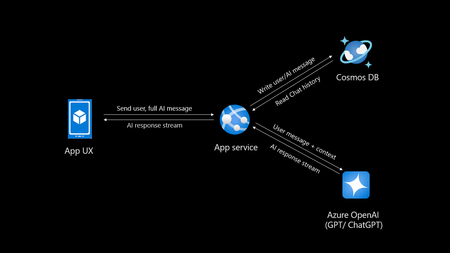
Introduction Creating your own private ChatGPT allows you to leverage AI capabilities while ensuring data privacy and security. This guide walks you through building a secure, customized chatbot using tools like Azure OpenAI, Cosmos DB and Azure App service. Why Build a Private ChatGPT? With the rise of AI-driven applications, organizations, people often face challenges related to data privacy, customization, and integration. Building a private ChatGPT addresses these concerns by: Maintaining Data Privacy: Keep sensitive information within your infrastructure. Customizing Responses: Tailor the chatbot’s behavior and language to suit your requirements. Ensuring Security: Leverage enterprise-grade security protocols. Avoiding Data Sharing: Prevent your data from being used to train external models. If organizations do not take these measures their data may go into future model training and can leak your sensitive data to public. Eg: Chatgpt collects personal data mentioned in their privacy policy Prerequisites Before you begin, ensure you have: Access to Azure OpenAI Service. A development environment set up with Python. Basic knowledge of FastAPI and MongoDB. An Azure account with necessary permissions. If you do not have Azure subscription, try Azure for students for FREE. Step 1: Set Up Azure OpenAI Log in to the Azure Portal and create an Azure OpenAI resource. Deploy a model, such as GPT-4o (multimodal), and note down the endpoint and API key. Note there is also an option of keyless authentication. Configure permissions to control access. Step 2: Use Chatgpt like app sample You can select any repository to be as base template for your app, in this I will be using the third option AOAIchat. It is developed by me. GitHub - mckaywrigley/chatbot-ui: AI chat for any model. Azure-Samples/azure-search-openai-demo: A sample app for the Retrieval-Augmented Generation pattern running in Azure, using Azure AI Search for retrieval and Azure OpenAI large language models to power ChatGPT-style and Q&A experiences. sourabhkv/AOAIchat: Azure OpenAI chat This architecture diagram represents a typical flow for a private ChatGPT application with the following components: App UX (User Interface): This is the front-end application (mobile, web, or desktop) where users interact with the chatbot. It sends the user's input (prompt) and displays the AI's responses. App Service: Acts as the backend application, handling user requests and coordinating with other services. Functions: Receives user inputs and prepares them for processing by the Azure OpenAI service. Streams AI responses back to the App UX. Reads from and writes to Cosmos DB to manage chat history. Azure OpenAI Service: This is the core AI service, processing the user input and generating responses using models like GPT-4o. The App Service sends the user input (along with context) to this service and receives the AI-generated responses. Cosmos DB: A NoSQL database used to store and manage chat history. Operations: Writes user messages and AI-generated responses for future reference or analysis. Reads chat history to provide context for AI responses, enabling more intelligent and contextual conversations. Data Flow: User inputs are sent from the App UX to the App Service. The App Service forwards the input (with additional context, if needed) to Azure OpenAI. Azure OpenAI generates a response, which is streamed back to the App UX via the App Service. The App Service writes user inputs and AI responses to Cosmos DB for persistence. This architecture ensures scalability, secure data handling, and the ability to provide contextual responses by integrating database and AI services. What can you do with my template? AOAIchat supports personal, enterprise chat enabled by RAG People can enable RAG mode if they want to search within their database, else it behaves like normal ChatGPT. It supports multimodality, (supports image, text input) also depends on model deployed in Azure AI foundry. Step 3: Deploy to Azure Deploy a Cosmos DB account in nearest region Deploy Azure OpenAI model (gpt-4o, gpt-4o-mini recommended) Deploy Azure App service, try using container I would recommend B1plan to your nearest region, select docker registry sourabhkv/aoaichatdb:0.1 startup command uvicorn app:app --host 0.0.0.0 --port 80 After app service starts, put all environment variables The application requires the following environment variables to be set for proper configuration: Environment Variable Description AZURE_OPENAI_ENDPOINT The endpoint for Azure OpenAI API. AZURE_OPENAI_API_KEY API key for accessing Azure OpenAI. DEPLOYMENT_NAME Azure OpenAI deployment name. API_VERSION API version for Azure OpenAI. MAX_TOKENS Maximum tokens for API responses. MONGO_DETAILS MongoDB connection string. AZURE_OPENAI_ENDPOINT=<your_azure_openai_endpoint> AZURE_OPENAI_API_KEY=<your_azure_openai_api_key> DEPLOYMENT_NAME=<your_deployment_name> API_VERSION=<your_api_version> MAX_TOKENS=<max_tokens> MONGO_DETAILS=<your_mongo_connection_string> Optional feature: implement authentication to secure access. Within app service select Authentication and select service providers. I went with Entra based authentication with single tenant. There is option of multi-tenant, personal accounts as well. Restart App service and within 2 minutes your private ChatGPT is ready. Pricing Pricing may depend on the plan you have deployed resources and region. Check Azure calculator for price estimation. My estimate for pricing I deployed all my resources in Sweden central Cosmos DB config - Cosmos DB for MongoDB (RU) serverless config with single write master, 2 GB transactional storage, 2 backup plan (FREE) ~ 0.75$ Azure OpenAI service - plan S0, model gpt-4o-mini global deployment, Input 20000 tokens, Output 10000 tokens ~ 9.00$ App service plan - OS Linux, Tier B1, instance count 1 ~13.14$ Total monthly cost = 22.89$ This price may vary in future, in region I calculated my configuration in Azure calculator Governance Azure OpenAI provides content filters to block any kind of input that violates responsible AI practices. Categories include Hate and Fairness Sexual Violence Self-harm User Prompt Attacks (direct and indirect) The content filtering system detects and takes action on specific categories of potentially harmful content in both input prompts and output completions. Azure OpenAI Service includes default safety settings applied to all models set as medium. Content filters can be modified to different level depending on use case. It supports RAG, I have provided detailed solution for it in my GitHub. Practical implementation GE Aerospace, in partnership with Microsoft and Accenture, has launched a company-wide generative AI platform, leveraging Microsoft Azure and Azure OpenAI Service. This solution aims to transform asset tracking and compliance in aviation, enabling quick access to maintenance records and reducing manual processing time from days to minutes. It supports informed decision-making by providing insights into aircraft leasing, compliance gaps, and asset health. For enterprises implementing private ChatGPT solutions, this illustrates the potential of generative AI for streamlining document-intensive processes while ensuring data security and compliance through cloud-based infrastructure like Azure. GE Aerospace Launches Company-wide Generative AI Platform for Employees | GE Aerospace News Build your own private ChatGPT style app with enterprise-ready architecture - By Microsoft Mechanics How to make private ChatGPT for FREE? It can be FREE if all of the setup is running locally on your hardware. Cosmos DB <-> MongoDB. Azure OpenAI <-> Ollama / LM studio Refer this NOTE : I have used gpt-4o, gpt-4o-mini these values are hardcoded in webpage, if you are using other models, you might have to change them in index.html. App Service <-> Local machine Register for Github models to access API for FREE. Note: GitHub models have rate limit for different models. Useful links sourabhkv/AOAIchat: Azure OpenAI chat What is RAG? Get started with Azure OpenAI API Chat with Azure OpenAI models using your own data16KViews1like1Comment120 Days Study Plan to Become an AI-Focused Full-Stack Software Engineer
Hello there, my name is Oumaima, and I am an MLSA student ambassador from Morocco, studying at the University Of The People. Welcome to the first step in my exciting, unpredictable journey, one I’ve chosen to embark on with you! For the past three years, I’ve watched the AI industry evolve dramatically. Generative AI has shifted from a fascinating experiment to an integral part of our everyday lives, whether at school, work, or even in our personal routines. In fact, my ChatGPT app is now my go-to therapist, lawyer, and all-around advisor! As a software engineering student for over three years, I’ve seen the growth of generative AI up close. But this shift didn’t just inspire me; it made me realize that I don’t want to remain only a consumer of this technology. I want to contribute to it! Seeing AI’s ability to mimic human thought, draw connections from vast amounts of information, and deliver impressive results sparked something in me. It showed me that the best way to break into AI might just be to use AI itself as my guide. That’s when the idea came to ask ChatGPT O1-preview for a personalized study plan, crafted uniquely for me. It takes into account my available time, coding background, learning preferences, mental health, and energy. Here’s how my journey began with a simple prompt: I want to become an AI-focused full-stack software engineer and have 120 days to dedicate to this goal. Please create a detailed 120-day study plan tailored for me, dedicating 3-4 hours daily. The study plan should: - Cover all essential topics including programming foundations, data structures and algorithms (DS&A), mathematics for AI, machine learning fundamentals, deep learning, advanced AI topics, integrating AI into applications, web development basics for AI integration, advanced web development, full-stack project development, scripting, DevOps, and career development. - Include weekly breakdowns and daily tasks. - Provide recommended resources for each topic (e.g., online courses, tutorials, documentation). - Suggest hands-on projects or exercises to apply the concepts learned. - Incorporate tips for success, such as active engagement, seeking feedback, balancing depth and breadth, and maintaining well-being. - Emphasize developing all the skills that will make me an irreplaceable software developer, including scripting and DevOps skills. - Conclude with a summary and final advice. Please ensure the plan is structured, comprehensive, and practical for someone balancing work and study. Then it generated the following plan, that I tried to follow by using Microsoft Learn learning paths that offer in depth trainings on each topic I got: Days 1–25: Programming Foundations & Data Structures and Algorithms (DS&A) Microsoft Learn path suggestion: Python for beginners Days 26–50: Mathematics for AI & Machine Learning Fundamentals Microsoft Learn path suggestion: Introduction to machine learning Days 51–80: Deep Learning & Advanced AI Topics Microsoft Learn path suggestion: Train and evaluate deep learning models Days 81–100: Integrating AI into Applications Microsoft Learn path suggestion: Microsoft Azure AI Fundamentals: Generative AI Days 101–115: Advanced Web Development & Full-Stack Project Development Microsoft Learn path suggestion: Build an AI web app by using Python and Flask Days 116–120: Portfolio Projects and Industry Trends. Not going to lie, the roadmap turned out to be even more exciting than I’d expected! When I asked for it, I specified that it should guide me through developing problem-solving skills directly tied to full-stack development. I wanted a path that not only sharpens my abilities but also allows me to build interesting, hands-on applications where I can see the results of what I’m learning. And now, my friends, the journey has officially begun! I’ll be following the roadmap closely, documenting my weekly progress to learn AI, noting the challenges, and celebrating the accomplishments. The goal is to see if artificial intelligence can really help create a customized study plan that aligns with my personal goals, circumstances, and unique learning rhythm. So, stay tuned — this is only the beginning! See you in my first step with DSA!14KViews4likes4CommentsEnhancing Student Resumes: An Innovative Approach Using Azure OpenAI ChatGPT-4o
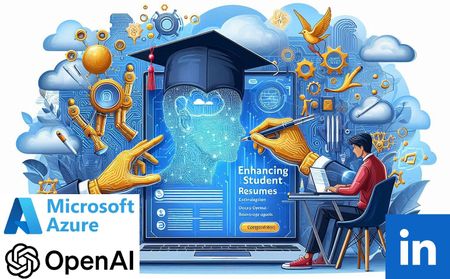
Discover the transformative power of AI in education with our innovative approach to enhancing student resumes. Leveraging Azure OpenAI ChatGPT-4o, we’ve automated the initial review and feedback process, ensuring meticulous examination of each resume. This not only saves time for career mentors but also significantly improves the quality of student resumes. Witness an increase in employment rates and a positive impact on our course reputation. Join us as we redefine educational and career support services, demonstrating the potential of AI in shaping the future of learning and career development.8.9KViews0likes1CommentUsing Azure OpenAI Services to automate programming test scoring
Automated Azure OpenAI solution uses open-source Jupyter notebooks and ChatGPT to score programming tests in GitHub Classroom, reducing the time and effort required by educators. The solution providing an objective reference to prevent errors and score programming tests more efficiently.3.7KViews0likes0Comments