chatgpt
43 TopicsEnterprise Deployment Architecture for Agentic AI: ChatGPT-Style UI on IIS over Agents & MCP Servers
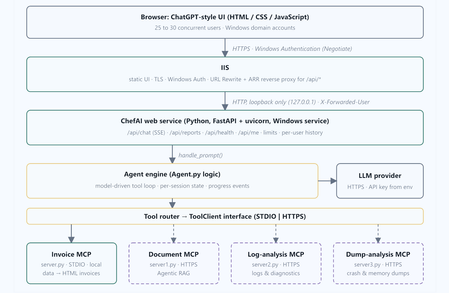
Research Disclaimer: This article is a technical research paper intended solely for educational, research, and illustrative purposes. It reflects the author’s personal technical perspectives. All concepts, architectural designs, diagrams, and implementation approaches are provided “AS IS” for technical exploration and review, not as production-ready development guidance. Organizations considering implementing these approaches should consult their internal software development standards, enterprise architecture teams, corporate security policies, and governance requirements. Any production implementation must undergo appropriate end-to-end architectural, security, privacy, compliance, and responsible AI or ethics reviews, along with necessary testing and organizational approvals before deployment. Abstract. Large language model agents that call tools through the Model Context Protocol (MCP) are usually shown from a console or a developer IDE. Enterprise users expect something different. They want a familiar chat interface, single sign-on and steady behavior when many people use the system at once. This paper gives architectural guidance for a ChatGPT-style web interface, hosted in Microsoft Internet Information Services (IIS) with Windows Authentication, that fronts an MCP-based agent for 25 to 30 concurrent users. The work is broken into nine steps: the engine boundary, state isolation, a streaming API, the chat UI, a Windows service host, IIS reverse-proxy configuration, security, testing and deployment. The paper explains why a long-running Python service behind IIS beats launching Python for every request, and why no Kerberos delegation (the double hop) is needed. It also describes a small transport-neutral tool-client layer, so the same agent can call a local STDIO MCP server and several remote MCP servers over HTTPS without any change to the user interface. The reference scenario is ChefAI, a fictitious restaurant-operations assistant that needs real-time answers, invoice generation, and log and crash-dump analysis for technical troubleshooting. Its STDIO server generates invoices. Three HTTP servers handle document retrieval through an Agentic RAG system, log analysis and dump analysis. The agent logic itself is treated as a black box. The paper closes with a threat model, a capacity argument and an evaluation methodology. Keywords: Model Context Protocol, agent user interface, IIS, Windows Authentication, reverse proxy, Server-Sent Events, agentic RAG, concurrency control, tool routing 1. Introduction Tool-using language model agents have become practical because protocols such as the Model Context Protocol (MCP) standardize how an agent discovers and calls external capabilities [1]. A typical agent loop sends a user request and the list of available tools to a model, receives a tool choice, runs the tool, and feeds the result back until the model can answer. The loop is easy to demonstrate in a terminal. Putting it in front of a team is harder, because the interface, identity, concurrency, streaming and deployment all become real concerns. This paper addresses that gap for a common enterprise setting: Windows infrastructure, an intranet, Active Directory identities and IIS as the standard web host. It is written as a reference architecture. It describes the components, what each one is responsible for, the trust boundaries between them and the order in which to build them. A fictitious reference application, ChefAI (Section 1.2), keeps the discussion concrete. End users reach the application through a browser chat window with their Windows identity, while the agent behind the scenes talks to one local MCP server over STDIO and to several remote MCP servers over HTTPS. 1.1 Contributions A nine-step design for a ChatGPT-style web interface that fronts an MCP agent and is hosted on IIS with Windows Authentication (Sections 4 and 5). A concurrency design sized for 25 to 30 simultaneous users, with explicit queues, per-user limits, timeouts and cleanup (Sections 5.2, 5.5 and 10). A transport-neutral tool-client layer made of an interface, a server registry and a router, which keeps the UI independent of how tools are reached (Section 6). A reference fleet of four MCP servers with different capabilities and data sensitivities, including an Agentic RAG document server, used to reason about routing and security (Section 7). An analysis of identity flow showing that no Kerberos delegation is needed, a threat model and an evaluation methodology (Sections 8 to 10). 1.2 The ChefAI reference application What ChefAI is. ChefAI is a fictitious restaurant-operations application used throughout this paper as the reference scenario. It is an AI assistant for a restaurant business. Staff need real-time answers during service, invoices generated from purchasing data, and help with technical troubleshooting when systems such as point-of-sale terminals, kitchen displays or online-ordering services misbehave. Staff describe what they need in plain language in a browser. The assistant decides which capability to use and answers with figures, documents, diagnostics or a generated report. How it is structured. The application is split into an agent and four MCP servers. Agent.py is the agent. It receives a request, consults a language model and calls tools exposed by MCP servers. The first server, server.py , is a local STDIO server and acts as the invoice generator. It reads purchasing data and produces HTML invoices and reports. The other three servers are remote HTTP(S) servers ( server1.py , server2.py and server3.py ), not STDIO, and the agent calls them to get information and to support technical issues. They are a document processor that answers questions by retrieving data and documents from an Agentic RAG system, a log analyzer and a dump analyzer. Table 0 summarizes the scenario. Capability Example request from staff Served by Transport Real-time spend answers “What did we spend on tomatoes last year?” Invoice server ( server.py ) STDIO, local Invoice generation “Generate the year-to-date invoice.” Invoice server ( server.py ) STDIO, local Knowledge and documents “What is our return policy for dairy deliveries?” “How do we descale the combi oven?” Document processor with Agentic RAG ( server1.py ) HTTPS, remote Log analysis “Why did the point-of-sale terminals time out on Friday evening?” Log analyzer ( server2.py ) HTTPS, remote Dump analysis “The kitchen display crashed. What does this dump show?” Dump analyzer ( server3.py ) HTTPS, remote Table 0. The ChefAI reference scenario: capabilities, the server that provides each, and its transport. The scenario deliberately mixes a business need (spend, invoices, policies) with an operational need (logs, dumps and runbooks). One interface therefore has to route between servers with very different data and risk profiles. The restaurant details, hostnames and example questions are illustrative and do not describe a real business. 1.3 Scope The focus is the user-interface tier and its hosting. The agent internals are out of scope except for the configuration the UI depends on, namely how the agent is invoked and how it reaches tools. The tool names, capacity figures and timeouts in this paper are illustrative design values. They show how to reason about a deployment and should be checked against the real workload (Section 10). 2. Background 2.1 The Model Context Protocol and its transports MCP defines how a client discovers a server’s tools, resources and prompts and calls them using JSON- RPC messages [1]. Two standard transports matter here. STDIO launches the server as a child process and exchanges messages over standard input and output. It is simple and local and needs no network port, but it ties the server’s lifetime to the client process. Streamable HTTP exposes the server at a URL. That allows servers on other machines, shared by several clients and protected by TLS and HTTP authentication. The official SDKs let the same tool code be exposed over either transport, so a server can move from one to the other without rewriting its tools. 2.2 Server-Sent Events for progress Agent requests can last tens of seconds because they chain model calls and tool calls. Server-Sent Events (SSE) let the server push a one-way stream of text events over an ordinary HTTP response [2]. This suits a chat interface that wants to show “queued”, “analyzing logs” and “building invoice” before the final answer. SSE also passes through reverse proxies more easily than WebSockets, as long as buffering is turned off. 2.3 IIS, ARR and Windows Authentication IIS can authenticate users with the Negotiate provider, which uses Kerberos where available and falls back to NTLM [3]. With the URL Rewrite and Application Request Routing (ARR) extensions, IIS can act as a reverse proxy. It forwards selected paths to a back-end service and can copy server variables such as LOGON_USER into request headers [4]. 2.4 The double-hop problem A “double hop” happens when a server has to use the caller’s Windows identity to reach a second server on the caller’s behalf. That requires Kerberos delegation. Section 8 shows why this design avoids it. 3. Requirements and Constraints Category Requirement Interface ChatGPT-style chat in a browser, real-time progress, a stop button, report cards with preview, and no CDN so it works offline on an intranet. Identity Windows Authentication in IIS. The application knows the user’s name and never handles user passwords. Concurrency 25 to 30 simultaneous users without cross-user data leakage, orphaned processes or unbounded resource use. Tools A local STDIO MCP server and several remote HTTPS MCP servers. The UI must not change when servers are added or moved. Security LLM keys never in files, logs or the browser. Loopback-only back end, output escaping, restrictive report serving and allow-listed remote servers. Operations Runs as a Windows service with restart on failure, structured logs and idempotent deployment scripts. Constraints System Python without virtual environments, standard-library HTTP for model calls, IIS as the only public listener and no Kerberos delegation. 4. System Architecture Figure 1 shows the end-to-end architecture. Users reach IIS over HTTPS and authenticate with Windows credentials. IIS serves the static single-page interface and reverse-proxies /api/* over loopback to a Python web service. The service owns the agent engine, which plans with a language model and calls tools through a router. The router reaches the local invoice server over STDIO and the remote servers over HTTPS. Figure 1. End-to-end architecture. Solid boxes and arrows are local components and the local STDIO server. Dashed boxes and arrows are remote MCP servers reached over HTTPS. Adding a server only touches the service and the tool layer. The browser and IIS tiers stay the same. 4.1 Request lifecycle Figure 2 follows a single prompt. The browser posts to /api/chat . IIS authenticates the user, overwrites the identity header and proxies the call. The service queues and admits the request, then streams status events while the engine consults the model and calls tools. The loop repeats, up to a fixed number of tool calls, until the model reports completion or, for report requests, an HTML file exists. The final answer and report links go out as the last events. Figure 2. Request lifecycle for one prompt. Messages 3 and 12 are Server-Sent Events returned through IIS on the original HTTP response. The browser never talks to the engine, the model or any MCP server directly. 4.2 Why a web service sits between the browser and the agent, and why the browser cannot call MCP servers directly The browser cannot call the agent directly, for reasons of feasibility and of fitness. On feasibility, clientside JavaScript can only issue HTTP requests and cannot start or import a Python program. IIS, as a static-file and ASP.NET host, has no in-process Python runtime. An agent is also a script and not a network endpoint, so something has to listen for requests and invoke it. On fitness, an agent request is long-lived, stateful and costly. It chains model and tool calls for tens of seconds, spawns MCP child processes that must be cleaned up on timeout or disconnect, keeps per-conversation state and has to stream progress. It therefore needs a persistent process that can enforce admission control (per-user gates, a bounded queue, semaphores and timeouts), isolate sessions, emit Server-Sent Events and hold the model key and service credentials in a service account, not in the client or the IIS application pool. Launching Python for every request would add seconds of start-up cost and make streaming, cancellation and cleanup fragile. Letting IIS supervise the process, for example through FastCGI or HttpPlatformHandler, changes who restarts it but not the need for it. The browser also cannot call the MCP servers directly. A STDIO server has no network listener at all. A Streamable HTTP server does carry MCP’s JSON-RPC over HTTP, so transport is not the real obstacle. The real obstacle is that an MCP server exposes typed tools and does not understand natural language, so some component must decide which tool to call with which arguments and iterate on the results. That component is the modeldriven agent loop, and it needs the LLM key. Direct access would also place server tokens or client certificates in every browser and expose the sensitive log and dump servers to every desktop. It would bypass central rate limiting, audit, allow-listing and redaction, remove the agent’s defence against prompt injection in tool results, and force the interface to carry discovery, routing and namespacing logic for every server, so adding a server would change the UI. Putting the service in between reduces the browser’s contract to a single HTTP endpoint, /api/chat , and keeps MCP, model credentials and trust decisions on the server side. 5. User-Interface-Centered Design in Nine Steps The design is organized as nine steps (Figure 3). Steps 1 and 2 define the boundary to the agent, Steps 3 and 4 deliver the API and the interface, Steps 5 and 6 host it, Step 7 secures it, Step 8 tests it and Step 9 documents and deploys it. Figure 3. The nine-step roadmap. Amber is the agent boundary, green is the API and interface, grey is hosting, red is security, and purple is verification and delivery. 5.1 Step 1: Define an engine boundary the UI can call An agent is often first written as a console program that mixes the planning loop with prompts and printing. The first step separates them. The agent exposes one asynchronous function, handle_prompt(prompt, history, progress_callback) , that returns {answer, html_files, tool_trace, error} and reports progress through a callback instead of printing. It never reads from or writes to a console. A single prompt box replaces any menu of modes, and the model decides from the live tool list whether the request needs a generated file or only an answer. Recent conversation turns, six by default, are passed as context so that follow-ups such as “now compare it to 2026” work. Only aggregates and provenance go back to the model, and raw rows stay on the server. This boundary is the only contract between the interface tier and the agent. 5.2 Step 2: Remove shared mutable state Agents and tool servers often keep module-level state, such as loaded data and cached query results. With 25 to 30 concurrent users, that state becomes a correctness and privacy hazard. The design therefore does three things. It loads and parses reference data once into an immutable shared dataset, reloaded only when the source file’s size or modification time changes and guarded by a lock. It keeps query results in a per-session store, so each query identifier belongs to exactly one session. And it gives each request an isolated tool connection, or a bounded pool of server processes with per-request session identifiers. Shared outputs are written atomically (a temporary file, then a rename) so a reader never sees a half-written file. 5.3 Step 3: Provide a streaming API The service exposes four endpoints (Table 1). The chat endpoint returns a Server-Sent Event stream. Conversation history is kept per user and conversation with a time-to-live and a cap, and no other user can read it. Endpoint Behavior POST /api/chat Body {prompt, conversation id} . The prompt is validated and capped at 2000 characters. Streams status , tool , result , done and error events (Appendix A). GET /api/reports/{name} Serves generated HTML from one folder only. Filenames are allow-listed and the resolved path must stay inside the folder. Sends a restrictive Content-Security-Policy and nosniff . Reports are scoped per user, plus shared built-in reports. GET /api/health Status, provider, model, data-loaded flag, queue depth and running count. Never keys or paths outside the project. GET /api/me Authenticated display name taken from the trusted header. Table 1. API surface of the web service. 5.4 Step 4: Build the ChatGPT-style interface The interface is plain HTML, CSS and vanilla JavaScript. There is no framework and no CDN, so it works on an isolated intranet and adds no supply-chain exposure. Figure 4 shows the layout. The sidebar lists this browser’s recent conversations from localStorage . The main pane shows user and assistant bubbles, a live status line fed by the event stream, and report cards that open in a new tab or preview in a sandboxed iframe with scripts disabled. The composer grows with its content, sends on Enter, inserts a newline on Shift+Enter, shows a character counter and is disabled while that user has a request running. A Stop button aborts the stream, which in turn cancels the server-side run. Example prompts fill an empty chat. Figure 4. Wireframe of the chat interface. (1) Conversation sidebar, (2) message bubbles, (3) live status line from the event stream, (4) report card with Open and Preview, (5) composer with Send and Stop, (6) data-egress notice. All model and server text is inserted as escaped text. Minimal formatting (line breaks, bold, simple tables) is added by the interface itself and never by interpreting model output as HTML. Errors are visible and actionable. Network loss, 401 and 403, 409 (a request is already running), 429 (system busy, with a retry hint) and timeouts each show a message and a Retry button. Figure 5. Typical event sequence for an invoice request. The browser adds each event to the status line as it arrives and renders the final answer and report cards when the closing done event comes in. 5.5 Step 5: Host the service The Python application runs under a Windows service wrapper (for example NSSM or WinSW), bound to 127.0.0.1 on a fixed port, with automatic restart and a dedicated low-privilege account. It reads the provider name, the model override, the data path and the limits from environment variables, and it reads the LLM key from the service environment only. The account gets read access to the project and data, and write access only to the report output and log folders. Capacity is protected by explicit limits (Figure 6). There is a per-user gate (one running request and a rate limit), a bounded queue that reports “queued, position N” through the stream and returns HTTP 429 when full, a semaphore on concurrent agent runs (default 8) and a separate semaphore on concurrent model calls (default 6). Every request has a wall-clock timeout (default 120 s). On timeout, cancellation or browser disconnect, the request’s child processes are terminated and its slots released, so no orphaned processes remain. Blocking work such as file and network I/O runs off the event loop, so one slow call cannot stall other users. Figure 6. Admission control and cleanup. A request has to pass the per-user gate and the queue before it gets an agent slot, and model calls are throttled separately. 5.6 Step 6: Configure IIS IIS is configured as a thin front end. The site’s application pool uses “No Managed Code” because IIS only serves static files and proxies. URL Rewrite forwards /api/* to the loopback service and, in the same rule, sets an X-Forwarded-User header from the authenticated LOGON_USER value, overwriting anything the client sent. The ARR proxy is enabled with a timeout longer than the engine’s request timeout, and response buffering and dynamic compression are turned off so the event stream is delivered live. Request size is capped, risky file extensions ( .py , .csv , .env , .log , .md ) are denied and an HTTPS binding is required. Windows Authentication is enabled and Anonymous is disabled. Those sections are locked at server level by default, so they are set through appcmd at the application-host scope. Appendix C lists the key settings. 5.7 Step 7: Secure the system Section 8 covers the security controls in detail. In short, identity comes only from IIS and the service accepts connections from loopback only. The model key is read from the service environment and scrubbed from every error and log. All text is escaped in the browser. Reports are served with a restrictive policy from one folder. Tools are read-only against the data and write only to report folders. Users are told that aggregated figures are sent to the external model provider. 5.8 Step 8: Test Tests use a mocked model, so no paid calls are made and results are repeatable (Section 10.1). They cover the API contract, path traversal, cross-user isolation, malformed model output and missing keys. They also run a simulated 30-user mixed workload, check cleanup on timeout and disconnect, scan responses and logs to confirm the key never appears, and exercise the tool router with fake clients. 5.9 Step 9: Document and deploy Two idempotent PowerShell scripts install the service and configure IIS. The README documents installation, service commands, key rotation and troubleshooting. Idempotence matters because configuration drift is a frequent cause of failure in reverse-proxy deployments, and a script that can be safely rerun repairs drift instead of adding to it. 6. The Agent Boundary and a Transport-Neutral Tool Layer The agent is treated as a black box that takes a prompt and history and returns an answer, files and a trace. Only one part of its configuration matters to the interface design, and that is how it reaches tools. A deployment may reach a tool server as a local STDIO child process or as a remote HTTPS endpoint, and may move a server from one to the other. Neither choice should change the browser, IIS or the API contract. Three small abstractions achieve this (Figure 7). ToolClient interface. Three asynchronous operations: list_tools() , which returns name, description and input schema, call_tool(name, arguments) , which returns a result object, and close() . An STDIO client, an in-process fallback and a Streamable HTTP client all implement it. Server registry. A list of entries, each with a name, transport, command or URL, the name of the environment variable holding its credential, a timeout and an enabled flag. A deployment can start with a single entry, such as the local invoice server over STDIO, and grow by loading more entries from a configuration file. Tool router. It combines the tools of every enabled client into one live list for the model and sends each call to the client that owns the tool. Once more than one server is registered, it namespaces tool names ( server__tool ) so collisions cannot happen. A slow or unreachable server is skipped with a status event and does not fail the whole request. Application-specific behavior, such as the data summary sent to the model, query identifiers and the rule that report requests must produce an HTML file, lives in an adapter and not in the generic loop. That way, servers that know nothing about invoices can still be used. Figure 7. The transport-neutral tool layer. A remote server is added with a registry entry. One HTTP client implementation serves all remote servers, and no code above the router changes. 6.1 Registry example The following shows the shape of the registry for the four ChefAI servers. Credentials are referenced by environment-variable name, and the secrets themselves never appear in the file. Here docs , logs and dumps correspond to server1.py , server2.py and server3.py . With several servers registered, the model sees namespaced tools such as invoices__generate_invoice or logs__search_logs . Each extra server makes the tool list sent with every model call longer, so a practical deployment should filter or pre-route the list by request intent. Section 11 returns to this. 7. The ChefAI MCP Server Fleet The ChefAI scenario (Section 1.2) uses four servers with deliberately different capabilities (Table 2). Tool names are illustrative, and an implementation may name and group tools differently. Server Transport Capability and example tools Data sensitivity Operational notes Invoice generator server.py STDIO, local Queries purchasing data by period, item and vendor, and generates HTML invoices and reports with totals computed in code. Tools: query expenses ,generate invoice ,generate report , chef summary . Business- confidential totals and vendor names. One child process per request. Read- only on data, writes only to report folders. Document processor (Agentic RAG) server1.py HTTPS, remote Answers questions by retrieving data and documents (supplier contracts, return policies, menus, allergen sheets, equipment manuals, runbooks) from an Agentic RAG system and returning an answer with citations. Tools: search documents , get document, answer with citations . Mixed. Some documents are confidential (contracts, pricing), so it needs document-level access control. Read-only. Always returns source references. Has a retrieval budget and timeout, and shows index freshness. Log analyzer server2.py HTTPS, remote Searches and summarizes application and device logs from point-of-sale, kitchen-display and ordering systems: error counts by time bucket, top messages, correlation by request id. Tools: search logs ,summarize errors ,time histogram . May contain user identifiers, IP addresses or secrets, so it needs redaction. Read-only. Limits result size and redacts on the server side. Dump analyzer server3.py HTTPS, remote Triages crash or memory dumps from restaurant systems:exception summary, faulting module, thread stacks. Tools: list dumps , analyze dump , stack summary. Dumps can contain memory contents,including credentials. The most sensitive server. Long-running, so it needs a larger timeout. Strict access control. Returns summaries only, never raw dumps, to the model. Table 2. The four MCP servers in the ChefAI scenario. 7.1 Agentic RAG in the document processor Retrieval-augmented generation (RAG) grounds a model’s answer in retrieved documents instead of the model’s own memory. An agentic RAG system goes further. It plans the retrieval, may rewrite the query, searches several collections, reads the most promising documents, checks whether the evidence is enough and iterates before answering. In ChefAI this behavior lives inside the document server, behind a small tool surface. The main agent sees one tool, such as answer_with_citations , and does not need to know how the retrieval works. This has three consequences for the design. The document server must return citations so the interface can show sources. Its latency is usually higher than a simple lookup and is bounded by its own timeout and retrieval budget. And retrieved text is untrusted input that can carry injected instructions (threat T2 in Section 8). 7.2 Cross-server tasks The value of a multi-server fleet is that the servers can work together. Take a request such as “The kitchen display froze during Friday dinner service. What happened and what should we do?” It could need the log analyzer for an error histogram around the incident, the dump analyzer for the crash cause and the document processor for the vendor’s runbook and escalation policy. A request such as “Generate the year-to-date invoice and check our dairy return policy” combines the invoice generator with the document processor. The router makes these tools look like one catalogue. Per-server timeouts and failure isolation mean that if the dump server is down, the other tools still answer. Combining servers also raises a data-flow question, because results from one server become inputs to another through the model. Every result passes through the engine, so the engine is the right place to apply size limits, redaction rules and per-server allow-lists. 8. Windows Authentication, Trust Boundaries and Threats 8.1 Identity flow and the absence of a double hop The browser authenticates to IIS using Negotiate (Kerberos or NTLM). IIS knows the user’s account, copies it into X-Forwarded-User and forwards the request over loopback. From that point the application uses only the name, for scoping history, report access, rate limits and logs. The user’s Windows token is never impersonated or forwarded. Resources are reached with service-level credentials: the data file with the service account, the model with an API key, and remote MCP servers with a bearer token or client certificate (Figure 8). No downstream system needs to act as the user, so Kerberos constrained delegation is unnecessary. Figure 8. Identity and credential flow. The user identity is used only for scoping, and every downstream resource is reached with a service-level credential. When delegation would be needed. Delegation, or token forwarding, becomes necessary only if a downstream system must authorize the end user itself. Examples are a per-user permissioned file share, a SQL Server using Windows authentication as the user, or a remote MCP server (such as the document processor) that must apply the caller’s own document entitlements. Those cases would need Kerberos constrained delegation or an OAuthstyle token exchange, and they are outside this design. 8.2 Trust boundaries Figure 9 marks four zones and the threats that cross them. The key rule is that the Python service trusts the identity header only because it listens on loopback and IIS overwrites the header on every proxied request. Figure 9. Trust zones and threat markers T1 to T6 (Table 3). Arrows show the direction of requests. ID Threat Mitigation in this design T1 Spoofed identity header or direct access to the service port IIS overwrites the header on every proxied request. The service binds to 127.0.0.1 and rejects non-loopback callers, and the port is not opened in the firewall. T2 Prompt injection through tool results, retrieved documents or logs (for example text that says “ignore your instructions”) Tool results and retrieved text are treated as untrusted data. Tools are read- only. Tool calls are allow-listed and capped, arguments are validated against schemas, and results are size-limited and redacted before they reach the model. T3 Pointing the agent at arbitrary URLs (server-side request forgery) Remote servers come only from the registry. HTTPS is required, hosts are allow-listed and the model cannot supply URLs. T4 Sensitive data leaving the network through the model provider Only aggregates, provenance and short cited excerpts are sent, never raw rows. Log and dump summaries are redacted. The UI shows a notice and the provider is chosen by policy. T5 Cross-user leakage (history, query results, reports, documents) Per-session stores keyed by user and conversation. Query identifiers are owned by one session, reports are scoped, and the retrieval system applies document-level access control. Tests try cross-access on purpose. T6 Path traversal or exposure of secrets in files served by IIS or the service Report filenames are allow-listed and the resolved path is checked. IIS denies .py , .csv , .env , .log and .md . Keys live only in the service environment and are scrubbed from errors and logs. Table 3. Threat model. The model key is stored in the service’s environment, which administrators can read from the registry. Sites that need stronger protection should use a machine-level secret store read at start-up. 9. IIS Hosting and Deployment Figure 10 shows the physical deployment. Only port 443 is exposed to clients. The Python service listens on loopback and needs no inbound firewall rule. Outbound traffic is limited to the model provider and the approved remote MCP hosts. Figure 10. Deployment topology and firewall posture. 9.1 Provisioning sequence Install IIS with static content, request filtering and Windows Authentication. Install URL Rewrite and ARR. Enable the ARR proxy, set its timeout above the engine timeout, set the response buffer limit to zero and allow the HTTP_X_FORWARDED_USER server variable. Create the application pool (No Managed Code) and the site pointing at the UI folder, then add the HTTPS binding with an internal CA or test certificate. Disable Anonymous and enable Windows Authentication at the application-host scope. Add the rewrite rule, request limits, security headers and file-type deny list to the site configuration. Create the service account, grant the narrowest file permissions, install the service wrapper, set the environment variables and start the service. Verify the result: the service is running, the health endpoint answers on loopback, sign-in from a client is silent, a streamed answer arrives, a report card appears, access to data and source files is blocked, and two simultaneous users get independent results. 9.2 Common failure modes Symptom Typical cause 502.3 on /api Service stopped, wrong port, or ARR proxy not enabled. 500.50 from URL Rewrite The identity server variable is not in the allowed list. Repeated sign-in prompts Authentication sections not set at application-host scope, browser zone settings, or a missing service principal name for the site name. Progress arrives only at the end Response buffering or dynamic compression on the proxied route. Timeouts near two minutes Proxy timeout shorter than the engine timeout. Leftover Python processes Cleanup path not triggered on timeout or disconnect. 10. Evaluation Methodology and Capacity Reasoning 10.1 Evaluation plan An implementation of this architecture should be evaluated against the criteria in Table 4 before it is released to users. A mocked model keeps functional tests repeatable and free of provider cost. Latency and quality are then measured with the real provider. Question Method Metric or pass criterion Correctness of the API Mocked model, test client and deterministic scenarios. All contract and error-path tests pass, and totals equal direct data queries. Isolation 30 simulated users with mixed queries and reports, plus deliberate cross-access attempts. Zero cross-user data, zero unhandled exceptions and zero orphaned processes. Concurrency limits Ramp from 1 to 30 users, saturate agent slots and fill the queue. Running agents never exceed the configured cap, overflow returns 429, and the system recovers after the burst. Real-time responsiveness Mocked model with a fixed delay, then the real provider, with a browser trace through IIS. Median and 95th-percentile end-to-end time, time to first event, first event before the first tool completes, and no buffering. Cleanup Timeout and abrupt disconnect tests. Child processes terminated, slots released and no handle growth after repeated runs. Secret hygiene Automated scan of responses, logs and error text. The key never appears. Router Two to four fake clients, one slow and one failing. Correct routing and namespacing, and the request still succeeds when one client fails. Retrieval quality (document server) A question set with known source documents. Share of answers with correct citations, and refusal when evidence is missing. Table 4. Recommended evaluation plan. 10.2 A capacity argument Little’s law relates the average number of requests in service N to the arrival rate λ and the average time in the system W: N = λ × W [7]. Suppose, as an assumption, that each of 30 users submits one request per minute on average (λ = 0.5 requests per second). If the mean service time is 15 s, then on average N = 7.5 requests are in service at once. That fits the default of eight agent slots with little queueing. If the mean time is 30 s, then N = 15, the slots saturate and queueing delay grows, so either the cap or the speed of each run has to change. The model call is the biggest part of a run, and an Agentic RAG lookup adds its own multi-step latency. Provider latency and the number of tool calls per request therefore set the capacity you need. These figures illustrate the method, and each deployment should substitute its own measured arrival rate and service time. Memory per STDIO child process also grows with N, so it must be measured before choosing between one child per request and a pool. 11. Limitations and Future Work Reference architecture. ChefAI is a fictitious scenario and the figures in this paper are design values, not benchmark results. Capacity, latency and memory must be measured for each real deployment. Single-process assumption. Per-user limits, history and the shared data cache live in memory. Scaling to several worker processes needs a shared store, such as a database or cache, or sticky routing. Tool-list growth. More servers mean larger prompts and more mistakes in tool selection. Pre- routing by intent, per-user tool entitlements and lazy tool loading are natural extensions. Per-user authorization downstream. The design uses service credentials. If remote servers, notably the document processor, must enforce each user’s own rights, token exchange or delegation will be required. Model-provider dependence. Answers depend on an external provider’s availability, cost and data policy. An on-premises model would change the data-egress analysis. Human factors. The paper does not prescribe a usability study. Candidate measures include task completion, perceived trust in numbers and citations, and how clear the status line is. Secret storage. A service environment variable is fine for a pilot. A managed secret store is better for production. 12. Conclusion Putting an MCP agent behind a familiar chat interface is mostly an engineering problem at the edges. The questions are how the request enters, who the user is, how long-running work is streamed, how concurrent users are kept apart and how new tool servers are added without disturbing the rest. The architecture in this paper keeps IIS thin, with static content, TLS, Windows Authentication and a reverse proxy. It puts the agent behind a loopback Python service with explicit admission control, and it separates the interface from the way tools are reached by using a small transport-neutral tool layer. User identity is used only for scoping and every downstream resource is reached with a service credential, so no Kerberos delegation is needed. For the fictitious ChefAI restaurant, this gives staff real-time answers, invoices, document-grounded guidance and log and dump diagnostics from one chat window. The recommended path is to build the nine steps in order, validate the result with the evaluation plan, and add remote MCP servers one at a time through registry entries. References Model Context Protocol. “Model Context Protocol specification.” modelcontextprotocol.io (accessed October 2026). WHATWG. “HTML Living Standard: Server-sent events.” html.spec.whatwg.org (accessed October 2026). Jaganathan, K., Zhu, L., and Brezak, J. “SPNEGO-based Kerberos and NTLM HTTP Authentication in Microsoft Windows,” RFC 4559, IETF, June 2006. Microsoft. “URL Rewrite” and “Application Request Routing” documentation for IIS, learn.microsoft.com and iis.net (accessed October 2026). Fielding, R., Nottingham, M., and Reschke, J. “HTTP Semantics,” RFC 9110, IETF, 2022. OWASP Foundation. “OWASP Top 10 for Large Language Model Applications.” owasp.org (accessed October 2026). Little, J. D. C. “A Proof for the Queuing Formula: L = λW.” Operations Research 9(3), 1961. Appendix A. Event stream schema Each SSE message has an event name and a JSON data field. The schema is the only contract between the browser and the engine. Appendix B. Environment variables Variable Purpose LLM_PROVIDER, LLM_MODEL Model provider and optional model override. LLM_API_KEY Provider key. Service environment only, never logged or returned. CHEFAI_CSV_PATH Location of the purchasing data file used by the invoice server. CHEFAI_REQUIRE_USER 1 rejects requests without the identity header (production). 0 uses a single anonymous user (development). CHEFAI_MAX_AGENTS Concurrent agent runs (default 8). CHEFAI_REQUEST_TIMEOUT Per-request wall-clock limit in seconds (default 120). MCP_*_TOKEN Per-server credentials for remote MCP servers, referenced by name in the registry. Appendix C. Key IIS settings These settings are indicative. Module versions and server policies vary, so validate them in a non-production environment before rolling out.565Views3likes0CommentsSet Up Plaud Note Pro with Microsoft Foundry
Prerequisites Riffado, up and running: follow the setup guide in the official Riffado repository to get it going with Docker Compose. A Microsoft Foundry (formerly Azure AI Foundry) resource, with the models you want deployed; in my case, whisper for transcription and o3-mini for summaries. A Plaud device, or any audio recordings you can import into Riffado. Once Riffado is up, head to the Settings page > Providers > Add Provider, and select Custom. This is where the Azure details will go. Why "OpenAI-compatible" isn’t one thing on Microsoft Foundry Azure AI Foundry exposes two different API surfaces on the same resource, and which one serves your model depends on the model: Surface Path shape Serves OpenAI-compatible? v1 route /openai/v1/… gpt-4o-transcribe, gpt-4o-mini-transcribe, chat models, embeddings Yes: Bearer auth, model in the body, no api-version needed Classic route /openai/deployments/{name}/… Whisper (and other legacy audio) No: deployment name lives in the URL, and ?api-version= is mandatory A generic OpenAI client (Riffado's included) can only speak the first dialect. It has nowhere to put a deployment name in the path and no way to append a query parameter. That single fact drives everything below. Part 1 - Transcription Whisper and the DeploymentNotFound mystery Symptom My very first transcription attempt in Riffado failed with 404 Resource not found. Off to a flying start. Configured provider: base URL https://<resource>.services.ai.azure.com, model whisper. Dead end #1: the missing path The first bug was mine: the base URL had no path. Riffado's OpenAI client appends /audio/transcriptions to whatever you give it, so requests were hitting https://<resource>…/audio/transcriptions, a path that doesn't exist on the resource at all. Fixing the base URL to end in /openai/v1 got us to a more interesting error: POST /openai/v1/audio/transcriptions · model=whisper {"error":{"code":"DeploymentNotFound","message":"The API deployment for this resource does not exist. If you created the deployment within the last 5 minutes, please wait a moment and try again."}} Dead end #2: catalog ≠ deployment Worth checking before anything else: selecting a model in the Foundry catalog is not deploying it. GET /openai/v1/models lists everything you could deploy; only Deployments → Deploy model creates an endpoint that answers. If you get DeploymentNotFound, first confirm a deployment actually exists (the listing below requires only the API key): enumerate real deployments (classic control-plane, key auth) curl -s -H "api-key: $KEY" \ "https://<resource>.openai.azure.com/openai/deployments?api-version=2023-03-15-preview" # → {"data":[{"id":"whisper","model":"whisper","status":"succeeded",…}]} The actual cause Here is the part that nearly drove me mad: the deployment existed and was succeeded, yet the v1 route still said DeploymentNotFound. Because Whisper deployments are not served on the v1 route at all. They only answer on the classic path. Verified side by side with the same tiny WAV file: Request Result POST /openai/v1/audio/transcriptions · model=whisper · Bearer 404 DeploymentNotFound POST /openai/deployments/whisper/audio/transcriptions?api-version=2024-06-01 · Bearer 200 {"text":"you"} Same classic path, without ?api-version= 404 Resource not found Three constraints, then: Whisper needs the classic path; the classic path needs api-version; Riffado can send neither. One piece of good news hiding in the table: the classic route accepts Authorization: Bearer, not just Azure's api-key header, so the shim doesn't have to touch auth at all. The fix: a Caddy shim Drop a stock caddy:2-alpine container into the Compose network. Riffado points at it as if it were OpenAI; the shim rewrites the path, injects api-version, and proxies to Azure. The Bearer header passes through untouched. azure-shim.Caddyfile { admin off auto_https off } :80 { @transcribe path /v1/audio/transcriptions /audio/transcriptions handle @transcribe { rewrite * /openai/deployments/whisper/audio/transcriptions?api-version=2024-06-01 reverse_proxy https://<resource>.services.ai.azure.com { header_up Host <resource>.services.ai.azure.com } } handle { respond "azure-shim ok" 200 } } docker-compose.yml (added service) azure-shim: image: caddy:2-alpine restart: unless-stopped volumes: - ./azure-shim.Caddyfile:/etc/caddy/Caddyfile:ro Riffado's provider settings become: Field Value Base URL http://azure-shim/v1 Model whisper (must equal the deployment name) API key the Azure resource key (forwarded as Bearer) Verified From inside the Riffado container: POST http://azure-shim/v1/audio/transcriptions → 200 {"text":"…"}. Transcription works end-to-end in the UI. Part 2 · Summaries & titles o3-mini and the empty answer Symptom The summary button showed "An unexpected error occurred." The container logs were more honest: riffado-app logs Error generating title: TypeError: undefined is not an object (evaluating 'C.choices[0]') Riffado calls chat/completions and reads choices[0] without checking whether the response was an error. So anything the API refuses becomes "an unexpected error." What was it refusing? Cause 1: reasoning models reject the classic knobs o3-mini belongs to Azure/OpenAI's o-series reasoning models, which hard-reject parameters every classic chat client sends. Riffado sends temperature: 0.7 and max_tokens: 50 for titles (0.5 / 2000 for summaries), and o3-mini answers: POST /openai/v1/chat/completions · model=o3-mini HTTP 400 {"error":{"message":"Unsupported parameter: 'max_tokens' is not supported with this model. Use 'max_completion_tokens' instead.", …}} # and with max_tokens fixed: HTTP 400 {"error":{"message":"Unsupported parameter: 'temperature' is not supported with this model.", …}} Cause 2: reasoning tokens starve the output Stripping the bad params gets you to 200, and then comes a subtler failure, my personal favourite of this whole saga. Reasoning models spend completion tokens on internal "thinking" before emitting a single visible character. Riffado's 50-token title budget is consumed entirely by reasoning, and the reply comes back syntactically valid and empty: max_completion_tokens reasoning_effort finish_reason content 50 not set length "" (all 50 spent reasoning) 2000 not set stop "Q3 Budget Planning Strategy Meeting" 2000 low stop same, less reasoning overhead The fix: a Node shim that rewrites the request body Caddy can rewrite paths but not JSON bodies, so this shim is ~60 lines of dependency-free Node on node:20-alpine. Per request it: converts max_tokens → max_completion_tokens, strips temperature / top_p / penalties, floors the token budget at 4000, sets reasoning_effort: "low", maps /v1/* → /openai/v1/*, and forwards to the Azure resource. o3-shim.js const http = require('http'); const https = require('https'); const UPSTREAM_HOST = '<resource>.services.ai.azure.com'; // Params o-series reasoning models reject on chat/completions. const STRIP = ['temperature','top_p','presence_penalty', 'frequency_penalty','logprobs','top_logprobs']; const server = http.createServer((req, res) => { const chunks = []; req.on('data', c => chunks.push(c)); req.on('end', () => { let body = Buffer.concat(chunks); // Riffado's base_url is http://o3-shim/v1 → map to Azure's /openai/v1 let path = req.url; if (path.startsWith('/v1/')) path = '/openai' + path; const ct = (req.headers['content-type'] || '').toLowerCase(); if (ct.includes('application/json') && body.length) { try { const j = JSON.parse(body.toString('utf8')); if (j && typeof j === 'object' && !Array.isArray(j)) { if ('max_tokens' in j) { if (!('max_completion_tokens' in j)) j.max_completion_tokens = j.max_tokens; delete j.max_tokens; } // Reasoning spends tokens before any visible output; small // budgets (Riffado sends 50 for titles) return empty strings. if (Array.isArray(j.messages)) { j.max_completion_tokens = Math.max(Number(j.max_completion_tokens) || 0, 4000); if (!('reasoning_effort' in j)) j.reasoning_effort = 'low'; } for (const k of STRIP) delete j[k]; body = Buffer.from(JSON.stringify(j)); } } catch (_) { /* not JSON - forward untouched */ } } const headers = { ...req.headers, host: UPSTREAM_HOST, 'content-length': Buffer.byteLength(body) }; const up = https.request( { host: UPSTREAM_HOST, port: 443, method: req.method, path, headers }, upRes => { res.writeHead(upRes.statusCode, upRes.headers); upRes.pipe(res); } ); up.on('error', e => { res.writeHead(502, {'content-type':'application/json'}); res.end(JSON.stringify({error:{message:'o3-shim upstream error: '+e.message}})); }); up.end(body); }); }); server.listen(80, () => console.log('o3-shim listening on :80')); docker-compose.yml (added service) o3-shim: image: node:20-alpine restart: unless-stopped working_dir: /app command: ["node", "/app/o3-shim.js"] volumes: - ./o3-shim.js:/app/o3-shim.js:ro Add a second provider in Riffado (base URL http://o3-shim/v1, model o3-mini, the resource's API key) and set it as the default enhancement provider (summaries/titles), keeping the Whisper one as default for transcription. Riffado's exact title request (temperature: 0.7, max_tokens: 50) through the shim → 200, finish_reason: stop, real title text. A full meeting-transcript summary returns structured key points and action items. The final shape Reading it left to right: Riffado never talks to Azure directly. Transcription requests pass through azure-shim, a stock Caddy container that rewrites each request onto Whisper's classic deployment path and injects the mandatory api-version parameter. Summary and title requests pass through o3-shim, a tiny Node server that rewrites the request body into the shape o3-mini accepts and floors the token budget so the model's internal reasoning cannot starve the actual answer. As far as Riffado is concerned, it is simply talking to two ordinary OpenAI providers. Both shims live on the Compose network only; nothing is exposed publicly. Riffado is unmodified. Verification checklist Each layer, testable in isolation. Run these before blaming the app: smoke tests # 1. Key + resource alive? (v1 models listing, Bearer auth) curl -s -H "Authorization: Bearer $KEY" \ https://<resource>.services.ai.azure.com/openai/v1/models | head -c 200 # 2. Whisper answers on the classic path? curl -s -H "Authorization: Bearer $KEY" -F file=@test.wav \ "https://<resource>.services.ai.azure.com/openai/deployments/whisper/audio/transcriptions?api-version=2024-06-01" # 3. Shim translates correctly? (from inside the compose network) docker exec riffado-app node -e "fetch('http://azure-shim/') .then(r=>r.text()).then(console.log)" # 4. o3-mini via shim, sending the params Riffado sends? # (temperature + max_tokens:50; the shim must absorb both) If you'd rather not run shims Both shims exist because of the specific models chosen. Pick models that live natively on the v1 route and Riffado connects directly, with base URL https://<resource>.services.ai.azure.com/openai/v1 and zero extra containers: Transcription: deploy gpt-4o-mini-transcribe (or gpt-4o-transcribe) instead of Whisper. Summaries: deploy a non-reasoning chat model such as gpt-4o-mini, which happily accepts temperature and max_tokens. The shim approach earns its keep when you're standardized on specific models (Whisper's transcription quality, o3-mini's reasoning), or when you want a control point to add logging, retries, or budget caps later. For reference, this is what the finished setup looks like on Riffado's side. Each shim is registered as a plain Custom provider. Here is the whisper provider pointing at azure-shim, with Use for transcription ticked: And once both are saved, they sit side by side in the providers list, whisper tagged for transcription and o3-mini tagged for enhancement: A quick look at the Foundry portal In the Microsoft Foundry portal, head over to Models > AI Services and you will find a pleasant surprise: fifteen AI service models already deployed and ready to use, covering the Azure Speech family (including Voice Live and Speech to Text), Azure Translator, Azure Language, and Content Understanding: You can of course deploy another model for this, but the pre-deployed ones are a handy cost-saving option. Click on the Azure Speech – Voice Live radio button and you will be shown the Base URL and API Key, which you can then paste into the provider settings on Riffado's Settings page. A quick note on cost: these services are not free. They are billed pay-as-you-go based on usage. Azure Speech transcription is charged per audio hour, and Voice Live pricing is tiered by the model you choose. The free tier does include a monthly allowance, though. Check the Azure Speech pricing page before committing. And if you would rather deploy a dedicated transcription model such as whisper, Foundry gives you the flexibility to do just that. Open the model page in the catalogue, click Deploy, and go with Default settings unless you need custom quotas or guardrails: Let's test the setup On your Plaud device, just tap to start recording. The little LED bars light up to show it is listening: Or skip the device entirely and upload an audio file straight into Riffado using the Upload Audio button. Either way, the recording lands on the Recordings page; hit Transcribe and let the spinner do its thing: As you can see below, whisper, the transcription model we deployed earlier, even managed to transcribe a recording in Malay without a hitch. My 3:32 test clip came back as 186 words of clean Malay, with the language correctly detected and tagged: I have also set o3-mini as the enhancement provider, and it enhanced the transcription with a proper summary, key points, and title as well! The Meeting Notes-style summary came straight out of o3-mini through the shim, with zero manual prompting. Wrapping up What started as a TikTok-fuelled impulse buy nearly killed off by subscription pricing ended up as a fully self-hosted pipeline: Plaud for recording, Riffado as the interface, and Microsoft Foundry serving whisper and o3-mini behind two tiny shims. The total extra infrastructure came to two containers and roughly sixty lines of code, and not a single monthly subscription in sight. If you try this setup and run into a failure mode I have not covered here, do share it in the comments. Half the fun is in the debugging.476Views0likes0CommentsIntegrating Microsoft Foundry with OpenClaw: Step by Step Model Configuration
Step 1: Deploying Models on Microsoft Foundry Let us kick things off in the Azure portal. To get our OpenClaw agent thinking like a genius, we need to deploy our models in Microsoft Foundry. For this guide, we are going to focus on deploying gpt-5.2-codex on Microsoft Foundry with OpenClaw. Navigate to your AI Hub, head over to the model catalog, choose the model you wish to use with OpenClaw and hit deploy. Once your deployment is successful, head to the endpoints section. Important: Grab your Endpoint URL and your API Keys right now and save them in a secure note. We will need these exact values to connect OpenClaw in a few minutes. Step 2: Installing and Initializing OpenClaw Next up, we need to get OpenClaw running on your machine. Open up your terminal and run the official installation script: curl -fsSL https://openclaw.ai/install.sh | bash The wizard will walk you through a few prompts. Here is exactly how to answer them to link up with our Azure setup: First Page (Model Selection): Choose "Skip for now". Second Page (Provider): Select azure-openai-responses. Model Selection: Select gpt-5.2-codex , For now only the models listed (hosted on Microsoft Foundry) in the picture below are available to be used with OpenClaw. Follow the rest of the standard prompts to finish the initial setup. Step 3: Editing the OpenClaw Configuration File Now for the fun part. We need to manually configure OpenClaw to talk to Microsoft Foundry. Open your configuration file located at ~/.openclaw/openclaw.json in your favorite text editor. Replace the contents of the models and agents sections with the following code block: { "models": { "providers": { "azure-openai-responses": { "baseUrl": "https://<YOUR_RESOURCE_NAME>.openai.azure.com/openai/v1", "apiKey": "<YOUR_AZURE_OPENAI_API_KEY>", "api": "openai-responses", "authHeader": false, "headers": { "api-key": "<YOUR_AZURE_OPENAI_API_KEY>" }, "models": [ { "id": "gpt-5.2-codex", "name": "GPT-5.2-Codex (Azure)", "reasoning": true, "input": ["text", "image"], "cost": { "input": 0, "output": 0, "cacheRead": 0, "cacheWrite": 0 }, "contextWindow": 400000, "maxTokens": 16384, "compat": { "supportsStore": false } }, { "id": "gpt-5.2", "name": "GPT-5.2 (Azure)", "reasoning": false, "input": ["text", "image"], "cost": { "input": 0, "output": 0, "cacheRead": 0, "cacheWrite": 0 }, "contextWindow": 272000, "maxTokens": 16384, "compat": { "supportsStore": false } } ] } } }, "agents": { "defaults": { "model": { "primary": "azure-openai-responses/gpt-5.2-codex" }, "models": { "azure-openai-responses/gpt-5.2-codex": {} }, "workspace": "/home/<USERNAME>/.openclaw/workspace", "compaction": { "mode": "safeguard" }, "maxConcurrent": 4, "subagents": { "maxConcurrent": 8 } } } } You will notice a few placeholders in that JSON. Here is exactly what you need to swap out: Placeholder Variable What It Is Where to Find It <YOUR_RESOURCE_NAME> The unique name of your Azure OpenAI resource. Found in your Azure Portal under the Azure OpenAI resource overview. <YOUR_AZURE_OPENAI_API_KEY> The secret key required to authenticate your requests. Found in Microsoft Foundry under your project endpoints or Azure Portal keys section. <USERNAME> Your local computer's user profile name. Open your terminal and type whoami to find this. Step 4: Restart the Gateway After saving the configuration file, you must restart the OpenClaw gateway for the new Foundry settings to take effect. Run this simple command: openclaw gateway restart Configuration Notes & Deep Dive If you are curious about why we configured the JSON that way, here is a quick breakdown of the technical details. Authentication Differences Azure OpenAI uses the api-key HTTP header for authentication. This is entirely different from the standard OpenAI Authorization: Bearer header. Our configuration file addresses this in two ways: Setting "authHeader": false completely disables the default Bearer header. Adding "headers": { "api-key": "<key>" } forces OpenClaw to send the API key via Azure's native header format. Important Note: Your API key must appear in both the apiKey field AND the headers.api-key field within the JSON for this to work correctly. The Base URL Azure OpenAI's v1-compatible endpoint follows this specific format: https://<your_resource_name>.openai.azure.com/openai/v1 The beautiful thing about this v1 endpoint is that it is largely compatible with the standard OpenAI API and does not require you to manually pass an api-version query parameter. Model Compatibility Settings "compat": { "supportsStore": false } disables the store parameter since Azure OpenAI does not currently support it. "reasoning": true enables the thinking mode for GPT-5.2-Codex. This supports low, medium, high, and xhigh levels. "reasoning": false is set for GPT-5.2 because it is a standard, non-reasoning model. Model Specifications & Cost Tracking If you want OpenClaw to accurately track your token usage costs, you can update the cost fields from 0 to the current Azure pricing. Here are the specs and costs for the models we just deployed: Model Specifications Model Context Window Max Output Tokens Image Input Reasoning gpt-5.2-codex 400,000 tokens 16,384 tokens Yes Yes gpt-5.2 272,000 tokens 16,384 tokens Yes No Current Cost (Adjust in JSON) Model Input (per 1M tokens) Output (per 1M tokens) Cached Input (per 1M tokens) gpt-5.2-codex $1.75 $14.00 $0.175 gpt-5.2 $2.00 $8.00 $0.50 Conclusion: And there you have it! You have successfully bridged the gap between the enterprise-grade infrastructure of Microsoft Foundry and the local autonomy of OpenClaw. By following these steps, you are not just running a chatbot; you are running a sophisticated agent capable of reasoning, coding, and executing tasks with the full power of GPT-5.2-codex behind it. The combination of Azure's reliability and OpenClaw's flexibility opens up a world of possibilities. Whether you are building an automated devops assistant, a research agent, or just exploring the bleeding edge of AI, you now have a robust foundation to build upon. Now it is time to let your agent loose on some real tasks. Go forth, experiment with different system prompts, and see what you can build. If you run into any interesting edge cases or come up with a unique configuration, let me know in the comments below. Happy coding!12KViews2likes2CommentsMake your own private ChatGPT
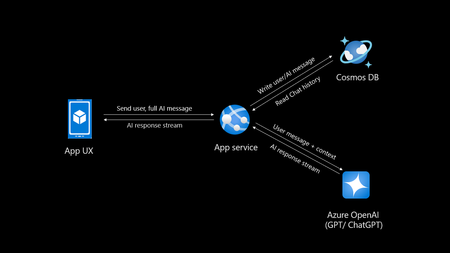
Introduction Creating your own private ChatGPT allows you to leverage AI capabilities while ensuring data privacy and security. This guide walks you through building a secure, customized chatbot using tools like Azure OpenAI, Cosmos DB and Azure App service. Why Build a Private ChatGPT? With the rise of AI-driven applications, organizations, people often face challenges related to data privacy, customization, and integration. Building a private ChatGPT addresses these concerns by: Maintaining Data Privacy: Keep sensitive information within your infrastructure. Customizing Responses: Tailor the chatbot’s behavior and language to suit your requirements. Ensuring Security: Leverage enterprise-grade security protocols. Avoiding Data Sharing: Prevent your data from being used to train external models. If organizations do not take these measures their data may go into future model training and can leak your sensitive data to public. Eg: Chatgpt collects personal data mentioned in their privacy policy Prerequisites Before you begin, ensure you have: Access to Azure OpenAI Service. A development environment set up with Python. Basic knowledge of FastAPI and MongoDB. An Azure account with necessary permissions. If you do not have Azure subscription, try Azure for students for FREE. Step 1: Set Up Azure OpenAI Log in to the Azure Portal and create an Azure OpenAI resource. Deploy a model, such as GPT-4o (multimodal), and note down the endpoint and API key. Note there is also an option of keyless authentication. Configure permissions to control access. Step 2: Use Chatgpt like app sample You can select any repository to be as base template for your app, in this I will be using the third option AOAIchat. It is developed by me. GitHub - mckaywrigley/chatbot-ui: AI chat for any model. Azure-Samples/azure-search-openai-demo: A sample app for the Retrieval-Augmented Generation pattern running in Azure, using Azure AI Search for retrieval and Azure OpenAI large language models to power ChatGPT-style and Q&A experiences. sourabhkv/AOAIchat: Azure OpenAI chat This architecture diagram represents a typical flow for a private ChatGPT application with the following components: App UX (User Interface): This is the front-end application (mobile, web, or desktop) where users interact with the chatbot. It sends the user's input (prompt) and displays the AI's responses. App Service: Acts as the backend application, handling user requests and coordinating with other services. Functions: Receives user inputs and prepares them for processing by the Azure OpenAI service. Streams AI responses back to the App UX. Reads from and writes to Cosmos DB to manage chat history. Azure OpenAI Service: This is the core AI service, processing the user input and generating responses using models like GPT-4o. The App Service sends the user input (along with context) to this service and receives the AI-generated responses. Cosmos DB: A NoSQL database used to store and manage chat history. Operations: Writes user messages and AI-generated responses for future reference or analysis. Reads chat history to provide context for AI responses, enabling more intelligent and contextual conversations. Data Flow: User inputs are sent from the App UX to the App Service. The App Service forwards the input (with additional context, if needed) to Azure OpenAI. Azure OpenAI generates a response, which is streamed back to the App UX via the App Service. The App Service writes user inputs and AI responses to Cosmos DB for persistence. This architecture ensures scalability, secure data handling, and the ability to provide contextual responses by integrating database and AI services. What can you do with my template? AOAIchat supports personal, enterprise chat enabled by RAG People can enable RAG mode if they want to search within their database, else it behaves like normal ChatGPT. It supports multimodality, (supports image, text input) also depends on model deployed in Azure AI foundry. Step 3: Deploy to Azure Deploy a Cosmos DB account in nearest region Deploy Azure OpenAI model (gpt-4o, gpt-4o-mini recommended) Deploy Azure App service, try using container I would recommend B1plan to your nearest region, select docker registry sourabhkv/aoaichatdb:0.1 startup command uvicorn app:app --host 0.0.0.0 --port 80 After app service starts, put all environment variables The application requires the following environment variables to be set for proper configuration: Environment Variable Description AZURE_OPENAI_ENDPOINT The endpoint for Azure OpenAI API. AZURE_OPENAI_API_KEY API key for accessing Azure OpenAI. DEPLOYMENT_NAME Azure OpenAI deployment name. API_VERSION API version for Azure OpenAI. MAX_TOKENS Maximum tokens for API responses. MONGO_DETAILS MongoDB connection string. AZURE_OPENAI_ENDPOINT=<your_azure_openai_endpoint> AZURE_OPENAI_API_KEY=<your_azure_openai_api_key> DEPLOYMENT_NAME=<your_deployment_name> API_VERSION=<your_api_version> MAX_TOKENS=<max_tokens> MONGO_DETAILS=<your_mongo_connection_string> Optional feature: implement authentication to secure access. Within app service select Authentication and select service providers. I went with Entra based authentication with single tenant. There is option of multi-tenant, personal accounts as well. Restart App service and within 2 minutes your private ChatGPT is ready. Pricing Pricing may depend on the plan you have deployed resources and region. Check Azure calculator for price estimation. My estimate for pricing I deployed all my resources in Sweden central Cosmos DB config - Cosmos DB for MongoDB (RU) serverless config with single write master, 2 GB transactional storage, 2 backup plan (FREE) ~ 0.75$ Azure OpenAI service - plan S0, model gpt-4o-mini global deployment, Input 20000 tokens, Output 10000 tokens ~ 9.00$ App service plan - OS Linux, Tier B1, instance count 1 ~13.14$ Total monthly cost = 22.89$ This price may vary in future, in region I calculated my configuration in Azure calculator Governance Azure OpenAI provides content filters to block any kind of input that violates responsible AI practices. Categories include Hate and Fairness Sexual Violence Self-harm User Prompt Attacks (direct and indirect) The content filtering system detects and takes action on specific categories of potentially harmful content in both input prompts and output completions. Azure OpenAI Service includes default safety settings applied to all models set as medium. Content filters can be modified to different level depending on use case. It supports RAG, I have provided detailed solution for it in my GitHub. Practical implementation GE Aerospace, in partnership with Microsoft and Accenture, has launched a company-wide generative AI platform, leveraging Microsoft Azure and Azure OpenAI Service. This solution aims to transform asset tracking and compliance in aviation, enabling quick access to maintenance records and reducing manual processing time from days to minutes. It supports informed decision-making by providing insights into aircraft leasing, compliance gaps, and asset health. For enterprises implementing private ChatGPT solutions, this illustrates the potential of generative AI for streamlining document-intensive processes while ensuring data security and compliance through cloud-based infrastructure like Azure. GE Aerospace Launches Company-wide Generative AI Platform for Employees | GE Aerospace News Build your own private ChatGPT style app with enterprise-ready architecture - By Microsoft Mechanics How to make private ChatGPT for FREE? It can be FREE if all of the setup is running locally on your hardware. Cosmos DB <-> MongoDB. Azure OpenAI <-> Ollama / LM studio Refer this NOTE : I have used gpt-4o, gpt-4o-mini these values are hardcoded in webpage, if you are using other models, you might have to change them in index.html. App Service <-> Local machine Register for Github models to access API for FREE. Note: GitHub models have rate limit for different models. Useful links sourabhkv/AOAIchat: Azure OpenAI chat What is RAG? Get started with Azure OpenAI API Chat with Azure OpenAI models using your own data16KViews1like1Comment120 Days Study Plan to Become an AI-Focused Full-Stack Software Engineer
Hello there, my name is Oumaima, and I am an MLSA student ambassador from Morocco, studying at the University Of The People. Welcome to the first step in my exciting, unpredictable journey, one I’ve chosen to embark on with you! For the past three years, I’ve watched the AI industry evolve dramatically. Generative AI has shifted from a fascinating experiment to an integral part of our everyday lives, whether at school, work, or even in our personal routines. In fact, my ChatGPT app is now my go-to therapist, lawyer, and all-around advisor! As a software engineering student for over three years, I’ve seen the growth of generative AI up close. But this shift didn’t just inspire me; it made me realize that I don’t want to remain only a consumer of this technology. I want to contribute to it! Seeing AI’s ability to mimic human thought, draw connections from vast amounts of information, and deliver impressive results sparked something in me. It showed me that the best way to break into AI might just be to use AI itself as my guide. That’s when the idea came to ask ChatGPT O1-preview for a personalized study plan, crafted uniquely for me. It takes into account my available time, coding background, learning preferences, mental health, and energy. Here’s how my journey began with a simple prompt: I want to become an AI-focused full-stack software engineer and have 120 days to dedicate to this goal. Please create a detailed 120-day study plan tailored for me, dedicating 3-4 hours daily. The study plan should: - Cover all essential topics including programming foundations, data structures and algorithms (DS&A), mathematics for AI, machine learning fundamentals, deep learning, advanced AI topics, integrating AI into applications, web development basics for AI integration, advanced web development, full-stack project development, scripting, DevOps, and career development. - Include weekly breakdowns and daily tasks. - Provide recommended resources for each topic (e.g., online courses, tutorials, documentation). - Suggest hands-on projects or exercises to apply the concepts learned. - Incorporate tips for success, such as active engagement, seeking feedback, balancing depth and breadth, and maintaining well-being. - Emphasize developing all the skills that will make me an irreplaceable software developer, including scripting and DevOps skills. - Conclude with a summary and final advice. Please ensure the plan is structured, comprehensive, and practical for someone balancing work and study. Then it generated the following plan, that I tried to follow by using Microsoft Learn learning paths that offer in depth trainings on each topic I got: Days 1–25: Programming Foundations & Data Structures and Algorithms (DS&A) Microsoft Learn path suggestion: Python for beginners Days 26–50: Mathematics for AI & Machine Learning Fundamentals Microsoft Learn path suggestion: Introduction to machine learning Days 51–80: Deep Learning & Advanced AI Topics Microsoft Learn path suggestion: Train and evaluate deep learning models Days 81–100: Integrating AI into Applications Microsoft Learn path suggestion: Microsoft Azure AI Fundamentals: Generative AI Days 101–115: Advanced Web Development & Full-Stack Project Development Microsoft Learn path suggestion: Build an AI web app by using Python and Flask Days 116–120: Portfolio Projects and Industry Trends. Not going to lie, the roadmap turned out to be even more exciting than I’d expected! When I asked for it, I specified that it should guide me through developing problem-solving skills directly tied to full-stack development. I wanted a path that not only sharpens my abilities but also allows me to build interesting, hands-on applications where I can see the results of what I’m learning. And now, my friends, the journey has officially begun! I’ll be following the roadmap closely, documenting my weekly progress to learn AI, noting the challenges, and celebrating the accomplishments. The goal is to see if artificial intelligence can really help create a customized study plan that aligns with my personal goals, circumstances, and unique learning rhythm. So, stay tuned — this is only the beginning! See you in my first step with DSA!15KViews4likes4CommentsEnhancing Student Resumes: An Innovative Approach Using Azure OpenAI ChatGPT-4o
Discover the transformative power of AI in education with our innovative approach to enhancing student resumes. Leveraging Azure OpenAI ChatGPT-4o, we’ve automated the initial review and feedback process, ensuring meticulous examination of each resume. This not only saves time for career mentors but also significantly improves the quality of student resumes. Witness an increase in employment rates and a positive impact on our course reputation. Join us as we redefine educational and career support services, demonstrating the potential of AI in shaping the future of learning and career development.8.9KViews0likes1CommentAI-900: Microsoft Azure AI Fundamentals Study Guide
This comprehensive study guide provides a thorough overview of the topics covered in the Microsoft Azure AI Fundamentals (AI-900) exam, including Artificial Intelligence workloads, fundamental principles of machine learning, computer vision and natural language processing workloads. Learn about the exam's intended audience, how to earn the certification, and the skills measured as of April 2022. Discover the important considerations for responsible AI, the capabilities of Azure Machine Learning Studio and more. Get ready to demonstrate your knowledge of AI and ML concepts and related Microsoft Azure services with this helpful study guide.41KViews11likes3Comments