certificate issues
10 Topics
PKIVIEW download error
We are deploying a 2-tier PKI with an offline Root CA and an Enterprise SubCA. After deploying the Root CA with CRL and AIA pointing to a web server http://crl.company.com we copied there the Root CA's Certificate and CRL. From the subordinate CA server we're able to open the publishing web site and load the crl and crt via Web browser. However when using PKIVIEW to check the setup we saw a "Download error" for both the Root and Subordinate CA. is there anyone that can help on this ? thanks223Views0likes1Comment
Import and enable SMIME PFX certificate for iOS Outlook and Mail
Hello, I have successfully implemented the Intune Certificate Connector and uploaded some SMIME certificates to Intune. I also can see the certificate in iOS (Management Profile) and it works perfectly in Windows. But when I try to enable SMIME in Outlook for iOS or iOS Mail, the device says "no certificates found". How can I deploy certificates to iOS devices using intune to be able to use them within iOS Mail and Outlook? Thank you for your help and best regards4.6KViews0likes3CommentsExternal email not received with NDR '550 5.4.317 Message expired, cannot connect to remote server(C
Hi all, we are getting some problem from one of the external domain not getting through. there is a NDR to the sender '550 5.4.317 Message expired, cannot connect to remote server(CertificateExpired)' I also run some test using checktls and it also report [001.696] Connection converted to SSL SSLVersion in use: TLSv1_3 Cipher in use: TLS_AES_256_GCM_SHA384 Perfect Forward Secrecy: yes Session Algorithm in use: Curve P-256 DHE(256 bits) Certificate #1 of 3 (sent by MX): EXPIRED Cert VALIDATION ERROR(S): certificate has expired So email is encrypted but the recipient domain is not verified ssl : scheme=smtp cert=94220930177 : identity=mail.domain.com cn=*.domain.com alt=2 *.domain2 domain.com Cert Hostname VERIFIED (mail.domain.com = *.domain.com | DNS:*.domain.com | DNS:domain.com) cert not revoked by OCSP Data: Version: 3 (0x2) Serial Number: 0e:cd:b7:0b:82:c2:46:0b::5c:0b:b4:29:5f:e2 Validity: Not Before: Oct 26 00:00:00 2021 GMT Not After: Nov 26 23:59:59 2022 GMT I have check all exchange server and mail security gateway, all using new ssl certificate. can anyone shed some light on this matter. Thank you all12KViews0likes2CommentsComputer certificate re-enrollment after ADCS architecture change and certificate revocation
Originally, I set up an ADCS server as an Enterprise Root CA. Automatic certificate enrollment was enabled via a GPO and computers were automatically assigned certificates. The more I learned about ADCS this year, the more uncomfortable I became with this configuration from a security perspective. I added an intermediate SubCA recently which was configured to use the Computer template. I removed the Computer template (and all other templates except for the SubCA template) from the Enterprise Root. Then I revoked all of the computer certificates on the Enterprise Root CA. I figured they would all just re-enroll automatically on the SubCA (I'm using a GPO to enable this) but that is not what happened. They are not re-enrolling. I confirmed that I am able to issue Computer certificates from the SubCA manually using MMC and the Certificates snap-in. I discovered how to remove the old, revoked certificates from the clients with PowerShell but the Get-Certificate applet is simply not working so I cannot issue new certificates from the SubCA. If I have to, I can manually assign new Computer certificates but there has got to be an easier way to do this (I was counting on the automatic certificate enrollment option). Ideally, I just want the computers to automatically obtain new certificates from the new SubCA. My hypothesis that the computers would simply re-enroll on the SubCA after their certificates were revoked proved to be incorrect but I cannot understand why. I've been researching this for about a week now and cannot figure out what I am missing so am hoping one of you may be able to offer some insight.1.8KViews0likes0CommentsCertification Authority not showing up in IIS Server Certificates Dialog
Got an Online Certification Auhtority that is not showing up in IIS when you are trying to renew a certificate? If so, this is the post for you. Sit back, grab a cup of coffee and start reading as we go over what you need to do to get your desired Online Certification Authority back in IIS.16KViews4likes0CommentsADCS Certificate template shows a number instead of the template name
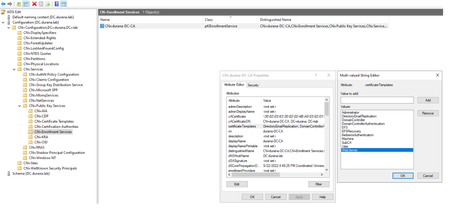
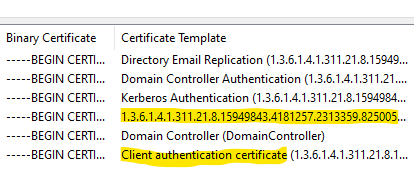
I'm looking at the Certification Authority console and under Issued Certificates, one of my certificates shows up properly with "client authentication certificate" but the other RAS & IAS certificate shows up with just the number. I'm not sure why it's showing just the number instead of the certificate name. Any ideas about what I've missed here?6.2KViews0likes2CommentsCan't install our app - "certificate in chain-of-trust is failing validation"
We've had a number of support incidents from users with Windows 11 Insider Preview reporting that they can't install our Windows Desktop app. Users with the retail release of Windows 11 (or Windows 10) do not experience this issue. Our (WiX) installer runs successfully until it gets to the driver installation step. Then it rewinds and quietly exits with no message popup or obvious error. Despite testing with a variety of different Insider Preview builds, we've so far been unable to reproduce the problem locally. Looking at a verbose setup log contributed by a user, I noticed the following: DIFXAPP: INFO: ENTER: DriverPackageInstallW DIFXAPP: INFO: RETURN: DriverPackageInstallW (0xE0000247) DIFXAPP: ERROR: encountered while installing driver package 'C:\Program Files\AcmeWidgets\WidgetApp\widget-driver.inf' DIFXAPP: ERROR: InstallDriverPackages failed with error 0xE0000247 DIFXAPP: RETURN: InstallDriverPackages() 3758096967 (0xE0000247) CustomAction MsiInstallDrivers returned actual error code 1603 (note this may not be 100% accurate if translation happened inside sandbox) Action ended 21:00:47: InstallFinalize. Return value 3. MSI (s) (50:CC) [...]: Note: 1: 2265 2: 3: -2147287035 Our driver is signed with a Digicert EV Code Signing Certificate: Certificate Certificate Order Common name Product Status Order date start date expiration expiration ------------- --------------- ------ ----------- ----------- ----------- ----------- Immersed Inc. EV Code Signing Issued 27 May 2020 28 May 2020 02 Jun 2022 02 Jun 2022 2 years While investigating, I also saw a message/description that mentioned a certificate in the chain-of-trust failing validation. I thought perhaps an intermediate CA cert might have been omitted from one of the Insider Preview builds, so I requested dumps of root, intermediate and third-party certs from a few affected users. My hope was to find a cert included in my test environment that was missing in all of theirs. No such luck, unfortunately; they all seem to have supersets of the certs I have in a fresh Insider Preview test installation. Can someone please respond with a suggestion on a path forward? Being unable to reproduce this in a test environment has me completely blocked. I'd really like to hear back from a Microsoft engineer on this. Thanks.1.9KViews2likes0CommentsCertificate Enrollment Policy
Hello I have a question about Certificate Enrollment Policies. I am seeing two different policies on two different computers and not sure why. Both users are logged into the same domain but when I go to request a certificate from UserA using the certmgr.msc console I see "Configured by your Administrator" Active Directory Enrollment Policy ID: xxxxx-xxxx-xxxx etc.. on one computer and am able to see certificate templates listed. When I log on as UserB on a different computer using certmgr.msc console I see "Configured by your Administrator" Active Directory Enrollment Policy ID: yyyyyy-yyyyyy-yyyyy etc.. and I don't see ANY certificate templates listed. Both users and the computers they are logging into are on the same domain but receiving two different Enrollment Policy ID's. Could someone help me out on why that would be? It is driving me crazy and need to figure this out so I can request certificates using the certmgr.msc Thanks in advance!!1.6KViews1like0Comments
Certificate Authority: Cross Certificates
We have noticed that we have a ton of certificates that were made by the Cross Certificate Temple. I am not even sure how they are getting made but is there a way to stop them and if so can we just delete them without harming anything? We only have one Root CA and one Sub CA. and only one domain. So how can I stop them from being made and if I delete them will it harm anything?1.8KViews0likes2CommentsCertificate Error and NAS management
I had to update the certificate on our NAS server. Edge has taken against it and will just not let me access the server again because the certificate is bad. It will remain bad because I cannot get access to the device to put it right!!! How can I get around a block that is intended to protect unaware users but is also stopping an admin from correcting an issue with the device. I really don't want to go to a seperate browser to do this!1.1KViews1like1Comment