calling
1452 TopicsWhat's New in Microsoft Teams | August - September 2026
A quick note before we get into it: What's New in Teams is shifting from a monthly to a quarterly rhythm. You'll hear from us next in December, March, and June, and each edition will round up everything announced and released over the full quarter. One post, one fuller view of what's new. Two investments shape where Teams is heading, and you'll see both in this quarter's releases: AI transforming teamwork with agents as part of the team, and a simpler, smarter, more secure foundation underneath it all. AI in Teams is showing up in the flow of your work. Teams Phone Agent brings that to your phone line, helping callers with common requests in more than 60 languages and routing them with context attached, so a missed call turns into a next step instead of a lost one. Context carries forward, too. Video recap turns a meeting you missed into a short, narrated highlight reel, so what a meeting decided outlasts the conversation itself. And protection for everyday collaboration is always top of mind. The new Security Detection Report brings detections such as impersonation and malicious URLs into one view in the Teams admin center, so admins see the whole picture in one place. Read on for all the latest updates! Feature categories: (All features listed are generally available unless otherwise noted) Chat and Collaboration Meetings Teams Phone Workplace Teams Events Fundamentals and Security Teams Platform Certified devices Chat and Collaboration Ask Copilot in Teams conversations Stay in the flow of work and get help from Copilot directly within your conversations. Open Copilot from a message or selected text in a Teams conversation, with the relevant context already included, making it easier to gain insights, explore questions, and move work forward without needing to re-explain information. Find agents and apps faster through Teams search Discover the tools you need with agents and apps surfaced directly in Teams search results. As you type in the search bar, matching agents and apps appear alongside other relevant results, helping you spend less time searching and more time getting things done. Find and share files faster in Teams Locate the files you need while sharing content in Teams. Search for cloud-based files directly from the attachment experience, making it easier to find and share the right content without interrupting the flow of collaboration. Emoji shortcuts on iOS and Android Express yourself with emoji shortcuts. Desktop emoji shortcuts now work on iOS and Android. Insert emojis directly in the compose box by typing a word between colons, so :smile: becomes 😊. Autocomplete suggestions help speed up entry, and custom emojis are also supported. Clearer text highlighting in dark mode and high contrast mode Make highlighted text easier to read while composing messages in Teams. Improvements to text highlighting in dark mode and high contrast mode provide a more consistent and accessible editing experience, helping content stand out more clearly. Meetings Video recap in Teams Meeting recap now delivers a bite-sized video recap of with key highlights from your Teams meeting. It combines AI-generated voiceover summaries with video snippets, spotlighting the most important moments while preserving the original tone and flow, so you can catch up on key topics in a few minutes. Video recaps now support meetings in 23 languages across 31 regional variants, learn more. Translation button to change the language for intelligent meeting recaps After an intelligent meeting recap is generated, you can change the recap language at any time using a translation button, even if a different language was selected during the meeting. Multilingual teams get more flexibility to read meeting insights, action items, and discussion summaries in the language that is most comfortable for them. Teams Phone Teams Phone Agent Teams Phone Agent is an AI-powered receptionist for your business’s phone line, so callers can get help with common requests even after hours. For customer-facing organizations and departments using Teams Phone, such as bank branches or IT help desks, it takes repetitive calls off employees' plates so they can focus on the conversations that truly need a human touch. With support for over 60 languages and locales, Teams Phone Agent handles common requests such as answering routine questions or booking appointments. , And it can route a caller to the right department or employee with an AI-generated summary of the conversation, so customers do not have to navigate phone menus or repeat themselves. Custom voice agents are available for specialized workflows. Teams Phone Agent is now generally available, learn more. If the player doesn’t load, open the video in a new window: Open video Intelligent call recap in Queues app Intelligent call recaps in Queues app help you catch up on recorded or transcribed queue calls with AI-generated summary notes covering key discussion points and follow-up actions. To open a recap, find the call record in the Queues app call history and select Recap. Copilot in Queues app’s shared call history for post-call insights Quickly catch up on a call queue call and uncover key details with the ability to use Copilot in the shared call history in Queues app. After a recorded call is completed, users with Copilot can now open the call record in the shared call history, access the Copilot Chat sidecar from the Recap tab, and ask questions about the call. Automatic recording and transcription for call queues Capture customer interactions without requiring your organization’s calling representatives to manually start recording. Admins can enable automatic recording and transcription for individual Teams call queues and control access to recordings. Recordings are stored in SharePoint and accessible through call recaps in the shared call history in Queues app. View and manage auto attendant shared voicemails in Queues app Help your team stay on top of customer messages by managing auto attendant shared voicemails directly in Queues app. Calls routed from an auto attendant to voicemail will appear in Queues app, giving collaborative calling teams a centralized place to track, triage, and respond to messages. Customize recording and transcription notifications for Teams calls Give your organization greater control over how recording and transcription are communicated during Teams calls. IT admins can customize select user notification strings for recording and transcription in the Teams admin center, helping tailor the experience for participants in Teams VoIP calls. Enhance control of delegated calls with call lock and delegate join alerts Call delegation in Teams gains real controls: a delegator can lock an active call and see when a delegate joins. Locking prevents delegates from joining or resuming the call, and optional warning tones notify participants when a delegate joins or resumes. Workplace Interpreter agent support in Teams Rooms on Android The Interpreter agent acts as a translator in Microsoft Teams meetings, letting participants listen in their chosen language with real-time translation. It is now available in Teams Rooms on Android licensed for Teams Rooms Pro. New room optimization mode in Teams desktop Room optimization mode makes it easier to use your laptop for meetings and collaboration in spaces such as focus or huddle rooms that do not yet have a Teams Rooms system. It replaces shared display mode, has a new location, and enables or disables room-specific features. When room peripherals are connected, Teams can automatically select audio and video devices, enable speaker recognition and shared display, and disable voice isolation. Modernized Gallery view in Teams Rooms on Android The updated Gallery view in Teams Rooms on Android prioritizes video on the meeting stage, arranges participants in consistent aspect ratios, and minimizes movement of participant tiles on stage. You can hide the room self-preview video and choose to see audio and video participants equally on stage instead of prioritizing video participants. Admins can set the default behavior using local device settings and the Pro Management portal. Teams Events Breakout rooms in Teams Meetings & Events Breakout rooms are now supported in Teams Meetings & Teams Events with up to 1,000 participants across 100 rooms, increased from the previous limit of 300 participants across 50 rooms. Organizers can use breakout rooms to create smaller focused sessions within an event for more interaction and collaboration. Specify who has control of production tools in Teams Events Organizers can designate who controls production tools, granting chosen people access to Manage what attendees see and the green room so event production stays with the right crew. The setting is a new meeting option applied when the event is set up. Expanding presenter visibility in “Manage what attendees see” Producers can resize and expand the presenter panel in Manage what attendees see, making it easier to view, manage, and switch between presenters while a live event is running. New layout when sharing content for Teams events Organizers and presenters who have access to production tools now see updated layout options when sharing content in the “Manage what attendees see” experience for Teams events. The available layouts are speaker focused, content focused, and content only. The new speaker focused layout prioritizes presenter video alongside shared content for greater visibility. Available for Teams events organizers on Teams for Windows desktop and Mac desktop. Fundamentals and Security Enhanced real-time alerting rule management in Teams admin center Administrators can now duplicate an existing alerting rule to create a similar configuration without rebuilding it, bulk upload users when creating or editing a rule, and delete rules directly from the management experience. These capabilities are available for in-progress meetings and calls rule types, and organizations can configure monitoring for up to 500 users across their real-time alerting rules. Security Detection Report in Teams admin center A new Security Detection Report in the Teams admin center gives admins a unified view of messaging security detections across signals such as impersonation, malicious URLs, and weaponizable file types. Admins can review detection activity in one place and export detailed data for further investigation, improving visibility into threats in Teams. Single pane for monitoring and troubleshooting meetings and calls (Windows) Administrators can monitor meeting and call health across the organization from one place, identifying recurring issues, uncovering trends, and proactively troubleshooting problems affecting people in both live and past meetings and calls. Meeting participant detail audit records in all participating tenants Admins can now access participant-level audit records for their own users in cross-tenant meetings, helping investigate incidents even when another organization hosted the meeting. Teams audit logging now shares meeting participant detail records with all participating tenants, not just the organizer tenant, and each record includes organizer information so admins can tell whether a meeting was organized inside or outside their tenant. Teams optimization for VDI now supports Teams Events (Windows) Attendees joining Teams Events from virtualized Windows desktops can offload audio and video to their local device, supporting high definition playback while easing load on the virtual desktop. Optimization works on Windows endpoints connecting to Azure Virtual Desktop, Windows 365, Citrix, Omnissa, or Amazon. Captions, DVR, reactions, streaming chat, and Q&A are all supported, as are first-party and third-party eCDNs. Teams Platform Unified agent and app installation management across Microsoft 365 and Teams admin center (Windows) Administrators using the Microsoft 365 admin center and Teams admin center can apply app and agent installation changes once and have them enforced consistently across Teams, Outlook, and Microsoft 365 Copilot. Previously, installation changes made in the Microsoft 365 admin center applied only to Outlook and Microsoft 365, and changes made in the Teams admin center applied only to Teams. Identify custom Teams apps that need updates for private and shared channels Admins can view a list in Teams admin center of custom apps in their tenant that need updates to work in private and shared channels. The list helps admins identify impacted apps, understand which ones require developer action, and coordinate updates so people can keep using custom apps across all supported channel types. Prominent search for app and agent discovery in the Store Search now sits in the middle of the Store page, with improved type-ahead suggestions, a more informative results page, and natural language processing to surface the most relevant apps and agents. Add multiple steps when building a workflow from scratch When building a workflow from scratch, you can add several steps at once, so you can assemble multi-step automation without returning to edit it step by step, reducing repetitive setup work and simplifying the creation of more advanced automations. Collect information with List Form in Workflows A workflow can open with a form that gathers the details it needs up front, so automation runs on structured input rather than chasing information midway. Single-character keyboard shortcuts for focused message actions (Windows) Single-character shortcuts let you quickly take common messaging actions such as edit, delete, reply, forward, pin, save, mark unread, quote reply, and react when a message has keyboard focus. The shortcuts are a predefined messaging set, and they are discoverable and customizable in the keyboard shortcuts dialog. Certified devices EPOS IMPACT 1000 MS UC ANC WL USB-C+A On-ear Bluetooth® headset. Supplied with a BTD 900c dongle, a USB‑C to USB‑A adapter, and a USB‑C charging cable. Features ANC, EPOS BrainAdapt™ technologies, and EPOS AI™‑powered voice pickup and noise cancellation, ensuring your voice sounds natural and clear in any environment. EPOS IMPACT 1000 MS UC ANC WL USB-C+A Stand On-ear Bluetooth® headset. Supplied with a table stand for wireless charging, a BTD 900c dongle, a USB‑C to USB‑A adapter, and a USB‑C charging cable. Features ANC, EPOS BrainAdapt™ technologies, and EPOS AI™‑powered voice pickup and noise cancellation, ensuring your voice sounds natural and clear in any environment. EPOS IMPACT 1000 MS UC Mono WL / ANC WL Dongle-free Bluetooth® headsets available in monaural and binaural on-ear configurations. Supplied with a USB-C charging cable and a USB-C to USB-A adapter. Features EPOS BrainAdapt™ technologies and EPOS AI™-powered voice pickup and noise cancellation for clear, natural-sounding communication in any environment. The binaural ANC WL model also includes Active Noise Cancellation (ANC) to help reduce background distractions. EPOS IMPACT 1000 MS UC ANC WL Stand On-ear, dongle-free Bluetooth® headset. Supplied with a table stand for wireless charging, a USB‑C charging cable, and a USB‑C to USB‑A adapter. Features ANC, EPOS BrainAdapt™ technologies, and EPOS AI™‑powered voice pickup and noise cancellation, ensuring your voice sounds natural and clear in any environment. Q-SYS RoomSuite Collaboration Bar + Controller The Q-SYS RoomSuite Collaboration Bar and expansion devices provide a scalable AV solution for standard small-to-large meeting spaces. This Windows-based solution features built-in audio, video, and supports Microsoft Teams Rooms and bring-your-own-meeting conferencing. Includes a touch panel for control and allows for optional table microphones for extended audio coverage. Q-SYS RoomSuite Collaboration Bar + Controller + Expansion Mic The Q-SYS RoomSuite Collaboration Bar and expansion devices provide a scalable AV solution for standard small-to-large meeting spaces. This Windows-based solution features built-in audio, video, and supports Microsoft Teams Rooms and bring-your-own-meeting conferencing. Includes a touch panel for control and allows for optional table microphones for extended audio coverage. The Q-SYS RoomSuite Collaboration Bar can support up to 4 expansion mics. Shure IntelliMix Room Kit 30 | 50 | 70 | 80 Microsoft Teams Rooms-certified solutions for small, medium, and large meeting spaces. Shure IntelliMix Room Kits include a Windows-based Teams Rooms compute with Shure’s premium audio signal processing, an intuitive touch panel, an all-in-one ceiling array microphone and loudspeaker, and intelligent high-resolution video. Designed for streamlined deployment with zero-touch or low-touch setup, the kits provide high-quality audio and video experiences across a range of room sizes. Simply connect devices, power on, and sign in to get started. Shure IntelliMix™ Bar Pro Kit (Black) Clearly capture precise audio and video for AI-powered meetings in medium to large collaboration spaces with this powerful all-in-one Android based video conference bar. Enterprise ready with auto-setup and simple global management, IT managers can create meeting experiences focused on participants with reliable transcription for enhanced AI tools. Shure MXA925 Ceiling Array Microphone + MXP-6 Pendant Passive Loudspeaker + MXN-AMP PoE + IntelliMix P300 This Microsoft Teams–certified bundle combines the MXA925 ceiling array microphone, IntelliMix® P300 DSP, MXN‑AMP PoE+ multichannel amplifier, and MXP‑6 pendant loudspeakers to deliver a fully validated, end‑to‑end room audio solution for medium to large spaces. Designed to meet Microsoft’s performance and reliability requirements, it provides automatic, precise speech capture, enterprise‑grade echo cancellation, and evenly distributed sound reinforcement while simplifying deployment through networked audio, PoE+ power, and a single‑vendor ecosystem. Shure MXA925 Ceiling Array Microphone + MXP-5 Ceiling-Mount Passive Loudspeaker + MXN-AMP PoE + IntelliMix P300 This Microsoft Teams–certified bundle delivers a complete, scalable room audio solution by combining the MXA925 ceiling array microphone with IntelliMix P300 DSP, the MXN‑AMP PoE+ multichannel amplifier, and MXP‑5 ceiling speakers for clear speech capture and consistent sound coverage in medium to large meeting spaces. The MXA925 uses Automatic Coverage™ and advanced IntelliMix DSP to capture natural, intelligible speech without complex setup, while the P300 provides powerful echo cancellation, noise reduction, and USB connectivity to Teams Rooms systems. The MXN‑AMP and MXP‑5 speakers simplify installation with networked audio and PoE+ power, delivering balanced, room‑filling audio for both in‑room and remote participants. Shure MXA320 Table Array Microphone+MXN5-C Networked Loudspeaker + Intellimix P300 Audio Conferencing Processor The Shure MXA320 Table Array Microphone, MXN5‑C Networked Loudspeaker System, and IntelliMix P300 Conferencing Processor form a fully certified Microsoft Teams Rooms audio bundle designed for Medium meeting spaces. This integrated solution delivers clear, consistent, and intelligible audio through advanced DSP, Steerable Coverage™ technology, and optimized networked loudspeaker performance. The MXA320 captures voices with precision while minimizing ambient noise, the P300 enhances audio quality with powerful IntelliMix® processing, and the MXN5‑C ensures natural, room‑filling sound playback. Together, they provide a seamless, scalable, and easy‑to‑deploy conferencing experience that meets Microsoft’s stringent certification requirements for performance, reliability, and user experience. Shure MXA902 Ceiling Microphone & Loudspeaker + ANIUSB-MATRIX Audio Conferencing Ki High-quality, reliable meeting room audio is now easier than ever. Certified for Microsoft Teams, the Shure MXA902 Integrated Ceiling Array Microphone + Loudspeaker, paired with the ANIUSB-MATRIX Audio Network Interface, delivers a complete, easy to install, ready to use audio solution. Designed for small and medium sized spaces, it provides premium sound, full room coverage, and seamless connectivity. Shure MXW neXt 4&8 Wireless Microphone Systems with boundary microphone configuration + MXN5W-C Networked Loudspeaker This Microsoft Teams-certified solution combines MXW neXt wireless microphones, IntelliMix® DSP, and the MXN5W-C networked ceiling loudspeaker to deliver consistent speech capture and clear room audio for hybrid learning and collaboration spaces. With flexible wireless deployment, integrated signal processing, and cloud-based management, the solution simplifies installation while providing reliable audio performance for both in-room and remote participants. Shure MXW neXt 2 Wireless Microphone System with Boundary Microphone Configuration and MXN5W-C This Microsoft Teams certified bundle combines the MXW neXt 2 wireless microphone system with boundary microphones and the MXN5W-C networked ceiling loudspeaker to deliver clear speech capture and consistent room audio for classrooms and collaboration spaces. Easy to deploy and cloud enabled for remote management, the solution simplifies installation while providing reliable wireless performance for both in-room and remote participants. Logitech Zone Vibe Pro for Business Zone Vibe Pro for Business is certified for Microsoft Teams and offers the over-ear design that people love — purpose-built for open offices and wide deployment. Our AI-powered voice isolation uses machine learning to capture your voice clearly. Adaptive hybrid ANC minimizes distractions, while custom 40 mm drivers deliver vivid, true-to-life audio.2.4KViews1like1Comment
Teams calls reporting as potentially scams incorrectly
Hey Teams Community, In the past 5 days I am seeing callers from external tenants that are trusted and in mto showing as suspected scam callers when they call me. They see.me as a suspected scam also when I call. These tenants are all trusted and most of them are.members of the same MTO. This only started happening in the last 7 days. What is causing this? Does anybody else see this happening recently with a similar setup?435Views0likes3CommentsHelp your customers get answers and support with Teams Phone Agent
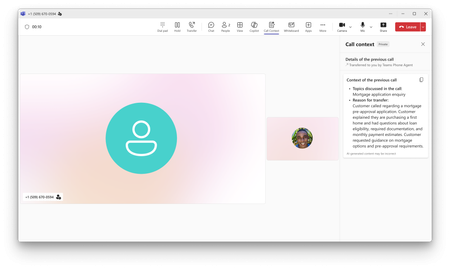
Now generally available, Teams Phone Agent is an AI-powered calling receptionist that helps organizations serve their customers. It answers incoming calls to help customers with common requests, such as answering questions and booking appointments. It also intelligently transfers callers to an employee or department with context notes when additional assistance is needed.1.7KViews2likes1CommentServe customers with Queues app's collaborative calling for Microsoft Teams
Queues app for Microsoft Teams turns an existing call queue into a collaborative workspace where calling representatives and supervisors work the same set of customer conversations together in Teams. Eligible organizations can try it with a 90-day Teams Premium trial and discount opportunity. Terms and conditions apply.1.5KViews0likes0CommentsMulti Teams enviroment drops current call when receiving a call on other Teams profile
Hi all, I'm running multiple Teams accounts on Windows. This is all working fine, untill I receive some calls, while I'm on a call already, from another account. This abruptly cancels the current call!! How is that possible? So, while on a call with PROFILE-A, I do get another call from PROFILE-B, the call in PROFILE-A gots ended, while the PROFILE-B call get to ring. Any idea how I could prevent this? I dont want to go over all the profile to set to DND mode, which would make it really hard for me to manage during all the day. Thanks!1.4KViews0likes4Comments
Microsoft Teams Calling blocked "We couldn't complete the call. Please contact your admin"
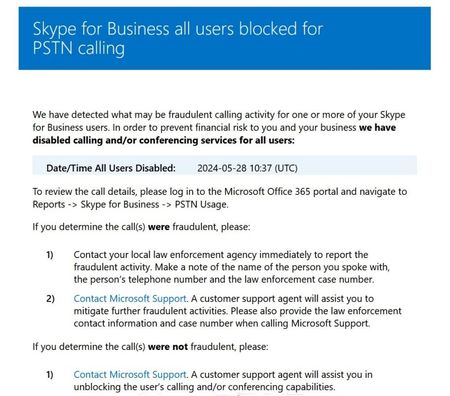
On a relatively new (3 weeks old) tenant, set up cleanly, with paid subscriptions and proper, correct licensing for Teams Calling, PSTN calling has been working fine since implementation. But last night I received multiple emails stating "Skype for Business all users blocked for PSTN calling - We have detected what may be fraudulent calling activity for one or more of your Skype for Business users. In order to prevent financial risk to you and your business we have disabled calling and/or conferencing services for all users:" I got an email for each user, AND an email stating that ALL users were blocked. This is a brand new tenant in Teams-only mode, SkypeForBusiness doesn't even show up in the tenant. There is no "Reports->Skype for Business->ANYTHING" option in the M365 Admin Center. Entra Admin Center shows no logins or unknown activity for any of the users (all of which are protected with 2FA and authenticators). The Teams Admin Center Usage Report shows only two calls made in the past 24 hours - both were test calls from me to my cell testing out call forwarding. The Teams Admin Center Blocked Users Report is broken and crashing. I tried to test with the self-help diagnostics. Interestingly, the diagnostic fails saying there is no number assigned to the user... Except that there is. In the assigned numbers screen, everything shows up properly and correctly. The emails state: "If you determine the call(s) were not fraudulent, please: Contact Microsoft Support. A customer support agent will assist you in unblocking the user’s calling and/or conferencing capabilities." The problem is that the support engineers I'm getting are on the other side of the planet, with an accent very different than mine. They can barely understand me and I can barely hear them. Worse: they kept attempting to debug using Get-CsUser - which is a fully-deprecated and no-longer-working cmdlet, and then basically gave up, saying they would "escalate it to their back office." They have no idea what is happening or why or how to fix it. I've had no updates since. Does anyone know why this happened or how to fix it? No fraudulent logins, no compromised accounts, no strange calls, no nothing... and yet the entire tenant is blocked? I've gone through most of the PowerShell cmdlets I can think of, compared them against a working tenant, and they're all identical - yet both incoming and outgoing PSTN calling remains blocked. Can anyone help me either fix this, or teach me how to get past the front-line support at Microsoft to someone who knows how to unblock this? My users are already looking at Google Voice... ugh...2.5KViews0likes3CommentsFocus on the Teams Phone calls that matter most with intelligent call delegation
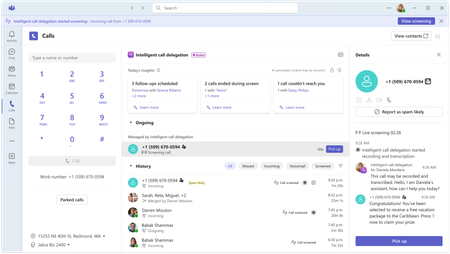
We're excited to announce that intelligent call delegation can now help answer your incoming Teams calls and schedule follow-up appointments on your behalf. This experience helps users focus on engaging with the calls that matter most and is available through the Frontier program.5.1KViews1like8Comments
Direct Routing PSTN calls to Teams Auto Attendant does not forward to Shared Voicemail
Hi all, I’m running into a strange issue with a Teams Auto Attendant and I’m hoping someone here has seen it before. We have a Direct Routing number where business hours calls go to a Call Queue, which works, and after hours calls should go to Shared Voicemail for a Microsoft 365 Group. If I call the Auto Attendant from inside our Teams tenant, the after-hours Shared Voicemail works correctly. I can leave a message and the voicemail is delivered to the group inbox as expected. If I call the same number from the PSTN over Direct Routing, I hear the after-hours greeting, so the schedule and call flow are clearly being hit, but once the greeting finishes I get: “Sorry, we cannot connect your call at the moment, please try again later.” I have already verified that the resource account has the correct Teams Phone Resource Account license, Enterprise Voice is enabled, the LineURI is assigned, the Online Voice Routing Policy is assigned, the Direct Routing route and SBC look healthy, the Auto Attendant is associated with the correct resource account, the after-hours call flow points to the correct Microsoft 365 Group, and the group mailbox exists and is healthy. What makes this more confusing is that redirects to internal or tenant-side destinations work, but redirect to Shared Voicemail from a PSTN-originated call does not work. I also tested redirect to an external PSTN number, and that fails with the same error as well. Because the after-hours greeting plays correctly, and because internal Teams calls can successfully leave voicemail in the shared mailbox, I do not think the issue is with the Auto Attendant configuration itself or with the Microsoft 365 Group mailbox. At this point it looks more like the handoff or redirect path for PSTN-originated calls over Direct Routing is where things break. Has anyone run into this with a Teams Auto Attendant, Shared Voicemail, and inbound PSTN over Direct Routing? I’m trying to figure out whether this is a known limitation, a bug, or if there is some specific setting related to PSTN-originated redirects that I am missing. Thanks!380Views1like1Comment
Stop Automatic Calling when Screensharing
I screenshare a lot in my position; I call the coworker (Phone/Headset) and train them on what I need them to look at. I am in a large office building, and the automatic calling of the receivers' PC is disruptive, as I do not was the whole office to hear my conversation or have people hear my trainee. I see no way to disable the team auto-call once I start to screen share or in the Options. All my coworkers feel this frustration as well. I do use the computer microphone/speaks aspect when working from home, but would disable it totally, if it would stop the auto-call. I do not want it to affect meeting invites to others, as others around the country can use their PC speak/microphone, if they want. Please advise.366Views0likes2CommentsTeams devices (deskphones) Throwing 488 error regarding media bypass
Have a Direct routing setup that is using media bypass. Calls using PC client or web client are fine. Calls using any model\mfg of Teams phone throws the following every 10 minutes and then the call drops on the 3rd event. Primarily looking at Poly CCX500 but have tried Yealink MP58 and Audiocodes C450HD as well. Updating to latest firmware and Teams app in TAC doesn't fix it. "488 Not Acceptable Here REASON: Q.850;cause=79;text="15cfcbd7-1ab7-4d79-9957-85344e485f29;BackToBackBypass offer was declined by Peer" " I have tickets open with Microsoft and Poly. No one seems to know what is going on. Any one else seeing the same behavior?5KViews0likes7Comments